Zoho One Tips & Tricks 03: Zoho Commerce integraties
Sinds een aantal maanden behoort Zoho Commerce tot Zoho One. Met deze app heb je de mogelijkheid om een webwinkel op te zetten en net zoals met alle andere Zoho-apps is het mogelijk om meerdere apps te integreren. Uiteraard is de vraag, waar begin je? En welke voordelen levert dit op?
Voordeel integraties:
Door deze apps te integreren leg je alvast de basis voor toekomstige activiteiten zoals nieuwe producten toevoegen, je salespipeline managen en je marketing-activiteiten uitvoeren. Zo hoef je niet meer op afzonderlijke apps dezelfde producten toe te voegen, je mailing op te stellen en behoud je het overzicht van je sales en inventaris.
Van alle apps die binnen Zoho One mogelijk zijn, adviseren wij om deze vijf apps als eerste te integreren met Zoho Commerce.
- Zoho CRM
- Zoho Inventory
- Zoho PageSense
- Zoho Markering Automation
- Zoho SalesIQ
Om te beginnen, ga naar Zoho Commerce.
1. Klik op "Settings"
2. Ga vervolgens naar "Integrations"

Zoho CRM:
Met Zoho CRM beschik je over de mogelijkheid om je verkoop te managen. Je kan de app gebruiken om producten en klanten van jouw winkel te synchroniseren in CRM en vice versa.
Voordelen van de integratie:
- Je vereenvoudig je salesproces. Voeg onder andere alle inschrijvingen van jouw online winkel rechtstreeks toe aan CRM,
- Stuur gepersonaliseerde sms-berichten naar jouw klanten wanneer hun bestelling is bevestigd, verzonden of afgeleverd
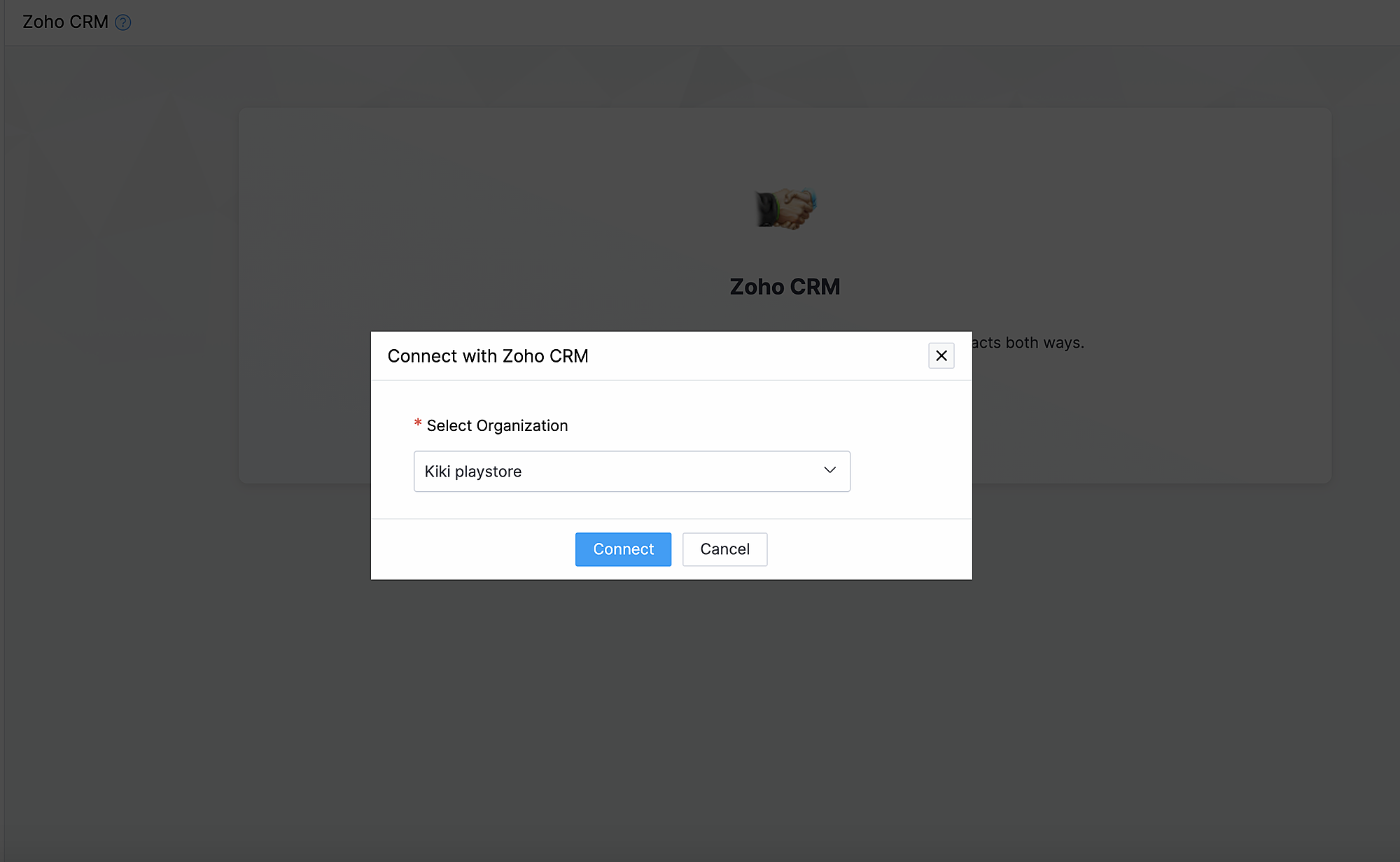
1. Ga naar instellingen, klik onder Integraties Zoho CRM.
2. Klik op Connect
3. Importeer contacten en producten van Zoho CRM en kies de organisatie van de dropdown.
Synchroniseer contacten.
Met deze functionaliteit synchroniseer je de contacten die je in Zoho CRM heb gemaakt met Zoho Commerce.
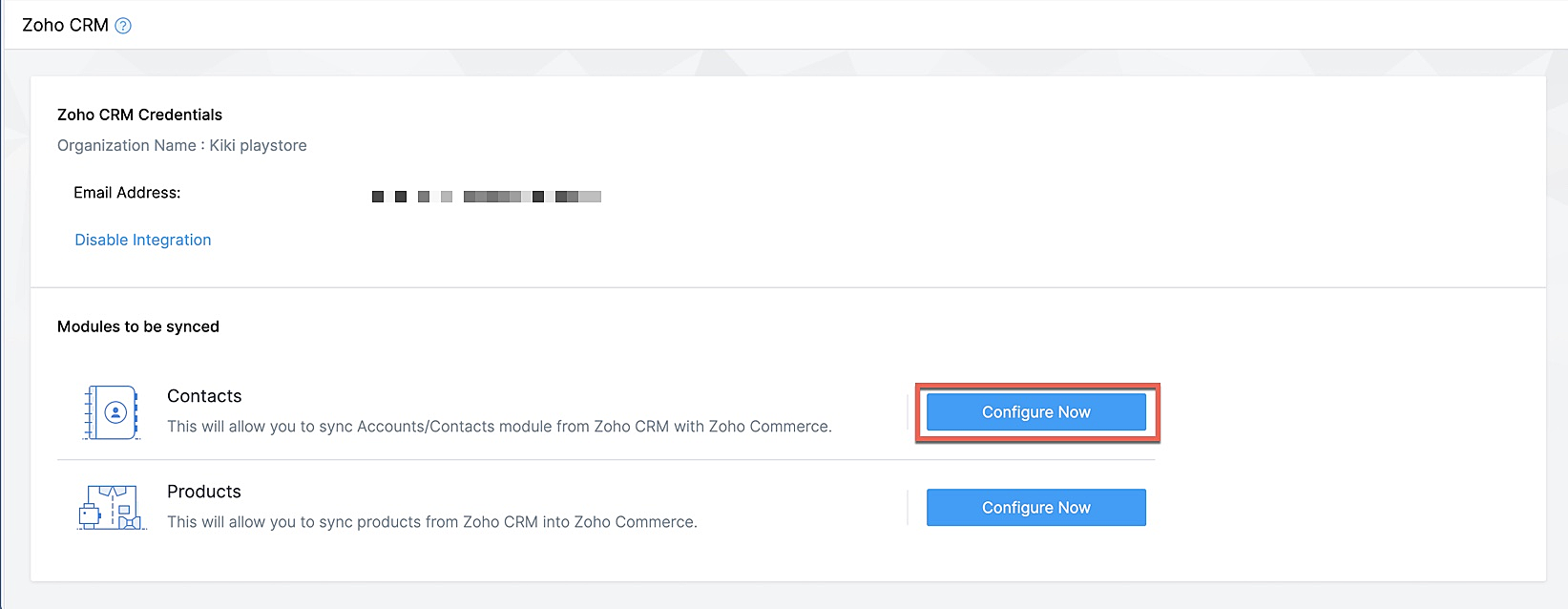
Klik op Configureer nu naast Contact
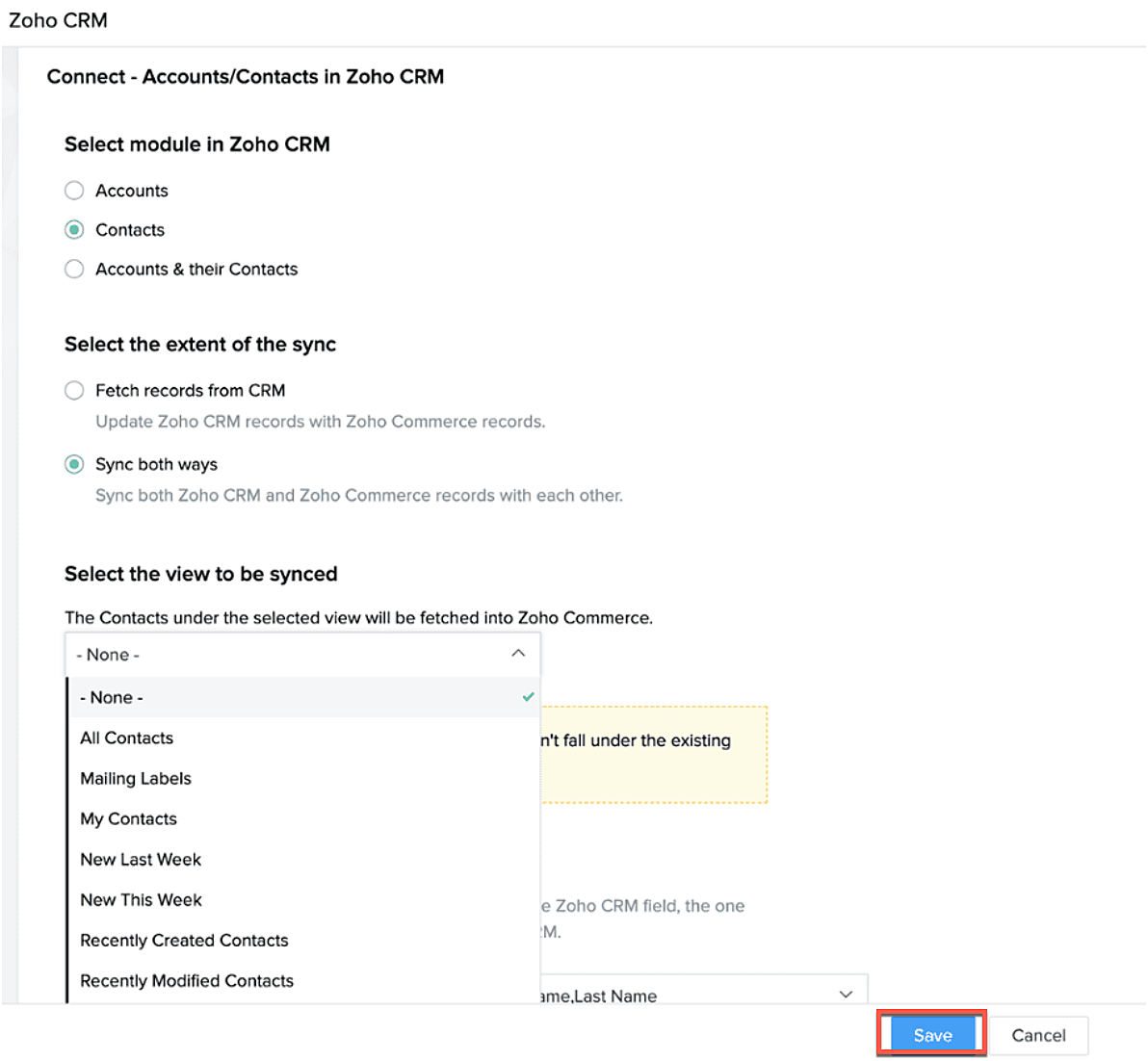
Selecteer de Zoho CRM module die je wilt synchroniseren
Kies tot hoever je wilt synchroniseren.
Selecteer de type CRM view die je wilt synchroniseren.
Producten synchroniseren.
Maak je producten in CRM of in Zoho Commerce? Synchroniseer het met elkaar zodat je ze niet twee keer hoef in te voeren. Klik op deze link om te lezen hoe je producten moet toevoegen in Zoho Commerce.
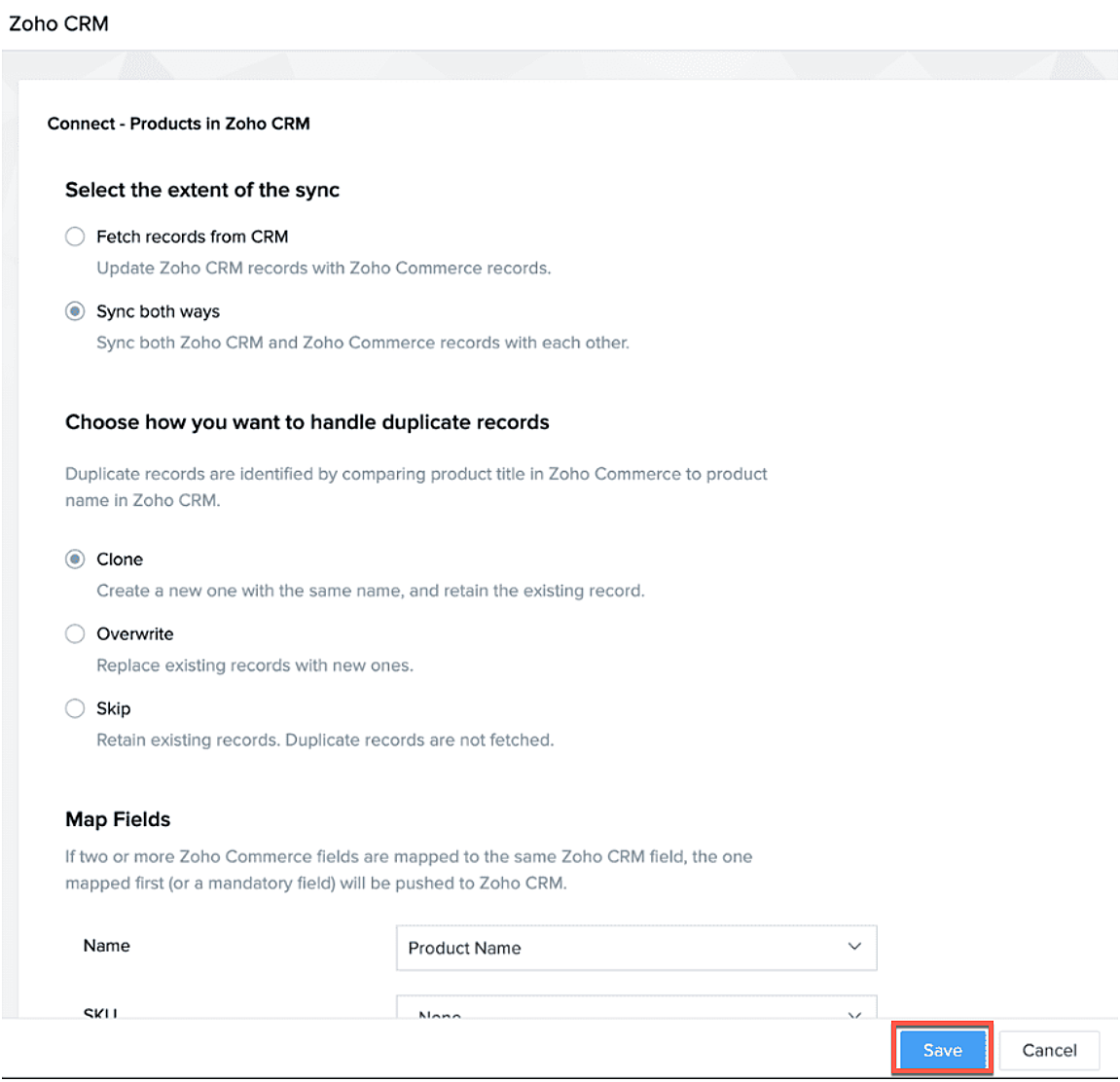
Klik op configureer producten.

Selecteer of je alleen je producten wilt ophalen of je van beide platformen wilt synchroniseren.
Selecteer of je het wilt klonen, overschrijven of na wilt bootsen.
Geef aan waar je het wilt plaatsen zodat Zoho Commerce de velden kan blijven synchroniseren.
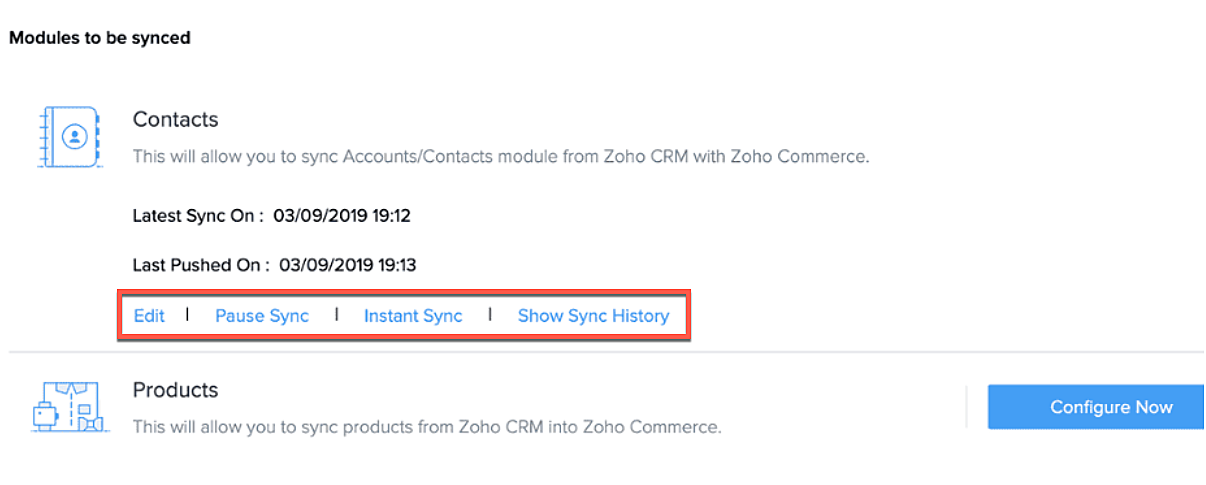
Na synchronisatie kan je de volgende acties uitvoeren.
- Aanpassen
- Pauseer sync
- Instant sync (Handmatig synchroniseren)
- Laat geschiedenis zien.
Formulieren
Je kan ook webformulieren koppelen vanuit Zoho CRM aan Zoho Commerce. Voeg vanuit de sitebuilder een formulier toe die je hebt gemaakt in Zoho CRM.
- Open sitebuilder
- Klik op +
- Selecteer "Forms"
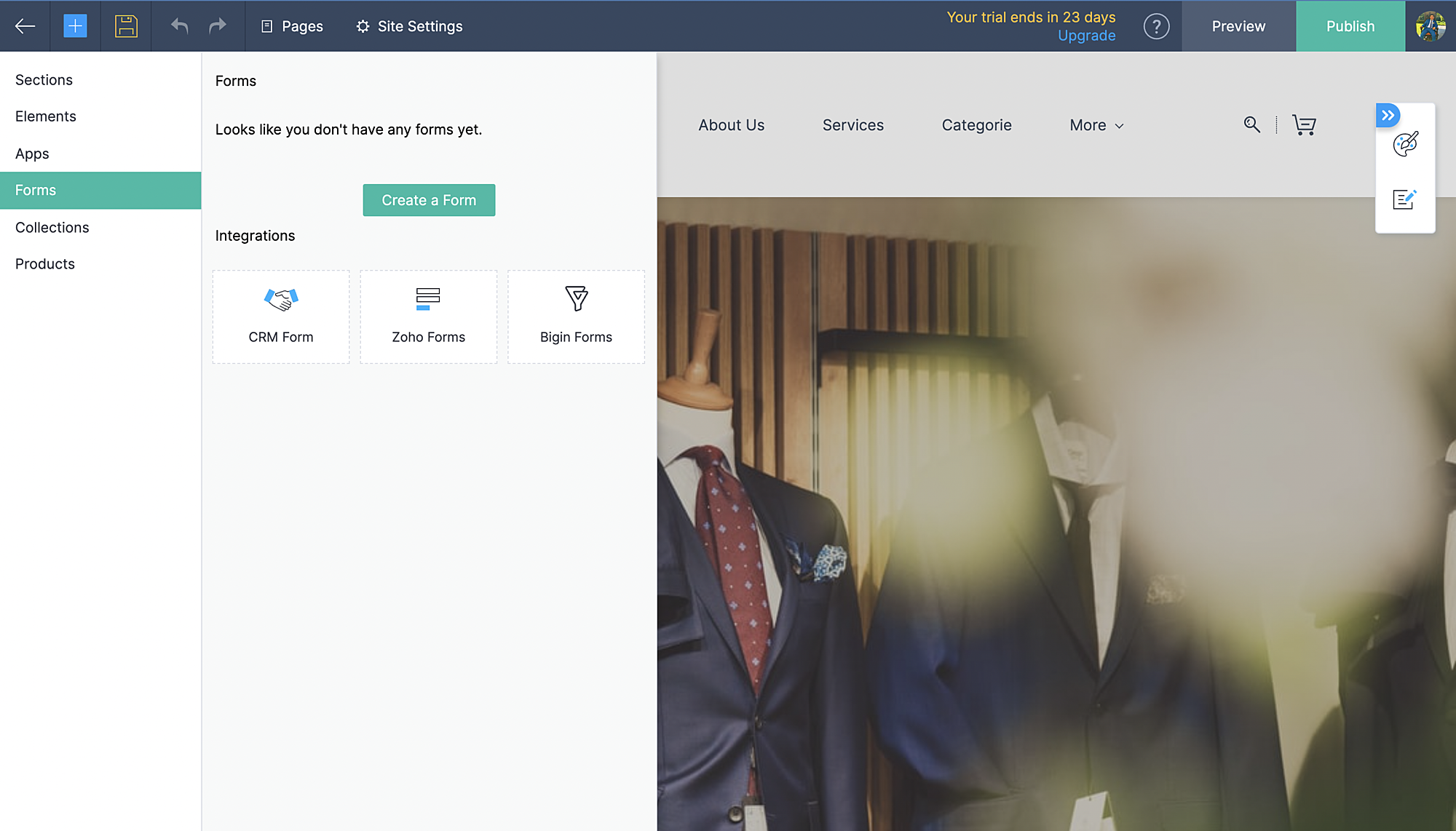
- Kies vervolgens CRM-form en selecteer de form die jij hebt ontworpen in CRM.
- Voeg formulier toe.
- De aanvraag komt vervolgens in je Leadmodule in CRM terug.
Zoho Inventory:
Met de integratie met Zoho Inventory kan je het voorraad- en voorraadbeheer van jouw online winkel naar een hoog niveau tillen. Gegevens van jouw Commerce-winkel worden gesynchroniseerd met je Inventory-account, zodat je naadloos tussen de twee kunt werken.
Voordelen van de integratie:
- Vergemakkelijk jouw voorraadbeheer en bijbehorende activiteiten.
- Houd zicht op leveranciers, retourzendingen en gedane betalingen
- Verruim de mogelijkheden van jouw online winkel
Ga naar instellingen, Zoho Inventory
Selecteer je bedrijf

Alle portal members en guest shoppers worden gesynchroniseerd naar contacten.
*Als je al Inventory gebruikt, selecteer je organisatie vanuit Zoho Commerce en start met je online shop.
Al je verkoop en rapporten worden gesynchroniseerd
Je organisatie profiel wordt geüpdate.
Zoho PaginaSense
Met Zoho PageSense beschik je over de mogelijkheden om de prestaties van je webwinkel te meten.. Zo kan je onder andere A/B tests uitvoeren op jouw winkel en jouw winkel optimaliseren voor verbeterde bezoekersconversies.
Voordelen van Integratie
- Voer A/B-tests uit en begrijp het gedrag van jouw publiek
- Creëer gepersonaliseerde variaties van jouw website voor jouw publiek
- Begrijp waar jouw bezoekers op klikken en optimaliseer jouw teksten en CTA-knoppen
- Creëer trechterexperimenten om te begrijpen waar jouw bezoekers afhaken
Vereisten
Je moet jouw winkel gepubliceerd hebben om de integratie te laten werken.
Ga naar instellingen, kies Zoho PageSense onder integraties
Klik op Access Portal, je wordt doorverwezen naar Zoho PageSense

Maak een portal door op Mijn Spaces te klikken rechts bovenin.
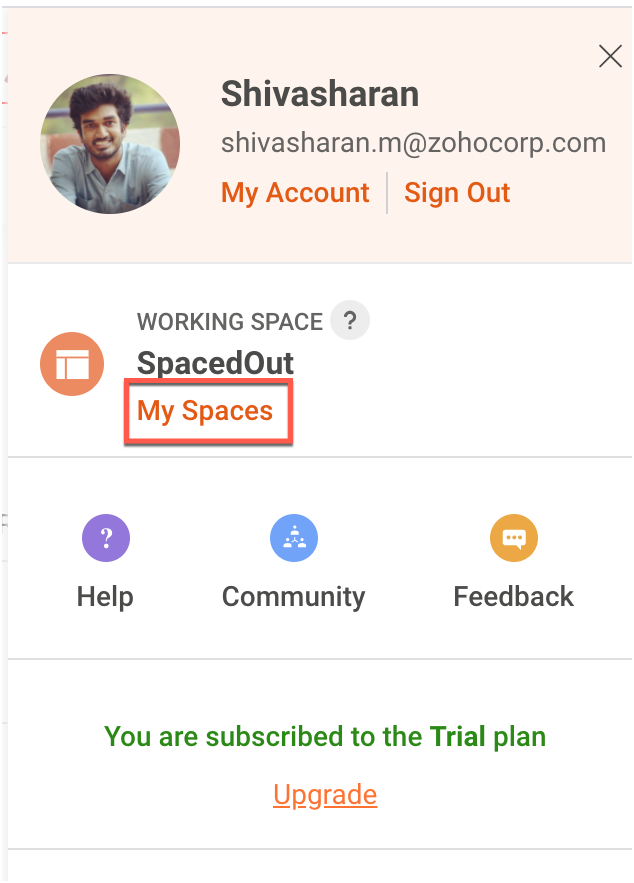
In Zoho Commerce selecteer je de Portal naam.
Maak een project of gebruik een bestaande project. (Klik op deze link om te leren hoe je een project aanmaakt.)
Maak een Funnel Experiment of gebruik een bestaande. (Klik op deze link om te leren hoe je een Funnel Experiment maakt.)
Klik op Connect.
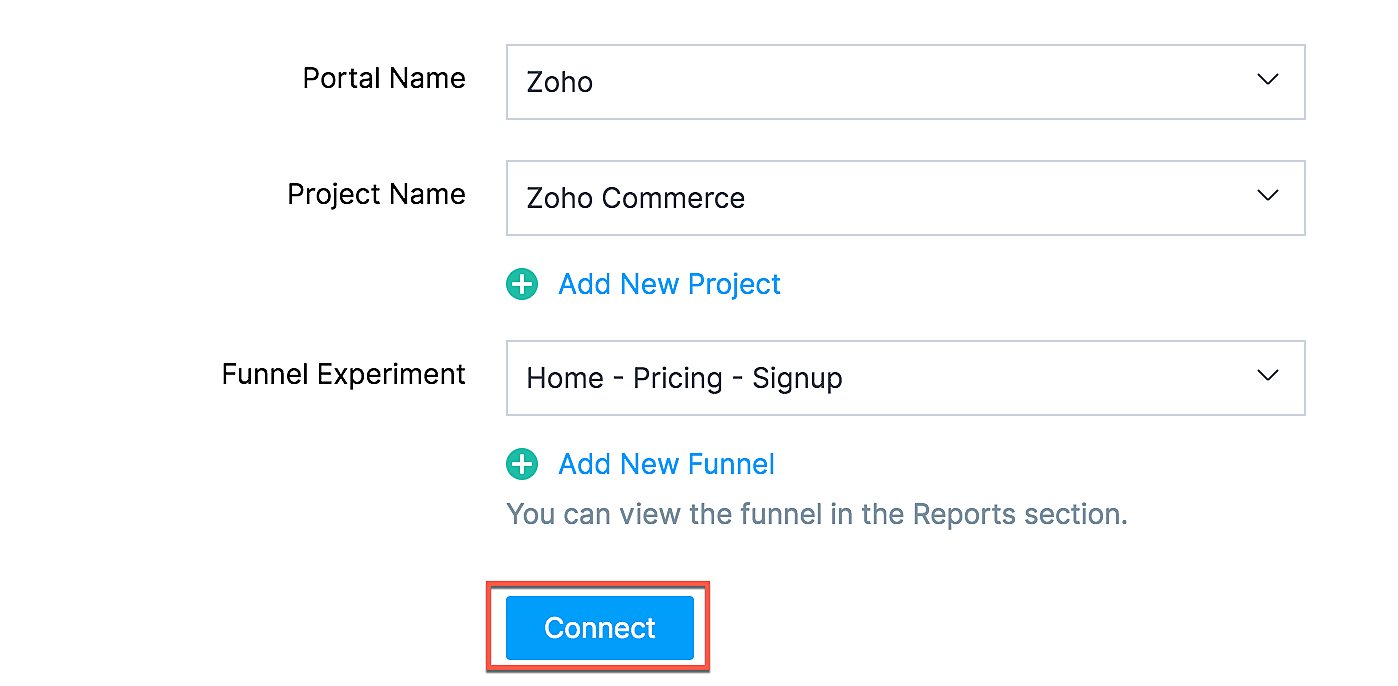
Als jij je selectie wilt wijzigen zoals een project of funnel experiment, klik dan op de beste optie en klik op Update.

Jouw Zoho Commerce is nu verbonden met je PageSense-account. Klik op Access Portal wanneer je integratie compleet is.
Marketing Automation
Automatiseer je jouw marketing activiteiten door je webwinkel te integreren met Zoho Marketing Automation
De voordelen van de integratie
- Bekijk winkelomzet, productdetails en klantinzichten op één pagina
- Stuur promotiecampagnes en creëer klantreizen
- Segmenteer leads op basis van hun activiteiten
- Initieer geautomatiseerde reeksen van opvolgingsberichten en actiesflows
Ga naar instellingen en selecteer Marketing Automation onder integraties.
Klik op Access Marketing Automation.
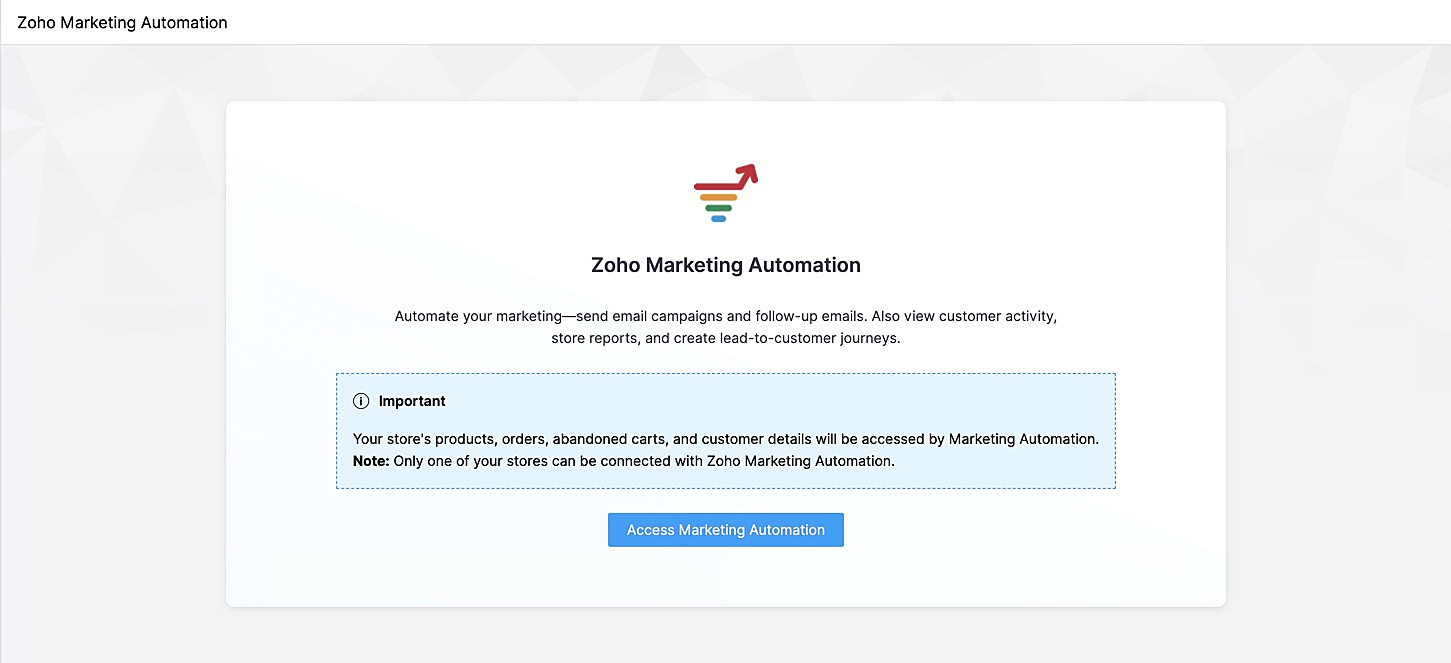
Je wordt naar Marketing Automation gebracht. Als je nog geen account hebt aangemaakt, ga je naar Engagement op het linker tabblad en klik je op Ecommerce.
Selecteer de winkel die je wilt koppelen en de mailinglijst waaraan je de klanten van jouw winkel wilt toevoegen en beheren. Maak een nieuwe mailinglijst aan als je er nog geen hebt gemaakt. Klik op deze link om te leren hoe je een mailinglijst moet maken.
Jouw winkel zal nu worden verbonden, en jouw producten, klanten, winkelwagen, en ordergegevens zullen worden gesynchroniseerd met Marketing Automation.
SalesIQ
Wil je direct in contact komen met je klanten? Met behulp van Zoho SalesIQ, kunt u een live chat widget toevoegen aan uw online winkel, en tevens de activiteit van uw bezoekers bijhouden.
Voordelen van integratie:
- Interactie met bezoekers via live chat
- Verhoog verkoopconversies met geprioriteerde bezoekers
- Bekijk activiteit, leg leads vast en geef bezoekers prioriteit voor outreach
Vereisten
Je moet jouw Zoho Commerce winkel hebben gepubliceerd om deze integratie te laten werken.
Hoe te integreren
1. Ga naar Instellingen in het linkerpaneel en klik op Zoho SalesIQ - Live Chat onder Integraties.
2. Zorg ervoor dat de Live Chat aan staat en click op "Connect"

3. Publiceer het op je website en controleer of de Live Chat aan staat. Die wordt rechtsonder weergegeven.
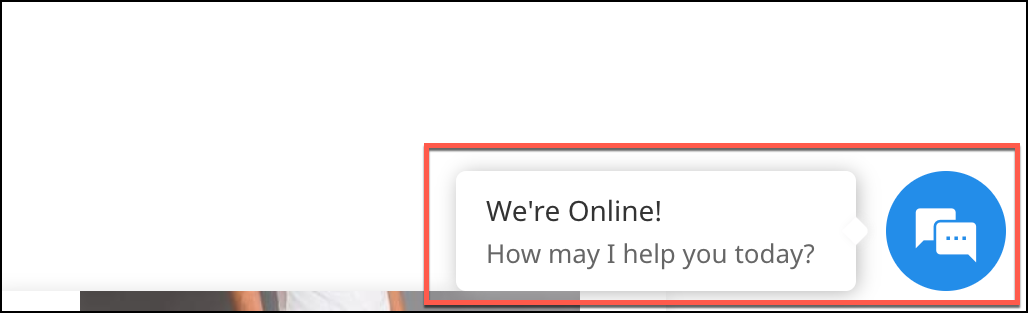
4. Verstuur een bericht. Dit wordt weergegeven in SalesIQ onder Chat history.

Heb jij een andere tips en tricks. Laat het weten.
Topic Participants
Theo Su
Sticky Posts
De nieuwe Zoho One is hier! Deel 1
Beste Community-leden, Zoho One, hét besturingssysteem voor bedrijven introduceert vandaag haar nieuwste update met maar liefst 5 nieuwe apps, 3 nieuwe services en 7 grote platform verbeteringen. Wij hebben gekeken naar hoe wij jullie verder kunnen helpen.Tips &Tricks: Jouw online boekingssysteem in 5 stappen!
1 Creëer een afsprakenkalender die past bij jouw branding Met Zoho Bookings behoud je de kleuren van jouw merk in alle applicaties. Je kan kiezen uit vier voorgedefinieerde thema's (Modern Web, Nieuwe Opmaak, Klassiek en Nieuw) met daarnaast opties omStart met Zoho One
Welkom op de community-pagina van Zoho One, hét besturingssysteem voor bedrijven. Op deze pagina geven wij een korte introductie over Zoho One. Daarnaast geven wij een aantal tips om te starten met deze besturingssysteem. Tegenwoordig zijn Cloud-oplossingen
Recent Topics
Zoho Trident Windows - Streams Not Visible
Namaste We’re having an issue with Streams not being visible in Trident (Windows), which is important for us as we share many emails internally. It appears that the feature to show Streams above the Inbox folder, as seen in the default mailbox view, isSales IQ Chat Widget is Only Displaying Last Name
Can anyone suggest why the widget is only displaying "last name"?! We have the latest version of the wordpress plugin installed. Thanks Thanks!Shopify - Item sync from Zoho Inventory
Hi team, We’ve connected Shopify with Zoho Inventory. We want that when an item is created in Zoho Inventory, it must create a product in Shopify. But currently, new items created in Zoho Inventory are not getting created in Shopify even after clickingBulk upload image option in Zoho Commerce
I dont know if I am not looking into it properly but is there no option to bulk upload images along with the products? Like after you upload the products, I will have to upload images one by one again? Can someone help me out here? And what should I enterIs it possible to setup bin locations WITHOUT mandating batch tracking?
Hi fellow zoho users, I'm wondering if anyone else has a similar issue to me? I only have some products batch tracked (items with shelf life expiry dates) but I am trying to setup bin locations for my entire inventory so we can do stock counting easier.Kill zoho meeting
Saying the quiet part out loud. Can zoho please just give up on the idea that they can make a meeting platform and just make our workplace licenses cheaper when you remove it so people can switch to zoom or teams. Tired of the excuses, you guys cant makeUtilisation de Zoho en conformité avec l’article 286 du Code général des impôts (CGI)
Cher(e) client(e), Conformément à l’article 286 du Code général des impôts (CGI) impose aux entreprises assujetties à la TVA d’utiliser des systèmes de caisse ou de gestion commerciale certifiés lorsqu’elles enregistrent des ventes à des particuliers.Unable to Create Task as a Support Administrator
Hello! I want to ask for help regarding creating tasks within the tickets. I am by default the Support Admin. I should be able to create tasks or activities right? But there's a prompt that I need to contact the Administrator. See photos for reference.Introducing Forms in Zoho Sheet
We hereby bring you the power of forms in Zoho Sheet. Now, build and create your own customized forms using Zoho Sheet. Be it compiling a questionnaire or rolling out a survey, Zoho Sheet can do it all for you. Forms is an excellent feature that helps you collect information in the simplest of ways and having it in Zoho Sheet takes it a notch higher. Build Simple yet Powerful forms Building forms using Zoho Sheet is fairly simple. The exclusive 'Form' tab lets you create one quickly. Whether youLayout one survey question in a time & redirect next Page based on previous response
I have doubt while, I am scripting survey on the Zoho where I redirecting to next page based on my previous response but didn’t get success on this. Please help me on this and tell me how I layout one survey questions in a time when I submit responseZoho Bookings form pre-filled with Zoho Forms in
Hi, I've got a contact page on my website and I'd like to have the option to book an appointment (redirected to zoho bookings page) after an option is submitted on the contact form. how would I go about doing this? thanksSupport “Other” Option with Free Text in Dropdown Fields
Hello Zoho Bookings Team, Greetings, We would like to request an enhancement to the registration form fields in Zoho Bookings, specifically for dropdown fields. Current Limitation: At the moment, dropdown fields do not support an “Other” option that allowsSending automated messages that appear in the ticket's conversation thread
Good morning, esteemed Zoho Desk community, warm greetings Today I am here to raise the following problem, seeking a solution that I can implement: I need to implement an automation that allows me to send reminder messages to customers when I am waitingIntroducing parent-child ticketing in Zoho Desk [Early access]
Hello Zoho Desk users! We have introduced the parent-child ticketing system to help customer service teams ensure efficient resolution of issues involving multiple, related tickets. You can now combine repetitive and interconnected tickets into parent-childPayment Card or Identity form-fill from Vault?
Hello! I'm working on replacing Bitwarden with Vault and one issue I've run into is that I can't find any option to fill address and payment forms from Payment Card or Identity info that has been saved in Vault. Is there a way to do this? Is it a plannedAbility to add VAT to Retainer Invoices
Hello, I've had a telephone conversation a month ago with Dinesh on this topic and my request to allow for the addition of VAT on Retainer Invoices. It's currently not possible to add VAT to Retainer Invoices and it was mutually agreed that there is absolutely no reason why there shouldn't be, especially as TAX LAW makes VAT mandatory on each invoice in Europe! So basically, what i'm saying is that if you don't allow us to add VAT to Retainer Invoices, than the whole Retainer Invoices becomesTime Log Reminder
Tracking the time spent on tasks and issues is one of the most important functions of a timesheet. However, users may forget to update the time logs because they have their own goals to achieve. But, time logs must be updated at regular intervals to keep[Early-access] Introducing Zoho's CommandCenter - Cross-Zoho business process automation
Resources to help Webinar recording | Documentation Feature Restrictions Currently available on early-access only for US data center accounts Features Role CommandCenter as a Service uses signals across Zoho services to propel the movement of recordsTip #58- Accessibility Controls in Zoho Assist: Learning- 'Insider Insights'
Learning should be clear and interruption-free for everyone. Timely feedback plays an important role in helping users understand actions as they happen, without breaking their focus. In this post, we’ll explore the final section of Accessibility: Learning.ZIA "Generate Content" action doesn't have contexual data from the ticket
"Generate Content" action doesn't have contexual data from the ticket. I try to get AI to help me with this ticket but it doesn't seem to have any ticket information as context. Although the ticket has a lot of information in it.Zoho Desk - Zoho FSM Integration issue on Mobile and iPad
Hello Team, I am trying to create a Work Order (WO) using the Zoho FSM integration (Add-on Service) that is integrated with Zoho Desk. The issue is that the integration is not working on mobile devices and iPads. While I am able to create the WO, Request,E-File Form 1099 Directly With the IRS From Zoho Books
The Form 1099 filing season has begun, and businesses are required to e-file certain forms with the IRS to report payments made to vendors and contractors. If your business made qualifying payments during the year, you must e-file the appropriate FormCan I hide empty Contact fields from view?
Some contacts have a lot of empty fields, others are mostly filled. Is there a way I can hide/show empty fields without changing the actual Layout? I would like to de-clutter my view, and also be able to add information later as I am able. I would be willing to learn to code a button, but I am highly confused about it and thus worried it would be beyond me. I've looked at a lot of the developer documents and I'm not able to make a lot of sense of them. Thank you in advance to anyone who knows theSuggestions for showing subscribed Topics in CRM (contact record)
We have several Topics set up in ZMA. We also have a sync set up between ZMA and CRM. I'd like to display the subscribed topics on the CRM Contact record. This will allow the Sales team (who uses CRM) to see at a glance what topics a Contact is subscribedReplies sometimes creating separate ticket
Sometimes when a customer responds to an email coming from Zoho Desk, instead of adding a reply to the original ticket, a separate ticket is created. This happens even though the response subject line contained the ticket number, and the person respondingRe-hide fields when option is unselected
Hi all Can anyone help me with this - when I create a 'show' field rule for when a dropdown option is selected, how to I make it so the 'show' option re-hides if that option is no longer selected?Allow Attaching Quartz Recordings to Existing Zoho Support Tickets
Hi Zoho Team, We would like to request an enhancement to how Zoho Quartz recordings integrate with Zoho Support tickets. Current Behavior: At the moment, each Quartz recording automatically creates a new support ticket. However, in many real-world scenarios:I'm getting this error when I try to link an email to a deal inside the Zohomail Zoho CRM extension.
When I click "Yes, associate," the system displays an "Oops!! Something went wrong" error message. I have attached a screenshot of the issue for reference.Custom Fields
There is no way to add a custom field in the "Timesheet" module. Honestly, the ability to add a custom field should be available in every module.Remove the “One Migration Per User” Limitation in Zoho WorkDrive
Hi Zoho WorkDrive Team, Hope you are doing well. We would like to raise a critical feature request regarding the Google Drive → Zoho WorkDrive migration process. Current Limitation: Zoho WorkDrive currently enforces a hard limitation: A Zoho WorkDriveTranslation from Chinese (Simplified) to Chinese (Traditional) is not working. It randomly translated. Google Translate accurately but zoho translate is not working at all
Hi friends, The newly added language for translation. https://www.zoho.com/deluge/help/ai-tasks/translate.html "zh" - Chinese "zh-CN" - Chinese (Simplified) "zh-TW" - Chinese (Traditional) my original text: 郑这钻 (and it is zh-CN) translated traditionalConsultant-Only Booking Page
Zoho Bookings does not allow for Meeting Type OR Workspace-Wide booking pages to be turned off. This is detrimental to organizations that have territory-based or assigned accounts, because if prospects can go to these booking pages and either select theAll new Address Field in Zoho CRM: maintain structured and accurate address inputs
The address field will be available exclusively for IN DC users. We'll keep you updated on the DC-specific rollout soon. It's currently available for all new sign-ups and for existing Zoho CRM orgs which are in the Professional edition. Latest updateCall result pop up on call when call ends
I’d like to be able to create a pop up that appears after a call has finished that allows me to select the Call Result. I'm using RingCentral. I have seen from a previous, now locked, thread on Zoho Cares that this capability has been implemented, butCustom Sorting based on other columns in table
I need the ability to apply custom sorting to a text-based dimension in the X axis where the sorting is based on another column in the table. For example, I have a chart report where the X axis is a text label. I would like to be able to sort those textFeature Request: Enable Custom PDF Layout Editor for All Modules (Including Package Slips)
Hello Zoho Community and Product Team, I am writing to share a suggestion that would significantly enhance the customization capabilities within Zoho Books. We all appreciate the power of the Custom PDF Layouts (the "New" template engine) that allowsIs there a way to invoke deluge function from within a widget?
Hi! I have custom functions in deluge and I was wondering whether there is any way to call this function through a widget? Something like on click of a button inside a widget, run the deluge custom function. Would this be possible?Can a default task Priority be set?
The "Priority" field in the Task layout does not allow a default to be set. Is there another way of doing it? Because the current default is "None" and the Zoho Kanban board design has selected this field as critical information to surface by includingAdding a threshold to a line chart based on date range
I have a line chart that is tracking a percentage over time. It also has a filter for 50 different clients. I would like to create a threshold that is based on a portion of the date range. As I understand it, this would be done by adding a column to theResize Signature field dynamically
On the tablet, it is perfect. But on smaller mobile devices and PCs, both web and application, it is too small for people to sign. Is there any plan to make the signature field size dynamically in the future update?Next Page