Announcing Kiosk 1.1 - Customize screen titles, configure new fields & actions, use values from your Kiosk to update fields, and more.
Hello all
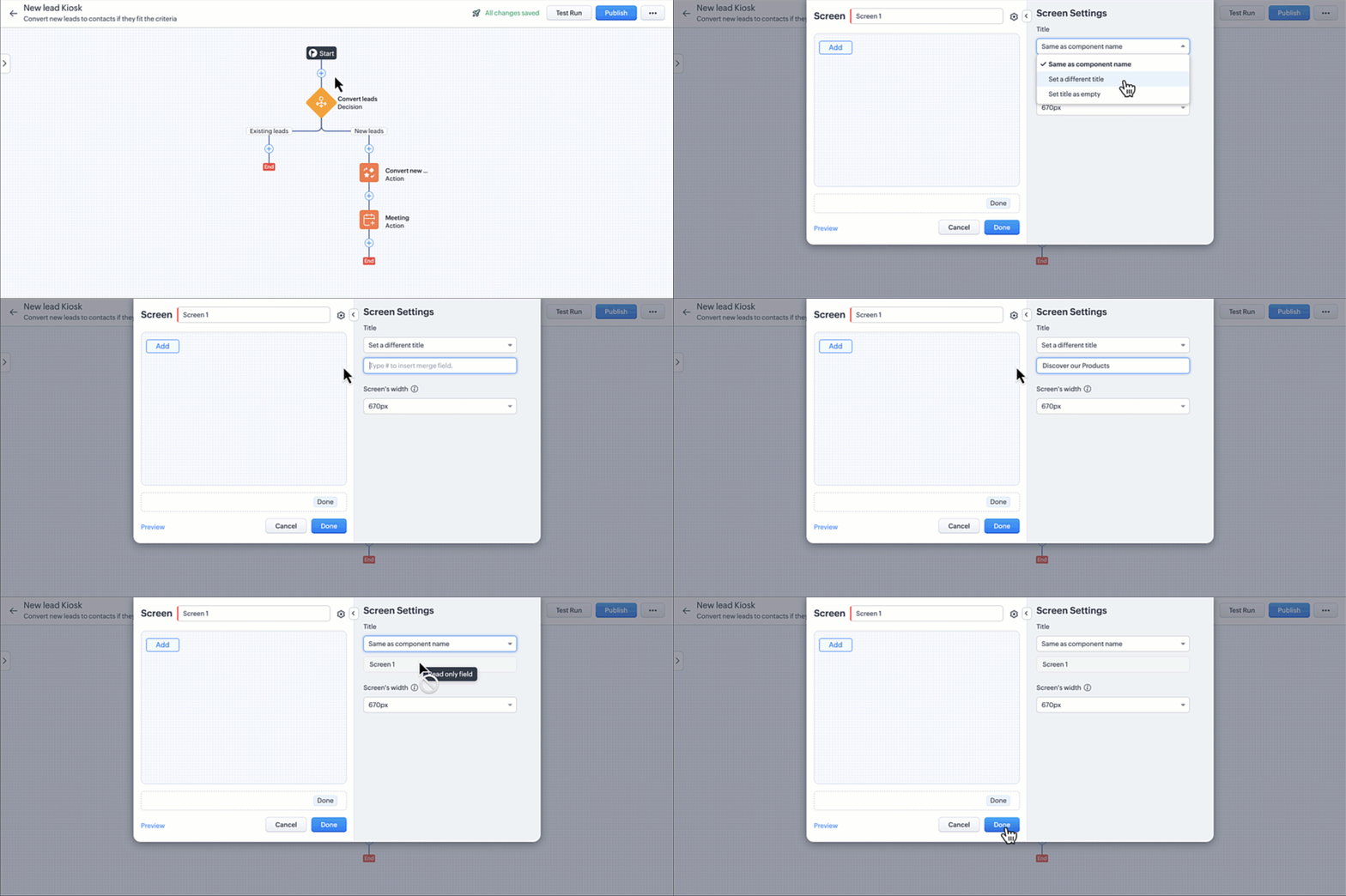
Add titles for your Kiosk screens and adjust its width to suit your viewing preferences.
Three new fields can be added to your screen: Percentage, URL, & Decimal
Edit the default path's name of your Kiosk in the decision component.
Enhancements made to the Actions
Convert, Add Meeting, & Add Calls actions can now be configured in your Kiosk.
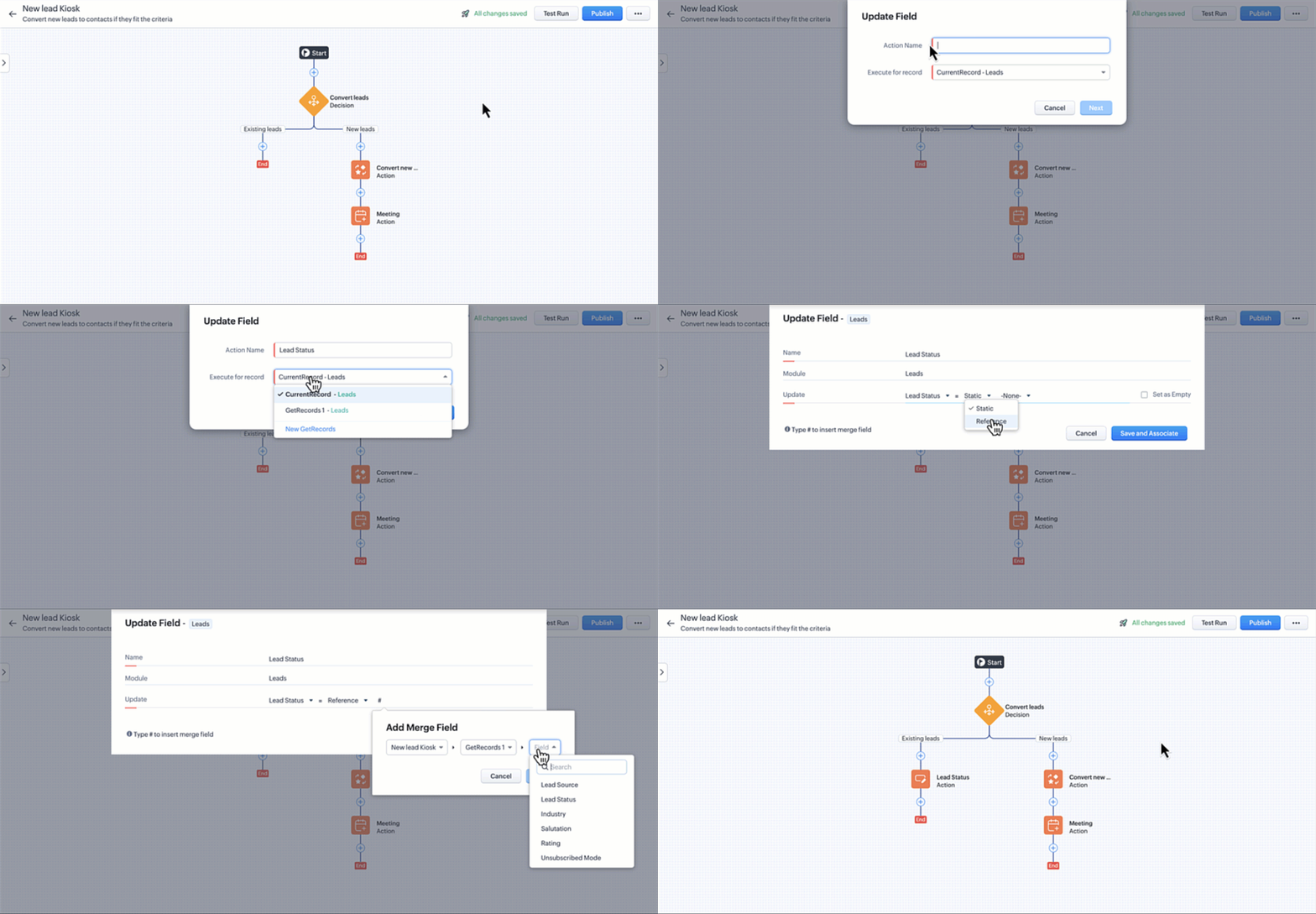
Merge any value from your Kiosk screens or from CRM data using the # Merge Field function in the field update action.
Select values from existing data in the picklist fields, multi-line fields and check box fields in the create record action.
Add titles for your Kiosk screens and adjust its width to suit your viewing preferences
- Screen titles can help grab attention and set the tone for users interacting with your Kiosk. You can customize the screen title to match the purpose of your kiosk. Choose to either use the component's name as the title, set a new title, or leave it blank.
- Configure the screen width to either 670 pixels or 1000 pixels. A screen width of 670 pixels is recommended for popup windows, while a screen width of 1000 pixels is more suitable for a larger display preference.
Percentage, URL, & Decimal : The three new fields that can be added to your Kiosk screen

Decimal
Use this field to allow users to enter number values as decimals in your Kiosk screens. You can choose to define the maximum digits allowed and the number of decimal places that can be displayed. Also choose to merge any value from your Kiosk, be it from screen fields or data you get from the CRM system, mark it as a mandatory field, display it with number separators, and show a tooltip for users to get a little more understanding.
Percentage
Use this field to allow users to enter a percentage value into your Kiosk screens. You can choose to merge any value from your Kiosk, be it from screen fields or data you get from the CRM system, mark it as a mandatory field, and show a tooltip for users to get a little more understanding.
URL
Use this field to allow users to enter a URL in your Kiosk screens. You can choose to merge any value from your Kiosk, be it from screen fields or data you get from the CRM system, mark it as a mandatory field, and show a tooltip for users to get a little more understanding.
Edit the default path's name in your Kiosk's decision component screen
Convert, Add Meeting, & Add Calls : The three new actions that can be configured in your Kiosk
In your Kiosk, you can set up actions to be displayed to users or save data from users in the CRM system. In addition to the available actions, you now have the option to convert a lead to a contact, schedule a meeting, or arrange a call with users interacting with your Kiosk.

Convert
Use this action to convert your records in the Kiosk screen. Say you have created a Kiosk for the new leads in your CRM system - New lead Kiosk. You can now use the convert action to convert those leads to contacts when a record has been updated. You can also create a new deal for the newly converted leads and use the CRM system to follow up with the contact.

Add Meeting
Set up meetings with users who interact with your kiosks. Let's say you have a Kiosk setup for customers who've purchased your product. You can now schedule meetings with them from your kiosk as soon as they have completed a purchase. You use this action to provide a demo of your products or provide additional information if needed.

Schedule a call
You can use a Kiosk screen to schedule calls with users interacting through a Kiosk. For instance, if you have set up a Kiosk for new customers, you can schedule calls to provide them with a product briefing, clarify any doubts, or inform them about new features.

Merge any value using # Merge Field from your Kiosk screen or from CRM data in the Field Update action
Select values from existing data in picklist fields, multi-line fields and check box fields in the Create Record Action

 Availability : These enhancements are available to all partner demo accounts of all DCs except IN DC. We will update you on its availability in the IN DC soon.
Bring data from third-party applications into a kiosk.
You will have an option to display GetRecords in a table with optional selection or as a list without any selection.
Kiosk Studio will support Zoho Flow Actions.
Add OpenURL and OpenRecord as actions soon in Kiosk Studio.
Create a clone of existing kiosks.
Reorder buttons in Kiosk screens.
Connect any path in a Kiosk.
Reuse Screen Fields in your Kiosks.
Let actions be completed sequentially in your Kiosk.
Pass or use a response in the next set of actions.
We've started working on these features and will have them ready soon. There are more cool updates coming for Kiosk Studio too, so stay tuned!
Thanks and have a great day!
Topic Participants
Serena Woolridge
Pablo Silva Osorio
Hugh Marshall
Ponns
jaken
Sticky Posts
Good news! Calendar in Zoho CRM gets a face lift
Dear Customers, We are delighted to unveil the revamped calendar UI in Zoho CRM. With a complete visual overhaul aligned with CRM for Everyone, the calendar now offers a more intuitive and flexible scheduling experience. What’s new? Distinguish activitiesVoC in Zoho CRM is now data savvy: Explore response drilldown, summary components and participation in CRM criteria
VoC has all the goods when it comes to customer intelligence—which is why we're constantly enhancing it. We recently added the following: A customer drilldown component that shows you the list of prospects and customers behind a chart's attribute ExpandedWrapping up 2025 on a high note: CRM Release Highlights of the year
Dear Customers, 2025 was an eventful year for us at Zoho CRM. We’ve had releases of all sizes and impact, and we are excited to look back, break it down, and rediscover them with you! Before we rewind—we’d like to take a minute and sincerely thank youPresenting ABM for Zoho CRM: Expand and retain your customers with precision
Picture this scenario: You're a growing SaaS company ready to launch a powerful business suite, and are looking to gain traction and momentum. But as a business with a tight budget, you know acquiring new customers is slow, expensive, and often deliversCreate and populate a record in an instant: Introducing zero-shot field prompting to Zia's ICR
A couple of months ago, we upgraded our in-house AI image detection and validation tool, Zia Vision, with intelligent character recognition (ICR). By training Zia with sample images, you could create and enrich CRM records with data extracted from standard
Recent Topics
Zohomail - The "All Messages" vs "In Box"
Why do some new email message appear under the all messages view but not in my inbox? That's really annoying but to be fair I've experienced the same with gmail.error while listing mails
I can't access email in any of my folders: Oops, an error occurred - retry produces the second error response: error while listing mails (cannot parse null string). I've signed in and out of Zoho, restarted my iMac.Introducing the Zoho Projects Learning Space
Every product has its learning curve, and sometimes having a guided path makes the learning experience smoother. With that goal, we introduce a dedicated learning space for Zoho Projects, a platform where you can explore lessons, learn at your own pace,Where to show Customization Field ?
Dear Sir, I have made some New Field in Item Field Customisation. Now I don't require that field in Estimate, Sales Orders etc. I just wants that field in Sales Invoice to Show/Hide... Is that possible ?Zoho Desk 2025 round-up: Key highlights on feature releases
Hello everyone, As we gear up for 2026, here is a detailed round-up of all feature releases in Zoho Desk web throughout the year. For consolidated information on releases check out the What’s New page You can also watch these webinars. Zia in web ZiaPrint Sales Orders, Purchase Orders or Invoices from API
Hello, Is it possible to use the print option that is available in Sales Orders Purchase Orders and Invoices with the API?. I don't see any information in the docs about this. ThanksHow to show a hided report??
in CRM Report , I clicked Hide incidently , how to show the floder again? Nowhere I can find the hided report floder...Converting Customer Invoice to Purchase Bill
Hi, In my service-based business, I sometimes create the customer invoice first, and later I receive the purchase bill from the vendor for the same job. Is there any option in Zoho Books to: Convert a customer invoice into a purchase bill, or Link/associateEmail tracking inquiry
I am trying to track when my emails are opened and clicked like I previously did in HubSpot. HubSpot pretty much did the entire process automatically. After digging through, I finally found in settings --> emails --> BCC Dropbox there is an email I canMass Update of Lookup Fields not possible
Hello List I've created a custom field for Leads and Contacts 'Current Campaign'. This is very Handy as I can filter leads and then related them to a campaign. Everything ready, but then I realized that mass update doesn't work for lookup fields... aCollapsible Sections & Section Navigation Needed
The flexibility of Zoho CRM has expanded greatly in the last few years, to the point that a leads module is now permissible to contain up to 350 fields. We don't use that many, but we are using 168 fields which are broken apart into 18 different sections.Quick Create needs Client Script support
As per the title. We need client scripts to apply at a Quick Create level. We enforce logic on the form to ensure data quality, automate field values, etc. However, all this is lost when a user attempts a "Quick Create". It is disappointing because, fromDownload Attached Files
Hi everyone, Brand new to Zoho Creator. I have a form with a subform. The subform has a field for "File Upload" I have this in a subform to allow multiple files to be uploaded to the parent form. Once the files are uploaded, how can i download or view them? Is this a setting I am just not seeing? If there isn't a way to download them, could i create another form field that dynamically creates the file's URL? That way a user can click the URL to get to the file? Any help with this would be greatlyTicket layout based on field or contact
Hi! I want to support the following use-case: we are delivering custom IT solutions to different accounts we have, thus our ticket layouts, fields and languages (priority, status field values should be Hungarian) will be different. How should I setupNo funcionan correctamente el calculo de las horas laborales para informe de tickets
Hola, estoy intentando sacar estadísticas de tiempo de primera respuesta y resolución en horario laboral de mis tickets, pero el calculo de horas en horario laboral no funciona correctamente cree los horarios con los feriados : Ajusté los acuerdos deZoho Mail Android app update: Set out of office response exclusively for organization members and external users, response interval
Hello everyone! We have now introduced an option to configure out of office messages exclusively for organization members and external users within the Zoho Mail app. Additionally, now you can also customize response intervals for the Out of office messages.Feature Request: Detailed View - Related Block Links!
Desperately need a view record link option on records displaying in the related blocks on a Detail View. For the love of god, please add this feature. Thank you!Sub-Form Padding in CSV Export
Hi, When you use the Sub-Form, and for example you have a Date Field on the Main Page, then Option 1 and Option 2 fields on the Subform, when you export this to CSV the Date column will only have the Date in 1 row, the first row, it would be nice to padDependent / Dynamic DropDown in ZohoSheets
Has anyone figured out a way to create a Dropdown, the values of which is dependent on Values entered in the other cell ?How do I change the order of fields in the new Task screen?
I have gone into the Task module layout, and moving the fields around does not seem to move them in the Create Task screen. Screenshot below. I have a field (Description) that we want to use frequently, but it is inconveniently placed within the MoreZoho → ShipStation Integration – Sales Order–Driven Fulfilment Workflow
Hello All, I’m reaching out to explore the best way to integrate a shipping tool into our inventory which will speed our process up. We are looking to integrate ShipStation into our existing order-to-fulfilment workflow, as we’re keen to standardise onIA ou je peux trouver comment utiliser IA
Je voudrais utiliser IA dans l'interface zoho pour m'aider quand j'ai des questions de rôle partage ou autre configuration d'automatisation, j'utiliser ChatGPT externe mais il ne connait pas toujours l'interface zoho et les réponses sont parfois longueData Processing Basis
Hi, Is there a way to automate the data processing for a candidate every time an application arrives from job boards, without requiring manual intervention? That is, to automatically acquire consent for data processing. I've seen a workflow that allowsDisable Zoho Inventory Tracking / Delink Zoho Books & Inventory
We have integrated zoho inventory with zoho books? Now after a long time, we want to disable inventory tracking and delink these 2 modules. Zoho says we cant do it. Anybody else going thru the same ? Any possibility at all? Why does zoho not allow toZoho vault instal on windows
I am trying to use Zoho Vault Desktop for Windows, but I am unable to complete the sign-in process. Problem description After logging in to my Zoho account and clicking Accept on the authorization page, nothing happens. The application does not proceedZOHO GLITCHES
Ok, you guys have done a great job at building a platform that has the potential to surmount the competition but these glitches are becoming more than frustrating! This is beyond annoying, I'm trying draft lawsuits and type up privacy and refund policiesPlease, make writer into a content creation tool
I'm tired of relying on Google Docs. I'm actually considering moving to ClickUp, but if Writer were a good content creation tool instead of just a word processor, I would finally be able to move all my development within the Zoho ecosystem, rather thanNotification to customers when I use a Zoho function
Hi all, I tried searching the community but couldn't find anything about it. I noticed that the customer receives the notification of reopening the old ticket but does not receive the notification of opening a new ticket when I use the function: "separateDate Filters in Zoho Desk Dashboard
Hello Team, Currently, in the Zoho Desk dashboard, the date filter is available only for daily, weekly, and monthly views. Could we also add a yearly date filter to allow filtering by an entire year? Additionally, in the custom date filter, it is currentlyMobile app - offline
If I made a couple of forms and my field guys had the mobile app and were somewhere without signal, could they open the app, complete and sumbit a form and have it upload when they are back in signal (we need different info at different jobs and I'm tryingConsumption based inventory
I am currently using Zoho Books for my hospitality business, which includes lodging and restaurant services. We purchase many items in bulk for storage and consumption as needed. I'd like these items to be recorded as inventory when purchased and categorizedZoho Survey reminder settings are extremely confusing
Hi, I just want to set 3 reminders, one week apart from the first email out. Your form is too confusing and I don't understand. Can you simplify and be more specific regarding the language used on the form ?Zobot drop down list
Hi, I am trying to create a drop down list in Zobot by creating a plug. I think I am close but I just can't get it over the line and was hoping that someone could help me. I had a little bit of help getting the script started (hence the comments) // DelugeHow to compare a subform lookup field that allows multiple entries when edited
I have a form with a subform with multiple fields. One of the fields is a lookup field that allows a multi select. On edit validation, I want a workflow to execute only when the entries in that subform field has changed. The old. function is not workingTranslation of Tooltip Messages
The descriptive help messages should be available to provide translations for.Function #53: Transaction Level Profitability for Invoices
Hello everyone, and welcome back to our series! We have previously provided custom functions for calculating the profitability of a quote and a sales order. There may be instances where the invoice may differ from its corresponding quote or sales order.Business Day Logic Update: More Accurate Scheduling for Your Workflows
Hello everyone, We’re improving how business-day calculations work in workflows, especially when triggers happen on weekends. This update ensures that offsets like +0, +1, and +2 business days behave exactly as intended, giving you clearer and more predictableLead Blueprint transition in custom list view
Hi, Is It possible to insert the Blueprint transition label in a custom Canvas list view? I am using Lead module. I see the status, but it would be great if our users could execute the Blueprint right from the list view without having to enter the detailedEmail Notifications not pushing through
Hi, Notifications from CRM are not reaching my users as they trigger. We have several workflow triggers set up that send emails to staff as well as the notifications users get when a task is created for them or a user is tagged in the notes. For the past 6 days these haven't been coming through in real time, instead users are receiving 30-40 notifications in one push several hours later. This is beginning to impact our daily usage of CRM and is having a negative effect on our productivity becauseDebit opening balances of vendors
Dear colleagues: I am looking at the trial balance as on 31st March 2024, and punching opening balances (1st April 2024) in Zoho Books. Vendors have credit balances, by its nature, but some of our vendors have debit balances as well (e.g., we have paidNext Page