Automation#34 : Automate Email threading for Ticket notification

Hello Everyone,
It's been a while since we've presented an automation. However, our community has been buzzing with ideas, use cases, and discussions with our community experts and Ask the Experts session.
So, here we are again, presenting an automation focused on threading ticket notification emails.
Let's see how this automation helped our folks at Zylker Techfix.
Zylker Techfix, a gadget service company, has grown significantly and now serves a large customer base. The support team receives tickets from various customers, some of whom send multiple emails regarding servicing multiple gadgets. With their expanding customer base, Zylker Techfix wanted to effectively track notification emails sent to customers for each respective ticket.
Additionally, Zylker Techfix aimed to inform customers about the engineer assigned to support them with their submitted gadget, helping establish a stronger connection with their customers.
In this post, let's explore how we can adopt Zylker Techfix's customization.
Notify Customers when a ticket is created
The notification rule has an option to notify your customers when a ticket is created.
You can add the details of the ticket owner within the Email template so customers will know the support executive who will be handling the ticket.
How to include Ticket Owner details within the Email template?
You could create a New Email template or use the Existing email template.
Create an Email template
You can either create a New Email template or edit an existing Email template.
To Add a New Template : Go to Setup (S) >> Customization >> Email Templates >> Select the required Department >> Click on Add >> New Template >> Select the Tickets module >> Enter Name > Select Folder, From Address, Enter Reply to address if required, Add Subject and desired description.
To add Ticket owner's name, insert the placeholders First Name and Last Name (if required) ${Case Owner.First Name}${Case Owner.Last Name}, under Ticket Owner.
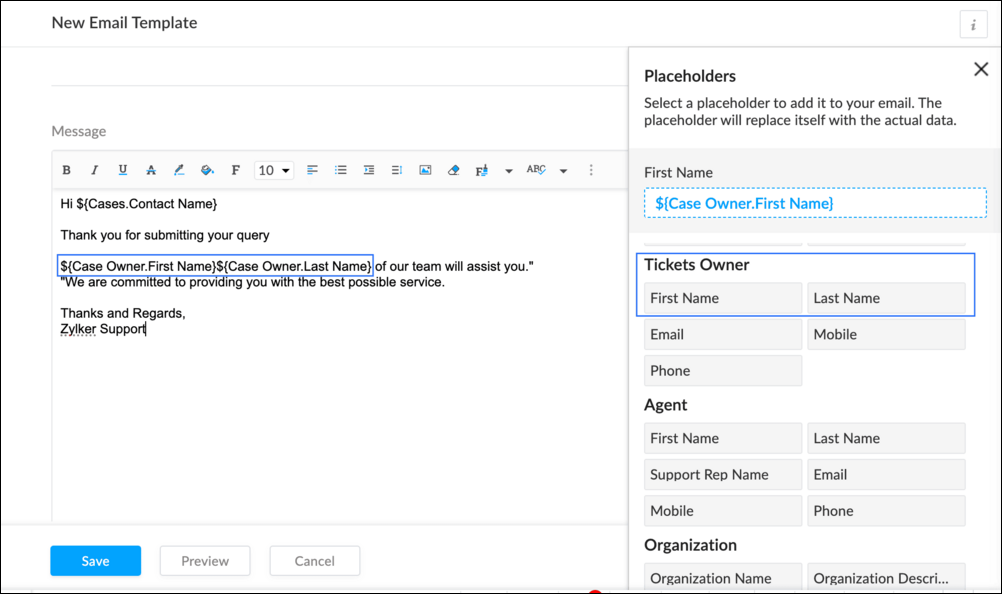
To Edit an Existing Email
To edit an existing Email, Go to Setup (S) >> Customization >> Email Templates >> Select the required Department >> Click on the Edit icon for the existing template or select the existing Template >> Edit description. To insert Ticket owner's name, insert the placeholders for first name and last name (if required) ${Case Owner.First Name}${Case Owner.Last Name}, under Ticket Owner.
Create a connection
1.1 Go to Setup(S) and choose Connections under Developer Space.
1.2 Click Create Connection.
1.3 Select Zoho Desk under Default Services.
1.4 Set the connection name as zohodeskconnection.
1.5 Under Choose Scopes, choose the below scope values:
1.5 Under Choose Scopes, choose the below scope values:
Desk.settings.ALLDesk.tickets.UPDATE
1.6 Click Create and Connect.
1.7 Click Connect.
1.8 Choose the Desk's organization to connect with Deluge, and click Submit.
1.9 Click Accept.
Connection is created successfully.
Configure Custom Function within the Workflow Rule
1. Go to Setup, choose Workflows under Automation.
2. Under Workflows, click Create Rule.
3. Under Basic Information, choose Tickets under Module, give a Rule Name and Description.
4. Click on the Active checkbox to activate the rule once created. Click Next.
5. Under Execute on, select Create.
6. Add Criteria, if required.
7. Under Actions, click on the drop-down in the + icon and select Custom Functions >> New.
7.1 Under Basic Information, enter Name and Description. Choose Tickets under Module.
7.2 Under Argument Mapping, give a desired Method Name. Map the arguments as below:
7.2.1 In the Argument Name field, type ticketId and select Ticket Id in the Tickets Section.
7.2.2 In the Argument Name field, type contactEmail and select Email in the Contacts Section.
7.2.3 In the Argument Name field, type fromEmailAddress, click on Specify Custom Value and type the verified From Address of your department.

7.3 In the script window, insert the Custom Function given below:
- //<<<< User Inputs Section >>>>----
- // Replace ".com" with appropriate domain extension based on customer's location/DC
- deskURL = "https://desk.zoho.com";
- templateId = "xxxxxxtemplateIdxxxxx";
- //<<<< Initial Configs >>>>----
- logs = Map();
- template = invokeurl
- [
- url :deskURL + "/api/v1/templates/" + templateId + "/render?entityId=" + ticketId
- type :POST
- connection:"deskconnection"
- ];
- if(template != null && template.containsKey("body"))
- {
- logs.put("template",template);
- emailContent = template.get("body");
- emailReplyParams = {"channel":"EMAIL","to":contactEmail,"fromEmailAddress":fromEmailAddress,"content":emailContent,"contentType":"html"};
- logs.put("emailReplyParams",emailReplyParams);
- sendReply = invokeurl
- [
- url :deskURL + "/api/v1/tickets/" + ticketId + "/sendReply"
- type :POST
- parameters:emailReplyParams + ""
- connection:"deskconnection"
- ];
- logs.put("sendReply",sendReply);
- }
- info logs;

Note
a. In Line 3, replace .com in the address with .in/.eu/.ca based on your DC.
b.In Line 4, enter the template id within " " of the Email template you created or edited.
To fetch Template id, go to Setup (S) >> select Email Templates under Customization >> click on the Email template and on the Address bar, copy the numeric value at the end of the URL.
8. Click Save to save the custom function.
9. Click Save again to save the workflow.
Now, along with your ticket conversations, you can also track the emails sent as notifications within your ticket conversations.
Until the next post,
Lydia | Zoho Desk
Topic Participants
Lydia | Zoho Desk
Sticky Posts
Register for Zoho Desk Beta Community
With the start of the year, we have decided to take a small step in making the life of our customers a little easier. We now have easy access to all our upcoming features and a faster way to request for beta access. We open betas for some of our featuresShare your Zoho Desk story with us!
Tell us how you use Zoho Desk for your business and inspire others with your story. Be it a simple workflow rule that helps you navigate complex processes or a macro that saves your team a lot of time; share it here and help the community learn and grow with shared knowledge.Tip #1: Learn to pick the right channels
Mail, live chat, telephony, social media, web forms—there are so many support channels out there. Trying to pick the right channels to offer your customers can get pretty confusing. Emails are most useful when the customer wants to put things on record. However, escalated or complicated issues should not be resolved over email because it's slow and impersonal. When you need immediate responses, live chat is more suitable. It's also quick and convenient, so it's the go-to channel for small issues.Welcome to Zoho Desk Community - Say hello here!
Hello everyone! Though we have been here for a while, it’s time to formally establish the Zoho Desk Community; we’re really happy to have you all here! This can be the place where you take a moment to introduce yourself to the rest of the community. We’d love to hear all about you, what you do, what company or industry you work for, how you use Zoho Desk and anything else that you will like to share! Here’s a little about me. I am Chinmayee. I have been associated with Zoho since 2014. I joined hereWebinar 1: Blueprint for Customer Service
With the launch of a host of new features in Zoho Desk, we thought it’ll be great to have a few webinars to help our customers make the most of them. We’re starting off with our most talked about feature, Blueprint in Zoho Desk. You can register for the Blueprint webinar here: The webinar will be delivered by our in-house product experts. This is a good opportunity to ask questions to our experts and understand how Blueprint can help you automate your service processes. We look forward to seeing
Recent Topics
When Opening Zoho Mail I always get a Tab with an error (See attached image)
Everytime I open Zoho mail I get this. It is trying to open a deleted email. I already tried going to Settings > While Starting up Changed that option back and forth but this persists. Its annoying. Other than that I love this. Any help would be appreciated.Pre-Registration - Suggestion
Suggest to add a Pre-Registration feature for non-scheduled events. Scenario is that we have a training academy and would like to collect pre-registrants prior to an actual scheduled event so we can use this as a basis for demand management and scheduling of new events for those expressing interest.Not all messages showing in folders in iOS mail.app
I have a bunch of emails filed in various folders. Those folders are showing all of the emails in them on Zoho.com and in the Zoho Mail app on my iPhone and my iPad. They also all show up fine in Mail.app on my Mac. The problem is that certain (not all)Where do the 'Archived' mails go?
I have hit 'Archive' on quite some mails I still needed, but didn't want in my inbox anymore. I obviously thought 'Archive' is not the same as 'Delete', since they don't even pass the trash folder this way, and right now I was looking for one of thoseSignature image size changing on replied emails
Hi, Sometimes I see the size of the image I use as signature changes when I open replied emails. Do you know why is this happening? It doesn't seem to happen when I send emails to Gmail though. Signature should look like in attachment "Signature_normal.jpg"Não consigo enviar emails. "Razão:533"
Não consigo enviar emails. "Razão: 533 Relaying disallowed. Invalid Domain" aparece e me impede de enviar emails... Como resolver o problema?Error when setting up IMAP access in Gmail
Hi I set up POP3 access via Gmail for my Zoho-hosted domain email. I just tried to change it to IMAP access, however when inputting the settings I received the following error message from Gmail "Missing +OK response upon connecting to the server: * OKZoholics Europe 2025: Unlocking the Power of Zoho CRM : A Hands-On Workshop
Why should you attend? At Zoholics Europe 2025, Zoho’s official user conference, you’ll have the opportunity to connect directly with experts and explore powerful tools that help businesses elevate customer experiences. Be sure to attend one of the mostHow do I delte a mailbox alias
Hi everyome, I have created a mailbox alias on one of my accounts, but I can't figure out how to delete it again. When I go into the control panel on my super-admin account and click on user details and the settings for the user, I can see the mailboxAllowing vendors to Upload Purchase Invoices against Purchase Order
Work Flow: Once Project is executed, We send Purchase order to every Vendors asking them to Share the invoice against the same. Most of the time Vendors Send invoices through Mails but our Finance Team miss to book those Purchase Invoices in Zoho Books.Deluge - forward incoming email with original attachments and content but new subject
I'm working in ZohoMail with a 10GB paid account. Using a filter and a custom function, I can send a new mail with the original email content and a new subject, but I'm struggling to find how to attach the original attachment to a new mail - or even toError: "The conversation window has expired." on WhatsApp
Hello, I would like to know why this error appears in the messages within WhatsApp from the CRM: "The conversation window has expired." The question arises because a potential client sent us a message at 11:00 PM and we are responding the next day atHow to Sync Desk KB and Sales IQ KB?
Hi, we have just started to use Desk and are using the SalesIQ Chat. Ideally I'd like to use the 'FAQ' feature on chat (which uses SalesIQ KB) and also allow our customers to use the self-service KB that comes with Desk. Unfortunately they are two differentNeed help! Unable to send message; Reason: 554 5.1.8 Email Outgoing Blocked.
Hi Zoho team My account name is senpai.atelier, it’s been few days I can’t send Emails with the same error messages. I’ve raised the issue to support@zohomail.com that doesn’t respond to my query. I wonder if you may help troubleshooting soon.Zoho arrives to Spam on all Microsoft Accounts (Outlook, Hotmail, Microsoft 365)
I believe this is a very serious issue. All my email accounts in Zoho arrives straight to SPAM. Thing is, a lot of clients rely on email arriving to Inbox, specially on Microsoft Accounts since it is used a lot both for business and personal email sending.Registeration
I just added the TXT code. What next?Cannot receive password protected zip files
Hello, I cannot received a password protected attachments. Also all my members in the same domain has the same problems. Can you please help me? Best regradsERROR 554 5.1.8 Sender Address Blocked code(554)
We have an email with Zoho ( comercial@bruiser.com.br), but, when we try associate the account in GMAIL, the server shows this message: 554 5.1.8 Sender Address Blocked code(554) I see this error appear when the limits of returns exceded 10 messages,Zoho mail stopped receiving emails
Our email are stopped to receive outsider email. i have checked the DSN, it's pointed to ZOho mail. Can anyone help me to fix this issue urgently? Thankssend email from web application
Hello, I'm experiencing an issue with sending emails from my web application. Here are the configuration parameters currently in use: ini Copia Modifica quarkus.mailer.from=noreply.sedis@mondonovo.net quarkus.mailer.host=smtp.zoho.com quarkus.mailer.port=465Custom CSS in Zoho Form
Hi, Please let me know, how we can add custom css in Zoho Form. ThanksZoho Recruit
Getting this issueMissing Email
We recently started using ZohoMail we migrated our users from google workspaces. The migration process seemed to have gone smoothly however not all emails are showing in the inbox folder. For example: If I sort the inbox folder from old to new. (OldestClient Script Quality of Life Improvements #1
Since I'm doing quite a bit of client scripting, I wanted to advise the Zoho Dev teams about some items I have found in client script that could be improved upon. A lot of these are minor, but I feel are important none-the-less. Show Error on SubformAccount blocked after accessing via VPN
All my accounts are blocked after using a VPN. I have submitted multiple support tickets without response. It’s critical that my email be restored asap Can you please provide a way to unblock my accountsCourses without signup
Can I create "real" public courses where no signup is needed?Espace Sandbox – Votre environnement de test sécurisé dans Zoho Projects
Zoho Projects propose un sandbox sécurisé pour tester des configurations, des personnalisations et des modifications sans compromettre les données en production. Note : Disponible avec le plan Enterprise le plus récent basé sur les utilisateurs (y comprisDescargas en learn
Buenos dias, yo en mis cursos para no tener que cargar los archivos que utilizare en las lecciones decidi utilizar la opcion de bloques para añadir un enlace de mi workdrive con el video que deseo para que sea todo mas organizado, pero hay un problema.Mail delivery
I initially had a problem sending any outgoing mail and was able to fix it on my own, given Zoho support never got back to me. However, despite being able to send emails now, none of my mail to different Gmail addresses are arriving, and they are notMermaid Support & Zoho Learn
Hi Zoho Team, I’m currently working with Zoho Learn and was wondering if there’s any way to add support for Mermaid syntax to create flowcharts, sequence diagrams, and other visual elements within articles or lessons. Mermaid is widely used in technicalBlocked due to VPN
Hi My account outgoing mails and IMAP access have been blocked due to using a vpn being interpreted as suspicious logins. I’ve tried to mail support but not sure if this is also blocked. This is extremely frustrating as I’m using a vpn because I’m travellingreset admin access.
I am a user under the domain @lanutraceuticals.com. I do not have admin access. Kindly let me know the administrator contact or help me reset admin access.”Unsubscripation booked domin
Kindly Un subscription booked domainHow to change Super Admin
Good Day, Can someone kindly guide me on how to change the super Administrator. I have tried many times but could not succeed.Events disappearing in Calendar
To reproduce the bug: 1.- Add a new event in Calendar 2.- Type any name for the Event 3.- Click "Create" 4.- The event appears 5.- Click on the event to open it 6.- Optional: Edit the event 7.- Click OK 8.- After two seconds, the event disappears Now, click on another day and then come back to the inserted event's day. The event appears.Mail transfer to a contact with multiple accounts
Hi, Since we can only associate one email for a Contact across Zoho, would it be a problem if we want to merge our mailbox in the future? For example, Mr. Jones is the main POC for 5 accounts, once we merge our mail where would the messages go-- is it@mention not working in Mail
Am I missing something? When trying to forward a message there is a hint you could do this also by "@mention" at the end of the message. When typing (for example) "@s.." there should appear addresses from my contacts, shouldn´t it? But nothing happens! So what can I do? Best regards and thanks for any help in advance! JH P.S.: Sorry for my bad English.Enable Zia-Powered Deluge Assistance and AI Agent Without Mandatory OpenAI Integration
Hi Zoho Creator Team, Hope you're doing well. We’d like to request a feature enhancement related to Zia's AI capabilities in Zoho Creator, particularly regarding Deluge Assistance and the AI Agent. Currently, as shown in your documentation (Generate DelugeZoho Sign community meetup series - India
Hello everyone! Zoho Sign is a comprehensive digital signature application tailor-made for Indian businesses with unique features like Aadhaar eSign, eStamping, USB/PFX signing. We are now excited to announce our first meetup series for Zoho Sign in India,Product Updates in Zoho Workplace applications | June 2025
Hello Workplace Community, Let’s take a look at the new features and enhancements that went live across all Workplace applications this June. Zoho Mail Slideshow view for inline images in Notes View all your inline images added in a notes in a effortlesslyNext Page