Comment gérer les transferts de stock d'un entrepôt à l'autre dans Zoho Inventory ?
Un ordre de transfert est un document utilisé pour exécuter le mouvement de marchandises d'un entrepôt à un autre. L'ordre de transfert est généré dans le but de gérer l'entrepôt ou de traiter la commande. Il peut s'agir de la préparation des commandes, du stockage, de la mise à jour des commandes, du remballage ou de la gestion des stocks.
Pourquoi Transférer des stocks
De nombreux distributeurs et commerçants disposent d'un entrepôt central pour stocker les produits. À la réception des demandes des magasins ou lorsque le système détecte des points de commande dans l'un des entrepôts ou magasins satellites, le responsable de l'entrepôt déplace les articles de l'entrepôt central vers les magasins par ordre de transfert. Cela permet d'éviter de conserver des stocks expirés et ainsi de réduire les pertes de stock.
Il arrive qu'un des magasins manque de quelques articles, mais qu'un autre magasin ne vende pas bien ces mêmes articles. Avec l'ordre de transfert, vous pouvez équilibrer les stocks entre les magasins ou les entrepôts, en minimisant les achats excédentaires et en optimisant les ventes.
Certains distributeurs ont une politique de livraison pour promouvoir les nouveaux produits. Dans ce cas, l'ordre de transfert est utilisé pour assurer le suivi de ces mouvements.
Les ordres de transfert sont également utilisés pour éliminer les marchandises abîmées.
Comment gérer les transferts de stock depuis Zoho Inventory
Bon à savoir : Vous devez avoir au moins deux entrepôts dans Zoho Inventory pour pouvoir transférer le stock.
Créer un ordre de transfert
Sélectionnez l'onglet "Ordres de transfert" depuis le panneau à gauche.
Allez sur "+ Nouveau"
Dans la première section, saisissez les détails demandés comme No d'ordre de transfert, la date et le motif.
Dans la deuxième section, saisissez les détails sur les entrepôts de source et de destination.
Saisissez les détails sur les articles à transférer. Vous pouvez soit ajouter les articles un par un, soit les ajouter en masse.
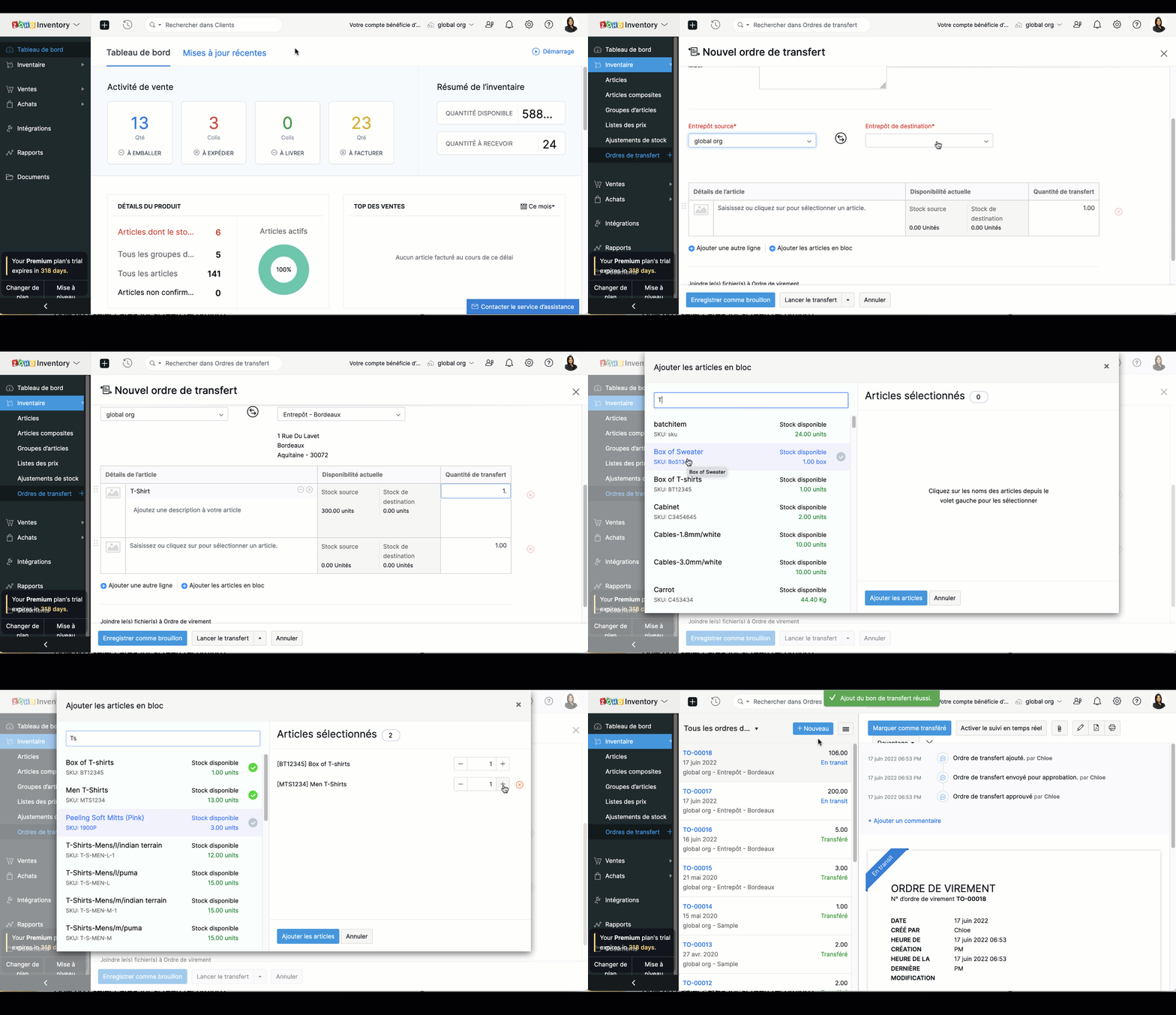
Lorsque les articles font l'objet d'un suivi de série ou de batch, vous pouvez ajouter des articles en sélectionnant les numéros de série ou de batch associés à vos articles.
Si vous souhaitez démarrer un transfert et le recevoir plus tard, cliquez sur "Lancer le transfert". Le statut de l'ordre de transfert sera défini comme "En Transit", et l'entrée en stock devra être effectuée manuellement.
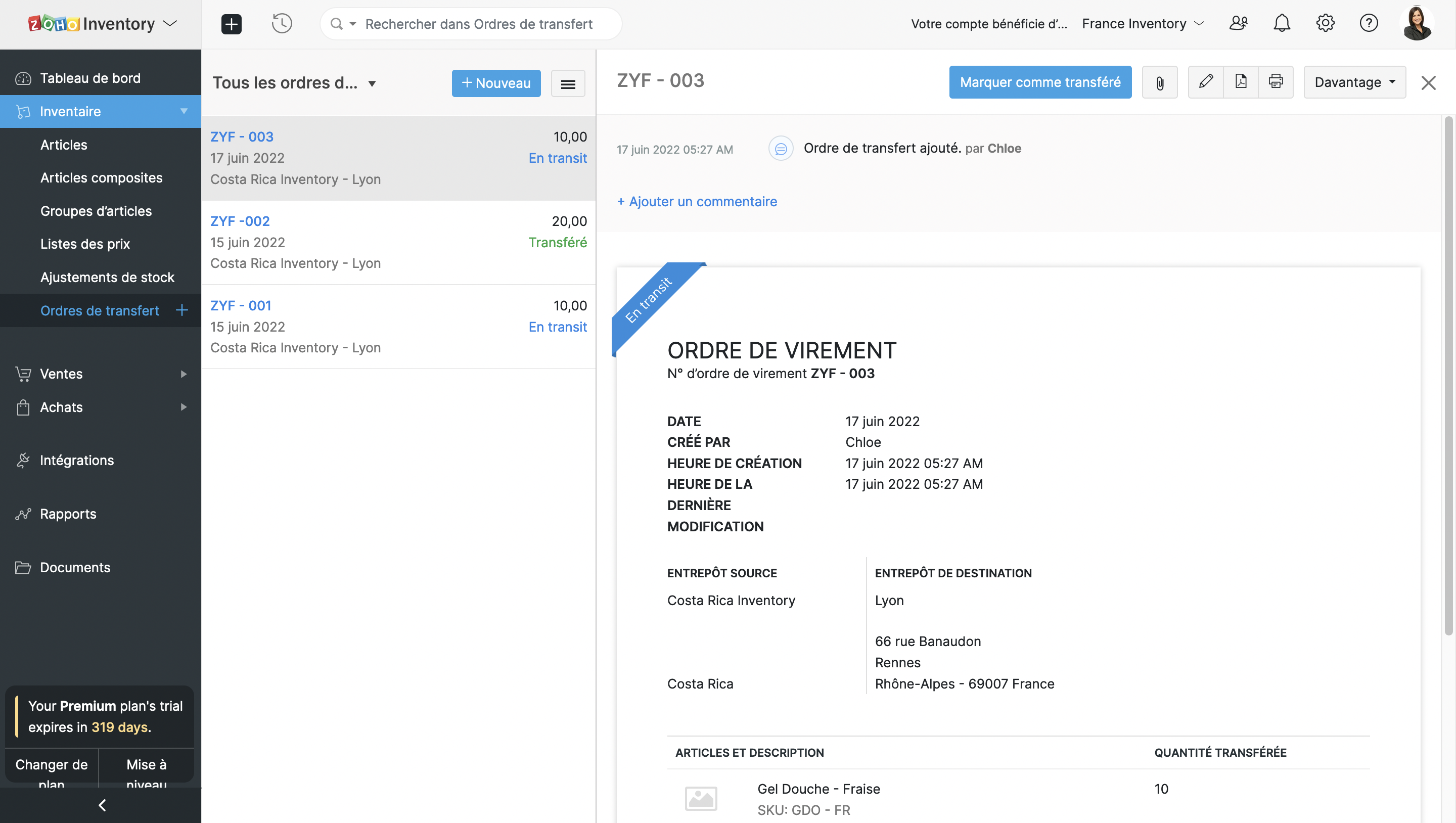
Si vous souhaitez effectuer le transfert instantanément, cliquez sur "Transférer et recevoir". Dans ce cas, le stock sera transféré immédiatement. Cette option peut être utilisée pour enregistrer un transfert de stock qui a déjà eu lieu.
Approuver les ordres de transfert
Lorsque votre entrepôt est occupé par des entrées et sorties de stock plusieurs fois par jour, il est possible de perdre le fil et d'émettre un ordre de transfert avec des détails incorrects. Cela aura une incidence sur le processus d'exécution. Pour éviter ce genre de contretemps, vous pouvez mettre en place un workflow d'approbation afin que les ordres de transfert soient vérifiés et approuvés par les responsables de l'entrepôt avant d'être émis.
Configurer l'approbation
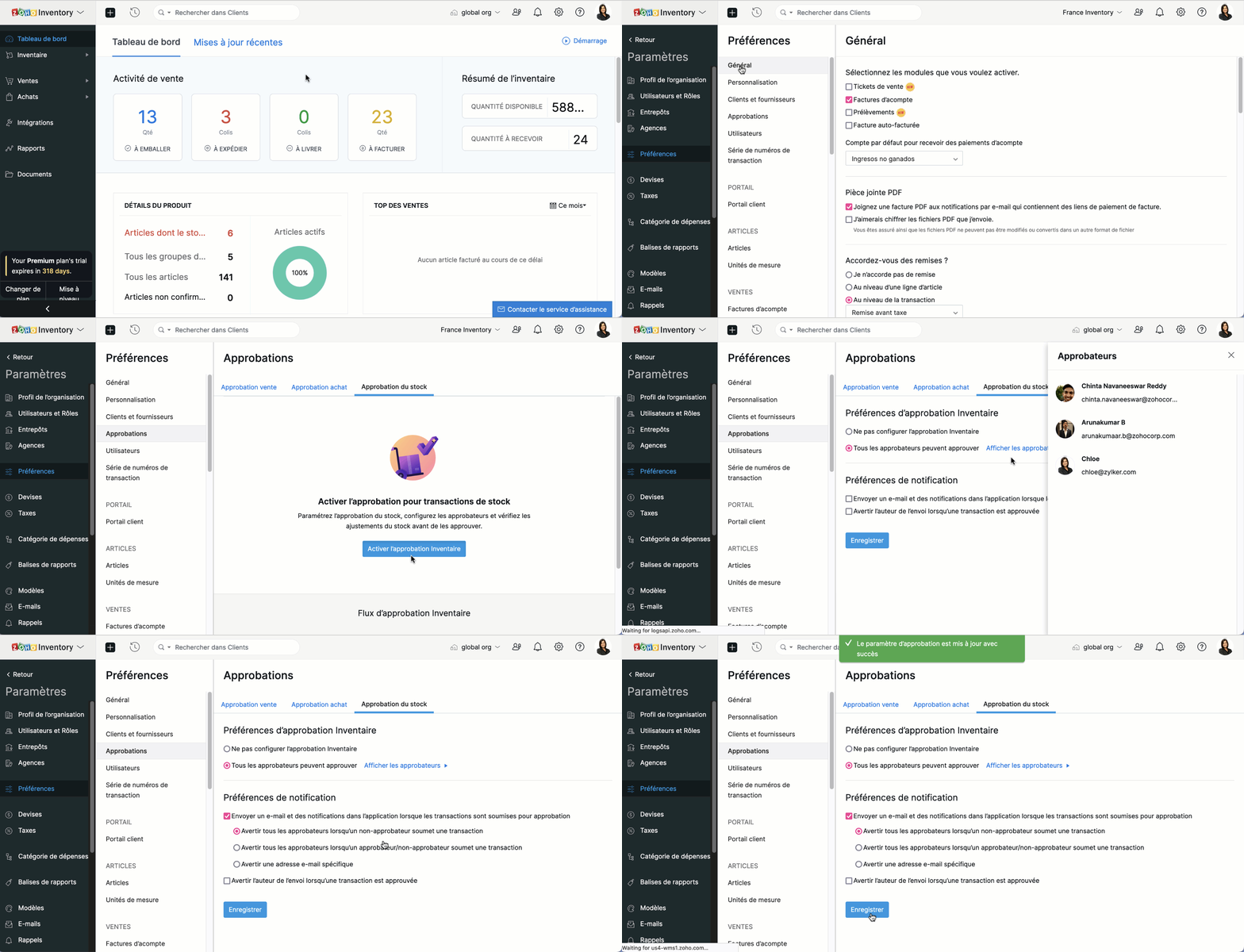
Paramètres >> Préférences >> Approbations
Sous l'onglet "Approbation du stock" , sélectionnez "Activer l'approbation inventaire".
Choisissez l'option "Tous les approbateurs peuvent approuver" sous les préférences.
Réglez les préférences de notifications et cliquez sur "Enregistrer".
Comment le système d'approbation fonctionne
L'utilisateur crée un ordre de transfert et clique sur "Enregistrer et soumettre".
L'approbateur visualise les transferts en attente d'approbation et, s'il est satisfait, clique sur "Approuver et lancer le transfert".
Une fois le transfert approuvé, l'utilisateur peut le terminer en cliquant sur "Marquer comme transféré". Sinon, l'utilisateur peut modifier l'ordre ou soumettre un nouvel ordre de transfert avec toutes les modifications suggérées.
Suivi des transferts de stocks
Les entreprises disposant de plusieurs entrepôts transfèrent souvent des marchandises d'un entrepôt à l'autre lorsqu'elles ont un besoin immédiat d'approvisionnement. Il est donc essentiel que les responsables d'entrepôt sachent exactement quand ils recevront les marchandises de l'entrepôt source pour gérer efficacement les ventes et l'exécution des commandes. L'intégration d'AfterShip à Zoho Inventory vous permet d'être informé en temps réel de l'état de vos stocks.
Exigences pré-réglées
Intégration AfterShip
Numéro de suivi des marchandises expédiées - le suivi n'est possible que grâce au numéro de suivi.
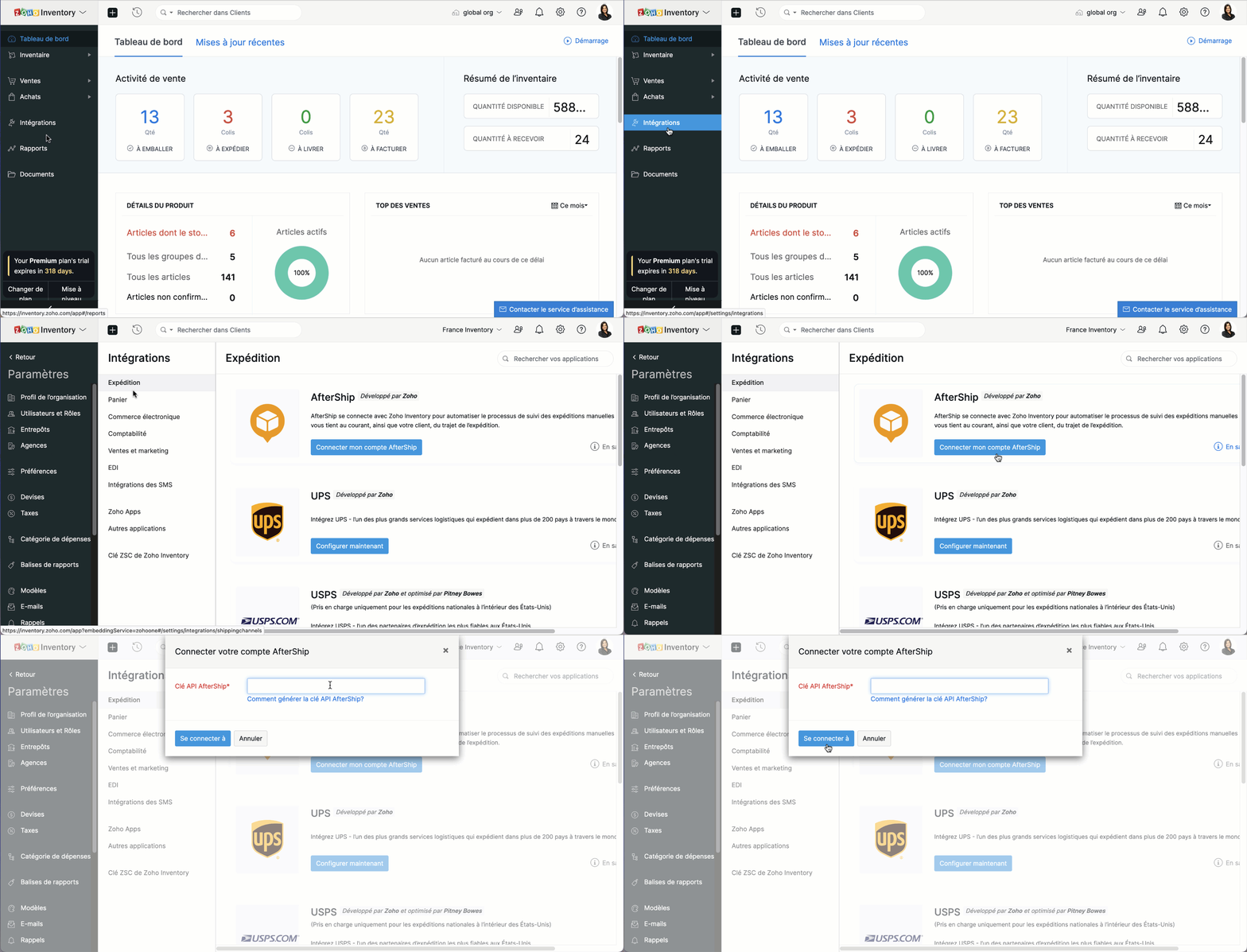
Activer le suivi de l'ordre de transfert
- Allez sur l'onglet "Ordres de transferts"
Ouvrez l'ordre de transfert que vous souhaitez suivre. Notez que l'ordre de transfert doit avoir le statut "En transit".
Cliquez sur "Activer le suivi en temps réel" depuis la page des détails de l'ordre de transfert.
Saisissez les détails de suivi fournis par votre service d'expédition.
Activez "Envoyer la notification de statut" pour recevoir des mises à jour sur l'état du transfert. Cette option sera disponible si vous avez activé l'activation instantanée lors de l'intégration avec AfterShip.
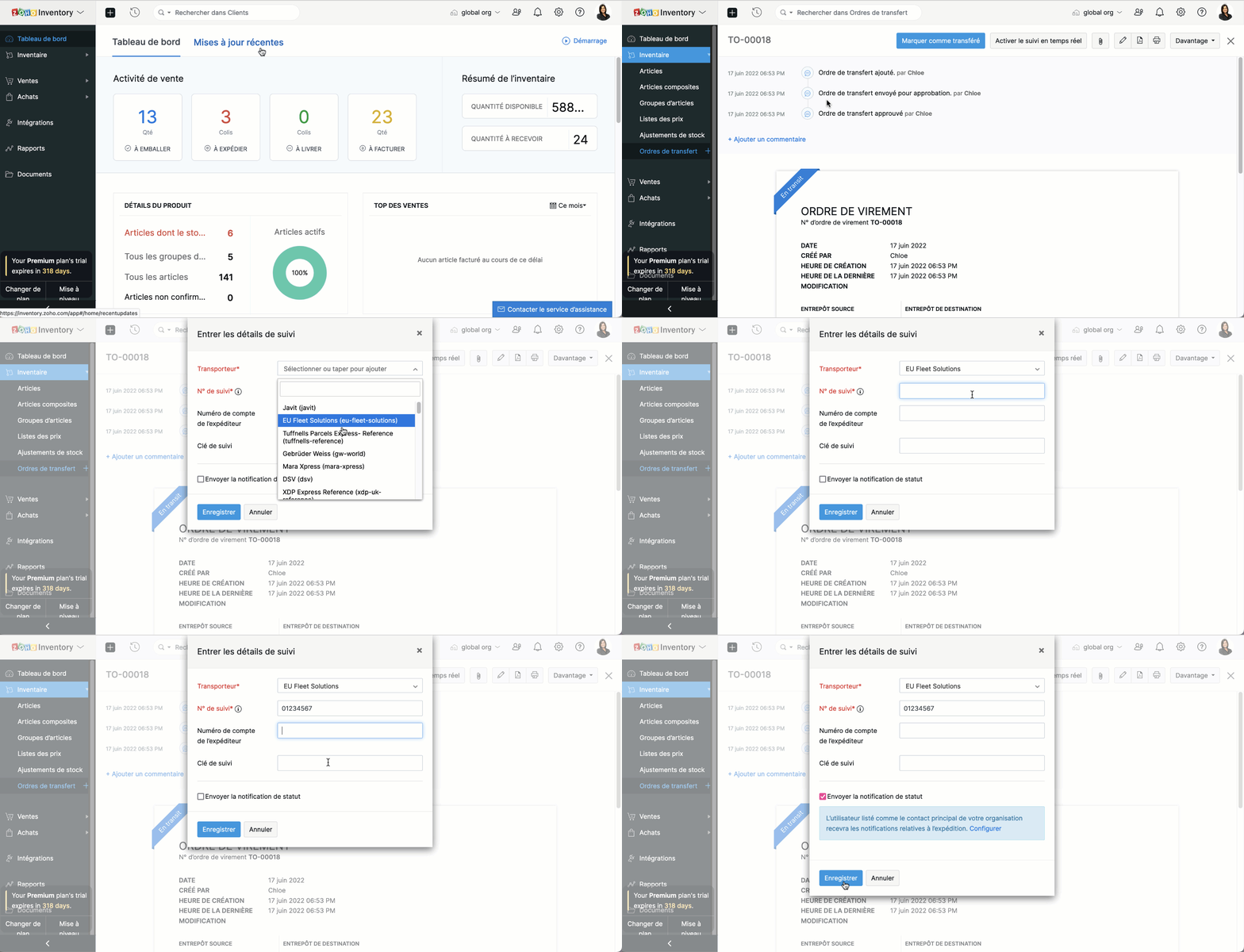
Autrement, fournissez vos informations d'email ou de SMS pour recevoir des mises à jour de suivi. Cette option sera disponible si vous avez intégré votre propre compte AfterShip à Zoho Inventory.
Pour afficher le statut de votre transfert, ouvrez l'ordre de transfert, cliquez sur "Chronologie du transfert". Vous y trouverez la position actuelle et le déroulement complet de votre transfert de stock en chronologie.
Pour confirmer la prise en charge de l'ordre de transfert, sélectionnez l'ordre de transfert que vous avez reçu et cliquez sur "Marquer comme reçu" à partir de la page de l'ordre de transfert.
Topic Participants
Kinjal Lodaya
Sticky Posts
Collaboration sans faille avec Zoho One
Bonjour à tous, Dans cet article nous allons voir comment Zoho One permet une collaboration à différents niveaux . La façon dont nous travaillons évolue. À mesure que les entreprises se mondialisent, la plupart des activités sont menées en équipe.
Recent Topics
Separate Items & Services
Hi, please separate items and services into different categories. Thank youItems Below Reorder Point Report?
Is there a way to run a report of Items that are below the Reorder Point? I don't see this as a specific report, nor can I figure out how to customize any of the other stock reports to give me this information. Please tell me I'm missing something sAllocating inventory to specific SO's
Is there a way that allocate inventory to a specific sales order? For example, let's say we have 90 items in stock. Customer 1 orders 100 items. This allocates all 90 items to their order, and they have a back order for the remaining 10 items which couldCancelled Transfer order problem
Hello, We've canceled a transfer order, and we can't add the related items to a new Transfer Order. The system tells us that the bin doesn't have the required quantity, but when we check the item, it indicates that there are 2 units in the bin. It alsoCreating a Chart from a Report
In Zoho Analytics, is it possible to create a chart from a Pivot View report? We are looking to use Zoho Analytics to replace Excel for Sales reports and would like to be able to show both the table and the chart together.Client Portal ZOHO ONE
Dear Zoho one is fantastic option for companies but it seems to me that it is still an aggregation of aps let me explain I have zoho books with client portal so client access their invoice then I have zoho project with client portal so they can access their project but not their invoice without another URL another LOGIN Are you planning in creating a beautiful UI portal for client so we can control access to client in one location to multiple aps at least unify project and invoice aps that wouldEmail Insights included in Bigin emals are marked as SPAM everywhere
Today I noticed that email recipients who use Office 365 never receive emails sent from Bigin. Further examination showed that all Email Insights links in email headers are marked as spam/phishing by Office 365. Example screen included. The problem isData Import | Zoho Analytics Custom Query Window Size
Please increase the window size for the Custom Query Data Import. It's impossible to work with such a small query window.Name changed in settings for mailbox but still not changed when typed in To field
In the email account secretary@ i have updaetd the new staff members details but the old members name still appears when I type secretary@ in the To field. I cant work out where Zoho is finding the old name from. I have deleted the browser cache. If ICannot add my name to my domain name
I want to have My name@mydomain.com and it says my name is linked to another account already. Please fix it since I do not have another account.Invoice status on write-off is "Paid" - how do I change this to "Written off"
HI guys, I want to write off a couple of outstanding invoices, but when I do this, the status of the invoices shows as "Paid". Clearly this is not the case and I need to be able to see that they are written off in the customer's history. Is there a wayEstablishing new Zoho email account on laptop
Good Morning: I am very long time Outlook business user and decided to try your email service last night and had established an account. I am trying to verify my account; how do I establish my Zoho email account on my laptop? I opened the account withunable to send message reason 550 5.4.6 unusual sending activity
My email account can't send message. It shows unable to send message reason 550 5.4.6 unusual sending activity detectedhow to add email to existing organization i w
I am already registered my organization and i have an email id. I need one more email id but i can't find anywhere .i want the cheapest email id . how to add ?e-mail bloqueado
Estou com meu e-mail lucas@peplus.me bloqueado, preciso desbloquear para retorno de usos em minhas atividades.zoho labels api not working
We're using n8n to automte email reply using zoho api. I'm facing issue with label api. I added the required scopes but its not working. i followed zoho api documentation but didn't work. also, where do i find/how do i create zoho oauth token mentioneeedDesk DMARC forwarding failure for some senders
I am not receiving important emails into Desk, because of DMARC errors. Here's what's happening: 1. email is sent from customer e.g. john@doe.com, to my email address, e.g info@acme.com 2. email is delivered successfully to info@acme.com (a shared inboxStreams/Shared email doesn't show up in windows trident app. It works fine on MAC. Is there any difference between 2 install ?
I can see streams/share email boxs on my MAC version of trident app but i can't see them in windows version of trident app. Is there any difference between 2 install? I try to find setting but not able to see any setting to add stream/share email boxes.add zoho account
How to add a zoho mail to previous zoho account? I have twoZoho Desk Mobile App Year-End Roundup - 2025
Dear Zoho Desk users, Greetings! As you gear up for the festive season, we are excited to share a quick journey into all that is released in 2025! Zia's generative AI capabilities Zia insights can be highly beneficial in helping agents manage daily supportNarrative 17: The role of Zia AI in customer support
Behind the scenes of a successful ticketing system: BTS Series Narrative 17: The role of Zia AI in customer support Overview Zia in Zoho Desk is a layered AI assistant that combines generative AI, prediction, and automation to support agents, automateDomain Transaction
I have purchased a domain name called trainedworkforce.co.in I made the payment got the receipt but the domain is still not purchased after successful transaction .Ability to Set a Unified Tab Order/View for All Users in Zoho Projects
Hello Zoho Projects Team, We hope you are doing well. We would like to submit a feature request regarding tab/menu organization in Zoho Projects. Current Behavior: The tab (module) order in Zoho Projects is user-specific. Each user (internal or external)Zohomail - The "All Messages" vs "In Box"
Why do some new email message appear under the all messages view but not in my inbox? That's really annoying but to be fair I've experienced the same with gmail.error while listing mails
I can't access email in any of my folders: Oops, an error occurred - retry produces the second error response: error while listing mails (cannot parse null string). I've signed in and out of Zoho, restarted my iMac.Introducing the Zoho Projects Learning Space
Every product has its learning curve, and sometimes having a guided path makes the learning experience smoother. With that goal, we introduce a dedicated learning space for Zoho Projects, a platform where you can explore lessons, learn at your own pace,Where to show Customization Field ?
Dear Sir, I have made some New Field in Item Field Customisation. Now I don't require that field in Estimate, Sales Orders etc. I just wants that field in Sales Invoice to Show/Hide... Is that possible ?Zoho Desk 2025 round-up: Key highlights on feature releases
Hello everyone, As we gear up for 2026, here is a detailed round-up of all feature releases in Zoho Desk web throughout the year. For consolidated information on releases check out the What’s New page You can also watch these webinars. Zia in web ZiaPrint Sales Orders, Purchase Orders or Invoices from API
Hello, Is it possible to use the print option that is available in Sales Orders Purchase Orders and Invoices with the API?. I don't see any information in the docs about this. ThanksHow to show a hided report??
in CRM Report , I clicked Hide incidently , how to show the floder again? Nowhere I can find the hided report floder...Converting Customer Invoice to Purchase Bill
Hi, In my service-based business, I sometimes create the customer invoice first, and later I receive the purchase bill from the vendor for the same job. Is there any option in Zoho Books to: Convert a customer invoice into a purchase bill, or Link/associateEmail tracking inquiry
I am trying to track when my emails are opened and clicked like I previously did in HubSpot. HubSpot pretty much did the entire process automatically. After digging through, I finally found in settings --> emails --> BCC Dropbox there is an email I canMass Update of Lookup Fields not possible
Hello List I've created a custom field for Leads and Contacts 'Current Campaign'. This is very Handy as I can filter leads and then related them to a campaign. Everything ready, but then I realized that mass update doesn't work for lookup fields... aCollapsible Sections & Section Navigation Needed
The flexibility of Zoho CRM has expanded greatly in the last few years, to the point that a leads module is now permissible to contain up to 350 fields. We don't use that many, but we are using 168 fields which are broken apart into 18 different sections.Quick Create needs Client Script support
As per the title. We need client scripts to apply at a Quick Create level. We enforce logic on the form to ensure data quality, automate field values, etc. However, all this is lost when a user attempts a "Quick Create". It is disappointing because, fromDownload Attached Files
Hi everyone, Brand new to Zoho Creator. I have a form with a subform. The subform has a field for "File Upload" I have this in a subform to allow multiple files to be uploaded to the parent form. Once the files are uploaded, how can i download or view them? Is this a setting I am just not seeing? If there isn't a way to download them, could i create another form field that dynamically creates the file's URL? That way a user can click the URL to get to the file? Any help with this would be greatlyTicket layout based on field or contact
Hi! I want to support the following use-case: we are delivering custom IT solutions to different accounts we have, thus our ticket layouts, fields and languages (priority, status field values should be Hungarian) will be different. How should I setupNo funcionan correctamente el calculo de las horas laborales para informe de tickets
Hola, estoy intentando sacar estadísticas de tiempo de primera respuesta y resolución en horario laboral de mis tickets, pero el calculo de horas en horario laboral no funciona correctamente cree los horarios con los feriados : Ajusté los acuerdos deZoho Mail Android app update: Set out of office response exclusively for organization members and external users, response interval
Hello everyone! We have now introduced an option to configure out of office messages exclusively for organization members and external users within the Zoho Mail app. Additionally, now you can also customize response intervals for the Out of office messages.Feature Request: Detailed View - Related Block Links!
Desperately need a view record link option on records displaying in the related blocks on a Detail View. For the love of god, please add this feature. Thank you!Next Page