Comment gérer les transferts de stock d'un entrepôt à l'autre dans Zoho Inventory ?
Un ordre de transfert est un document utilisé pour exécuter le mouvement de marchandises d'un entrepôt à un autre. L'ordre de transfert est généré dans le but de gérer l'entrepôt ou de traiter la commande. Il peut s'agir de la préparation des commandes, du stockage, de la mise à jour des commandes, du remballage ou de la gestion des stocks.
Pourquoi Transférer des stocks
De nombreux distributeurs et commerçants disposent d'un entrepôt central pour stocker les produits. À la réception des demandes des magasins ou lorsque le système détecte des points de commande dans l'un des entrepôts ou magasins satellites, le responsable de l'entrepôt déplace les articles de l'entrepôt central vers les magasins par ordre de transfert. Cela permet d'éviter de conserver des stocks expirés et ainsi de réduire les pertes de stock.
Il arrive qu'un des magasins manque de quelques articles, mais qu'un autre magasin ne vende pas bien ces mêmes articles. Avec l'ordre de transfert, vous pouvez équilibrer les stocks entre les magasins ou les entrepôts, en minimisant les achats excédentaires et en optimisant les ventes.
Certains distributeurs ont une politique de livraison pour promouvoir les nouveaux produits. Dans ce cas, l'ordre de transfert est utilisé pour assurer le suivi de ces mouvements.
Les ordres de transfert sont également utilisés pour éliminer les marchandises abîmées.
Comment gérer les transferts de stock depuis Zoho Inventory
Bon à savoir : Vous devez avoir au moins deux entrepôts dans Zoho Inventory pour pouvoir transférer le stock.
Créer un ordre de transfert
Sélectionnez l'onglet "Ordres de transfert" depuis le panneau à gauche.
Allez sur "+ Nouveau"
Dans la première section, saisissez les détails demandés comme No d'ordre de transfert, la date et le motif.
Dans la deuxième section, saisissez les détails sur les entrepôts de source et de destination.
Saisissez les détails sur les articles à transférer. Vous pouvez soit ajouter les articles un par un, soit les ajouter en masse.
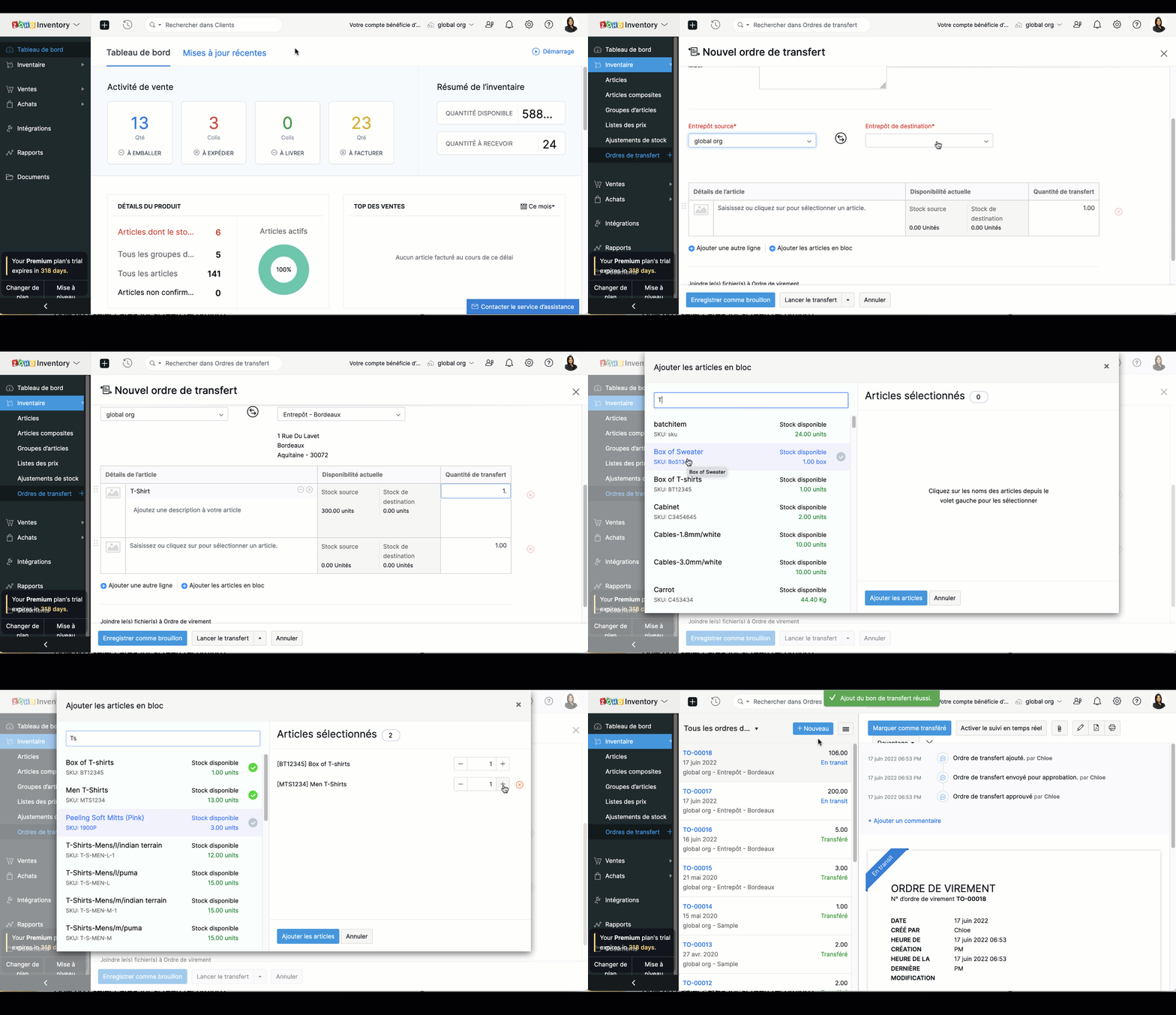
Lorsque les articles font l'objet d'un suivi de série ou de batch, vous pouvez ajouter des articles en sélectionnant les numéros de série ou de batch associés à vos articles.
Si vous souhaitez démarrer un transfert et le recevoir plus tard, cliquez sur "Lancer le transfert". Le statut de l'ordre de transfert sera défini comme "En Transit", et l'entrée en stock devra être effectuée manuellement.
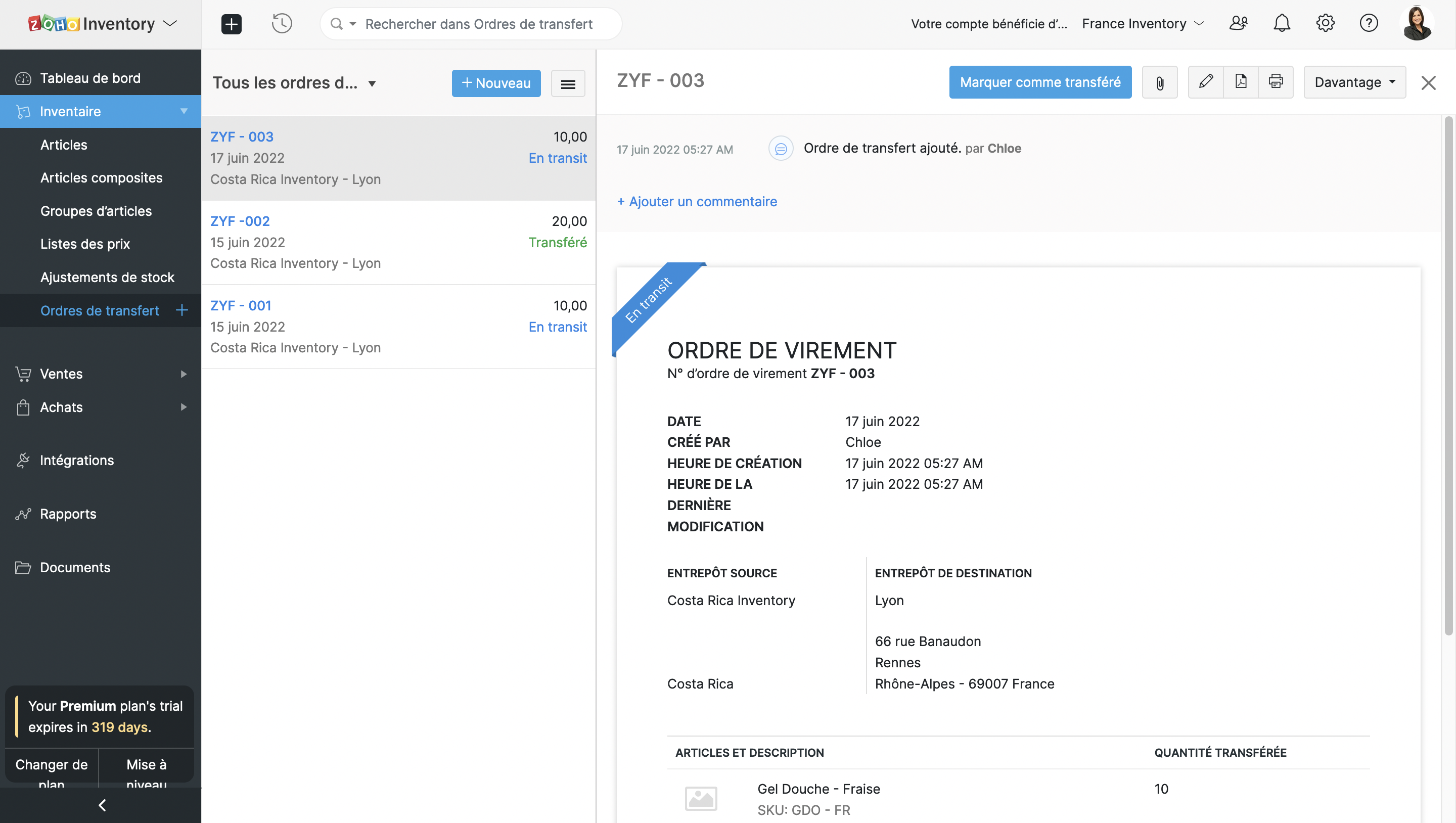
Si vous souhaitez effectuer le transfert instantanément, cliquez sur "Transférer et recevoir". Dans ce cas, le stock sera transféré immédiatement. Cette option peut être utilisée pour enregistrer un transfert de stock qui a déjà eu lieu.
Approuver les ordres de transfert
Lorsque votre entrepôt est occupé par des entrées et sorties de stock plusieurs fois par jour, il est possible de perdre le fil et d'émettre un ordre de transfert avec des détails incorrects. Cela aura une incidence sur le processus d'exécution. Pour éviter ce genre de contretemps, vous pouvez mettre en place un workflow d'approbation afin que les ordres de transfert soient vérifiés et approuvés par les responsables de l'entrepôt avant d'être émis.
Configurer l'approbation
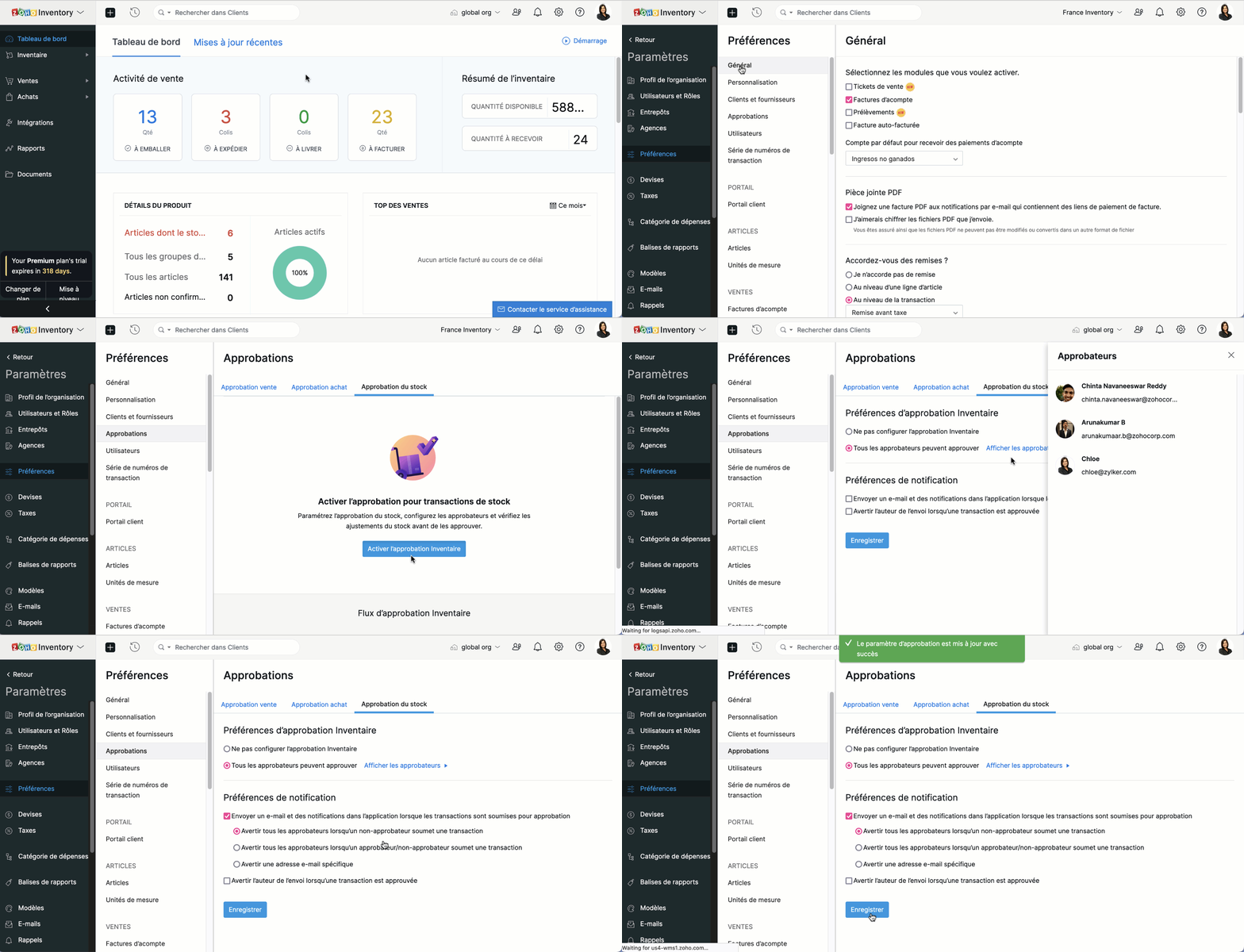
Paramètres >> Préférences >> Approbations
Sous l'onglet "Approbation du stock" , sélectionnez "Activer l'approbation inventaire".
Choisissez l'option "Tous les approbateurs peuvent approuver" sous les préférences.
Réglez les préférences de notifications et cliquez sur "Enregistrer".
Comment le système d'approbation fonctionne
L'utilisateur crée un ordre de transfert et clique sur "Enregistrer et soumettre".
L'approbateur visualise les transferts en attente d'approbation et, s'il est satisfait, clique sur "Approuver et lancer le transfert".
Une fois le transfert approuvé, l'utilisateur peut le terminer en cliquant sur "Marquer comme transféré". Sinon, l'utilisateur peut modifier l'ordre ou soumettre un nouvel ordre de transfert avec toutes les modifications suggérées.
Suivi des transferts de stocks
Les entreprises disposant de plusieurs entrepôts transfèrent souvent des marchandises d'un entrepôt à l'autre lorsqu'elles ont un besoin immédiat d'approvisionnement. Il est donc essentiel que les responsables d'entrepôt sachent exactement quand ils recevront les marchandises de l'entrepôt source pour gérer efficacement les ventes et l'exécution des commandes. L'intégration d'AfterShip à Zoho Inventory vous permet d'être informé en temps réel de l'état de vos stocks.
Exigences pré-réglées
Intégration AfterShip
Numéro de suivi des marchandises expédiées - le suivi n'est possible que grâce au numéro de suivi.
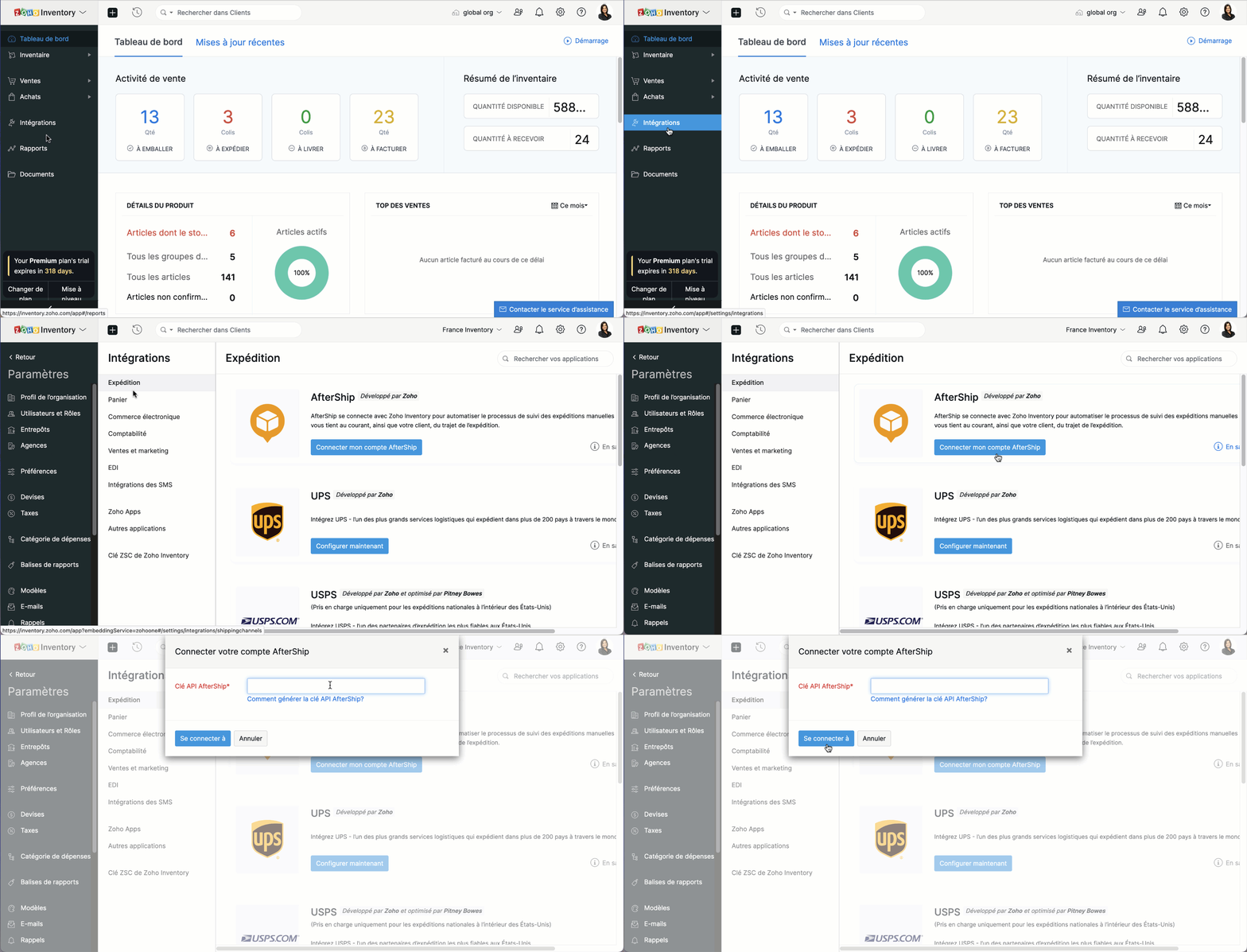
Activer le suivi de l'ordre de transfert
- Allez sur l'onglet "Ordres de transferts"
Ouvrez l'ordre de transfert que vous souhaitez suivre. Notez que l'ordre de transfert doit avoir le statut "En transit".
Cliquez sur "Activer le suivi en temps réel" depuis la page des détails de l'ordre de transfert.
Saisissez les détails de suivi fournis par votre service d'expédition.
Activez "Envoyer la notification de statut" pour recevoir des mises à jour sur l'état du transfert. Cette option sera disponible si vous avez activé l'activation instantanée lors de l'intégration avec AfterShip.
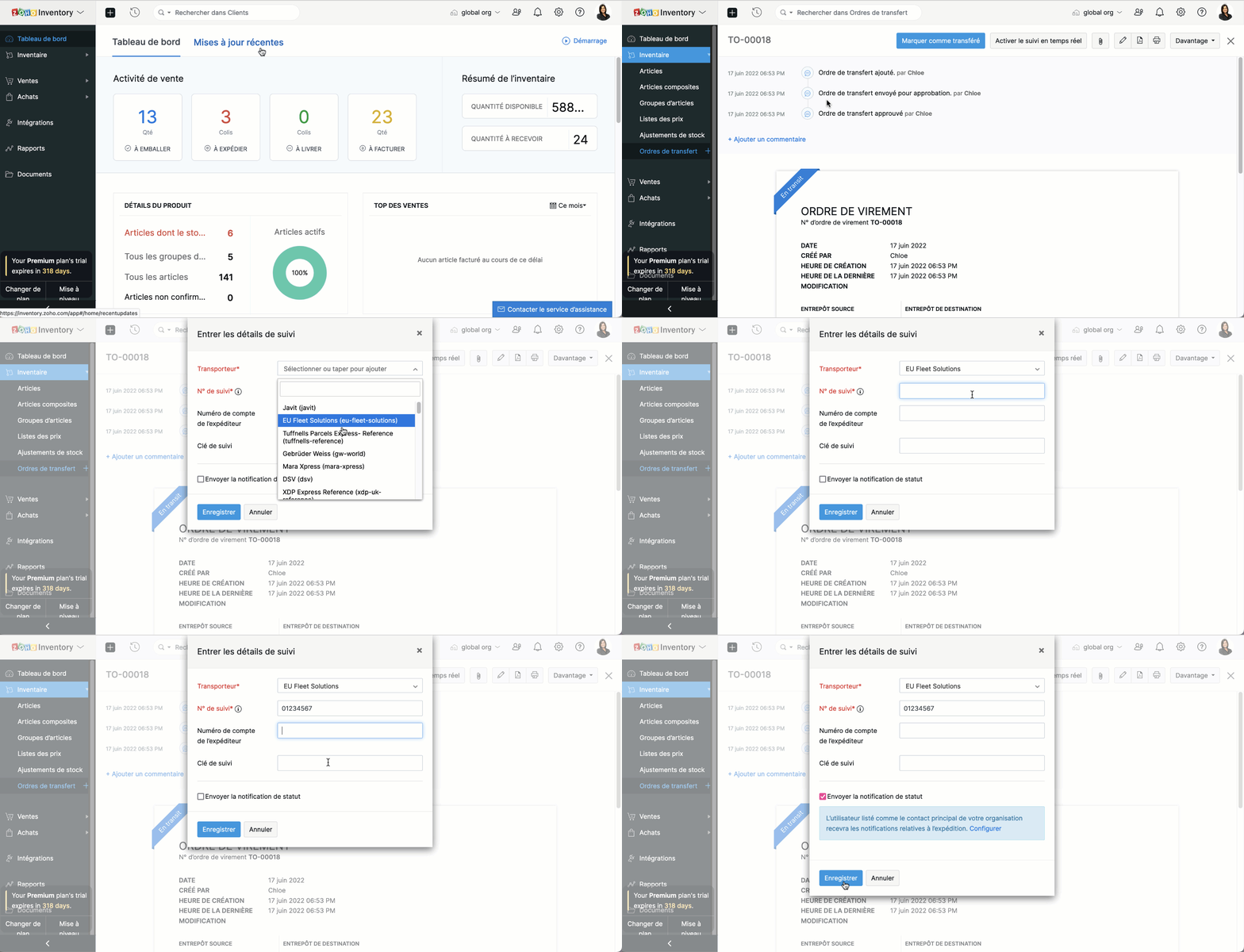
Autrement, fournissez vos informations d'email ou de SMS pour recevoir des mises à jour de suivi. Cette option sera disponible si vous avez intégré votre propre compte AfterShip à Zoho Inventory.
Pour afficher le statut de votre transfert, ouvrez l'ordre de transfert, cliquez sur "Chronologie du transfert". Vous y trouverez la position actuelle et le déroulement complet de votre transfert de stock en chronologie.
Pour confirmer la prise en charge de l'ordre de transfert, sélectionnez l'ordre de transfert que vous avez reçu et cliquez sur "Marquer comme reçu" à partir de la page de l'ordre de transfert.
Topic Participants
Kinjal Lodaya
Sticky Posts
Collaboration sans faille avec Zoho One
Bonjour à tous, Dans cet article nous allons voir comment Zoho One permet une collaboration à différents niveaux . La façon dont nous travaillons évolue. À mesure que les entreprises se mondialisent, la plupart des activités sont menées en équipe.
Recent Topics
No funcionan correctamente el calculo de las horas laborales para informe de tickets
Hola, estoy intentando sacar estadísticas de tiempo de primera respuesta y resolución en horario laboral de mis tickets, pero el calculo de horas en horario laboral no funciona correctamente cree los horarios con los feriados : Ajusté los acuerdos deZoho Mail Android app update: Set out of office response exclusively for organization members and external users, response interval
Hello everyone! We have now introduced an option to configure out of office messages exclusively for organization members and external users within the Zoho Mail app. Additionally, now you can also customize response intervals for the Out of office messages.Feature Request: Detailed View - Related Block Links!
Desperately need a view record link option on records displaying in the related blocks on a Detail View. For the love of god, please add this feature. Thank you!Sub-Form Padding in CSV Export
Hi, When you use the Sub-Form, and for example you have a Date Field on the Main Page, then Option 1 and Option 2 fields on the Subform, when you export this to CSV the Date column will only have the Date in 1 row, the first row, it would be nice to padDependent / Dynamic DropDown in ZohoSheets
Has anyone figured out a way to create a Dropdown, the values of which is dependent on Values entered in the other cell ?How do I change the order of fields in the new Task screen?
I have gone into the Task module layout, and moving the fields around does not seem to move them in the Create Task screen. Screenshot below. I have a field (Description) that we want to use frequently, but it is inconveniently placed within the MoreZoho → ShipStation Integration – Sales Order–Driven Fulfilment Workflow
Hello All, I’m reaching out to explore the best way to integrate a shipping tool into our inventory which will speed our process up. We are looking to integrate ShipStation into our existing order-to-fulfilment workflow, as we’re keen to standardise onIA ou je peux trouver comment utiliser IA
Je voudrais utiliser IA dans l'interface zoho pour m'aider quand j'ai des questions de rôle partage ou autre configuration d'automatisation, j'utiliser ChatGPT externe mais il ne connait pas toujours l'interface zoho et les réponses sont parfois longueData Processing Basis
Hi, Is there a way to automate the data processing for a candidate every time an application arrives from job boards, without requiring manual intervention? That is, to automatically acquire consent for data processing. I've seen a workflow that allowsDisable Zoho Inventory Tracking / Delink Zoho Books & Inventory
We have integrated zoho inventory with zoho books? Now after a long time, we want to disable inventory tracking and delink these 2 modules. Zoho says we cant do it. Anybody else going thru the same ? Any possibility at all? Why does zoho not allow toZoho vault instal on windows
I am trying to use Zoho Vault Desktop for Windows, but I am unable to complete the sign-in process. Problem description After logging in to my Zoho account and clicking Accept on the authorization page, nothing happens. The application does not proceedZOHO GLITCHES
Ok, you guys have done a great job at building a platform that has the potential to surmount the competition but these glitches are becoming more than frustrating! This is beyond annoying, I'm trying draft lawsuits and type up privacy and refund policiesPlease, make writer into a content creation tool
I'm tired of relying on Google Docs. I'm actually considering moving to ClickUp, but if Writer were a good content creation tool instead of just a word processor, I would finally be able to move all my development within the Zoho ecosystem, rather thanNotification to customers when I use a Zoho function
Hi all, I tried searching the community but couldn't find anything about it. I noticed that the customer receives the notification of reopening the old ticket but does not receive the notification of opening a new ticket when I use the function: "separateDate Filters in Zoho Desk Dashboard
Hello Team, Currently, in the Zoho Desk dashboard, the date filter is available only for daily, weekly, and monthly views. Could we also add a yearly date filter to allow filtering by an entire year? Additionally, in the custom date filter, it is currentlyMobile app - offline
If I made a couple of forms and my field guys had the mobile app and were somewhere without signal, could they open the app, complete and sumbit a form and have it upload when they are back in signal (we need different info at different jobs and I'm tryingZoho Survey reminder settings are extremely confusing
Hi, I just want to set 3 reminders, one week apart from the first email out. Your form is too confusing and I don't understand. Can you simplify and be more specific regarding the language used on the form ?Zobot drop down list
Hi, I am trying to create a drop down list in Zobot by creating a plug. I think I am close but I just can't get it over the line and was hoping that someone could help me. I had a little bit of help getting the script started (hence the comments) // DelugeHow to compare a subform lookup field that allows multiple entries when edited
I have a form with a subform with multiple fields. One of the fields is a lookup field that allows a multi select. On edit validation, I want a workflow to execute only when the entries in that subform field has changed. The old. function is not workingTranslation of Tooltip Messages
The descriptive help messages should be available to provide translations for.Business Day Logic Update: More Accurate Scheduling for Your Workflows
Hello everyone, We’re improving how business-day calculations work in workflows, especially when triggers happen on weekends. This update ensures that offsets like +0, +1, and +2 business days behave exactly as intended, giving you clearer and more predictableLead Blueprint transition in custom list view
Hi, Is It possible to insert the Blueprint transition label in a custom Canvas list view? I am using Lead module. I see the status, but it would be great if our users could execute the Blueprint right from the list view without having to enter the detailedEmail Notifications not pushing through
Hi, Notifications from CRM are not reaching my users as they trigger. We have several workflow triggers set up that send emails to staff as well as the notifications users get when a task is created for them or a user is tagged in the notes. For the past 6 days these haven't been coming through in real time, instead users are receiving 30-40 notifications in one push several hours later. This is beginning to impact our daily usage of CRM and is having a negative effect on our productivity becauseDebit opening balances of vendors
Dear colleagues: I am looking at the trial balance as on 31st March 2024, and punching opening balances (1st April 2024) in Zoho Books. Vendors have credit balances, by its nature, but some of our vendors have debit balances as well (e.g., we have paidIs there an equivalent to the radius search in RECRUIT available in the CRM
We have a need to find all Leads and/or Contacts within a given radius of a given location (most likely postcode) but also possibly an address. I was wondering whether anyone has found a way to achieve this in the CRM much as the radius search in RECRUITAllow Text within a Formula
Hi, I would like to be able to use this for others things like taking an existing Date Field and copying its value, so by entering getDay(Date)&"-"&getMonth(Date)&"-"&getYear(Date) it results in 01-02-2026. And then when the Date is changed so is thisChange Number Field to Decimal Field
Hi, It would be nice to be able to change the field type without having to delete it and create a new one, messing up the database and history. Thanks DanPipeline.Company Name field shows up as numbers! [Bigin Developer Console > Component > URL]
Hi there, I am setting up to invoke URL to send infromation zoho bigin > zoho forms with company name pre-fill in the form. however when I use : ${Pipelines.Company Name} field it shows up as a string of number instead of words. Help.Add specific field value to URL
Hi Everyone. I have the following code which is set to run from a subform when the user selects a value from a lookup field "Plant_Key" the URL opens a report but i want the report to be filtered on the matching field/value. so in the report there isHow to Move Behavior, Acquisition, Polls & Forms Data from Zoho PageSense to Zoho Analytics?
Hi Zoho Community, I'm looking for a way to transfer data from Zoho PageSense to Zoho Analytics, specifically: Behavioral data (clicks, scrolls, heatmaps, etc.) Acquisition data (traffic sources, campaigns, etc.) Polls and forms data As far as I can tell:Zoho Social - Feature Request - Non-US Date Format
Hi Social Team, I have noticed that there is no option to change the date format from US mm/dd/yyyy to others like dd/mm/yyyy. It would be great to see this added as the platform matures. Thanks for considering this feedback.In arattai received message can't be deleted
The issue has been noticed in following: arattai app (Android) arattai app (Window) arattai web While the message posted by me may be deleted, the ones received from others can't be. The item <Delete> change to <Report> when the message is a receivedZoho CRM Community Digest - December 2025 | Part 1
Hello Everyone! In the first half of December, Zoho CRM rolled out auto-invite for portals, smarter CPQ with Zia suggestions and price rules, and Query Workbench for faster query building. We also highlight other noteworthy conversations you shouldn’tMarketing Tip #15: Rank better with keyword-rich URLs for product pages
Your product page URL is a small detail that can make a surprisingly big difference. Clean, readable URLs help in two ways: They’re easier for customers to trust and remember (no one likes clicking a link that looks messy or random). They help searchZoho Flow Credits
Hi , I would like to ask the reason why every time I added plus credit but few days later I will return back to default? (as below I add credit to 3000 but today It change back to 1000) Most important is, when the credit fully used, not any reminder toCustom Module Send Email not filling To automatically after adding Email field also
I create custom module in zohoCRM but problem is in custom module when i click send email there in popup To is filling automatic its coming empty which i need to manually add an email there. How can I fix it? I already added the Email field there, butIntroducing Intake Forms
We are excited to announce the release of Intake Forms, a new feature in Zoho Contracts designed to make contract requests simple, structured, and efficient. Intake Forms allow organization members to request new contracts through a web form instead ofManage control over Microsoft Office 365 integrations with profile-based sync permissions
Greetings all, Previously, all users in Zoho CRM had access to enable Microsoft integrations (Calendar, Contacts, and Tasks) in their accounts, regardless of their profile type. Users with administrator profiles can now manage profile-based permissionseIDAS 2.0: What's changed for digital trust in Europe, and where Zoho Sign stands
Hi there! It's that time of year when many of us get our ducks in a row. A new year often makes us reassess priorities, and for businesses in the EU, it means taking a closer look at how digital identities and electronic signatures work across borders,Directly Edit, Filter, and Sort Subforms on the Details Page
Hello everyone, As you know, subforms allow you to associate multiple line items with a single record, greatly enhancing your data organization. For example, a sales order subform neatly lists all products, their quantities, amounts, and other relevantNext Page