Export data using advanced export options and customizable settings
Hello everyone,
The user interface for exporting data has been revamped with updates to make data exports more flexible and efficient for users.
These updates not only enhance usability but also bring advanced capabilities to help users extract precise data effortlessly. Whether analyzing ticket trends, migrating to another platform, or creating backups, these enhancements simplify the export process for greater efficiency.

What’s new in the revamped export page?
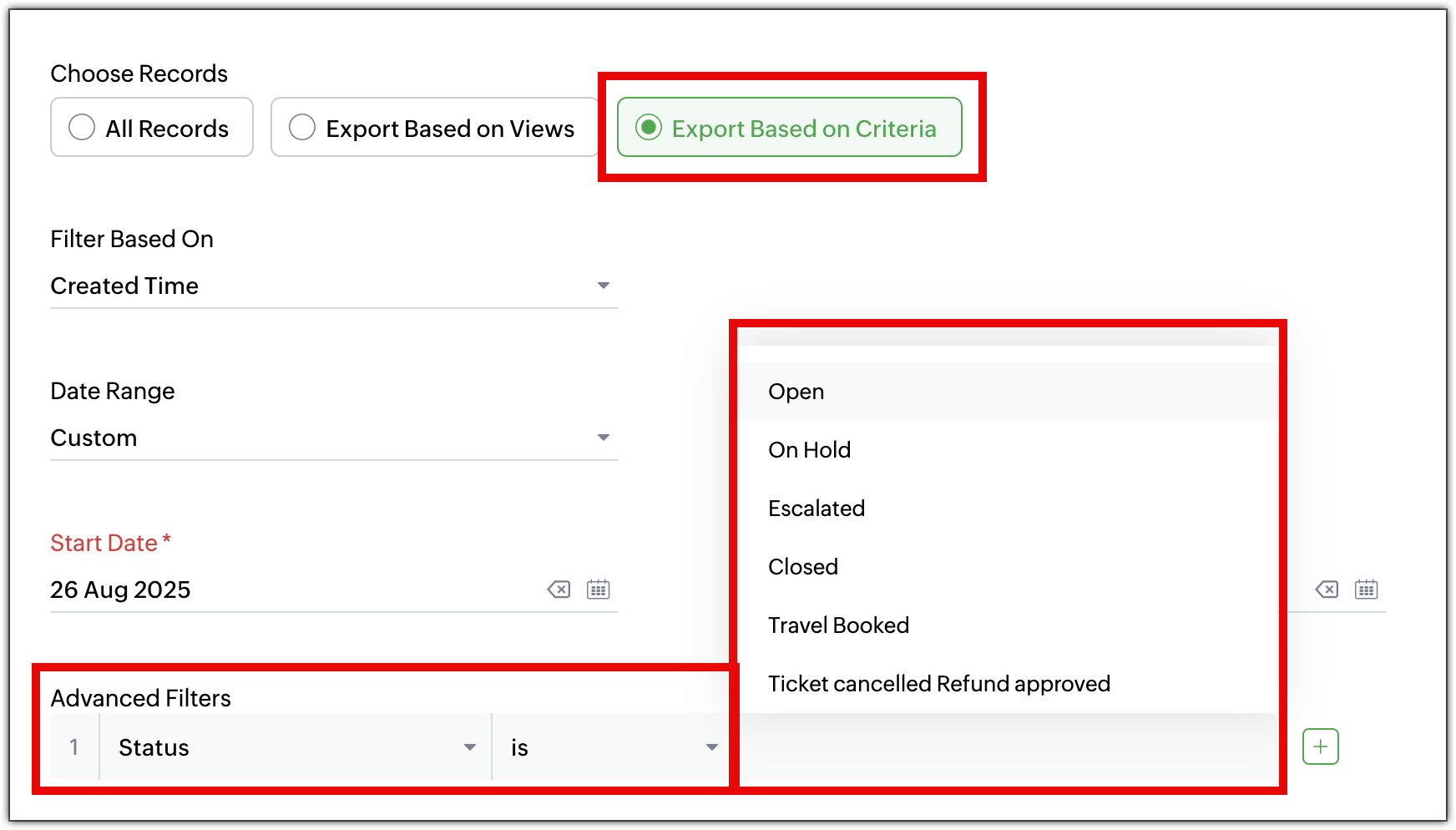
- Export records based on criteria
Previously, users were able to export all records within a module. Now, they can export specific records by defining the criteria. For instance, users can export: - The list of agents added last month
- Tickets from the last month that were marked high priority.
- Select fields to export
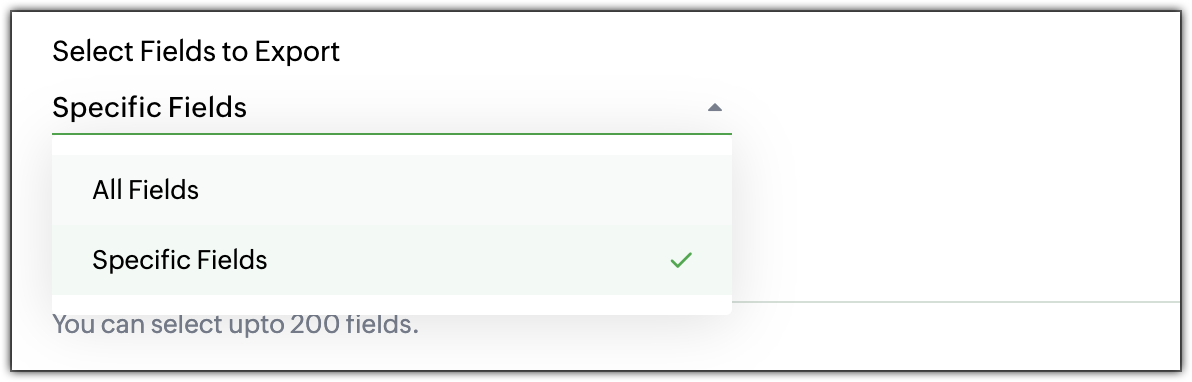
Users no longer have to export all fields. They can choose specific fields to export, giving them complete control over the data. They can select: - All Fields: Export all available fields.
- Specific Fields: Select only the fields that are needed, including fields from multiple layouts.
- Time frame and date range options
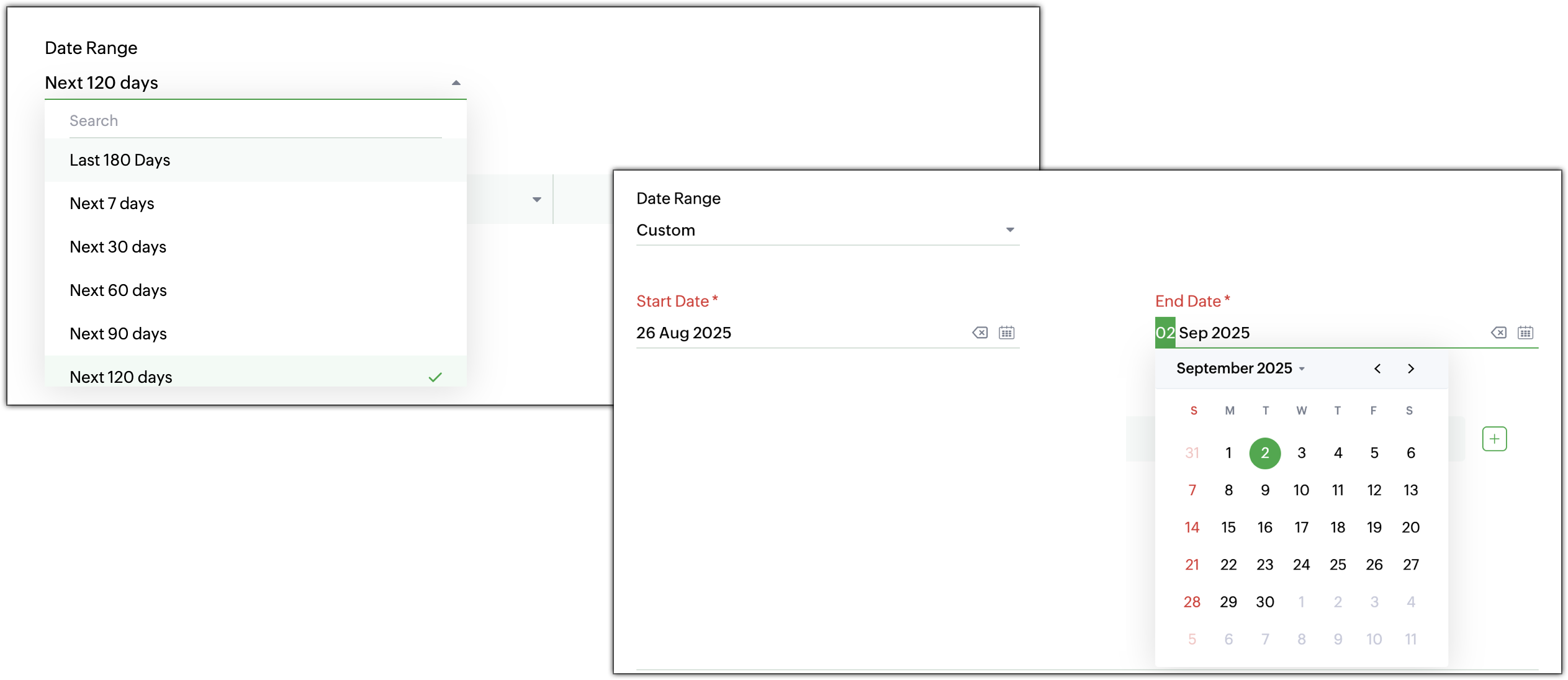
When exporting data, users can specify a time frame from where the records are needed. - Time-based filters: Choose records based on created time, modified time, closed time, or completed time.
- Custom or predefined date range: Select a specific date range or pick from predefined options for faster filtering. For example, users can export all high-priority tickets closed in the last 30 days.
- Increased export record limit
The export record limit has been increased from 3,000 to 50,000 records per export. Need to export more records at a time? Use Zoho Desk’s Data Backup to retrieve the complete dataset. - Redesigned export history page
The Export History page has undergone a complete makeover for a cleaner, more intuitive look and feel. View details such as record count, export time, and download links in a tabular form at a glance.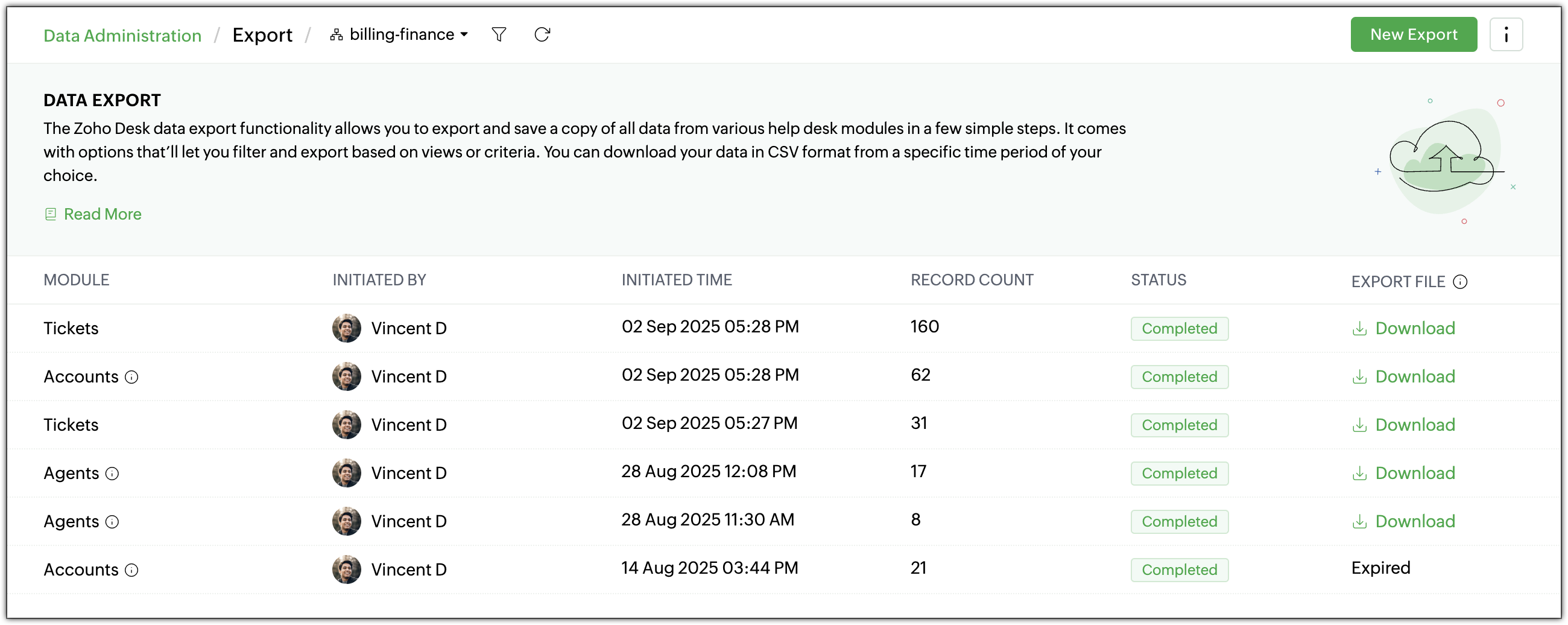
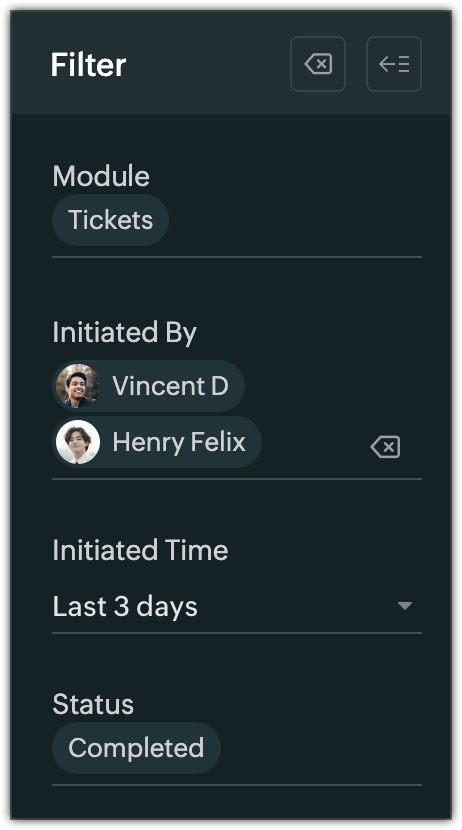
- Filters for export history
Quickly find previous exports with new filters based on: - Module
- Initiated By
- Initiated Time
- Status (In Progress, Completed, or Failed)
- Export standard and custom list views
Export View lets users export specific record sets directly from a module’s list view, there's no need to export the entire dataset or apply filters manually. Both standard and custom list views can be exported. For example, a support manager can export the “Overdue Tickets” view for a team review, without reapplying filters or reformatting data.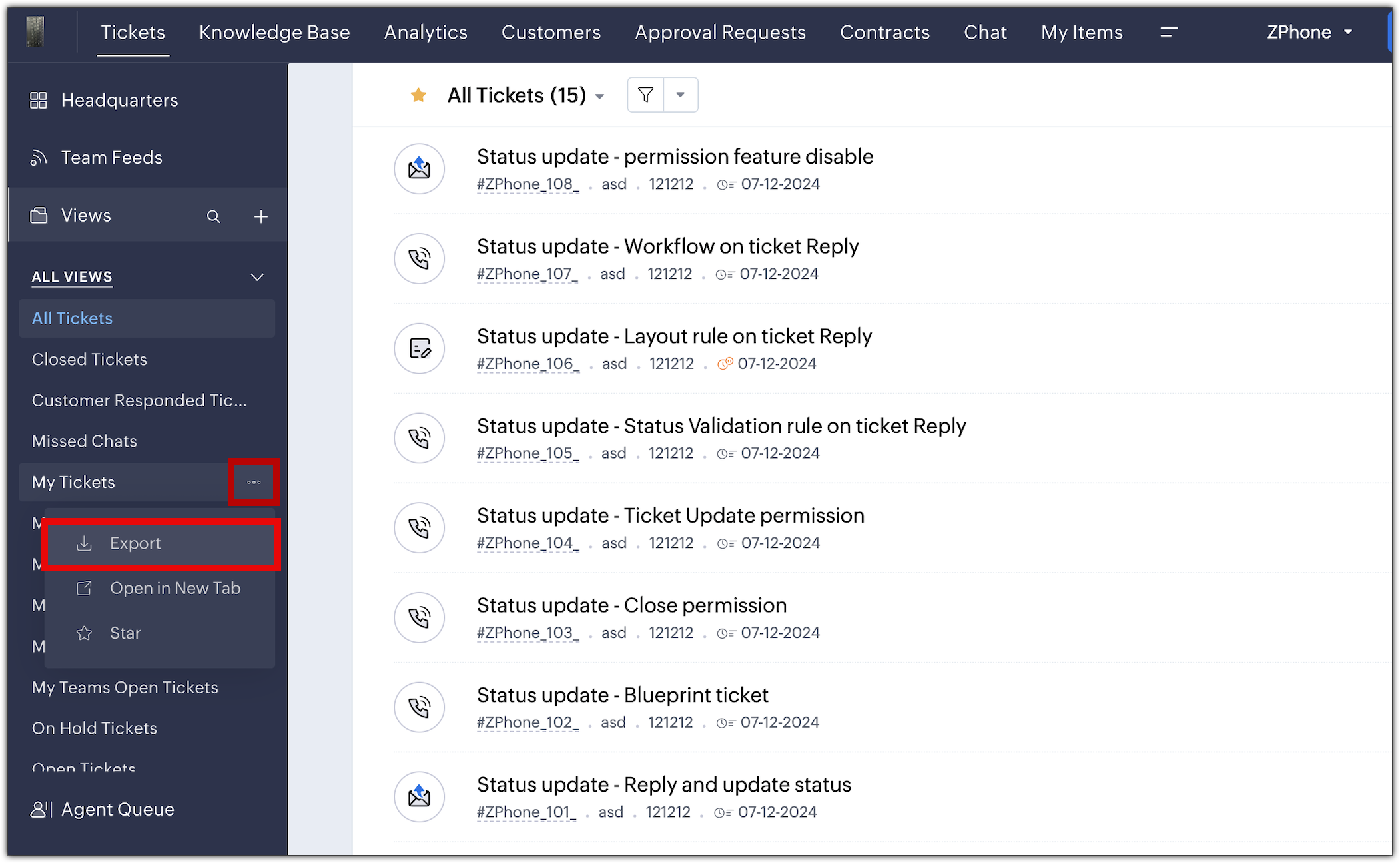
The new export UI is available in all data centers. For more details, please refer to the help doc.
PM: @Nivedhan Senthilkumar
Regards,
Velantina V
User Ed | Zoho Desk
Topic Participants
Velantina V
Sticky Posts
2024 Email Authentication Standards: Elevating Security with Google and Yahoo
In contemporary email communication, email authentication plays a pivotal role in mitigating email fraud, spam, and phishing attacks. Brace yourself for a new level of security. Starting February 2024, Gmail and Yahoo will be implementing robust emailUsing Agent Email Address as From Address
Currently, while replying to a ticket, it is possible for agents to choose their own email addresses as 'from' addresses. Although we built this just for that little extra flexibility, in hindsight, it hasn't figured much in conventional usage. Almost all businesses prefer that responses to their customers' tickets be sent from the common support/service email address and NOT from those of individual agents. During personal interactions at events, some of you have even made passing mentions aboutEdit and Delete options in Comments
A lot of teams have been using ticket comments extensively to collaborate everyday. Notification Center further improved this experience by bringing real-time updates. As we continue to build more improvements to this experience, we've shipped a small-yet-importantWebinar 2: Supercharged customer support for growing business
Join us for this webinar and learn how to step up your support game using a real-time communication platform to generate happier, more successful customers. In this live webinar, we will will discuss the importance of SalesIQ for your support team and how it can help you: Understand your customers better and their journeys to proactively support and engage them even before they ask for help. Integrating real time conversations into Zoho Desk’s Support, providing a conversational customer serviceCustomize Colors of your Customer Self Service Portal
You asked for it. We heard you. We're happy to roll out the most sought after feature request, Customizing the Colors of your Customer Self-service Portal. Now you can set the color of your customer portal to mimic your company's web site, so that your customers visiting the portal will not feel alienated by the default theme. Go ahead and configure the color of the header, tabs, fonts and background according to your needs. You can either choose between default color themes like Blue, Grey, Green
Recent Topics
Attaching files to emails within CRM Deals.
Hello, We have recently started using the extension "Workdrive for CRM" (Related List) to view/store our documents for each Deal, instead of using Attachments. Overall it feels like a better way to go but the user experience is not so great when it comes500 internal server error on opening an iframe through a deluge script
Hi Team I am trying to open an external url in an iframe through my deluge script which is associated to a custom button . By doing this i am getting an "Internal Server Error" . Please can you help me with this.Kaizen #225 - Making Query-based Custom Related Lists Actionable with Lookups and Links
Hello everyone! Welcome back to another post in the Kaizen series! This week, we will discuss an exciting enhancement in Queries in Zoho CRM. In Kaizen #190, we discussed how Queries bridge gaps where native related lists fall short and power custom relatedFilter button in the Zoho Sheet Android App doesn't toggle on
I am a new Zoho Sheets user and experiencing a specific issue with the filter functionality in the Android mobile application. Detailed Issue Description: The filter icon appears correctly in the toolbar. Upon tapping the filter icon/button, the toggleIs Zoho Sites still actively being developed?
Hello, Is Zoho Sites still actively being developed as part of the Zoho ecosystem? I noticed that the What's New page (https://www.zoho.com/sites/whats-new.html) does not show any updates since Q1 2025. We were considering migrating our website from SquarespaceProject Notifcatiion Emails - Milestone
Hello: I cannot get myself, or most importantly my portal client user to recieve an email upon completion of a milestone. I have set up our 1st project. I have set up a test client user. (accepted the invitation and is listed in the system as a clientZoho Forms - Feature Request - Year Field
Hi Zoho Forms Team, You currently have the following date and time fields: Date Time Date and Time Year and Month It would be useful if you could include a "Year" field For example a recent application I completed said "What year was your house built?"Integrate Excel or Zoho Sheet functions / calculations to CRM product module
Hello Community, I hope someone more experienced can help me with this question. Our price / payment plan calculations are in an Excel spreadsheet and I would like to use all those functions / calculations in my Products module. So when we send a quoteSync CRM Contacts to USER'S contacts on Office 365
I can see that the O365 sync is transferring contacts backwards and forwards between Zoho CRM and Office365. But it has created a separate address book in Office 365 called "Zoho CRM Contacts". This address book is not used by Office/Outlook's email functionManage Every Customer Conversation from Every Channel inside Zoho SalesIQ
Your customers message you from everywhere. But are you really able to track, manage, and follow through on every conversation, without missing anything? With interactions coming in from websites, mobile apps, and messaging platforms like WhatsApp andZoho Books | Product updates | February 2026
Hello users, We’ve rolled out new features and enhancements in Zoho Books. From Advanced Reporting Tags to the ability to mark projects as completed, explore the latest updates designed to improve your bookkeeping experience. Introducing Advanced ReportingThis project could not be synced because it is not associated with a primary client
When I go to ProjectName->Finance I receive a "This project could not be synced because it is not associated with a primary client" error. The project has been associated in ZohoCRM with the client. How can I set the primary client for this project. OtherUpdate latitude & longitude address field API
How do I update the coordinates of an address field from a widget? I can't modify the latitude and longitude of the address field. I think the problem is how I'm writing formdata variable. zoho_init.then(function (data) { var queryParams = ZOHO.CREATOR.UTIL.getQueryParams();Zoho Forms - Feature Request - Past Into Scanning/OCR Field
Hi Zoho Forms Team, You recently introduced the OCR/Scanning field which I have found great use for with one client who receives work orders as a screenshot from one customer. I want to raise a feature request here which would make that field even moreinability to use different primary address on invoice per location
my company operates in two different locations with different email address. The problems then is the inability to edit the primary to suite the invoice for the second location.Use Zoho Creator as a source for merge templates in Zoho Writer
Hello all! We're excited to share that we've enhanced Zoho Creator's integration with Zoho Writer to make this combination even more powerful. You can now use Zoho Creator as a data source for mail merge templates in Zoho Writer. Making more data fromAnyone in Australia using Zoho Books AND has their account with NAB?
Hi I have an account with both NAB and Suncorp. Suncorp transaction come in the next day however NAB transactions take 4-5 business days to appear. eg: A deposit made today in my Suncorp will be imported into Zoho tomorrow. A deposit made today to the NAB account will be imported maybe Saturday (Friday overnight). I have contacted both Zoho and NAB but noone seems to know why. I was just wondering if anyone else in Australia uses NAB and has this issue (or doesn't) maybe we could compare notes andDetailed Balance Sheet for tax preparer
I'm using the free edition of Zoho Books. My tax preparer is asking for "detailed" Profit & Loss and Balance Sheet reports which include all the activity and transactions within the various categories. The default reports do not include these details.Zoho Projects - Cloning a task does not trigger task workflow when created
Hello! I have a Project where my team uses a set of tasks from a tasklist as templates, so we could simply clone it and drag it to another list in kanban view to avoid creating a new one from scratch. The process works well, but after cloning it the newHost Group Appointments Online in Zoho Bookings
Greetings from the Zoho Bookings team! We’re excited to announce a new enhancement to Group Booking that makes hosting online group events smoother and more professional than ever. You can now conduct online group events with auto-generated meeting linksCan't rename groups on Mac desktop app
I'm working on an up-to-date Mac with a freshly downloaded Notebook app. I'm trying to rename a group within a notebook. Here I have, left to right, a note, a group, and a note. I select the group. On the top left, I select Action. On the dropdown, "Rename"Workdrive Collaboration with an External User
I would like to know if I can setup a collaboration space with an external user in workdrive or do I need to add them as a user on my system? If I need to add them, can I add them on Workdrive only and give limit access to our space only?FSM integration with Books
Hi, I have spent a few months working with FSM and have come across a critical gap in the functionality, which I find almost shocking....either that, or I am an idiot. The lack of bi-directional sync between Books and FSM on Sales Orders/ Work OrdersMarketing Tip #23: Help customers with how-to guides and usage tips
Customers don’t stop needing you after they place an order. Helping customers use your product correctly and confidently can improve satisfaction, reduce returns, and increase repeat purchases. Sharing simple how-to guides, usage tips, or care instructionsPowering Customer Support with our women
In Zoho Desk support, women make up 50% of our team. We see this as one of our strengths, reflecting the spirit of this year’s theme, "Give to Gain". Our women find their balance Women carry many responsibilities — they represent frontline support, leadFunction #25: Automatically generate purchase orders from a sales order
We kicked off the "Function Fridays" series with the goal of helping you automate your everyday accounting tasks. As we delve into today's post, I'm delighted to announce that we're here to present the 25th custom function in this series. While it isSales IQ chat is not working in signed android apk
I have integrated ZOHO sales IQ support chat and i have followed each step and its working fine in my development build but when i create signed APK for it. Chat does not work in it and showing awaiting for detail. I previously asked the same query butHow to add line breaks in zoho.cliq.postToUser(...) message?
In a CRM function using Deluge I'm sending this message and attempting to add some line breaks but they are ignored. Is there another way to add these breaks? My message: message: New urgent task\nDescription \nThis is a fake description.\n A new line?Problem with CRM Connection not Refreshing Token
I've setup a connection with Zoom in the CRM. I'm using this connection to automate some registrations, so my team doesn't have to manually create them in both the CRM and Zoom. Connection works great in my function until the token expires. It does not refresh and I have to manually revoke the connection and connect it again. I've chatted with Zoho about this and after emailing me that it couldn't be done I asked for specifics on why and they responded. "The connection is CRM is not a feature toCreate Receipt of a Donation (not a sale)
We are a non-profit organization that receives general donations. How do I create a receipt of payment for the donor and categorize the payment as a Gift? I tried the method of creating an invoice; however that automatically created a "Sales" transactionZoho Books Invoices Templates
It would be really helpful to have more advanced features to customise the invoice templates in Zoho Books. Especially I´m thinking of the spacing of the different parts of the invoice (Address line etc.). If you have a sender and receiver address inIn Lesson Video
Can anyone help me with this? I'm not sure what happened. It suddenly became like that. I tried to reupload. I tried create a new lesson. Still the same. Please help!emailing estimates
Shows up in the customer mail logs as sent but nobody is receiving them, even when I send them to myself I don't get them ??? Something wrong with the mail server or my end ?Custom TDS on Vendor Credits via API
Hi, We are using Zoho Books APIs for posting Bills and vendor credits. We are unable to post custom TDS amount posting vendor credits. Can you please share the API spec and Payload that need to be sent for Custom TDS for Vendor Credits.How to use OR when filtering using two fields
I want to create return a list of Account Names by filtering on Field1 = "yes" OR Field 2 = "no" I can't see how to use the OR in the filter.Editing the list of Categories in the Categorize Manually section of Banking in Zoho Books
Hi, I need to create two new Categories called Withdrawals and Deposits to categorize payments in a bank account. How do I edit the Categories list?Mobile phone version not working well
I am working on the Zoho Site Builder. In the preview the desktop version looks okay, but in the mobile phone preview many words are cut off in the weirdest (wrong) way. How can I fix that?Zoho - Please explain difference between Thread view and Conversation view on Ticket
I have reviewed the help document here but am still not clear on the difference between the two views. As an example, I just had a back and forth on a ticket: - Customer emails support email. - I email back from Desk. - Customer responds back. - I email back from Desk. On the upper left drop down box on the ticket Zoho Desk now says this is "4 Threads" and "4 Conversations" . How is that 4 threads?? By my count it is 1 thread and 4 conversations (assuming by "conversation" Zoho means number of totalI need help to take Reports for tickets moved between departments.
Hi, I need help to take Reports for tickets moved between different departments. Pls guide ShyamExport to excel stored amounts as text instead of numbers or accounting
Good Afternoon, We have a quarterly billing report that we generate from our Requests. It exports to excel. However if we need to add a formula (something as simple as a sum of the column), it doesn't read the dollar amounts because the export storesNext Page