Extension pointers #13: Handle cases with personalized solutions using custom actions
In our last post, we detailed the steps involved in creating a custom action and the workflow from the developer and end user's side. Now let's look at a working example of how we can create a custom action and implement it in a Zoho CRM account to make the end user's work simpler.
You are a sales representative (the end user/extension user) handling cases and their solutions in a Zoho CRM account. While cases may arrive by phone, web, or email, you must log them with basic information, such as the subject, description, and priority.
Issues are typically recorded in cases modules using the Subject field, which contains a brief description of the problem. You may discover an immediate solution to the issue while manually logging the cases. In those cases, you must still manually feed the solution into the Solution field. How convenient would it be if the solution for a case could be auto-populated when a case with a common issue arises? We can streamline this process by creating a custom action.
Note: Throughout the following example explanation, the terms "sales representative", "end user", and "extension user" can be used interchangeably, but refer to the same person. The sales representative is the end user who installs and makes use of the extension features in their Zoho CRM account.
Create a custom action as part of extension development that includes a custom UI for obtaining personalized solution inputs and an action that will update the solution in the Solution field of a case. After installing the extension, the end user can simply create workflows and associate the custom action with them.
Because the sales representative who installs the extension will be dealing with the cases in their Zoho CRM account, they can easily create different workflows. Each of these workflows can be assigned criteria so that when the Subject field contains specific keywords typically used by the sales representative while logging, the custom action updates the personalized solution provided as part of that workflow custom action.
Let's go over the steps in order to achieve this.
- Create a custom user interface (widget-connected app) that allows the user to enter their personalized solution inputs.
- In the Zoho Developer console, create a custom action.
- Associate the custom UI to the custom action.
- Define an action that performs the function of updating a case's Solution field.
- Create workflows (as an end-user perspective that meets specific subject criteria (e.g., if the subject contains keywords like "widget," "not," and ''loading," then set a personalized solution in the case) and associate a custom action to them.
Creating a custom UI to obtain an end user's personalized solution inputs
- Create a custom UI to retrieve the end user's personalized input for the solution field and later be updated in a case based on the workflow the user creates.
Case handling.html code snippet
|
Case handling.js code snippet
|
- The above javascript code snippet will fetch the current case's ID and set it to a variable "Caseid". The end user's inputted solution through the UI is also set to a variable "Solution".
- These values will be passed as parameters to the custom function that will be associated with the custom action in the coming section.
Creating a custom action
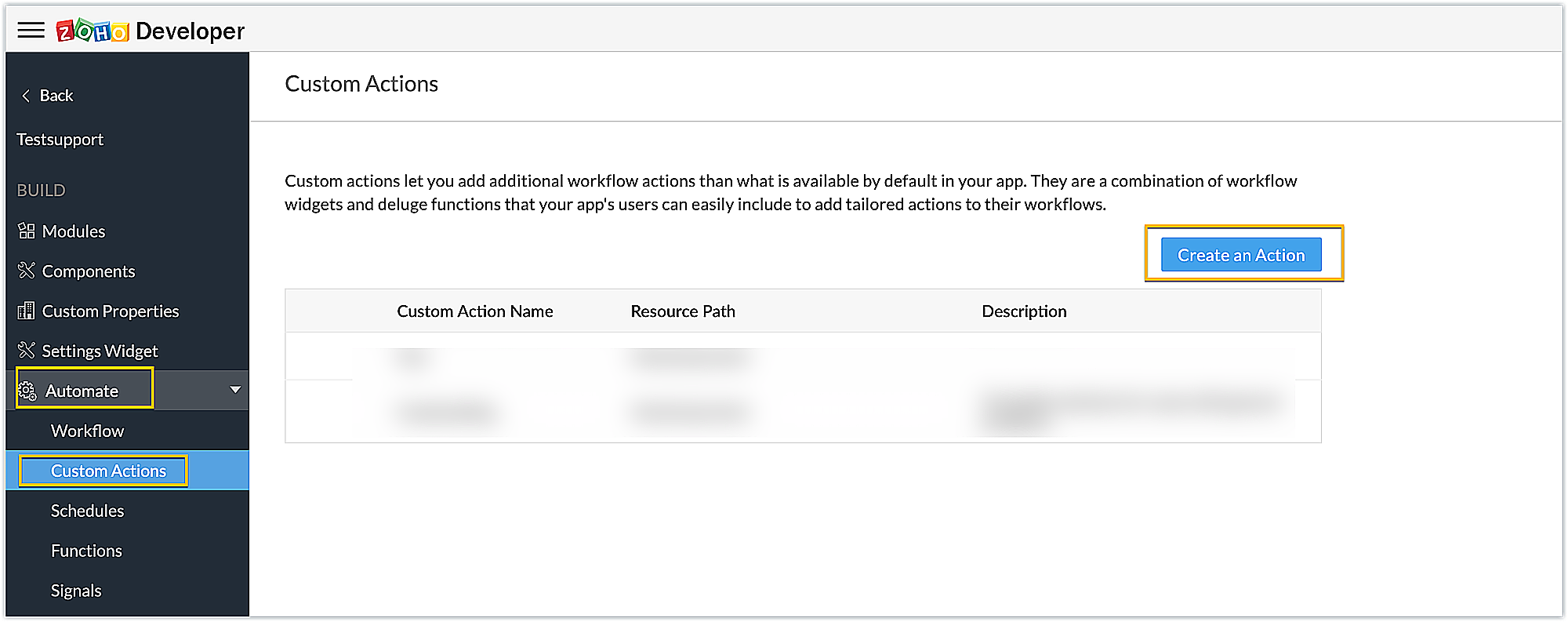
1. Create a custom action called "Casehandling" using the Create an Action button under the Custom Actions option, available in the Components section of the Zoho Developer console.
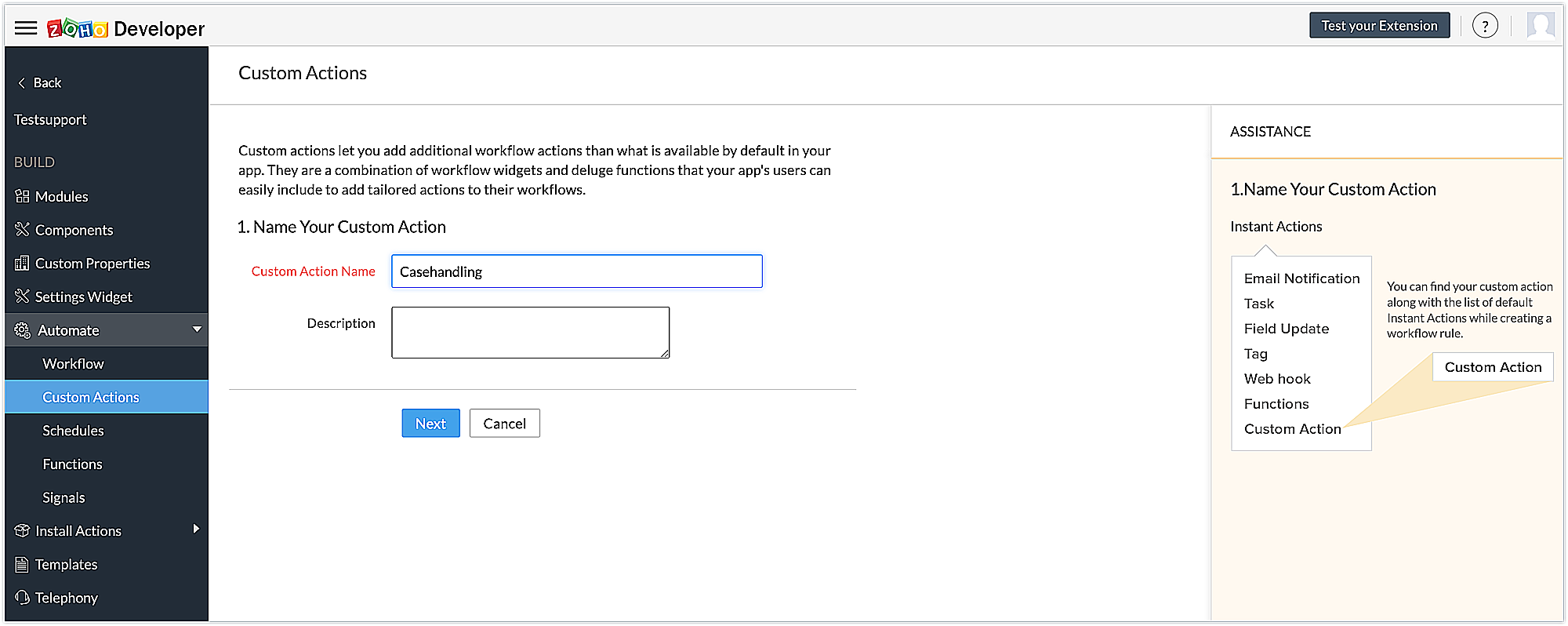
2. Provide a name for the custom action and a description if necessary. Click Next.
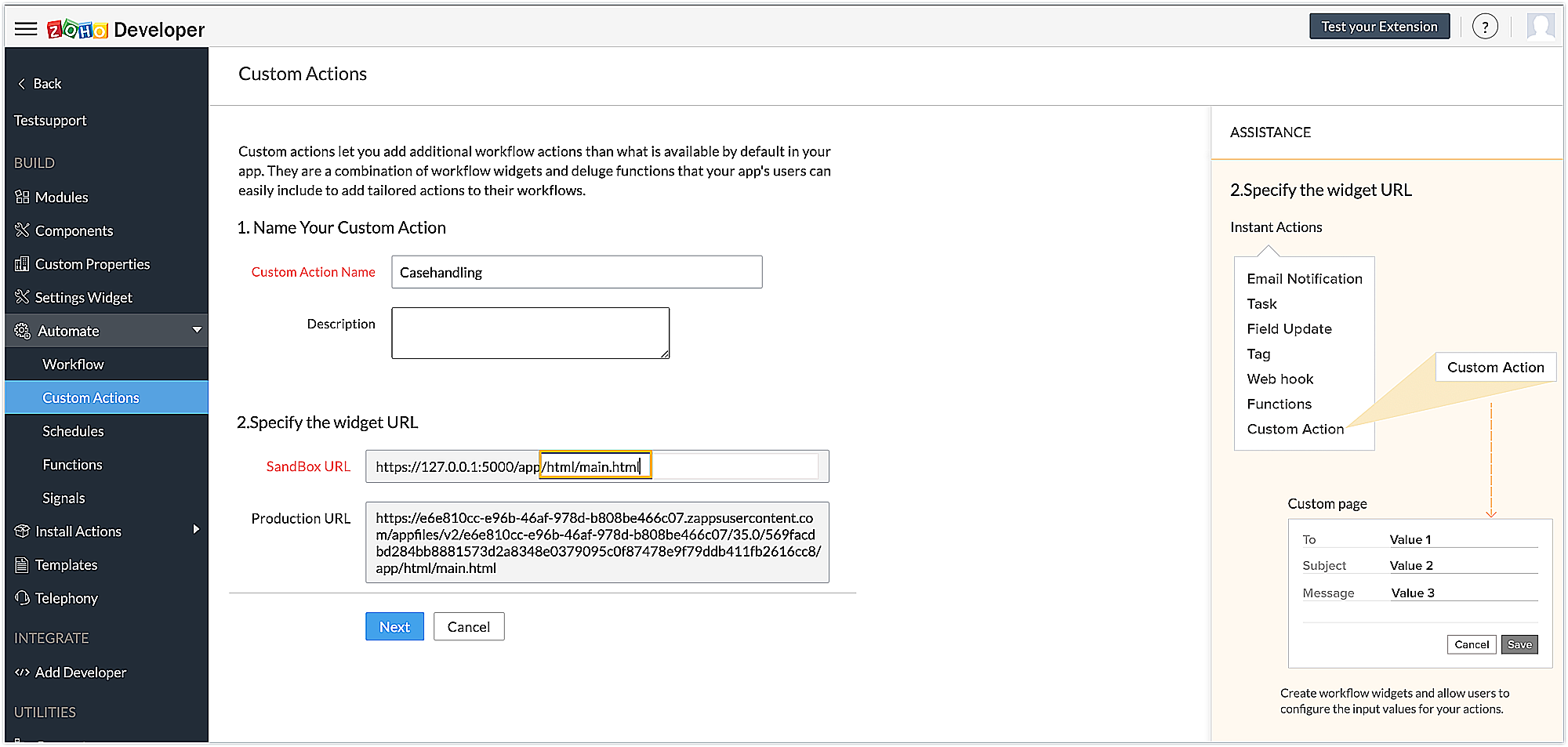
3. Associate the custom UI created earlier with the custom action by specifying the html page of the widget's connected app. Click Next.
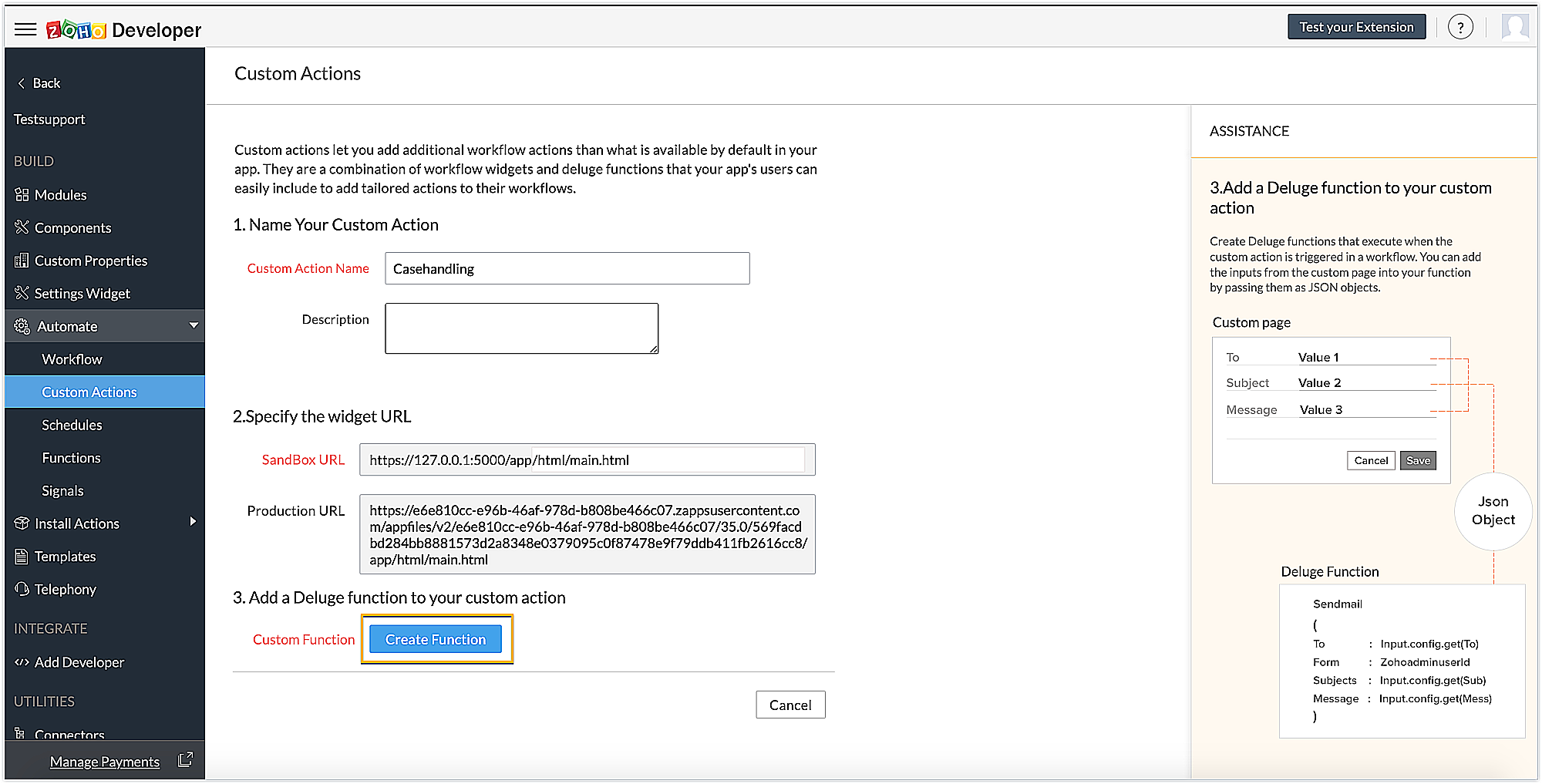
4. Then write a Deluge function to perform the desired action by clicking the Create Function button. As shown on the right hand side of the page, the values obtained in the custom UI earlier will be passed as a JSON object parameter to this Deluge function, and then the functionalities can be performed based on these inputs from the custom page.
Case handling Deluge function code snippet
caseinfo = {"ID":config.get("Caseid"),"Solution":config.get("Solution")}; response = zoho.crm.updateRecord("Cases",config.get("Caseid"),caseinfo); |
- The above Deluge code snippet uses the current case ID and the solution input by the end user through the UI to update the personalized solution to the Solution field of the case using the updateRecord deluge task.
- Click Save to save the custom action.
Now that the functionality is defined, the extension can be published and installed.
Creating workflows in Zoho CRM as an end user
1. As an end user, install the extension.
2. Now create a workflow using Setup->Automation->Workflow rules. Create workflows for two commonly arising cases so that, as an end user, you can predefine some personalized solution inputs for these common cases. This will thereby update the solution to the case when the workflow criteria is satisfied. The two sample workflows handled for this example are:
When a widget is not loading or a 404 page not found occurs in the user's Zoho CRM account.
When a connector unauthorized error occurs.
3. First, define a workflow for "Widget not loading" case by specifying the when and condition criteria.
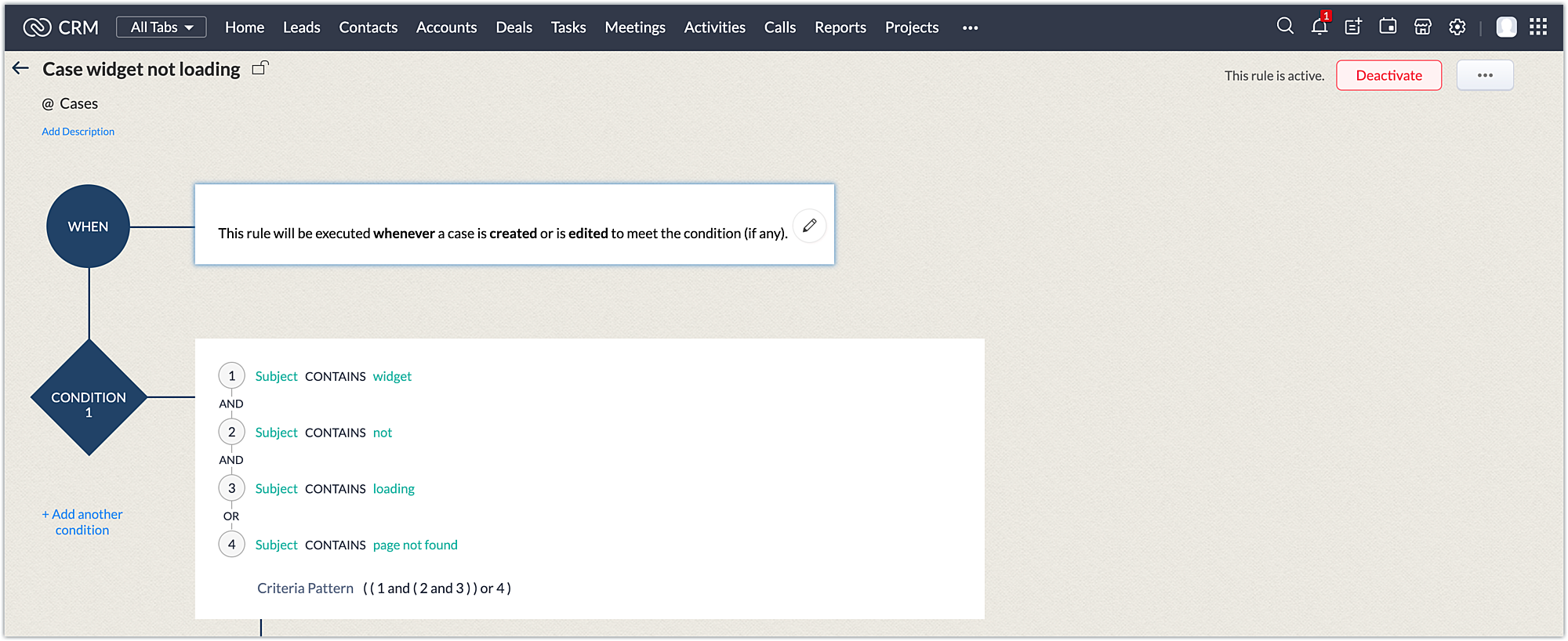
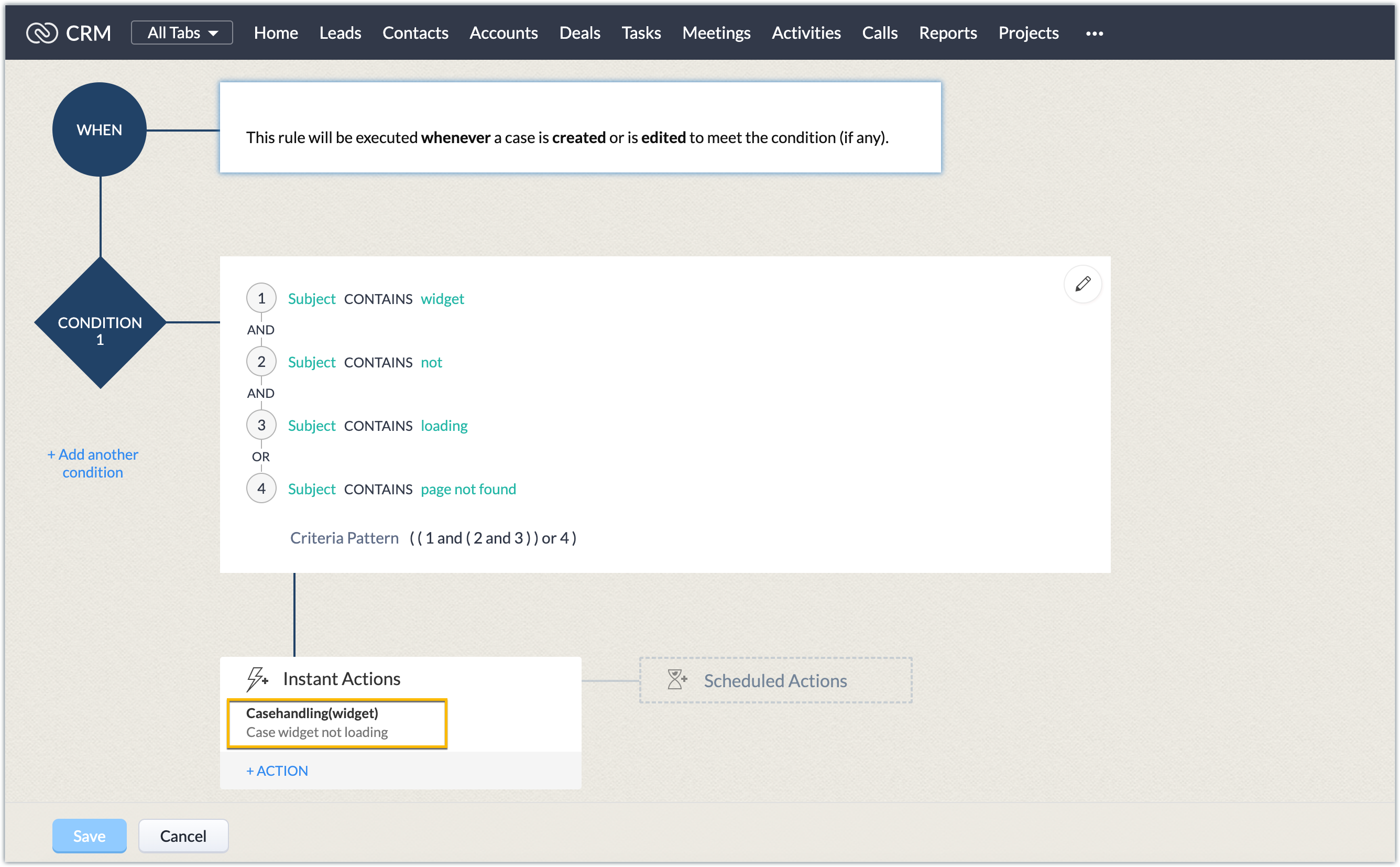
4. Now under "instant actions," you will find the custom action installed as part of the extension. Associate the case handling custom action with this workflow.
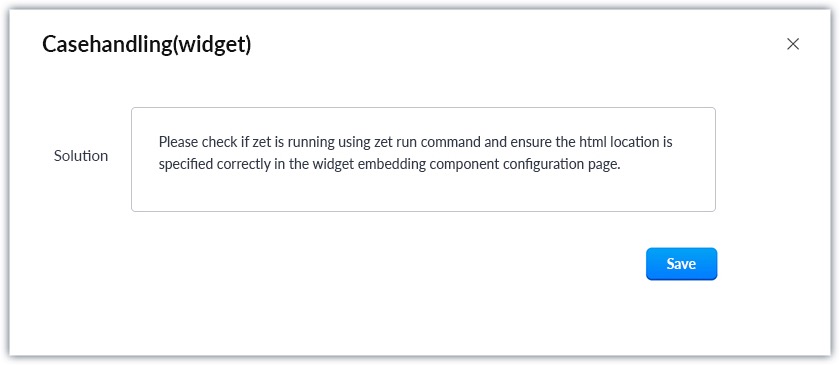
5. Enter the personalized solution in the custom UI displayed.
6. Go to the Cases module. Log a case with the Subject field, satisfying the workflow criteria.
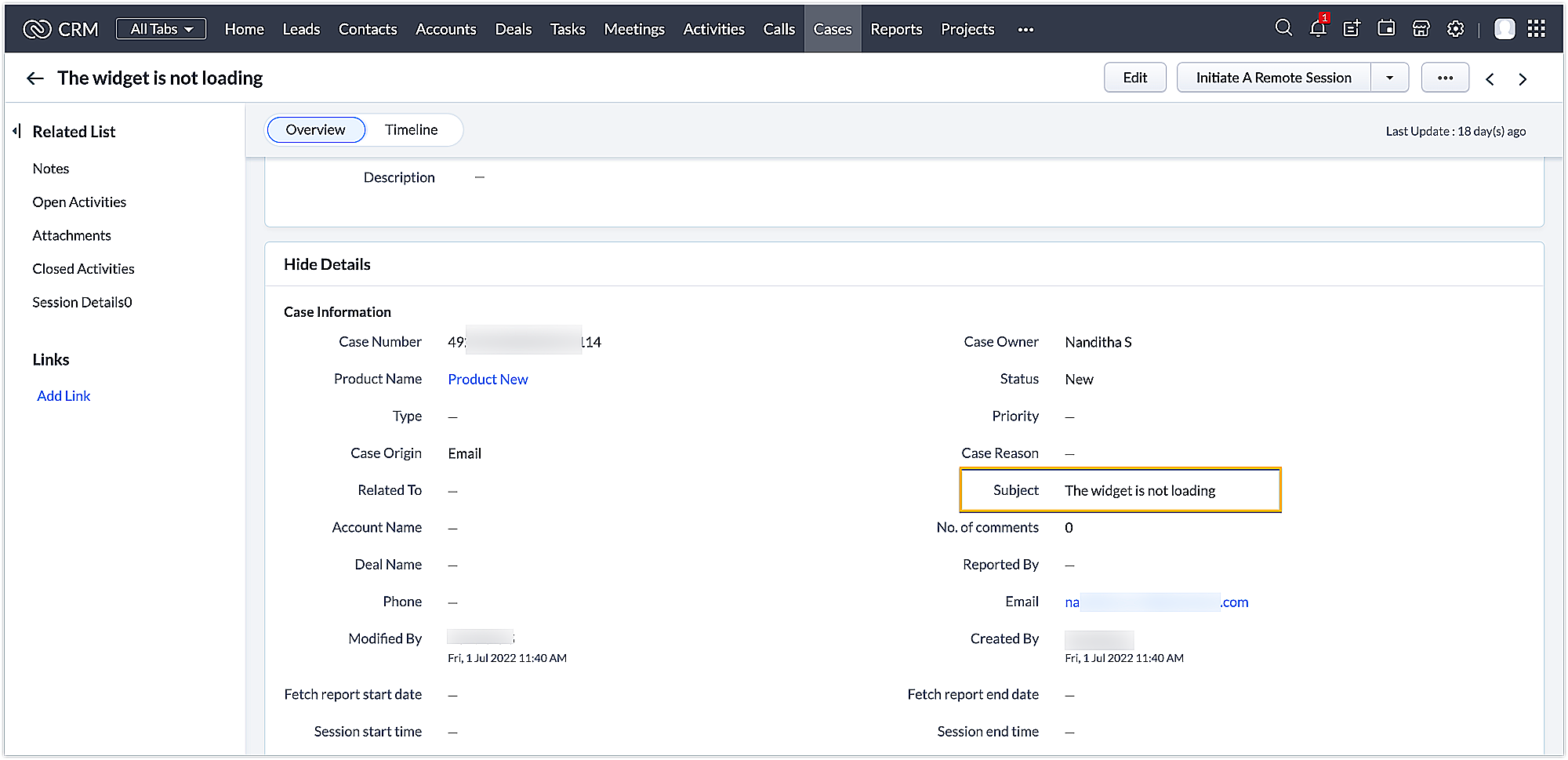
This automatically updates the Solution field with the predefined solution entered by the end user for this workflow.
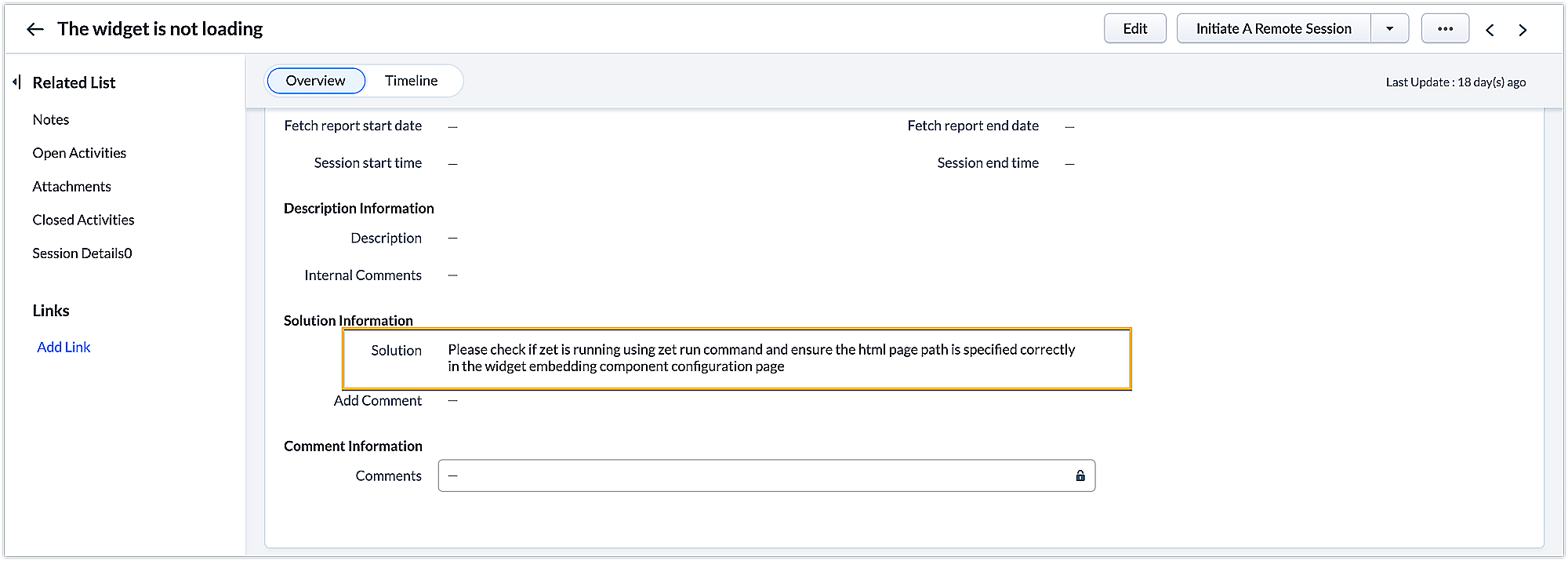
Similarly, you can create multiple workflows for different cases for which you can define predefined solutions to make the case logging process easy.
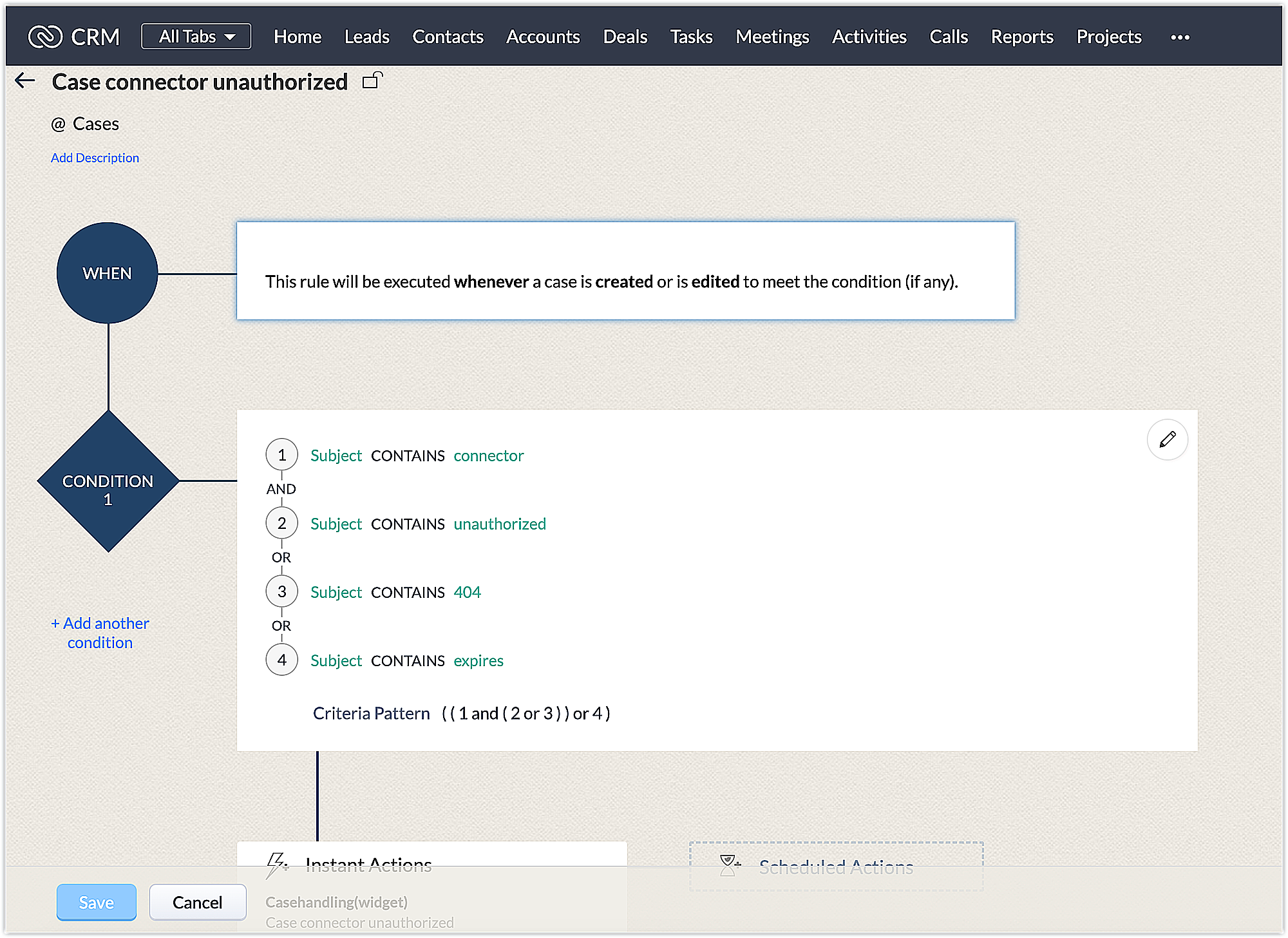
In this way, you can use custom actions to ease the end user's work by reusing templates created for them. We hope you find this information useful. Keep following this space for more insights!
SEE ALSO
Topic Participants
Nanditha Somasundaram Somasundaram
Swarnim Swaraj
Pheranda Nongpiur
Sticky Posts
Kaizen #198: Using Client Script for Custom Validation in Blueprint
Nearing 200th Kaizen Post – 1 More to the Big Two-Oh-Oh! Do you have any questions, suggestions, or topics you would like us to cover in future posts? Your insights and suggestions help us shape future content and make this series better for everyone.Kaizen #226: Using ZRC in Client Script
Hello everyone! Welcome to another week of Kaizen. In today's post, lets see what is ZRC (Zoho Request Client) and how we can use ZRC methods in Client Script to get inputs from a Salesperson and update the Lead status with a single button click. In thisKaizen #222 - Client Script Support for Notes Related List
Hello everyone! Welcome to another week of Kaizen. The final Kaizen post of the year 2025 is here! With the new Client Script support for the Notes Related List, you can validate, enrich, and manage notes across modules. In this post, we’ll explore howKaizen #217 - Actions APIs : Tasks
Welcome to another week of Kaizen! In last week's post we discussed Email Notifications APIs which act as the link between your Workflow automations and you. We have discussed how Zylker Cloud Services uses Email Notifications API in their custom dashboard.Kaizen #216 - Actions APIs : Email Notifications
Welcome to another week of Kaizen! For the last three weeks, we have been discussing Zylker's workflows. We successfully updated a dormant workflow, built a new one from the ground up and more. But our work is not finished—these automated processes are
Recent Topics
Update: New Security Admin Role
Hello Zoho Directory Admins! This post is to highlight the recent role and permission changes introduced as part of the security enhancements. Previously, Helpdesk Admins had the security permissions and were responsible for managing the security configurationsClient Script | Update #14 - Client Script Support for Quick Create
Hello Everyone! We are back with another exciting and highly awaited update in Client Script! Over the past months, many of you shared your insights and requests, asking for the power to extend Client Script functionality to Quick Create forms. This capabilityI'd like to suggest a feature enhancement for SalesIQ that would greatly improve the user experience across different channels.
Hello Zoho Team, Current Limitation: When I enable the pre-chat form under Brands > Flow Controls to collect the visitor’s name and email, it gets applied globally across all channels, including WhatsApp, Messenger, and Instagram. This doesn't quite alignThe Social Playbook - February edition: Why moment marketing works (and how brands use it)
Imagine the final season of your favorite series is about to drop. Your entire feed is talking about it. Trailers everywhere. Fan theories. Hype at 100%. Now your go-to burger place launches a limited-edition meal box themed around that series—customPDF Attachment Option for Service Reports
Hello Team, I would like to check with you all if there is an option to attach PDF documents to the service reports. When I try to attach a file, the system only allows the following formats: JPEG, JPG, and PNG. Could you please confirm whether PDF attachmentsCliq Bots - Post message to a bot using the command line!
If you had read our post on how to post a message to a channel in a simple one-line command, then this sure is a piece of cake for you guys! For those of you, who are reading this for the first time, don't worry! Just read on. This post is all about how【Zoho CRM】営業日のロジックに関するアップデート
ユーザーの皆さま、こんにちは。コミュニティチームの中野です。 今回は「Zoho CRM アップデート情報」の中から、営業日のロジックに関するアップデートをご紹介します。 本アップデートにより、ワークフローにおける営業日の計算方法が改善されました。 週末などの非営業日にワークフローのトリガーが発生した場合でも、 「+0」「+1」「+2 営業日」といった設定が、意図どおりに正確に動作するようになりました。 営業日に基づくワークフローでは、日付項目を基準に「何営業日後に処理を実行するか」を指定します。Merged cells are unmerging automatically
Hello, I have been using Zoho sheets from last 1 year. But from last week facing a issue in merged cells. While editing all merged cells in a sheet became unmerged. I merged it again, but it again unmerged. In my half an hour work I have to do this 3-4Introducing Built-in Telephony in Zoho Recruit
We’re excited to introduce Built-in Telephony in Zoho Recruit, designed to make recruiter–candidate communication faster, simpler, and fully traceable. These capabilities help you reduce app switching, handle inbound calls efficiently, and keep everyJust want email and office for personal use
I am unclear as how to how I would have just a personal email (already do have it and love it) and get to use docs, notebook, workdrive etc. In other words mostly everything I had a google. I find gocs can be free with 5gb and so can mail with 5gb. AreUnable to change the "credentials of login user" option when creating a connection
I want to create a new Desk connection where the parameter to use 'credentials of login user' is set to YES. I'm able to create a new connection but am never given the option to change this parameter. Is this a restriction of my user profile, and if so,Show backordered items on packing slip
Is it possible to show a column on the Packing Slip that shows number of backordered items when a PO is only partially filled? I would also like to see the Backordered column appear on POs after you receive items if you didn't get ALL of the items or partial amounts of items. And lastly, it would be nice to have the option of turning on the Backordered column for invoices if you only invoice for a partial order. -TomZoho CRM Community Digest - January 2026 | Part 1
The new year is already in motion, and the Zoho CRM Community has been buzzing with steady updates and thoughtful conversations. In this edition, we’ve pulled together the key product enhancements, Kaizen learnings, and helpful discussions from the firstZoho CRM Feature Requests - SMS and Emails to Custom Modules & Time Zone Form Field
TLDR: Add Date/Time/Timezone form field, and be able to turn off auto timezone feature. Allow for Zoho Voices CRM SMS Extension to be able to be added to custom modules, and cases. Create a feature that tracks emails by tracking the email chain, ratherIntroducing Bigin's Add-in for Microsoft Outlook
Hello Everyone, Email is an important way to communicate with customers and prospects. If you use Outlook.com for emails and Bigin as your CRM, the Outlook Add-in helps you connect them easily so you can see your Bigin contact details right inside Outlook.com.Ask the Expert – Zoho One Admin Track : une session dédiée aux administrateurs Zoho One
Vous administrez Zoho One et vous vous posez des questions sur la configuration, la gestion des utilisateurs, la sécurité ou encore l’optimisation de votre back-office ? Bonne nouvelle : une session Ask the Expert – Zoho One Admin Track arrive bientôt,Zoho Commerce
Hi, I have zoho one and use Zoho Books. I am very interested in Zoho Commerce , especially with how all is integrated but have a question. I do not want my store to show prices for customers that are not log in. Is there a way to hide the prices if notHow to Associate Zoho Projects in Zoho CRM
Hi I need script for associating projects in zoho projects to particular Account in zoho CRM side. It can be done manually but I need the automation for this process. There are no api regarding associating a project in zoho crm account. Need assistanceAdd Claude in Zoho Cliq
Let’s add a real AI assistant powered by Claude to your workspace this week, that your team can chat with, ask questions, and act on conversations to run AI actions on. This guide walks you through exactly how to do it, step by step, with all the codeNeed to set workflow or journey wait time (time delay) in minutes, not hours
Minimum wait time for both Campaigns workflows and Marketing Automation journeys is one hour. I need one or the other to be set to several minutes (fraction of the hour). I tried to solve this by entering a fraction but the wait time data type is an integerEditing Item Group to add Image
I did not have the image of the product when the Item Group was created. Now I have the product image, and would like to associate/add to the Item Group. However the Item Group Edit functionality does not show/allow adding/changing image. Please helZoho Books - France
L’équipe de Zoho France reçoit régulièrement des questions sur la conformité de ses applications de finances (Zoho Books/ Zoho Invoice) pour le marché français. Voici quelques points pour clarifier la question : Zoho Books est un logiciel de comptabilitéNew in Office Integrator: Download documents as password-protected PDFs
Hi users, We're excited to introduce password-protected PDF as a download option in Zoho Office Integrator's document editor. This allows you to securely share confidential information from within your web app. Highlights of the password-protected PDFSales IQ - Zobot en multilangue
Bonjour, J'ai un Zobot installé sur mon site depuis longtemps. J'ai ajouté plusieurs langues, dans la configuration et dans le générateur de bot sans code Pourtant, le Chat continue à s'afficher en Francais. Comment enclencher le multilangue en frontStreamlining E-commerce Photography with AI Background Tools
Hey Zoho Community, I’ve been messing around with ways to make product images less of a headache for fashion brands on Zoho Commerce. You know how boring generic backdrops can get, and how much time traditional photoshoots eat up, right? I tried out thisUnable to Assign Multiple Categories to a Single Product in Zoho Commerce
Hello Zoho Commerce Support Team, I am facing an issue while assigning categories to products in Zoho Commerce. I want to assign multiple categories to a single product, but in the Item edit page, the Category field allows selecting only one categoryCollapsing and expanding of lists and paragraphs
hello Would you ever implement Collapsing and expanding of lists and paragraphs in zoho writer ? Best regardsSaving issue
First problem I opened a MS word file in writer. after the work is done, it does not save instantly, I waited for like 10min and it still did not save. second problem When I save a file, then file gets saved as another copy. I just did save, not saveSerious problem with file that contains non-ASCII characters
I imported many pdf files from Evernote whose names contain Hebrew characters, such as ח רבעוני - ביטוח חיים - סוף רבעון 3 - לשנת 2025.pdf I have two very serious problems: (1) Zoho Notebook cannot open the pdf file; (2) It cannot download the pdf file.Notifications Feeds unread count?
How do I reset the unread count on feeds notifications? I've opened every notification in the list. And the count never goes to zero.Zoho Finance Limitations 2.0 #3: Can't assign a Contact to a Finance Record (estimate, sales order or invoice)
If you use a business to business scenario with different contact people within the company you can't assign a finance record (estimate, invoice, etc...) to that person. Why this matters? No way to find out which person placed the order without manualZoho Community Digest — Febrero 2026
¡Hola, comunidad! Un mes más os traemos las novedades más interesantes de Zoho para febrero de 2026, incluyendo actualizaciones de producto publicadas oficialmente, cambios de políticas y noticias del ecosistema. Pero antes de lanzarnos a las actualizaciones,Disable Zoho Contacts
We don't want to use this app... How can we disable it?Filter button in the Zoho Sheet Android App doesn't toggle on
I am a new Zoho Sheets user and experiencing a specific issue with the filter functionality in the Android mobile application. Detailed Issue Description: The filter icon appears correctly in the toolbar. Upon tapping the filter icon/button, the toggle【Zoho CRM】商談タブへのデータインポート
Zoho使用前にエクセルで管理していた商談情報を、Zoho一括管理のため、商談タブにインポートしたいのですが、お客さまの氏名だけが紐づけられませんでした。 「Zoho CRMにインポートする項目を関連付ける」のところが画像のようになっています。 (弊社では、「姓」を「★個人データ名」という項目名に変更し、フルネームを入れて使用しています。) どのようにしたら氏名をインポートできるかご存じの方がいらっしゃいましたら、ご教示いただきたく、よろしくお願いいたします。 (投稿先が間違っていましたらご指CRM Cadences recognise auto-responses
I have leads in a Cadence. I get an auto-responder reply "I'm out of the office..." Normally Cadences seems to know that isn't a real reply and keeps the lead enrolled in the cadence. However, today, Cadences has UNENROLLED a Lead who sent an auto-reponseSelecting all notes in a notebook
In Windows11, I select a notebook and I get a list of notes, but only 30 notes. If I scroll down to the end, I get an additional 30 notes (and at the top it now shows 60 notes). I can keep doing this to eventually see all my notes but this is a real pain.SalesIQ Chat Notifications
I am the admin of our salesIQ implementation. About two weeks ago, I started hearing/seeing notification for ALL chats messages from monitored agents/chat participants. I don't need to see these, we have a manager who deals with this. I can't stop theHow to Create a Fixed Sliding Time Window (D-45 to D-15) in Zoho Analytics ?
Hello, I would like to create a report in Zoho Analytics based on a sliding time window between D-45 and D-15, with a fixed snapshot of that specific period. The data displayed should strictly reflect activity recorded between D-45 and D-15 only, withoutExport Zoho Books to another accounting package?
Is an export feature to Quickbooks or Accpac available (or a form that is easily imported by them)? My reasons: 1) my accountant, who prepares my corporate tax return, prefers to work with their own accounting system. If I can convert Zoho books a form that is easily importable into Quickbooks or an Accpac format, this process would be easy. 2) I don't want to keep my data in a proprietary format on the cloud somewhere without a way to easily extract it to a format that can be read my a well establishedNext Page