Kaizen 224 - Quote-driven Deal Reconciliation Using Zoho CRM Functions and Automation

Hello everyone!
Welcome back to another instalment in the Kaizen series.
This post covers quote-driven deal reconciliation, emphasizing Functions and Automation to address practical sales challenges.
Business Challenge
Sales organizations often mark deals as Closed Won before commercial transactions fully conclude. Quotes generate promptly upon closure, yet businesses typically provide a brief window such as one week for renegotiation or payment. During this period, currency fluctuations, payment delays, and risk thresholds can significantly alter the final deal value.
This Kaizen demonstrates how Zoho CRM Functions and Automation work together to reconcile deal financials with quote activity over time. Sales, finance, and operations teams can thus access accurate, policy-compliant values.
Here is a typical sequence:
- Deal closes with Closed Won status
- Quote generates immediately
- Customer receives grace period (e.g., one week) for payment or adjustments
Key factors during this window:
- Exchange rates fluctuate
- Payments may succeed or fail
- Business absorbs limited losses(up to 10%, for example)
- Major variances trigger renegotiation
CRM must reflect actual outcomes rather than initial closure assumptions. Quotes serve as the authoritative commercial record, with final deal values depending on execution timing. This approach captures intermediate and final financial states to enable automated decisions and audits.
Key business scenarios covered
Scenario 1: Payment is made during the grace period
- Quote is generated on day 0
- Customer completes payment on day 7
- Exchange rate has changed since quote generation
Business Requirement
The business wants to calculate the actual payable amount using the exchange rate on the payment day and store it explicitly in CRM.
Outcome
The realized value is captured and stored, ensuring that reports and downstream systems reflect the true commercial result.
Scenario 2: Acceptable loss threshold (10%)
- Exchange rate movement results in a loss
- The business is willing to absorb losses up to 10%
- Loss exceeds the acceptable threshold
Business requirement
If the loss exceeds the defined tolerance, the quote should move to renegotiation instead of being accepted automatically.
Outcome
CRM enforces pricing policy consistently, without manual intervention or subjective judgment.
Scenario 3: Significant currency fluctuations
- Exchange rate volatility is unusually high
- Even if loss is within limits, risk exposure is significant
Business requirement
Large fluctuations should trigger renegotiation, regardless of absolute loss percentage.
Outcome
Financial risk is handled proactively based on measurable criteria.
Scenario 4: No payment after the grace period
- Customer does not pay within the allowed window
- Updated exchange rate is favorable to the business
Business Requirement
If the updated rate is profitable, the quote can be revised and reissued with the new amount.
Outcome
CRM reflects market-aligned pricing while maintaining transparency around why the amount changed.
Why Zoho CRM Functions is the best fit?
This reconciliation pattern requires the following capabilities beyond static configuration.
- Reading and reconciling data across Deals and Quotes
- Applying time-based and threshold-based business rules
- Writing calculated values into dedicated fields
- Supporting multiple decision paths(accept, renegotiate, revise)
- Running logic at specific business moments
Zoho CRM Functions provide the flexibility and control required to implement this logic cleanly, while automation ensures it runs consistently and reliably.
Custom fields used in this post
Deals
- Final Accepted Amount - Currency - Amount finally agreed and accepted
- FX Impact Percentage - Percent - Gain or loss due to exchange movement
- Reconciliation Status - Picklist - Accepted or Renegotiate
- Reconciled On - DateTime- Timestamp of final reconciliation
Quotes
- Quote Reference Amount - Currency - Amount at quote generation
- Quote Exchange Rate - Decimal - Exchange rate used in quote
- Payment Due Date - Date - End of grace period
- Potential Payable Amount - Currency - Recalculated amount at evaluation time
- FX Variance Percentage - Decimal - Difference vs quoted amount
- FX Evaluation Status - Picklist - Pending or Evaluated
- Recalculate FX - Checkbox - Explicit recalculation trigger
These fields capture commercial intent and outcome, not just static numbers.
High level automation flow
- Deal is marked Closed Won
- Workflow triggers a function to generate a Quote
- Business updates evaluation inputs when needed
- User explicitly triggers FX recalculation
- Function
- Calculates financial impact
- Updates quote and deal
- Applies business decisions
- CRM reflects finalized commercial reality
Function 1: Generate a Quote from the Deal
This function creates a Quote automatically when a Deal is closed, ensuring downstream processes start immediately and consistently.
void automation.generateQuoteFromDeal(int dealId) { deal = zoho.crm.getRecordById("Deals", dealId); if(deal == null) return; amount = deal.get("Amount"); exchangeRate = deal.get("Exchange_Rate"); account = deal.get("Account_Name"); productItem = Map(); productItem.put("product", {"id":"<PRODUCT_ID>"}); productItem.put("quantity", 1); productItem.put("list_price", amount); productList = List(); productList.add(productItem); quoteMap = Map(); quoteMap.put("Subject", "Quote for Deal"); quoteMap.put("Deal_Name", dealId); quoteMap.put("Account_Name", account.get("id")); quoteMap.put("Product_Details", productList); quoteMap.put("Quote_Stage", "Draft"); quoteMap.put("Valid_Till", zoho.currentdate.addDay(7)); quoteMap.put("Quote_Reference_Amount", amount); quoteMap.put("Quote_Exchange_Rate", exchangeRate); zoho.crm.createRecord("Quotes", quoteMap); } |
Function 2: Reconcile Deal from Quote
This function calculates payable values, evaluates financial impact, and updates the Deal with finalized financial information.
void automation.reconcileDealFromQuote(Int quoteId) { info "Starting FX reconciliation for Quote ID: " + quoteId; // ------------------------------------------------- // Fetch Quote // ------------------------------------------------- quote = zoho.crm.getRecordById("Quotes", quoteId); if(quote == null) { info "Quote not found"; return; } dealInfo = quote.get("Deal_Name"); if(dealInfo == null) { info "Quote not linked to Deal"; return; } dealId = dealInfo.get("id"); deal = zoho.crm.getRecordById("Deals", dealId); if(deal == null) { info "Deal not found"; return; } // ------------------------------------------------- // Mark FX Evaluation as PENDING // ------------------------------------------------- zoho.crm.updateRecord( "Quotes", quoteId, {"FX_Evaluation_Status" : "Pending"} ); // ------------------------------------------------- // Read required FX inputs // ------------------------------------------------- quotedAmount = quote.get("Quote_Reference_Amount"); quoteRate = quote.get("Quote_Exchange_Rate"); evaluationRate = quote.get("Evaluation_Exchange_Rate"); info "Quoted Amount: " + quotedAmount; info "Quote Rate: " + quoteRate; info "Evaluation Rate: " + evaluationRate; if(quotedAmount == null || quoteRate == null || evaluationRate == null) { info "Missing required FX inputs"; return; } // ------------------------------------------------- // FX Calculations(rounded) // ------------------------------------------------- payableAmount = (quotedAmount * evaluationRate / quoteRate).round(2); fxVariance = (((payableAmount - quotedAmount) / quotedAmount) * 100).round(2); info "Payable Amount: " + payableAmount; info "FX Variance %: " + fxVariance; // ------------------------------------------------- // Decide Quote Stage(Business decision here) // ------------------------------------------------- quoteStage = ""; reconciliationStatus = ""; if(fxVariance <= 10) { quoteStage = "Acceptable FX Impact"; reconciliationStatus = "Accepted"; } else { quoteStage = "FX Impact Exceeds Threshold"; reconciliationStatus = "Renegotiate"; } // ------------------------------------------------- // Update Quote(Final state) // ------------------------------------------------- quoteUpdate = Map(); quoteUpdate.put("Potential_Payable_Amount", payableAmount); quoteUpdate.put("FX_Variance_Percentage", fxVariance); quoteUpdate.put("FX_Evaluation_Status", "Evaluated"); quoteUpdate.put("Quote_Stage", quoteStage); quoteUpdate.put("Recalculate_FX", false); quoteResp = zoho.crm.updateRecord("Quotes", quoteId, quoteUpdate); info "Quote update response:"; info quoteResp; // ------------------------------------------------- // Update Deal // ------------------------------------------------- dealUpdate = Map(); dealUpdate.put("Final_Accepted_Amount", payableAmount); dealUpdate.put("FX_Impact_Percentage", fxVariance); dealUpdate.put("Reconciliation_Status", reconciliationStatus); dealUpdate.put( "Reconciled_On", zoho.currenttime.toString("yyyy-MM-dd'T'HH:mm:ssXXX") ); dealResp = zoho.crm.updateRecord("Deals", dealId, dealUpdate); info "Deal update response:"; info dealResp; info "FX reconciliation completed successfully"; } |
Workflow
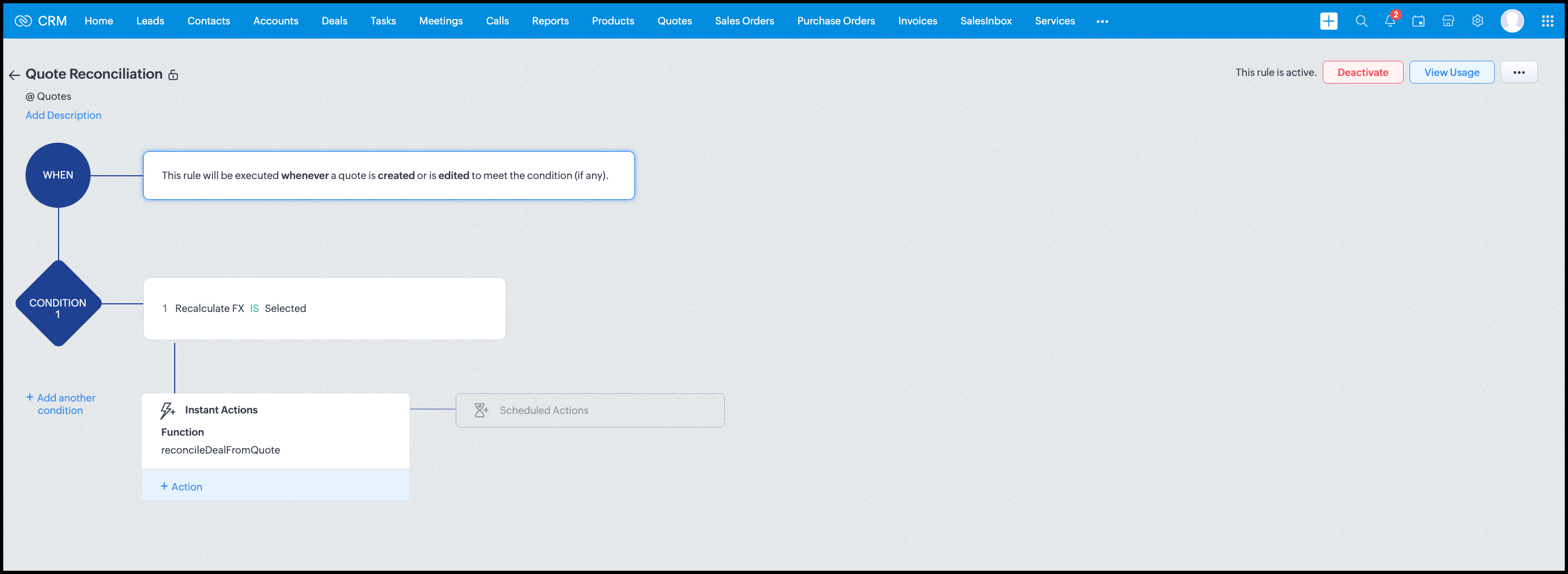
Module: Quotes
Trigger: On create or edit
Condition: Recalculate FX = true
Action: Execute reconcileDealFromQuote
Argument: quoteId -> ${Quotes.id}
All decision logic lives inside the function.
Business Outcome
After implementing this pattern,
- Deals and quotes stay aligned with real-world behavior
- FX risk is measurable and auditable
- Renegotiation is policy-driven
- Reports reflect finalized values, not assumptions
- Sales and finance operate on the same truth.
Summary
Zoho CRM extends beyond static closures by reconciling deals against quote behavior. Functions plus Automation enforce pricing, limit exposure, and capture true outcomes reliably at scale.
The true value of this implementation is not the calculation itself, but the fact that it produces stable, auditable financial states that can be reused across reporting, approvals, integrations, and policy enforcement.
Further extensions
Executive reporting and dashboards
You can build Dashboards that answer questions like
- Total revenue before vs after FX reconciliation
- Total FX gain or loss by
- Region
- Currency
- Quarter
- Sales owner
- Percentage of deals renegotiated due to FX risk
Without the function,
- FX impact is implicit
- Numbers keep changing
- Finance does not trust reports
With the function,
- Final Accepted Amount is stable
- FX Impact % is explicit
- Reconciled On gives a time anchor
Policy enforcement and compliance
Examples
- Automatically flag deals where FX loss > 10% but status = Accepted
- Audit trail for
- Who recalculated FX
- When renegotiation was triggered
- SLA checks when Deals are not reconciled within 'X' days of quote creation
For many companies, FX policy violations are discovered at a later point in time, but you now enforce them at the moment of decision.
Sales coaching and deal hygiene
Unlock insights such as
- Which sales reps close deals with high FX volatility or frequently trigger renegotiation?
- Which regions or currencies produce unstable deals?
- Which deals are consistently over-optimistic at closure?
Other scenarios
- Approval and exception workflows
- Integration with ERP or accounting systems
- Predictive insights to forecast FX risk
- Historical snapshots for audit and analytics
We hope you found this post useful. Let us know your feedback in the comments or write to us at support@zohocrm.com.
Thanks!
=============================================================================

See Also
Topic Participants
Shylaja S
Sticky Posts
Kaizen #198: Using Client Script for Custom Validation in Blueprint
Nearing 200th Kaizen Post – 1 More to the Big Two-Oh-Oh! Do you have any questions, suggestions, or topics you would like us to cover in future posts? Your insights and suggestions help us shape future content and make this series better for everyone.Kaizen #226: Using ZRC in Client Script
Hello everyone! Welcome to another week of Kaizen. In today's post, lets see what is ZRC (Zoho Request Client) and how we can use ZRC methods in Client Script to get inputs from a Salesperson and update the Lead status with a single button click. In thisKaizen #222 - Client Script Support for Notes Related List
Hello everyone! Welcome to another week of Kaizen. The final Kaizen post of the year 2025 is here! With the new Client Script support for the Notes Related List, you can validate, enrich, and manage notes across modules. In this post, we’ll explore howKaizen #217 - Actions APIs : Tasks
Welcome to another week of Kaizen! In last week's post we discussed Email Notifications APIs which act as the link between your Workflow automations and you. We have discussed how Zylker Cloud Services uses Email Notifications API in their custom dashboard.Kaizen #216 - Actions APIs : Email Notifications
Welcome to another week of Kaizen! For the last three weeks, we have been discussing Zylker's workflows. We successfully updated a dormant workflow, built a new one from the ground up and more. But our work is not finished—these automated processes are
Recent Topics
Fillable template with dynamic tables?
Is there a way to build a fillable template so that users can add rows to a table? To describe what I'm trying to accomplish the table has 3 sections; a header row, some number of rows with custom information, and a summary row with totals. I can't figureInvoicing multiple expense items as a single line item
My client would like me to invoice them for multiple expense items on a single line item on an invoice. Can this be done? I know I can import billable expenses to an invoice, but I don't know how to show them as a single line item or have themTables improvement ideas / features
Heya, I've been using Zoho Tables for a few months now and wanted to post some features that I think will be greatly beneficial for the tool: 1. Ability to delete a record in automation or move a record in automation. - Usecase: I move a record from oneAnnouncing offline payment modes for event tickets
Hello everyone, Collecting ticket payments from prospective attendees can be a tricky part of event planning. While Zoho Backstage has always allowed you to collect payments online as people buy tickets from your event microsite, we have now enabledGmail is ramping up its email sender policy from November 2025
Hello marketers, As you may be aware, Gmail introduced a guideline for bulk senders starting February 2024. If not, here's a quick refresher straight from Google: After this policy was announced first in 2023 and soft-implemented in February 2024, weIs there a list of Zoho Icons?
Is there a list of Zoho Icons you can reference: i.e. business-gold is <image marginRight='7px' color='#2A70E7' bgColor='#FFFFFF' width='52px' height='52px' type='icon' value='business-gold' size='24px' cornerRadius='26px' iconType='solid' /> Thanks!Item images
Can we get an "On hover" expanded image for items please ?Ability to Create and Manage YouTube Video Chapters in Zoho Social
Hi Zoho Social Team, How are you? We would like to request an enhancement to Zoho Social that would allow users to create and manage YouTube video chapters directly within the platform. Currently, Zoho Social does not support manually adding chaptersWhat happens to my current site SEO if i opt for zoho creator?
I have an existing website and I need to use Zoho creators for the rapid creation of my webpage creation. Currently, my IT team is creating the web pages, but I am concerned about the SEO of my current website if I shift to zoho will i loose it all?Preview Emails with Merge Fields before sending
Hello, Are there plans to preview an email with merge fields before sending out? Currently, all you see in the preview are the merge field values, but before I send out the email I want to make sure the merge is working. Also, the saved emails only showUser Filter not selecting All Items
We are encountering 2 issues when using the user filter. When users are trying to search using the filter option, the OK button is grayed out. Users have to unselect or make a change before it filters properly. 2. When filtering and the OK button works,Support Nested JavaScript Variables in PageSense Pop-up Targeting
Hello Zoho PageSense Team, I hope you're doing well. I’d like to request a feature enhancement for the PageSense pop-up targeting functionality. Current Limitation: Currently, PageSense pop-ups can be triggered using simple JavaScript variables. However,Cannot Invert Axis for Rankings
Hi there I want to be able to create a ranking graph in Analytics/BI, with 1 at the top of the Y axis, but I am unable to invert the axis. Super simple example in Excel below. Higher rankings need to be higher up on the graph to give the correct visualHow to copy value from a single line field into a picklist field within a module's subform?
Hello there, I have a single line field in a module's subform. I would like the value in the field to automatically update a picklist field within the same subform (both have items with the same names). Is this possible via function? Unfortunately, workflowsCommitted Stock and To Be Received Stock via API?
Is it possible to retrieve Committed Stock and/or To Be Received Stock for an Item via the API? I want to use this information for calculating the amount of inventory needed to be purchased.Creating Email template that attaches file uploaded in specific field.
If there's a way to do this using Zoho CRM's built-in features, then this has eluded me! I'm looking to create a workflow that automatically sends an email upon execution, and that email includes an attachment uploaded in a specific field. Email templatesMarketer’s Space - Automate a Personalized Holiday Workflow with Zoho Campaigns
Hello marketers, Welcome back to another post in Marketer’s Space! From Thanksgiving through Christmas, you have a flurry of opportunities to connect with your audience. In this post, we’ll see how you can plan an entire month-long automated workflowSorting columns in Zoho Projects
Hi, In project management best practice, sorting columns (ascending, descending) is an important tool. Sorting dates to see the order of tasks starting, sorting on priority or even on planned hours is a must for an efficient project control. Currently,Zoho CRM - Calendar Cards View - Let Users Decide What Is Displayed On Calendar Entries
Imagine planning your week of face-to-face meetings across three counties. You’re trying to group appointments by location to make the best use of your time, but Zoho CRM’s calendar doesn’t show where each meeting is happening. You’re left trying to rememberZoho Inventory - How to pay a supplier up front then receive multiple deliveries
How do we manage situations where we pay a supplier up front, then the receive the products in increments? Example Workflow: Create Purchase Order > Receive Bill for full amount > Receive Items 2 or more deliveries. Currently, once a Bill is created againstHow can I add or change the active customer in Zoho Projects?
I'm trying to change the customer in an active Zoho project. Is it possible to add or change the customer?What happens when someone clicks 'unsubscribe' in a zoho CRM email
Hello, As per, i am going round in circles trying to find an answer to these 2 question. I have an email template that has an unsubscribe link in the footer in zoho CRM. First, what happens when someone clicks it - where does the contact get unsubscribedZoho CRM - Scheduled Reports Which Contain Chart
Hi Zoho CRM Team, I'm requesting that the Report Export and Scheduling feature be enhanced to include a chart, if one has been created on a report. At the moment I have a report which shows Sales This Week by Deal Owner and a pie chart at the top of theCadences
I have just started using Cadences for follow-up up email pipeline. Is it just me or do you find the functionality very basic? For example, it will tell me (if I go looking for it) if someone has replied to a follow-up and been unenrolled; but it won'tCanvas View in Zoho Recruit
Is it possible or would it be possible to have the new 'Canvas View' in Zoho Recruit?Zoho Inventory - Move Orders
Quick question about Move Orders... Why is there no status to say something like "Draft", "In Progress" and "Completed", similar to Transfer Orders? I'm assuming that when something needs to be moved it should be planned in Inventory, executed and thenKaizen #215 - Workflow APIs - Part 3 - Create and Update Workflow Rules
Welcome back to another week of Kaizen! Over the last couple of weeks, we’ve joined Zylker Cloud Services as they review and improve their workflows. In Part 1, we discovered and audited their sprawling workflow landscape. In Part 2, we learned how toDataPrep Bigquery Connection failed
Hello everybody, I want to create a connnection beetwen Bigquery and Dataprep but when I try to connect my project I got this error Loading tables has failed. Table list fetched from the data source expired.Issue in Zoho People Regularization – Incorrect Hour Calculation
I have noticed that when applying attendance regularization in Zoho People for previous dates, the total working hours are not calculated correctly. For example, even if the check-in is 10:00 AM and check-out is 6:00 PM, the system shows an incorrectAllow Multiple usage units to items while adding them to sales/purchase transactions
The usage unit of items added in zoho books are static right now and can not be changed. But certain items are received or sold in multiple usage units. One example is fabric. It can be bought in Meters, inches, kgs or other units. Another example wouldPO receive quantities
At last, Zoho has finally got around to allowing us to receive a larger qty than recorded in the PO :-) Saves us all from editing the PO's before receiving larger quantities ( usual for us ) ! It's still in "beta" but available upon request, I've testedAnalytics : How to share to an external client ?
We have a use case where a client wants a portal so that several of his users can view dashboards that we have created for them in Zoho Analytics. They are not part of our company or Zoho One account. The clients want the ability to have user specific,Reference Deal Categories in Deluge
Hello, Is there a way to reference Deal Category in deluge functions? So for our Deals, we have several different WON stages in a pipeline. Rather than type each stage into our functions, we'd like to be able to reference the Deal Category. SimilarUsers Name & Email in Reports
Hi, I would like to show the Users Name from their Zoho Acount in All Entries/Reports as well as the current Account Email. Thanks DanWorkflow Creation with Zia gets stuck
It gets stuck here:Unable to Add Asset to Work Order Due to Different Contact and Company
Hello Zoho Team, I’m facing an issue in our environment related to asset linking in Work Orders. Here’s the situation: When our engineers go for field activities, they initially create the Work Order using the salesperson’s contact details. After completingI NEED MORE CUSTOM FIELDS!!!
Why can I only have 60 custom fields! It's not enough. I want another 100 extra custom fields to do what's necessary for my business! I'm sure I can't be the only one with this problem!!! How hard would it be to fix this? Just fix it for me please atZoho Webinar et Zapier : de la prise de rendez-vous aux relances — une automatisation performante
Organiser un webinaire réussi et gérer efficacement les participants peut être un véritable défi. Avec Zoho Webinar et Zapier, vous pouvez rendre vos processus plus simples. Vous gagnez du temps en automatisant les tâches répétitives. Résultat : une expérienceTicket Stages Report
From data to decisions: A deep dive into ticketing system reports Ticket stages refer to the series of transitions from the moment a support ticket is created until it is closed. It moves through various stages based on the actions taken at each preceding【参加無料】今年最後のZoho ユーザー交流会|東京・大阪・名古屋で開催! 活用事例&ユーザー同士の情報交換
ユーザーの皆さま、こんにちは。コミュニティチームの中野です。 11月に東京、大阪、名古屋の3都市でZoho ユーザー交流会を開催します! 毎回ご好評いただいている本イベントでは、実際の Zohoユーザーによるリアルな活用事例の共有や 参加者同士でノウハウを交換し合うグループワークを予定しています。 「他社の活用を参考にしたい」「Zoho をもっと使いこなしたい」方にぴったりの場です。 初参加の方もぜひお気軽にご参加ください! ーーーーーーーーーーーーーーーーーーーーーーーーーーーーーーーーーーーーーNext Page