Kaizen 224 - Quote-driven Deal Reconciliation Using Zoho CRM Functions and Automation

Hello everyone!
Welcome back to another instalment in the Kaizen series.
This post covers quote-driven deal reconciliation, emphasizing Functions and Automation to address practical sales challenges.
Business Challenge
Sales organizations often mark deals as Closed Won before commercial transactions fully conclude. Quotes generate promptly upon closure, yet businesses typically provide a brief window such as one week for renegotiation or payment. During this period, currency fluctuations, payment delays, and risk thresholds can significantly alter the final deal value.
This Kaizen demonstrates how Zoho CRM Functions and Automation work together to reconcile deal financials with quote activity over time. Sales, finance, and operations teams can thus access accurate, policy-compliant values.
Here is a typical sequence:
- Deal closes with Closed Won status
- Quote generates immediately
- Customer receives grace period (e.g., one week) for payment or adjustments
Key factors during this window:
- Exchange rates fluctuate
- Payments may succeed or fail
- Business absorbs limited losses(up to 10%, for example)
- Major variances trigger renegotiation
CRM must reflect actual outcomes rather than initial closure assumptions. Quotes serve as the authoritative commercial record, with final deal values depending on execution timing. This approach captures intermediate and final financial states to enable automated decisions and audits.
Key business scenarios covered
Scenario 1: Payment is made during the grace period
- Quote is generated on day 0
- Customer completes payment on day 7
- Exchange rate has changed since quote generation
Business Requirement
The business wants to calculate the actual payable amount using the exchange rate on the payment day and store it explicitly in CRM.
Outcome
The realized value is captured and stored, ensuring that reports and downstream systems reflect the true commercial result.
Scenario 2: Acceptable loss threshold (10%)
- Exchange rate movement results in a loss
- The business is willing to absorb losses up to 10%
- Loss exceeds the acceptable threshold
Business requirement
If the loss exceeds the defined tolerance, the quote should move to renegotiation instead of being accepted automatically.
Outcome
CRM enforces pricing policy consistently, without manual intervention or subjective judgment.
Scenario 3: Significant currency fluctuations
- Exchange rate volatility is unusually high
- Even if loss is within limits, risk exposure is significant
Business requirement
Large fluctuations should trigger renegotiation, regardless of absolute loss percentage.
Outcome
Financial risk is handled proactively based on measurable criteria.
Scenario 4: No payment after the grace period
- Customer does not pay within the allowed window
- Updated exchange rate is favorable to the business
Business Requirement
If the updated rate is profitable, the quote can be revised and reissued with the new amount.
Outcome
CRM reflects market-aligned pricing while maintaining transparency around why the amount changed.
Why Zoho CRM Functions is the best fit?
This reconciliation pattern requires the following capabilities beyond static configuration.
- Reading and reconciling data across Deals and Quotes
- Applying time-based and threshold-based business rules
- Writing calculated values into dedicated fields
- Supporting multiple decision paths(accept, renegotiate, revise)
- Running logic at specific business moments
Zoho CRM Functions provide the flexibility and control required to implement this logic cleanly, while automation ensures it runs consistently and reliably.
Custom fields used in this post
Deals
- Final Accepted Amount - Currency - Amount finally agreed and accepted
- FX Impact Percentage - Percent - Gain or loss due to exchange movement
- Reconciliation Status - Picklist - Accepted or Renegotiate
- Reconciled On - DateTime- Timestamp of final reconciliation
Quotes
- Quote Reference Amount - Currency - Amount at quote generation
- Quote Exchange Rate - Decimal - Exchange rate used in quote
- Payment Due Date - Date - End of grace period
- Potential Payable Amount - Currency - Recalculated amount at evaluation time
- FX Variance Percentage - Decimal - Difference vs quoted amount
- FX Evaluation Status - Picklist - Pending or Evaluated
- Recalculate FX - Checkbox - Explicit recalculation trigger
These fields capture commercial intent and outcome, not just static numbers.
High level automation flow
- Deal is marked Closed Won
- Workflow triggers a function to generate a Quote
- Business updates evaluation inputs when needed
- User explicitly triggers FX recalculation
- Function
- Calculates financial impact
- Updates quote and deal
- Applies business decisions
- CRM reflects finalized commercial reality
Function 1: Generate a Quote from the Deal
This function creates a Quote automatically when a Deal is closed, ensuring downstream processes start immediately and consistently.
void automation.generateQuoteFromDeal(int dealId) { deal = zoho.crm.getRecordById("Deals", dealId); if(deal == null) return; amount = deal.get("Amount"); exchangeRate = deal.get("Exchange_Rate"); account = deal.get("Account_Name"); productItem = Map(); productItem.put("product", {"id":"<PRODUCT_ID>"}); productItem.put("quantity", 1); productItem.put("list_price", amount); productList = List(); productList.add(productItem); quoteMap = Map(); quoteMap.put("Subject", "Quote for Deal"); quoteMap.put("Deal_Name", dealId); quoteMap.put("Account_Name", account.get("id")); quoteMap.put("Product_Details", productList); quoteMap.put("Quote_Stage", "Draft"); quoteMap.put("Valid_Till", zoho.currentdate.addDay(7)); quoteMap.put("Quote_Reference_Amount", amount); quoteMap.put("Quote_Exchange_Rate", exchangeRate); zoho.crm.createRecord("Quotes", quoteMap); } |
Function 2: Reconcile Deal from Quote
This function calculates payable values, evaluates financial impact, and updates the Deal with finalized financial information.
void automation.reconcileDealFromQuote(Int quoteId) { info "Starting FX reconciliation for Quote ID: " + quoteId; // ------------------------------------------------- // Fetch Quote // ------------------------------------------------- quote = zoho.crm.getRecordById("Quotes", quoteId); if(quote == null) { info "Quote not found"; return; } dealInfo = quote.get("Deal_Name"); if(dealInfo == null) { info "Quote not linked to Deal"; return; } dealId = dealInfo.get("id"); deal = zoho.crm.getRecordById("Deals", dealId); if(deal == null) { info "Deal not found"; return; } // ------------------------------------------------- // Mark FX Evaluation as PENDING // ------------------------------------------------- zoho.crm.updateRecord( "Quotes", quoteId, {"FX_Evaluation_Status" : "Pending"} ); // ------------------------------------------------- // Read required FX inputs // ------------------------------------------------- quotedAmount = quote.get("Quote_Reference_Amount"); quoteRate = quote.get("Quote_Exchange_Rate"); evaluationRate = quote.get("Evaluation_Exchange_Rate"); info "Quoted Amount: " + quotedAmount; info "Quote Rate: " + quoteRate; info "Evaluation Rate: " + evaluationRate; if(quotedAmount == null || quoteRate == null || evaluationRate == null) { info "Missing required FX inputs"; return; } // ------------------------------------------------- // FX Calculations(rounded) // ------------------------------------------------- payableAmount = (quotedAmount * evaluationRate / quoteRate).round(2); fxVariance = (((payableAmount - quotedAmount) / quotedAmount) * 100).round(2); info "Payable Amount: " + payableAmount; info "FX Variance %: " + fxVariance; // ------------------------------------------------- // Decide Quote Stage(Business decision here) // ------------------------------------------------- quoteStage = ""; reconciliationStatus = ""; if(fxVariance <= 10) { quoteStage = "Acceptable FX Impact"; reconciliationStatus = "Accepted"; } else { quoteStage = "FX Impact Exceeds Threshold"; reconciliationStatus = "Renegotiate"; } // ------------------------------------------------- // Update Quote(Final state) // ------------------------------------------------- quoteUpdate = Map(); quoteUpdate.put("Potential_Payable_Amount", payableAmount); quoteUpdate.put("FX_Variance_Percentage", fxVariance); quoteUpdate.put("FX_Evaluation_Status", "Evaluated"); quoteUpdate.put("Quote_Stage", quoteStage); quoteUpdate.put("Recalculate_FX", false); quoteResp = zoho.crm.updateRecord("Quotes", quoteId, quoteUpdate); info "Quote update response:"; info quoteResp; // ------------------------------------------------- // Update Deal // ------------------------------------------------- dealUpdate = Map(); dealUpdate.put("Final_Accepted_Amount", payableAmount); dealUpdate.put("FX_Impact_Percentage", fxVariance); dealUpdate.put("Reconciliation_Status", reconciliationStatus); dealUpdate.put( "Reconciled_On", zoho.currenttime.toString("yyyy-MM-dd'T'HH:mm:ssXXX") ); dealResp = zoho.crm.updateRecord("Deals", dealId, dealUpdate); info "Deal update response:"; info dealResp; info "FX reconciliation completed successfully"; } |
Workflow
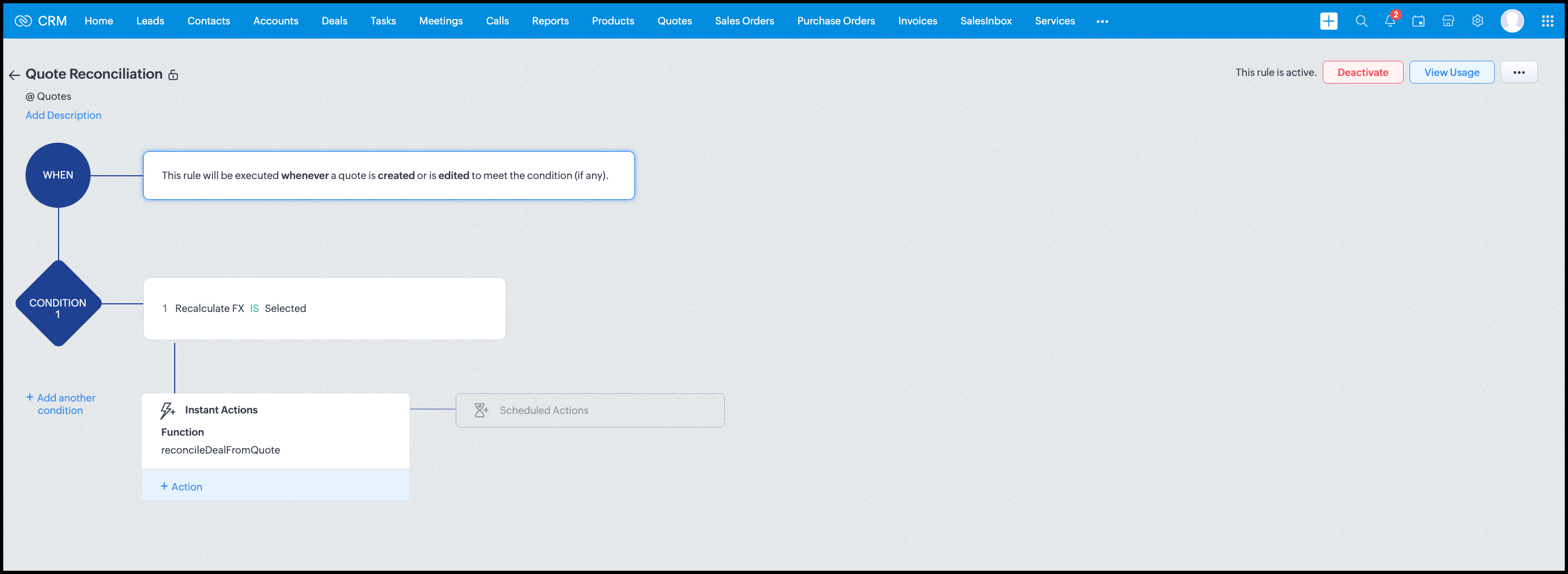
Module: Quotes
Trigger: On create or edit
Condition: Recalculate FX = true
Action: Execute reconcileDealFromQuote
Argument: quoteId -> ${Quotes.id}
All decision logic lives inside the function.
Business Outcome
After implementing this pattern,
- Deals and quotes stay aligned with real-world behavior
- FX risk is measurable and auditable
- Renegotiation is policy-driven
- Reports reflect finalized values, not assumptions
- Sales and finance operate on the same truth.
Summary
Zoho CRM extends beyond static closures by reconciling deals against quote behavior. Functions plus Automation enforce pricing, limit exposure, and capture true outcomes reliably at scale.
The true value of this implementation is not the calculation itself, but the fact that it produces stable, auditable financial states that can be reused across reporting, approvals, integrations, and policy enforcement.
Further extensions
Executive reporting and dashboards
You can build Dashboards that answer questions like
- Total revenue before vs after FX reconciliation
- Total FX gain or loss by
- Region
- Currency
- Quarter
- Sales owner
- Percentage of deals renegotiated due to FX risk
Without the function,
- FX impact is implicit
- Numbers keep changing
- Finance does not trust reports
With the function,
- Final Accepted Amount is stable
- FX Impact % is explicit
- Reconciled On gives a time anchor
Policy enforcement and compliance
Examples
- Automatically flag deals where FX loss > 10% but status = Accepted
- Audit trail for
- Who recalculated FX
- When renegotiation was triggered
- SLA checks when Deals are not reconciled within 'X' days of quote creation
For many companies, FX policy violations are discovered at a later point in time, but you now enforce them at the moment of decision.
Sales coaching and deal hygiene
Unlock insights such as
- Which sales reps close deals with high FX volatility or frequently trigger renegotiation?
- Which regions or currencies produce unstable deals?
- Which deals are consistently over-optimistic at closure?
Other scenarios
- Approval and exception workflows
- Integration with ERP or accounting systems
- Predictive insights to forecast FX risk
- Historical snapshots for audit and analytics
We hope you found this post useful. Let us know your feedback in the comments or write to us at support@zohocrm.com.
Thanks!
=============================================================================

See Also
Topic Participants
Shylaja S
Sticky Posts
Kaizen #198: Using Client Script for Custom Validation in Blueprint
Nearing 200th Kaizen Post – 1 More to the Big Two-Oh-Oh! Do you have any questions, suggestions, or topics you would like us to cover in future posts? Your insights and suggestions help us shape future content and make this series better for everyone.Kaizen #226: Using ZRC in Client Script
Hello everyone! Welcome to another week of Kaizen. In today's post, lets see what is ZRC (Zoho Request Client) and how we can use ZRC methods in Client Script to get inputs from a Salesperson and update the Lead status with a single button click. In thisKaizen #222 - Client Script Support for Notes Related List
Hello everyone! Welcome to another week of Kaizen. The final Kaizen post of the year 2025 is here! With the new Client Script support for the Notes Related List, you can validate, enrich, and manage notes across modules. In this post, we’ll explore howKaizen #217 - Actions APIs : Tasks
Welcome to another week of Kaizen! In last week's post we discussed Email Notifications APIs which act as the link between your Workflow automations and you. We have discussed how Zylker Cloud Services uses Email Notifications API in their custom dashboard.Kaizen #216 - Actions APIs : Email Notifications
Welcome to another week of Kaizen! For the last three weeks, we have been discussing Zylker's workflows. We successfully updated a dormant workflow, built a new one from the ground up and more. But our work is not finished—these automated processes are
Recent Topics
Zoho CRM iOS app updates: the Homepage, Zoho Survey integration, and support for multiple file uploads in subform
Hello everyone! The Zoho CRM mobile app continues to evolve to bring you a smoother and more powerful CRM-on-the-go experience. We're excited to share some important updates now available in the iOS app. Here's what's new: Homepage support Zoho SurveyI am trying to integrate my module in sandbox environment to add data via API
I went through the documents and tried to setup the API for adding the module via the api but the problem is the token setup is done on "https://accounts.zoho.in/oauth/v2/token" domain and the bulk write is done on "https://content.zohoapis.com/crm/v8/upload"Setting up primary mobile number.
Hi Sir Earlier I joined IIFL team and got an organizational email of zoho services. Later i quit and now my account is deactivated with IIFL but i am unable to link my mobile number to my own email id with zoho.Tables for Europe Datacenter customers?
It's been over a year now for the launch of Zoho Tables - and still not available für EU DC customers. When will it be available?Guided Conversations - Ticket Creation
Hi there, Using Guided Conversations to Take Customer Data and apply it into a Support Ticket for internal use, Is there a way to take multiple Textual Variables Inputs (A series of questions), and have the answers all appear in the Description of theHow to send certain invoices for Approval based on condition?
To streamline operations, I need the invoices to go for approval when certain conditions are met. For example, if my staff gives a discount of x amount, it must go for approval. If there is no discount, then the invoice will be approved automatically.Unable to continue payment
Hi, I want to make a payment for my email subscription, but I cannot proceed with the payment because my NITKU is invalid. In Indonesia, the NITKU consists of 22 digits, but Zoho only provides 20 digits, causing my NITKU to be invalid. Please help meMassive spam pretending to come from our address – is this a Zoho security issue?
Hi, We’ve been receiving more and more suspicious emails lately — many of them clearly look like scams. But yesterday, we got an email that appeared to be sent from our own address, which was very concerning. We're starting to wonder if this might beCant recieve mails
I’m having an issue with my external IMAP account not fetching any emails into Zoho Mail, even though the connection test says “Success”. I can send, if someone sends an email to me. my original directory (home.pl host) recieves it in their portal butZoho Sheet Autofit Data
While using Autofit Data function in Zoho Sheets with Devnagri Maratji or Hindi Fonts, a word or a number, it keeps couple of characters outside the right side border.Enhancements to finance suite integrations
Update on the migration (October 28, 2025): Starting this week (October 29 tentatively), we’ll begin migrating Zoho CRM users to Zoho Books as integration users. This means actions will now run under each user’s own Zoho Books access, instead of the admin’s.Edit 'my' Notes only
The permissions around Notes should be more granular, and allow to user to be able to edit the notes he created only. The edit Notes permission is useful as it allows the user to correct any mistakes or add information as needed. However, with this sameJob Alerts for Candidates
hi All, I have 2 questions relating to sharing job details with candidates. 1. is there a way to notify candidates that meet certain criteria of current jobs available? eg. I run a candidate search, and identify 50 candidates that might be suitable. CanEnhancing Task Accuracy: Automatically notify the owners upon Task duplication.
Hello Everyone, A Custom function is a user-written set of code to achieve a specific requirement. Set the required conditions needed as when to trigger using the Workflow rules (be it Tasks / Project) and associate the custom function to it. The requirementNodemailer not working with Zoho
Hi All, I'm having issues with Zoho working with Nodemailer. It works as expected when using gmail as the service. Below is the code I get when using zoho. Error sending email: Error: connect ECONNREFUSED 127.0.0.1:587 at TCPConnectWrap.afterConnect [asdesktop app for TODO
Is there a desktop app for Zoho TODO?Show/ hide specific field based on user
Can someone please help me with a client script to achieve the following? I've already tried a couple of different scripts I've found on here (updating to match my details etc...) but none of them seem to work. No errors flagged in the codes, it justWhere are Kanban swimlanes
So i've been playing with Zoho Projects Kanban view a bit more. It appears that task lists are being used as the Kanban columns, which makes sense from the implementation point of view but not the logical one. Kanban columns are statuses that a task can flow through, while a task list has been a logical way to organize related tasks and relate them to a mislestone. In other words a task in a particular task can go through several stages while remaining in the same task list. After doing some researchTip 19: How to display images in Pages using ZML snippets
Hi folks, We're back with another tip on how to use Zoho Markup Language (ZML) to create interactive pages in Zoho Creator. You can use ZML snippets to add various kinds of components to your pages and structure them in meaningful ways. That's not all, though—using ZML you can ensure your application is automatically compatible with all kinds of devices without any inconsistencies. We often get questions from users about how to invoke Deluge scripts within ZML code. Here's a simple use case for addingCan zoho swign format block text spacing automatically when prefilled from zoho crm?
I'm sending zoho sign template from zoho crm, so that zoho crm pre-populates most fields. I have existing pdf documents that i am having signed. I have no ability to change the pdf documents, they are standardized government forms. The problem I am facingReference lookup field values in Client script
hello all, I'm using a "ZDK.Apps.CRM.Products.searchByCriteria" function call, which is returning the matching records correctly; however, one of the fields is a lookup field which I need the associated data. I believe there is a way to get this dataEvery time an event is updated, all participants receive an update email. How can I deactivate this?
Every time an event is updated in Zoho CRM (e.g. change description, link to Lead) every participant of this meeting gets an update email. Another customer noticed this problem years ago in the Japanese community: https://help.zoho.com/portal/ja/community/topic/any-time-an-event-is-updated-on-zohocrm-calendar-it-sends-multiple-invites-to-the-participants-how-do-i-stop-that-from-happeningHow can I filter a field integration?
Hi, I have a field integration from CRM "Products" in a form, and I have three product Categories in CRM. I only need to see Products of a category. Thanks for you answers.Zoho CRM - Portal Users Edit Their Own Account Information
Hi Community, I'm working on a client portal and it seems like the only I can make the Account record editable to the Contact, is if I add another lookup on the Account to the Contact record. Am I missing something as the account already has a list ofConnecting Zoho Mail with Apollo.io
Hi, I am trying to connect my Zoho Mail account with my Apollo.io account to start sending cold email for prospecting purposes. I have activated the IMAP setting but I am still unable to connect to the Apollo account. I am using my email credentials butWhere does this report come from in the Zoho One ecosystems?
Is this directly from MA, Analytics or ??? ???Contact's title in "Contact Role Mapping"
When I'm creating a deal, I'd like to see the contacts title in the listing. Right now, I only see this: How can I get the contact's title in there?Zoho CRM - Client Portal - Hide Notes Related List
Hi Community, I'm building a customer portal and I can't find a way to hide the notes related list. I don't want the client to see the notes I have about them. Is there a way to do this as it is no bin/trash icon when I hover over."Pivot Table" Conditional Formatting
Team, I there a way to use conditional formatting a "Pivot Table" report? Thanks, Arron Blue Pumpkin Hosting | Solutions Made SimpleHow many clients can be added to Zoho Practice?
How many clients can be added to Zoho Practice without having their zoho app?Stage History
when viewing a ticket , and you look at stage history tab (kanban view) and look at the stage duration column in days, it shows the current stage of the ticket as " current stage ". Should it not rather show the amount of days it has been in that currentAutomating Ticket Responses Using Zoho Desk's AI Features
We’re looking to set up an automation within Zoho Desk that can analyze incoming emails or tickets and automatically respond with relevant knowledge base articles based on the content of the request. Could you please guide us on how to configure thisService locations are tied to contacts?
Trying the system out. And what I discovered is that it seems that the whole logic of the app is, I'd say, backwards. There is a Customer - a company. The company has contact persons and service locations can be associated with different contact persons.Enhancements to Zoho Map integration tasks
Hello everyone, We're excited to announce enhancements to the Zoho Map integration tasks in Deluge, which will boost its performance. This post will walk you through the upcoming changes, explain why we're making them, and detail the steps you need toBug in Total Hour Calculation in Regularization for past dates
There is a bug in Zoho People Regularization For example today is the date is 10 if I choose a previous Date like 9 and add the Check in and Check out time The total hours aren't calculated properly, in the example the check in time is 10:40 AM checkNarrative 12: Sandbox - Testing without the risk
Behind the scenes of a successful ticketing system: BTS Series Narrative 12: Sandbox - Testing without the risk What is a sandbox environment? A sandbox environment is a virtual playground that allows you to test freely and experiment with various elementsAnnouncing new features in Trident for Mac (1.27.0)
Hello everyone! Trident for macOS (v1.27.0) is here with new features and enhancements to improve scheduling and managing your calendar events. Let's take a quick look at them. Stay aligned across time zones. Both the scheduled and original time zonesSlow uploads of large files
I'm wanting to use Workdrive for transferring large images and video (we're talking things from 100MB-5GB). I'm running solo on a 500MBit/sec fiber connection. I'm getting upload speeds to Workdrive of no more than about 1-3Mbytes/sec when going throughMigrate Your Notes from OneNote to Zoho Notebook Today
Greetings Notebook Users, We’re excited to introduce a powerful new feature that lets you migrate your notes from Microsoft OneNote to Zoho Notebook—making your transition faster and more seamless than ever. ✨ What’s New One-click migration: Easily importneed to upload from airtable to google drive
I have a zapier zap that automates between airtable and google drive. When a customer uploads a new file into airtable via a client portal interface, zapier uploads that file into a folder linked to that customer's project record. I need to replicateNext Page