Client Script Support for List Page (Canvas)
Hello everyone!
Welcome to another week of Kaizen. In today's post lets see how Client Script can be used in Canvas List Page to mask sensitive information from specific roles and add colors to Canvas List Page records based on custom criteria.This use case solves the question raised in this post.
In this Kaizen post,
- About Canvas List Page
- Supported Events for List Page(Canvas)
- Supported ZDKs for List Page(Canvas)
- Use Case
- Solution
- Summary
- Related Links
1. About Canvas List Page
The Canvas List Page provides ways to customize the record display in the module list. You can add record images, use custom buttons to represent fields, use specific font style or size for the field labels, change the alignment of field types and more.
2. Supported Events for List Page(Canvas)
You can write Client Script for three different views of the Canvas List page.
You can trigger Client Script on your List Page (Canvas) using the following events.
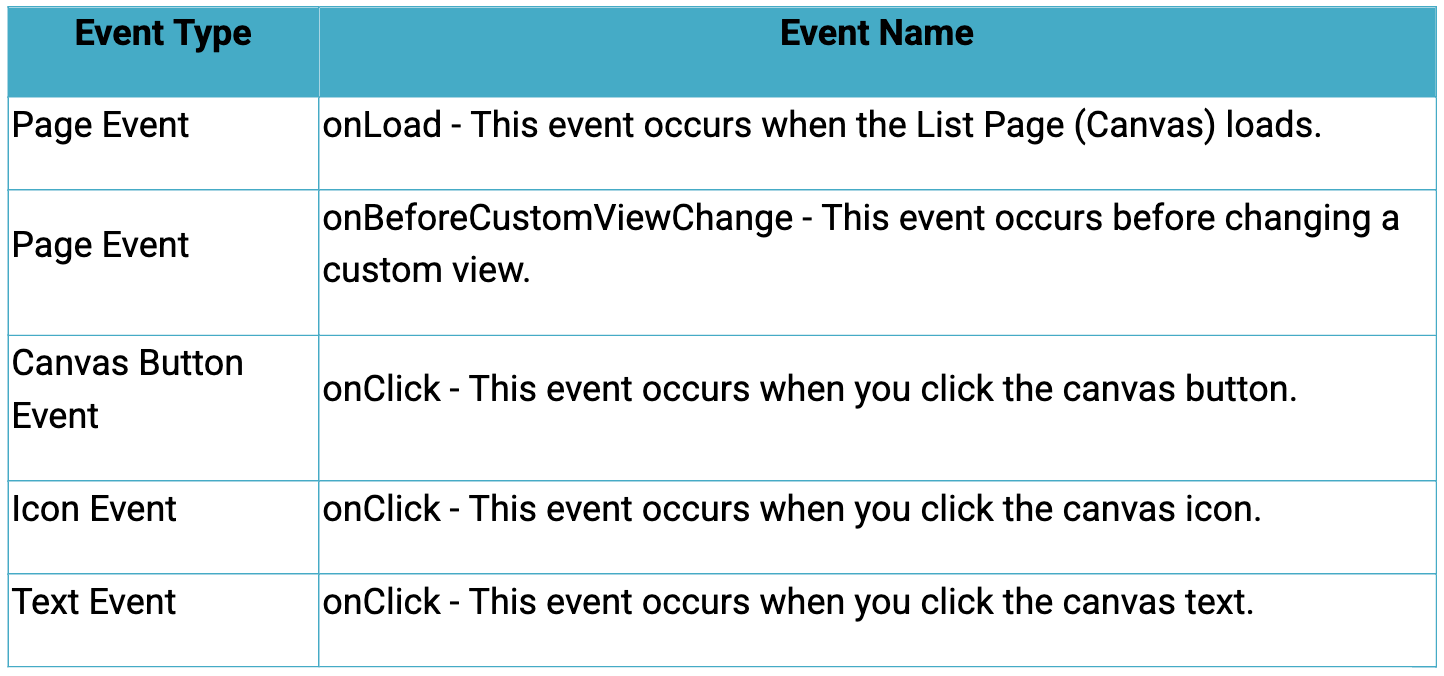
Click here to know more about the Events.
3. Supported ZDKs for List Page(Canvas)
Client Script enables you to customize List Views using the following list of ZDKs and Client Script functions.
- freezeColumns(option) - You can freeze list view and disable modifying columns.
- maskField(field_name, (length,character,reverse)) - You can mask fields in the List View
- sortByField(field_name, option) - You can sort field in the List View
- getRecords() - You can get Records in the List View
- selectRecords(criteria) - You can select Records in the List view by criteria
- selectRecordsByID(ids) - You can select Records in the List view by record ID
- clearSelection() - You can clear selected Records in the List view
- style(style_config, criteria) - You can style Records in the List View.
4. Use Case
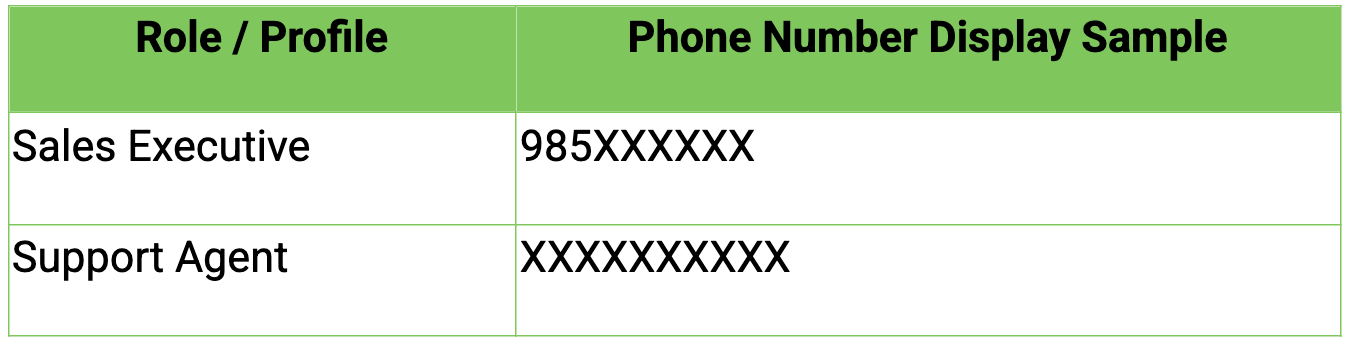
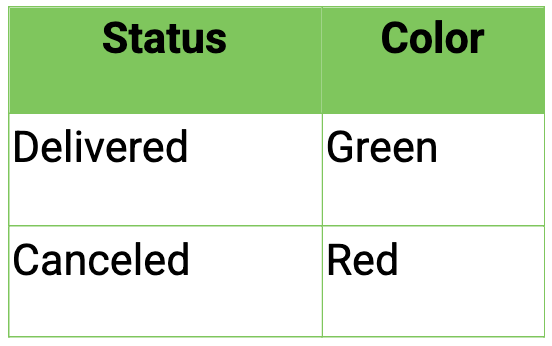
Zylker uses Zoho CRM to manage high-volume orders where customer phone numbers are sensitive data. The CRM Admin wants role-based phone number masking on the Orders List Page (Canvas). To improve visibility and speed, the Admin also wants color-coded order cards in the List View based on order status.
Role-Based Phone Number Visibility
Order Status Color Coding
5. Solution
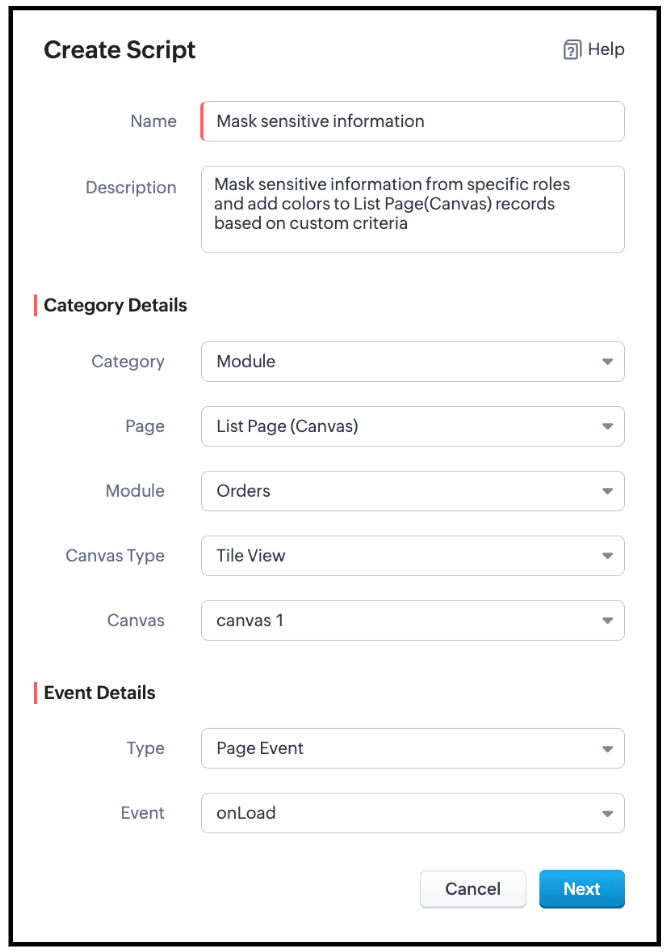
- Go to Setup > Developer Space > Client Script. Click +New Script.
- Specify the details to create a script and click Next.
- Enter the following script and click Save.
- // Mask phone number based on user role
- if ($Crm.user.role.name === "Sales Executive") {
- // Mask 7 digits for Sales Executive
- ZDK.Page.getList().maskField("Phone_Number", {
- length: 7,
- character: "#",
- reverse: true
- });
- } else if ($Crm.user.role.name === "Support Agent") {
- // Mask 10 digits for Support Agent
- ZDK.Page.getList().maskField("Phone_Number", {
- length: 10,
- character: "#",
- reverse: true
- });
} - // Highlight cancelled orders in light red
- ZDK.Page.getList().style({
- record: {
- backgroundColor: "#FFD6D6"
- }
- },
- "(Status:equals:Cancelled)"
- );
- // Highlight delivered orders in light green
- ZDK.Page.getList().style({
- record: {
- backgroundColor: "#D3F9D8"
- }
- },
- "(Status:equals:Delivered)"
- );
- Use $Crm.user.role.name to retrieve the role of the currently logged-in user.
- When the role is Sales Executive, use ZDK.Page.getList().maskField() on the Phone_Number field to mask the first 7 digits, where
- length defines how many characters should be hidden
- character: '#' specifies the masking symbol
- reverse: false ensures masking starts from the beginning, allowing partial visibility.
- When the role is Support Agent, use ZDK.Page.getList().maskField() on the Phone_Number field to mask all 10 digits, fully hiding the phone number using the same masking parameters.
- Use ZDK.Page.getList().style() to apply conditional styling to list records by configuring the record parameter to set the row backgroundColor.
- Apply the condition (Status:equals:Cancelled) to highlight cancelled records in light red, and (Status:equals:Delivered) to highlight delivered records in light green, enabling quick visual identification.
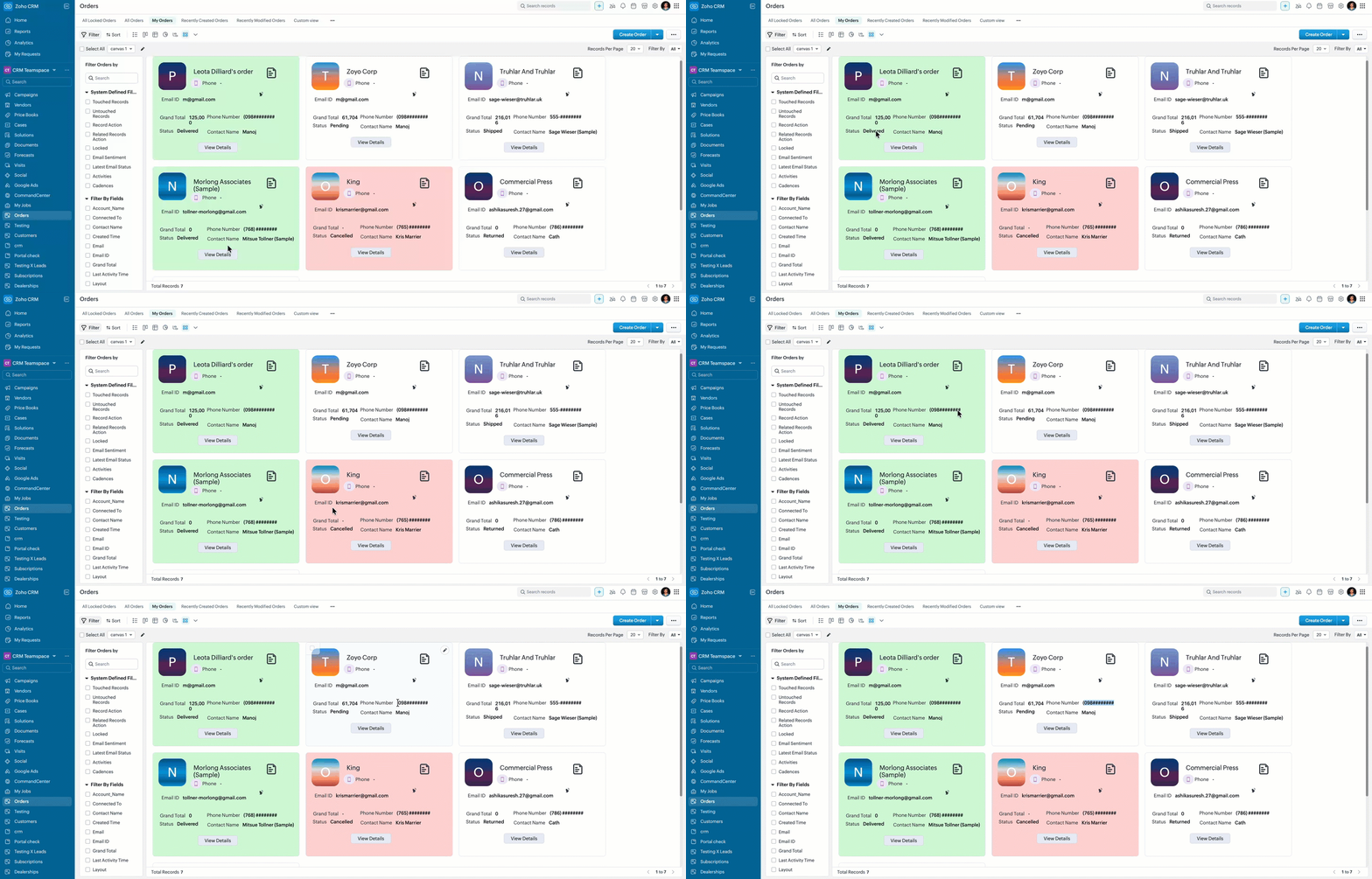
- Here is how the Client Script works for a "Sales Executive".
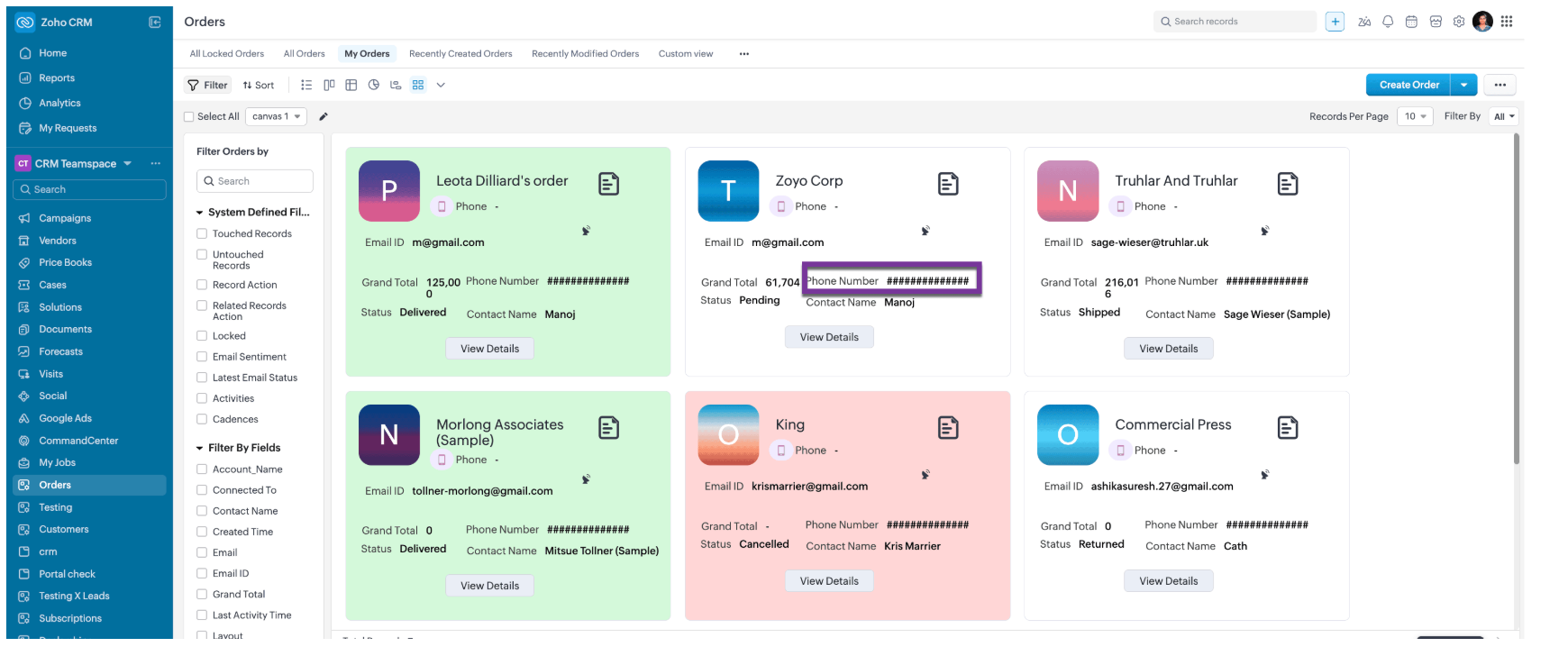
- Here is how the Client Script works for a "Support Agent".
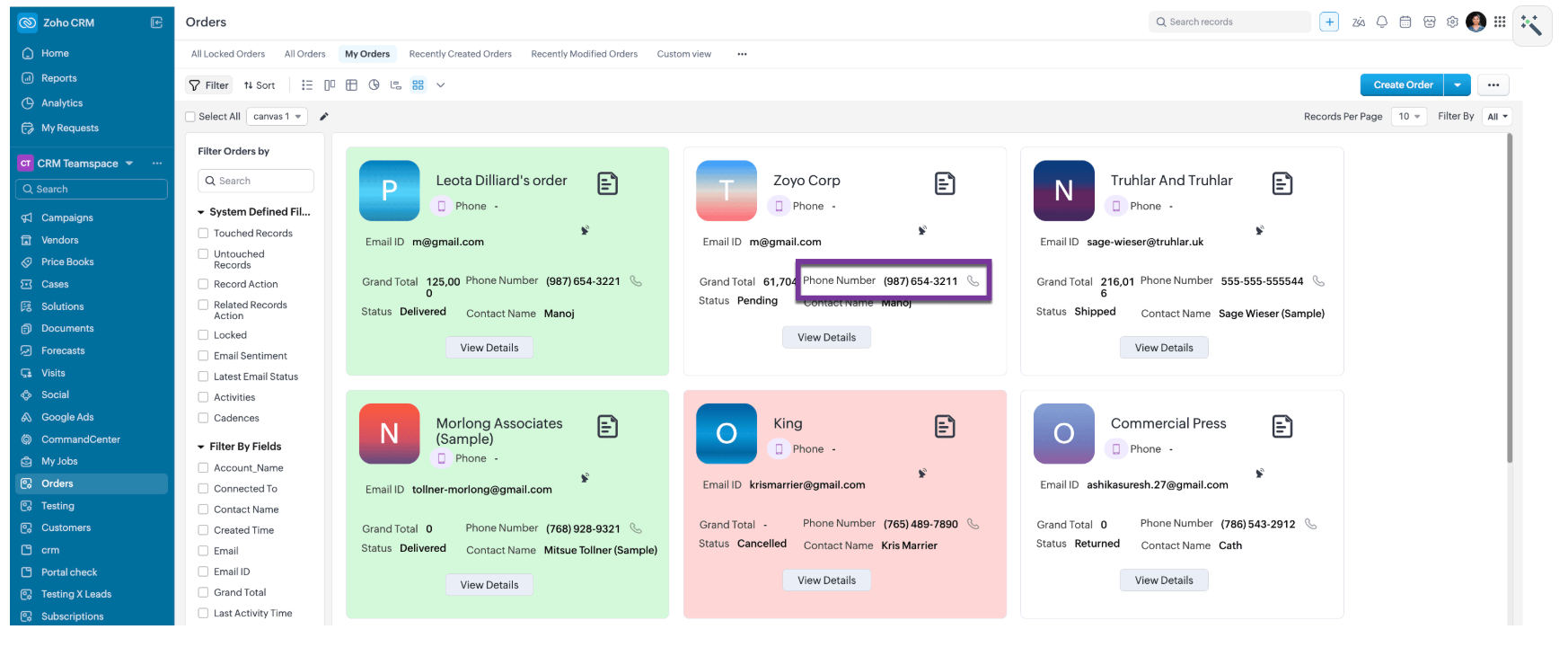
- Here is how the Client Script works for a for other roles like, Manager and Admin.
6. Summary
- Mask sensitive fields dynamically in List Page Canvas
- Apply role-based logic using current user context
- Improve list view readability with conditional record styling
7. Related Links

Topic Participants
Maadhari M
Sticky Posts
Kaizen #198: Using Client Script for Custom Validation in Blueprint
Nearing 200th Kaizen Post – 1 More to the Big Two-Oh-Oh! Do you have any questions, suggestions, or topics you would like us to cover in future posts? Your insights and suggestions help us shape future content and make this series better for everyone.Kaizen #226: Using ZRC in Client Script
Hello everyone! Welcome to another week of Kaizen. In today's post, lets see what is ZRC (Zoho Request Client) and how we can use ZRC methods in Client Script to get inputs from a Salesperson and update the Lead status with a single button click. In thisKaizen #222 - Client Script Support for Notes Related List
Hello everyone! Welcome to another week of Kaizen. The final Kaizen post of the year 2025 is here! With the new Client Script support for the Notes Related List, you can validate, enrich, and manage notes across modules. In this post, we’ll explore howKaizen #217 - Actions APIs : Tasks
Welcome to another week of Kaizen! In last week's post we discussed Email Notifications APIs which act as the link between your Workflow automations and you. We have discussed how Zylker Cloud Services uses Email Notifications API in their custom dashboard.Kaizen #216 - Actions APIs : Email Notifications
Welcome to another week of Kaizen! For the last three weeks, we have been discussing Zylker's workflows. We successfully updated a dormant workflow, built a new one from the ground up and more. But our work is not finished—these automated processes are
Recent Topics
Questions about ACH in Zoho Billing
We have ACH enabled for subscriptions in Zoho Billing and we have the option enabled for users to be able to log in to their bank to add the account to their payment methods. Questions: 1) If the user's bank isn't supported via the log-in method, willZoho Writer Default Publish Setting for Mail Merge
Hello, I was thinking of using Mail Merge to create documents from CRM and automatically link them. However, I noticed the "publish" function and it seems the default is "to the world". This creates some anxiety as it is not clear what this "to the world"Contacts Profile
Is there a way to add a picture to my contacts profile? You have an outline of a person but no way I can see to import a picture.Tip 46: View resource allocation while adding or editing tasks
Keeping track of employees workload can be daunting but also necessary. Overloading employees with work can cause burnout and reduce productivity. Managers should be able to identify resources who are less engaged when assigning tasks. This will ensure a balanced workload and also improve employee's efficiency. Zoho Projects lets you identify resources who are available to take up a job when you add or edit a task. Assign the task to team members and the calendar in the Start Date field will displaySwitching Between Multiple Zoho One Organizations in New UI
Here’s a polished version in English that you can use on Zoho’s support or community forum: Subject: Switching Between Multiple Zoho One Organizations in New UI Hello Zoho Community / Support Team, I’m currently managing two independent Zoho One organizations..ds import error from .ds file
Problem encountered while creating the application Exception occured while publishing message to the topic :: [DataModelTopic]Fully functional FSM workflow
I am using Books, FSM, Begin and Desk. At this moment, FSM is not fully functional even on its own. For example, Customer A buys 4 air-cons and 3 brackets from us. We are fine to create WO manually in FSM. This should be the full loop for a FSM workflow:-Connect Woocommerce new order to zoho books via zoho flow
Hello i want help to create a flow to create a new sales order from woocommerce to zoho books. Can someone send me step by step flow, functions and fields?What's New in Zoho Invoice | April - June 2025
Hello everyone! We're excited to share the latest feature updates and enhancements we've made to Zoho Invoice from April to June 2025. In this, you will learn more about the following features: New Integrations via Zoho Marketplace Add Images to EmailPROJECTS - More flexibility with task and pricing
Hi Everyone, I would like to use PROJECTS in my Zoho Booking app but it does not fit into my business. For example: I charge per sessions fixed price. My session usually are 2 hours and I bill the customer on the end of the month. My session can haveIs it possible to change default payable account for a bill?
We have a case where we need to change a bill account from the default accounts payable to another account (it can be current asset or current liability, depending on the case). However, Zoho Books has set default account for bills, (accounts payable)how to upload a reviewed price list in zoho to replace the existing price list
Price list upload for my zoho booksCompany details and emails
Our company has recently been rebranded and we have new email address - How do I update information for users. I have tried to re invite users with new email but it sends me to organization and there is no where I can change the email or invite with newLinking Resale Certificates to Customer Locations
Florida Resale Certificates must be on every customer invoice. We have customers with multiple locations and each location has a seperate FL Resale Certificate. The FL Resale Certificate makes the transaction EXEMPT from Sales Tax. Can FL Resale CertificateNotebook App Not Opening
I love this app but for the last 2 days it recuses to open. My phone tells me the app is bugged and I must wait for a new update. Is anyone else having this problem or is something going on with me? I have many important notes that I can't necessarilyAdmin and Dispatcher Users show as Field Technicians in Dispatch Module?
Hi Zoho, Our Admin and Dispatch user both show up as Fied Technicians / Field Agents in the Dispatch module, but they most certainly should not be assigned to any of the work orders and service appointments. These users are NOT service resources. HowCopy Sales Order Reference# to Purchase Order#
Hello, We use our customer's purchase order number as the order number on our purchase order to the supplier. We direct ship everything from our suppliers and the customers then see their PO number on the packing notes (instead of a sequentially-generated one). Therefore, is it possible to use automation to copy the Sales Order Reference# (customer PO) to the respective Purchase Order# (our PO) when converting the Sales Order to a Purchase Order?Free webinar: Zoho Sign in Q2 2025: A quick walkthrough
Hi there! We’re halfway through the year—and Zoho Sign has some exciting enhancements to show for it! Join us in our upcoming webinar to discover what's new and what you can look forward to. What will this session cover? Explore the newest features introducedUsing a Webhook as an Action
I have been able to setup where I can use a webhook as a Trigger, but I am wondering how I can use a webhook as an Action. In the Zoho Flow Builder when using Zoho CRM as a trigger, I do not see a way to invoke a URL to POST json data that can be usedAdding commas to a numeric value
Hi, I want to add commas to numeric values so that they look like money E.g 1234.56 to 1,234.56 12345.67 to 12,345.67 12345678.90 to 12,345,678.90 How do you do that in Deluge? Thanks for the helpTiktok and Instagram Carousel with Music
Is it possible to add music or sound (can be downloaded or uploaded or attached) when we upload carousels in IG and Tiktok?Once again, non-admins can no longer revise the site map
Not sure when this change happened, but it's a problem now. This appears to be a regression on this issue: https://help.zoho.com/portal/en/community/topic/bug-non-admins-can-no-longer-revise-the-site-map ... which was solved. That issue was also a regression.Detail View in Mobile without Labels
Zoho creator 6. I have been trying to acheieve this but not able to. I have a quick view of my articles using custom layout for mobile. When i tap on an article it opens in detail view on my mobile which has two cols. Left displays label and right theUpdating task using excel file
Hi, Is there a way to update existing tasks using excel file import? ThanksCross module filtering is now supported in CRM
Editions: All DCs: All Release plan: This enhancement is being released in phases. It is now available in AU, JP, and CN DCs. Help resource: Advanced filters The Cross-module filtering enhancement is now available to all CRM accounts in the followingBefore Going To The Qc stage , site ready ness file upload mandtoty how to achive this in the blue print transition
Before Going To The Qc stage , site ready ness file upload mandtoty how to achive this in the blue print transition On click of the Predelivery transition can we show site ready ness file upload mandtoty or on click of the QC show the alert message siteNote cards are duplicating
Hi, I've been using this app for some time and love it. Recently I've noticed that upon closing a note card, it creates a duplicate. If I exit the notebook it's in and go back, everything is back to normal. Not a major issue but still a little annoying.Where is the (Bulk) Notes Export function from Notebook ???????
I have seen various threads over the last two years on this and basically no action from ZOHO at all ! BTW having to go to an individual note and export to PDF (which now doesn't even work ) or some sort of zoho format is by no means the answer ! I still can't see any sort of bulk (or even individual) export function across notes. This is really poor for a notes product that is nearly 4 years old from a "major vendor". I now have a large number of notes (some with images) that I want to export andAgain about the backlighting of the search query when searching in a client for Linux
Some time passed, I installed a client for Linux version 3.4.0, but I still did not receive the promised search with the backlighting of the search query how it was implemented in the client for android. In the previous topic, you told me that this functionImportant! ZipRecruiter Sponsored Posting Plan Changes in Zoho Recruit
Greetings, We’re reaching out to inform you about an important upcoming change to the ZipRecruiter Sponsored job board integration within Zoho Recruit. What’s Changing? Starting June 1, 2025, Zoho Recruit will be updated with ZipRecruiter's latest pricingIn the Blue Print Transition requirement received it will show 8 check field in pop up if they any one of this field then only move to next stage Ist quote
In the Blue Print Transition requirement received it will show 8 check field in pop up if they any one of this field then only move to next stage Ist quote Pls help how i fix thisConvert Item to composite item
When using Zoho CRM integrated with Zoho Inventory/Books, the item creation process is a little messy. After a few years of trial and error, we have settled on creating items in CRM, which are sync'ed to Zoho Inventory using Zoho's own internal integration.Mapping “Account Name” from CRM to Campaigns
I’m syncing our Contacts list to Campaigns and want to select “Account Name” as an available field. Account Name does not appear in the drop down menu for CRM field even though Account Name is a field in our standard layout. How can I make it availaZoho Campaigns to Zoho Analytics Sync Fails – Field Mapping Shows But Not Applied
I’m facing a persistent issue with the Zoho Campaigns integration to Zoho Analytics in my workspace. Here’s a detailed description of the problem: Under Edit Setup, I see a field mapping summary that shows: DataField Mapping: Most Recent Login However,Host in US Data Centre
I humble apply to be registered on US Data centreMultiple images, one record
I have a form that is used to capture the following info: -Facility Name -Origin -Shipment # -Picture of Damaged Pallet (Image field) I want to be able to capture multiple pictures without having to create a new record, as there might be multiple damaged pallets on the shipment. Obviously, one never knows how many damaged pallets might be on a shipment so I'd prefer not to create 20 image fields and have most of them unused. I'd prefer that they have an option to add another image only if they needhow to dynamically upload multiple images for single record?
Is the use of dynamic multiple images in a single record supported? I've searched but have not found the answer. If it is supported, how is it done? I saw 1 suggestion to add a sub-form but that doesn't seem to be the answer. I don't want to add a set number of image fields. Each record would have a different number of images. I want the addition of images to be dynamic. thanksMulti-upload field
Hi I need to include a file upload field that allows the user to select multiple files and upload all at once. I hope I can do this with HTML, I'm new to merging HTML and deluge... Can I trigger a hidden file upload window to appear On User Input of a field in an embedded form? Thanks! Leviis it possible to add multiple attachments to a record?
Hello, I'm trying to add functionality so that a record can have several associated attachments. I obviously added a File Upload field to my form, but that appears to only allow one total. Is there a way around this? Thanks, - Kevinmultiple upload files in zoho form
Hi, I need upload multiple files in a single upload field thknsNext Page