Narrative 14: The magic bazaar of Desk
Behind the scenes of a successful ticketing system: BTS Series
Narrative 14: The magic bazaar of Desk
Marketplace is a centralized platform where users can discover Zoho and third-party applications that can be integrated with their Desk account to facilitate various business processes. It's straightforward: Admins can search for, install, and manage the installed extensions directly from the Marketplace.
How extensions empower teams that use Desk
A popular customer service company began using Desk to help business clients deliver exceptional service. As more companies adopted Zoho Desk for its powerful ticketing and multichannel messaging tools, managers and agents discovered a hidden challenge: every team worked a little differently. One day, a curious help desk manager named Ananya wished she could connect Desk to her favorite CRM, translate messages instantly, and automate ticket follow-up with just a tap. Still, these features were nowhere to be found.
Determined to find a solution, Ananya embarked on a quest. She soon stumbled upon the Marketplace, a lively bazaar filled with hundreds of extensions, like magical artifacts, each crafted by developers around the globe. In the Marketplace, Ananya discovered tools that extended Your Desk’s capabilities beyond her imagination: integrations with web products and ERP systems, project management widgets, private apps designed specifically for her company, and even connectors to keep up with customer reviews on social channels like TripAdvisor and Instagram.
Ananya's team quickly installed helpful extensions: a translation app to respond to international customers, a calendar sync never to miss a follow-up, and a ticket insights tool to visualize performance trends with a single click. Every challenge she faced now had a ready-made solution, and her agents rejoiced as work became easier, customers were happier, and collaboration was more enjoyable.
Thanks to the ever-growing Marketplace, Ananya turned her help desk into a central hub where everything connected, every workflow flowed smoothly, and every customer felt listened to and valued.
Moreover, the story continues. As more businesses join Your Desk, the Marketplace grows richer, with new integrations appearing each season, each one a step closer to the perfect help desk experience, limited only by the imagination of the people who use it.
How to explore Desk's Marketplace
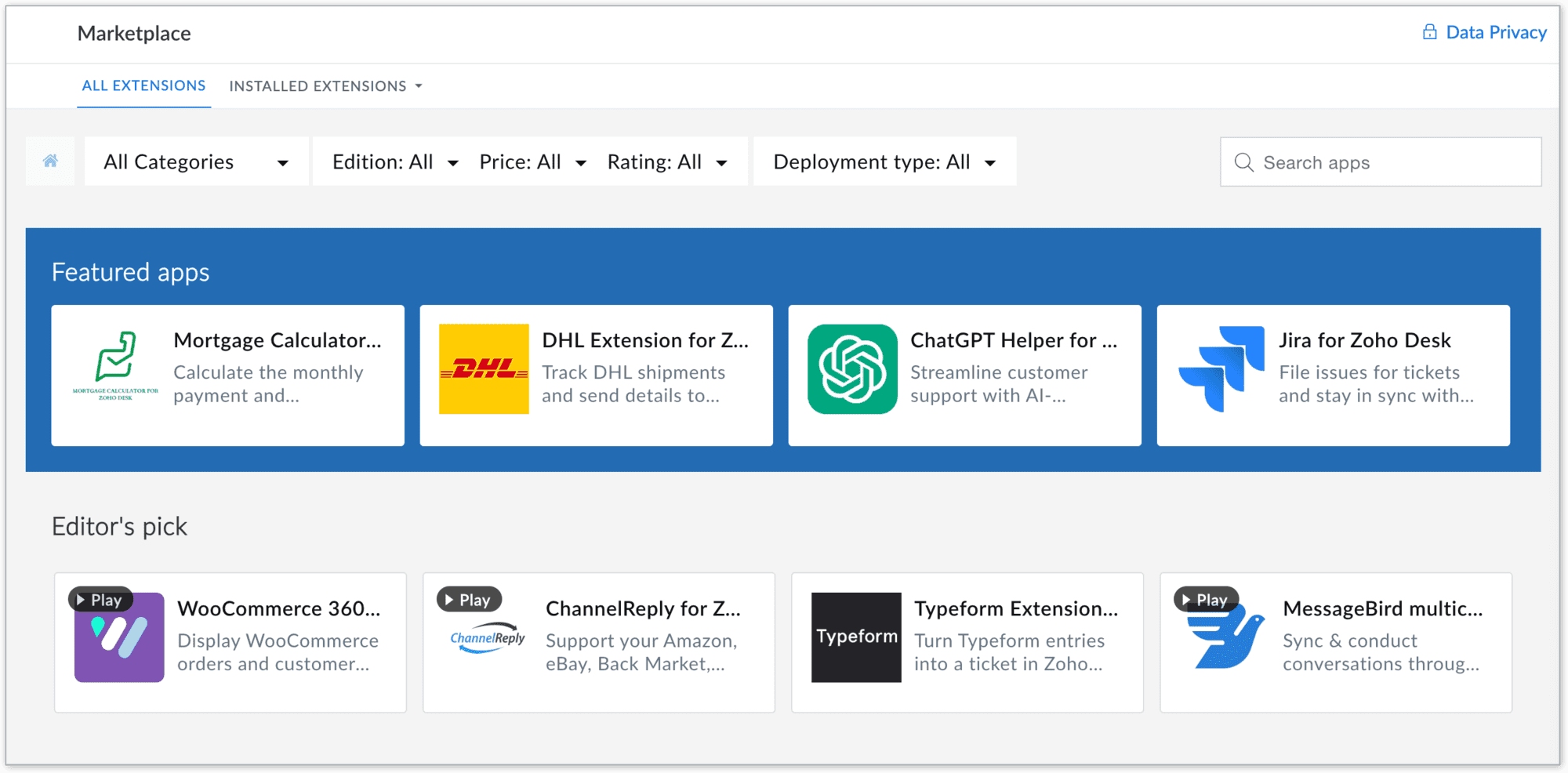
The Marketplace home page is a library of applications that users can install to amplify their business processes.
Marketplace benefits
For users
- Provide a wide range of solutions to access hundreds of ready-to-use apps and extensions across categories like CRM, finance, IM, HR management, marketing and analytics, catering to your business needs
- Quick integrations: All the apps are designed for seamless integration with simplified workflows, eliminating the need for complex development or switching between platforms
- Easy automation of routine tasks, breaking data silos, streamlining processes, and improving team collaboration, resulting in better productivity
- Apps in Zoho Desk Marketplace are thoroughly vetted for quality and security, ensuring that your business data remains safe and reliable
- Enables easy customization and deployment of new functionalities to address unique requirements without requiring coding expertise
- Reduce time and cost by providing out-of-the-box integrations and reducing dependency on expensive custom solutions
For developers
- Showcase expertise by creating solutions for various business needs and industries, enhancing credibility and opportunities
- Access developer resources, sandbox environments, and a streamlined publishing process for hassle-free app deployment
Takeaway
In summary, Zoho Desk's Marketplace is a central hub where businesses can discover, install, and manage apps that extend the functionality of their business, making it easier to meet their diverse needs while unlocking opportunities for growth and increased efficiency.
Please stay tuned for more in the Desk behind-the-scenes series.
Regards,
Kavya Rao
The Zoho Desk Team

Also, read:
Behind the scenes of a successful ticketing system (BTS Series)
- Narrative 13: Importing your data
- Narrative 12: Sandbox - Testing without the risk
- Narrative 11: Are your customers happy?
- Narrative 10: Assignment Rules - Streamlining Ticket Management
- Narrative 9 - GC—Meaningful conversations that benefit your customers
- Narrative 8 - Intelligent in-app support that's instantly available anytime and anywhere
- Narrative 7 - The importance of data sharing
- Narrative 6 - The impact of rebranding
- Narrative 5 - The essential role of SLAs
- Narrative 4 - Exploring the support channels
- Narrative 3 - Comprehending user management
- Narrative 2 - Understanding organizational departments
- Narrative 1 - The significance of a business account
Topic Participants
Kavya Rao Addepalli
Recent Topics
Introducing Connected Records to bring business context to every aspect of your work in Zoho CRM for Everyone
Hello Everyone, We are excited to unveil phase one of a powerful enhancement to CRM for Everyone - Connected Records, available only in CRM's Nextgen UI. With CRM for Everyone, businesses can onboard all customer-facing teams onto the CRM platform toUnknown table or alias 'A1'
I would like to create a subquery but i am getting the following error: Unknown table or alias 'A1' used in select query. This is the sql statement: SELECT A1.active_paying_customers, A1.active_trial_customers, A1.new_paying_signup, date(A1.date_active_customers),in the Zoho creator i have address field based the customer lookup im selecting the addresss , some times the customer address getting as null i want to show as blank
in the Zoho creator i have address field based the customer lookup im selecting the addresss , some times the customer address getting as null ,i want to show as blank instead of showing null. input.Billing_Address.address_line_1 = ifNUll(input.Customers_Name.Address.address_line_1,"");Question about upgrade and storage space Zoho Notebook
After upgarding my Zoho Notebook plan, I am running into the following issue. I just upgraded from a free Zoho Notebook subscription to Pro Lite after I got a notification in my Window Zoho Notebook desktop app saying that I had run out of space. However,how to add email to existing organization i w
I am already registered my organization and i have an email id. I need one more email id but i can't find anywhere .i want the cheapest email id . how to add ?add zoho account
How to add a zoho mail to previous zoho account? I have twoName changed in settings for mailbox but still not changed when typed in To field
In the email account secretary@ i have updaetd the new staff members details but the old members name still appears when I type secretary@ in the To field. I cant work out where Zoho is finding the old name from. I have deleted the browser cache. If IPrinting to a brother label maker
I see allot of really old unanswered posts asking how to print to a label maker from a zoho creator app. Has their been any progress on providing the capability to create a customized height & width page or print template or whatever to print labels?Sync desktop folders instantly with WorkDrive TrueSync (Beta)
Keeping your important files backed up and accessible has never been easier! With WorkDrive desktop app (TrueSync), you can now automatically sync specific desktop folders to WorkDrive Web, ensuring seamless, real-time updates across devices. Important:Track online, in-office, and client location meetings separately with the new meeting venue option
Hello everyone! We’re excited to announce meeting enhancements in Zoho CRM that bring more clarity and structure to how meetings are categorized. You can now specify the meeting venue to clearly indicate whether a meeting is being held online, at theCalling the new 'Custom API' feature from within a Custom Widget
From what I've learned it is not possible to call an endpoint from the new "Custom API" feature within a Creator Widget. The SDK's doesn't support it yet, when calling it natively you end up with CORS issues or at least I couldn't get it working evenAnnouncing new features in Trident for Mac (1.32.0)
Hello everyone! We’re excited to introduce the latest updates to Trident, which are designed to reinforce email security and protect your inbox from evolving threats. Let’s take a quick look at what’s new. Deliver quarantined emails. Organization adminsMarketing Tip #5: Improve store speed with optimized images
Slow-loading websites can turn visitors away. One of the biggest culprits? Large, uncompressed images. By optimizing your images, your store loads faster and creates a smoother shopping experience leading to higher sales. It also indirectly improves SEO.PDF Attachment Option for Service Reports
Hello Team, I would like to check with you all if there is an option to attach PDF documents to the service reports. When I try to attach a file, the system only allows the following formats: JPEG, JPG, and PNG. Could you please confirm whether PDF attachmentsZoho Browser??
hai guys, this sounds awkward but can v get a ZOHO BROWSER same as zoho writer, etc. where i can browse websites @ home and continue browsing the same websites @ my office, as v have the option in Firefox, once i save and close the browser and again when i open it i will be getting the same sites. If u people r not clear with my explanation, plz let me know. Thanks, SandeepSMS to customers from within Bigin
Hi All, Is there anyone else crying out for Bigin SMS capability to send an SMS to customers directly from the Bigin interface? We have inbuilt telephony already with call recordings which works well. What's lacking is the ability to send and receiveAdmins cannot see each others' Scheduled Reports?!
Very frustrating that as an admin I cannot see what my reports my fellow admins have created and scheduled. After asking about this on the help chat, I was told the issue is trust and security. By giving someone Admin status, it means we trust them with those responsibilities. Please change this, it is not a good process to have to bother other users to change a report or change users within a report.Automatically CC an address using Zoho CRM Email Templates
Hi all - have searched but can't see a definitive answer. We have built multiple email templates in CRM. Every time we send this we want it to CC a particular address (the same address for every email sent) so that it populates the reply back into ourWriter update results in BitDefender blocking it as malware
After updating Writer to latest update, Bitdefender blocked the app and writer no longer runs.Is there a way to invoke deluge function from within a widget?
Hi! I have custom functions in deluge and I was wondering whether there is any way to call this function through a widget? Something like on click of a button inside a widget, run the deluge custom function. Would this be possible?Missing Import Options
Hello, do I miss something or is there no space import option inside of this application? In ClickUp, you can import from every common application. We don't want to go through every page and export them one by one. That wastes time. We want to centralizeZoho CRM Portal Field Level Permission Issue
Hi Support Team, I am using the Zoho CRM Portal and configuring field-level editing permissions. However, we are unable to restrict portal users from editing certain fields. We have created a portal and provided View and Edit (Shared Only) access forWhy am I seeing deleted records in Zoho Analytics syncing with Zoho CRM?
I have done a data sync between Zoho CRM and Zoho Analytics, and the recycle bin is empty. Why do I see deleted leads/deals/contacts in Zoho Analytics if it doesn't exist in Zoho CRM? How can I solve this problem? ThanksZoho Tables is now live in Australia & New Zealand!
Hey everyone! We’ve got some great news to share — Zoho Tables is now officially available in the Australian Data Center serving users across Australia and New Zealand regions! Yes, it took us a bit longer to get here, but this version of Zoho TablesCustom Fonts in Zoho CRM Template Builder
Hi, I am currently creating a new template for our quotes using the Zoho CRM template builder. However, I noticed that there is no option to add custom fonts to the template builder. It would greatly enhance the flexibility and branding capabilities ifIntroducing the Zoho Projects Learning Space
Every product has its learning curve, and sometimes having a guided path makes the learning experience smoother. With that goal, we introduce a dedicated learning space for Zoho Projects, a platform where you can explore lessons, learn at your own pace,All new Address Field in Zoho CRM: maintain structured and accurate address inputs
The address field will be available exclusively for IN DC users. We'll keep you updated on the DC-specific rollout soon. It's currently available for all new sign-ups and for existing Zoho CRM orgs which are in the Professional edition. Latest updateCollaboration with customers made easy with Zoom Meeting and Zoho Desk integration
Hello everyone! We are happy to announce that you can now integrate your Zoho Desk account with Zoom Meeting. The integration bridges the gap between digital communication and human connection, empowering teams to deliver timely support when it mattersCRM Canvas - Upload Attachments
I am in the process of changing my screens to Canvas. On one screen, I have tabs with related lists, one of which is attachments. There doesn't appear to be a way to upload documents though. Am I missing something really obvious? Does anyone haveTrueSync regularly filling up my local disk
Seems that WorkDrive's TrueSync randomly starts filling up my local hard drive space. None of the folders have been set as "Make Offline" but still it seems to randomly start making file offline. The settings of the app is so minimal and is of no realKaizen #194 : Trigger Client Script via Custom buttons
Hello everyone! Welcome back to another interesting and useful Kaizen post. We know that Client Scripts can be triggered with Canvas buttons and we discussed this with a use case in Kaizen#180. Today, let us discuss how to trigger Client Script when a[Webinar] A recap of Zoho Writer in 2025
Hi Zoho Writer users, We're excited to announce Zoho Writer's webinar for January 2026: A recap of Zoho Writer in 2025. This webinar will provide a recap of the features and enhancements we added in 2025 to enhance your productivity. Choose your preferredPicklist field shows "none" as default
Hello, Is there an option to avoid showing "none" as the default value in a picklist field? I also don't want to see any option displayed. My expectation is to have a blank bar, and then when I display the drop-down list, I can choose whichever I waStage-probability mapping feature in custom module
Hi, I'm building a custom module for manage projects. I would like to implement the stage-probability feature that Potentials has. Is this possible?Create static subforms in Zoho CRM: streamline data entry with pre-defined values
Last modified on (9 July, 2025): This feature was available in early access and is currently being rolled out to customers in phases. Currently available for users in the the AU, CA, and SA DCs. It will be enabled for the remaining DCs in the next coupleField Description is very small
Hello, The field Description in the activity is very small. Why don't try open a new window, or a bigger popup, or increase the width of the "popup". Example:StatusIQ
Please add StatusIQ to data sources. We using site24x7 and StatusIQ together and site24x7 integration is already there. Thanks and regards, TorstenIn Zoho People, the Operations buttons are frequently not visible or do not appear consistently.
In Zoho People, the Operations buttons are frequently not visible or do not appear consistently. We request you to please investigate and address this issue, as it is affecting daily HR operations and user access.Marketing Tip #14: Increase cart value with product bundles
Bundling products is a great way to increase average order value while giving customers more convenience. Think “camera + tripod + memory card” or “soap + lotion + bath salts.” Bundles make shopping easier and feel like a better deal. It’s a win-win forProblem with Workdrive folders
I'm having a problem a problem accessing files in a Zoho work drive folder when using the Zoho writer app. The problem folder appears grayed out in the Zoho work drive window in both the online and writer application. However I can open the folder inNext Page