Recrutement - Gestion des CVs

Avoir la bonne personne pour le bon poste dans votre organisation est un atout pour votre entreprise. Cependant, l'ajout de candidats compétents et qualifiés à votre organisation est un défi, que vous soyez une PME ou une entreprise de plus grande taille.
D'une part, il est difficile de trouver des talents bien formés et, d'autre part, trier les CV et les candidatures qui s'accumulent et sélectionner les meilleurs talents est une tâche énorme pour les recruteurs.
Une solution optimale est l'identification des candidats qualifiés dans le vaste réservoir de candidatures, qui doit être effectuée dès le début du processus d'embauche. Cela permettra à vos recruteurs de ne pas perdre de temps et de ressources organisationnelles en éliminant les candidats qui ne répondent pas aux critères.
Découvrons comment vous pouvez gérer les CV dans Zoho One depuis son service de Zoho Recruit.
Analyseur de CV
Intérêt d'un analyseur de CV
- Vitesse et efficacité de la saisie de données - En fonction du secteur dans lequel vous opérez, vos candidats peuvent inclure une variété de sous-sections et de points de données dans leur CV sans suivre un système. Cela peut rendre le traitement manuel fastidieux pour votre responsable RH. Un analyseur de CV vous permettra d'accélérer vos activités de saisie de données et donc de gagner un temps précieux.
- Erreur réduite - Pour améliorer l'image de votre marque en matière de recrutement et offrir une expérience excellente aux candidats dès le premier jour, ces analyseurs de CV sont utiles puisqu'ils réduisent la marge d'erreur.
- Cohérence des données - Les recruteurs reçoivent chaque jour un nombre incroyable de CV dans différents formats (pdf, docx, etc.). Avec un analyseur de CV, vous pouvez standardiser un format dans lequel les CV peuvent être stockés dans votre base de données. Cela vous permet de gérer efficacement d'énormes pools de candidats et d'éviter toute confusion.
Analyseur de CV dans Zoho Recruit
Dans Zoho Recruit, vous pouvez analyser des CV par
- Copier-coller le CV
- Extraire de CV du web
- Extraire des CV des e-mails
Configurer l'analyseur de CV
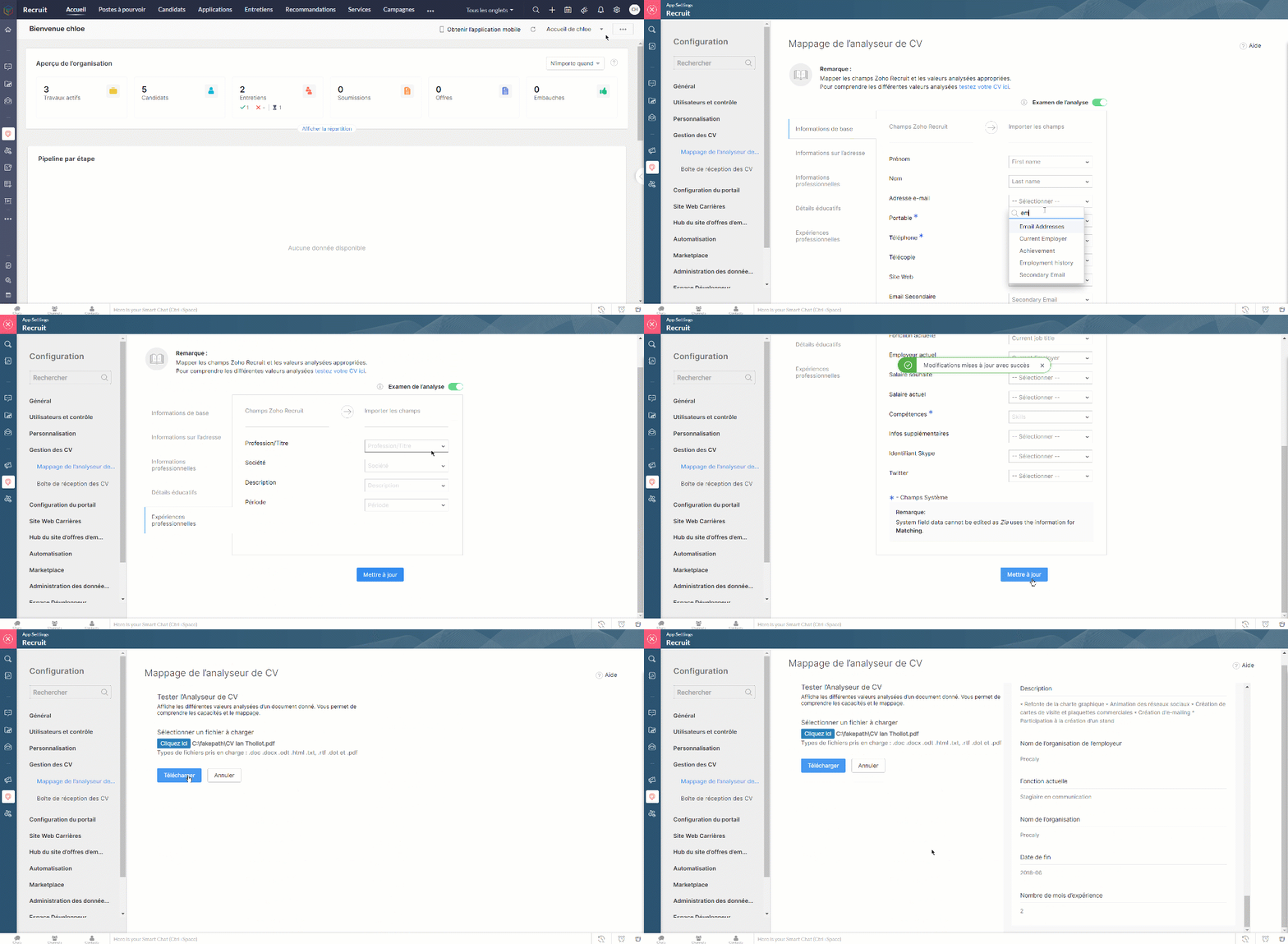
- Paramètres > Gestion des CV > Mappage de l'analyseur de CV
- Configurez les champs Zoho Recruit avec les champs correspondants à importer.
- Il y a des champs par défaut que vous ne pouvez pas modifier.
- Testez depuis l'onglet " Testez votre CV ici"
- Cliquez sur "Mettre à jour".
- Activez l'option "Revue de l'analyse", lorsque vous souhaitez revoir les informations sur les candidats que vous avez étudiés.
Copier-coller le CV
En tant qu'un responsable de recrutement de votre organisation, vous recevrez plusieurs CV à partir de sources différentes. Grâce à la fonctionnalité copier-coller des CV, vous pouvez facilement ajouter des candidats à votre compte Zoho Recruit en copiant et collant le texte du CV du candidat.
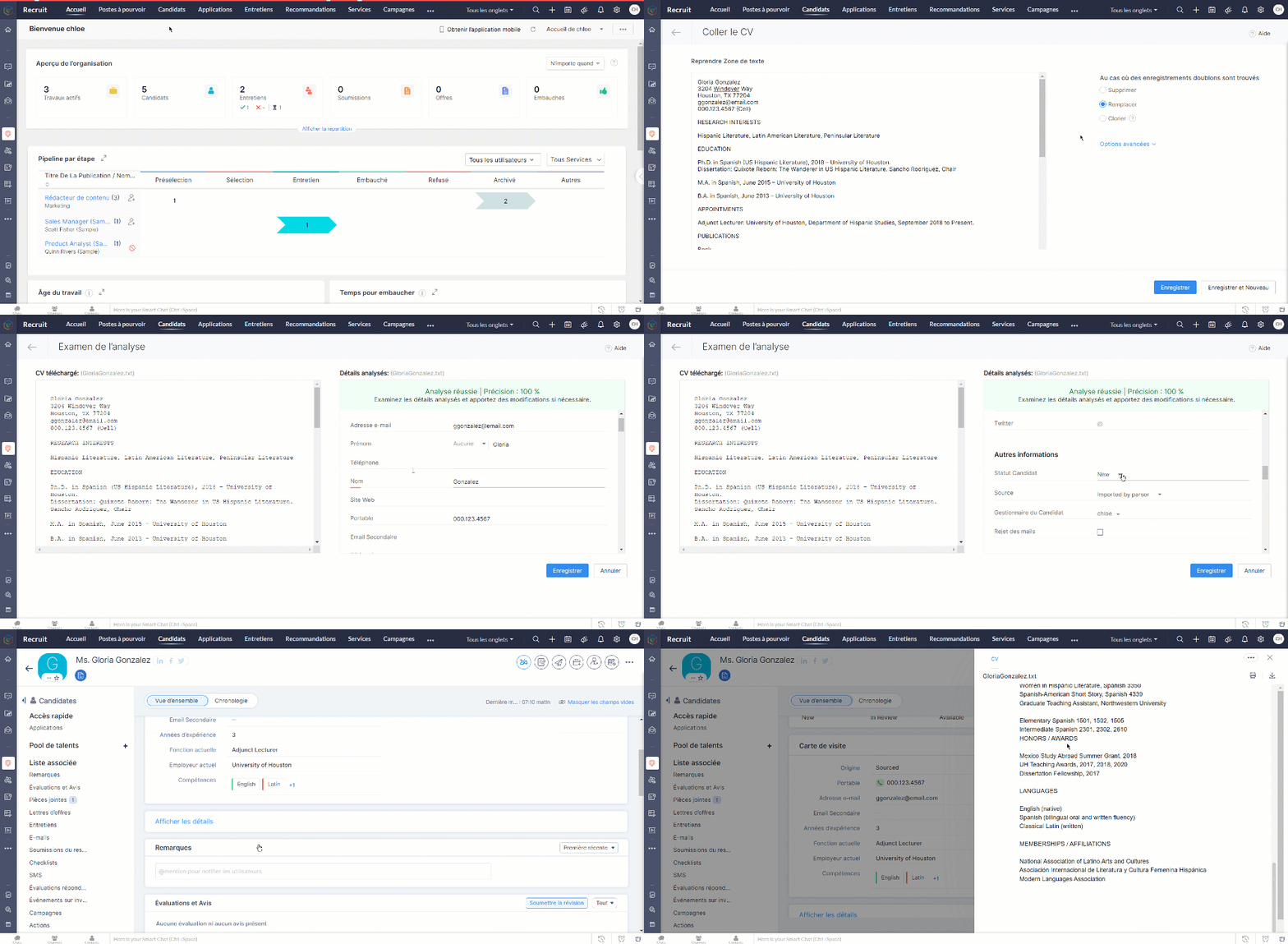
- Copiez le texte CV à coller
- Allez sur l'onglet "Candidat"
- Cliquez sur "Importer" > "Coller le CV"
- Collez le CV sur la section qui s'affiche.
- Paramétrez les enregistrements doublons, enregistrez
- Examinez les détails analysés et apportez des modifications si nécessaire, enregistrez.
Extraire des CV du Web
La recherche de candidats au travers des sites d'emploi, des sites carrière, et de multiples autres sources peut le plus souvent sembler une tâche herculéenne. Avec l'extracteur de CV de Zoho Recruit, plus besoin de télécharger, de convertir ou de saisir manuellement les informations relatives aux candidats. Vous pouvez extraire un CV de n'importe quelle page web d'un simple clic, avec une extension chrome de "Zoho Recruit Resume Extractor"
Bon à savoir
Pour accéder à l'extension Resume Extractor, les utilisateurs doivent avoir :
- Accès aux modules Candidats
- Autorisation d'importer un CV
- Autorisation d'associer un candidat à un poste à pourvoir.
Extraire un CV
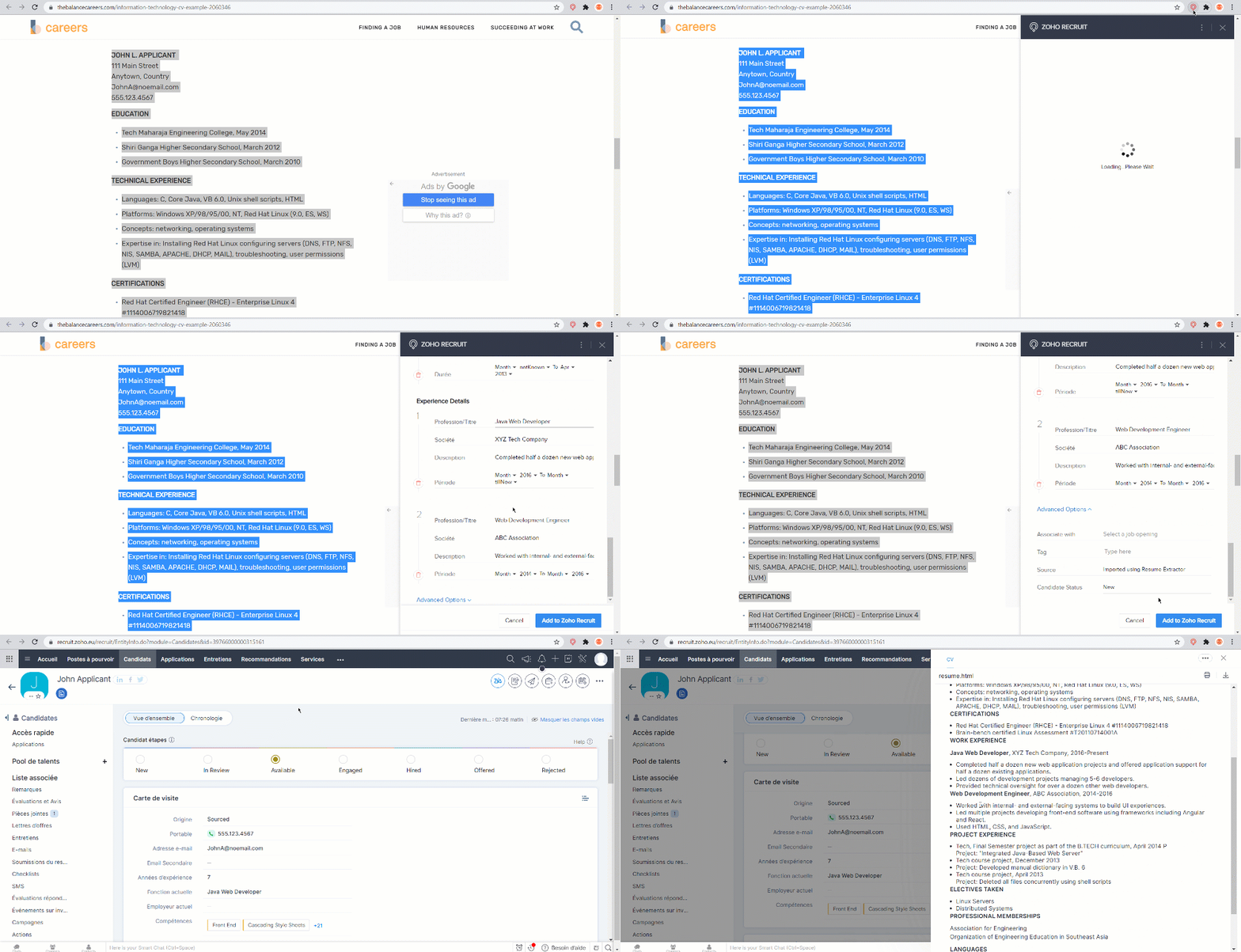
- Téléchargez et installez Resume Extractor dans votre navigateur Google Chrome.
- Connectez-vous au site d'emploi, sélectionnez le texte du CV que vous souhaitez importer.
- Cliquez sur l'icône Resume Extractor dans la barre d'outils du navigateur.
- Le CV est extrait et les informations s'affichent dans le formulaire, cliquez "Ajouter à Zoho Recruit".
- Un nouveau candidat est créé sous l'onglet "Candidat".
Gérer des champs dans un Resume Extractor
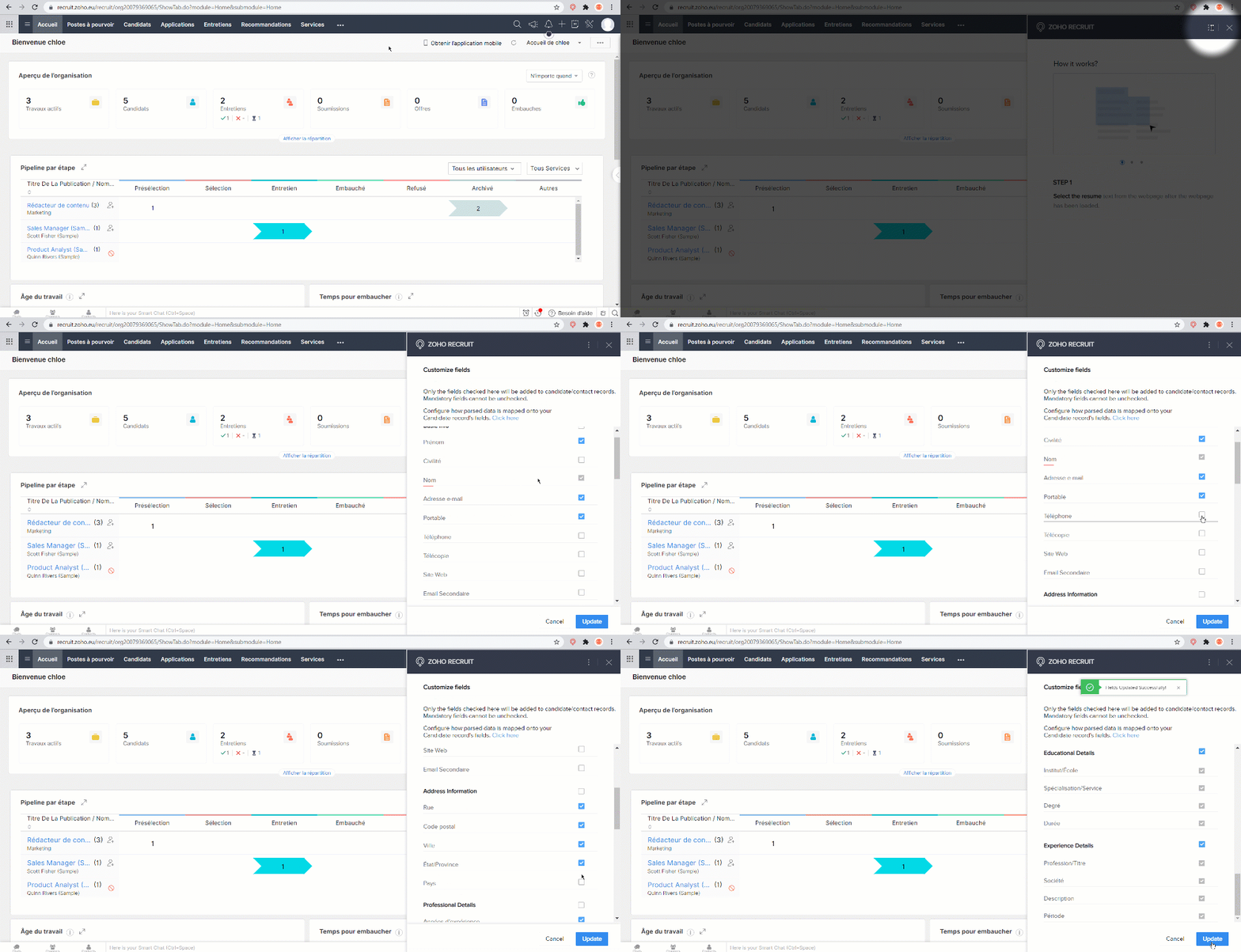
- Cliquez sur l'extension Resume Extractor
- Cliquez sur "Plus" , sélectionnez "Personnalisation"
- Sélectionnez les informations vous voulez extraire, cliquez "Mise à jour".
Extraire des CV des e-mails (Resume Inbox)
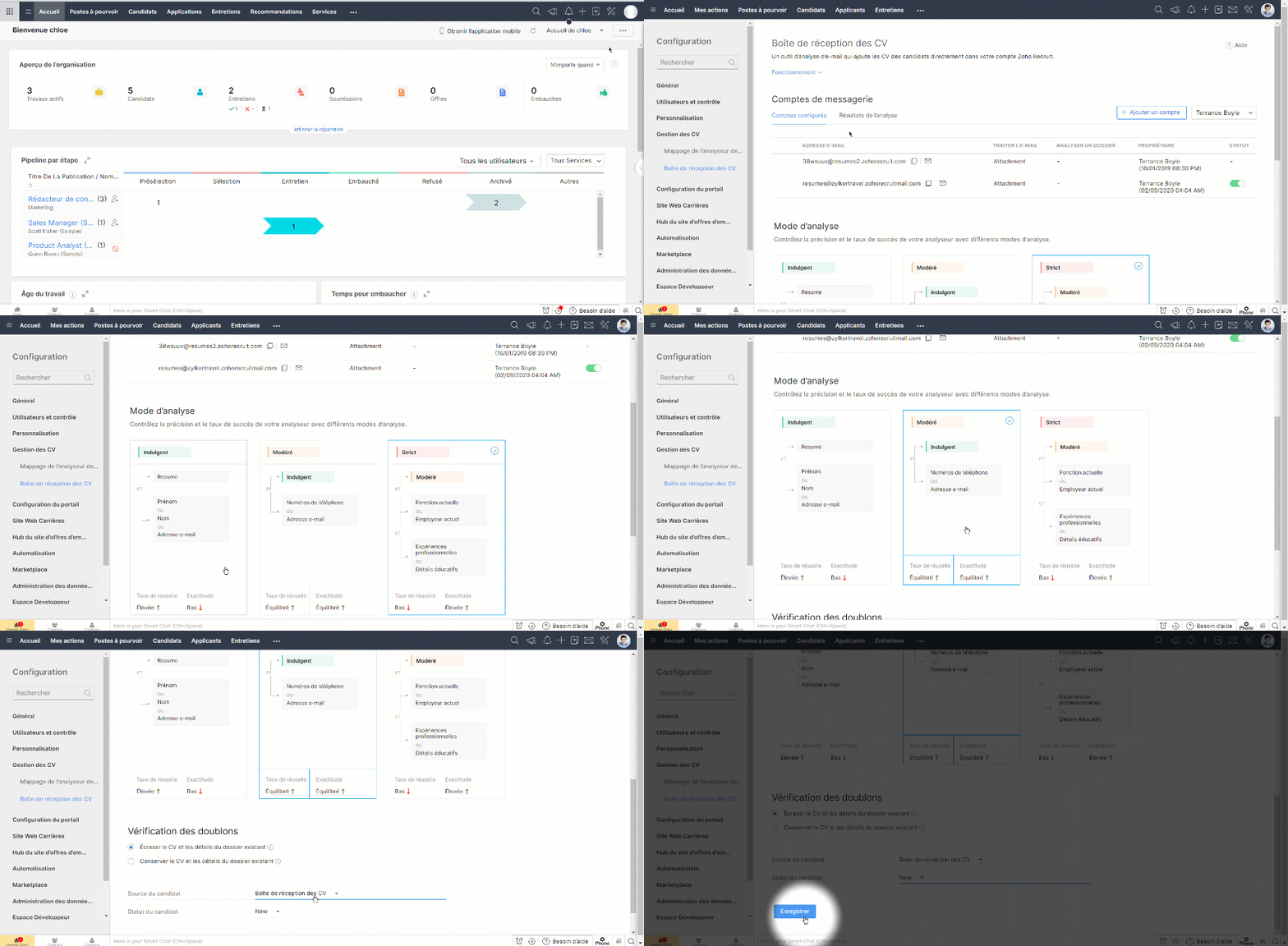
Resume Inbox est un outil d'analyse convivial qui vous permet d'analyser automatiquement les CV envoyés en pièces jointes et de les ajouter directement à votre compte Zoho Recruit. Ajoutez votre compte e-mail comme boîte de réception de CV et choisissez l'un des trois modes d'analyse syntaxique : Agréable, Modéré et Strict, chacun avec des précisions et des taux de réussite équilibrés.
Configurer Resume Inbox
- Paramètres > Gestion des CV > Boîte de réception des CV
- Dans la section Comptes configurés, vous pouvez afficher et gérer vos boîtes de réception de CV.
- Choisissez un mode d'analyse syntaxique et équilibrez la précision et le taux de réussite de votre analyseur syntaxique.
- Dans la section "Vérification des doublons", sélectionnez "Écraser les données existantes du candidat" ou "Conserver les données existantes du candidat" pour effectuer l'action correspondante lorsque des enregistrements en double sont trouvés. Les enregistrements en double sont identifiés à l'aide de l'adresse e-mail fournie dans le CV.
- Cliquez sur enregistrez. Voila, votre boîte de réception de CV est à présent configurée. Vous serez en mesure d'ajouter des enregistrements de candidats dans votre compte Zoho Recruit en analysant les CV envoyés comme pièces jointes aux e-mails.
Nous continuerons d'en découvrir les étapes suivantes dans nos prochains articles. En attendant, n'hésitez pas à poser vos questions en commentaire.
L'équipe Zoho France
Topic Participants
Kinjal Lodaya
Sticky Posts
Collaboration sans faille avec Zoho One
Bonjour à tous, Dans cet article nous allons voir comment Zoho One permet une collaboration à différents niveaux . La façon dont nous travaillons évolue. À mesure que les entreprises se mondialisent, la plupart des activités sont menées en équipe.
Recent Topics
YouTube Live streaming? how to? Zoom has this feature, built-in. Can't find it on zoho meetings.
YouTube Live streaming? how to? Zoom has this feature, built-in. Can't find it on zoho meetings.Feature Request - A Way To Search Item Groups
Hi Inventory Team, I can't find any way to filter or search by fields of Item Groups. It would be great to see that functionality added. I have a use case where a single product might come from 5 or more suppliers and each supplier's item is an Item inFeature Reqeust - Include MPN In Selectable FIelds
I have noticed that the MPN is not available to show in the list view of Items. Please consider adding it as EAN, UPC and ISBN are all available, so it doesn't make much sense to exclude this similar option. Thanks for considering my feedback.Feature Request - Option To Hide Default System Fields on Items
Hi Zoho Inventory Team, As far as I know it is not possible to hid some of the defult system fields on Items, such as UPC, MPN, EAN, ISBN. A good use case is that in many cases ISBN is not relevant and it would be an improved user experience if we couldMaking an email campaign into a Template
I used a Zoho Campaign Template to create an email. Now I want to use this email and make it a new template, but this seems to be not possible. Am I missing something?Campaigns does not work!
I am running into so many problems trying to use Zoho Campaigns, that I am seriously considering dropping the app from my (shrinking) list of Zoho applications I actually use. Apart from having to fight the software trying to create a design and email,Feature Request - Make Available "Alias Name" Field In Item List View
Hi Zoho Inventory Team, I have noticed that the "Alias Name" field does not appear on the list of selectable columns in the Customise Columns feature in the Items module. This would be very useful to see for businesses who are using the Alias Name fieldMarketing Automation
L.S. Marketing Automation is and has always been part of the Zoho One bundle - according to the information provided on the Zoho Website. Why when I open Marketing Automation do I get the following message?: "Your trial has expired. We hope you enjoyedCliq iOS can't see shared screen
Hello, I had this morning a video call with a colleague. She is using Cliq Desktop MacOS and wanted to share her screen with me. I'm on iPad. I noticed, while she shared her screen, I could only see her video, but not the shared screen... Does Cliq iOS is able to display shared screen, or is it somewhere else to be found ? RegardsBigin, more powerful than ever on iOS 26, iPadOS 26, macOS Tahoe, and watchOS 26.
Hot on the heels of Apple’s latest OS updates, we’ve rolled out several enhancements and features designed to help you get the most from your Apple devices. Enjoy a refined user experience with smoother navigation and a more content-focused Liquid Glassproject name field issue- n8n
Hey guys, I have a question. I want to create a new product using the workflow. The problem is with the product name field; I don't know how to fill it in. The workflow starts with retrieving information from the leads table, retrieving links to scrapeAutomatic Matching from Bank Statements / Feeds
Is it possible to have transactions from a feed or bank statement automatically match when certain criteria are met? My use case, which is pretty broadly applicable, is e-commerce transactions for merchant services accounts (clearing accounts). In theseHow to filter Packages in zoho inventory api
Hi Team, I want to perform some tasks in a schedular on the packages which are in "Shipped" state. I tried to use filter_by in my api call but in return I get response as {"code":-1,"message":"Given filter is not configured"} My Api request is as followsCRM
Is anyone else experiencing this issue? Our company is not moving out of using Gmail's web app. It just has more features and is a better email program than Zoho Mail. Gmail has an extension (Zoho CRM for Gmail) that we're using but we've found some seriousZOHO add-in issue
I cannot connect ZOHO from my Outlook. I am getting this error.Automate pushing Zoho CRM backups into Zoho WorkDrive
Through our Zoho One subscription we have both Zoho CRM and Zoho WorkDrive. We have regular backups setup in Zoho CRM. Once the backup is created, we are notified. Since we want to keep these backups for more than 7 days, we manually download them. TheySyncing with Google calendar, Tasks and Events
Is it possible to sync Zoho CRM calendar, task and events with Google Calendar's tasks and events. With the increasing adoption by many major tool suppliers to sync seamlessly with Google's offerings (for instance I use the excellent Any.do task planningHow can i view "Child" Accounts?
It can be very useful in our field of business to know the parent-child account relationship. However, there seems to be a shortcoming in the parent account view: no child account list. How can we view the child accounts per each account?Ability to assign Invoice Ownership through Deluge in FSM
Hi, As part of our process, when a service appointment is completed, we automated the creation of the invoice based on a specific business logic using Deluge. When we do that, the "Owner" of the invoice in Zoho FSM is defaulted to the SuperAdmin. ThisEasily perform calculations using dates with the new DATEDIF function
Hey Zoho Writer users! We've enhanced Zoho Writer's formula capabilities with the new DATEDIF function. This allows you to calculate the difference between dates in days, months, and years. Function syntax: =DATEDIF(start_date, end_date, unit) Inputs:Adding Comments Using Workflows - How to Change User Attributed
We have worklflows in Desk where a comment is added to a ticket based on certain criteria. It seems that the comment added is always attributed to the user who last edited the workflow. This does not make sense for us because: - It's misleading to otherAdd Attachment Support to Zoho Flow Mailhook / Email Trigger Module
Dear Zoho Support Team, We hope you are well. We would like to kindly request a feature enhancement for the Mailhook module in Zoho Flow. Currently, the email trigger in Zoho Flow provides access to the message body, subject, from address, and to address,Conect chat of salesiq with zoho cliq
Is there any way to answer from zoho cliq the chat of salesiq initiated by customers?Les dernières avancées en saisie de données et collaboration
Après une année dédiée à la recherche et au développement, notre équipe est prête à dévoiler des améliorations majeures pour Zoho Sheet. Ces nouveautés seront lancées par étapes afin d’en assurer une prise en main optimale. Nous commençons avec des fonctionnalitésDeluge Learning Series – Client functions in Deluge | January 2026
We’re excited to kick-start the first session of the 2026 Deluge Learning Series (DLS) with Client functions in Deluge. For those who are new to DLS, here’s a quick overview of what the series is all about: The Deluge Learning Series takes place on theRich Text For Notes in Zoho CRM
Hello everyone, As you know, notes are essential for recording information and ensuring smooth communication across your records. With our latest update, you can now use Rich Text formatting to organize and structure your notes more efficiently. By usingImplement Meeting Polls in Zoho Bookings
Dear Zoho Bookings Support Team, We'd like to propose a feature enhancement related to appointment scheduling within Zoho Bookings. Current Functionality: Zoho Bookings excels at streamlining individual appointment scheduling. Users can set availabilityZoho Bookings and Survey Integration through Flow
I am trying to set up flows where once an appointment is marked as completed in Zoho Bookings, the applicable survey form would be sent to the customer. Problem is, I cannot customise flows wherein if Consultation A is completed, Survey Form A would beService Account Admin for API Calls and System Actions
Hello, I would like to request the addition of a Service Account Admin option in Zoho product. This feature would allow API calls and system actions to be performed on behalf of the system, rather than an active user. Current Issue: At present, API callsHow to apply customized Zoho Crm Home Page to all users?
I have tried to study manuals and play with Zoho CRM but haven't found a way how to apply customized Zoho CRM Home Page as a (default) home page for other CRM users.. How that can be done, if possible? - kipi Moderation Update: Currently, each user hasPlease can the open tasks be shown in each customer account at the top.
Hi there This has happened before, where the open tasks are no longer visible at the top of the page for each customer in the CRM. They have gone missing previously and were reinstated when I asked so I think it's just after an update that this featureHow to Customize Task Creation to Send a Custom Alert Using JavaScript in Zoho CRM?
Hello Zoho CRM Community, I’m looking to customize Zoho CRM to send a custom alert whenever a task is created. I understand that Zoho CRM supports client scripts using JavaScript, and I would like to leverage this feature to implement the alert functionality.Send Whatsapp with API including custom placeholders
Is is possible to initiate a session on whatsapp IM channel with a template that includes params (placeholders) that are passed on the API call? This is very usefull to send a Utility message for a transactional notification including an order numberConfigurable Zoho Cliq Notifications for Zoho People Alerts
Hello Zoho People Product Team, Greetings and hope you are doing well. We would like to request an enhancement to Zoho People notifications, enabling a native delivery via Zoho Cliq with admin-level control, similar to the notification settings availableAdd Israel & Jewish Holidays to Zoho People Holidays Gallery
Greetings, We hope you are doing well. We are writing to request an enhancement to the Holidays Gallery in Zoho People. Currently, there are several holidays available, but none for Israel and none for Jewish holidays (which are not necessarily the sameKeep Zoho People Feature Requests in the Zoho People Forum
Hello Zoho People Product Team, Greetings. We would like to submit a feature request regarding the handling of feature requests themselves, specifically for Zoho People. Issue: Feature Requests Being Moved to Zoho One Zoho People feature requests areZO25: The refreshed, more unified, and intelligent OS for business
Hello all, Greetings from Zoho One! 2025 has been a remarkable year, packed with new features that will take your Zoho One experience to the next level! From sleek, customizable dashboards to an all-new action panel for instant task management, we’veIntroducing Multi-Asset Support in Work Orders, Estimates, and Service Appointments
We’re excited to announce a highly requested enhancement in Zoho FSM — you can now associate multiple assets with Work Orders, Estimates, and Service Appointments. This update brings more clarity, flexibility, and control to your field service operations,[Product Update] Locations module migration in Zoho Books integration with Zoho Analytics
Dear Customers, As Zoho Books are starting to support an advance version of the Branches/Warehouses module called the Locations module, users who choose to migrate to the Locations module in Zoho Books will also be migrated in Zoho Analytics-Zoho BooksIntroducing Schedules for smarter availability management
Greetings from the Zoho Bookings team! We’re excited to introduce Schedules, a powerful enhancement to manage availability across your workspace. Schedules are reusable working-hour templates that help you define and maintain consistent availability acrossNext Page