Supercharge your operator productivity by leveraging the power of OpenAI in Zoho SalesIQ
Heads-up: The OpenAI integration is currently available only for users in (US, IN EU, AU and JP region). We will be rolling it out to other regions soon.
From complex neuroscience to simple note-taking, AI has seeped through every part of human lives, and we can only assume it is to stay with us and become a part of our lives moving forward. AI has revolutionized how businesses operate; many companies have already implemented AI in their core operations, saving hundreds of hours and tens of thousands of dollars due to its effectiveness and efficiency.
When we implemented AI features in Zoho SalesIQ, we had to prioritize functionality and reliability over features that are merely trendy. So, for this first phase, our focus was customer support.
Here are the features that have been enhanced by AI:
Become a better scriber with AI
We have introduced a new module in the operator chat window called Writing Assistant powered by OpenAI. Using this, your operators can send better responses to customers. Proofreading is one of the most tiresome jobs, but with the Writing Assistant, you can quickly proofread for spelling, grammar, and tone.
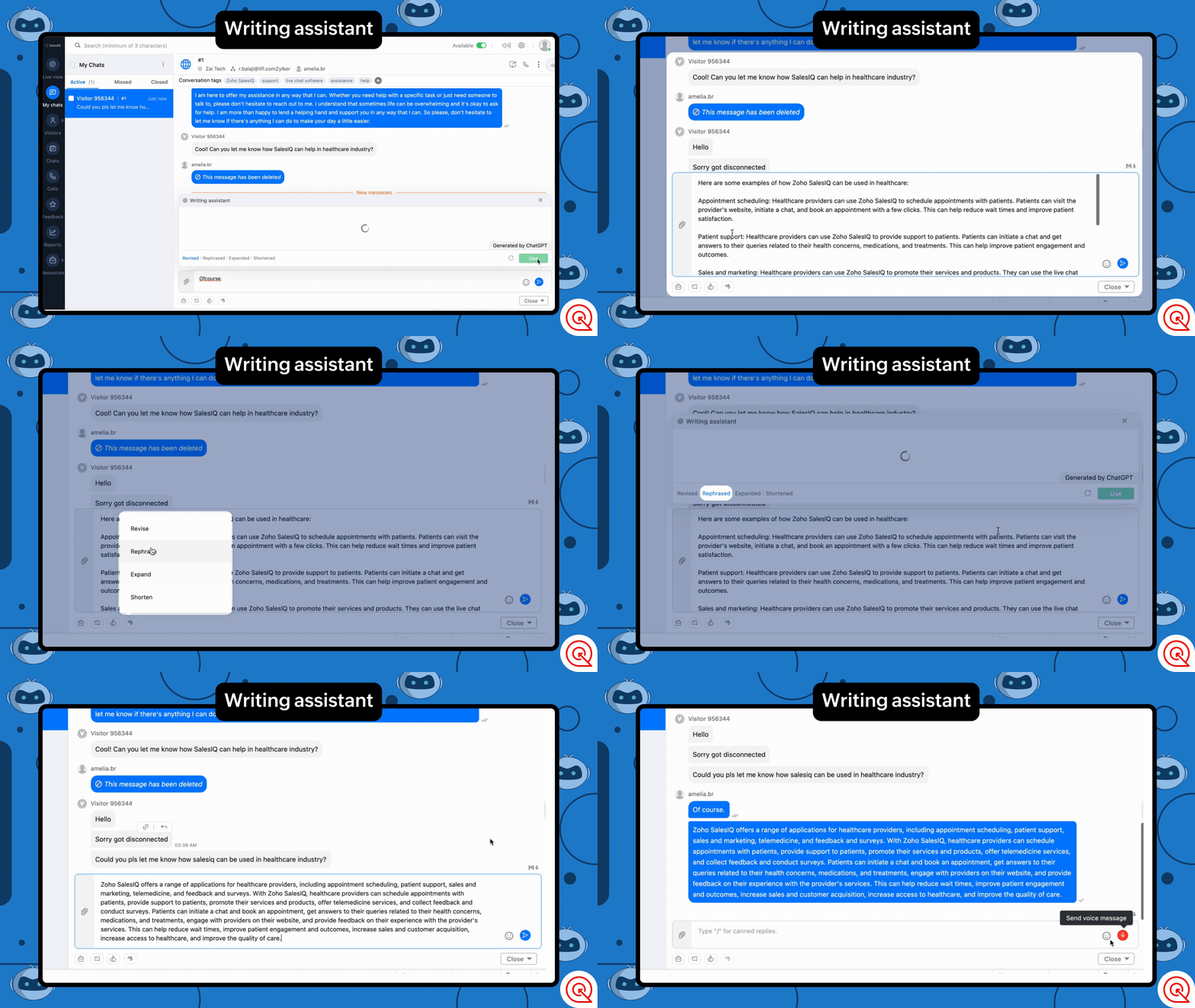
What can it do?
- Rephrase - Paraphrase to enrich the message.
- Shorten - Shorten the message to make the content crisp.
- Expand - Make the message longer to offer a more comprehensive explanation.
- Revise - Checks of grammar and spelling errors in the message.
Conversation summary for quick understanding and recap
Our new feature Summarize powered by OpenAI, will help you get a condensed overview of the entire conversation in actionable points.
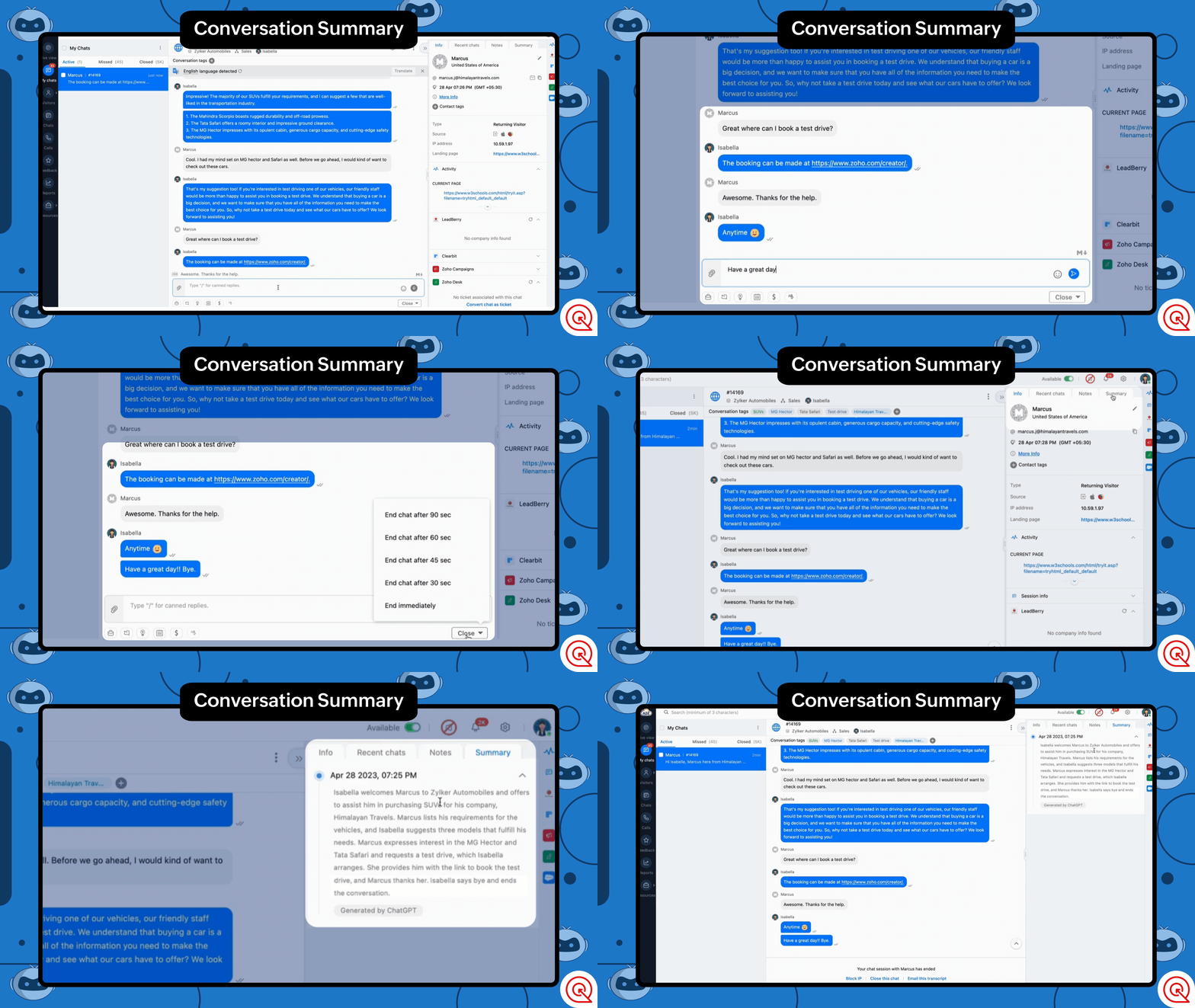
How can this help?
- Get a quick overview or recap of the conversation. Operators can skim through previous conversations to contextual assistance.
- Admins and analysts can now skim through customer chats 10 times faster.
- It can mitigate the need for operators to make conversation overview notes for admins, allowing them to focus on noting down critical drivers.
Quick Tag Suggestions for Better Classification
Tagging can be one of the most compelling features of Zoho SalesIQ when categorizing your conversations. Using Tags, analysts and admins can get in-depth insights into the conversation; it can also be used to understand customer behaviors and trends at a glance.
But manually tagging all the conversations can be tiresome, even more so if you have many untagged chats and want to add tags.
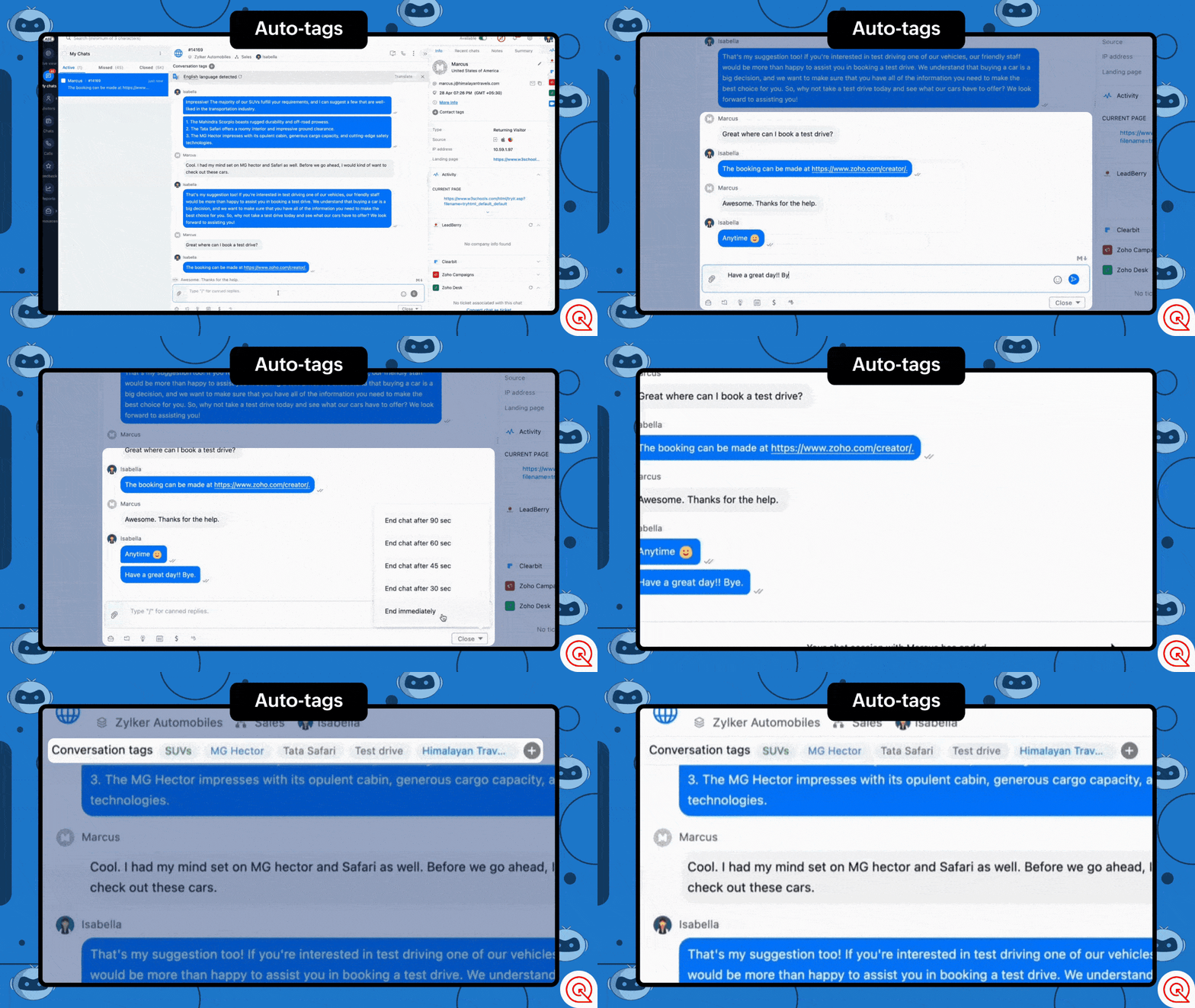
With the tags generation feature, OpenAI can analyze conversations and assign tags to them. You can choose one or both of these options for tag generation.
- Generate and suggest tags - This option allows you to generate new tags or assign existing based on the conversation and assign them with the help of OpenAI.
- Auto-assign tags - This option automatically assigns tags based on the conversation once ended.
Power Up Your Chatbots with ChatGPT
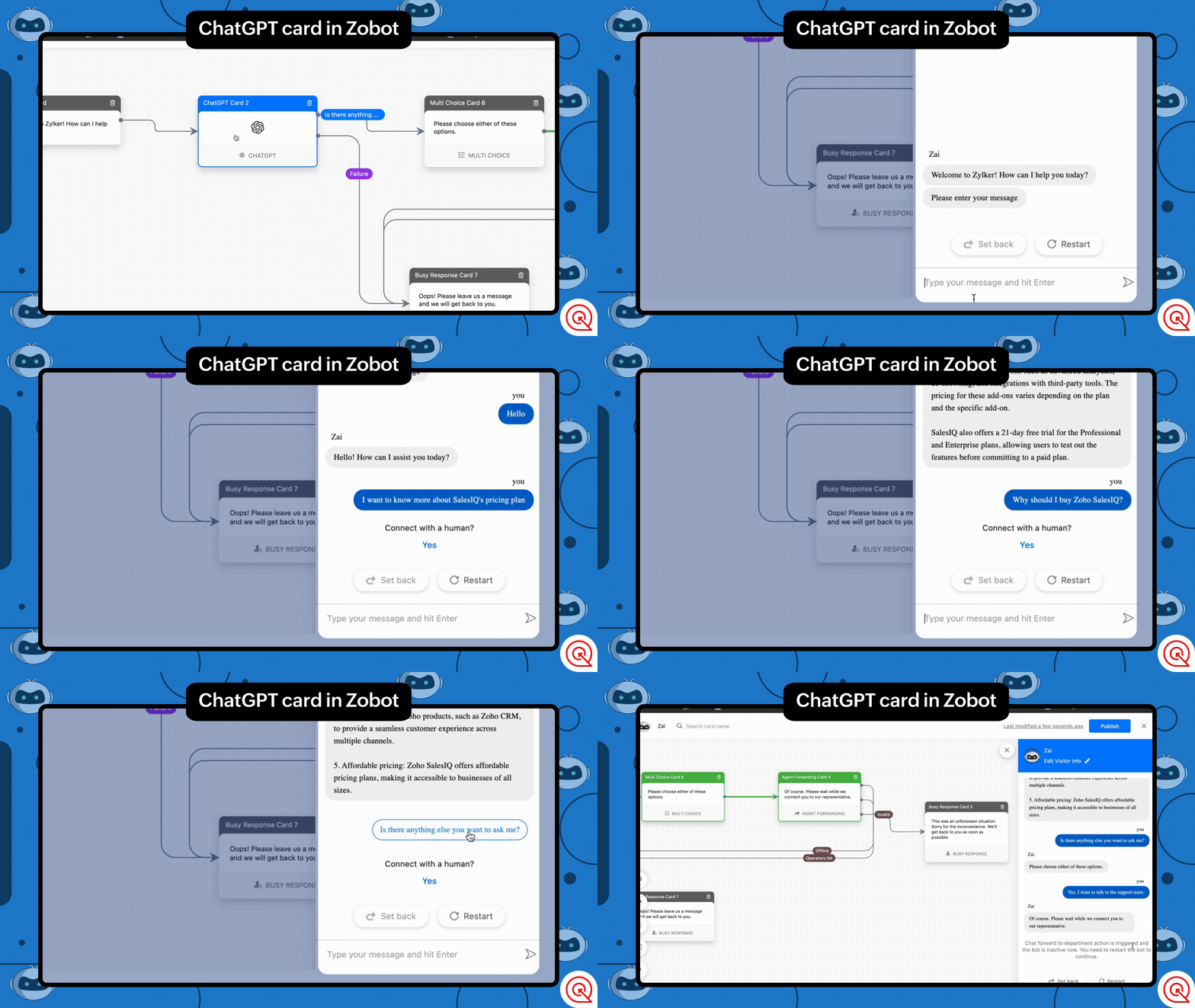
Take your chatbots to the next level and give them a boost by connecting them directly with ChatGPT, allowing your users to communicate directly with the AI. This feature can enrich your automated conversations by allowing users to ask general questions about your business domain or questions that are outside your area of expertise. With AI in the picture, your chatbots can become smart assistants that keep your visitors engaged.
Here is an example on how you can use the block in your chatbot:
Assuming you run a car retail business, you can set up the this block to help visitors with general questions about cars or how they work. ChatGPT can intuitively assist your visitors with these questions.
With features like the Writing Assistant, Summarize, and Tag generation, businesses can improve efficiency, accuracy, and personalization. As AI technology improves and becomes more reliable, we will be looking forward to further automating features of Zoho SalesIQ.
We hope that these features would add great value to operators and admins and to provide optimal support for your users. We are not stopping with this, as AI evolves and becomes more reliable we will be adding more AI based features or core functions of Zoho SalesIQ. Until then, please use this integration and let us know your suggestions. We are happy to hear back from you.
Get Started Now
Caution: Please be aware of the privacy concerns of using OpenAI. We prioritize protecting user data and encourage users to read more about OpenAI privacy policies. Read More.
Regards,
Naveen
Topic Participants
Naveen Chandar
Sushil Bhattachan
director
Adam LV
BeeTravel
Sticky Posts
Important update: Migrate to the new SalesIQ live chat widget before November 30, 2026
The old SalesIQ live chat widget will be deprecated on November 30, 2026. This is a final reminder to migrate to the new SalesIQ live chat widget before this date. After November 30, 2026, the old widget will no longer be maintained, which can lead toPlug Sample #9 - Get Notified on Cliq When Your Premium Customers Interact with SalesIQ's Zobot
Hi everyone! We're here with another simple yet effective plug for your chatbot to integrate with Zoho Cliq to make your job easier. Just imagine whenever a potential lead or your premium customers are on your website, and they engage with your chatbot,Your bot just got smarter: AI-Powered routing that reads between the lines
What if your bot could tell the difference? Between a visitor who just needs a quick answer, someone actively comparing options, and a frustrated customer one click away from leaving? Most bots can't. They deliver the same response to everyone, missingRight Moment, Right Message, Right Operator: Never Miss a High-Intent Lead
Ever been on a website or app, thinking “Should I buy this or not?” and suddenly a friendly message “Hi! How can I help you?” pops up at the perfect moment? That’s not luck. That’s timing done right. Engaging right visitors at the right moment, with theSpeak Your Customers' Language: SalesIQ's chatbots now support 30 languages 🤖
We're unveiling some major upgrades to our chatbot that are set to revolutionize your experience! Now SalesIQ support 30 languages for both Zobot and Answer bot. By speaking your customers' language, you can enhance engagement, improve customer satisfaction,
Recent Topics
Zoho Plug In
Is there anyone out there who is able to use it? I have seen lots of problems posted, unable to get any satisfactory suppport at the moment! I would be really appreciate hearing from users that have it installed and working, my team are loosing belief it will ever work. Be great to hear from those that have a more positive experienceOutlook to Zoho sync
I am the admin for our company and I have (1) single user that is having difficulties with her emails syncing. I have found where the problem is, but I don't know 100% if what is happening is how the plug-in works or if it's a setup issue. My boss createdCant' find the CRM plug in for outlook
I want to be able to tag emails that I have received into accounts. But I can't find the plug in for out look in the other apps section. Where can I download it from?Problems with Zoho CRM Microsoft Outlook Plug-In (Add-On)
I am having problems with the Zoho CRM Microsoft Outlook Plug-In. I was able to install and setup the Plug-In correctly I believe in Microsoft Outlook, but contacts are now being created in Zoho CRM when an email is sent from MS Outlook. A contact is created and appears under Contacts in Zoho CRM but no other information is populated in the fields; for instance only the name is there (for instance "rfairley" ) which matches the beginning of their email address; but no phone numbers. Also, otherzoho for outlook
it would be woderfull to be able to add an email to a case, just as it is possible to add an email to a potential VincentMail Addon issue
Hi, I am trying to make the mail add on feature work without clutter. The issues is that all emails from the contact are being listed in every opportunity that contact is involved in/ linked to. I want to filter out the emails that are not relevant to the opportunity. It is ok to have all the mails of a contact under in the contact module. But under the opportunity it shall show only the relevant emails. Is there a way i could do this? Atleast if I could manually assign or amend the listed emailsEliminate duplicate tickets in one department using Email Deduplication
Hello everyone, A department can have multiple email addresses designed for different purposes for example, support@zpad.com and help@zpad.com. When a customer sends an email or thread response to both addresses, or includes both in the To, CC, or BCC"Pinning" a Note
It would be really helpful to have a way to "Pin" a note to the top of the notes section. This is really important when you have something important about someone and do not want the note to get buried farther and farther down the note stream. For instance:ChatGPT Plugin / MCP Server auth error
Hi all I'm trying to connect the ChatGPT plugin for Zoho CRM but after username stage of the auth process, I get this error from the URL https://mcp.zoho.eu/mcp-client/ {"error_description":"Invalid request url, Request is not as per defined in oauthFeature Request - Copy Reschedule Link
Hi Bookings Team, I had a client contact me today, to let me know that she can't make a meeting she booked this week. I can't remember if I included a reschedule link in email notifications, but I was thinking that it would be great if I could just openIssue While Rescheduling Interviews in Zoho Recruit
Dear Zoho Support Team, We are facing an issue with the Interview Rescheduling functionality in Zoho Recruit integrated with Microsoft Teams. Problem Description When an interview is rescheduled through Zoho Recruit: The new interview is created successfullyEnhancement Request for Job Publishing Management in Zoho Recruit
Provide a centralized view to Publish/Unpublish job openings across: - Job Portals - Career Portal - Employee Referral Portal Add filters to view job openings based on: Published to Career Portal Published to Employee Referral Portal Published to specificMass Update Option for Changing Work Order Owner
Hello FSM Team/Mr. Abid, We would like to inquire if there is an option to mass update or bulk change the Owner of Work Orders in Zoho FSM. Current Situation: At the moment, the Owner of a Work Order can only be changed individually, which becomes time-consumingAs notificações enviadas pelo webhook da API de Notifications do Zoho CRM consomem créditos de API?
Olá, Estamos avaliando a API Notifications v8 do Zoho CRM para enviar notificações ao nosso webhook quando um Deal for criado ou atualizado. Gostaríamos de confirmar especificamente se o Zoho cobra créditos de API por cada notificação enviada para a notify_url.Categorize Items with Item Headers
Hello customers, Did you ever want to classify items based on specific categories to help your customers understand your invoice better? With the new Item Header feature, you can easily categorize items in your invoices and estimates and give them a common title. Item Headers are available in the Invoices, the Recurring Invoices and the Estimates module. It can be carried forward from estimates to invoices at the time of converting the estimates. To add an item header: Go to the Estimates, InvoicesCareers Site & Job Openings
Hello, It would be good to have a section in the careers site with past and inactive jobs. On that note, active jobs to automatically move to this section once the target date in the job opening is reached. At the moment, Recruit administrator will haveTeamInbox - Configure Email Sending Delay
Hello, The feature in Zoho Mail to automatically DELAY a sent message by X minutes is a wonderful feature to catch mistakes before they are sent out. Is this possible with TeamInbox? If not, is it on the roadmap to add it in? ThanksZoho Desk API Custom Module not all data is showing up
When i get a record by id for my new module: responseDetailed = invokeurl [ url :"https://desk.zoho.eu/api/v1/cm_tickets_CM/" + record.getJSON("id") type :GET parameters:"" connection:"desk_connection" ]; The response doesnt contain all fields, the fieldCan you sync CRM contacts to TeamInbox?
Can you sync CRM contacts to TeamInbox? Or at least upload them? From what I can see, you have to enter them manually one at a time.Team Inbox Support Is TERRIBLE
Team inbox has the worst support team i've ever dealt with. They take forever to reply to your emails/issues, if you even get a reply. They don't have a phone number so you can't talk with anyone. There is clearly bugs in their system and they don't addressIntroducing ServiceDesk Plus Integration
Integrate Zoho Sprints with ServiceDesk Plus (SDP), a service management system that wraps IT asset management, IT service management, and configuration database management into a unified solution. With this integration, agile teams can track and manageRequest for Backscatter Protection and Filtering Options
Hello Zoho Support, Recently, my domain has been targeted by an email spoofing/backscatter attack. Attackers are using our legitimate email addresses, particularly one as forged sender addresses when sending messages from unauthorized servers. Our SPFKeeping phone number text format exporting from Books to Sheet
We have a custom function that copies data from our customers in Books to Sheets. In the process the customers' phone numbers (unless they contain a space) get treated as numeric values, so leading zeros get stripped off, and in some cases scientificprint preview
We are using microsoft edge, till 12 sep we were getting directly print option. Now we are getting this preview option we have to click print option again. How to bypass this-preview option?NOT SYNCING ORGANIZATIONS-ZOHO BOOKS AND ZOHO INVENTORY
I purchased the zoho books before and again i purchased zoho inventory after 2 day while syncing the orzaniazation i deleted the trial account of inventory and started the new organization on same user. The problem is that the new inventory organizationVehicle Tracking
we have GPS devices that installed on our vehicles, and we would like to know if it's possible to get vehicle live location data from the GPS device To Zoho Creator App. Thank You[Critical] Massive delays with e-mail
It takes half an hour or longer for emails to arrive or replies to go out! Another thing I have noticed with outgoing e-mails is that I see an error message when I click on "Show original" (tab "HEADER"). If I click on the "CONTENT" tab, the mail bodyCliq iOS can't see shared screen
Hello, I had this morning a video call with a colleague. She is using Cliq Desktop MacOS and wanted to share her screen with me. I'm on iPad. I noticed, while she shared her screen, I could only see her video, but not the shared screen... Does Cliq iOS is able to display shared screen, or is it somewhere else to be found ? RegardsZohoのAIエージェント、作り方から使いどころまで。デモとユーザー事例で学ぶ|12/8東京・無料
ユーザーの皆さま、こんにちは。 ゾーホージャパンの中野です。 12月8日(火)、Zohoコミュニティで初めてとなる「Zoho コミュニティ ユーザー総会 2026」を開催します。 年に一度、ユーザーとZoho社員が集まる総会として、今回は100名規模での開催を予定しています。 ユーザー企業の実践事例、AIエージェント / Zoho MCP のデモ、CRM・Campaignsの活用セッションなど、 日頃の交流会よりも幅広いプログラムをご用意しました。 以前のご案内から新たに予定している内容も含め、当日の見どころをご紹介します。How to sync Organisation Contacts to Android / AES
After migration form Exchange compatible server, I got Org Contacts: I've turned on EAS Organisation contacts sync. But on my phone they don't appear and there is no contacts folder to select for these contacts. Only personal contacts. They do appearA way to report on all leads for a given month
Is there a way to report on ALL leads created in one month by source. I need to include both open, closed lost and converted leads. Right now I can only see source of non converted lead and cannot find a way to add the converted leads to the same report. I'm trying to do this to gain insight into my sources of leads, volume in and disposition of each lead.Unable to delete domains from Zoho Campaigns
This error occurs while deleting a domain "This domain cannot be deleted because we've found $1sender addresses associated to it." But I have no more sender addresses of this domain anymore. I can't delete the domain.Ability to translate Zoho CRM Kiosks
Hi team, Is support for translating kiosk text and screen names in the Zoho CRM translation tool planned on the roadmap? Thanks,Number of contacts skipped and not allowed to enter the workflow component.
My contacts were skipped.Automating CRM backup storage?
Hi there, We've recently set up automatic backups for our Zoho CRM account. We were hoping that the backup functionality would not require any manual work on our end, but it seems that we are always required to download the backups ourselves, store them,Account for Cryptocurrency Holdings in Zoho Books/Custom Currencies?
Hello, I've recently started using Zoho to run my small business and I've really been enjoying all of its features. However, I've been struggling to find a way to account for cryptocurrencies in Zoho Books. My company mines a Cryptocurrency token called#21 The Customer Sent Part of It Back
Ravi delivered 200 trays to a customer and raised an invoice for the full order. Two days later, the customer returned 60 trays. The customer had also paid an advance against the invoice. Ravi now needs to account for the returned items, adjust the amountZoho Assist Feature Update: November 2026
Screen Analyzer Zoho Assist’s Screen Analyzer, part of Answer Bot, helps technicians troubleshoot faster during live sessions. Capture the full remote screen or a specific portion, and it instantly analyzes the snapshot to detect errors and issues. ItZoho Assist Feature Update: October 2026
H.265 support for Native Viewer and Mobile Viewer H.265 (HEVC) delivers sharper screen sharing at lower bandwidth than H.264. Already live in the Web Viewer, the codec is now available for the Windows Native Viewer and Mobile Viewers too. Support is inTrident Missing
No way you guys get so close to having trident complete for over a year then just kill it off. Wow just wowNext Page