The Social Playbook - February edition: Why moment marketing works (and how brands use it)
Imagine the final season of your favorite series is about to drop. Your entire feed is talking about it. Trailers everywhere. Fan theories. Hype at 100%.
Now your go-to burger place launches a limited-edition meal box themed around that series—custom packaging, a collectible character inside, and a menu inspired by the show.
Be honest… you’re not just hungry anymore. You want it. You need it. That feeling? That’s not random. That’s "moment marketing."
What's happening here?
Moment marketing is when you start creating content around what’s actually happening in the world. It’s about tapping into real-time moments like a new series drop, a big match, or even a pop culture wave, and using that excitement to connect with your audience in a way that feels natural, fun, and timely. When a brand launches a limited-edition product, a themed post, or even just a clever content during a big moment, it’s not just marketing. It’s joining the conversation.
In the February edition of The Social Playbook, we break down what moment marketing is, how brands use real-time moments to create buzz, iconic examples that worked, and how you can apply it to your own content.
Why moment marketing works
When you connect your content or product to something people already care about, you stop feeling like an ad and start feeling like part of their world.
Here’s how using moments elevates your marketing:
- It builds brand recall and trust
When your audience sees your brand talking about something that’s happening right now, it feels relatable. Over time, this builds both brand recall and trust.
- It increases reach and shares
If your post taps into a moment in a clever way, your audience is more likely to send it to friends, post it on stories, or talk about it. That’s how your reach grows.
- It drives fast sales with FOMO (Limited-edition products)
When brands launch something exclusive around a hyped-up event (a series finale, a tournament, a festival) like limited-edition products, fans don’t want to miss out on something tied to what they love. It’s no longer just a product. It’s part of their passion. And that’s how brands build emotional connections.
Now let's take a look at an example;
During the Cricket World Cup, boAt launched a World Cup–themed edition watch.
It worked because:
- It showed up during a moment cricket fans truly cared about -> built recall and trust
- Fans shared it because it felt cool and personal -> boosted reach
- It was a limited-edition product at the right time -> created FOMO and quick sales
That’s moment marketing done right: right time, right idea, right emotion.

How brands use moment marketing (with real examples)
Brands adapt to moments based on what fits their brand voice, audience, and product. Some go big with campaigns, some keep it simple with packaging or social posts, but the goal stays the same: stay relevant and memorable.
Let’s look at a few popular ways brands have done this really well.
- Limited-edition products and themed packaging
When a big show, movie, or cultural moment drops, some brands create products and packaging inspired by it. When Bridgerton released a new season, several brands jumped in creatively. Brands like Kimirica, Dove, Nykaa, and others launched Bridgerton-inspired packaging and limited-edition products. The designs, colors, and themes matched the vibe of the series This makes fans feel like they were owning a piece of the moment. The launch of Nykaa’s Bridgerton collection resulted in a significant and record-setting boost in sales.

Similarly, when Stranger Things dropped a new season, brands like KFC, Burger King, Kinder Joy, and Miniso introduced themed meal boxes, collectibles, and special products. These weren’t just products, they were experiences fans wanted to be part of.

- Timely and relatable social media content
Some brands use the moments just by showing up at the right time with the right content. Whether it's creating posts, visuals, or captions linked to trending shows, events, or pop culture moments, brands insert themselves into conversations audiences are already having. This makes the content feel less like advertising and more like participation.

The most iconic moment marketing move in history
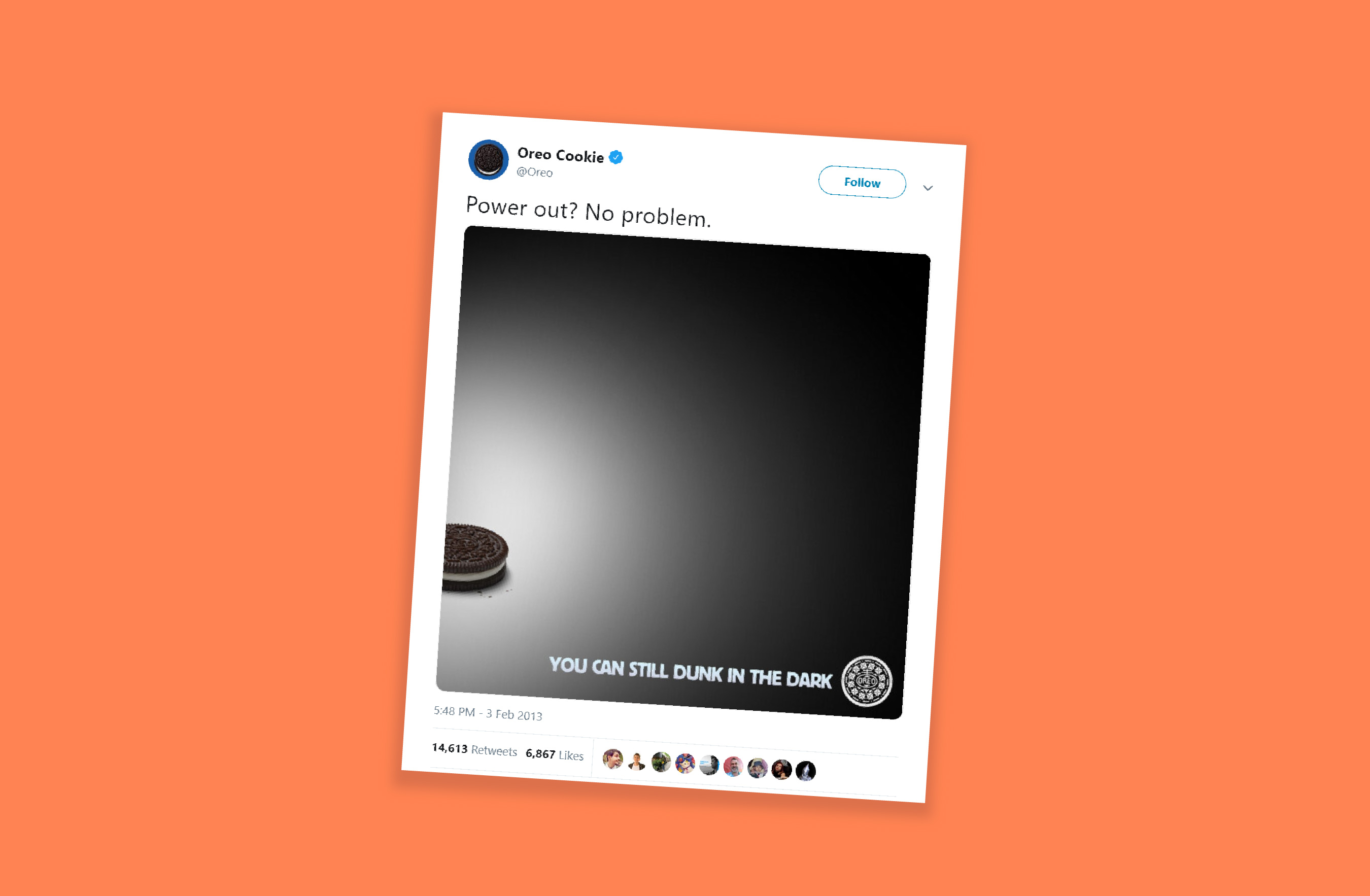
If there’s one example that perfectly defines moment marketing, it’s Oreo’s “Dunk in the Dark” moment during the 2013 Super Bowl.
During the Super Bowl, the stadium suddenly went dark due to a power outage. The game paused. The audience waited. And within minutes, Oreo’s social team posted a simple Tweet: “You can still dunk in the dark.” That’s it. No long copy. Just perfect timing and creativity.
The Tweet went viral, won multiple marketing awards, and is still talked about today as the most iconic moment marketing example ever.
- The Impact: The post received nearly 15,000 retweets and over 20,000 likes on Facebook within the first night.
- Social Growth: Oreo's Twitter following increased by 8,000, and Instagram followers grew from 2,000 to over 36,000 (reaching over 85,000 later that month).
- Media Value: The campaign generated approximately USD 525 million in earned media impressions.
How to use moment marketing the right way
Moment marketing works best when three things come together:
Perfect timing -> smart idea -> creative execution
- Get the timing right
- Keep an eye on what’s trending using tools like Google Trends, X, and social media analytics
- Watch for events, shows, matches, and cultural moments
- React fast, because the earlier you join the moment, the more attention you get
- Build a smart idea
- Your idea should connect naturally to the trend
- It should match your brand’s tone and personality
- Don’t force-fit yourself into a moment that doesn’t fit
- Add creative execution
- Use crisp copy
- Keep visuals clean and simple
- Add a witty or relatable twist
- Make people smile and think
For example, during the Women’s Premier League, Amul used the cricket buzz at the right time and created a fun post in their usual style. Even though they sell dairy products, the content felt natural and not forced. It worked because the timing was right, the idea made sense, and the creativity matched their brand.

Common mistakes in moment marketing
- Jumping on every trend without checking if it fits your brand
- Posting too late and missing the moment
- Using sensitive, political, or emotional topics for humor
- Being unclear or confusing in your message
- Trying to fit into trends that don’t suit your brand style
In moment marketing, you’re not chasing attention—you’re meeting your audience where their attention already is. When brands show up at the right moment, people notice and remember.
Stay tuned for the March edition of The Social Playbook.
Topic Participants
Stephania Beverly
Sticky Posts
The Social Playbook - February edition: Why moment marketing works (and how brands use it)
Imagine the final season of your favorite series is about to drop. Your entire feed is talking about it. Trailers everywhere. Fan theories. Hype at 100%. Now your go-to burger place launches a limited-edition meal box themed around that series—customThe Social Playbook - January edition: Getting started with content creation
Social media isn’t just about posting some random content. It’s about why certain content works, how brands stand out, and what makes people pause mid-scroll. The Social Playbook is a monthly community series where we break all of that down. Through real
Recent Topics
Feature Request - Make Available "Alias Name" Field In Item List View
Hi Zoho Inventory Team, I have noticed that the "Alias Name" field does not appear on the list of selectable columns in the Customise Columns feature in the Items module. This would be very useful to see for businesses who are using the Alias Name fieldproduct name field issue-n8n
Hey guys, I have a question. I want to create a new product using the workflow. The problem is with the product name field; I don't know how to fill it in. The workflow starts with retrieving information from the leads table, retrieving links to scrapeHow to filter Packages in zoho inventory api
Hi Team, I want to perform some tasks in a schedular on the packages which are in "Shipped" state. I tried to use filter_by in my api call but in return I get response as {"code":-1,"message":"Given filter is not configured"} My Api request is as followsCRM
Is anyone else experiencing this issue? Our company is not moving out of using Gmail's web app. It just has more features and is a better email program than Zoho Mail. Gmail has an extension (Zoho CRM for Gmail) that we're using but we've found some seriousSyncing with Google calendar, Tasks and Events
Is it possible to sync Zoho CRM calendar, task and events with Google Calendar's tasks and events. With the increasing adoption by many major tool suppliers to sync seamlessly with Google's offerings (for instance I use the excellent Any.do task planningHow can i view "Child" Accounts?
It can be very useful in our field of business to know the parent-child account relationship. However, there seems to be a shortcoming in the parent account view: no child account list. How can we view the child accounts per each account?Easily perform calculations using dates with the new DATEDIF function
Hey Zoho Writer users! We've enhanced Zoho Writer's formula capabilities with the new DATEDIF function. This allows you to calculate the difference between dates in days, months, and years. Function syntax: =DATEDIF(start_date, end_date, unit) Inputs:Adding Comments Using Workflows - How to Change User Attributed
We have worklflows in Desk where a comment is added to a ticket based on certain criteria. It seems that the comment added is always attributed to the user who last edited the workflow. This does not make sense for us because: - It's misleading to otherAdd Attachment Support to Zoho Flow Mailhook / Email Trigger Module
Dear Zoho Support Team, We hope you are well. We would like to kindly request a feature enhancement for the Mailhook module in Zoho Flow. Currently, the email trigger in Zoho Flow provides access to the message body, subject, from address, and to address,Conect chat of salesiq with zoho cliq
Is there any way to answer from zoho cliq the chat of salesiq initiated by customers?Les dernières avancées en saisie de données et collaboration
Après une année dédiée à la recherche et au développement, notre équipe est prête à dévoiler des améliorations majeures pour Zoho Sheet. Ces nouveautés seront lancées par étapes afin d’en assurer une prise en main optimale. Nous commençons avec des fonctionnalitésRich Text For Notes in Zoho CRM
Hello everyone, As you know, notes are essential for recording information and ensuring smooth communication across your records. With our latest update, you can now use Rich Text formatting to organize and structure your notes more efficiently. By usingImplement Meeting Polls in Zoho Bookings
Dear Zoho Bookings Support Team, We'd like to propose a feature enhancement related to appointment scheduling within Zoho Bookings. Current Functionality: Zoho Bookings excels at streamlining individual appointment scheduling. Users can set availabilityService Account Admin for API Calls and System Actions
Hello, I would like to request the addition of a Service Account Admin option in Zoho product. This feature would allow API calls and system actions to be performed on behalf of the system, rather than an active user. Current Issue: At present, API callsPlease can the open tasks be shown in each customer account at the top.
Hi there This has happened before, where the open tasks are no longer visible at the top of the page for each customer in the CRM. They have gone missing previously and were reinstated when I asked so I think it's just after an update that this featureHow to Customize Task Creation to Send a Custom Alert Using JavaScript in Zoho CRM?
Hello Zoho CRM Community, I’m looking to customize Zoho CRM to send a custom alert whenever a task is created. I understand that Zoho CRM supports client scripts using JavaScript, and I would like to leverage this feature to implement the alert functionality.Send Whatsapp with API including custom placeholders
Is is possible to initiate a session on whatsapp IM channel with a template that includes params (placeholders) that are passed on the API call? This is very usefull to send a Utility message for a transactional notification including an order numberZO25: The refreshed, more unified, and intelligent OS for business
Hello all, Greetings from Zoho One! 2025 has been a remarkable year, packed with new features that will take your Zoho One experience to the next level! From sleek, customizable dashboards to an all-new action panel for instant task management, we’veIntroducing Multi-Asset Support in Work Orders, Estimates, and Service Appointments
We’re excited to announce a highly requested enhancement in Zoho FSM — you can now associate multiple assets with Work Orders, Estimates, and Service Appointments. This update brings more clarity, flexibility, and control to your field service operations,[Product Update] Locations module migration in Zoho Books integration with Zoho Analytics
Dear Customers, As Zoho Books are starting to support an advance version of the Branches/Warehouses module called the Locations module, users who choose to migrate to the Locations module in Zoho Books will also be migrated in Zoho Analytics-Zoho BooksIntroducing Schedules for smarter availability management
Greetings from the Zoho Bookings team! We’re excited to introduce Schedules, a powerful enhancement to manage availability across your workspace. Schedules are reusable working-hour templates that help you define and maintain consistent availability acrossWhy Zoho Contracts Prefers Structured Approvals Over Ad-hoc Approvals
Approvals are one of the most important stages in a contract’s lifecycle. They determine whether a contract moves forward, gets revised, or needs further discussion. The approval process also defines accountability within the organization. Zoho ContractsWhatsapp Connection Status still "Pending" after migration
Hello, I migrated my WhatsApp API to Zoho from another provider a day ago. So far the connection status is still “Pending”. There is a problem? How long does it usually take?Kaizen #226: Using ZRC in Client Script
Hello everyone! Welcome to another week of Kaizen. In today's post, lets see what is ZRC (Zoho Request Client) and how we can use ZRC methods in Client Script to get inputs from a Salesperson and update the Lead status with a single button click. In thisHow to Filter timewise question to check uploaded one month or two months before in these community question ?
i want to find the question that is asked some month or before any particular year, so how can i filter it ?Proposal for Creating a Unique "Address" Entity in Zoho FSM
The "Address" entity is one of the most critical components for a service-oriented company. While homeowners may change and servicing companies may vary, the address itself remains constant. This constancy is essential for subsequent services, as it providesWorkflow Down/Bug
We have a workflow that sends an email to one of our internal departments 10 minutes after a record is created in a custom module. The workflow actually works correctly. However, we have now noticed that on January 8, between 3:55 p.m. and 4:33 p.m.,Service Locations: Designed for Shared Sites and Changing Customers
Managing service addresses sounds simple—until it isn’t. Large facilities, shared sites, and frequently changing customers can quickly turn address management into an operational bottleneck. This is where Service Locations deliver clarity and control.Can I re-send the Customer Satisfaction Survey after a ticket closure?
Hello, Some customers does not answer the survey right after closure, is it possible to re-send after a few days or weeks? Best Regards!Is the app being developed?
Hi, is this app being developed/improved? Or is it just another app started and let go like others (market automation, campaign, etc)?Filter contacts based on selected category in Zoho Desk ticket
Hello community, I’m setting up the Tickets module in Zoho Desk and I need help implementing the following: When a category is selected in a ticket, I want the Contact field to be filtered so that it only displays contacts that are related to that category.Profile Page View Customization
I need to change the fields, sections from the profile view of an emplyoyee.Zoho Desk Android app update: Filter, Sort and Saved filters Enhancements
Hello everyone! We are excited to introduce the below features on the Android version Zoho Desk mobile app: 1. Filter & Sort support has been introduced for the Contacts and Accounts modules. 2. Sort options is now available in Custom Modules as well.Accessing shared mailboxes through Trident (Windows)
Hi, I have a created a couple of shared mailboxes. The mailboxes are showing up on the browser based Zoho workplace, but I cannot seem to figure out how to access my shared inboxes through Trident (Windows). Am I missing something or is this feature notfiltering lookup field options based on information in another module.
In our CRM system. We have the standard Accounts and Deals modules. We would like to introduce the ability to classify Accounts by Sector. Our desired functionality is to have a global list of all sectors that an Account can select, with the ability toIntroducing Assemblies and Kits in Zoho Inventory
Hello customers, We’re excited to share a major revamp to Zoho Inventory that brings both clarity and flexibility to your inventory management experience! Presenting Assemblies and Kits We’re thrilled to introduce Assemblies and Kits, which replaces theDoes the ability exist to make tax on the customer profile mandatory?
I am reaching out to inquire about the possibility of making the "Customer Tax" field mandatory when creating a new customer in Zoho. We want to ensure that all customers have their tax information recorded to maintain compliance with our internal processes.email association with CRM
Why is it 2024 (almost 2025) and Zoho has not figured out how to integrate email with CRM? It is so inconsistent at associating emails within CRM. I am an attorney. I have clients and work with other attorneys. Attorney John Doe is associated with multipleCredit Note for Shipped and Fatoora pushed invoices
We have shipped a Sales Order and created an Invoice. The Invoice is also pushed to Fatoora Now we need to create a credit note for the invoice When we try it, it says we need to create a Sales Return in the Zoho Books, we have already created a SalesFSM - Timesheet entires for Internal Work
Hi FSM Team, Several of my clients have asked how they can manage internal timesheets within Zoho FSM. Since their technicians already spend most of their day working in FSM, it would be ideal if they could log all working hours directly in the FSM app.Next Page