Zoho One Tips & Tricks 03: Zoho Commerce integraties
Sinds een aantal maanden behoort Zoho Commerce tot Zoho One. Met deze app heb je de mogelijkheid om een webwinkel op te zetten en net zoals met alle andere Zoho-apps is het mogelijk om meerdere apps te integreren. Uiteraard is de vraag, waar begin je? En welke voordelen levert dit op?
Voordeel integraties:
Door deze apps te integreren leg je alvast de basis voor toekomstige activiteiten zoals nieuwe producten toevoegen, je salespipeline managen en je marketing-activiteiten uitvoeren. Zo hoef je niet meer op afzonderlijke apps dezelfde producten toe te voegen, je mailing op te stellen en behoud je het overzicht van je sales en inventaris.
Van alle apps die binnen Zoho One mogelijk zijn, adviseren wij om deze vijf apps als eerste te integreren met Zoho Commerce.
- Zoho CRM
- Zoho Inventory
- Zoho PageSense
- Zoho Markering Automation
- Zoho SalesIQ
Om te beginnen, ga naar Zoho Commerce.
1. Klik op "Settings"
2. Ga vervolgens naar "Integrations"

Zoho CRM:
Met Zoho CRM beschik je over de mogelijkheid om je verkoop te managen. Je kan de app gebruiken om producten en klanten van jouw winkel te synchroniseren in CRM en vice versa.
Voordelen van de integratie:
- Je vereenvoudig je salesproces. Voeg onder andere alle inschrijvingen van jouw online winkel rechtstreeks toe aan CRM,
- Stuur gepersonaliseerde sms-berichten naar jouw klanten wanneer hun bestelling is bevestigd, verzonden of afgeleverd
1. Ga naar instellingen, klik onder Integraties Zoho CRM.
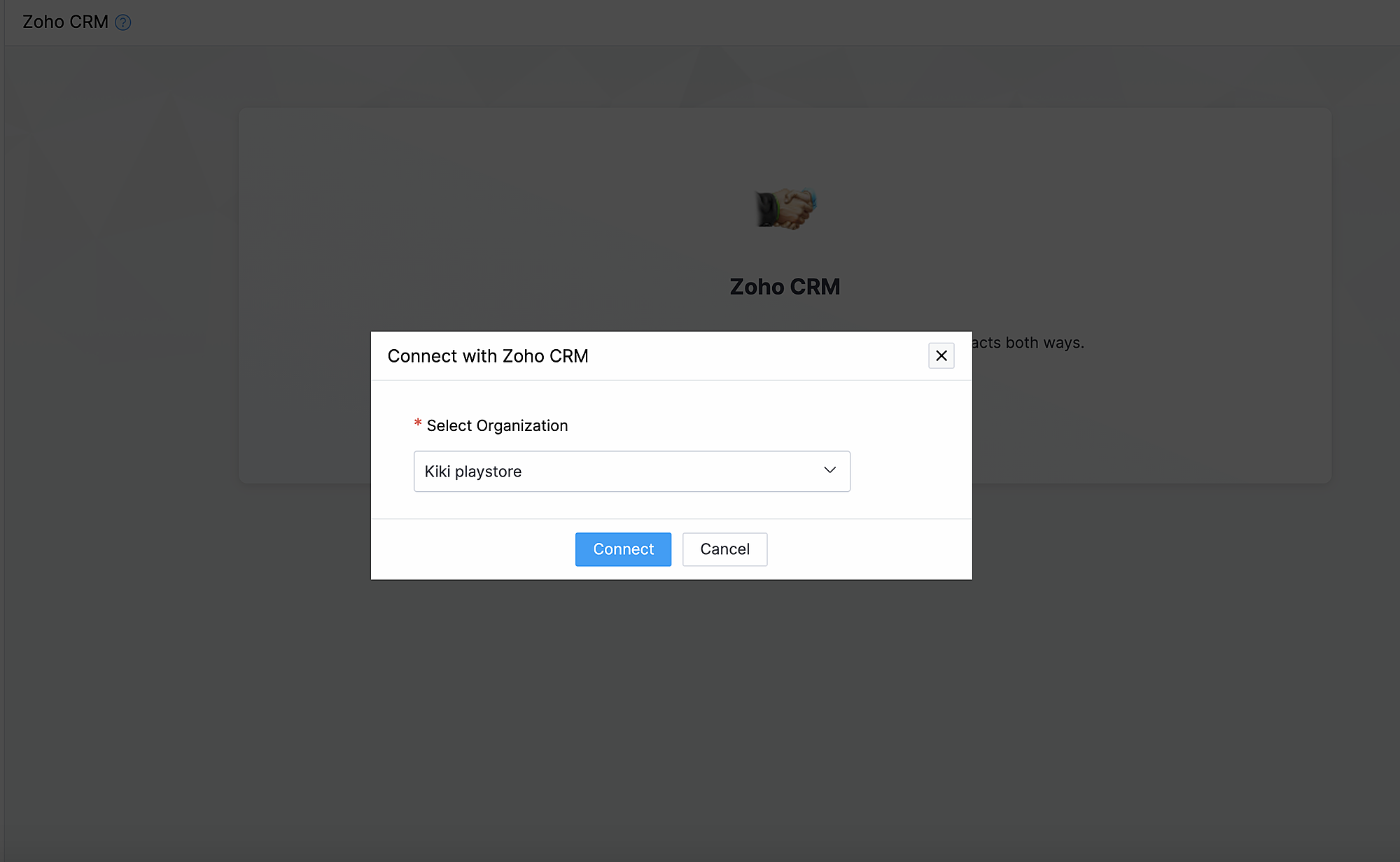
2. Klik op Connect
3. Importeer contacten en producten van Zoho CRM en kies de organisatie van de dropdown.
Synchroniseer contacten.
Met deze functionaliteit synchroniseer je de contacten die je in Zoho CRM heb gemaakt met Zoho Commerce.
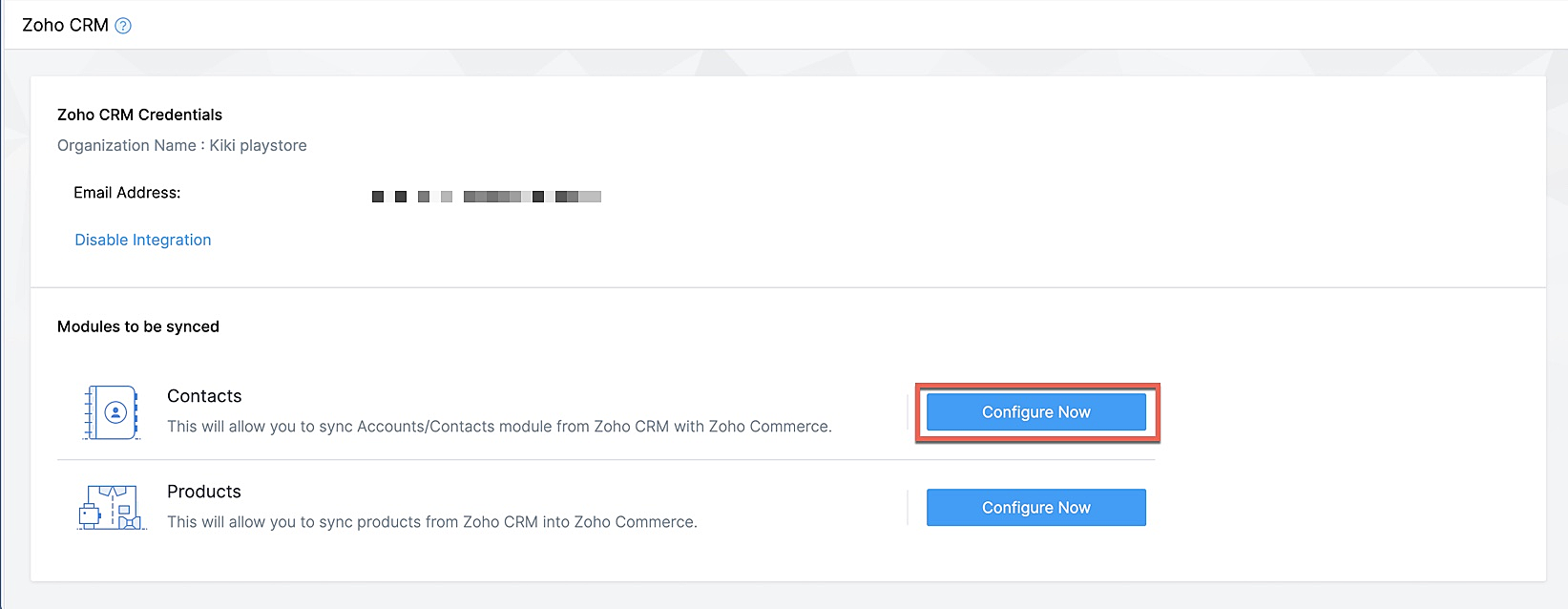
Klik op Configureer nu naast Contact
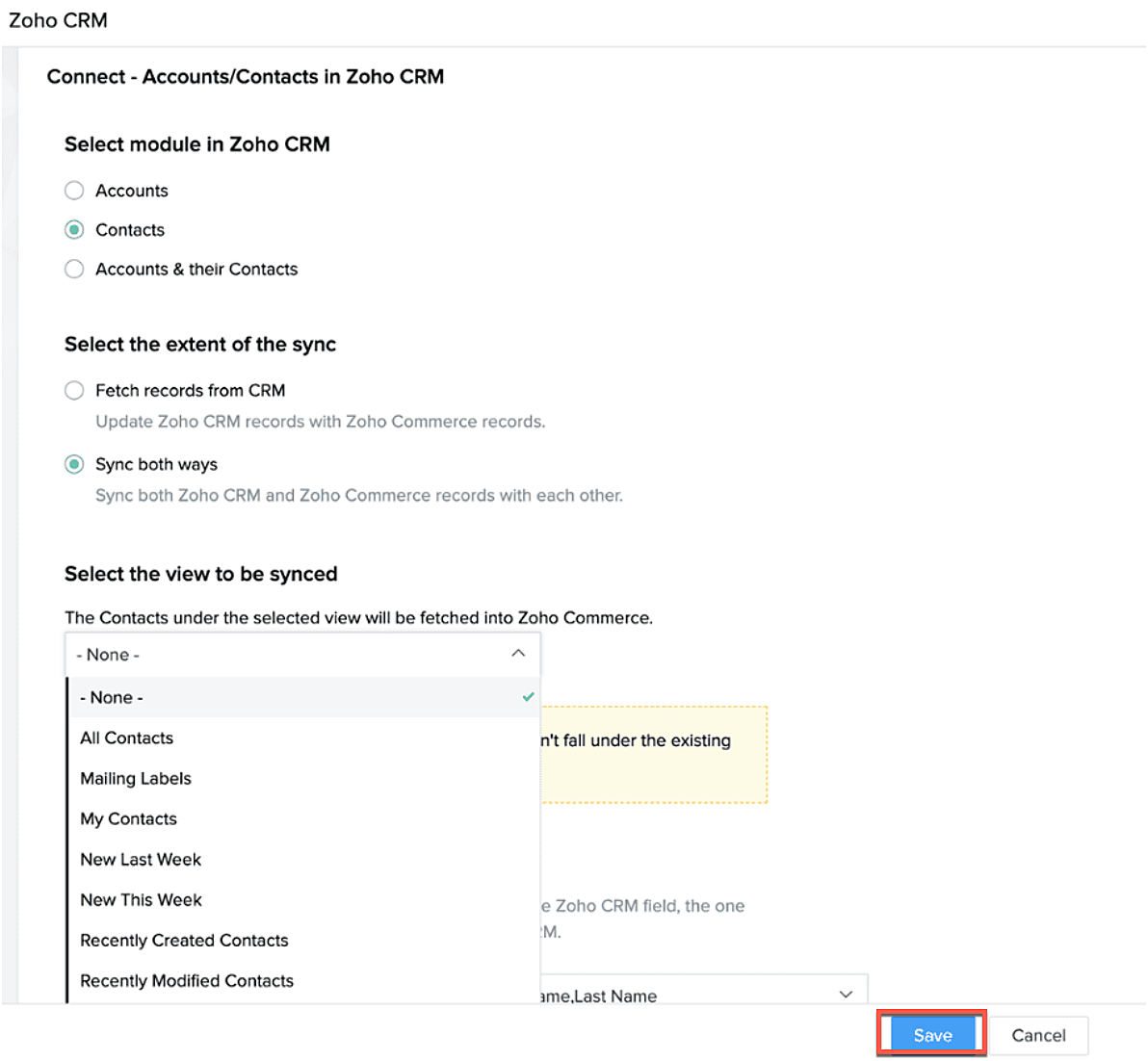
Selecteer de Zoho CRM module die je wilt synchroniseren
Kies tot hoever je wilt synchroniseren.
Selecteer de type CRM view die je wilt synchroniseren.
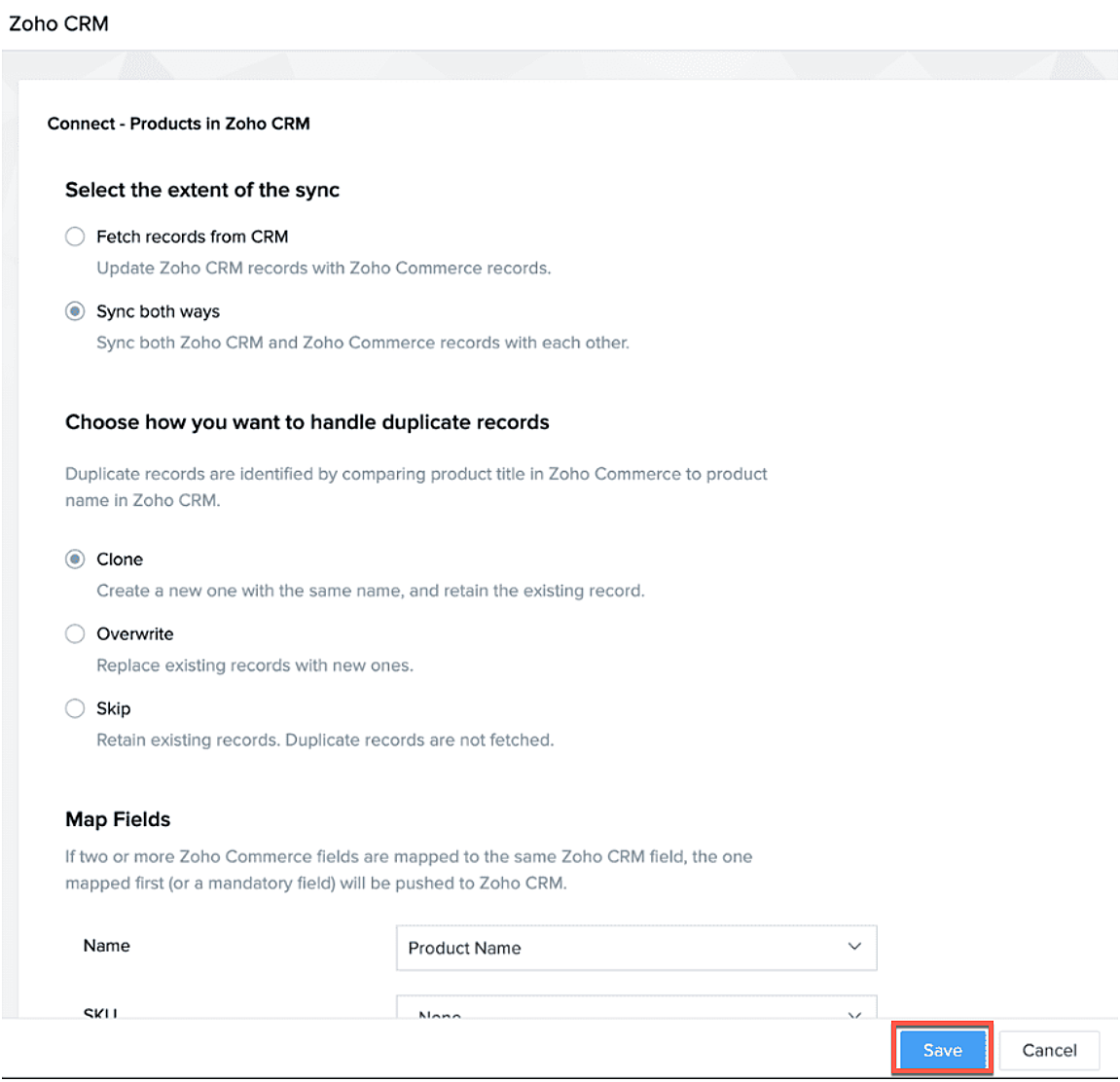
Producten synchroniseren.
Maak je producten in CRM of in Zoho Commerce? Synchroniseer het met elkaar zodat je ze niet twee keer hoef in te voeren. Klik op deze link om te lezen hoe je producten moet toevoegen in Zoho Commerce.
Klik op configureer producten.

Selecteer of je alleen je producten wilt ophalen of je van beide platformen wilt synchroniseren.
Selecteer of je het wilt klonen, overschrijven of na wilt bootsen.
Geef aan waar je het wilt plaatsen zodat Zoho Commerce de velden kan blijven synchroniseren.
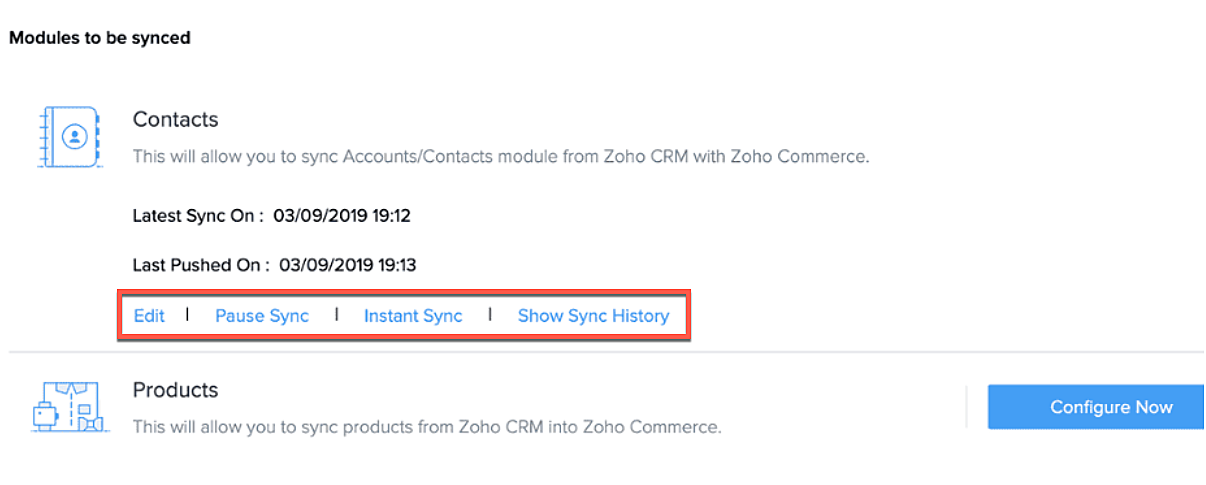
Na synchronisatie kan je de volgende acties uitvoeren.
- Aanpassen
- Pauseer sync
- Instant sync (Handmatig synchroniseren)
- Laat geschiedenis zien.
Formulieren
Je kan ook webformulieren koppelen vanuit Zoho CRM aan Zoho Commerce. Voeg vanuit de sitebuilder een formulier toe die je hebt gemaakt in Zoho CRM.
- Open sitebuilder
- Klik op +
- Selecteer "Forms"
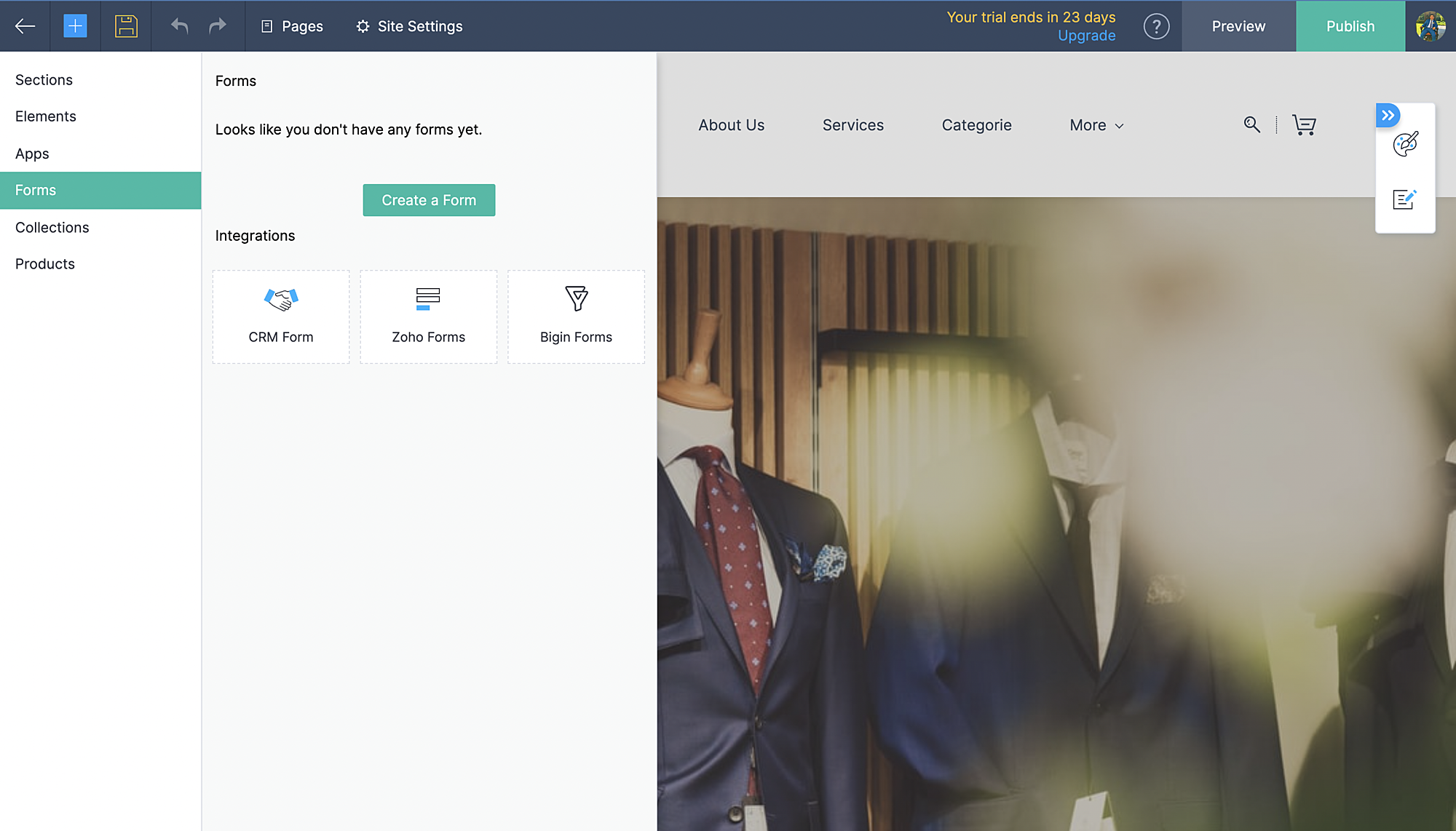
- Kies vervolgens CRM-form en selecteer de form die jij hebt ontworpen in CRM.
- Voeg formulier toe.
- De aanvraag komt vervolgens in je Leadmodule in CRM terug.
Zoho Inventory:
Met de integratie met Zoho Inventory kan je het voorraad- en voorraadbeheer van jouw online winkel naar een hoog niveau tillen. Gegevens van jouw Commerce-winkel worden gesynchroniseerd met je Inventory-account, zodat je naadloos tussen de twee kunt werken.
Voordelen van de integratie:
- Vergemakkelijk jouw voorraadbeheer en bijbehorende activiteiten.
- Houd zicht op leveranciers, retourzendingen en gedane betalingen
- Verruim de mogelijkheden van jouw online winkel
Ga naar instellingen, Zoho Inventory
Selecteer je bedrijf

Alle portal members en guest shoppers worden gesynchroniseerd naar contacten.
*Als je al Inventory gebruikt, selecteer je organisatie vanuit Zoho Commerce en start met je online shop.
Al je verkoop en rapporten worden gesynchroniseerd
Je organisatie profiel wordt geüpdate.
Zoho PaginaSense
Met Zoho PageSense beschik je over de mogelijkheden om de prestaties van je webwinkel te meten.. Zo kan je onder andere A/B tests uitvoeren op jouw winkel en jouw winkel optimaliseren voor verbeterde bezoekersconversies.
Voordelen van Integratie
- Voer A/B-tests uit en begrijp het gedrag van jouw publiek
- Creëer gepersonaliseerde variaties van jouw website voor jouw publiek
- Begrijp waar jouw bezoekers op klikken en optimaliseer jouw teksten en CTA-knoppen
- Creëer trechterexperimenten om te begrijpen waar jouw bezoekers afhaken
Vereisten
Je moet jouw winkel gepubliceerd hebben om de integratie te laten werken.
Ga naar instellingen, kies Zoho PageSense onder integraties
Klik op Access Portal, je wordt doorverwezen naar Zoho PageSense

Maak een portal door op Mijn Spaces te klikken rechts bovenin.
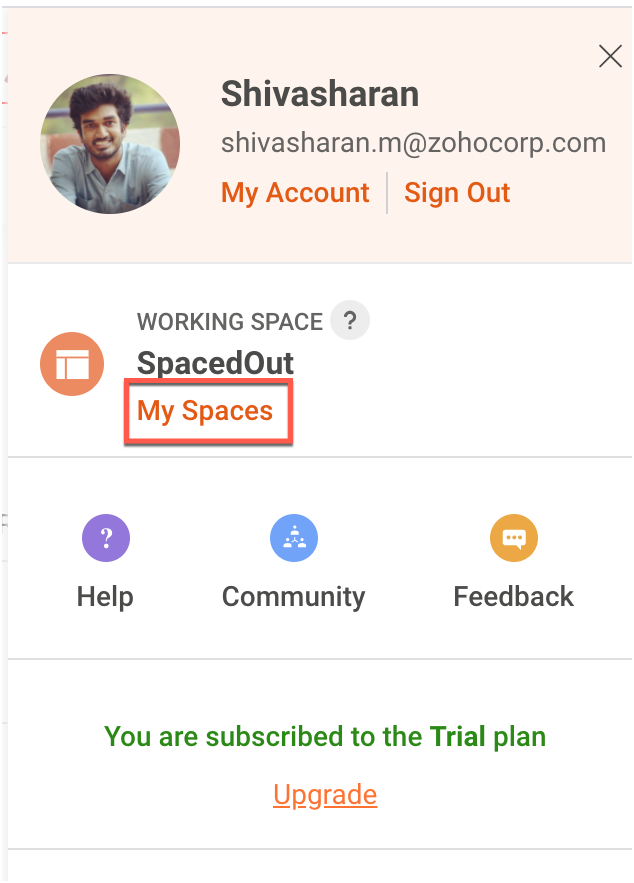
In Zoho Commerce selecteer je de Portal naam.
Maak een project of gebruik een bestaande project. (Klik op deze link om te leren hoe je een project aanmaakt.)
Maak een Funnel Experiment of gebruik een bestaande. (Klik op deze link om te leren hoe je een Funnel Experiment maakt.)
Klik op Connect.
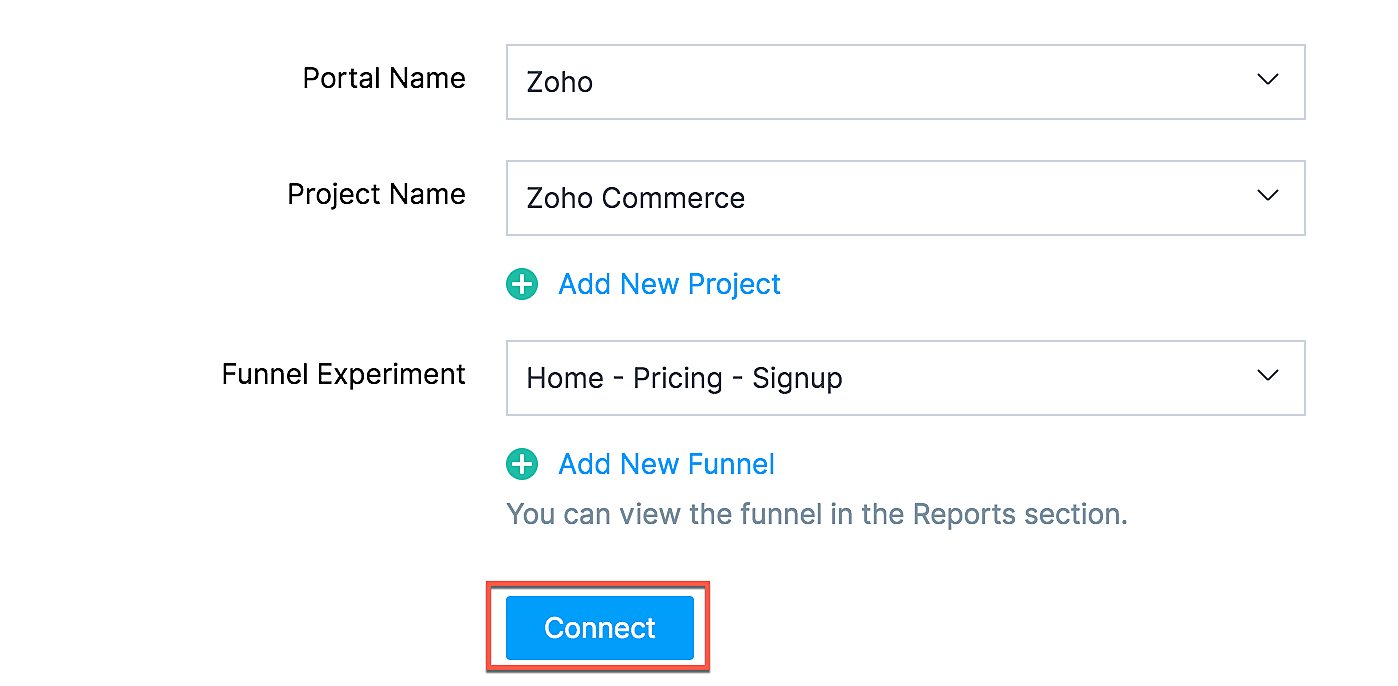
Als jij je selectie wilt wijzigen zoals een project of funnel experiment, klik dan op de beste optie en klik op Update.

Jouw Zoho Commerce is nu verbonden met je PageSense-account. Klik op Access Portal wanneer je integratie compleet is.
Marketing Automation
Automatiseer je jouw marketing activiteiten door je webwinkel te integreren met Zoho Marketing Automation
De voordelen van de integratie
- Bekijk winkelomzet, productdetails en klantinzichten op één pagina
- Stuur promotiecampagnes en creëer klantreizen
- Segmenteer leads op basis van hun activiteiten
- Initieer geautomatiseerde reeksen van opvolgingsberichten en actiesflows
Ga naar instellingen en selecteer Marketing Automation onder integraties.
Klik op Access Marketing Automation.
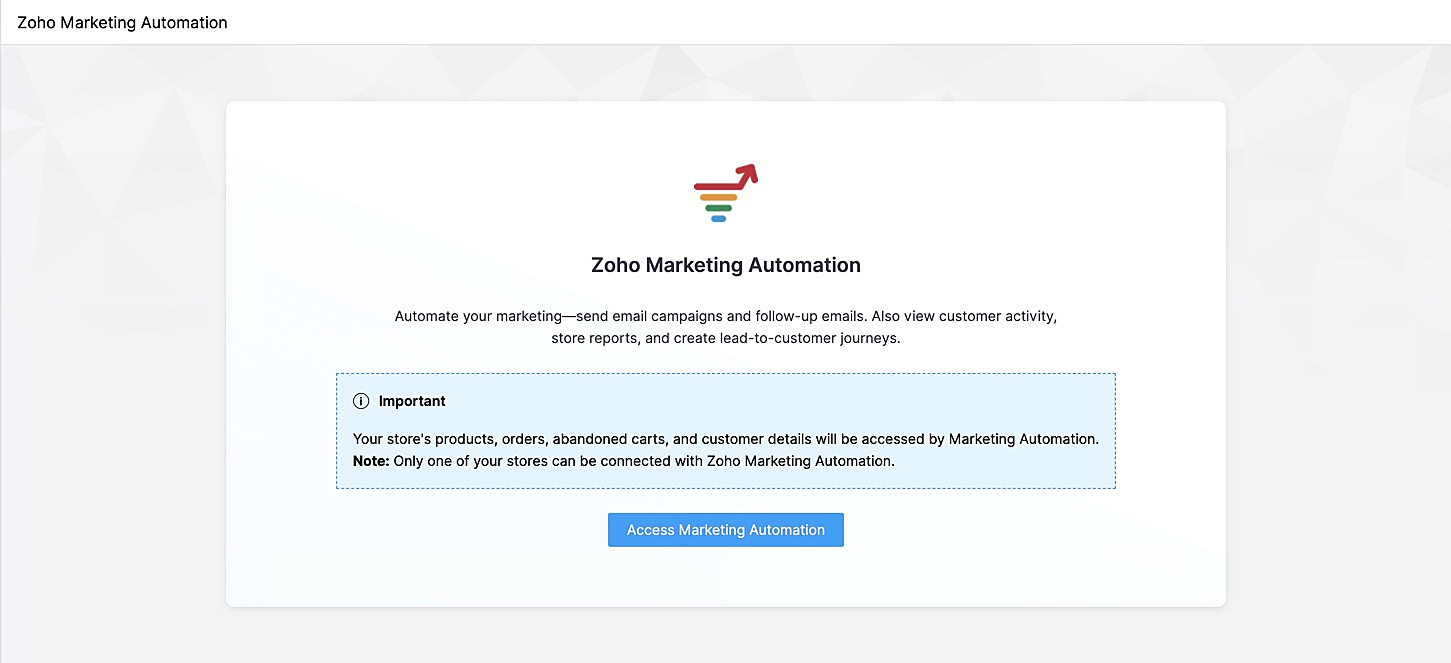
Je wordt naar Marketing Automation gebracht. Als je nog geen account hebt aangemaakt, ga je naar Engagement op het linker tabblad en klik je op Ecommerce.
Selecteer de winkel die je wilt koppelen en de mailinglijst waaraan je de klanten van jouw winkel wilt toevoegen en beheren. Maak een nieuwe mailinglijst aan als je er nog geen hebt gemaakt. Klik op deze link om te leren hoe je een mailinglijst moet maken.
Jouw winkel zal nu worden verbonden, en jouw producten, klanten, winkelwagen, en ordergegevens zullen worden gesynchroniseerd met Marketing Automation.
SalesIQ
Wil je direct in contact komen met je klanten? Met behulp van Zoho SalesIQ, kunt u een live chat widget toevoegen aan uw online winkel, en tevens de activiteit van uw bezoekers bijhouden.
Voordelen van integratie:
- Interactie met bezoekers via live chat
- Verhoog verkoopconversies met geprioriteerde bezoekers
- Bekijk activiteit, leg leads vast en geef bezoekers prioriteit voor outreach
Vereisten
Je moet jouw Zoho Commerce winkel hebben gepubliceerd om deze integratie te laten werken.
Hoe te integreren
1. Ga naar Instellingen in het linkerpaneel en klik op Zoho SalesIQ - Live Chat onder Integraties.
2. Zorg ervoor dat de Live Chat aan staat en click op "Connect"

3. Publiceer het op je website en controleer of de Live Chat aan staat. Die wordt rechtsonder weergegeven.
4. Verstuur een bericht. Dit wordt weergegeven in SalesIQ onder Chat history.

Heb jij een andere tips en tricks. Laat het weten.
Topic Participants
Theo Su
Sticky Posts
De nieuwe Zoho One is hier! Deel 1
Beste Community-leden, Zoho One, hét besturingssysteem voor bedrijven introduceert vandaag haar nieuwste update met maar liefst 5 nieuwe apps, 3 nieuwe services en 7 grote platform verbeteringen. Wij hebben gekeken naar hoe wij jullie verder kunnen helpen.Tips &Tricks: Jouw online boekingssysteem in 5 stappen!
1 Creëer een afsprakenkalender die past bij jouw branding Met Zoho Bookings behoud je de kleuren van jouw merk in alle applicaties. Je kan kiezen uit vier voorgedefinieerde thema's (Modern Web, Nieuwe Opmaak, Klassiek en Nieuw) met daarnaast opties omStart met Zoho One
Welkom op de community-pagina van Zoho One, hét besturingssysteem voor bedrijven. Op deze pagina geven wij een korte introductie over Zoho One. Daarnaast geven wij een aantal tips om te starten met deze besturingssysteem. Tegenwoordig zijn Cloud-oplossingen
Recent Topics
In App Auto Refresh/Update Features
Hi, I am trying to use Zoho Creator for Restaurant management. While using the android apps, I reliased the apps would not auto refresh if there is new entries i.e new kitchen order ticket (KOT) from other users. The apps does received notification but would not auto refresh, users required to refresh the apps manually in order to see the new KOT in the apps. I am wondering why this features is not implemented? Or is this feature being considered to be implemented in the future? With theIMAP mail after specify date
Hi My customer's mail server is on premise and mail storage is very huge. So It never finish sync. and finally stop sync. Cloud CRM have a option like zoho mail sync mail after some date.Claude + MCP Server + Zoho CRM Integration – AI-Powered Sales Automation
Hello Zoho Community 👋 I’m excited to share a recent integration we’ve worked on at OfficehubTech: ✅ Claude + MCP Server + Zoho CRM This integration connects Zoho CRM with Claude AI through our custom MCP Server, enabling intelligent AI-driven responsesSearch Bar positioning
Why is the Search bar on the far right when everything is oriented towards the left?Import Error: Empty values for mandatory fields - Closing Date
Hello, I've tried multiple times to import a CVS Potential list from another Zoho account. But the error message I get is: Empty values for mandatory fields - Closing Date There are valid dates in this field, so I don't understand why this error messagesFeature Requests - Contact Coloured Picklist Visibility & Field Visibility During Ticket Creation
Hi Desk Team, I have 2 feature requests for you. Since Coloured Picklists are now available in Desk, It would be great if the colours were visible on the Related Details (Contact Information) when creating a ticket. In the screenshot below, I have 2 fieldsAccounts Receivable Balances Differs in Balance Sheet, Customer Balance Report, AR Ageing Summary, and AR Ageing Details.
Hello Zoho Accounts Receivable Balances Differs in Balance Sheet, Customer Balance Report, AR Ageing Summary, and AR Ageing Details. Please clarify and fix the issues here. ThanksHow to integrate XML with Zoho CRM
Hi, I have an eCom service provider that gives me a dynamic XML that contains order information, clients, shipments... The XML link is the only thing I have. No Oath or key, No API get... I want to integrate it into Zoho CRM. I am not a developer norFeature Request - Ability to Customise Contact Info Card on Ticket Details View
Hi Desk Team, I've added a "Contact Priority" and "Account Prioirty" field and it would be very useful to agents if they could see that information in the Contact Info card on the Ticket Details view. It would be great if we could choose some fields toTax in Quote
Each row item in a quote has a tax value. At the total numbers at the bottom, there is also a Tax entry. If you select tax in both of the (line item, and the total), the tax doubles. My assumption is that the Tax total should be totalling the tax fromZoho Flow integration with Facebook Messenger and Whatsapp
Hi there, any plans of adding integrations with Facebook Messenger and Whatsapp into Zoho Flow? Seems that more and more business are delivering automated updates such as "your order is received", "your order has been shipped" and so on via these two platforms. Not sure if Whatsapp has the API access needed i am pretty sure that Facebook Messenger has... Kind regards Bo ThygesenMulti-currency and Products
One of the main reasons I have gone down the Zoho route is because I need multi-currency support. However, I find that products can only be priced in the home currency, We sell to the US and UK. However, we maintain different price lists for each. ThereCampaigns unsubscribe/manage preferences links
Hi, Where can I edit the unscubscribe and manage preferences link in the footer of the email. I would like it so that when you click 'manage preferences' an form opens up that allows the person to choose what type of emails they do and don't wish toemail address somehow still not verified (?!)
L.S. After creating a new email template in CRM I was about to send a group email to my clients, then Zoho CRM announced that they would change the sender address to some kind of Zoho-e-ddress because my email address "has not been verified". Not onlyMarketing Tip #17: Add credibility to your online store with Review Widgets
One of the fastest ways to build trust in an online store is to show real customer feedback right where people are deciding to buy. Third-party widgets let you embed things like Google Reviews, Instagram feeds, or even a WhatsApp chat button. These addadding several team members to an Opportunity
How can we add several team members to one opportunity for collaboration? I have researched and only found something called Deal Team which I cannot find in my CRM to configure.PDF Annotation is here - Mark Up PDFs Your Way!
Reviewing PDFs just got a whole lot easier. You can now annotate PDFs directly in Zoho Notebook. Highlight important sections, add text, insert images, apply watermarks, and mark up documents in detail without leaving your notes. No app switching. NoBulk update Profile Permissions
Dears, What should we do if we add new forms or reports and need to update more than 20 permissions? Updating them one by one feels pretty harsh, doesn’t it?Filter in fields from Jira extension
We have installed the Jira extension so we can maken Jira issues from Zoho desk. In Zoho desk I can also see the Jira issue status for example but I can not filter on this field. I would like to setup an filter showing me the closed Jira issues. How canZoho Creator customer portal limitation | Zoho One
I'm asking you all for any feedback as to the logic or reasoning behind drastically limiting portal users when Zoho already meters based on number of records. I'm a single-seat, Zoho One Enterprise license holder. If my portal users are going to add records, wouldn't that increase revenue for Zoho as that is how Creator is monetized? Why limit my customer portal to only THREE external users when more users would equate to more records being entered into the database?!? (See help ticket reply below.)Add Reporting feature to display variance/change columns when comparing periods
When running reports to compare periods (for example, Profit and Loss comparing current year to previous), I would like to be able to display variance columns in both (a) amount or (b) percentage.Link Contacts to Billed Accounts
Hello, I want to do a survey on all my customers of 2025. For that I want to select all contacts linked to accounts who where billed in 2025. How to I create this link to I can then use Zoho Survey with this database of contacts?Pre-Zoho Sales Info - Best Way to Add to Desk / CRM
My company has been using Zoho One since 2021, with sales data going back through 2020. However, we have been in business much longer, and we have historical sales information that we want to have at our fingertips when talking with customers (usuallyCRM function REST API response format
Is there a way to control the JSON response returned by the CRM function REST API? If I call a function using either OAuth or an API key it returns a 200 OK response with a string in the format shown below. I am using a particular feature of an externalUsing MPN across multiple SKUs and inventory tracking
I have several different SKU's that share a common MPN and would like to track inventory by MPN. SKU1 has MPN1 assigned SKU2 has MPN1 assigned Here is an example If I start with 5 of MPN 1 in stock I want each SKU1 and SKU2 to show as 5 in stock, If IUnable to Access Application:
Whenever I try to access my application from the desktop, say I am editing it and want to test something in the desktop environment I get: An error has occurred. An internal error has occurred. Please check the URL , or try refreshing the page I can editEvernote (ENEX) import limitations
I have been with Evernote since 2010, but the latest price increase is ridiculous. I am currently testing Zoho Notebook as a replacement. I am impressed so far - if it were not for critical need to import legacy Evernote notes, I would 100% migrate toCannot see Application from Lookup field
Hi all, I am trying to access data for an application on our account via a lookup field; however, the application doesn't appear in the dropdown at all. Can anyone shed any light on this, please? I have asked Zoho support; however, they're just as confused,Zoho CRM Meetings Module Issues
We have a use-case that is very common in today's world, but won't work in Zoho CRM. We have an SDR (Sales Development Rep) who makes many calls per day to Leads and Contacts, and schedules meetings for our primary Sales Reps. He does this by loggingZoho Books integration sync from Zoho CRM does not work
Hi Zoho Community & Zoho Support We just tried to get a sync some products into Zoho Books from CRM using the native sync and we're getting an error: "It looks like some mandatory fields you're trying to map are empty. Please provide valid field namesDisable Auto Send Email Notification in Invoice Creation
Here is what I am facing Make payment via Razor Pay (All Good) Capture payload data on my webapp Send this data, along with other data to Zoho books to create the invoice However in this step - An email goes to the client + The Invoice remains as draftP & L Sub-categorized accounts
How can I show sub-categorized Income and Expense accounts on the P & L report?Report showing Bill Details with Project and Sales Invoice Number
Hi There, I am hoping that someone can help, I am looking for report that can show the bill and expense details along with project its as assigned to and the invoice number that the sales has been raised in. The goal is I can filter a customer/projectAdvanced Payment for Inventory Items with serial numbers
Hello, We sell equipment that we track the unique serial numbers on using Sales Orders. We can charge the customers an advanced payment, then the balance on delivery. We cannot figure out a way to do this in Books/Inventory: - Cannot part invoice a SOIs it possible to restrict ZCRM user to see only custom views created by administrator
I have segmented data in my CRM and I want to allow different users to be able to see only parts of it based on some criteria. I've tried to create and share a custom view, but then there is always an option for user to see all open lead for example.Issues Logging into ZOHO
Hello, one of my coworkers is having issues logging into ZOHO, she has requested a code when entering and the email is correct but she has not received the code. can you help us with this?Google Fonts Integration in Pagesense Popup Editor
Hello Zoho Pagesense Team, We hope you're doing well. We’d like to submit a feature request to enhance Zoho Pagesense’s popup editor with Google Fonts support. Current Limitation: Currently, Pagesense offers a limited set of default fonts. Google FontsAdd Popup Rejection Metrics to Reports
Hello Zoho PageSense Team, We would like to request improved reporting for popup interactions. Current Limitation: PageSense currently provides conversion data, but there is no clear visibility into: Popup rejections Popup closes (✕ button clicks) DismissalsAbility to Reset / Reinitialize Popup Cookies
Hello Zoho PageSense Team, We would like to request the ability to manually reset popup cookies. Current Limitation: At the moment, it is not possible to initiate a new popup cookie from the our side. Visitors who rejected or closed a popup will not seeControl Popup Cookie Expiration Duration
Hello Zoho PageSense Team, We would like to request an enhancement related to popup cookie management. Current Limitation: Currently, PageSense popup cookies remain active for 365 days, and this duration cannot be modified by us. If a visitor closes orNext Page