Building extensions #7: Create custom widgets for a simplified end-user experience
Discover the benefits of using widgets!
We explored the significance of widgets, prerequisites, and the availability of JS SDK methods as part of our previous post. In this post, let's go over a detailed example of using widgets along with certain Zoho Projects JS SDK methods.
Use case: A developer is working on a Zoho Projects task and wants to know if there are any existing references that could be used to get a head start on their work.
Goal: Our goal here is to simplify the developer's job by presenting them with articles that are relevant to the task at hand.
Solution: Widgets! To achieve this goal, it would be ideal for the developer to have access to relevant Zoho Desk articles from a tab on the Task Details page. This can be accomplished by developing a custom widget.
Required components:
- A connection between Zoho Projects and Zoho Desk.
- An extension configuration process that includes:
A. Creating an extensionB. Configuring the plugin manifestC. Setting up the widget code to display the Zoho Desk articles on the Zoho Projects Task Details tab
We have already explored the steps to establish a connection, create an extension, and configure the plugin-manifest.json file as part of our earlier posts. You can refer to those resources for detailed guidance. In this case, we have already completed most of these steps (screenshots below).
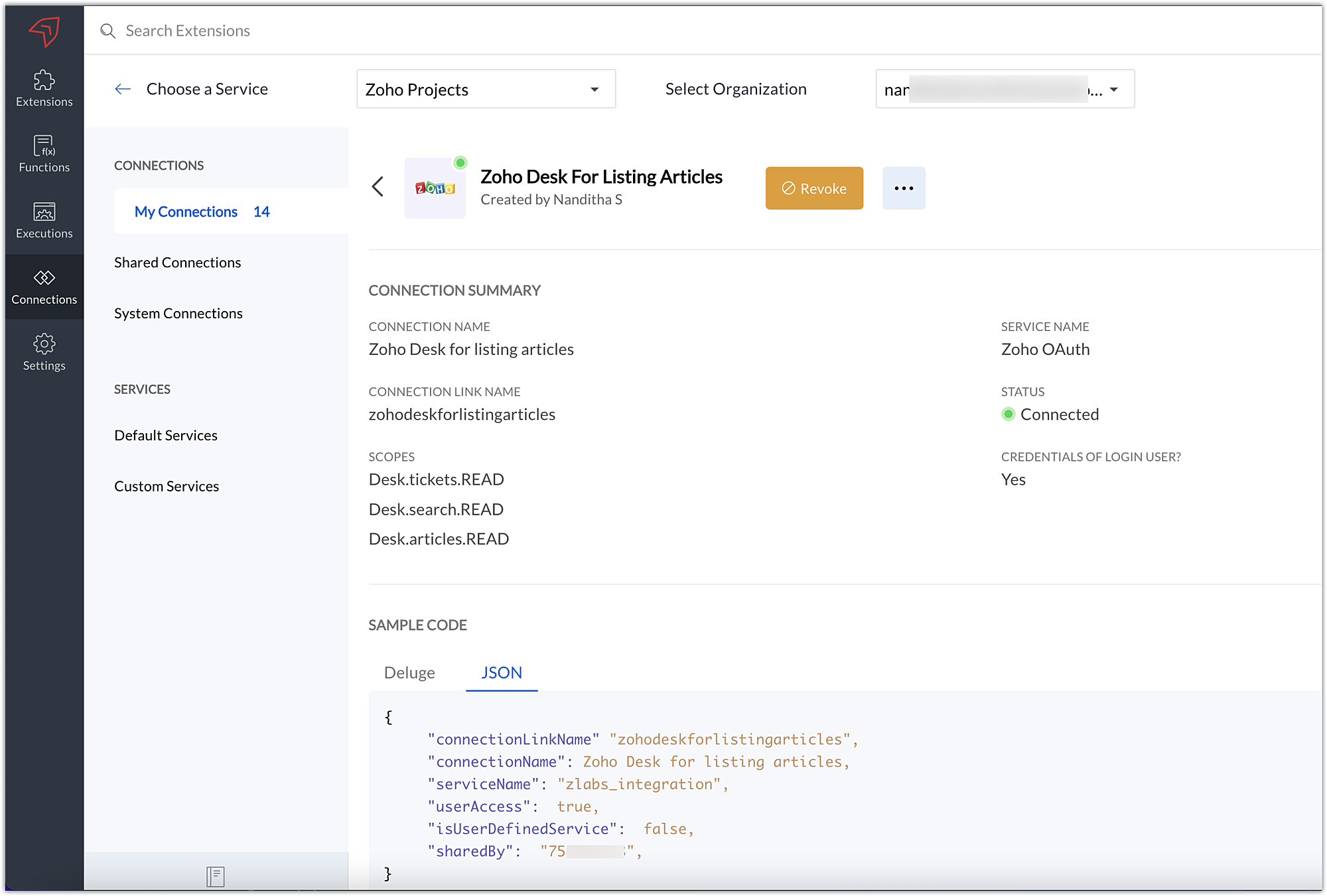
1. Connection
We have created a connection to establish a secure integration between Zoho Projects and Zoho Desk.
2. Extension Configuration
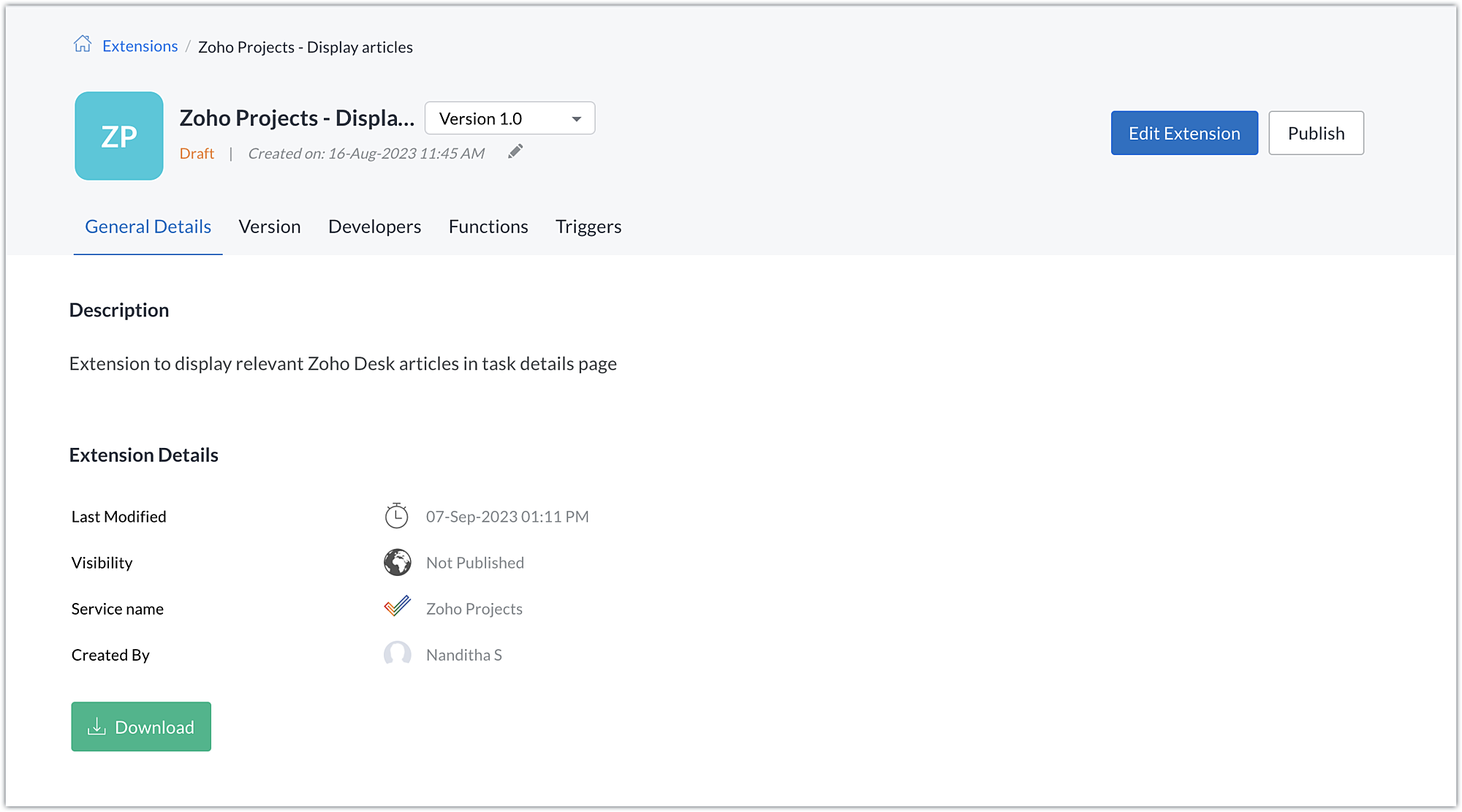
A. Extension creation: We have created a new extension for Zoho Projects.
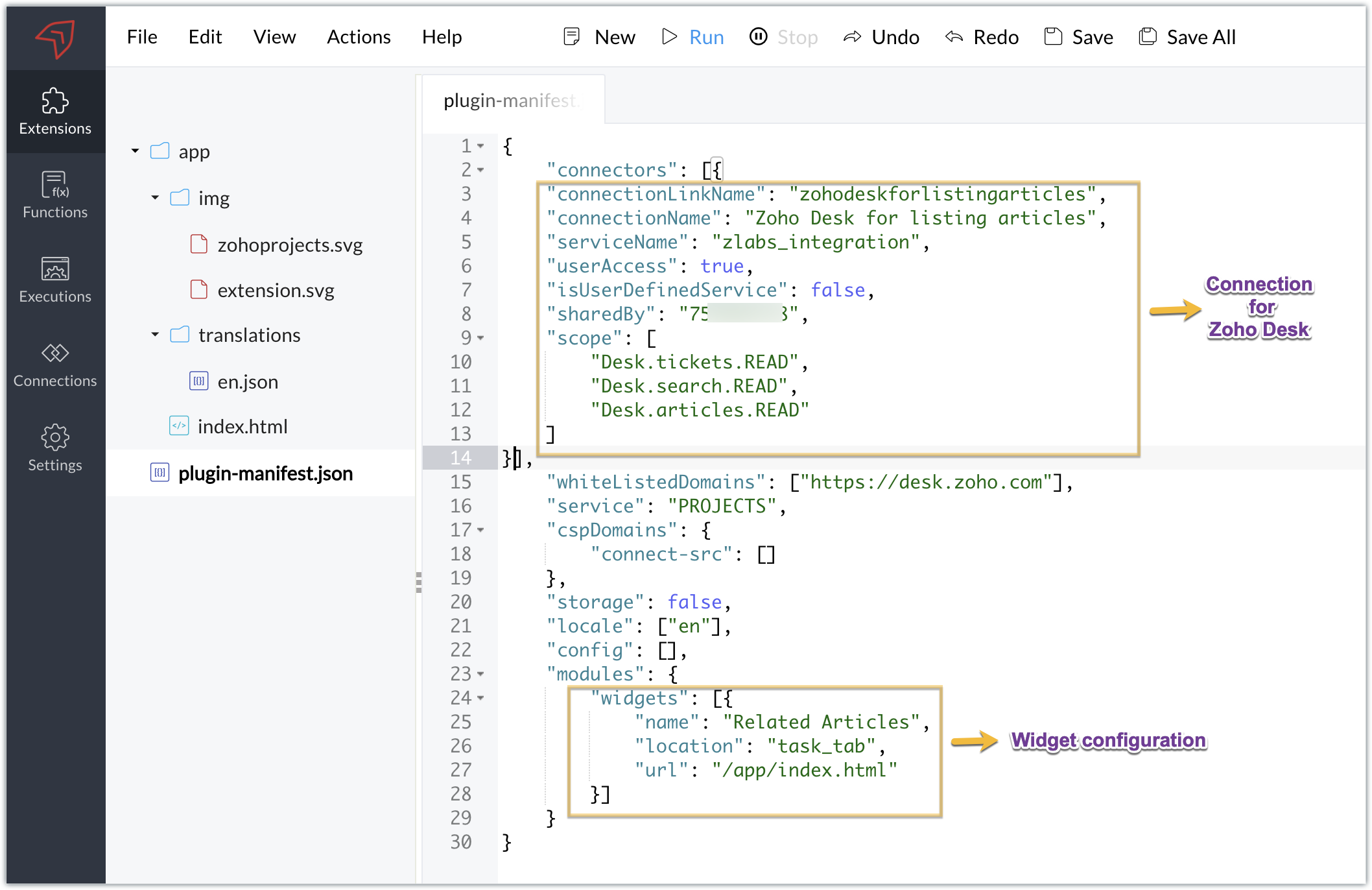
B. Plugin-manifest.json configuration: Once the extension is created, we next configure the plugin-manifest.json file to include the created connection and a widget.
For our extension use case, the plugin-manifest.json file is configured as shown in the below screenshot.
C. Setting up the widget code:
Now that we have the connection established, the extension created, and the plugin-manifest.json configured, let's go ahead and set up the custom widget code to achieve our goal.
Index.html - Widget code
<!DOCTYPE html> <html> <head> <title>App Default Screen</title> <script src="" target="_blank">https://js.zohocdn.com/projects/js/client_sdk.min.js"></script> <script src="" target="_blank">https://code.jquery.com/jquery-1.12.4.min.js"></script> <style> div.a { line-height: 200%; } </style> </head> <body> <div class="a"> <ul id="demo" style="font-size:20px"> <b>Article Details</b></ul> </div> </body> <script> var subject = ""; Util = {}; zohoprojects.init().then(function() { //Fetching the task subject using the Zoho Projects JS SDK method zohoprojects.get("task.name").then(function(response) { subject = response.data; var articledetails = { type: "GET", headers: { "orgId": "xxxxxxx", "Content-Type": "application/json" } }; var url = "https://desk.zoho.com/api/v1/articles/search?title=" + subject + "*"; //Using the request JS SDK method to invoke and get the Desk articles matching the task subject using the connection zohoprojects.request(url, articledetails, "zohodeskforlistingarticles").then(function(response) { var list = document.getElementById('demo'); var a = document.createElement("a"); var result = response.result; var data = result.data; //Looping through the articles for (i = 0; i < data.length; i++) { var title = data[i].title; var author = data[i].author; var authorname = author.name; var weburl = data[i].webUrl; var entry = document.createElement('li'); entry.innerHTML = title.link(weburl) + " by " + authorname; list.appendChild(entry); } }); }); }); </script> </html> |
- Here, we utilized the Zoho Projects JS SDK method to extract the task name, which is the task subject.
- We then used the Zoho Projects Request method to invoke the Zoho Desk API to search for articles.
- The Request method is used to make requests to third-party applications. It must be invoked with the belowparameters:
- Third-party API URL: This is the URL of the third-party application's API that needs to be invoked. In our case, we need to fetch articles from Zoho Desk based on a search value, so we used the Zoho Desk Articles Search API. We've included a search query parameter in the API as the title of the help article (wildcard search), and we've set the value of the search query parameter (title) as the task's subject. As a result, the API will look for any Zoho Desk help articles that satisfy a wildcard match with the task subject.
- Data object: Depending on the type of action being performed, each API requires a method type, body, header, and/or parameters to be invoked. To invoke the third-party application API, a data object with the necessary API details must be created. In our scenario, a header providing the Zoho Desk org ID is required to call the Zoho Desk article search API, which we have hardcoded.
- Connection: To work on the data of a third-party application safely, we would need to connect to that application. The link name of the connection created for the third-party application is the value of the connection parameter. This value will be available in the JSON code generated when the third-party application connection is established. This connection allows you to invoke the Zoho Desk API securely.
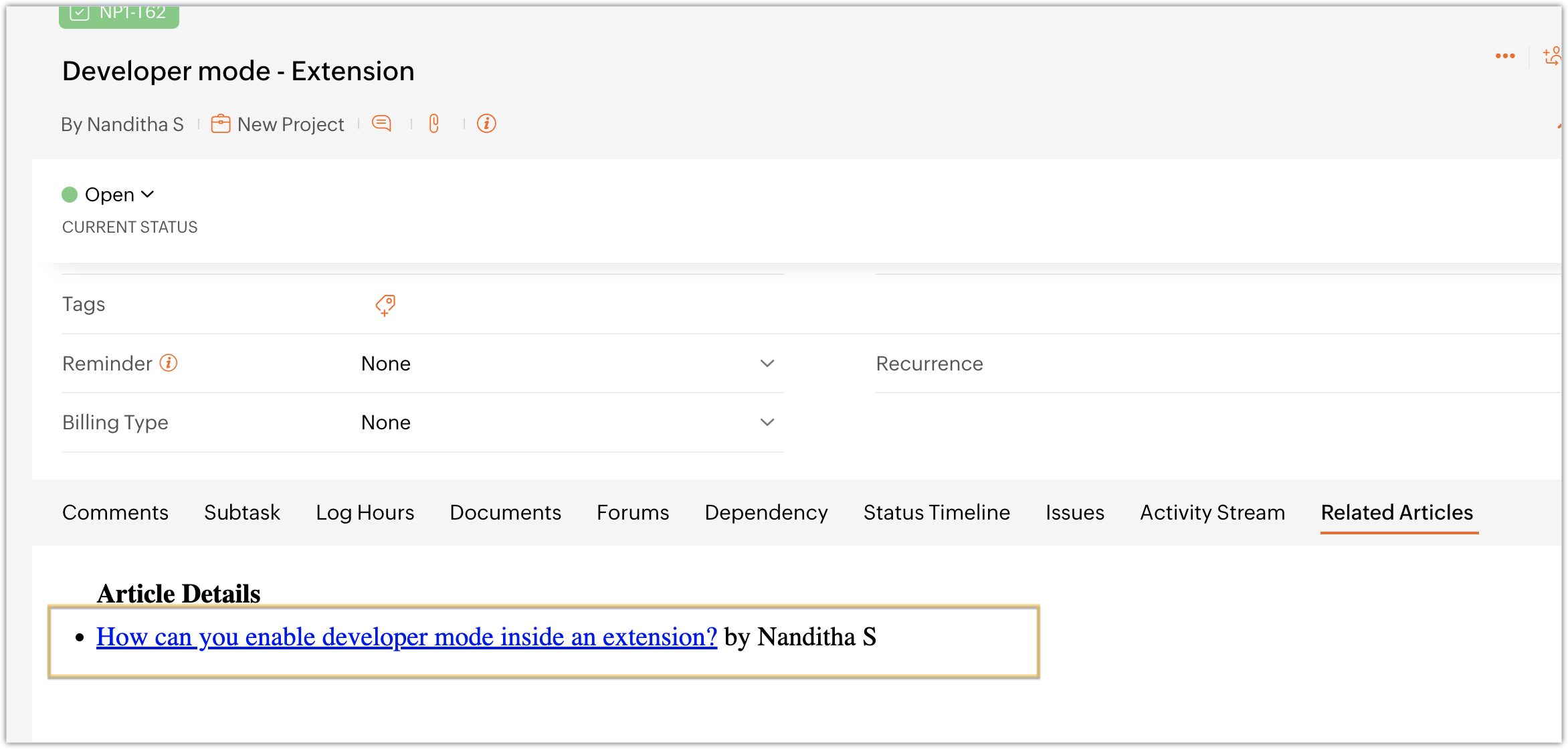
- Once the API is invoked by providing the necessary parameters for the Request method, the response for the invoked Zoho Desk search articles API is returned. We extract the information we require from the response, like the title, author name, and web URL. We then list and display this data in the Zoho Projects task details widget, Related Articles.
Sample output
- Access your Zoho Projects portal and enter into a task.
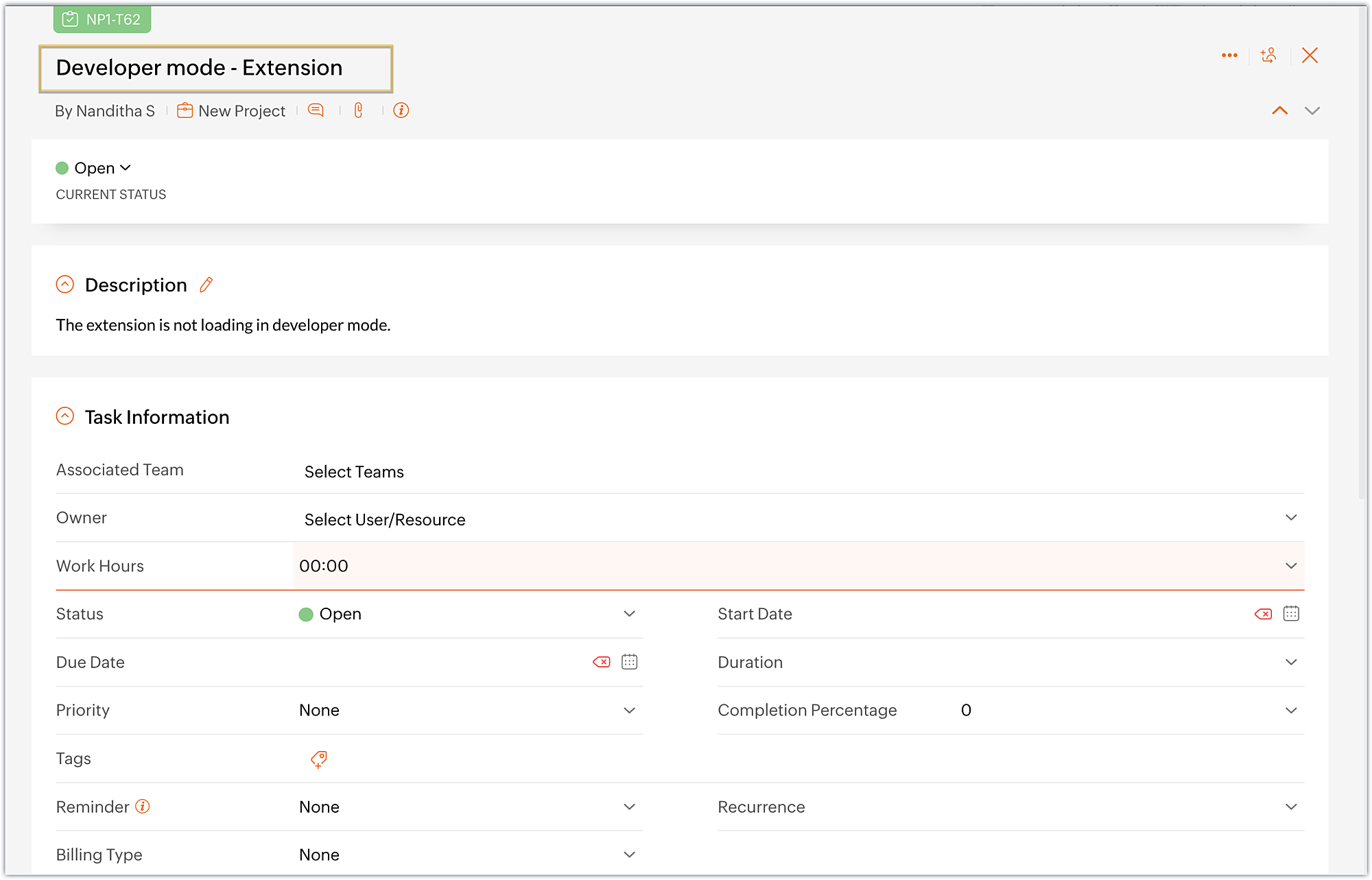
- Choose the Related Articles task tab, which is the widget we created.
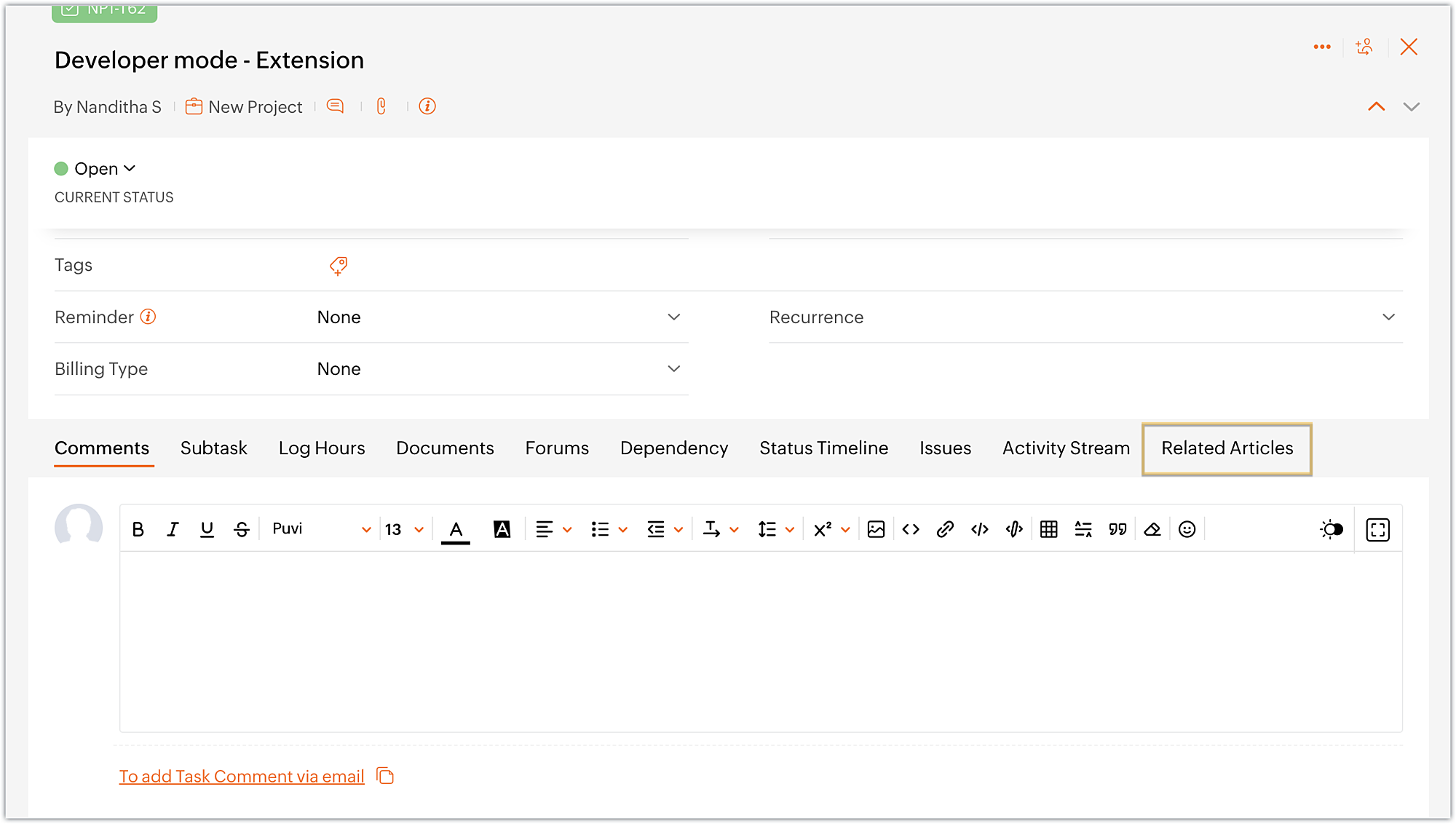
- The widget displays the available Zoho Desk articles that are related to the task at hand.
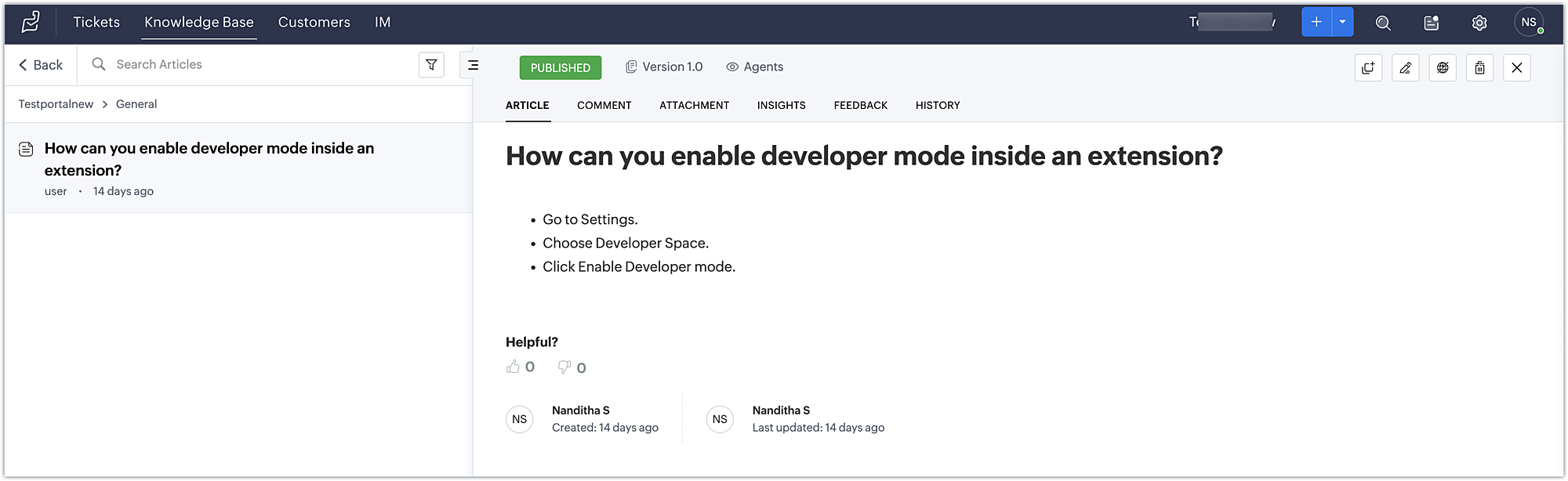
- Finally, click on an article to view its detailed information in Zoho Desk.
Using this method, developers working on Zoho Projects tasks can discover relevant articles and get helpful information to troubleshoot problems.
You can further enhance this use case by including a text box in the widget that allows the developer to enter a keyword and search for related articles using the Zoho Desk search articles API.
You can also accomplish use cases such as creating a task tab widget to associate data with a task. Every time the task loads, task-specific data can be displayed on the Task tab. To accomplish these kind of use cases, the data storage feature is available in Zoho Projects. We look forward to exploring the data storage feature,, and other use cases for custom widgets, in future posts.
We hope you found this information useful. Follow this space for further updates!
 Sign up for a Zoho Developer account and start developing extensions for Zoho products using Sigma.
SEE ALSO
Topic Participants
Nanditha Somasundaram Somasundaram
Sticky Posts
Building extensions #10: Fetch customized user inputs, store them globally at the app level, and access them across entities
This data storage concept enables you to store data related to your extension for both entity properties and extension properties. In our previous piece, we looked at how to store data for entities using entity properties. In this post, we'll look atBuilding extensions #9: Store, retrieve, and access entity-specific data in widgets using data storage
Data storage - Overview Storing data related to the extension you are working on is essential. It can be saved as key-value pairs for an entity or extension, known as entity and extension properties, respectively. Data can be saved for the following entitiesBuilding extensions #7: Create custom widgets for a simplified end-user experience
Discover the benefits of using widgets! We explored the significance of widgets, prerequisites, and the availability of JS SDK methods as part of our previous post. In this post, let's go over a detailed example of using widgets along with certain ZohoBuilding extensions #6: Custom user interfaces with Widgets
Welcome to our post on Widgets for Zoho Projects! In our last post, we explored the significance of the connections feature, showed how to use it, and provided an example use case. In this article, we'll look at the importance of widgets, another featureBuilding extensions #5: Integrating applications with Zoho Projects through Connections
In our last post, we discussed the essential features that a Zoho Projects extension can provide. Starting with this post andin every subsequent post going forward, we'll go through each of those features in depth, one by one, with an example use case.
Recent Topics
integrating Zoho CRM vendors with Zoho projects
In most of our projects we collaborate with our Vendors. Being able to integrate only Accounts and not Vendors from CRM, is a huge limitation for our perspective and needs. We would really love to see this feature in the CRM-Projects integration.Zoho Creator Workshops 2026—Europe & UK | Coming to a city near you!
Hello everyone! We're excited to announce the Zoho Creator Workshop Series 2026, coming to cities across Europe and the United Kingdom this year! Whether you're looking to explore the intermediate-to-advanced capabilities of Creator or you're a seasonedNumber 9 envelopes for invoice printing
I email and print invoices. Being new to Zoho and coming from QB, we did both as we have a more traditional So in Zoho i want to do the same using Number 9 envelopes. These have both a return window and mail to windoow see attached image. Im just looking for best suggestions on how to get a ZOHO invoice to work, so I can mail my invoices...Zoho Books/Square integration, using 2 Square 'locations' with new Books 'locations'?
Hello! I saw some old threads about this but wasn't sure if there were any updates. Is there a way to integrate the Square locations feature with the Books locations feature? As in, transactions from separate Books locations go to separate Square locationsOpen Sans Font in Zoho Books is not Open Sans.
Font choice in customising PDF Templates is very limited, we cannot upload custom fonts, and to make things worse, the font names are not accurate. I selected Open Sans, and thought the system was bugging, but no, Open Sans is not Open Sans. The realAdd Reporting feature to display variance/change columns when comparing periods
When running reports to compare periods (for example, Profit and Loss comparing current year to previous), I would like to be able to display variance columns in both (a) amount or (b) percentage.Payroll and BAS ( Australian tax report format )
Hello , I am evaluating Zoho Books and I find the interface very intuitive and straight forward. My company is currently using Quickbooks Premier the Australian version. Before we can consider moving the service we would need to have the following addressed : 1.Payroll 2.BAS ( business activity statement ) for tax purposes 3.Some form of local backup and possible export of data to a widely accepted format. Regards Codrin MitinInvalid scope choice: Workdrive integration in CRM
Bug: There is an invalid option in the permission choices for Workdrive integration in CRM. If the entry "WorkDrive.teamfolder.CREATE" is selected, it will return a message indicating invalid OAuth scope scope does not exist.What's New - February 2026 | Zoho Backstage
February 2026 brings a major new addition and a collection of enhancements across Zoho Backstage. We thought about writing a long introduction, but the updates in this release make a strong case on their own. So we’ll skip the buildup and dive straightAttaching files to emails within CRM Deals.
Hello, We have recently started using the extension "Workdrive for CRM" (Related List) to view/store our documents for each Deal, instead of using Attachments. Overall it feels like a better way to go but the user experience is not so great when it comesOne Contact with Multiple Accounts with Portal enabled
I have a contact that manages different accounts, so he needs to see the invoices of all the companies he manage in Portal but I found it not possible.. any idea? I tried to set different customers with the same email contact with the portal enabled andAnyone worked out how to export or screengrab a full heatmap?
I'd love to be able to include a copy of a heatmap in a report but can't work out how to grab the whole thing as there doesn't appear to be an export function? Thanks in advance.Establishing Relationships among contacts/leads with Reciprocal
Is there any way to create a relationship between contacts and leads and be able to go into just one of the files and have it reciprocate the entry in the other file? For example, if I have two people say John and Jane Smith who are husband and wife.Placeholder for Agent Signature in Email Templates
Dear Zoho Team, I hope this message finds you well. We currently face a limitation when designing email templates in Zoho Desk. While we can create email templates and include a footer at the end, the agent signature is always appended by default at theCustom View and Custom Fields on Zoho Books
Hi, I have some custom fields on Estimates and Invoices. I also use Custom Views so I can have a lot of information at a glance. I want to include my custom fields as columns in my custom views of estimates / invoice, but it looks like is not possible.%PaymentLink%
Does not work. Software creates a BAD link. ....and yes payment options are turned on. Link on the invoice pdf once opened will work but this template is a joke.Can Zoho Marketing Automation send OTP codes via WhatsApp during user registration?
The flow I would like to implement is: A user signs up in the mobile app and enters their phone number. The system generates a one-time verification code (OTP). The OTP is sent to the user via WhatsApp message. The user enters the code in the app to confirmWhere to show Customization Field ?
Dear Sir, I have made some New Field in Item Field Customisation. Now I don't require that field in Estimate, Sales Orders etc. I just wants that field in Sales Invoice to Show/Hide... Is that possible ?What's New in Zoho Analytics - February 2026
Hello Users! We're back with another round of updates for Zoho Analytics. This month's release focuses on giving you greater flexibility in how you visualize, manage, and act on your data - with new features like custom visualizations, remote MCP server,Zoho Books (and other Finance Suite Apps) - Clickable Item Name on Invoices and Reports
Hi Zoho Books team, It would be really helpful if the Item Name on Reports were clicable to take me to the item. The same on Invoices, often I am looking at an invoice and I want to look at the deails of a product. A link here would be helpful to jumpDisplay actual mileage on an invoice
My users are creating expenses in Zoho expense. For example, they expense 10 miles and get paid 7 dollars (10 miles * IRS rate of .70). If I look at the expenses in Zoho Books, it does show them at 10 miles at .70 cent When I add these expense to an invoiceCan you create relationships BETWEEN contacts within the same module
I am setting up my CRM, and I want to have a way to connect contacts within the same module. Is there a way to do this? If not - how do I decide how to split up contacts to make connections? What are best practices for this? We have clients who needFunction and workflow to create customer payment and send receipt
I am attempting to set up a workflow/custom function for the automatic creation of a customer payment and sending the email receipt, but am receiving the error "Improper Statement Error might be due to missing ';' at end of the line or incomplete expression" I've been over everything several times and cannot see where the error is (code is copied into the attached document). I haven't used custom functions before with Deluge, so it's very likely something very simple, or I've completely muckedDisable Sign Up option in Zoho Creator Portal and show only Sign In page
Is it possible to disable the Sign Up option in a Zoho Creator portal? The requirement is to show only the Sign In page and completely remove or hide the Sign Up page, so users cannot create accounts directly from the portal login page. Is there any settingCan I view the KB in the same way as a customer logged in as my Agent?
Sorry if this seems a mad question. I have some Articles that I want to be seen by my Agents and the status of these is set to Agents only. We also have some that are set to Public. When I sign in with my private email address (as a customer) I canWhat’s New in Zoho Inventory — Latest Features, Integrations & Updates | December 2025
Zoho Inventory has evolved significantly over the past months, bringing you smarter, faster, and more connected tools to streamline your operations. Whether you’re managing multichannel sales, complex fulfillment workflows, or fast-moving stock, our newestWhich user's capacity is used for Shared Mailbox storage?
We use shared mailboxes at our company, and their size is increasing daily. Which user(s)'s total mailbox limit is being used up by this space?Evernote (ENEX) import limitations
I have been with Evernote since 2010, but the latest price increase is ridiculous. I am currently testing Zoho Notebook as a replacement. I am impressed so far - if it were not for critical need to import legacy Evernote notes, I would 100% migrate toCan I create a CODE 128 custom field for my items in Zoho Inventory and then use it for generating Sales Orders?
Can anyone helps me, I don't want to use the SKU code for scanning my products. Because all my products have a CODE-128 label attached.Prevent duplicate with custom fields?
I was wondering something about custom field/custom modules in Zoho Desk. For some reason you can make a custom field mandatory but not unique? For example, if I create a custom module to manage equipment and renewal and make a field serial number noZoho Books' 2025 Wrapped
Before we turn the page to a new year, it’s time to revisit the updates that made financial management simpler and more intuitive. This annual roundup brings together the most impactful features and enhancements we delivered in 2025, offering a clearMultiple Vendor SKUs
One of the big concerns we have with ZOHO Inventory is lack of Vendor Skus like many other inventory software packages offer. Being able to have multiple vendor skus for the same product would be HUGE! It would populate the appropriate vendor Sku forCreate Invoice automated with Package
Does anyone knows how to create an invoice from a SO when we have created the package? We do these manually. and validate that the product packed is the product invoiced (if the order is partially packed) Regards, JSUnable to integrate Zoho Projects and Zoho Workdrive
I'm a Zoho One subscriber. When I go to Zoho Projects > Settings > Marketplace > Zoho Apps I do not see an option for Zoho Workdrive but I do see one for Zoho Docs that does nothing. How do I get the option to integrate Zoho WorkDrive and Zoho ProjeDisable payment thank-you emails
Hello, can someone please tell me how to disable sending of the "Payment Thank-You" emails?How to backdate record payment for the invoice
I would like to record a payment which happened 2 days ago, but I am not able to select any date later than today. I backdated the invoice, too, but it doesn't change anythingHelp with deluge script
Hi Community, this is my first Deluge script. I've pieced it together from reading various articles I want to use it in a workflow to 1 Convert a lead to a contact 2. Create a record in a custom module Below is what I have got so far but it does not fireConnect Airwallex in Zoho Books
I have a question. I’m trying to connect our Airwallex account to Zoho Books, but the integration does not seem to work. Could you please guide me on how to properly connect Airwallex? I need to see the expenses also, since it only shows the profits nowMarketer's Space: Why email authentication matters in Zoho Campaigns
Welcome back to another post in Marketer's Space! If you've recently started using Zoho Campaigns, you've probably come across terms like SPF and DKIM. You may have also noticed emails that show "via zcsend.net" in Gmail when testing or sending campaigns.Edit email address that appears on invoice
Hi How do I change the email address that appears on invoices, it is showing the email address that i used to sign up to zoho with but I want to change it to another email address that we use for accounts. also is there a way to edit the position of aNext Page