Advance Your Churn Predictions with Zia's Usage Data Feature: Event Mapping
Greetings all,
This is an important and exciting update about feeding usage data into Zoho CRM. To expand the scope of how usage data can be used by Zia, we are introducing a new section called Usage Data under Zia. Users can now easily import, edit, and update usage data within their CRM.
This feature helps you understand if your customers are losing interest or satisfaction with your service, experiencing technical difficulties, or switching to a different platform with the usage data you feed. Identifying these behavioral changes early on can provide valuable insights for businesses to step in and re-engage customers.

Through this enhancement,
- Improve the CRM's capability to leverage usage data for Zia-generated insights such as churn prediction, recommendations, and engagement signals.
- Enable users to link key attributes from usage data to terms that the system can understand for accurate Zia processing.
- Facilitate the seamless import of usage data from different sources into Zoho CRM.
What's new?
When AI models sometimes struggle to interpret the usage data, customers often find it challenging to use their usage data in CRM systems effectively. Event mapping is a proper mapping mechanism to utilize usage data fully, not missing any opportunity on customer engagement, retention, and personalized service delivery.
With the new Usage Data under Zia, you can map each static set of events to the fields of the custom module. This enhancement helps Zia provide a deep analysis that can help predict more insights. Likewise, your churn prediction goes on, and the data is automatically updated with incoming data whenever your customers engage.
Zia can expand the range of applications for the usage data beyond Churn prediction after being trained with the data. The scope of Zia expands with the full utilization of usage data, helping with the following use cases in other features.
- Recommendations help you decide what products you can cross-sell or upsell to which customers.
- Analyze your customers' signals and engagement rates to gain deeper insights.
- Bring in more accuracy to churn predictions, like when a specific customer is likely to churn.
Additionally, Zoho CRM can now access usage data sourced via API, URL, or any supported file format from any tool to be stored in a custom module. This lowers your dependency on restricted tools.
Let's get started with the details of the enhancement.
What is usage data?
All businesses need transactional data as a base to study user purchase behavior on metrics like customer details, date and time, payment methods, discounts, and inventory movements.
Unlike transactional data, which only includes information about customer purchases and subscription details, usage data tracks how these customers interact with or use them, through an app or a website, concentrating on metrics like frequency, duration, and patterns of usage, helping businesses understand user behavior and preferences.
Tools like Google Analytics track customer actions, such as logins, interests, purchases, and location, to provide us with this data. It is used for behavior analysis, engagement metrics, churn prediction, and more.

What is event mapping?
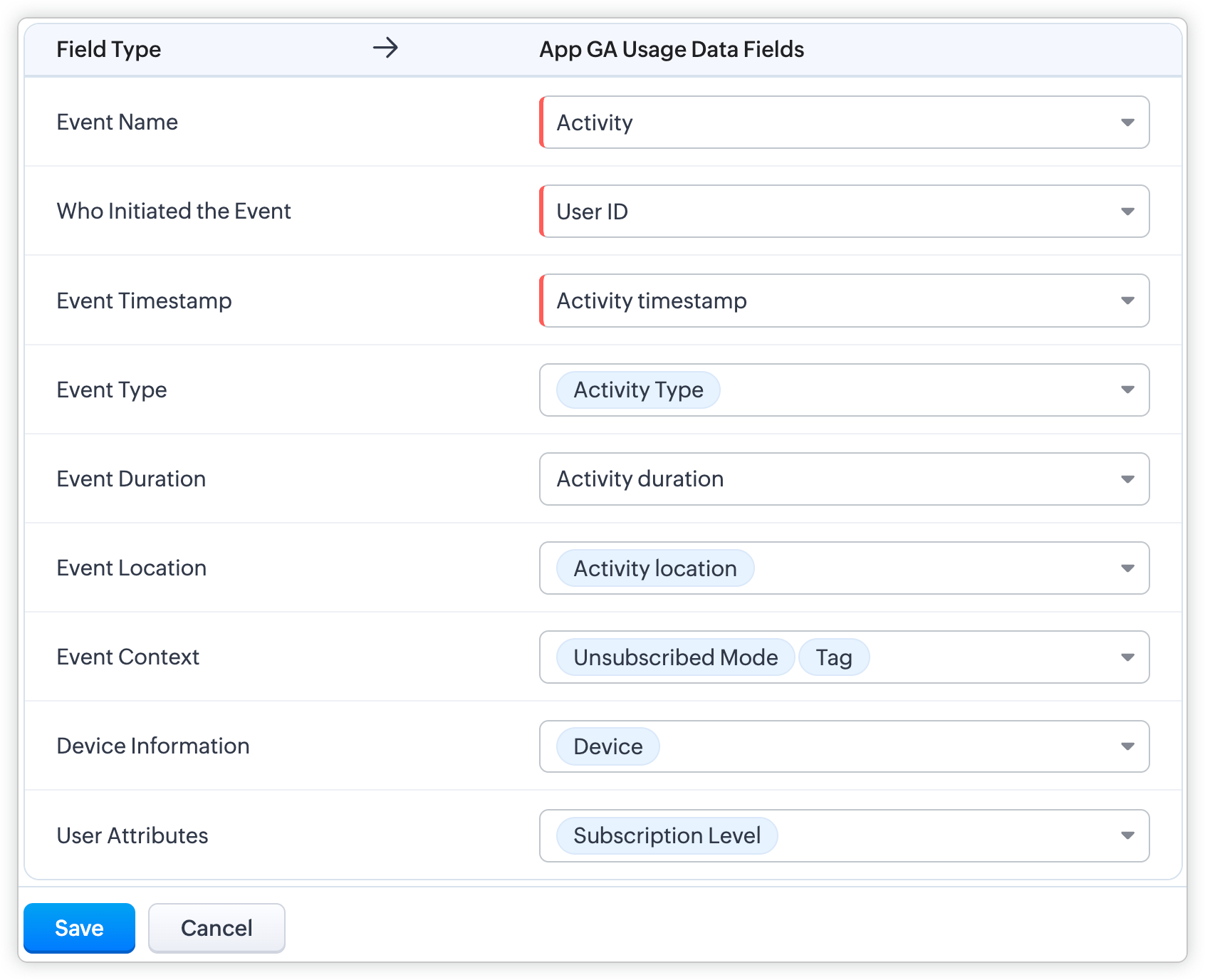
Event mapping is a learning technique for the system so the user can activate Predictions, such as churn prediction. Through event mapping, the system will learn and understand how to interpret usage data. Mapping involves certain data attributes like event name, event timestamp, event initiator, and others.
Why event mapping?
Since event mapping requires the mapping of information, you are directly feeding in more details about the user interactions, easing the accuracy of churn prediction. In simple words, more details give you more accurate prediction.
For instance, a sudden reduction in the amount of logins serves as a significant indication of decreasing engagement, potentially indicating churn. Through event mapping, Zia can anticipate the reasons why a certain demographic of users cease logging in at specific times and whether device-related factors impact their logins.
Moreover, event mapping unlocks various functionalities like calculating churn scores, generating personalized recommendations, and monitoring customer engagement. For example, through Workflow Rules, users can send promotional emails to encourage customers who have not logged in for over 30 days to stay engaged.
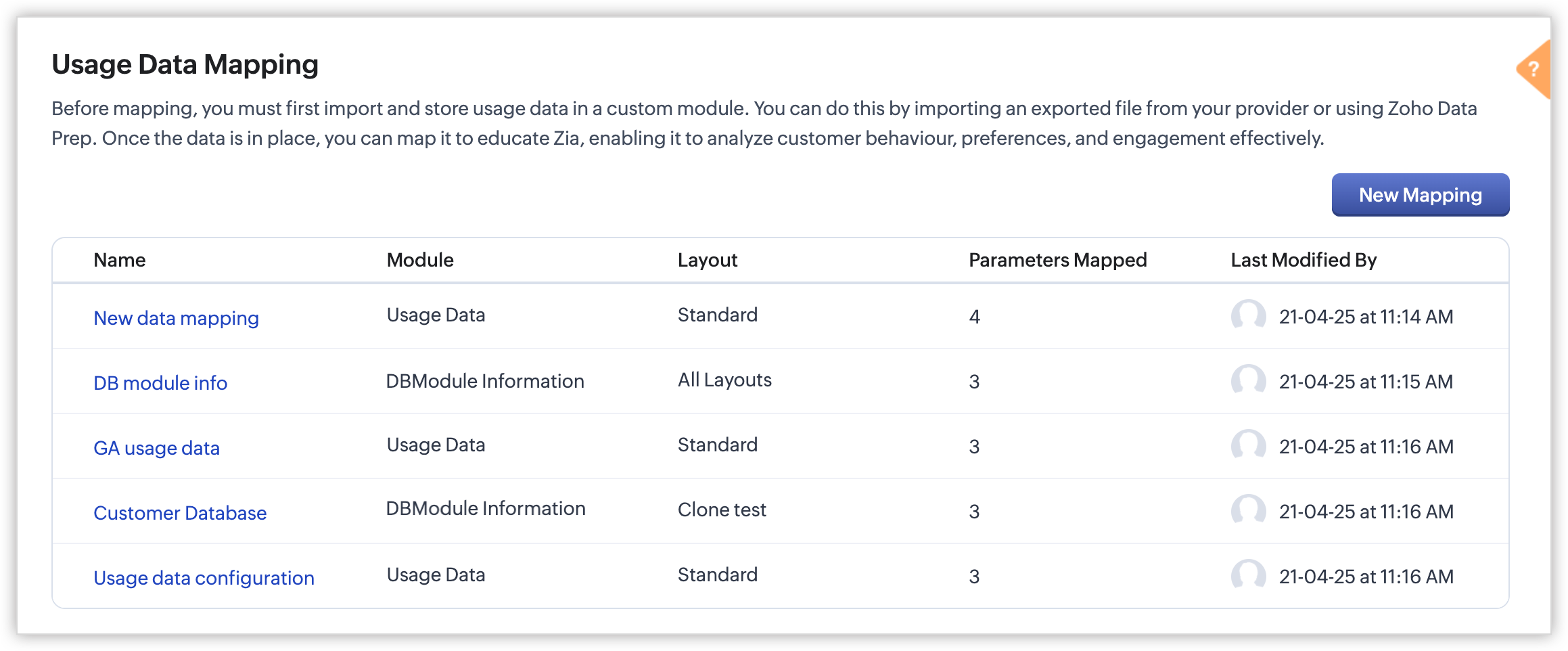
Steps to configure:
With the enhancement, import usage data into a CRM custom module, create a mapping of the data called event mapping, and utilize that data for churn prediction and more Zia insights. Through event mapping, AI increases the accuracy of Zia-driven predictions and also widens its scope for personal recommendations and other predictions.
Let's look at this activation in the below steps:
- Create a custom module and three (mandatory) fields to store the following data: event name, event timestamp, and event initiator.
- Import the usage data from other sources (via API, DataPrep, CSV, or any supported file format) to the created custom module and map the fields.
- In Usage Data under Zia, perform the event mapping to create a way that the system understands.
Availability
DC: All DCs
Editions: Enterprise and Ultimate editions
Release Plan: This feature will be released phase-wise to all DCs
For detailed description and guide, refer to our resources:
Topic Participants
Pauplin Fiona Peries G
Rich Brandwein
Sunderjan Siddharth
Sticky Posts
Introducing Multiple Sandbox Types and Support for Module's Data Population
Register here for the upcoming Focus Group webinar on Multiple Sandbox | Help documentation to learn more about the new enhancements Hello everyone, Sandbox in CRM is a testing environment for users to create and test new configurations like workflowGood news! Calendar in Zoho CRM gets a face lift
Dear Customers, We are delighted to unveil the revamped calendar UI in Zoho CRM. With a complete visual overhaul aligned with CRM for Everyone, the calendar now offers a more intuitive and flexible scheduling experience. What’s new? Distinguish activitiesVoC in Zoho CRM is now data savvy: Explore response drilldown, summary components and participation in CRM criteria
VoC has all the goods when it comes to customer intelligence—which is why we're constantly enhancing it. We recently added the following: A customer drilldown component that shows you the list of prospects and customers behind a chart's attribute ExpandedWrapping up 2025 on a high note: CRM Release Highlights of the year
Dear Customers, 2025 was an eventful year for us at Zoho CRM. We’ve had releases of all sizes and impact, and we are excited to look back, break it down, and rediscover them with you! Before we rewind—we’d like to take a minute and sincerely thank youPresenting ABM for Zoho CRM: Expand and retain your customers with precision
Picture this scenario: You're a growing SaaS company ready to launch a powerful business suite, and are looking to gain traction and momentum. But as a business with a tight budget, you know acquiring new customers is slow, expensive, and often delivers
Recent Topics
Zoho CRM for Everyone's NextGen UI Gets an Upgrade
Hello Everyone We've made improvements to Zoho CRM for Everyone's Nextgen UI. These changes are the result of valuable feedback from you where we’ve focused on improving usability, providing wider screen space, and making navigation smoother so everything🚀 WorkDrive 6.0 (Phase 1): Empowering Teams with Content Intelligence, Automation, Accessibility, and Control
Hello, everyone! WorkDrive continues to evolve from a robust file management solution into an intelligent, secure, and connected content collaboration platform for modern businesses. Our goal remains unchanged: to simplify teamwork, strengthen data security,COQL API in JS Widget only pulling 200 records
Hello! We've been building a custom homepage widget using the Zoho JS SDK, and it seems that this https://help.zwidgets.com/help/latest/ZOHO.CRM.API.html#.coql only allows 200 records. I thought the limit was 2000 for COQL queries, but am I mistaken?Extend the Image Choice Field
Hi, The New Yes/No field is great for what it does, and the Image Choice Field is good but could be better with some functions from the Yes/No field. Take an example, rather than just Yes/No you want Yes/No/Maybe (Or more than 3 choices), but unlike theReopen ticket on specific date/time
Is there a way that we can close a ticket and setup a reopen of that ticket on a specific date and time? (without using the "on hold" ticket option)Customizing Helpcenter texts
I’m customizing the Zoho Desk Help Center and I’d like to change the wording of the standard widgets – for example, the text in the “Submit Ticket” banner that appears in the footer, or other built-in widget labels and messages. So far, I haven’t found[Important announcement] Zoho Writer will mandate DKIM configuration for automation users
Hi all, Effective Dec. 31, 2024, configuring DKIM for From addresses will be mandatory to send emails via Zoho Writer. DKIM configuration allows recipient email servers to identify your emails as valid and not spam. Emails sent from domains without DKIMColumn letter from number
Hello, I am trying to select a cell and i have the column number. How do i do this or is there a way of getting the letter from the number? Thank youAPI credit COQL COUNT
The docs describe API credits in COQL from the LIMIT perspective: https://www.zoho.com/crm/developer/docs/api/v8/COQL-Overview.html When using aggregate functions such as `COUNT` or `SUM`, is that billed as 1 API credit?Trigger a Workflow Function if an Attachment (Related List) has been added
Hello, I have a Case Module with a related list which is Attachment. I want to trigger a workflow if I added an attachment. I've seen some topics about this in zoho community that was posted few months ago and based on the answers, there is no triggerStandard Description Field - Can I change label or add dd tooltip
Is there a way fo you guys to allow the customer to change the label name for the description field in the customer portal when submitting tickets. Or at least allow us to add a tooltip to clarify what description we need from them. I know I can create my own separate multi line description field but if I do that, it doesn't have the nice toolbar with Bold, Italic, Underline, color, font, indent, etc. Can you please allow us to add a tooltip to the zoho standard description field?Weekly Tips : Save Time with Saved Search
Let's assume your work requires you to regularly check emails from important clients that have attachments and were sent within a specific time period. Instead of entering the same conditions every time—like sender, date range, and attachments included—youRemove 'This is an automated mail from Zoho Sign' in footer
Hi there, Is it possible to remove or change the text under the e-mail templates? I can't figure out how to do that: Would love to hear from you. Kind regards, TristanHow can I link Products in a Deal Subform to the Products Module
Hello, I have a pricing subform on our Deals page and use a lookup field to associate a product with each line. I want to be able to look at a product page within the Products module and see a list of the deals connected to that product. I have this workingOrganize and manage PDFs with Zoho PDF Editor's dashboard
Hello users, Zoho PDF Editor's dashboard is a one-stop place to upload, sort, share PDF files, and more. This article will explore the various capabilities that Zoho PDF Editor's dashboard offers. A few highlights of Zoho PDF Editor's dashboard: UploadUpdating records through Zoho Sheets View doesn't update timeline or trigger workflow rules
I have noticed that when i update a series of record with the zoho sheets view (see here http://d.pr/i/ahnR) it doesn't update timeline history or trigger workflow rules. I am using it in the Deals module. Looking forward for some more info. DenisPassing Info from Function to Client Script
Hello, I have recently started making use of client script for buttons, allowing me to give the user information or warnings before they proceed. This is great. However, I have never quite managed to pass back any extra information from the function toAutomatically Update Form Attachment Service with Newly added Fields
Hi, When I have a Form Setup and connected to a 3rd Party Service such as OneDrive for Form Attachments, when I later add a new Upload Field I have to remove and redo the entire 3rd Party Setup from scratch. This needs to be improved, such as when newCannot get code to work with v2.mergeAndStore!
Please can someone help me pass subform items into a repeating mail merge table row using v2.mergeAndStore? I have a mail merge template created in Writer and stored in Workdrive. This template is referenced by a custom CRM function which merges all ofDrag 'n' Drop Fields to a Sub-Form and "Move Field To" Option
Hi, I would like to be able to move fields from the Main Page to a Sub-Form or from a Sub-Form to either the Main Page or another Sub-Form. Today if you change the design you have to delete and recreate every field, not just move them. Would be nice toZoho Payroll for Canada
Is anyone else having problems getting setup for Canada?Passing the CRM
Hi, I am hoping someone can help. I have a zoho form that has a CRM lookup field. I was hoping to send this to my publicly to clients via a text message and the form then attaches the signed form back to the custom module. This work absolutely fine whenSuper Admin Logging in as another User
How can a Super Admin login as another user. For example, I have a sales rep that is having issues with their Accounts and I want to view their Zoho Account with out having to do a GTM and sharing screens. Moderation Update (8th Aug 2025): We are workingOne Contact with Multiple Accounts with Portal enabled
I have a contact that manages different accounts, so he needs to see the invoices of all the companies he manage in Portal but I found it not possible.. any idea? I tried to set different customers with the same email contact with the portal enabled andUser Automation: User based workflow rules & webhooks
User management is an undeniable part of project management and requires adequate monitoring. As teams grow and projects multiply, manual coordination for updating users & permissions becomes difficult and can give way to errors. User automation in ZohoDisable Zoho Contacts
We don't want to use this app... How can we disable it?Default Ticket View - Table?
Guys, We mostly use the table view to queue tickets. Maybe I am missing it - but how can I set that view as 'default" for all our agents? Thanks JVZoho One IS BUGGY
Here are some things that just don't work: - Disabling applications from certain Spaces - Adding users (probably only for me) - Renaming applications in Zoho One Portal (fixed by now) - Reordering applications in Spaces When I try to reorder: It feelsPaid Support Plans with Automated Billing
We (like many others, I'm sure) are designing or have paid support plans. Our design involves a given number of support hours in each plan. Here are my questions: 1) Are there any plans to add time-based plans in the Zoho Desk Support Plans feature? TheMerge Fields that previously worked are now giving an Error!
Saving a URL Link button on the Deal module. The below fields used to save without issue at all, but now produce an error of "URL contains unsupported merge field!" ${Contacts.Mailing Street} ${Contacts.Mailing City} ${Contacts.Mailing State} ${Contacts.MailingMove email between inboxes?
Is it possible to move emails from one team inbox to another? We would like to be able to have a single "catch-all" inbox for incoming requests, and then move the email to the appropriate department inbox. I was hoping we would be able to accomplish thisClarification on Zoho Forms 1-User Plan: Multiple Submitters and Approvers
Question Content (Copy–Paste Ready) Hello Zoho Team, I would like clarification regarding Zoho Forms pricing and user limits. I am planning to subscribe to the ₹700/month (1 user) plan. My use case is as follows: Only 1 person (myself) will create andCRM Cadences recognise auto-responses
I have leads in a Cadence. I get an auto-responder reply "I'm out of the office..." Normally Cadences seems to know that isn't a real reply and keeps the lead enrolled in the cadence. However, today, Cadences has UNENROLLED a Lead who sent an auto-reponseApp for Mac OS X please!
It would be awesome to have a mail app for Mac OS X that included all the cool features such as steams, calendar, tasks, contacts, etc. Most people prefer native apps, rather than running it through a web browser. I know that we can use the IMAP, CalDAV,Ability to Edit Ticket Subject when Splitting a Ticket
Often someone will make an additional or new request within an existing ticket that requires we split the ticket. The annoying part is that the new ticket maintains the subject of the original ticket after the split so when the new ticket email notificationFacing Issues with Sites Mobile font sizes
my page renediaz.com is facing issues mobile view, when i try to lower font sizes in home page, instead of changing the size, it changes the line spaceZoho Books Payroll
How am I supposed to do payroll and pay my employees with Zoho Books? I think it's pretty strange that an accounting software doesn't have the ability to perform one of the most common functions in business; paying your employees. Am I missing something,Different Task Layouts for Subtasks
I was wondering how it would be possible for a subtask to have a different task layout to the parent task.60 Days Into Zoho - Tiktok Branding Startup -7 Questions?!
Wsp Everybody I co-own a TikTok Branding / Consulting Startup & have been using Zoho for the past 60 days - Am now looking to make our overall operations & processes more Efficient & Effective! Curious to know how others are using the platform & what'sNotifications in Cliq client for Linux
If I got it right, Cliq desktop client for Linux does not use the generally accepted notification method via org.freedesktop.Notification interface. For this reason, Cliq notifications do not look and behave as all other notifications. Is it possibleNext Page