Kaizen #126 - Circuits in Zoho CRM - Part 1
Hello everyone!
Welcome back to another week of Kaizen!
Today, we will discuss an exciting topic—Circuits in Zoho CRM.
For starters, we will discuss what Circuits are, how beneficial they are for businesses, different views of a Circuit, and the different states and flow controls.
In the next post, we will discuss associating a Circuit to a blueprint, workflow, and a button, testing and execution, and see a Circuit in action with an interesting use case.
What are Circuits in Zoho CRM?
We use different microservices to accomplish our business needs, but most of the time, we are forced to switch over to multiple places.
With Circuits in Zoho CRM, you can integrate multiple microservices in a single platform and create automated workflows, all within your CRM!
For example, consider that you have an e-commerce application that involves multiple processes like tracking inventory, payment processing, fulfilling and tracking orders, generating receipts and reports, etc.
Typically, you would code this entire logic and use it to fulfill your business needs. But, with Functions in Zoho CRM, you can write the logic for each of these individual processes and simply orchestrate them using Circuits.
So, for the above example, you can simply create an automated workflow using Circuits and use the functions in the right order. That's not just it! You can re-use these functions elsewhere, too.
Another simple example of a Circuit is when you want to automating sending SMS alerts to users when an event occurs. How this is different from a workflow is that in this circuit, you can have a function that triggers an SMS alert, and also a function that sends an email to the user when the SMS alert ails. This involves circuit's functional states and a decision making state.
Like this, the use cases of circuits are endless.
Advantages of Circuits
- Automate your routines
Convert all your manual routines to automated workflows to save time. Avoid the need to trigger or interrupt applications to control the system flow, as you can create smooth-sailing, smart workflows that control themselves. - Scale fast
Handle any number of requests hassle free as your workflows get executed on cloud. While Zoho Circuit dynamically allocates resources on need, you can focus more on building your applications rather than managing them. - Update in minutes
Building the business logic of your applications in workflows empowers you to update the applications quickly. Swap or reorganize the components easily and build the modified applications in minutes. - Low-code
Create a circuit effortlessly with the visual drag-and-drop interface, which makes it easier for the users with minimum coding knowledge. - Developer-friendly
Circuits help you manage parallel processes, service integrations, spot failures, retry, and view logs, within minutes. Developers can focus on the business logic and not worry about these factors. - Orchestrate CRM Functions
Use various CRM functions on your circuit to integrate multiple third-party apps and Zoho CRM seamlessly. Write functions once, and orchestrate them in circuits to solve different business needs. - Automate IT and business processes within CRM
Create a circuit, associate it with a workflow, blueprint, or button, and automate your entire business process. With high availability, scalability, and fault tolerance, circuits ensure the performance of your workflow remains consistent even with changing states and an increase in frequency. - Diagnose errors and view audit logs
A detailed log of each execution provides the status of each state's task execution, the payload and parameters passed, and the responses and exceptions generated. - Use Existing Functions
From picking functions you've already tried, tested, and are up and running in your CRM account, to using a circuit within another circuit, this flexibility opens up possibilities of handling so much of your out-of-the-box requirements in a single space.
How are Circuits different from Workflow Rules and Blueprints?
Circuits is simply an orchestration of functions with powerful state management capabilities, along with in-built flow controls to automate the business process.
Workflow rules help us automate repetitive tasks and standardize business processes within the CRM system.
Workflow rules are useful in simple automations that the sales person does on a regular basis, like sending an email after record creation.
Builder View and Code View of a Circuit
Builder View
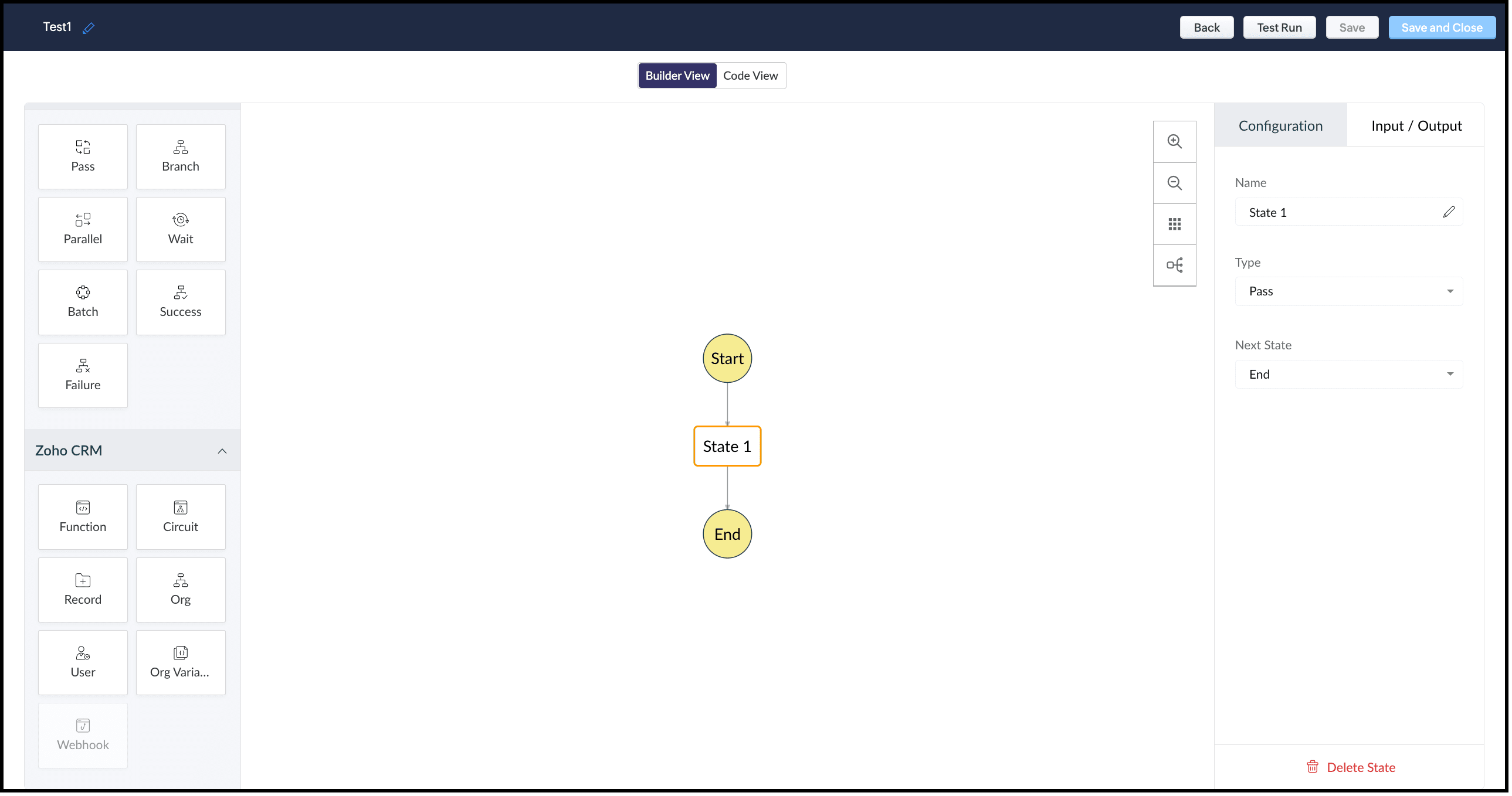
This view offers an easy drag-and-drop interface to build your circuit. The left pane in this view comprises all the states that can be added to a circuit.
The right pane comprises Configuration and Input/Output.
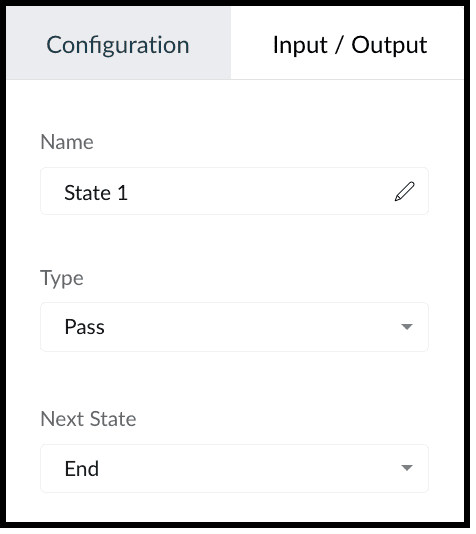
The Configuration tab lets you give a name to the state, choose its type, and select its next state.
The Input/Output tab allows you to control how JSON data must flow from one state to another through Paths.
Paths are strings beginning with $ that identify the components within the JSON. Specific parts of a JSON can be accessed by denoting their attributes in Input Path, Result Path, and Output Path.
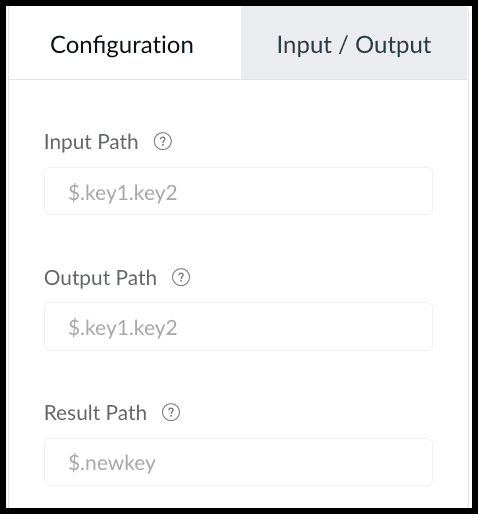
This tab contains the following.
1. Input Path
Input path selects parts of the input JSON to pass to the state. You can also pass parameters to the input as a collection of key-value pairs. The values of Parameters can either be static or parts of the input JSON selected as a Path. For example, if your state's input is
{
"Entry1": {...},
"Entry2": {...}
}
then, you can apply the input path as $.Entry2 within the state definition. So, only the data inside the "Entry2" object will be passed as input to the state.
2. Result Path
After the input is processed by the state, Result Path selects what combination of the state result and the actual state input has to be passed to the output.
3. Output Path
Output Path further filters the data from the Result Path to pass it as state output.
Code View of a Circuit
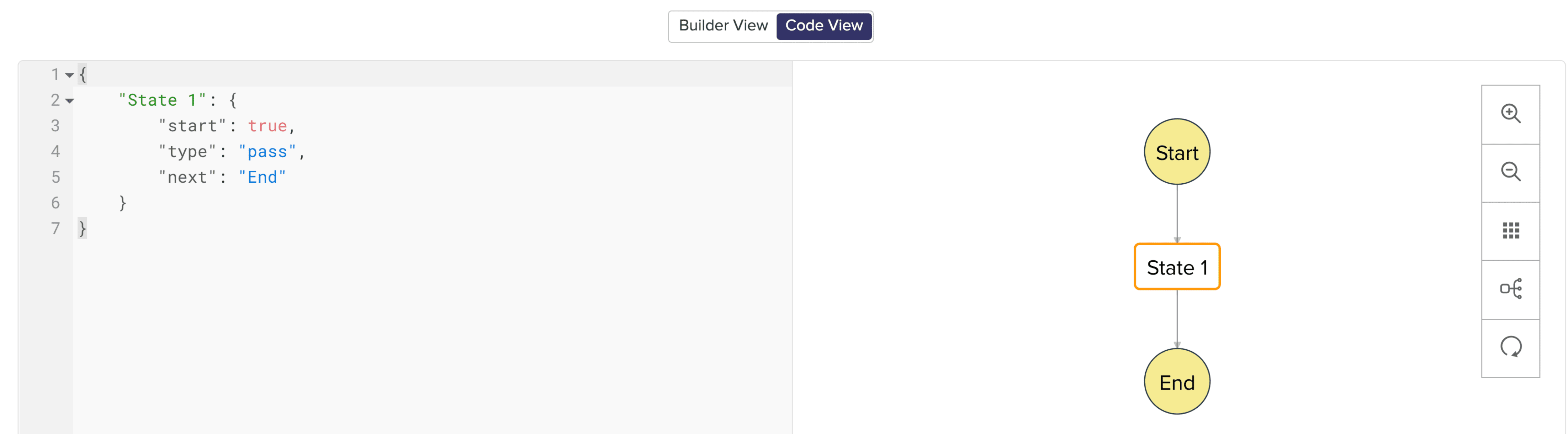
In Code View, you can define your state machine in a simple JSON-based, structured language. Once a circuit is created, a sample workflow with the pass state as 'State 1' is created by default.
States of a Circuit and Flow Controls
Circuits offer a cascading structure to different states in a business process, allowing you to write functions that each feed their output into the next one, or any other one you pre-define, individually. You can also reroute, pause for a certain period, or feed it in batches to enable just about any sort of action.
Simply put, Circuits have different 'functional states' and 'flow controls' that allow you to automate execute your business process.
Flow Controls
Flow Controls let you control the flow of your circuit. To achieve this, Circuits make use of different states that allow you to make the execution, 'Wait' for another state, 'Pass' the input of a state to another, use 'Success' and 'Failure' to stop the execution of the Circuit.
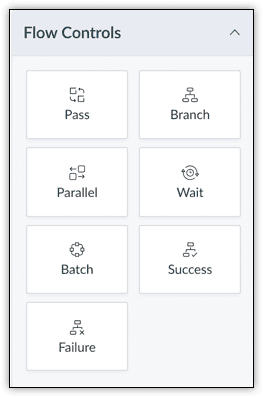
The different states available are:
- Pass: Transfers the input from one state to another.
- Branch: Decides between branches of execution based on input.
- Parallel: Performs simultaneous executions.
- Wait: Inserts a delay for a specific time. The maximum wait time is 30 days.
- Batch: Implements multiple group executions. You can have a maximum of 10 jobs per batch.
- Success: Terminates an execution, returning 'Success'.
- Failure: Terminates an execution, returning 'Failure'.
For more details on states, refer to this article.
Zoho CRM
Zoho CRM states help you execute business logic in circuits with respect to the data available in CRM.
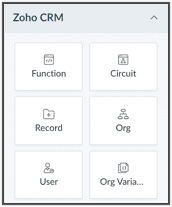
You can write functions in the built-in editor or orchestrate existing ones, get the details of a record as an input to other the states, get the details of your org, user, CRM variables and use them in your Circuit.
You can also trigger another Circuit within a Circuit using the 'Circuit' flow control.
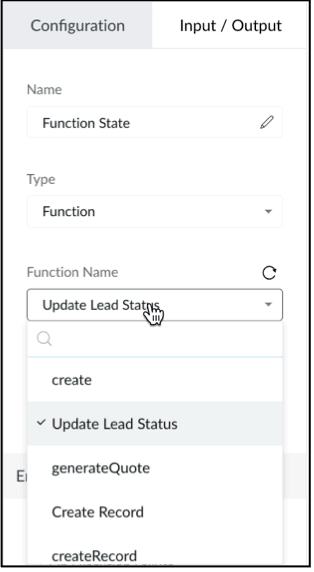
'Function' State
Use this state in your Circuit to use an existing function in CRM. Depending on your need, you can configure the input and output, and control data flow in your circuit. Only the functions that are REST API-enabled are shown here.
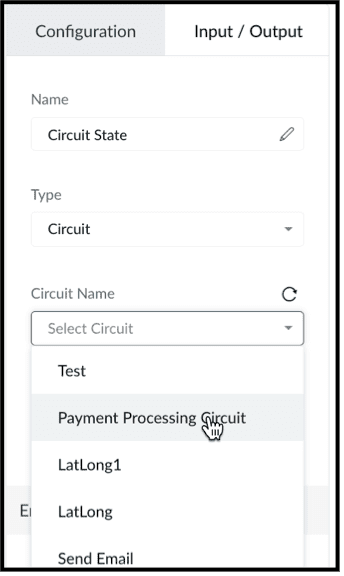
'Circuit' State
You can use another Circuit in one of the states and configure the flow accordingly.
'Record' State
This state fetches the details of a particular record in a module in CRM. You can choose to pass a portion or all of this state's result as an input to the next state in the circuit. Note that the information displayed will be based on the scope provided to the user.
Depending on where the Circuit is associated(Blueprint, Workflow, Button - Create/Clone/Details/Edit View pages, individual record, mass action), the response of the Record State differs.
'Org' State
This state gives you the details of your CRM org that you can use in your circuit.
'User' State
Use this state in your circuit to get the details of the current user in your org and process this information in other states.
'Org Variable'
This state gives you the details of all CRM Variables in your org.
Error Handling
When you use any of the Zoho CRM states, you can also perform error handling as these functional states tend to have runtime errors.
On TimeOut
When a functional state runs longer than the expected time, timeout errors occur. For handling timeout errors in code view, the field value "errorType": "Error.TimeOut" will be added.
On Execution Failure
When a state's execution fails due to some exception that cannot be processed, it can be handled using execution failure. In code view, key-value "errorType": "Error.ExecutionFailure" is appended.
Custom Error
You can also have custom error handling for your states.
Configure Exception Type and Exception Value to set the error handling options based on the error code or error message delivered by the state's output.
Retry the function in case of failure or timeout, set the Attempt (number of retries) and Delay (wait time after failure for every retry attempt).
In case of failure, if the retries fail to fix the error, the State will Fallback the error output to the Next state in the Result field.
We hope you found this post useful. Stay tuned for part 2!
Let us know if you have any questions or suggestions.
Cheers!
Shylaja S
Topic Participants
Shylaja S
Ash-Tech.co.il
Pheranda Nongpiur
Nicolás
Sam Stemp
Sticky Posts
Kaizen #198: Using Client Script for Custom Validation in Blueprint
Nearing 200th Kaizen Post – 1 More to the Big Two-Oh-Oh! Do you have any questions, suggestions, or topics you would like us to cover in future posts? Your insights and suggestions help us shape future content and make this series better for everyone.Kaizen #226: Using ZRC in Client Script
Hello everyone! Welcome to another week of Kaizen. In today's post, lets see what is ZRC (Zoho Request Client) and how we can use ZRC methods in Client Script to get inputs from a Salesperson and update the Lead status with a single button click. In thisKaizen #222 - Client Script Support for Notes Related List
Hello everyone! Welcome to another week of Kaizen. The final Kaizen post of the year 2025 is here! With the new Client Script support for the Notes Related List, you can validate, enrich, and manage notes across modules. In this post, we’ll explore howKaizen #217 - Actions APIs : Tasks
Welcome to another week of Kaizen! In last week's post we discussed Email Notifications APIs which act as the link between your Workflow automations and you. We have discussed how Zylker Cloud Services uses Email Notifications API in their custom dashboard.Kaizen #216 - Actions APIs : Email Notifications
Welcome to another week of Kaizen! For the last three weeks, we have been discussing Zylker's workflows. We successfully updated a dormant workflow, built a new one from the ground up and more. But our work is not finished—these automated processes are
Recent Topics
Is it possible to do validation for the Actions added to Reports?
We have an all-around On Validate function that checks all the possibilities before the Created/Edited form submissions. We want to have a button in the report view, so we can change records without entering. We are able to add this button, and it doesAbility to Edit Ticket Subject when Splitting a Ticket
Often someone will make an additional or new request within an existing ticket that requires we split the ticket. The annoying part is that the new ticket maintains the subject of the original ticket after the split so when the new ticket email notificationFunction #11: Apply unused credits automatically to invoices
Today, we bring you a custom function that automatically applies unused credits from excess payments, credit notes, and retainer payments to an invoice when it is created. Prerequisites: Create a Connection named "zbooks" to successfully execute the function.[Free Webinar] Environments in Zoho Creator - Creator Tech Connect
Hello Everyone, We’re delighted to kick off the 2026 edition of the Zoho Creator Tech Connect Series and are excited to continue this learning journey with you. The Creator Tech Connect series is a free monthly webinar featuring deep-dive technical sessionsZoho Voice API SMS
I made a post request in Zapier to try to send an SMS. Authentication appears to be configured correctly. I followed the documentation and I'm getting a 400 Error "Internal Server Error". Not helpful at all. Anyways, I could not find any information onHow do I change (error) display messages
Hi! I would like to edit display messages like "invalid entries" and "enter a value for Nome" and so on into Italian language messages. How can I do that? Already tried on Validate on form submit. Where I am failing? Thanks in advance.Record Overseas Transactions Along with CC charges
Hi All, We receive payments via stripe in multiple currencies and stripe takes around 2.5% fees. The amount is settled in INR into our local bank. What should be the currency of the income account used for Stripe payments? Here is a sample flow that weEasier onboarding for new users with stage descriptions
Greetings, I hope all of you are doing well. We're happy to announce a recent enhancement we've made to Bigin. You can now add descriptions to the stages in your pipeline. Previously, when creating a pipeline, you could only add stages. With this update,Pieds de page personnalisé - Document Zoho Writer
Bonjour à tous, Je rencontre un souci avec l’ajout d’un pied de page personnalisé dans un document Zoho Writer. Je souhaite insérer les informations de mon entreprise (notamment un logo + adresse) dans le pied de page. Le problème, c’est que lorsque j’ajouteCredit card transactions are backwards after importing statements
I am new to Zoho Books so I'm importing my firm's bank and credit card statements in. My credit card statements have a single column with negative numbers so that is the option I chose. But when I went to categorize the credit card transactions, I canPermissions on Views
Having the option of any agent creating custom views is firing back and got a situation where there are a hundred different views across the team and tickets are not being dealt in the most efficient of ways. Tickets seems to be missed by some agents,Function #8: Add additional charges to invoices
Here goes one of the highly sought-after custom functions in Zoho Books. If you find yourself needing to apply additional charges to customers on their invoices (say credit card surcharges, or fuel charges applicable to customers from a certain region,VIsual maindmaps in Zoho notebook Ai
Can I create and export VIsual maindmaps in Zoho notebook Ai1stDibs Integration to Zoho Inventory
Hello is it possible to integrate my Zoho inventory and 1stDibs?Community Question: Renewal vs Invoicing
This is a question for the community. Does anyone else consider there to be a difference between a subscription renewal event and sending out a recurring invoice for a subscription? For example, let's say customer XYZ purchases a 1-year subscription tocloud console support for music websites
Hi Friends, I am not from a very technical background.. So need support from the Zoho family. I want to build a e-commerce website which is in Musical Niche. It will help people learn music & play instruments of all types. There are a few players in the market like Chordify , Guitaa, Guitar Dashboard, ChordU & few others. But I all these websites allow only a few instruments to play. So I want to build a better website than the one I mentioned. So wnated to know what UI & AI should I use so thatScheduled Reports - Do not send empty report
Hello, We are intensively using reports in the CRM, especially for sales managers. When data is empty, they still receive an email. Can you add an option to avoid sending the report when data is empty?Is Zoho One Desktop more secure than Zoho One Web SaaS?
Is Zoho One Desktop more secure than using Zoho One in browser? Inherently, it seems desktop would be unless you don't do things like share your pw or leave pc on. I am concerned about data being on the cloud or someone else's server and database.Reminder Settings - Time Tracker
On the time tracker in Reminder Settings I created a reminder according to the Zoho manual. But a manager asked me to change the message that goes in the email. Is it possible to change the message? I didn't find that in the Zoho manual. Another question: I configured to receive the reminder everyone who logged in less than 40 hours. Does Zoho consider less than 40 hours of the current week or the whole month? Another situation, I put it so that I and another specific user would receive the notification,Create Item group from a composite Item
I have applied my mind for hours but cannot figure this out. Can you have a composite item in an item group?. E.g. We bundle different color and size SKU's together as composite items. Also Using composite items as Bill of Materials. We want to createMain difference of Zoho Recruit Corporte version and Staffing HR vesion
Hi Zoho, I need help to fully understand what is the main key point differences of Recruit Corporate version versus the Staffing HR version? We are currently using Corporate HR version and we are looking on having an insightful automated reporting, doesOut of Stock items showing in Commerce
I have over 6000 items and most are not in stock, but all items are showing up in Commerce whether they are inventory or not. What option or feature can you use to hide items in Commerce at zero or negative quantities? I currently am using Commerce forIs it possible to transfer data from one related list to another within the same module ?
In the Leads module, there is an existing default Product related list that already contains data. Recently, I added a custom multi-lookup field, which created a new related list in the same Leads module. Now, I need to move the existing data from theHow to implement new online payment gateway?
Hello, Can you tell me how to proceed to implement my local payment gateway? DIBS has an open avaiable API that should be easy to implement into ZOHO BOOKS. http://tech.dibspayment.com/dibs_payment_windowFormula working in MS Excel , is not working in Zoho Sheets, Filter fuction which is working in MS sheets per the attached workbook / Daily update.
Filter function , which is working in MS Excel is not working in Zoho sheets. Please help on function of filter of particular class sheets and extract students name who has more than 3.5 hours of study hours on particular day depending on date in D7 cell.New in Smart Prompt: Record Assistant for contextual assistance, and support for new AI models
Smart Prompt helps teams stay informed and move faster by providing relevant suggestions where work happens in CRM. With this update, Smart Prompt becomes more adaptable to your organization’s AI preferences. You can now choose which Large Language ModelImproved Integration Failure Information (And Notification Options)
Hi, When an attachment service for example fails, you just get "Field x - Error", I can check the field it is failing on and find nothing wrong, same file size, type, dimensions, etc. so more information as to the actual issue would be helpful. And anChange User Role in a Form
Hi, When in a form, it would be good (And consistent) to be able to change the user role/permission like you can with Shared Reports, All Entries or the actual User itself, rather than having to delete the users permission and then add it back again withReassign Partially Saved Entries
Hi, I would like to be able to go to Partially Saved Entries and like the option to delete them I would like the option to multi-select and be able to reassign them to another user to complete (Such as when a user has left the company). Thanks DanIncrease the "Maximum Saved Entries per User" Options Limit
Hi, You can create lots of saved entries, yet the Limit when you apply one is 25, we may often expect 32 to be in draft, and therefore want to enforce that, can we increase the limit of this field from 25 to 100 (As you can just turn it off and have moreDynamic Field Folders in OneDrive
Hi, With the 2 options today we have either a Dynamic Parent Folder and lots of attachments all in that one folder with only the ability to set the file name (Which is also not incremented so if I upload 5 photos to one field they are all named the sameProduct Updates in Zoho Workplace applications | December 2025
Hello Workplace Community, Let’s take a look at the new features and enhancements that went live across all Workplace applications this December. Zoho Mail Block emails without notifying the sender Block emails without sending a rejection notificationZoho CRM for Gmail Extension Not Working in Brave Browser?
Is anyone able to get the Zoho CRM Chrome Extension working in the Brave browser? They're both built on the Chromium platform and every other Chrome Extension works with the exception of Zoho CRM for Gmail so any ideas here?Set Frozen Cells in the Report Settings
Hi, It would be nice to be able to set the frozen cells in the report Settings, and have an option if this is fixed or can be changed after loading (On the next load it still goes back to the Settings). Thanks DanMicrosoft Teams now available as an online meeting provider
Hello everyone, We're pleased to announce that Zoho CRM now supports Microsoft Teams as an online meeting provider—alongside the other providers already available. Admins can enable Microsoft Teams directly from the Preferences tab under the MeetingsTip of the week #26: Import/ Export calendars in Zoho Calendar.
Any calendar on the web or calendars that you create in any other calendar application can be imported in to Zoho Calendar. This will help you to add the events from the calendars that you import to your Zoho Calendar. You also have the option to exportAdd Zoho Forms to Zoho CRM Plus bundle
Great Zoho apps like CRM and Desk have very limited form builders when it comes to form and field rules, design, integration and deployment options. Many of my clients who use Zoho CRM Plus often hit limitations with the built in forms in CRM or Desk and are then disappointed to hear that they have to additionally pay for Zoho Forms to get all these great forms functionalities. Please consider adding Zoho Forms in the Zoho CRM Plus bundle. Best regards, Mladen Svraka Zoho Certified Consultant andSocial icons, open in new tab?
Hello, I have two social icons on my footer, Facebook and Psychology Today. Clicking on the Facebook icon opens a new tab, the Psychology Today icon does not. I would like them both to open a new tab. Am I missing a setting somewhere?Real-Time Screen Annotation During Zoho Cliq Screen Sharing
Hi Zoho Support Team, Hope you're doing well. We’d like to request the addition of real-time screen annotation tools during screen sharing sessions in Zoho Cliq video calls. 🔍 What We're Looking For: The ability for the presenter—and optionally, otherAutofill address using smart fields mapped over the pdf document
Hi, I'm using mail merge to map smart fields onto PDF documents I plan to distribute for signing. I already have a Zoho Sign subscription. When mapping smart fields from the Employee form, I only see the permanent and current addresses which include theNext Page