Kaizen #175 - Leverage Settings Widget for Zoho CRM Extensions

Howdy, innovators!
Welcome back to a fresh week of Kaizen.
This week, we will delve into configuring a Settings widget in Zoho CRM for the effective functioning of extensions. It centralizes around key configurations that will be carried out to various integrations in an extension. A user-friendly settings widget enhances the usability and flexibility of your extensions.
Why use a Settings Widget?
A Settings Widget plays a crucial role in making extensions user-friendly and adaptable to specific business needs. Following are a few key advantages of using the settings widget:
- Seamless Setup Post-Installation: Users can configure critical parameters right after installing the extension.
- Dynamic Customization: Users can revisit and modify configurations at any time, ensuring that the extension adapts to changing needs without re-installation or development
- Improved User Experience: Allows the end-users to control how the extension interacts with their workflows and data.
- Enhanced Control: Provides an overview and centralized control, making maintenance, troubleshooting, and updates simpler and faster.
Business Scenario: Notification Settings for Lead Import Extension
Let’s take a real-world use case to understand the value of this settings widget.
Imagine an organization named Zylker, using Zoho CRM along with a lead import extension. This extension pulls in leads from multiple sources like web forms, social media, or third-party marketing tools.
Requirement
Whenever a new lead enters a Zoho CRM organization through this extension, the sales team wants to receive an instant notification on a specific Zoho Cliq channel for that organization. This ensures they never miss a lead.
Solution
By adding a Settings Widget to the extension, users can:
> Select a Preferred Zoho Cliq Channel: From the settings page, users can choose the channel where notifications should be sent.
> Modify the Channel Anytime: Based on team restructuring or communication preferences, users can revisit the settings and update the channel as needed.
With this setup, the settings widget becomes the control center, ensuring the efficient functioning of both the extension and the sales process.
Building a Settings Extension Widget
Let us create a sample settings widget for the above business scenario.
Create a Private Extension Widget
1. Log into Zoho CRM, navigate to Setup > Marketplace > Extension Builder, and create a new extension by selecting Zoho CRM as the service.
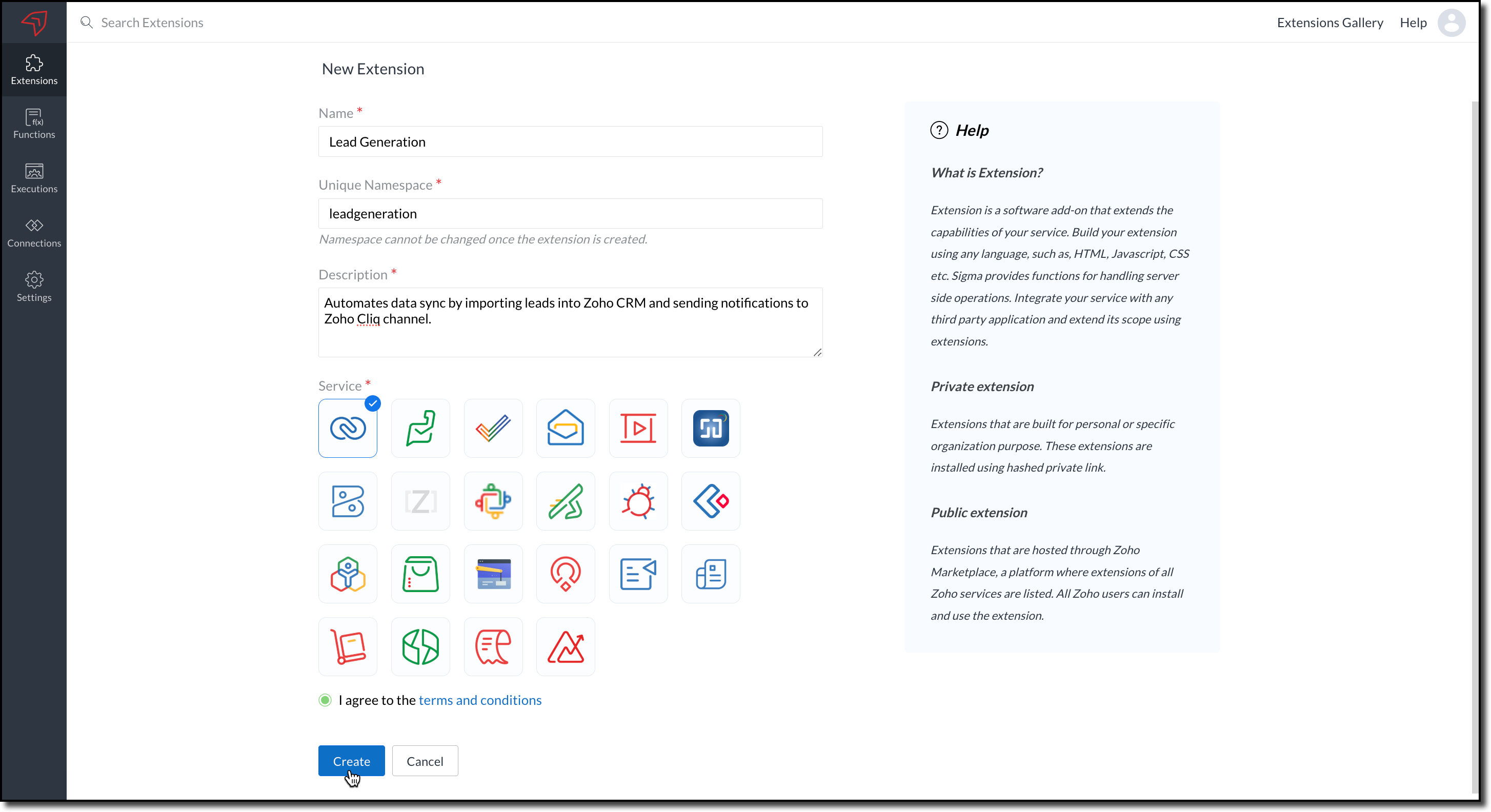
2. The private extension that you have created will be listed in the Extensions page. Choose your extension and click the edit icon.
You will then be redirected to the Zoho Developer Console.
Dependency Configuration
Now, let us configure a couple of dependencies required for this use case in the developer console.
Connectors
To notify a Zoho Cliq channel, Connectors authorize the end user's Zoho Cliq account with the extension and grant access to the necessary data. Follow these steps to create a connector with the required APIs for the widget.
3. In the console, navigate to Utilities > Connectors on the left-side menu.
4. Click Create Connector and provide the required details using the guidance available on the Server-based Application help page.
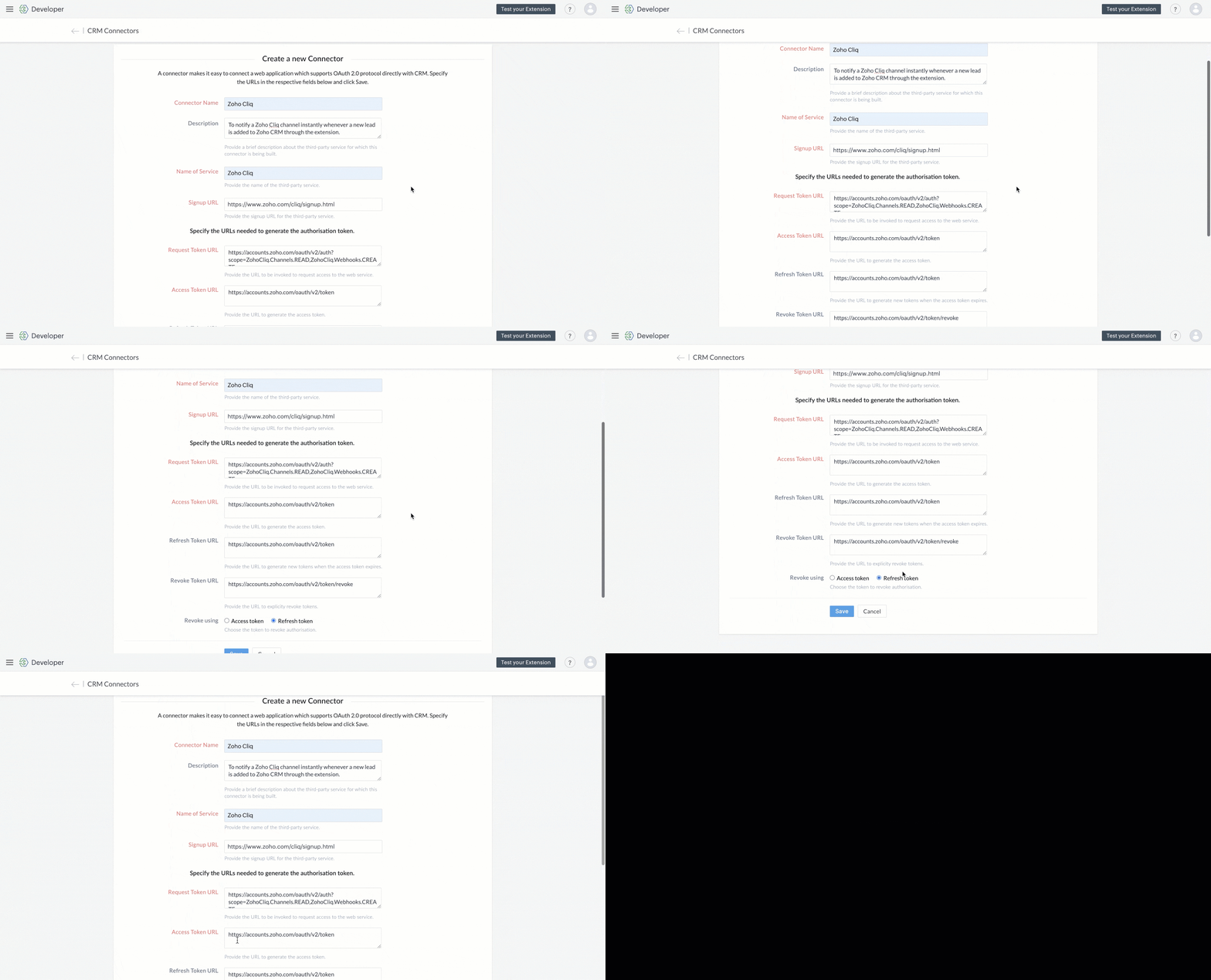
5. Use the generated Redirect URL to register your application in Zoho's API Console. After registration, enter the Client ID and Client Secret in the developer console.

6. Create Connector APIs for the following:
- GET List of all Channels to fetch all the available channels from your Zoho Cliq Account.
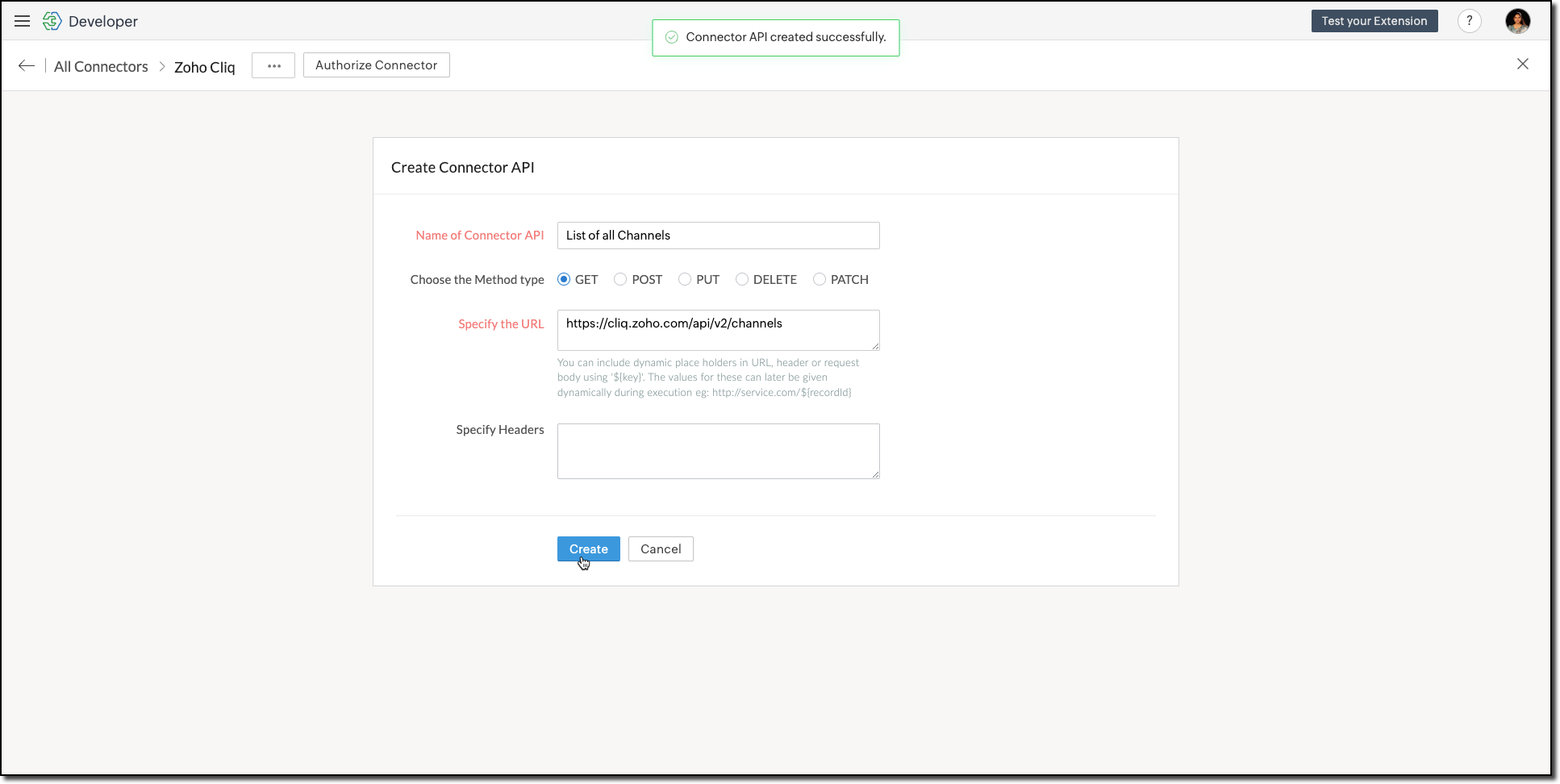
The Authorization header is automatically added to all the Connector APIs. - POST Message in Channel to notify the incoming leads in the channel.
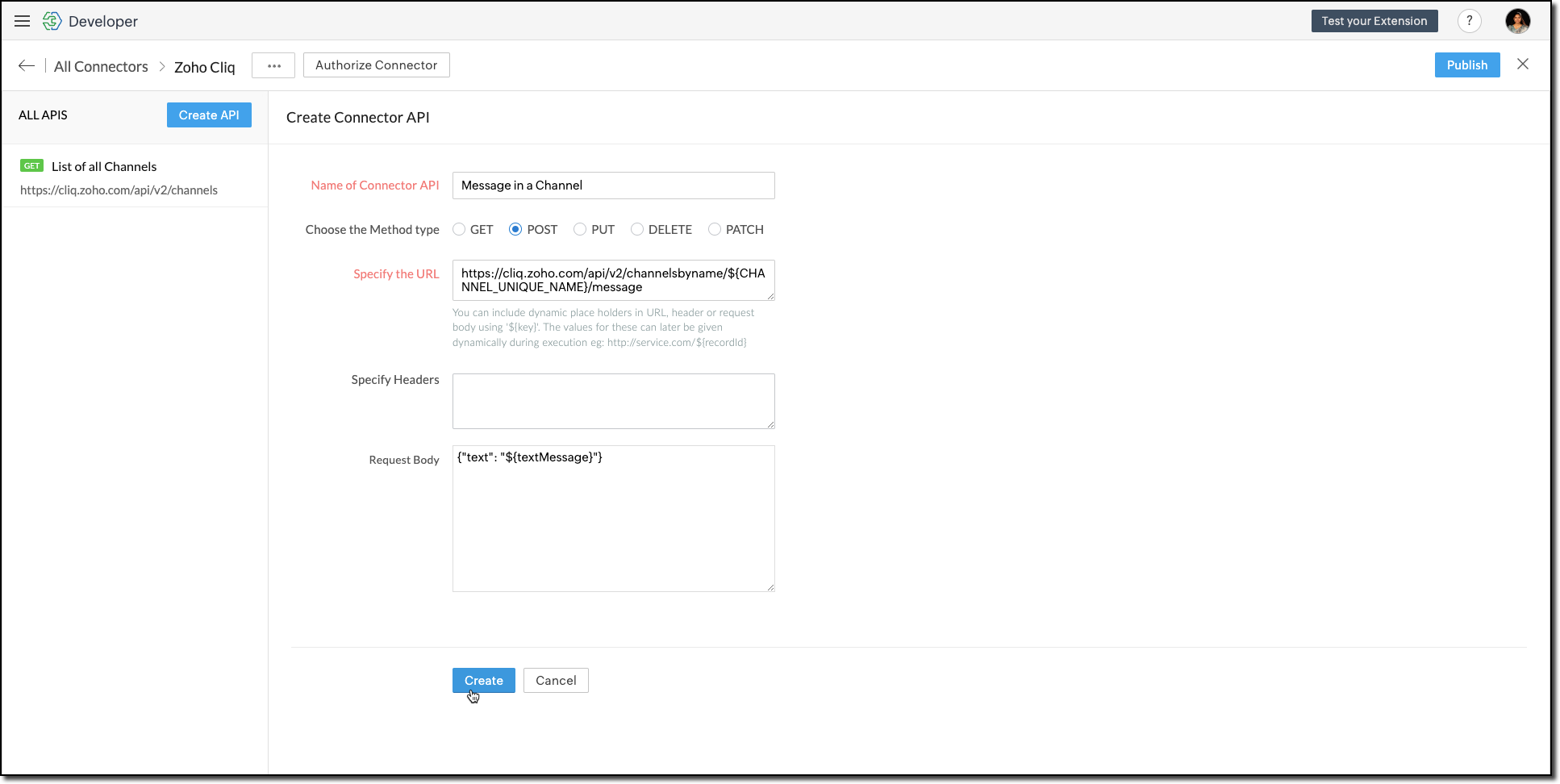
You can include dynamic place holders in the URL, header, or request body using this format ${place_holder}.
7. Once the APIs are configured, publish and associate the connector with the extension.

Refer to the Connectors help document to learn more.
Variable
Variables are required to store the admin's preferred channel details and retrieve them when a lead enters Zoho CRM through the extension. Upon installing the extension, this variable is automatically created in your Zoho CRM org.
8. Go to Build > Custom Properties and create a variable.

Set the variable's permission to Hidden to prevent the CRM users from accessing/modifying the variable data from the Zoho CRM Variables page. This ensures that variables can only be configured through the extension.
For more information, refer to the Custom Variables help document.

Tip
In your Zoho CRM, go to Setup > Security Control > Profiles and restrict permissions for your extension to prevent unauthorized access to the settings page.
In your Zoho CRM, go to Setup > Security Control > Profiles and restrict permissions for your extension to prevent unauthorized access to the settings page.
Building a Connected App
9. In the console, go to Utilities > Connected Apps on the left-side menu.
10. Follow the steps provided in this kaizen to create a new Zoho CRM widget for this use case.
Code Logic for the Settings Panel
- Create a drop-down field called Select Cliq Channel to the settings panel. This dropdown should dynamically list the channels from your Zoho Cliq account by invoking the GET Cliq Channels API. Follow the given Invoke Connector method to execute Connector APIs.
// Initialize Zoho Embed SDK ZOHO.embeddedApp.on("PageLoad", function () { fetchCliqChannels(); }); ZOHO.embeddedApp.init(); // Fetch Cliq channels async function fetchCliqChannels() { const channelDropdown = document.getElementById("cliqChannel"); try { console.log("Fetching channels from Zoho Cliq..."); const req_data = { "parameters": {} }; const response = await ZOHO.CRM.CONNECTOR.invokeAPI("leadgeneration.zohocliq.listofallchannels", req_data); console.log("Response from Zoho Cliq:", response); const parsedResponse = JSON.parse(response.response); const channels = parsedResponse.channels; if (channels && Array.isArray(channels)) { channelDropdown.innerHTML = channels.map(channel => `<option value="${channel.unique_name}">${channel.name}</option>`).join(''); } else { throw new Error("Invalid response structure"); } } catch (error) { console.error("Error fetching channels:", error); if (error.code === '403') { console.error("Authorization Exception: Please check your API permissions and authentication."); } channelDropdown.innerHTML = '<option value="">Failed to load channels</option>'; } } |
- Add a Save Configuration button that stores the selected channel name and channel ID in the variable created earlier. To save the selected data into the variable, use the invokeAPI() function, with the namespace as crm.set.
// Save configuration async function saveConfiguration(event) { event.preventDefault(); const channelDropdown = document.getElementById("cliqChannel"); const selectedChannelUniqueName = channelDropdown.value; const selectedChannelName = channelDropdown.options[channelDropdown.selectedIndex].text; if (!selectedChannelUniqueName) { alert("Please select a channel."); return; } const settings = { unique_name: selectedChannelUniqueName, name: selectedChannelName }; const data = { "apiname": "leadgeneration__Cliq_Channel", "value": JSON.stringify(settings) }; try { const response = await ZOHO.CRM.CONNECTOR.invokeAPI("crm.set", data); console.log("Updated settings:", response); document.getElementById("setupStatus").innerText = "Configuration saved successfully!"; } catch (error) { console.error("Error saving configuration:", error); document.getElementById("setupStatus").innerText = "Failed to save configuration."; } } |
- When a lead enters Zoho CRM through the extension, it should trigger a function that:Retrieves the saved channel details:
> Retrieves the saved channel details: Uses the Get Organization Variable JS SDK to call the Zoho CRM GET Variable API to fetch the saved channel details.
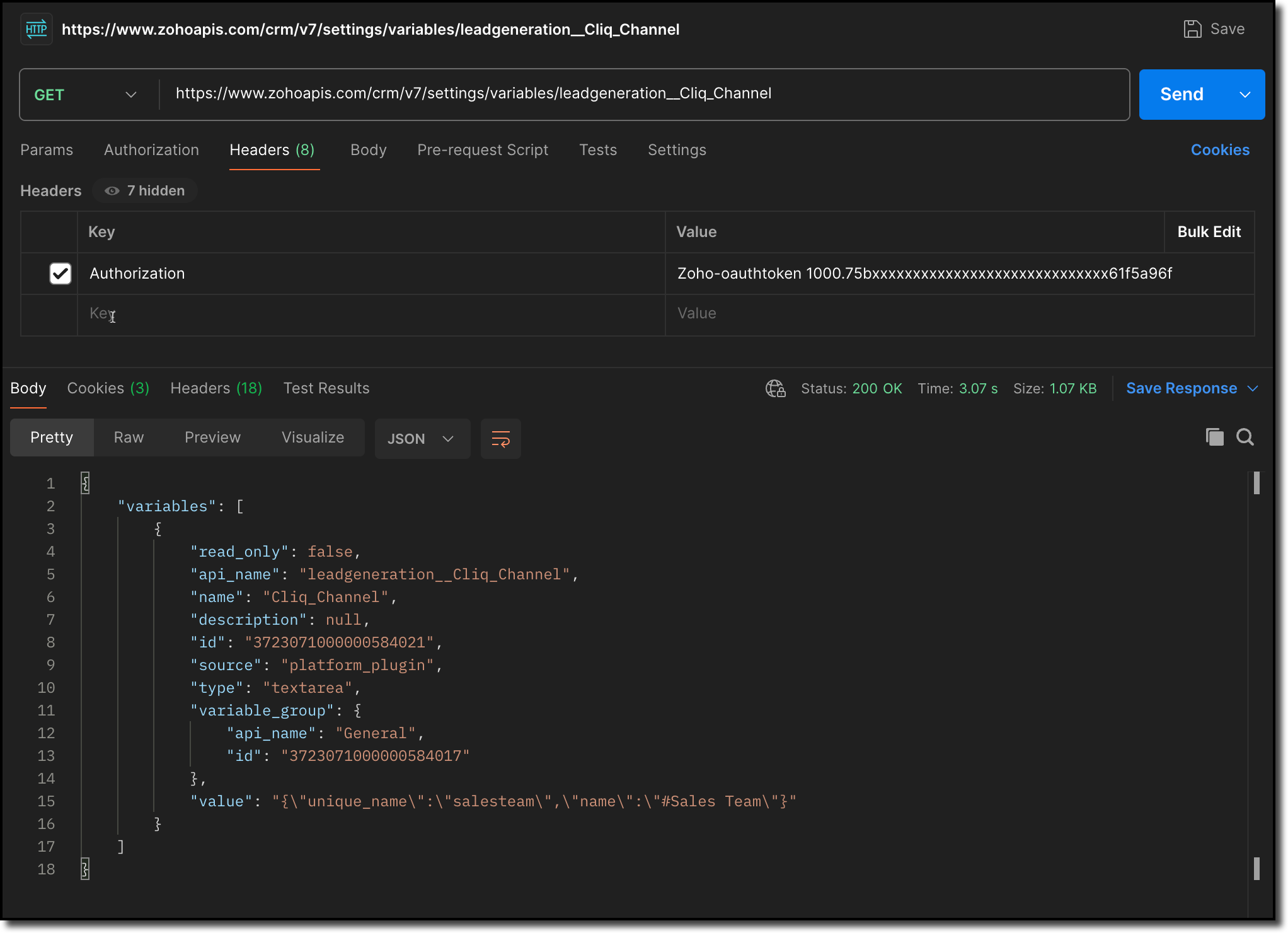
> Notifies the channel: Sends a message to the retrieved channel using the Post Message API.

Info
-> A complete working code sample for the use case is attached at the end of this post for your reference.
-> The test function for triggering notifications is also included in the attachment. You can use the same snippet in your extension to initiate the notification process.
-> Ensure to replace the unique names of your Connector APIs and Variable.
11. Fill in the details of the application as shown in this image and upload the widget ZIP file packed using the Zoho CLI command.
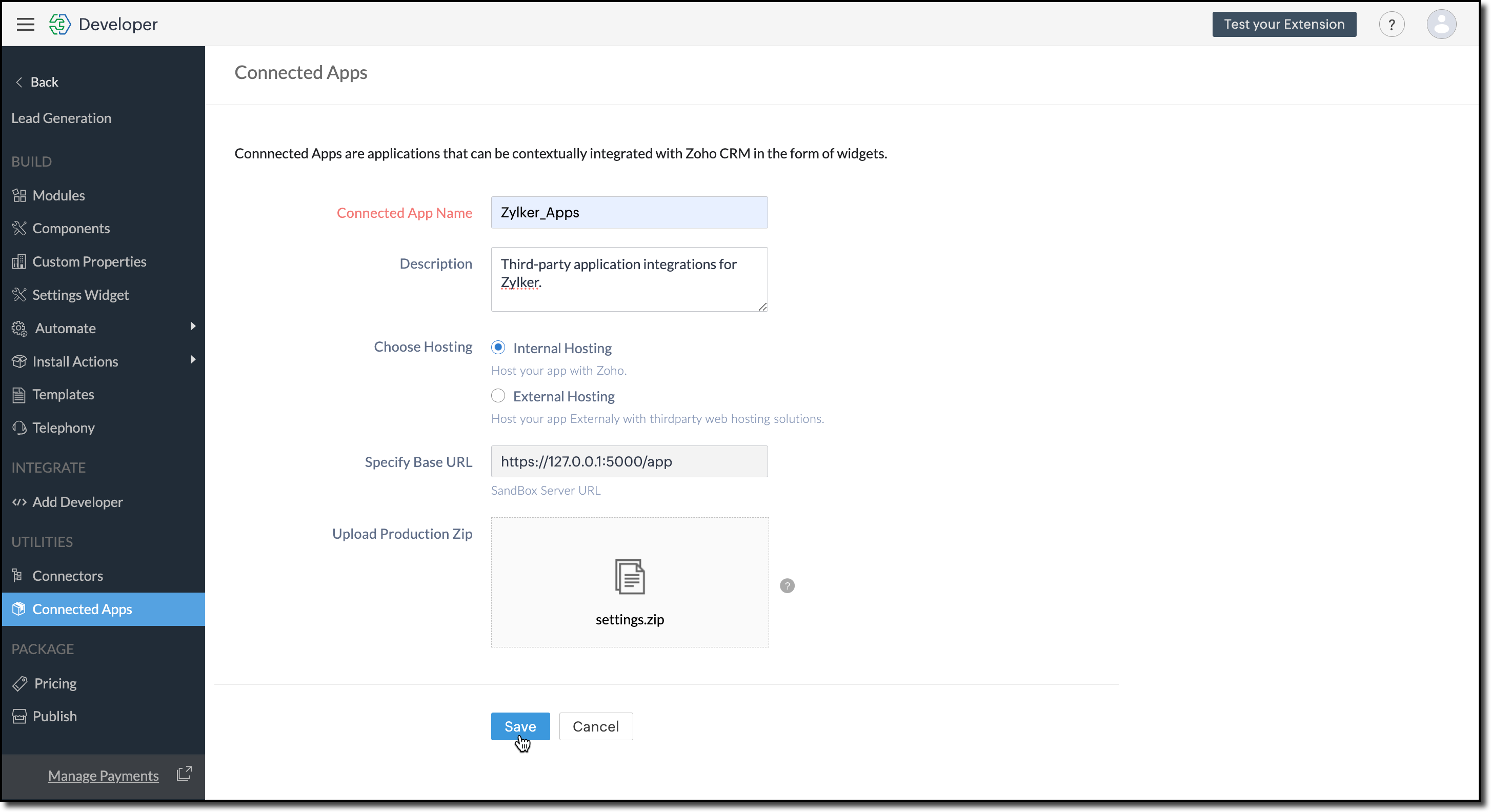
12. Click Save.
Configure the Settings Widget
13. Navigate to Build > Settings Widget in the left menu.
14. Provide a Name and the Resource Path of your widget.
15. Click Save.

The Settings Widget for Extension is available upon request. Contact support@zohocrmplatform.com to enable it for your account.
Packaging, Publishing and Deploying
16. Go to Package > Publish on the left-side menu and publish the extension.
17. The review process for listing an extension in the Marketplace will take from three weeks to one month.
For the demo, we will proceed with deploying the extension using the private plugin deployment link.

18. Now, replace the URL of your Zoho CRM page with the deployment link from the Developer Console and approve the extension installation.
Try it Out!
Once installed:
> A pop-up will appear, prompting you to authorize Zoho Cliq for the required configurations.
If you do not already have a Zoho Cliq account, you can sign up directly from the pop-up and proceed with the authorization.
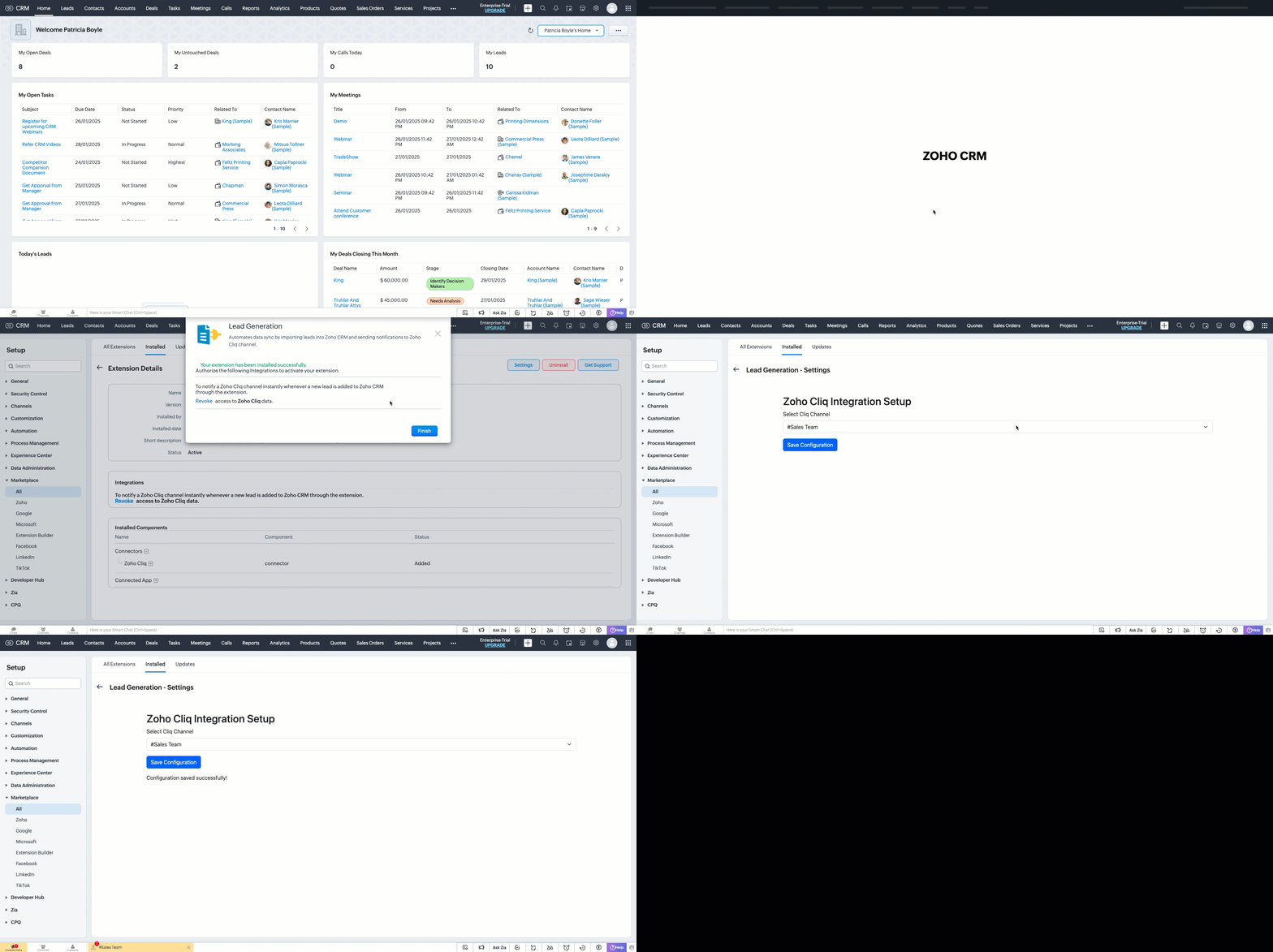
> After authorization, you will be redirected to the Settings widget page, where you can select and save your preferred Cliq channel.
> If you need to update the settings later, you can find them on the Installed Extensions page under the respective extension.


Note
The demo videos above use a testing function to notify the channel. You can deploy it anywhere in your extension to trigger a notification whenever a lead enters a Zoho CRM organization through the extension.
Find the function in the attachments at the end of this post.
Similar Scenarios
- Sales Territory Management: An extension that auto-assigns incoming leads to sales reps can use a settings widget to allow managers to define territories and sales rep mappings dynamically.
- Custom Field Mapping: For extensions that sync data between Zoho CRM and external systems, a settings widget can let users map CRM fields to external system fields.
- Automated Email Preferences: In email automation extensions, the settings widget can allow users to specify email templates, recipients, or trigger conditions for follow-ups and campaigns.
Adding a Settings Widget to your Zoho CRM Extensions not only enhances user experience but also boosts the flexibility and efficiency of your extension. Whether it is notifying sales teams or customizing field mappings, a well-designed settings page is a game-changer for your extensions.
Explore the Widget section in our Kaizen collection to try out various widget types and discover their unique use cases.
If you have any queries or a topic to be discussed reach out to us at support@zohocrm.com or drop your comment below.
Until next time, keep innovating!
Cheers!
----------------------------------------------------------------------------------------------------------------------------------------
Related Reading
- Zoho CRM Widget - An Overview, Installation and Creation, Mobile Compatibility, Telephony Widget Extension, and other Kaizens.
- Widget SDKs - An Overview, Invoke Connector and Get Organization Variable.
- Zoho Developer Console - An Overview, Creating Extensions, Building Connected Apps, and A Quick Start Guide.
- Zoho Extensions - Custom Variables and Connectors
- Zoho Cliq - GET List of Channels and POST Message in Channel.
- Zoho Marketplace - An Overview
----------------------------------------------------------------------------------------------------------------------------------------
Previous Kaizen: Kaizen #174 - Client Script Commands | Kaizen Collection: Directory
More enhancements in the COQL API are now live in Zoho CRM API Version 7. Check out the V7 Changelog for detailed information on these updates.
Topic Participants
Kiruthiga G
Sticky Posts
Kaizen #217 - Actions APIs : Tasks
Welcome to another week of Kaizen! In last week's post we discussed Email Notifications APIs which act as the link between your Workflow automations and you. We have discussed how Zylker Cloud Services uses Email Notifications API in their custom dashboard.Kaizen #216 - Actions APIs : Email Notifications
Welcome to another week of Kaizen! For the last three weeks, we have been discussing Zylker's workflows. We successfully updated a dormant workflow, built a new one from the ground up and more. But our work is not finished—these automated processes areKaizen #152 - Client Script Support for the new Canvas Record Forms
Hello everyone! Have you ever wanted to trigger actions on click of a canvas button, icon, or text mandatory forms in Create/Edit and Clone Pages? Have you ever wanted to control how elements behave on the new Canvas Record Forms? This can be achievedKaizen #142: How to Navigate to Another Page in Zoho CRM using Client Script
Hello everyone! Welcome back to another exciting Kaizen post. In this post, let us see how you can you navigate to different Pages using Client Script. In this Kaizen post, Need to Navigate to different Pages Client Script ZDKs related to navigation A.Kaizen #210 - Answering your Questions | Event Management System using ZDK CLI
Hello Everyone, Welcome back to yet another post in the Kaizen Series! As you already may know, for the Kaizen #200 milestone, we asked for your feedback and many of you suggested topics for us to discuss. We have been writing on these topics over the
Recent Topics
Items Below Reorder Point Report?
Is there a way to run a report of Items that are below the Reorder Point? I don't see this as a specific report, nor can I figure out how to customize any of the other stock reports to give me this information. Please tell me I'm missing something sCalendar week view: Today + 6
Is there anyway to have the calendar change dynamically based on the date? Due to the amount of events, we only display a week at a time, but towards the end of the week, we can no longer see ahead to next week (without changing it manually every time).How to restrict user/portal user change canvas view
Hi , I would like to restrict user / portal user change their canvas view because I hide some sensitive field for them. I dont want my user switch the canvas view that do not belong to them But seems Zoho do not provide this setting?Introducing parent-child ticketing in Zoho Desk [Early access]
Hello Zoho Desk users! We have introduced the parent-child ticketing system to help customer service teams ensure efficient resolution of issues involving multiple, related tickets. You can now combine repetitive and interconnected tickets into parent-childHow to add to Subforms via Zapier with Zoho Writer?
I have the following layout for a Zoho Writer Document. As you can see there is a repeating subform taking in "Items". I am trying to make a Zapier integration with it, and I can see there is 1 field saying: "Items", but it does not specify how I'm supposedContrôles administratifs granulaires : un atout pour la sécurité des e-mails
La moindre erreur dans votre système de messagerie peut coûter très cher à votre entreprise, tant en argent qu’en conformité et en image de marque. Pour beaucoup d’organisations, ce risque est bien réel. Les e-mails véhiculent quotidiennement des informationsMarketer's Space: Why mobile optimization deserves a place in your email strategy
Hello Marketers, Welcome back to Marketer's Space! Today, we'll talk about the importance of creating mobile-friendly email designs. While mobile phones were once used only to make phone calls, today they're used for almost everything, including texting,Collections Management: #6 Realign Customers who gets back In-Term
Arun stared at the subscription list on his dashboard. Another account had just been moved to Cancelled status after completing the whole dunning process. Nothing unusual, just that payment failures happen, retries fail, and cancellation is the expectedZoho Mail IP Blacklist
I need problems with send mails: Error: junk mail rejected - sender4-op-o10.zoho.com 136.143.188.10, is in RBL. Spamcop. Please remove FQDN for blacklist. Regards.I can receive but not send emails
Hello, I've been not able to send emails for almost a year now. I been using alternate email to do this. I want to know how to fix this so I can use my zoho account normally again.The challenge of 24/7 connectivity: Being present and meeting customer expectations
Before television entered our homes, radio was our window to the world. We had to tune carefully to catch voices from distant places. When television arrived, the world began to grow smaller. We can watch rocket launches, see the goal that wins our favoriteHow to download all attachments from inbox, send, other folders in one go
Hi All, Appreciate if anyone could help me with steps for below requirement. How to download all attachments from inbox, send, other folders in one go. Even mapping to new folder will help me. Thanks in advance.Cannot connect mail accounts to Thunderbird
Hi Support - I'm attempting to add my mail accounts to Thunderbird but I'm getting an unable to login to server error. I tried to use the password associated with my account I received the unable to login error. So I went into Zoho Accounts and generateAlias Email Id already exists
Hi, I just verified my domain sesque (dot) com and now I am trying to create the admin account using admin (at) sesque (dot) com, but I am getting an error saying "Alias Email Id already exists". I used to have another Zoho account with this email address,Unable to connect to smtp server, connection timed out
Hi Team, I am facing below issue, while sending out emails from thunderbird client. It used to work, facing this issue from morning. Error: Sending of the message failed. The message could not be sent because the connection to Outgoing server (SMTP) smtp.zoho.comjavax.mail.authenticationfailedexception 535 authentication failed
Hi, I am facing 535 authentication failed error when trying to send email from zoho desktop as well as in webmail. Can you suggest to fix this issue,. Regards, RekhaZoho Creator customer portal users
Hi, I'm in a Zoho One subscription with our company. I'm running a project now that involves creating a Zoho Creater application and using the Zoho Creator Customer Portal. At most we need 25 customer portal users. In our Zoho One plan we only get 3DKIM Verification Failed (Namecheap)
Hi! I have already set up the TXT records in Namecheap but I keep getting the "Verification Failed" pop up. Was wondering if I'm the only one who has this problem and can anyone help me with this? Thanks!Emails stuck in Queue
Hi there, Since yesterday I have a few out going emails stuck in a queue. It say it will auto retry sending however nothing is happening. It seems to be affecting roughly 50% of my outgoing emails. Please help ThanksSoft Bounce from transational emails from BREVO (Sendinblue)
I manage the website of a client who uses your EMAIL service for the domain floranativadobrasil.com. And I use the BREVO email service, previously called SendinBlue, to send transactional emails about events specific to the website. All emails sent toAbility to Edit YouTube Video Title, Description & Thumbnail After Publishing
Hi Zoho Social Team, How are you? We would like to request an enhancement to Zoho Social that enables users to edit YouTube video details after the video has already been published. Your team confirmed that while Zoho Social currently allows editing theGetting an error Address not found Your message wasn't delivered
Hey, I'm trying to configure zoho mail for my website https://businessentity.org/ The email is meredith.karter@businessentity.org I'm able to successfully send the mails but when someone sends an email to above mail, this error shoots up: Address notSupport Uploading YouTube Videos Longer Than 60 Minutes
Hi Zoho Social Team, How are you? We would like to request support for uploading YouTube videos longer than 60 minutes directly through Zoho Social. Your support team informed us that Zoho Social currently cannot upload videos over 60 minutes due to “APINeed Faster Help? Try Live Chat Support
Hello there, We understand that sometimes, whether you’re facing an issue, exploring a feature, or need quick clarification, sending an email and waiting for a response just doesn’t cut it. You need answers, and you need them now. That’s exactly why weCan't deactivate Spell Check
Hi Community, right now I'm using the Zoho Mail Desktop-Software. So far, so good.. many possibilities. Overall very nice. What is extremely annoying right now, is that we are not able to deactivate the Spell Check feature. And we are barely able to focusZoho Toolkit Email Signature Generator
I'm having real issues with the email signature generator with no matter where I host the photo, Zoho doesn't seem to show the photo on the link provided?Company Policy Upload - Request All EE to review and sign
How can I upload policies into Zoho People and have the employees review them and sign off saying they agree, etc.? Also, if I make a revision to a policy, I would like that changed or updated policy to be distributed or have the employees notified thatZoho Sign Global Settings vs. Template and Document
Hello, We are running into an issue on a current use case. We already use Zoho Sign. Now that KBA is available, we want to begin using it in our tax delivery process, by allowing clients to sign electronically, but also download a copy of their returnZoho Mail Desktop Crashes on Linux - Ubuntu 24 LTS
Hi, I have been trying to run the desktop app on Ubuntu for the past few day with no luck. I have tried both the .deb package and the appImage. When I attempt to open the app. It just crashes immediately. The crash error dialog appeared once and I cantCan't login to Zoho mail
I'm logged into Zoho but when I try to go in zoho mail I get: Invalid request! The input passed is invalid or the URL is invoked without valid parameters. Please check your input and try again. I just set up my mx records and stuff with namecheap a fewZoho IP blocked by SpamCop
Hi, Many of my emails are blocked and I receive this: INVALID_ADDRESS, ERROR_CODE :550, ERROR_CODE :spamcop.mimecast.org Blocked - see https://www.spamcop.net/bl.shtml?136.143.188.51. - https://community.mimecast.com/docs/DOC-1369#550 [DGwIYPPSOfWIDifferences between Zoho Books and Zoho Billing
Without a long drawn out process to compare these. If you were looking at these Books and Billing, what made you opt for one and not the other. ThanksCustom validation in CRM schema
Validation rules in CRM layouts work nicely, good docs by @Kiran Karthik P https://help.zoho.com/portal/en/kb/crm/customize-crm-account/validation-rules/articles/create-validation-rules I'd prefer validating data input 'closer to the schema'Server error when trying to Data > Sort > Custom Sort
Been using Data > Sort > Custom Sort for a while, now it has suddenly stopped working. When selecting the same data range and trying to execute, I get "Sorry! There was a problem saving your last edit. Please try again."To Assign a genrated pdf to a file upload field using delug
content = "<html><body>HTML Content on page One <div style='page-break-after:always'></div> HTML Content on page Two </body></html>"; file = zoho.file.convertToPDF(content); file.setFileName("Name of the file"); <variableName> = <FormLinkName>[ID == input.ID];TArgets To Accounts (Modules)
How can i set sale target to Customers (Accounts Module)Breaking barriers with multilingual WhatsApp templates in IM
Ever wondered what it feels like to be greeted in your own language by a brand you love? A “Welcome!” feels nice, but a “¡Bienvenido!” or “स्वागत है!” feels personal. In today’s global world, conversations often need to cross both time zones and crossSuper Admin Logging in as another User
How can a Super Admin login as another user. For example, I have a sales rep that is having issues with their Accounts and I want to view their Zoho Account with out having to do a GTM and sharing screens. Moderation Update (8th Aug 2025): We are workingHow to share private Opportunities with whole org at an account level
Opportunities are currently set to private, so our sales team only sees their own opportunities, along with their manager and upper leadership. The need is the ability for the rest of the Org to see the opportunities at an account level, not within theNew in Smart Prompt: Record Assistant for contextual assistance, and support for new AI models
Smart Prompt helps teams stay informed and move faster by providing relevant suggestions where work happens in CRM. With this update, Smart Prompt becomes more adaptable to your organization’s AI preferences. You can now choose which Large Language ModelNext Page