View subform entries without viewing a record in Zoho CRM | Kiosk Studio Session #8

View subform entries without viewing a record in Zoho CRM | Kiosk Studio Session #8

In a nutshell

Have you ever wanted to take a quick peek at a record's subform

Examples might be invoiced items in an invoice, ordered items in a sales order, or purchased items in a purchase order. 

Let's say you're viewing your list of invoices in Zoho CRM and there's a button next to an invoice. When you click it, you see the invoiced items (subform entries) for that invoice—and you can do the same for every invoice in the list. And imagine you can quickly add a subform entry or delete multiple entries—all without ever opening a record.

With Kiosk Studio, you can now quickly build this for your CRM users.

Want to replicate this option in multiple modules? Simply clone the kiosk and rework it to suit each module. Easy work with Kiosk Studio!
Hello everyone, 

Modules in Zoho CRM often contain subforms, which are collections of individual entries related to the specific module you're looking at. For example, records in an invoice module might contain the products/services for which each customer has been billed, all added as entries in a subform, along with other details like quantity, list price, and so on.
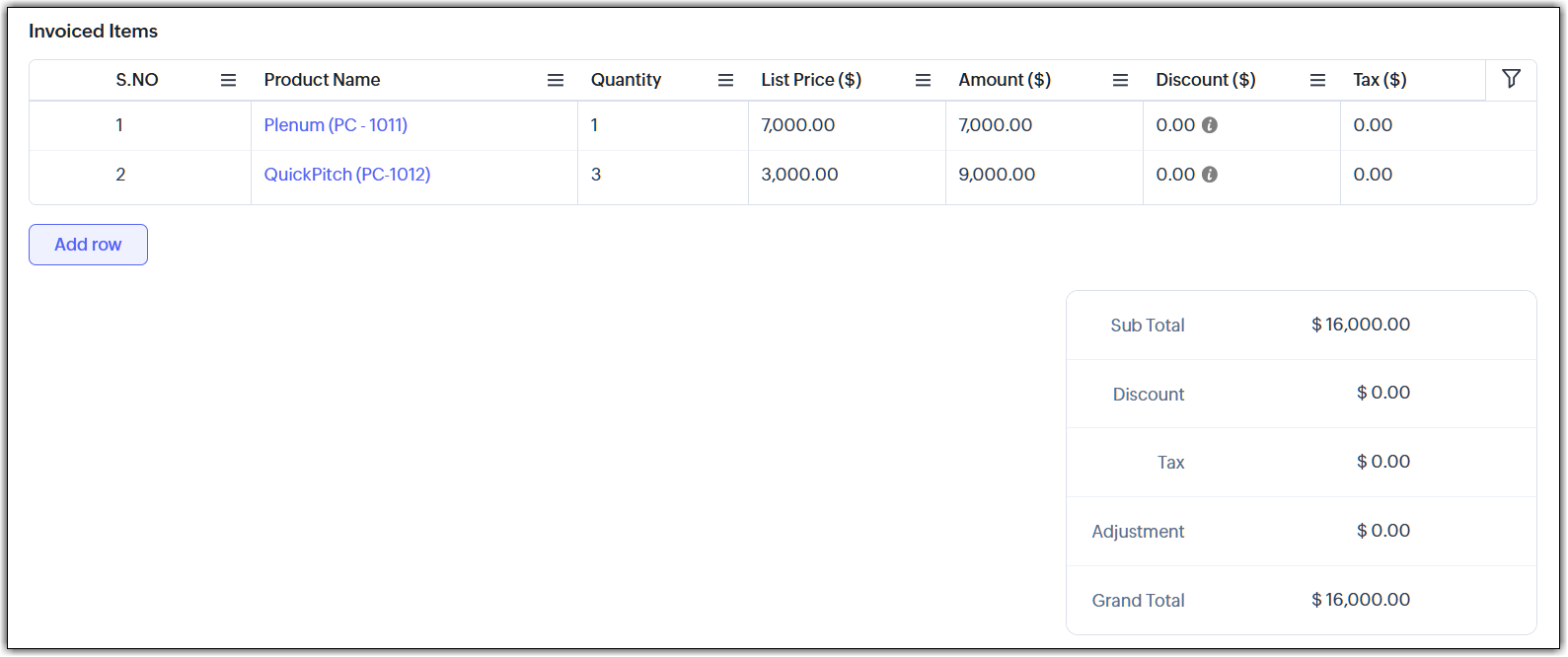

In the past, working with a subform has usually involved opening a record, scrolling down, making changes, saving them, and then returning to the list view. Doing that for multiple records ends up in a slow workflow for your end users.

Speed it up with Kiosk Studio

What if you could add a button that made the following possible?
  • Click the button and instantly see the invoiced items tied to that invoice.
  • Need to add a new item? Do that right there.
  • Want to remove one or more items? Select and delete—again, without opening that record.
You can make this happen with Kiosk Studio. Let's look at how.

Scenario
Members of your finance team open the Invoices module and are surprised to see a new addition. Next to each invoice is a button: “View Invoiced Items.”


They decide to try it out:


Your teams can zoom through their workflows and make small changes quickly—all thanks to this new button. You can even clone this kiosk for other modules, like Sales Orders, Quotes, and so on.

Behind the button

The button that you see in the UI is connected to a kiosk. 


Let's see how this kiosk is configured:


As you can see, we can quickly configure the kiosk using elements like GetRecords, Screens, and others.

The code for the adding and removing subform entries is attached to this article. Please note that the code in these files will give you a rough idea of what to do, but you'll have to tweak it and make it better before you use it in your account.

New to Kiosk Studio? Get up to speed quickly by checking out the following resources:
Check out previous Kiosk Studio session posts here:
  • Session #1 covers how to view customers from the same industry.
  • Session #2 covers how to build a call script kiosk.
  • Session #3 looks at streamlining appointments.
  • Session #4 shows how kiosks can simplify sales for bank employees.
  • Session #5 helps you review loan applications quickly.
  • Session #6 packs an entire service request workflow into a single kiosk.
  • Session #7 helps you create your own convert feature.
Got a Kiosk Studio success story or creative use case? Share it in the comments—we might feature yours in an upcoming post!
    • Recent Topics

    • On Edit Validation Blueprint

      Hello, I have a notes field and a signature field. When the Approve button is clicked, the Signature field will appear and must be filled in. When the Reject button is clicked, the Notes field will appear and must be filled in. Question: Blueprint will
    • PDF Generator Upgrade

      Hi Team, What will happen if I don't make any changes for existing template. Zoho just ask us upgrade but haven't tell the benefit. Zoho Corporation
    • Delete button

      Hi, The delete button were hide into the three dot button. Can I display outside? why Zoho make this update?
    • Zoho Subscriptions -- Zoho Commerce integration

      Is there integration between Zoho Subscriptions and Zoho Commerce? I would like to create subscription plans in Zoho Subscritpions and list them for on my Zoho Commerce store.
    • Synching changes to Stripe when changes are made in Zoho Billing

      We have a situation where we have merged customers in Zoho BIlling and then found out later that the payment in Stripe was not updated and still associated with the old customer record. The card gets updated and billed, but that payment is still associated
    • How can I link Products in a Deal Subform to the Products Module

      Hello, I have a pricing subform on our Deals page and use a lookup field to associate a product with each line. I want to be able to look at a product page within the Products module and see a list of the deals connected to that product. I have this working
    • Help Center and SEO: Any Benefit to My Domain-Mapped Website Ranking?

      First of, I love the Help Center which I've just decided to integrate into my website to replace its old-fashioned FAQs. So much more to achieve there now! Lots of new benefits to the site visitors and to me in terms of organizing and delivering all the
    • Business Hours with lunch break

      Our business hours are: mon - fri 08:30 - 13:00, 15:00 - 18:30. How can I handle the lunch break? If I use 8:30 - 18:30 it obviously breaks SLA. Thanks
    • Automatically Update Ticket Status in Zoho Desk Based on Actions in Zoho Projects

      Hi Zoho Desk Team, Hope you’re doing well. We’re using the Zoho Desk–Zoho Projects integration to manage tasks related to customer tickets, and it works well for linking and tracking progress. However, there are a few important automation capabilities
    • Zoho Desktop App- Unable to Minimize/Freezes

      I'm having issues with my Zoho Mail desktop app (PC). When go on my desktop and open the app this is what happens: - Unable to minimize and close app (in the screenshot attached you can see at the top right there is no option to minimize/close) - Unable
    • Can Zoho Marketing Automation send OTP codes via WhatsApp during user registration?

      The flow I would like to implement is: A user signs up in the mobile app and enters their phone number. The system generates a one-time verification code (OTP). The OTP is sent to the user via WhatsApp message. The user enters the code in the app to confirm
    • Enable Free External Collaboration on Notecards in Zoho Notebook

      Hi Zoho Notebook Team, I would like to suggest a feature enhancement regarding external collaboration in Zoho Notebook. Currently, we can share notes with external users, and they are able to view the content without any issue. However, when these external
    • Can I export to PDF in Zoho Learn

      I have seen help pages where export to pdf options are available but I do not see that option available from the application. I see that exprt is available in my free trial version but that is only to html pages. I need to be able to export my manuals
    • Zoho Commerce

      Hi, I have zoho one and use Zoho Books. I am very interested in Zoho Commerce , especially with how all is integrated but have a question. I do not want my store to show prices for customers that are not log in. Is there a way to hide the prices if not
    • Multi-currency in Zoho CRM Forecast and Reports

      As a company we have branches in 4 different countries with as many different currencies. Our Sales Teams would like to work with their local currency as much as possible. The Forecast module using only 1 currency is practically usable only by the sales
    • Zoho Sprints iOS app update: Global view, screen capture control, file encryption, tags enhancement

      Hello everyone! We are excited to introduce new features in the latest version(v2.1) of the Zoho Sprints iOS app update. Let’s take a quick look at what’s new. 1. Global view Global view brings all your project items into one centralised space. You can
    • Marking a meeting 'done'.

      I would like to somehow mark a meeting 'done' and placed under the contact's page rather than deleting it and having no record of it. Am I missing a button that does this?
    • Zoho Projects Android and iOS app update: Conditional layout rules for Tasks

      Hello everyone! Task conditional layout rules configured on the web app(projects.zoho.com) are now applied on the Zoho Projects Android and iOS app. Conditional layout rules can be set for the Add/ edit task form and it allows you to change the property
    • How to account for vat with postponed VAT accounting

      Hi everyone, looking for some help with postponed VAT accounting, I use DHL express for my imports and they used to pay the VAT for me and then invoice me. I could then log this as a bill and the VAT element from import was recorded as input VAT, all
    • Introducing Formula Fields for performing dynamic calculations

      Greetings, With the Formula Field, you can generate numerical calculations using provided functions and available fields, enabling you to derive dynamic data. You can utilize mathematical formulas to populate results based on the provided inputs. This
    • Zobot with Plugs

      Hello, I am having a problem with Zobot using Plugs. Here is my current flow: When I run the flow, I should immediately see the messages from the initial cards (Send Message cards), then after running the plug, and finally, see the messages after the
    • Use URL field to populate Image in a Email Template

      We have two records Record 1: Appointments (with a Lookup to Doctors module) Related Record 2: Doctors (with a URL field that is an image of the doctor) We would like to populate a CRM email template with the image of the URL field for the related doctor
    • Is there a way to show contact emails in the Account?

      I know I can see the emails I have sent and received on a Contact detail view, but I want to be able to see all the emails that have been sent and received between all an Accounts Contacts on the Account Detail view. That way when I see the Account detail
    • Invalid scope choice: Workdrive integration in CRM

      Bug: There is an invalid option in the permission choices for Workdrive integration in CRM. If the entry "WorkDrive.teamfolder.CREATE" is selected, it will return a message indicating invalid OAuth scope scope does not exist.
    • Dark Mode - Font Colors Don't Work

      When editing a document in Dark Mode and selecting font colors, they don't show up on screen.  Viewing/editing the same document in Light Mode shows them just fine.
    • Good news! Calendar in Zoho CRM gets a face lift

      Dear Customers, We are delighted to unveil the revamped calendar UI in Zoho CRM. With a complete visual overhaul aligned with CRM for Everyone, the calendar now offers a more intuitive and flexible scheduling experience. What’s new? Distinguish activities
    • Zoho mail admin panel not opening

    • Zoho CRM WooCommerce Integrtation

      Looking for a solution for my 50 client to show detailed analytics on source of traffic that led to events, leads, conversions. Hi all, I have not been able to find a workable guide or solution to how exactly step by step integrate the Zoho CRM with WooCommerce
    • Attaching files to emails within CRM Deals.

      Hello, We have recently started using the extension "Workdrive for CRM" (Related List) to view/store our documents for each Deal, instead of using Attachments. Overall it feels like a better way to go but the user experience is not so great when it comes
    • Service line items

      Hello Latha, Could you please let me know the maximum number of service line items that can be added to a single work order? Thanks, Chethiya.
    • 500 internal server error on opening an iframe through a deluge script

      Hi Team I am trying to open an external url in an iframe through my deluge script which is associated to a custom button . By doing this i am getting an "Internal Server Error" . Please can you help me with this.
    • Kaizen #225 - Making Query-based Custom Related Lists Actionable with Lookups and Links

      Hello everyone! Welcome back to another post in the Kaizen series! This week, we will discuss an exciting enhancement in Queries in Zoho CRM. In Kaizen #190, we discussed how Queries bridge gaps where native related lists fall short and power custom related
    • No Need To Fix Something That Is Working

      Zoho Books is a great financial tool which helps businesses to become more efficient and productive with day-to-day operations. As such, every change, upgrade, improvement needs to be carefully thought before implemented in the software and I'm sure Zoho
    • Filter button in the Zoho Sheet Android App doesn't toggle on

      I am a new Zoho Sheets user and experiencing a specific issue with the filter functionality in the Android mobile application. Detailed Issue Description: The filter icon appears correctly in the toolbar. Upon tapping the filter icon/button, the toggle
    • Is Zoho Sites still actively being developed?

      Hello, Is Zoho Sites still actively being developed as part of the Zoho ecosystem? I noticed that the What's New page (https://www.zoho.com/sites/whats-new.html) does not show any updates since Q1 2025. We were considering migrating our website from Squarespace
    • Project Notifcatiion Emails - Milestone

      Hello: I cannot get myself, or most importantly my portal client user to recieve an email upon completion of a milestone. I have set up our 1st project. I have set up a test client user. (accepted the invitation and is listed in the system as a client
    • Zoho Forms - Feature Request - Year Field

      Hi Zoho Forms Team, You currently have the following date and time fields: Date Time Date and Time Year and Month It would be useful if you could include a "Year" field For example a recent application I completed said "What year was your house built?"
    • Integrate Excel or Zoho Sheet functions / calculations to CRM product module

      Hello Community, I hope someone more experienced can help me with this question. Our price / payment plan calculations are in an Excel spreadsheet and I would like to use all those functions / calculations in my Products module. So when we send a quote
    • Sync CRM Contacts to USER'S contacts on Office 365

      I can see that the O365 sync is transferring contacts backwards and forwards between Zoho CRM and Office365. But it has created a separate address book in Office 365 called "Zoho CRM Contacts". This address book is not used by Office/Outlook's email function
    • Manage Every Customer Conversation from Every Channel inside Zoho SalesIQ

      Your customers message you from everywhere. But are you really able to track, manage, and follow through on every conversation, without missing anything? With interactions coming in from websites, mobile apps, and messaging platforms like WhatsApp and
    • Next Page