Team Modules in Zoho CRM: Empower Every Team, Break Silos and Boost Collaboration
Hello Everyone,
The ultimate goal of every business is to achieve customer delight—and achieving customer delight cannot happen with the effort of a single person or team. At Zoho CRM, we believe that it’s a shared mission that spans across your entire organization. From Sales and Pre-sale to Marketing, Onboarding, and beyond, every team plays a role in shaping the customer's experience.
While sales teams are the champions that lead customer conversions and make the tough negotiations with prospects, the ultimate clinching of a business deal is the result of cumulative efforts of multiple minds. So instead of limiting Zoho CRM's capabilities to just one team, we introduced Teamspaces to onboard multiple customer-facing teams onto the CRM platform.
However, how do these teams work in the CRM system?
Presenting Team Modules, a powerful new way to empower all customer-facing teams with the tools they need to manage relationships and contribute to business success.
With Team Modules, each department within a team can build and manage their own processes directly within Zoho CRM; there will be no need to rely solely on central admins. This enables cross-functional teams to work in sync toward a common goal: delighting your customers, every single day.
In this post, we’ll walk you through how Team Modules fit into Zoho CRM, the availability of automation within them, manage team users, and enable seamless coordination through requests.
How do Team modules fit into Zoho CRM?
In traditional CRM setups, the authority to configure processes across all teams typically rests with central admins — a necessary measure to ensure data privacy and consistency. However, this often creates bottlenecks, delaying essential internal processes.

With Zoho CRM for Everyone, we’ve changed that. Now, multiple customer-facing teams can operate from within their dedicated Teamspaces and each teamspace can have its own Teamspace Admin, who oversees the activities and workflows specific to that team. Learn more.
Within every Teamspace, processes can be configured and executed through Team Modules. Team modules are customizable modules that enable teams to set up their own workflows and manage data independently. Learn more.
Let's take the example of the Sales team. They may handle multiple processes such as Customer Conversions, Sales Administration, Renewals, and more. Each of these processes is typically managed by different departments. These departments with their own processes and responsibilities can be captured via Team Modules.
To ensure data security and integrity, Team Modules come with module-level access controls that let you manage permissions with precision. Team Modules include different types of users or roles:
- Team module admins,
- Managers,
- Members,
- Participants, and
- Requesters.
From our example above, the department heads for each sales process in the sale team can be assigned as team module admin. Team members from the department can be assigned with other types of users or personas depending on their roles and responsibilities.
Each role or type of user in the team module have specific permissions, ensuring that they perform their tasks without compromising data access or privacy. Learn more.

In conclusion, while a central admin will certainly continue to operate at the highest level to take care of company-wide priorities and governance, team module admins now have the flexibility to configure and run their own modules — leading to faster, more efficient operations.
The image below depicts a CRM system built for an ecommerce industry where there are multiple teams within their teamspaces, having multiple processes captured in a team module and each process will be managed by a team module admin.

Automation in Team Modules
Empowering teams to build their own processes means giving them the tools to automate those processes too. Team module admins or users with Create Team Module permissions enabled can set up automations for their team.
Team Module Admins or users with the appropriate permissions can:
- Create workflow rules, blueprints, approval processes, and assignment rules
- Design canvas pages, webforms, layout rules, validation rules, and wizards
This lets them handle a huge set of use cases when it comes to common tasks like assignment, approval, process compliance, notifications, etc. Learn more.
Let's look at an example of automation configured in a case study team module of the Marketing Team:
- An assignment rule to assign enterprise case studies to marketing managers automatically
- A workflow rule to send notifications to customers to keep them in the loop.
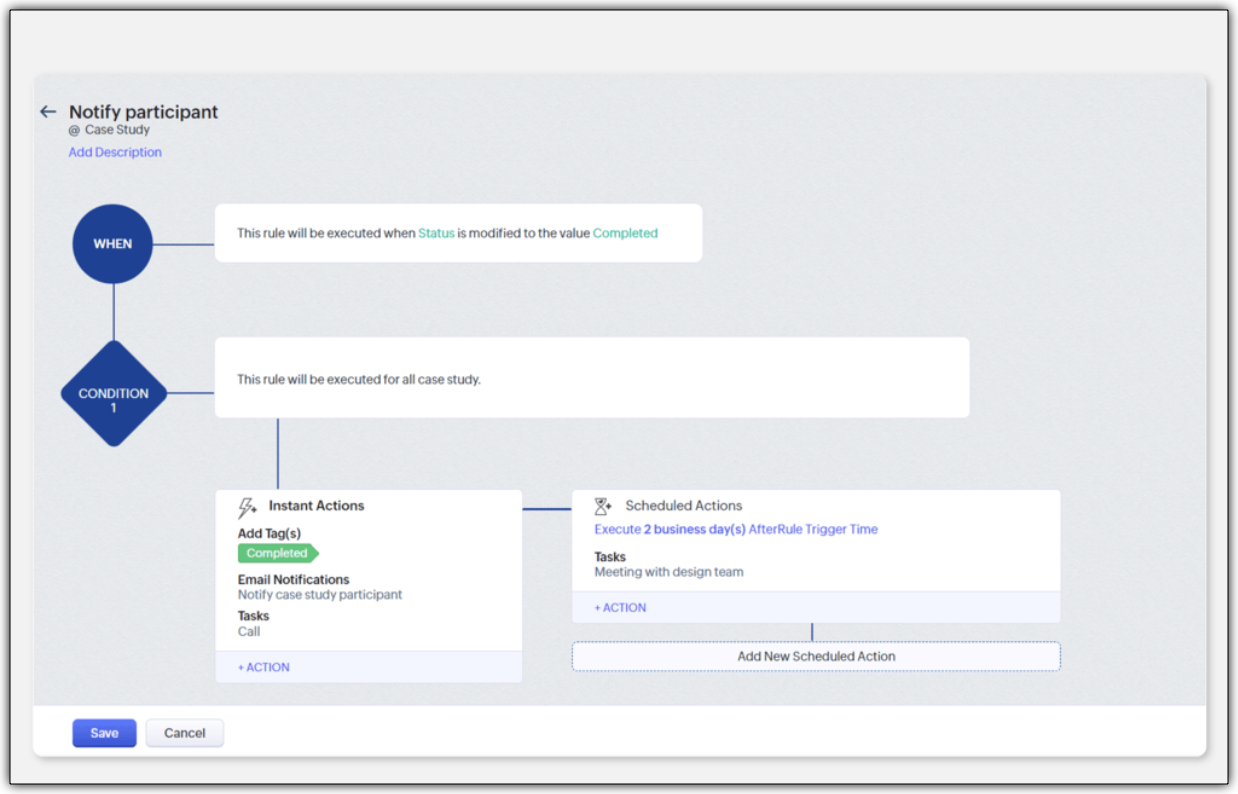
- A blueprint to streamline the case study publishing process
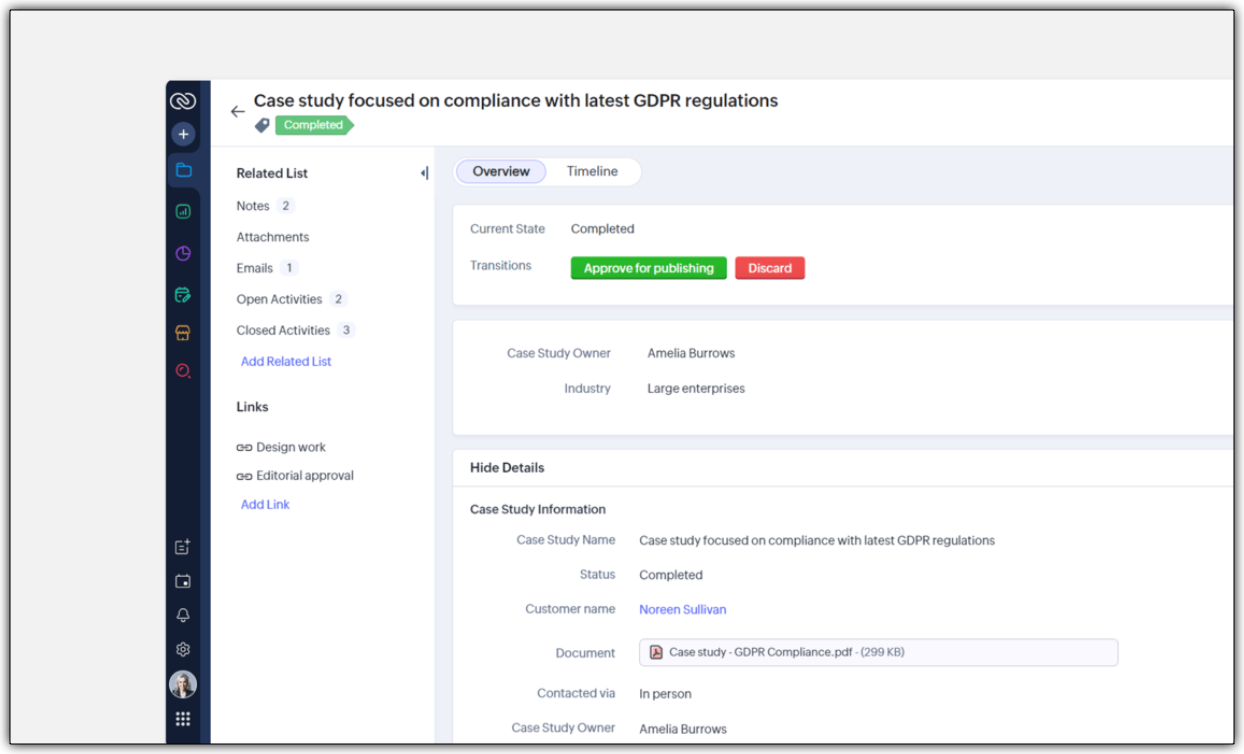
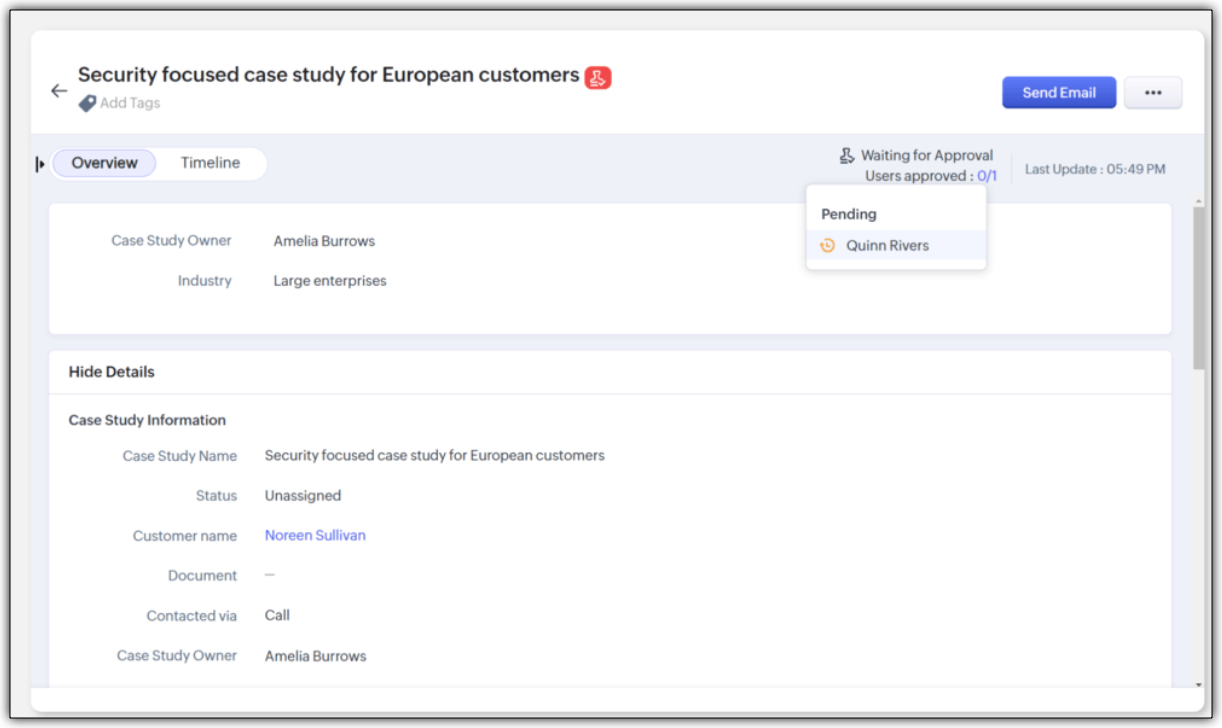
- An approval process to ensure that case studies are signed off by a team module manager
Improving Team Coordination
Winning a customer is often like running a relay race where one team hands off to the next until the goal is achieved. With multiple customer-facing teams onboard, how can they coordinate to achieve their goal - in case of any industry, it would be to close a deal successfully.
For example, in a typical SAAS industry, there would be multiple customer-facing teams : Sales team, Marketing team, Pre-sales team, Onboarding team and a Training team. Once all the teams are onboarded onto the CRM platform, teams would require information from each other during a sales process. Example,
- While the sales team is negotiating their next big deal, they may have to request supporting material like case studies from the marketing team.
- If a marketer wants to write a better case study, in turn, they may like to raise a request for customer implementation from the solutions experts team and so on.
In our current-day CRM system, these requests or the need for information between teams happen outside the CRM ; via chats, emails, or spreadsheets, thus leading to disconnects and inefficiencies.

CRM for Everyone addresses this challenge by making team coordination a seamless part of the user interface by introducing Requesters.
Each team could register a need for a deliverable from another team in order to move ahead in the process by raising what we call a "request". In the above case, the sales team is the "Requester" for Marketing, Presales, and Legal teams requesting different materials and action items in order to close a sale. Learn more

They can keep a track of their requests without being privy to their other teams' internal operations directly from the "My Requests" tab. The Requesters can also be kept informed once their requests have been met. In our example, when ultimately the case study does arrive, the sales team that "requested it" can follow it up, not via chat or email, but in the CRM itself.

How can users be assigned as Requesters?
Team Module Admins can assign Requesters in three ways:
- Individually : Add specific users when setting up a Team Module.
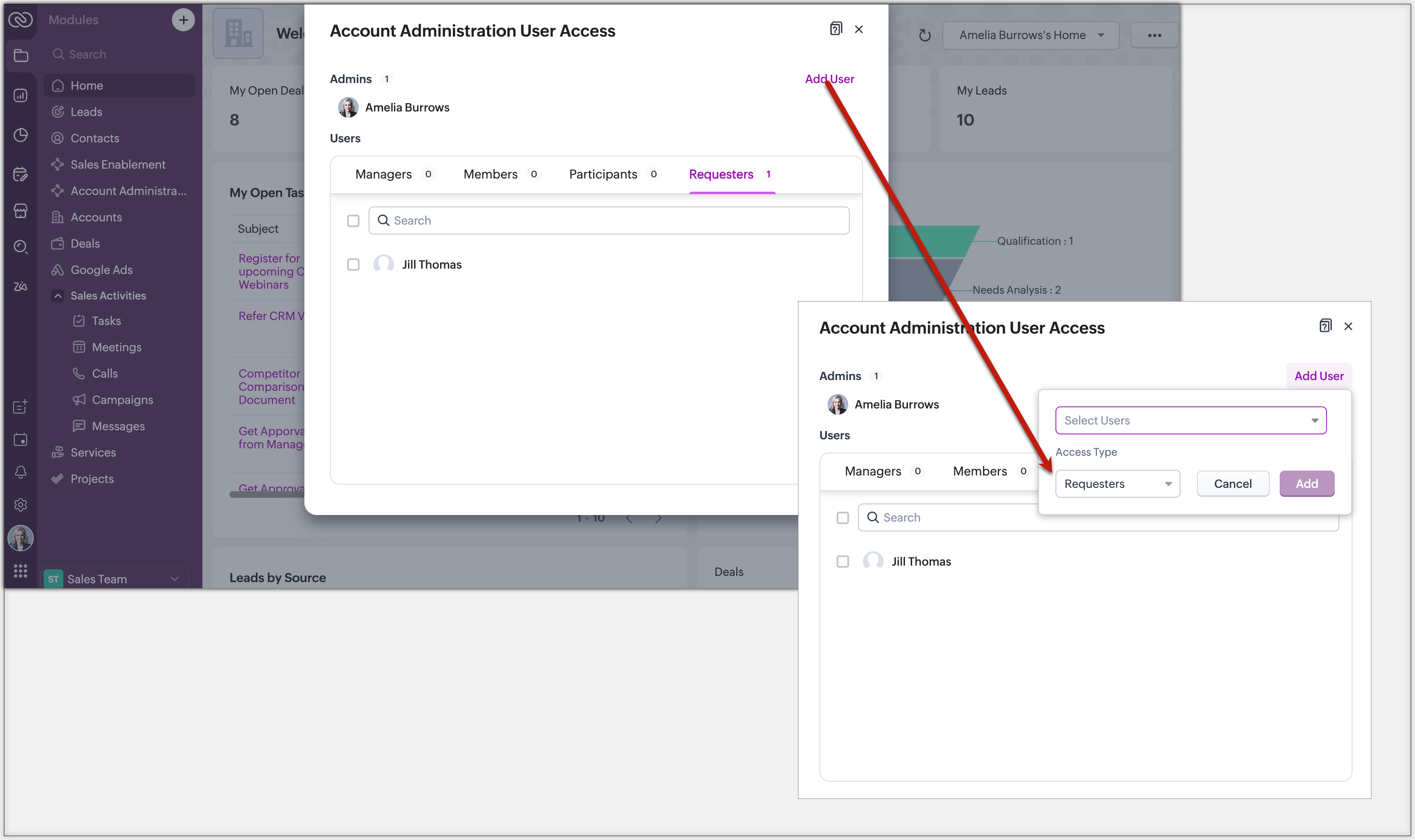
- QR Code or Link : Generate a link or code from requester settings. Anyone with access can instantly join and submit requests, no manual effort needed.
Example: Marketing can embed a QR code in an internal newsletter to allow regional sales reps to submit campaign briefs easily.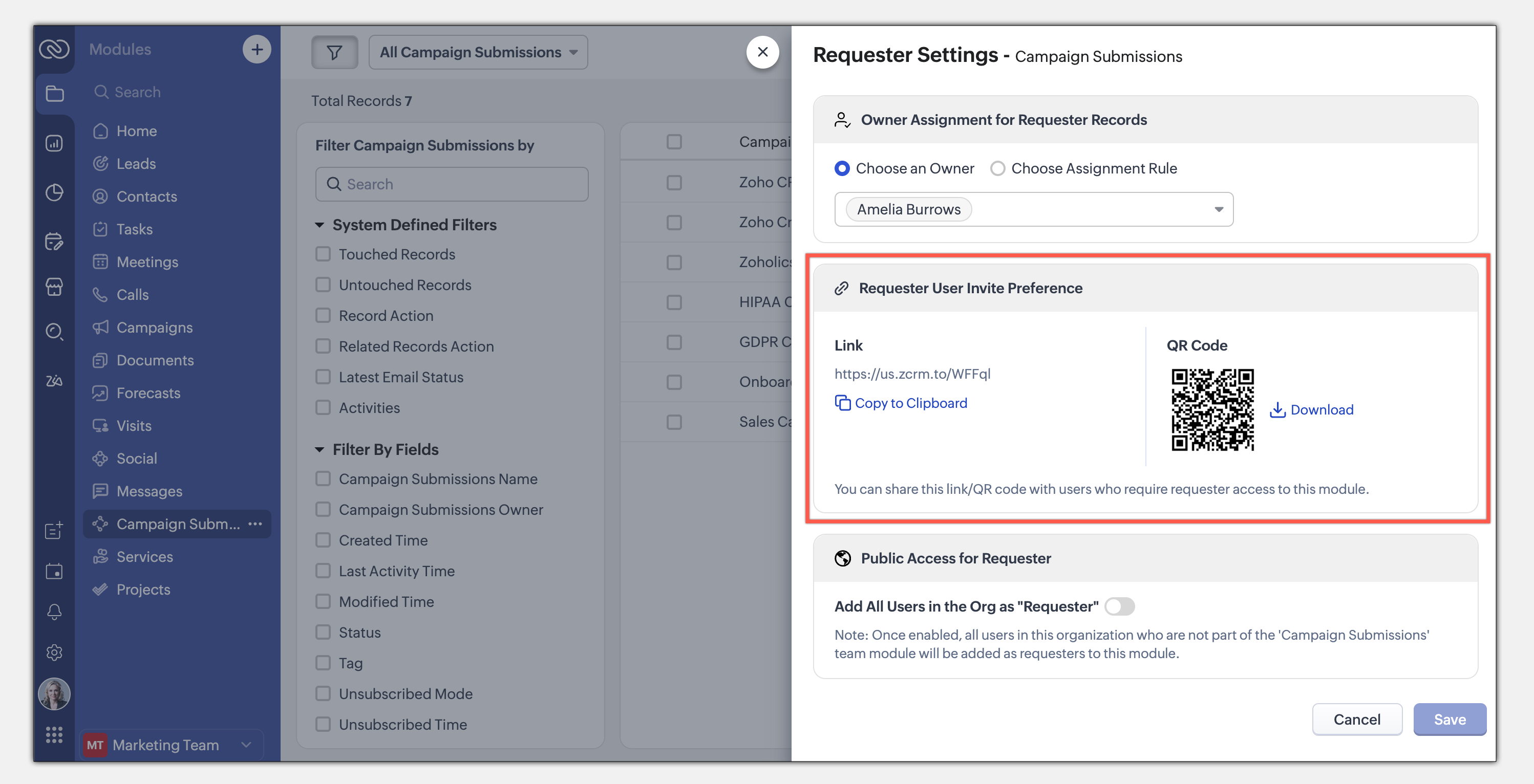
- Enable All Users : Allow all users in the organization to become requesters in a given module.
Example: A Sales Enablement module can be accessed by Product, Marketing, or Training teams to submit requests for sales insights.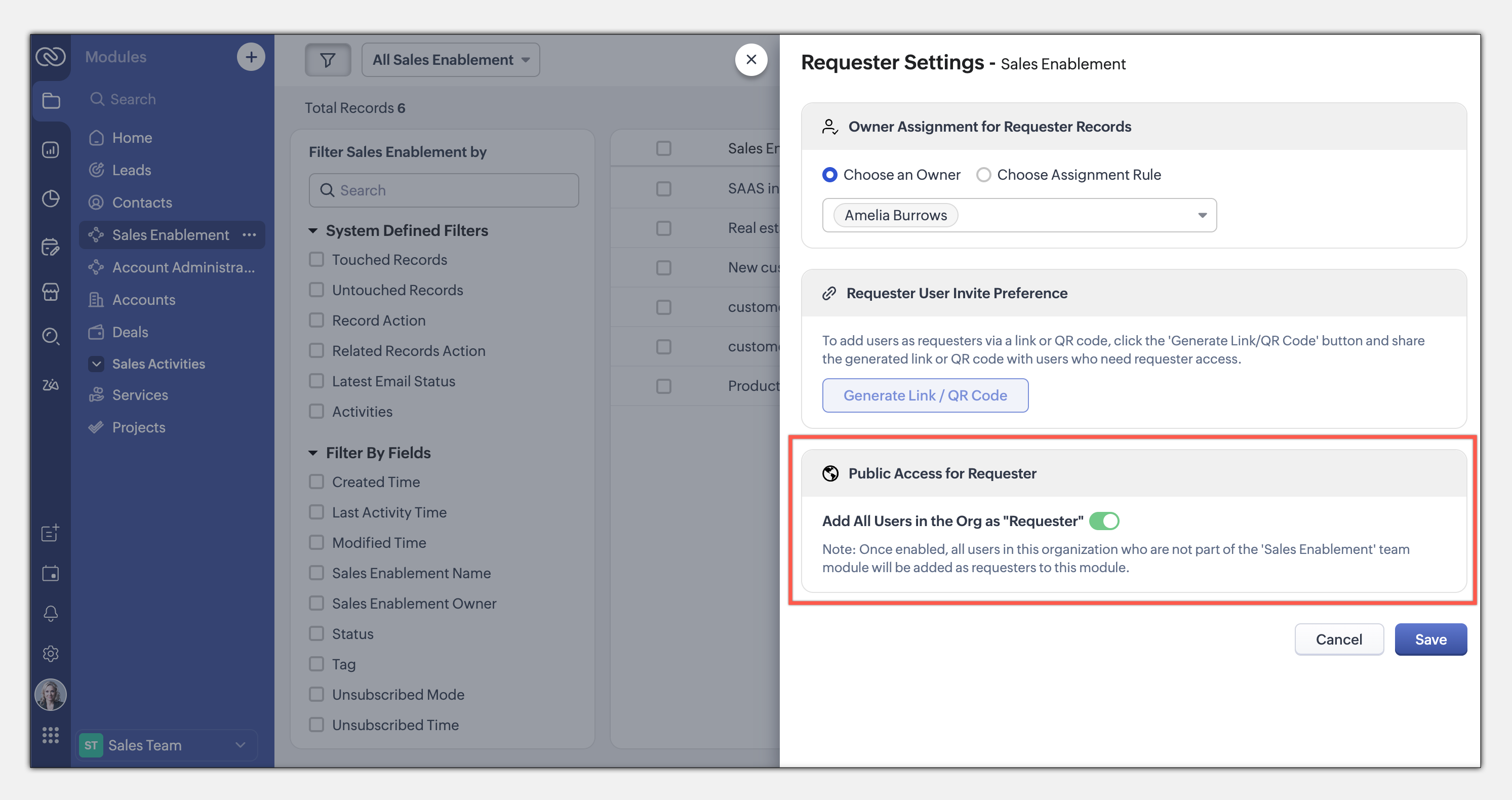
This seamless, integrated request system ensures teams can collaborate efficiently while maintaining privacy and process control. Learn more
This entire loop of requests and coordination between teams to meet a common goal is woven into the CRM interface as an integral part of the system, thus eliminating communication silos. This also puts us a good step closer to improving the adoption of CRM by several teams across the organization.
The details and nitty-gritty of who can manage what, who can view which data sets, etc., have to be carefully decided and managed. So CRM for Everyone also packs in an easy interface for each team to organize and manage their team modules.
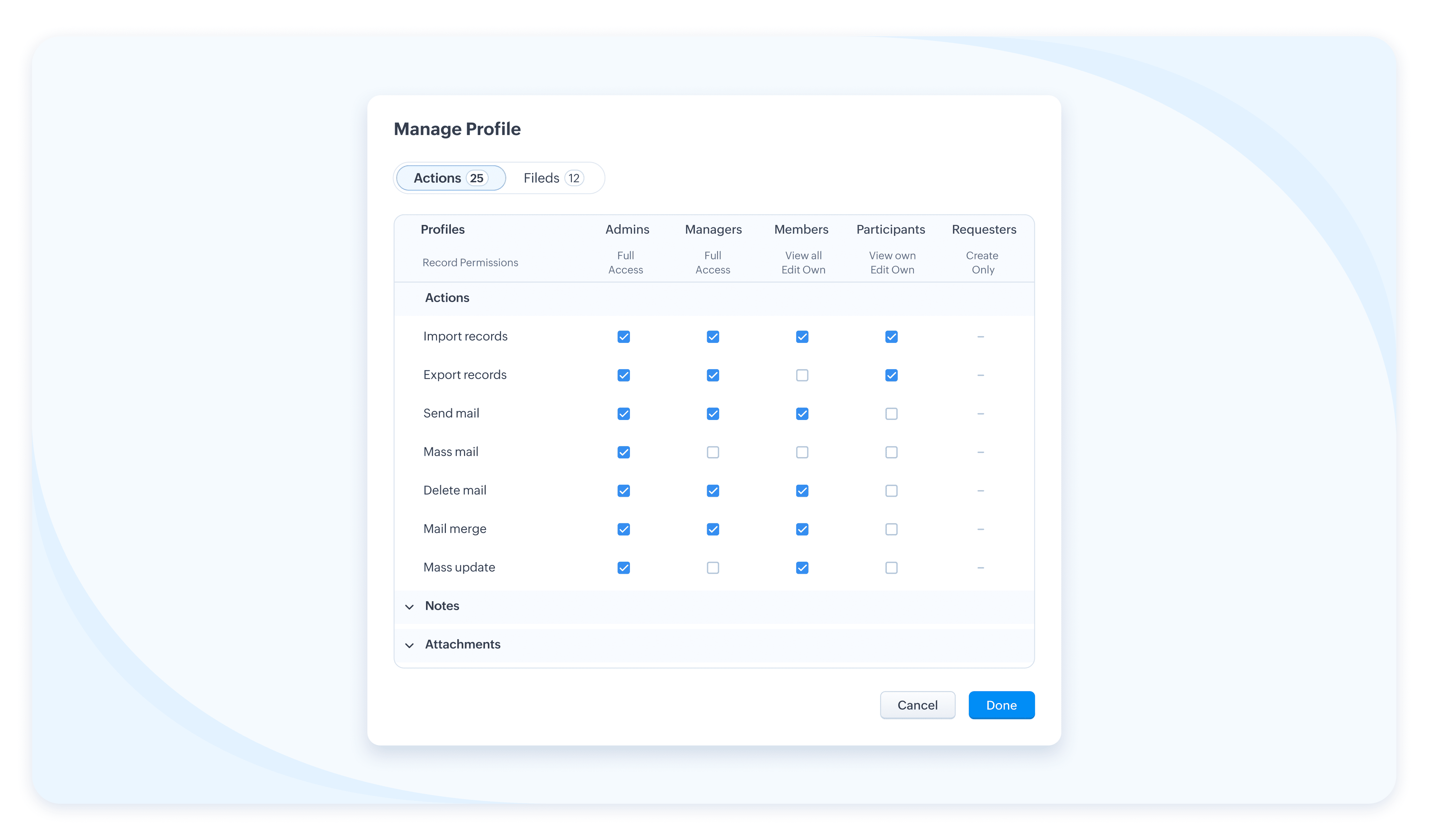
The details and nitty-gritty of who can manage what, who can view which data sets, etc., have to be carefully decided and managed. So CRM for Everyone also packs in an easy interface for each team to organize and manage their team modules.
Team Users For Team Modules
When we aspire to democratize the system and empower various non-sales teams, we hear you thinking, how do we take it from being an aspiration to ground level implementation? What motivates an organization to bring, most likely a large number of non-sales users, on to Zoho CRM? What’s their incentive?
Well, so far, the non-sales teams have probably not had the opportunity at all, to be a part of the same CRM system where all the customer data and processes are housed. The fact that Team Module will now give them that opportunity to be a part of this crucial system and simplify their work management is an incentive in itself, so to speak.
Of course, there is also a cost-related incentive. Since the non-sales team members will typically not need access to all of CRM, we have created a new type of user license to encourage their access to CRM— called the Team User license, which is priced lower than a regular CRM user license, and by design will allow only limited access to CRM.
With the introduction of Team User licenses, we will now have two types of CRM users:
➤ Organization User
➤ Team User
Well, so far, the non-sales teams have probably not had the opportunity at all, to be a part of the same CRM system where all the customer data and processes are housed. The fact that Team Module will now give them that opportunity to be a part of this crucial system and simplify their work management is an incentive in itself, so to speak.
Of course, there is also a cost-related incentive. Since the non-sales team members will typically not need access to all of CRM, we have created a new type of user license to encourage their access to CRM— called the Team User license, which is priced lower than a regular CRM user license, and by design will allow only limited access to CRM.
With the introduction of Team User licenses, we will now have two types of CRM users:
➤ Organization User
➤ Team User
- The Organization User is your regular power CRM user who will need access to all CRM data and most functionalities. Typically, a sales team member.
- A Team User is typically a non-sales team member, whose work could be managed in CRM alongside sales, as they have a part to play in the entire customer-oriented process. For example: A presales executive who needs to step in to give a product demo to a customer right after a salesperson's pitch. Alternatively, a Legal team member might have to process contract signatures while closing a deal. Additionally, a Training team member who will take up a training request for a customer on-demand.
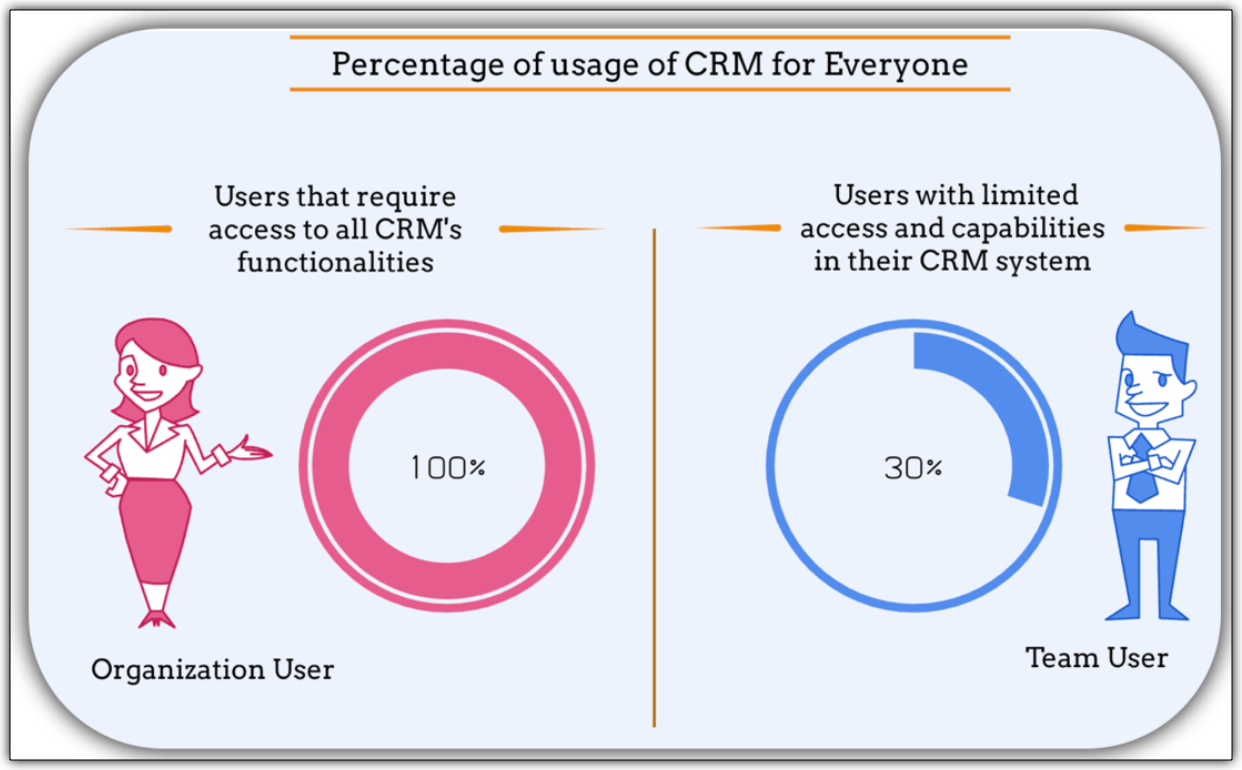
The legal team members, trainers, or pre-sales executives can make contributions only in their respective Team Modules. They don't require the entire range of features in the CRM system. In fact, they won't even need access to some key organization modules. They log into the system to fulfil their responsibilities, complete their deliverables, and then log out.
Such users are your ideal candidates for Team User Licenses.
Such users are your ideal candidates for Team User Licenses.
What is the cost of a Team User license?
Team User licenses are priced significantly lower than a regular CRM license and enable you to have cost savings, depending on how you want to distribute the Org Vs Team licenses among your users.
A Team User License costs:
➤ $9/ team license/ month (if paid annually)
➤ $11/ team license / month (if paid monthly)
For instance, Zylker Corp has onboarded 50 members of their sales team to the Zoho CRM Enterprise edition. They now wish to add an additional 30 non-sales customer operations members as Team Users. The distribution of licenses for these 80 users (on the Enterprise edition) will be as follows:
Organization Users - 50 users * 40 $ = 2000 $
Team Users [Annual ] - 30 users * 9 $ = 270 $
-----------------------------------------------------------------
Total Cost - 80 users = 2270 $
Let's see how much they would have to pay without this license in case they have to onboard all users using the regular CRM Org License :
All users as Organization users, therefore, 80 users * 40 $ = 3200
Thus, Zylker Corp's total savings with the Team User License is 930 $ which is significantly lower than regular CRM licenses.
A Team User License costs:
➤ $9/ team license/ month (if paid annually)
➤ $11/ team license / month (if paid monthly)
For instance, Zylker Corp has onboarded 50 members of their sales team to the Zoho CRM Enterprise edition. They now wish to add an additional 30 non-sales customer operations members as Team Users. The distribution of licenses for these 80 users (on the Enterprise edition) will be as follows:
Organization Users - 50 users * 40 $ = 2000 $
Team Users [Annual ] - 30 users * 9 $ = 270 $
-----------------------------------------------------------------
Total Cost - 80 users = 2270 $
Let's see how much they would have to pay without this license in case they have to onboard all users using the regular CRM Org License :
All users as Organization users, therefore, 80 users * 40 $ = 3200
Thus, Zylker Corp's total savings with the Team User License is 930 $ which is significantly lower than regular CRM licenses.
Team Modules in Zoho CRM make it easier for all your customer-facing teams to manage their own work, collaborate smoothly, and stay aligned. With CRM for Everyone, you can break down silos, speed up processes, and deliver better customer experiences—together.
It’s a smarter, more connected way to use CRM across your organization.
Start using Team Modules today and bring every team closer to your customers.
Regards,
Serena Woolridge
Resources
Topic Participants
Serena Woolridge
Sticky Posts
Introducing Multiple Sandbox Types and Support for Module's Data Population
Register here for the upcoming Focus Group webinar on Multiple Sandbox | Help documentation to learn more about the new enhancements Hello everyone, Sandbox in CRM is a testing environment for users to create and test new configurations like workflowGood news! Calendar in Zoho CRM gets a face lift
Dear Customers, We are delighted to unveil the revamped calendar UI in Zoho CRM. With a complete visual overhaul aligned with CRM for Everyone, the calendar now offers a more intuitive and flexible scheduling experience. What’s new? Distinguish activitiesVoC in Zoho CRM is now data savvy: Explore response drilldown, summary components and participation in CRM criteria
VoC has all the goods when it comes to customer intelligence—which is why we're constantly enhancing it. We recently added the following: A customer drilldown component that shows you the list of prospects and customers behind a chart's attribute ExpandedWrapping up 2025 on a high note: CRM Release Highlights of the year
Dear Customers, 2025 was an eventful year for us at Zoho CRM. We’ve had releases of all sizes and impact, and we are excited to look back, break it down, and rediscover them with you! Before we rewind—we’d like to take a minute and sincerely thank youPresenting ABM for Zoho CRM: Expand and retain your customers with precision
Picture this scenario: You're a growing SaaS company ready to launch a powerful business suite, and are looking to gain traction and momentum. But as a business with a tight budget, you know acquiring new customers is slow, expensive, and often delivers
Recent Topics
Cannot get code to work with v2.mergeAndStore!
Please can someone help me pass subform items into a repeating mail merge table row using v2.mergeAndStore? I have a mail merge template created in Writer and stored in Workdrive. This template is referenced by a custom CRM function which merges all ofHow to hide or archive a blog post temporarily in Zoho commerce website builder?
I would like to temporarily hide or archive a blog post in zoho commerce website builder so that it doesnt appear on my website till I enable it again. I tried to look for this option but could not find it. It only allows me to permanently delete a blogFounders using Zoho — are you leveraging Zoho Campaigns + Zoho Social for thought leadership… or just sending emails?
I’ve noticed something interesting in the Zoho ecosystem. Many founders use Zoho Campaigns and Zoho Social for basic marketing—newsletters, scheduled posts, and announcements. But very few are using these tools strategically to: • Position themselvesHow to mix different types of inputs (such as dropdown list and textbox)
Hi, I'm creating a form called "Room Reservations" for a company. I created a "table" using "Matrix Choice". I created "Room 1", "Room 2" and "Room 3" with the "Questions". I would then like to create two columns with the "Answers", one called "Department"Reply to Email for SO/PO
Hello, We are new to Zoho Books and running into an issue. Our support@ email is our integration user. When our team is sending out PO/SO's we are updating the sender email, but for some reason many of our responses are coming back to our support@ emailHow to Convert NSF to PST Format Effortlessly? - SYSessential
It is highly recommended to obtain the error-free solution of the SYSessential NSF to PST converter to convert NSF files from Lotus Notes. Using this professional software, it becomes easier to convert all NSF database items, including emails, journals,Zoho Commerce - Poor Features Set for Blogging
Hi Zoho Commerce team, I'm sure you will have noticed that I have been asking many questions about the Blogs feature in Commerce. I thought that it would be useful if I share my feedback in a constructive way, to highlight the areas which I feel needPass shipping info to payment gateway Zoho Books to Authorize.net
For some reason the integration from Zoho books to Authorize.net does not pass the shipping address. Authorize.net is ready to receive it, but zoho books does not send itMassive Zoho Books failure
We have not received any communication or notification from Zoho, but we have detected that Zoho Books is not working for all our users. We cannot access or use Zoho Books. This is critical. We are trying to contact Zoho on the Spain telephone number,Does the Customer “Company Name” field appear anywhere in the Zoho Books UI outside of PDFs?
Hi everyone, I’m trying to understand how the Company Name field is actually used in Zoho Books. There is a Company Name field on the customer record, but when viewing transactions like a Sales Order in the normal UI (non-PDF view), that field doesn’tEmail outbox is now available in the sandbox
Hello all! Testing emails without visibility has always been a blind spot in the sandbox. With the new Outbox, that gap is closed. You can now view and verify every email triggered from your sandbox, whether it’s through workflows, approvals, or massLooking For Recruit Developer
Hi everyone, I am looking for a Zoho Certified Developer to assist with a development project for MetalXpert. We are building a software system designed to bridge the gap between a candidate mobile app and an employer web portal using Zoho Recruit assales IQ issue on website
i integrated the zoho sales IQ code on the website but it is comming in distroted form i am sharing the screenshot below the website is bulit in wix platformMulti-currency and Products
One of the main reasons I have gone down the Zoho route is because I need multi-currency support. However, I find that products can only be priced in the home currency, We sell to the US and UK. However, we maintain different price lists for each. ThereDeprecation of the Zoho OAuth connector
Hello everyone, At Zoho, we continuously evaluate our integrations to ensure they meet the highest standards of security, reliability, and compliance. As part of these ongoing efforts, we've made the decision to deprecate the Zoho OAuth default connectorI need to know the IP address of ZOHO CRM.
The link below is the IP address for Analytics, do you have CRM's? IP address for Analytics I would like to know the IP address of ZOHO CRM to allow communication as the API server I am developing is also run from CRM. Moderation Update: The post belowImportant Update: Google Ads & YouTube Ads API Migration
To maintain platform performance and align with Google's newest requirements, we are updating the Google Ads and YouTube Ads integrations by migrating from API v19 to the newer v22, before the official deprecation of v19 on February 11, 2026. Reference:Zoho recruit's blueprint configuration is not functioning as mapped
Current Status: Zoho Blueprint is not functioning as configured. Issue: We are moving a Candidate status in Zoho Recruit "for active file" but we encountered: "Status cannot be changed for records involved in Blueprint." This happens to various clientSuper Admin Logging in as another User
How can a Super Admin login as another user. For example, I have a sales rep that is having issues with their Accounts and I want to view their Zoho Account with out having to do a GTM and sharing screens. Moderation Update (8th Aug 2025): We are workingBlocklist candidates in Zoho Recruit
We’re introducing Block Candidate, which helps recruiters to permanently restrict a candidate from applying to current/future job openings. Once the candidate is blocked, they will no longer be able to participate in the recruitment process. This willAdmin asked me for Backend Details when I wanted to verify my ZeptoMail Account
Please provide the backend details where you will be adding the SMTP/API information of ZeptoMail Who knows what this means?Zoho Desk - Upsert Ticket
Hi Desk Team, It is common to request more information from end-users. Using forms is a great way to ensure all the required information is collected. It would be great if there were an "upsert" option on the Zoho Form -> Zoho Desk integration which wouldAll new Address Field in Zoho CRM: maintain structured and accurate address inputs
The address field will be available exclusively for IN DC users. We'll keep you updated on the DC-specific rollout soon. It's currently available for all new sign-ups and for existing Zoho CRM orgs which are in the Professional edition. Latest updateClient Side Scripts for Meetings Module
Will zoho please add client side scripting support to the meetings module? Our workflow requires most meeting details have a specific format to work with other software we have. So we rely on a custom function to auto fill certain things. We currentlyIntroducing Multiple Sandbox Types and Support for Module's Data Population
Register here for the upcoming Focus Group webinar on Multiple Sandbox | Help documentation to learn more about the new enhancements Hello everyone, Sandbox in CRM is a testing environment for users to create and test new configurations like workflowCreator Offline
We had online access setup and working on our iphones. We have just set it up on an 'Android Tablet' and it is not downloading all the images? We use it to show customers our catalogue. Any ideas. Offline components all setup on both devicesUpdated font library: New font styles and custom font options in Zoho Sheet
Zoho Sheet's font library now supports 500+ font styles in 60+ languages! The updated font library is stacked with new font styles, and some of the previously available font styles have been replaced with equivalent options. There are two ways you canEnable or disable any Field Rule!
Hello Zoho Forms Community, We are excited to announce a powerful new enhancement to Field Rules that gives you greater control and flexibility in managing your form logic! Previously, if you wanted to temporarily deactivate a field rule, you had twoMarketing Tip #20: Increase traffic with strong meta titles and descriptions
Meta titles and descriptions are what people see first on search results before they ever click through to your website. If your pages use generic titles or basic descriptions, you miss the chance to stand out, and search engines may not know which pageDifferent form submission results for submitter and internal users
I'm looking for suggestions on how to show an external submitter a few results while sending internal users all the results from the answers provided by the external user. The final page of our form has a section with detailed results and a section withKanban view on Zoho CRM mobile app!
What is Kanban? The name doesn't sound English, right? Yes, Kanban is a Japanese word which means 'Card you can see'. As per the meaning, Kanban in CRM is a type of list view in which the records will be displayed in cards and categorized under the givenNot able to delete a QC nor able to revert or create a cycle of manufacturing for QC failed Jobs
Not able to delete a QC nor able to revert or create a cycle of manufacturing for QC failed JobsDheeraj Sudan and Meenu Hinduja-How do I customize Zoho apps to suit my needs?
Hi Everyone, I'm Meenu Hinduja and my husband Dheeraj Sudan, run a business. I’m looking to tweak a few things to fit my needs, and I’d love to hear what customizations others have done. Any tips or examples would be super helpful! Regards Dheeraj Sudanis there any way to change the "chat with us now" to custom message?
is there any way to change the "chat with us now" to custom message? I want to change this textDeprecation Notice: OpenAI Assistants API will be shut down on August 26, 2026
I recieved this email from openAI what does it means for us that are using the integration and what should we do? Earlier this year, we shared our plan to deprecate the Assistants API once the Responses API reached feature parity. With the launch of Conversations,Capture Last check-in date & days since
I have two custom fields on my Account form, these are "Date of Last Check-In" and "Days Since Last Contact" Using a custom function how can I pull the date from the last check-in and display it in the field "Date of Last Check-In"? and then also display the number of days since last check-in in the "Days SInce Last Contact" field? I tried following a couple of examples but got myself into a bit of a muddle!CRM gets location smart with the all new Map View: visualize records, locate records within any radius, and more
Hello all, We've introduced a new way to work with location data in Zoho CRM: the Map View. Instead of scrolling through endless lists, your records now appear as pins on a map. Built on top of the all-new address field and powered by Mappls (MapMyIndia),Enhance Appointment Buffers in Zoho Bookings
There was previously a long-standing feature request related to enhancing the way appointment buffers work in Zoho Bookings, but it looks like the original post has been deleted. I am therefore adding a new request that Zoho Bookings adjust how appointmentSubscriptions for service call
So we install products and we want to offer a service contract for the customers yearly service calls to be billed monthly. So ideally at some point we want to email them a quote for their needs. WE will choice it our end based on the equipment. It wouldDelay in rendering Zoho Recruit - Careers in the ZappyWorks
I click on the Careers link (https://zappyworks.zohorecruit.com/jobs/Careers) on the ZappyWorks website expecting to see the job openings. The site redirects me to Zoho Recruit, but after the redirect, the page just stays blank for several seconds. I'mNext Page