Updates in Zoho Workplace applications | Oct and Nov 2023
Hello Workplace Community,
We wish you all a Merry Christmas! 🎄
Hope you're all doing good and staying safe. This Christmas, we have quite a few treats in the form of new features and enhancements across the applications in Zoho Workplace.
Let's take a quick look at them.
Zoho Mail
Mail Reading Formats: Plain & Rich Text
In Zoho Mail, it is now possible to read emails in the preferred mode of your choice. Enabling Plain or Rich text mode from the Mail View Options within settings allows you to choose between a visually enhanced and formatted text or a simple, unformatted text format to read your emails.
Send personalized Out-of-Office messages for internal and external contacts
You can now set distinct Out-of-Office replies to senders within your organization and those outside it. Manage your professional communications effectively, ensuring that your messages are not only automated but also finely tuned to the expectations of both internal and external audiences.
Admin Configured Out-of-Office response for internal and external senders
Now, administrators can also configure distinct Out-of-Office responses for emails from senders within the organization and external senders, ensuring that both internal and external contacts receive responses crafted to their respective needs and contexts.
Users can create email-enabled Groups with admin approval
Organizations users now have the option to create a group as an email-enabled group directly from their group management page if the admin has granted permission through the admin console.
Add email event invitations to Zoho CRM Calendar
You can now choose to add event invitations from your emails directly to the Zoho CRM Calendar instead of the Zoho Calendar for more efficient and consolidated management of your business events or activities related to customer relationship management.
New DRE Gallery function alert!
Now, our gallery of pre-defined DRE functions has a new addition, bringing even more flexibility to manage your inbox. A pre-written script to automatically add attachments from an email to CRM when the sender is listed as a CRM lead or contact is added to the Gallery function.
Associate Contact card to your email signatures
No more copying and pasting your contact information repeatedly. You can now include contact cards directly into your email signature. Recipients can easily save your contact details directly from your signature, eliminating the hassle of manual entry. It's a one-time setup for a lasting impact on every email you send.
Seamless language translation for your emails
No need to worry about missing out on important information or struggling to understand emails in different languages. In Zoho Mail, you can now translate all your emails to your preferred language. Enhance your email communication experience, fostering global collaboration and ensuring that language diversity is no longer a barrier to effective communication.
Admins can now recall sent emails
No more worrying about emails sent by mistake. Admins can now recall emails sent by users within the organization. This ensures that any unintended or erroneous messages are swiftly corrected, providing enhanced control and flexibility over email communications.
Shared Mailbox support in email Retention and Backup
In Admin Console, the ability to retain, backup, or recover emails now extends to shared mailboxes. Administrators can now have the same level of control and security for shared mailboxes as they have for individual user accounts and make sure that critical data is protected and accessible when needed, even for collaborative spaces within Zoho Mail.
Zoho Calendar
Audio Meeting or Video Meeting - Pick your style
With the Zoho Meeting integration, you can now choose to create either audio or video conferencing while scheduling an event. When Zoho Meeting is selected as a Conference option, a meeting will be set up in Zoho Meeting and the conference link will be emailed to the attendees.
Zoho WorkDrive
Video and audio preview enhancements
We have enhanced video and audio previews by adding sneak forward (Shift+Right arrow) and sneak backward (Shift+Left arrow) options. We have also introduced shortcut options for muting/unmuting (M), entering/exiting full-screen mode (F), and playing/pausing your content (space bar).
Additionally, we have introduced picture-in-picture (PIP) support for video files.
Experience WorkDrive in your preferred Indian language
India's rich linguistic diversity is now fully accommodated by WorkDrive. No matter which region you're from or which language you speak, WorkDrive is here to support your collaboration and document management needs.
We have expanded our language support to include all 22 official Indian languages. This means that you can now access and interact with WorkDrive in your preferred Indian language for a more convenient and user-friendly experience.
Locate files quickly with our recent search enhancements
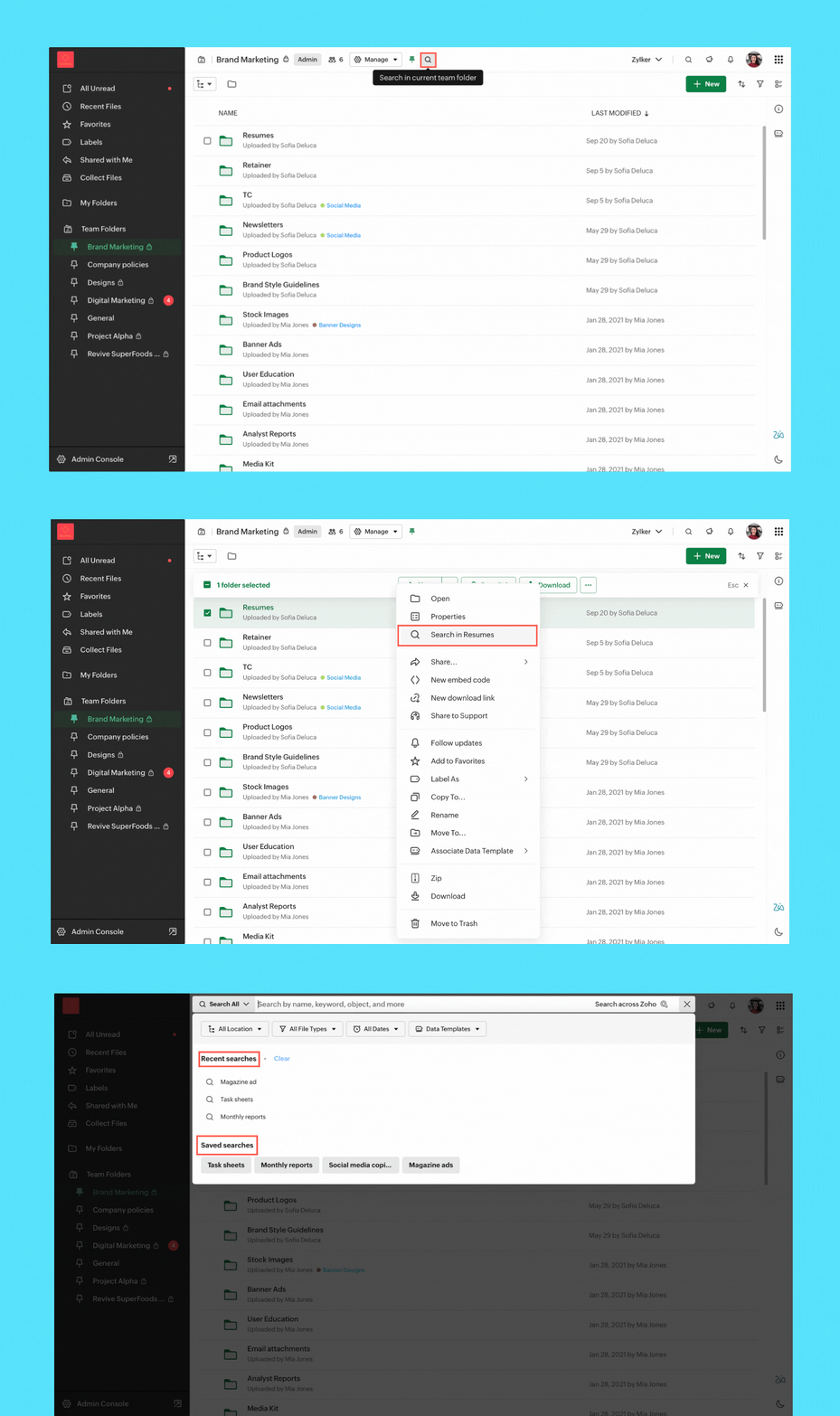
- Streamlined search: We've enabled quick search options to help you find files in your My Folder, Team Folder, Org Folder, and any other specific subfolder.
- Save search: You can now save search keywords along with the applied filters, making the process of generating future search results effortless.
- Recent search listings: Your recent searches are now at your fingertips within the search UI. Quickly access them to find the information you need.
Zoho Cliq
Enhancements in Admin Panel
- eDiscovery and data retention: Retrieve and clean up your organization’s data and assets with eDiscovery and data retention policies. These are necessary for compliance audits, lawsuits, and intellectual property theft, as you can quickly locate and provide the required supporting evidence.
- Audit trails: Get a snapshot of all user activities across chats and channels at a glance and maintain a record of all critical actions performed by specific users across different modules.
- Usage reports: Measure adoption rates and the hours spent on different modules. Admins can get a clear picture of the organization's interactions and how everyone uses Cliq.
- Media IP versioning: With this new tool, you can track which of Cliq's media servers are whitelisted within your organization's network. This ensures continuous and seamless connectivity in your calls and meetings.
- Status configuration across the organization: Manage your organization's status configurations by customizing the text, setting time limits for each status, and availability of custom statuses.
- Centralized management for your channels: Get better control over every channel within your organization by performing detailed actions like changing channel admins, adding or removing participants, and adjusting the roles available to a channel admin from a single centralized location.
AI advancements
- Meeting summary & action items: Effortlessly review discussions with AI-generated meeting transcripts, pinpointing critical details and follow-up tasks for actionable insights.
- Unread message summary: Missed a group chat and overwhelmed by hundreds of unread messages? Now generate message summaries to quickly catch up on what is going on.
- Writing assistant: Receive support in composing messages with tone analysis and grammar correction while also gaining additional insights about your texts from our AI, Zia. Explore details like writing quality, word count, and readability for a comprehensive writing experience.
Updates in the Collaboration corner
- Auto response: Set an auto-response in Cliq to keep your colleagues informed of your unavailability and return time with the out-of-office responder.
- Pin multiple messages: Effortlessly pin multiple important messages in a chat to ensure essential information remains at the forefront.
Channel permission to close threads
With our latest addition to channel permissions, you can efficiently designate who can close threads, offering improved control over your channel's discussions.
Zoho Meeting
Import webinar registrants with a CSV
Streamline your webinar registration process by uploading a CSV file containing attendee names and emails. You can effortlessly import your webinar registrations, saving time and simplifying the process. To import registrations, navigate to the registrations tab of the scheduled webinar and click Import CSV in the top right corner.
End of session notification
With the end-of-session notification, you can choose to remind all participants or only the host about the scheduled end time of a meeting. You can also choose when and how many times you'd like to be reminded about the scheduled end time. This can be customized under the Meeting settings.
Zoho Writer
Visualize, summarize, and transform data in mail merge templates
Display data exactly the way you want and highlight key insights with group by and aggregate in Zoho Writer's mail merge templates.
Zoho Sheet
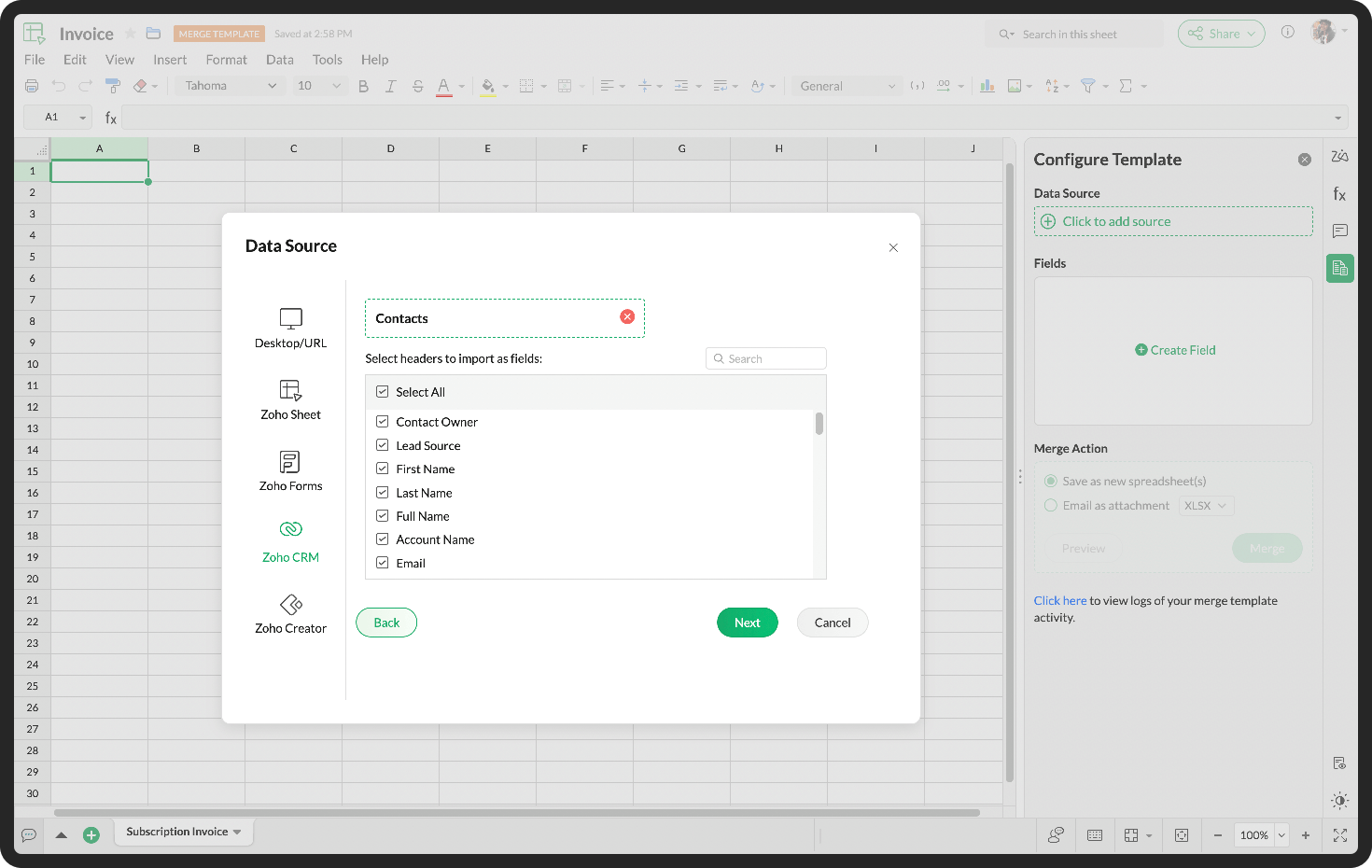
Create and share bulk spreadsheets seamlessly using Merge Templates
Do you spend hours drafting new records and copy-pasting data from other sources? You can efficiently create and share bulk data records with the Merge Template in Zoho Sheet.
Zoho Connect
Get instant reminders for live broadcasts
With the convenience of reminders, you can get notified about live broadcasts to help you plan your participation effectively.
Boost task activity with the fun Arcade feature
Get points for performing certain task activities. From creating a task to changing the task status, earn points for your active participation on the board.
Get detailed insights on your posts
Understand user sentiment and interaction on your posts, such as views, comments, and reactions to help you keep track of your post-related engagement at all times.
Do try out the features, enhancements and let us know your feedback and suggestions in the comments section given below.
Topic Participants
Ranadive E
Sticky Posts
Product Updates in Zoho Workplace applications | December 2025
Hello Workplace Community, Let’s take a look at the new features and enhancements that went live across all Workplace applications this December. Zoho Mail Block emails without notifying the sender Block emails without sending a rejection notificationProduct Updates in Zoho Workplace applications | November 2025
Hello Workplace Community, Let’s take a look at the new features and enhancements that went live across all Workplace applications this November. Zoho Mail Format comments easily using Slash Commands With Slash commands, you can easily format text, insertProduct Updates in Zoho Workplace applications | October 2025
Hello Workplace Community, Let’s take a look at the new features and enhancements that went live across all Workplace applications this October. Zoho Mail Create Signature from Compose window You can now effortlessly create a Signature using the CreateProduct Updates in Zoho Workplace applications | September 2025
Hello Workplace Community, Let’s take a look at the new features and enhancements that went live across all Workplace applications this September. Zoho Mail Attach email as EML file in Compose Effortlessly attach emails as EML file in Compose by simplyAI in Zoho Workplace: A Sneak Peek into What’s Coming!
Hello everyone, We’re super excited to share something we’ve been working on and we want you to be part of it! You may have seen our announcement blog post introducing a major evolution in how AI works within Zoho Workplace. Want to be among the first
Recent Topics
Introducing Forms in Zoho Sheet
We hereby bring you the power of forms in Zoho Sheet. Now, build and create your own customized forms using Zoho Sheet. Be it compiling a questionnaire or rolling out a survey, Zoho Sheet can do it all for you. Forms is an excellent feature that helps you collect information in the simplest of ways and having it in Zoho Sheet takes it a notch higher. Build Simple yet Powerful forms Building forms using Zoho Sheet is fairly simple. The exclusive 'Form' tab lets you create one quickly. Whether youLayout one survey question in a time & redirect next Page based on previous response
I have doubt while, I am scripting survey on the Zoho where I redirecting to next page based on my previous response but didn’t get success on this. Please help me on this and tell me how I layout one survey questions in a time when I submit responseZoho Bookings form pre-filled with Zoho Forms in
Hi, I've got a contact page on my website and I'd like to have the option to book an appointment (redirected to zoho bookings page) after an option is submitted on the contact form. how would I go about doing this? thanksSupport “Other” Option with Free Text in Dropdown Fields
Hello Zoho Bookings Team, Greetings, We would like to request an enhancement to the registration form fields in Zoho Bookings, specifically for dropdown fields. Current Limitation: At the moment, dropdown fields do not support an “Other” option that allowsSending automated messages that appear in the ticket's conversation thread
Good morning, esteemed Zoho Desk community, warm greetings Today I am here to raise the following problem, seeking a solution that I can implement: I need to implement an automation that allows me to send reminder messages to customers when I am waitingIntroducing parent-child ticketing in Zoho Desk [Early access]
Hello Zoho Desk users! We have introduced the parent-child ticketing system to help customer service teams ensure efficient resolution of issues involving multiple, related tickets. You can now combine repetitive and interconnected tickets into parent-childPlease verify my account
Hi, We have just launched our website and received media coverage in our country. Hundreds of users are signing up for our platform every day. We would like to send them a welcome email, but we are unable to do so because our ZeptoMail account has notPayment Card or Identity form-fill from Vault?
Hello! I'm working on replacing Bitwarden with Vault and one issue I've run into is that I can't find any option to fill address and payment forms from Payment Card or Identity info that has been saved in Vault. Is there a way to do this? Is it a plannedAbility to add VAT to Retainer Invoices
Hello, I've had a telephone conversation a month ago with Dinesh on this topic and my request to allow for the addition of VAT on Retainer Invoices. It's currently not possible to add VAT to Retainer Invoices and it was mutually agreed that there is absolutely no reason why there shouldn't be, especially as TAX LAW makes VAT mandatory on each invoice in Europe! So basically, what i'm saying is that if you don't allow us to add VAT to Retainer Invoices, than the whole Retainer Invoices becomesTime Log Reminder
Tracking the time spent on tasks and issues is one of the most important functions of a timesheet. However, users may forget to update the time logs because they have their own goals to achieve. But, time logs must be updated at regular intervals to keep[Early-access] Introducing Zoho's CommandCenter - Cross-Zoho business process automation
Resources to help Webinar recording | Documentation Feature Restrictions Currently available on early-access only for US data center accounts Features Role CommandCenter as a Service uses signals across Zoho services to propel the movement of recordsTip #58- Accessibility Controls in Zoho Assist: Learning- 'Insider Insights'
Learning should be clear and interruption-free for everyone. Timely feedback plays an important role in helping users understand actions as they happen, without breaking their focus. In this post, we’ll explore the final section of Accessibility: Learning.ZIA "Generate Content" action doesn't have contexual data from the ticket
"Generate Content" action doesn't have contexual data from the ticket. I try to get AI to help me with this ticket but it doesn't seem to have any ticket information as context. Although the ticket has a lot of information in it.Zoho Desk - Zoho FSM Integration issue on Mobile and iPad
Hello Team, I am trying to create a Work Order (WO) using the Zoho FSM integration (Add-on Service) that is integrated with Zoho Desk. The issue is that the integration is not working on mobile devices and iPads. While I am able to create the WO, Request,E-File Form 1099 Directly With the IRS From Zoho Books
The Form 1099 filing season has begun, and businesses are required to e-file certain forms with the IRS to report payments made to vendors and contractors. If your business made qualifying payments during the year, you must e-file the appropriate FormCan I hide empty Contact fields from view?
Some contacts have a lot of empty fields, others are mostly filled. Is there a way I can hide/show empty fields without changing the actual Layout? I would like to de-clutter my view, and also be able to add information later as I am able. I would be willing to learn to code a button, but I am highly confused about it and thus worried it would be beyond me. I've looked at a lot of the developer documents and I'm not able to make a lot of sense of them. Thank you in advance to anyone who knows theSuggestions for showing subscribed Topics in CRM (contact record)
We have several Topics set up in ZMA. We also have a sync set up between ZMA and CRM. I'd like to display the subscribed topics on the CRM Contact record. This will allow the Sales team (who uses CRM) to see at a glance what topics a Contact is subscribedReplies sometimes creating separate ticket
Sometimes when a customer responds to an email coming from Zoho Desk, instead of adding a reply to the original ticket, a separate ticket is created. This happens even though the response subject line contained the ticket number, and the person respondingRe-hide fields when option is unselected
Hi all Can anyone help me with this - when I create a 'show' field rule for when a dropdown option is selected, how to I make it so the 'show' option re-hides if that option is no longer selected?Allow Attaching Quartz Recordings to Existing Zoho Support Tickets
Hi Zoho Team, We would like to request an enhancement to how Zoho Quartz recordings integrate with Zoho Support tickets. Current Behavior: At the moment, each Quartz recording automatically creates a new support ticket. However, in many real-world scenarios:I'm getting this error when I try to link an email to a deal inside the Zohomail Zoho CRM extension.
When I click "Yes, associate," the system displays an "Oops!! Something went wrong" error message. I have attached a screenshot of the issue for reference.Custom Fields
There is no way to add a custom field in the "Timesheet" module. Honestly, the ability to add a custom field should be available in every module.Remove the “One Migration Per User” Limitation in Zoho WorkDrive
Hi Zoho WorkDrive Team, Hope you are doing well. We would like to raise a critical feature request regarding the Google Drive → Zoho WorkDrive migration process. Current Limitation: Zoho WorkDrive currently enforces a hard limitation: A Zoho WorkDriveTranslation from Chinese (Simplified) to Chinese (Traditional) is not working. It randomly translated. Google Translate accurately but zoho translate is not working at all
Hi friends, The newly added language for translation. https://www.zoho.com/deluge/help/ai-tasks/translate.html "zh" - Chinese "zh-CN" - Chinese (Simplified) "zh-TW" - Chinese (Traditional) my original text: 郑这钻 (and it is zh-CN) translated traditionalConsultant-Only Booking Page
Zoho Bookings does not allow for Meeting Type OR Workspace-Wide booking pages to be turned off. This is detrimental to organizations that have territory-based or assigned accounts, because if prospects can go to these booking pages and either select theAll new Address Field in Zoho CRM: maintain structured and accurate address inputs
The address field will be available exclusively for IN DC users. We'll keep you updated on the DC-specific rollout soon. It's currently available for all new sign-ups and for existing Zoho CRM orgs which are in the Professional edition. Latest updateCall result pop up on call when call ends
I’d like to be able to create a pop up that appears after a call has finished that allows me to select the Call Result. I'm using RingCentral. I have seen from a previous, now locked, thread on Zoho Cares that this capability has been implemented, butCustom Sorting based on other columns in table
I need the ability to apply custom sorting to a text-based dimension in the X axis where the sorting is based on another column in the table. For example, I have a chart report where the X axis is a text label. I would like to be able to sort those textFeature Request: Enable Custom PDF Layout Editor for All Modules (Including Package Slips)
Hello Zoho Community and Product Team, I am writing to share a suggestion that would significantly enhance the customization capabilities within Zoho Books. We all appreciate the power of the Custom PDF Layouts (the "New" template engine) that allowsIs there a way to invoke deluge function from within a widget?
Hi! I have custom functions in deluge and I was wondering whether there is any way to call this function through a widget? Something like on click of a button inside a widget, run the deluge custom function. Would this be possible?Can a default task Priority be set?
The "Priority" field in the Task layout does not allow a default to be set. Is there another way of doing it? Because the current default is "None" and the Zoho Kanban board design has selected this field as critical information to surface by includingAdding a threshold to a line chart based on date range
I have a line chart that is tracking a percentage over time. It also has a filter for 50 different clients. I would like to create a threshold that is based on a portion of the date range. As I understand it, this would be done by adding a column to theResize Signature field dynamically
On the tablet, it is perfect. But on smaller mobile devices and PCs, both web and application, it is too small for people to sign. Is there any plan to make the signature field size dynamically in the future update?Super Admin Logging in as another User
How can a Super Admin login as another user. For example, I have a sales rep that is having issues with their Accounts and I want to view their Zoho Account with out having to do a GTM and sharing screens. Moderation Update (8th Aug 2025): We are workingZoho Creator Application - New User Not able to access the application
In Zoho Creator, The newly added user not able to access the " Added Application" - User has received the Invitation Email, but while clicking "confirm Account" in the invitation Email, the following error message has appeared. "Sorry! you cannot acceptDeleting Salutation Field
We have updated our lead input screen and 'Salutation' has appeared. This is not visible in the 'Edit Pgae Layout' screen so cannot be moved to 'List of Removed Fields' Salutation is visible in the list in 'Customization - Fields' however I can only 'Edit' or 'Replace' I cannot delete and I do not need this field on my lead input screen. Please can you advise how to get rid of this. Screen shots can be provided if needed. Thank you TashaAuto-Generate & Update Asset Serial Numbers using a custom function (Assets Module)
Hello Team, I’ve been working on a script to automate one of our processes in Zoho FSM, and the core functionality has been successfully implemented. However, I’m encountering an issue related to serial number allocation, which is not working as expected.Partner with HDFC And Sbi Bank.
Hdfc and sbi both are very popular bank if zoho books become partner with this banks then many of the zoho books users will benefit premium features of partnered banks.Zoho Mail iOS app update: Access Delegated Mailbox.
Hello everyone! You can now access the delegated mailbox from within the iOS version of the Zoho Mail app. To access the delegated mailbox: Open the Zoho Mail app. Go on to the 'Email' module. Tap the profile picture. Choose the delegated mailbox PleaseHow to convert Lead's country field from Text to Pick List
Hi, I would like to change the default country field in ZCRM from text to pick list. It looks like not I can't delete default country field and recreate it as pick list nor can i create an new custom field country because such a label belong to default field. So what do I have to do? Any ideas? LNext Page