Zoho Sprints - Q2 Updates for 2026 | Zoho Community

Zoho Sprints - Q2 Updates for 2026 | Zoho Community

Improve your agile project management experience with the newly released capabilities in Zoho Sprints. This quarter we've shipped a few new features and enhancements that are built around smarter planning and execution tools, tighter integrations, and improved user experience. Q2 2026 is all about helping you move faster and stay ahead of your project.

The following are the updates:
  1. Export test case and execution data
  2. Apply layout rules for releases
  3. Plan for sprint capacity
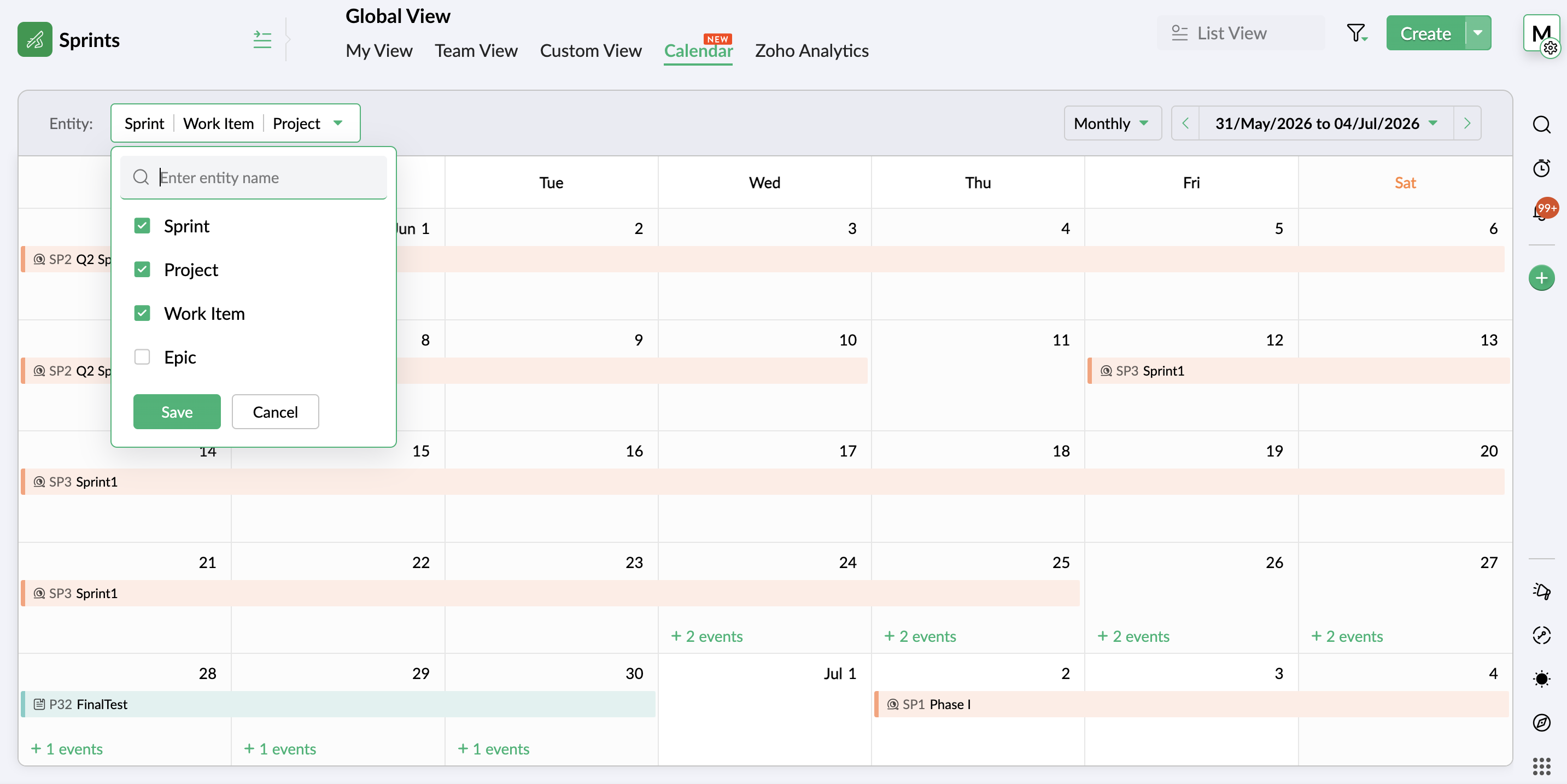
  4. View entities on a global calendar
  5. Create folders through Google Drive Extension
  6. Add custom nested picklist in form layout
  7. Use Zia Search for Zoho Sprints
  8. Compare data using duration and work hours in Timesheet report
  9. Restrict, pin, and share comments
  10. Add weekly logs in global view
  11. Add custom fields to OKR layout
  12. View unread notifications

Export test cases and execution details

Your test management system now enables you to export test cases and execution details for use or reference outside your Zoho Sprints environment. Export the data in XLS or CSV format and download the file for offline access or external use. Learn more

Sprint Capacity Planning

Capacity Planning is an integral aspect of an efficient agile project process. Zoho Sprints now equips sprint managers with the necessary tools to plan and assign work items to the team members based on their availability and workload. This helps proper load distribution and better productivity. The process helps set realistic deadlines, assess member availability, avoid uneven workload, and eventually improve overall sprint health. Learn more


View entities on global calendar and add weekly logs

Global View has two major capabilities:
  1. An additional view in the Global View presents your workspace entities on a calendar for a comprehensive, date-based view. It provides an overview of all the project activities throughout the workspace on a weekly or monthly calendar. Easily scan through the schedule of project, work item, sprint, epic, release, timesheet, or meeting. Learn more


  2. Adding weekly logs is now possible through global view. The timesheet view allows you to add logs in bulk through a weekly table, enabling multiple time logs being added in a single interface.

Create folders through Google Drive Extension

Google drive extension previously facilitated item level coordination between your Google and Sprints workspace. Now, its scope is widened to include Project, Sprint, Epic, and Release modules as well. Learn more

This enhancement also includes the google drive folder creation and parent folder mapping abilities that customers have requested.

Add custom nested picklist in form layout

Use the nested picklist option to heighten the capabilities of the picklist options in your custom layouts. Define groups of picklists in a single field to add sub-options under one the main options, creating a nested list of options. Learn more

Compare data using duration and work hours in Timesheet report

The duration and work hours details are incorporated into Actual vs Planned Timesheet report for better comparison-based insights. It offers a comparison of the actual hours for sprints and work items against their duration and work hours. This gives an understanding of the gaps in the pace of progress in terms of duration. Learn more

Search using Zia

Leverage a single search interface instead of sifting through individual projects to find and access your Zoho Sprints work items. Zia Search provides a unified search platform to find targeted information across workspace. Learn more


Restrict, pin, and share comments

  1. Restrict comments view access to your workspace to ensure external users cannot view them.
  2. Pin important comments at the top of the thread.
  3. Include comments across work items to reflect in linked or shared items.

Use Google Meet in MeetingBridge

Google Meet is now available alongside other service providers on MeetingBridge. Users with an existing Google account configured in Zoho Sprints can easily add Zoho Sprints OAuth scope to Google workspace to authenticate integration. Learn more

Apply layout rules for releases

The utilities of layout rules feature in now extended to the release module. Expand the scope of your data gathering and processing unit by adding conditional rules and subsequent trigger actions. Adding rules to your release layout provides you with an additional layout of customization that enables you to better refine data using facilities like dynamic show/hide fields or sections, mandate certain fields, set default values, or restrict picklists to adapt the layout to your project preferences. Learn more

Customize OKR layout

Add custom fields to the existing Objectives and Key Results layout to introduce business-specific or organization-specific details that need to be documented. Create a more targeted and self-reliant goal tracking system that work best for your vision. Learn more

View unread notifications

The new Unread view in Notifications section provides a dedicated view for unread notifications. The notifications that are read will be removed from this view.

There're more features and enhancements lined up for the upcoming quarter. So keep an eye on this space. In the meantime, explore these features and let us know which of these live up to your expectations.

Thanks,
Zoho Sprints Team

    • Sticky Posts

    • New in Zoho Sprints: Release Management

      Hello all,    We are excited to launch the next big feature on our roadmap - The all-new 'Release Management'. We can hear your 'WOW' and yes we're also happy to hit our next milestone. Agile as a concept strives in delivering a qualified outcome at the end of each iteration. This process will not only help hasten your delivery but can also stand as a potential to plan your next phase accordingly. Do you think these iterations are sufficient to run your projects?    For instance, if you have a big
    • Introduce automation to your iterations with Zoho Flow

      We are delighted to announce that you can now connect your favorite project management applications and automate your workflows using Zoho Flow. The great news is, you don't have to spend your time or effort in coding complex integrations. Using Zoho Flow's drag and drop builder, you can effortlessly build customized workflows with triggers and actions. What is a Trigger? A trigger is an event that kickstarts the flow. What is an Action? An action is a task that the flow executes automatically. For
    • Zoho Sprints - Your team is all set to sprint ahead

      Hello there, It's been a week since we launched the Zoho's only agile project management tool - Zoho Sprints. I guess you guys are loving it! Bringing agility to your team has never been this easy because you will be able to inspect, iterate, and adapt. You have a requirement; break it down into smaller units; get the work done in parallel; receive the deliverables in shorter phases called sprints. The best part of Agile is you get a chance to quickly respond to change and not stick to a fixed plan.
    • Recent Topics

    • Important updates to your connectors

      Hello everyone, Greeting from Zoho Creator! We're excited to announce that we'll be rolling out significant backend updates to Zoho Creator's built-in connectors to enhance security by following the latest frameworks. The existing version of some of the
    • Important updates to your Salesforce integrations in Zoho Creator

      Hello everyone, We're writing to inform you of an important change regarding Salesforce integrations in Zoho Creator. Salesforce has introduced new security requirements for third-party platforms that connect with their services via APIs. To comply with
    • Password Policy in Zoho Mail: Set password rules to keep your organization secure

      Weak or repetitive passwords are one of the most common causes of unauthorized account access in organizations. Zoho Mail's Password Policy feature allows administrators to define and enforce specific password requirements for all users in the organization,
    • What is Workqueue and how to hide it?

      Hi, My CRM suddenly have this "Workqueue", may I ask how to set the permission of this tab?
    • Zoho Community Digest - July 2026| Part 4

      Hi everyone, and welcome back! We're closing out July with a strong final week, from a major LinkedIn integration in Zoho Recruit to AI-powered forecasting in Zoho Analytics. There are also a few heads-ups worth noting, including API changes in Zoho CRM
    • Zoho CRM Community Digest - July 2026| Part 2

      Hello everyone! The second half of July brought five CRM updates, including a heads-up for developers on API changes coming in October, one Quick Win on keeping your attribution data intact through lead conversion, two Dev's Corner threads worth bookmarking,
    • Shared Snippets Everyone

      Hi, Now that the Shared Snippets have been released and I think will be the most used feature implemented in 2023 :) Creating and Using Snippets in Ticket Responses - Online Help | Zoho Desk Maintain consistency in ticket responses with shared snippets
    • Keeping project teams in the know with Zoho Cliq

      Project management is all about processes, data flow, and maintaining order. But communicating appropriate information at crucial times to stakeholders is as important as the moving parts of a project. Zoho Cliq can facilitate effective communication
    • Remove "Subject" as a required field on quotations

      Not sure why, but Zoho has made 'Subject' a system defined required field. I'm not entirely sure why subject would be required as a key field (i.e. you cannot deactivate it or change it from required). It doesn't make much sense on many product quotations,
    • Multi-currency and Products

      One of the main reasons I have gone down the Zoho route is because I need multi-currency support. However, I find that products can only be priced in the home currency, We sell to the US and UK. However, we maintain different price lists for each. There
    • Enable Credit Note creation for Sales Returns BEFORE receiving goods

      Currently, it is not possible to issue a Credit Note linked to a Sales Return until the goods have been officially marked as "received" in the system. In our business, we often need to issue a credit note to our clients immediately upon the initiation
    • Best way to setup Inventory bin tracking for products with multiple boxes/crates

      Hi - we need some advice from the community on setting up Items in the Inventory for products with multiple crates. We have large products in our warehouse where the product is delivered as two large (double pallet) crates. We've setup the Items for these
    • Getting Internal Server Error message when filing for MTD

      I am trying to file for the MTD submission, and after I filled in all the information and click (Fetch Obligation) this message "Internal Server Error [500]" pops up. I have been trying for awhile and its still the same. What shall I do as today is deadline
    • No access to change view permission for team members

      Hi, I want team members to be able to update the percentage progress on their goals at mid year. Currently they cannot edit this, they can only update the comments against the goals. The ability to add view permission to goal progress for team members
    • Turn your Zoho One Home into your workspace with Dashboard 2.0

      When you open Zoho One, you probably don't need to see everything. You need to see what matters to you. A sales manager may want to track pipeline and revenue. An HR manager may want to monitor employee information. A business leader may want a quick
    • Zoho Assist Feature Update: August 2026

      Web Forms Web Forms in Zoho Assist help you collect support requests directly from your website and route them to the right team. Embed a customizable form so customers can raise issue details or join an active remote session using a session ID. Depending
    • Tip #84 – A More Natural Remote Experience with Custom Cursor Support – 'Insider Insights'

      Hello Zoho Assist Community! Anyone who has spent time in a remote support session knows the feeling. You're guiding a customer through a task, moving the cursor across the screen, and something feels just slightly off. The cursor doesn't behave the way
    • 【無料/オンライン】8/20開催|Zoho ワークアウト|ユーザー同士で学び合うオンラインもくもく会

      ユーザーの皆さま、こんにちは。 コミュニティグループの中野です。 8月20日(木)開催の「Zoho ワークアウト」をご案内します。 Zoho ワークアウトは、参加者それぞれが取り組みたいテーマを持ち寄り、 ユーザー同士で交流しながら、設定・検証・運用改善を進めるオンラインの「もくもく会」です。 「作業を進めたいけれど、一人だと手が止まってしまう」 「他社がどのように活用しているのか知りたい」 「同じ課題を持つユーザーと情報交換したい」 そんな方は、ぜひお気軽にご参加ください。 ▶︎ 参加登録はこちら(無料)
    • Assign Price Book to Accounts (again!)

      I can see this topic has been bumping about for over 10 years and unfortunately Zoho hasn't seen the need (or use case) in CRM to be able to assign an account to a price book to automate quoting (amongst other things). Strange given they DO assign price
    • Custom Statuses - Can You Do Anything With Them?

      As far as I can tell, one really cannot do much with custom statuses. I created a new custom status for sales orders called "Customizing / Hold". This is for sales orders that have the Confirmed status. The use case here is that, as an e-commerce company,
    • Price Book in foreign currency

      We have many customers who buy in foreign currency (USD), where our base currency is our local currency (AUD). It would be normal (it is in Zoho Books, Zoho Inventory etc.) to assign a currency to a price book, but I cannot find this option in Zoho CRM
    • How to disable option to search (In Advanced Field > Matrix Choice > Dropdown)

      In Advanced Field > Matrix Choice > Dropdown I don’t want the option to search or type to fill in words. How can I disable or remove this function?
    • Layout rules in Zoho FSM

      As titled, is there an item in the pipeline or an ETA for the implementation of layout rules in Zoho FSM? Similar to how they work in Zoho CRM https://help.zoho.com/portal/en/kb/crm/customize-crm-account/customizing-page-layouts/articles/create-conditional-layouts
    • Marketing Tip #45: Use WhatsApp to engage customers and drive more sales

      Email is great. Social media is useful. But when it comes to getting a message actually read? WhatsApp wins. In general, open rates on WhatsApp messages are significantly higher than email, and the conversation feels personal rather than promotional.
    • Client Script also planned for Zoho Desk?

      Hello there, I modified something in Zoho CRM the other day and was amazed at the possibilities offered by the "Client Script" feature in conjunction with the ZDK. You can lock any fields on the screen, edit them, you can react to various events (field
    • View Answer Bot conversations?

      We are trialing Zia and are experimenting with Answer Bot on our knowledge base. So far so good! Management asks me if it is possible to view Answer Bot conversations, the purpose being to look over its shoulder and confirm that it is working as des
    • Add Comment workflow action delayed by 1–2 minutes in Zoho Desk

      Hello Zoho Support team, We are experiencing an issue with a workflow in Zoho Desk. The workflow is triggered when the Quote ID field is updated and performs two actions: A standard Field Update An Add Comment custom action When the Quote ID field is
    • Where do I edit the "Welcome to [portal name]" message

      I am looking for a way to edit the "Welcome to" part of the message that is seen on the landing page (ex: https://help.zoho.com/portal/en/home). When I use the French interface, it doesn't make sense... I want to change it from "Bienvenue chez" to" Bienvenue au". Thanks!
    • Zoho Books | Product updates | August 2026

      Hello users, July has been an exciting month for Zoho Books! This month, we're excited to introduce HTML PDF Templates, Placeholders as Pills, expanded approval workflows for Sales Returns and Journals, and significant compliance updates across the India,
    • Zoho CRM Layout Rules: Nine New Actions, Profile-Based Execution, and Interactive Preview

      Hello everyone, Availability: This feature is now available for customers in the JP and SA DCs. It is planned to be released for other customers in soon. We’re excited to announce powerful new enhancements to Layout Rules in Zoho CRM - a feature built
    • Zoho Books and TRAINING SALES receipt label for eTims?

      Hi, Can Zoho Books implement TRAINING SALES receipts and push them to eTims for test? In other words how can we send to Zoho or even create in Zoho training mode invoices and TEST the workflow POS>Zoho Books>eTims and back without actually registering
    • Reporting Tags and COGS

      Is there any way to get COGS recorded against reporting tags? The use cases seems very straightforward to me. If I'm running a P/L report against a specific reporting tag (I use mine for customer type, but it could be used for regions, etc.), the revenue
    • Hide Custom Fields for Customers or Vendors

      For whatever reason, all custom fields added to the Customer module also get added to the Vendor module. This leads to a clunky experience for users, as many custom fields we add only apply to one or the other. There should be a "hide" option to hide
    • Onboarding process

      I urgently need onboarding support. My account still shows trial period.
    • Detailed General Ledger - Display Transaction Description in Reports

      Hi Zoho Team, I'm currently using Zoho Books and have a question regarding the Detailed General Ledger report. When we enter a description or narration in transactions (Bills, Journal Entries, Expenses, etc.), the report does not display this description.
    • Which Zoho CRM tasks would you want an AI assistant to handle?

      I’ve started delegating my Zoho CRM work to AI – and many tasks now take me half the time. It has been so useful that we’re now working to make it available to everyone. Instead of clicking through records and tabs, I simply describe what needs to be
    • Zoho Mail Does Not Integrate with Analytics

      Hello everyone, Just wanted to make a quick post about the problem with zoho mail. Currently it does not connect to Zoho Analytics, which I think is crazy considering both of these applications have existed for a long period of time. Even zoho voice a
    • Net ##th Terms (e.g. due on the following 15th)

      I have a client who pays me twice monthly per our contract. It would be helpful to have terms on my invoices where the invoice is due on the 15th or the 30th of the same or the following month.
    • Project status update visibility within a project

      Currently the only place within Zoho projects to see status updates for a given project is actually not in the project it's self it's in the Collaboration section and then by searching for a given project and clicking on the status tab. It would be great
    • Using custom CRM fields

      I have created a series of fields in the Deals module that need to be linked to fields in a contract I have customized. I can only see how to map standard fields, not the custom ones. How do I do this?
    • Next Page