Building extensions #5: Integrating applications with Zoho Projects through Connections
In our last post, we discussed the essential features that a Zoho Projects extension can provide. Starting with this post andin every subsequent post going forward, we'll go through each of those features in depth, one by one, with an example use case.
In this post, we'll explore the Connections feature in detail.
Connections: When and why?
Creating a tightly coupled integration requires the establishment of a secure connection between applications. To achieve this secured connection, the Sigma platform provides the Connection feature that can be used to establish a secure link and perform data operations across applications seamlessly and efficiently through an extension.
Use case
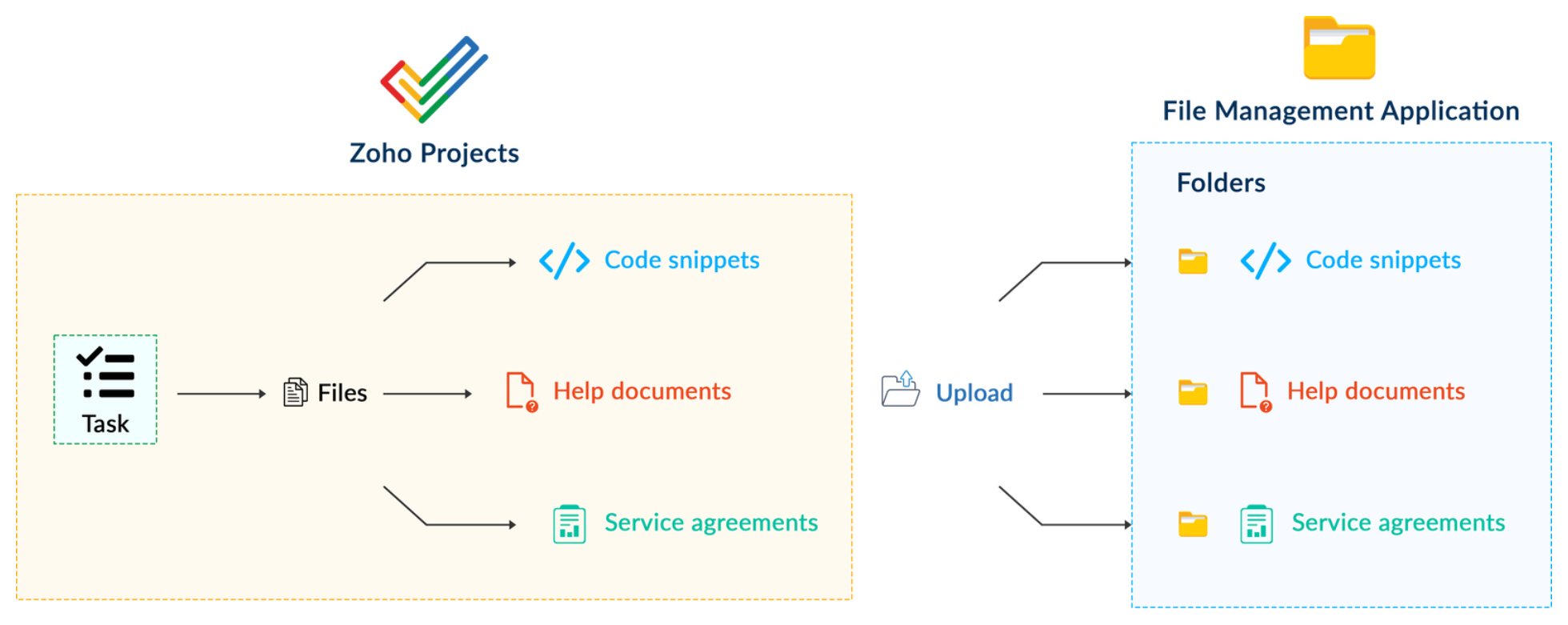
Working on development-related tasks might require dealing with a variety of files, such as code snippets, help documents, or service level agreements. While several file management applications are available to securely store and organize data, manually handling file storage between applications remains challenging.
For our example, let's use Zoho Projects to manage all tasks, and Dropbox to manage and store data.
What is the difficulty faced?
Dropbox offers a file request feature that allows you to collect files and organize them into folders. However, as we talked about in our previous post, manually categorizing and uploading task-related files to their respective file request folders in Dropbox would be a time-consuming and laborious activity. Instead, it would be more efficient to integrate Dropbox with Zoho Projects so that uploading task files to Dropbox file request folders can be done instantly from within Zoho Projects.
How can it be sorted?
You can create a connection between Zoho Projects and Dropbox. With the secure connection setup, the file request folders available in Dropbox can be listed on the task details page of Zoho Projects through an extension. You may then easily upload files from Zoho Projects to their corresponding folders in Dropbox, saving time and making you more organized.
What are the components required to achieve this use case?
- A connection between Zoho Projects and Dropbox.
- An extension configuration that includes:
- Creating an extension
- Configuring the plugin manifest
- Setting up the widget code to display the Dropbox file request folders inside the Zoho Projects task details page.
Now, let's see how we can achieve each of these components.
1. Creating a secure connection using the Connection feature
- Log in or sign up into developer.zoho.com.
- Go to Sigma and access your workspace.
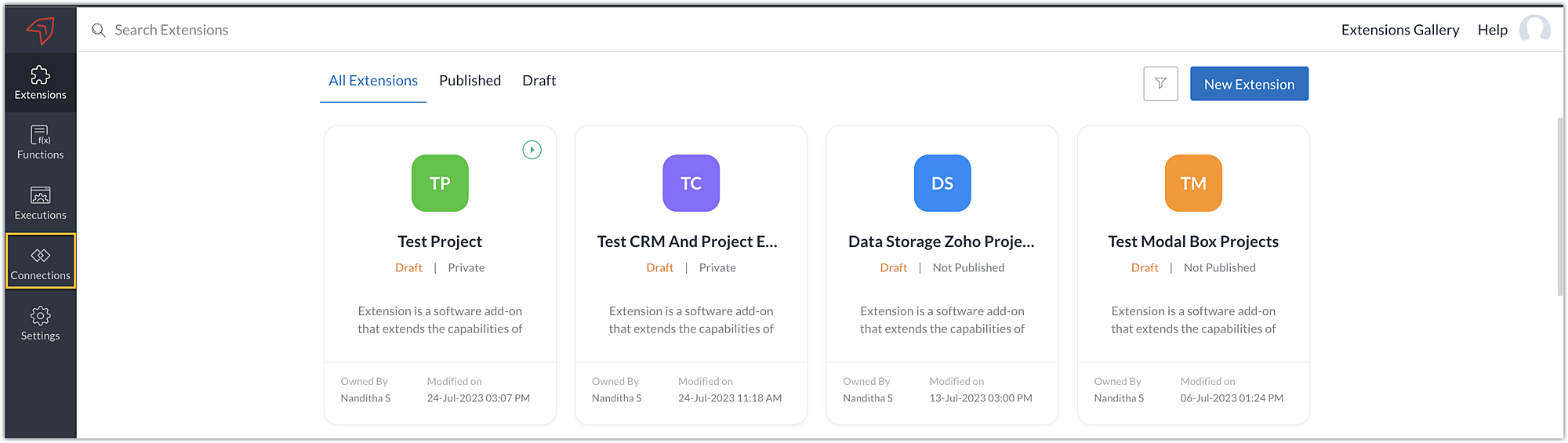
- Once you enter your workspace, select the Connections section in Sigma.
Note: Connections created in Zoho Projects are also accessible within the Connections section in Sigma. These connections can be used in extensions to connect with other applications.
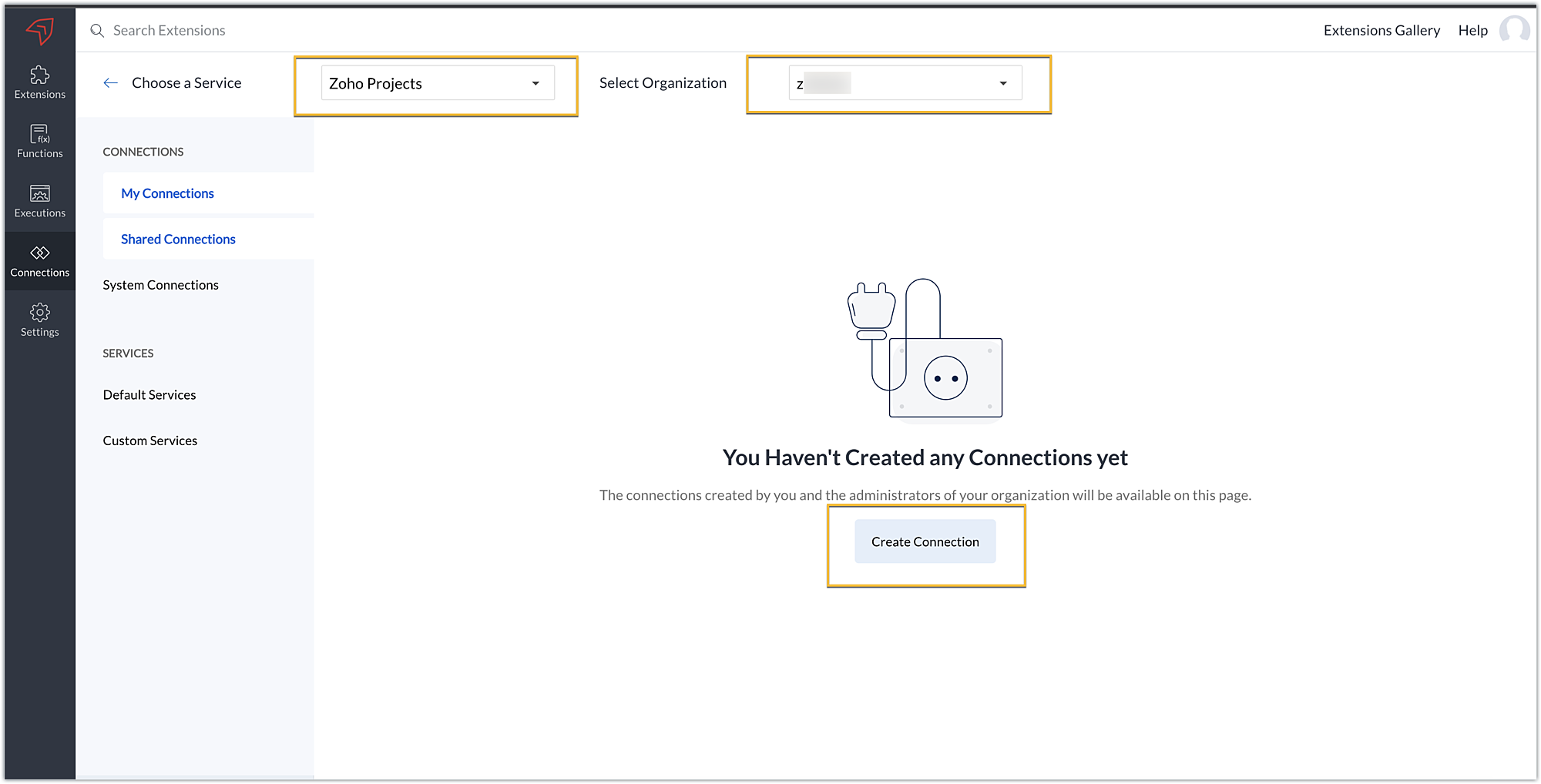
- Choose the service as Zoho Projects and select your Zoho Projects organization. Click on Create Connection.
- Sigma offers a list of default services from which you can choose and easily connect with Zoho Projects. If the application you want to integrate isn’t in the default list, you can add and build a connection with it using the custom services option.
Note: If you’re looking to connect Zoho Projects with another Zoho Product that also follows the OneAuth authentication mechanism, select the service Zoho OneAuth from the Default Services list to create the connection.
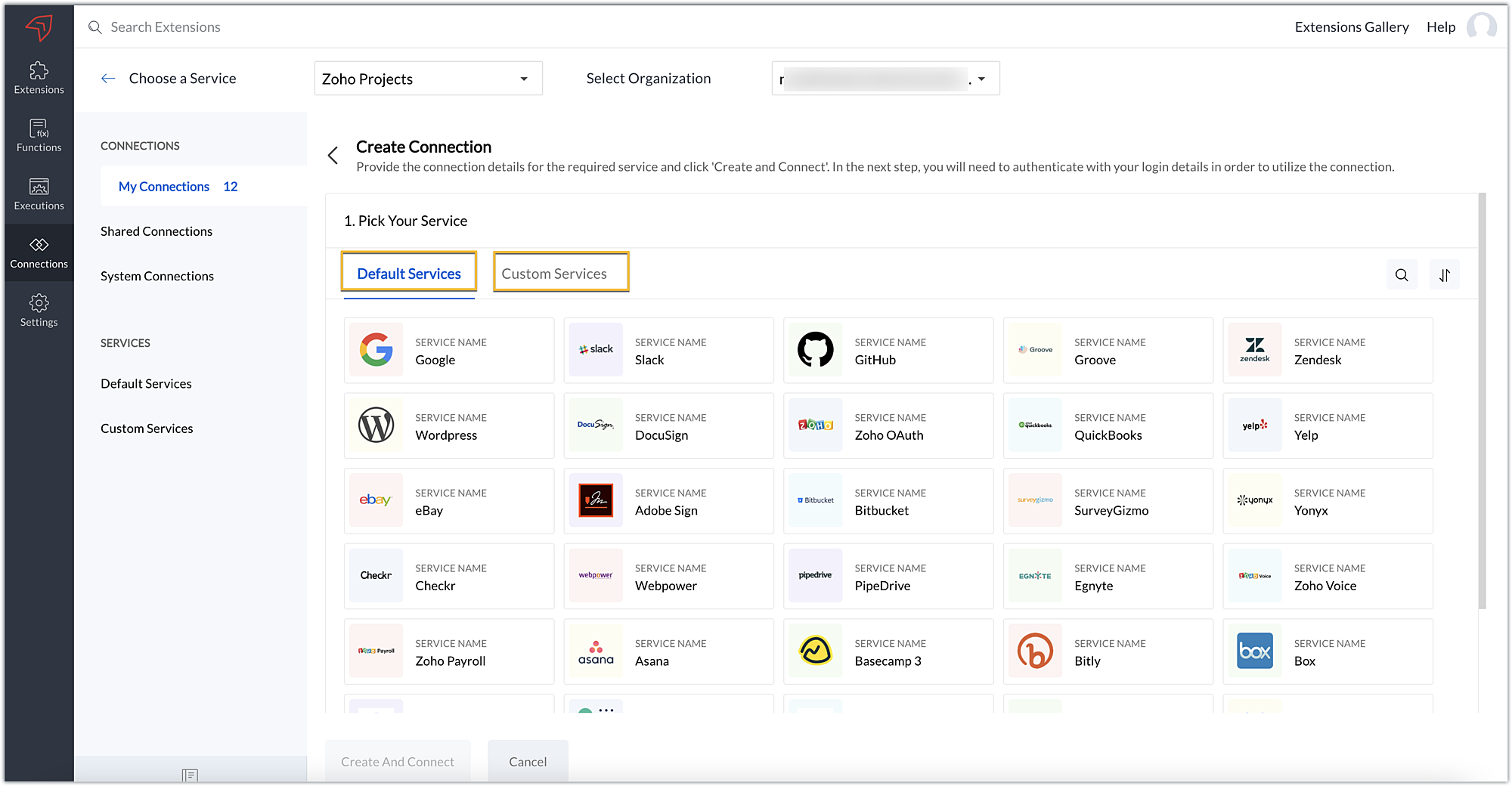
- In our example, the application to connect with Zoho Projects is Dropbox, and because it’s in the Default Services list, go ahead and choose Dropbox.
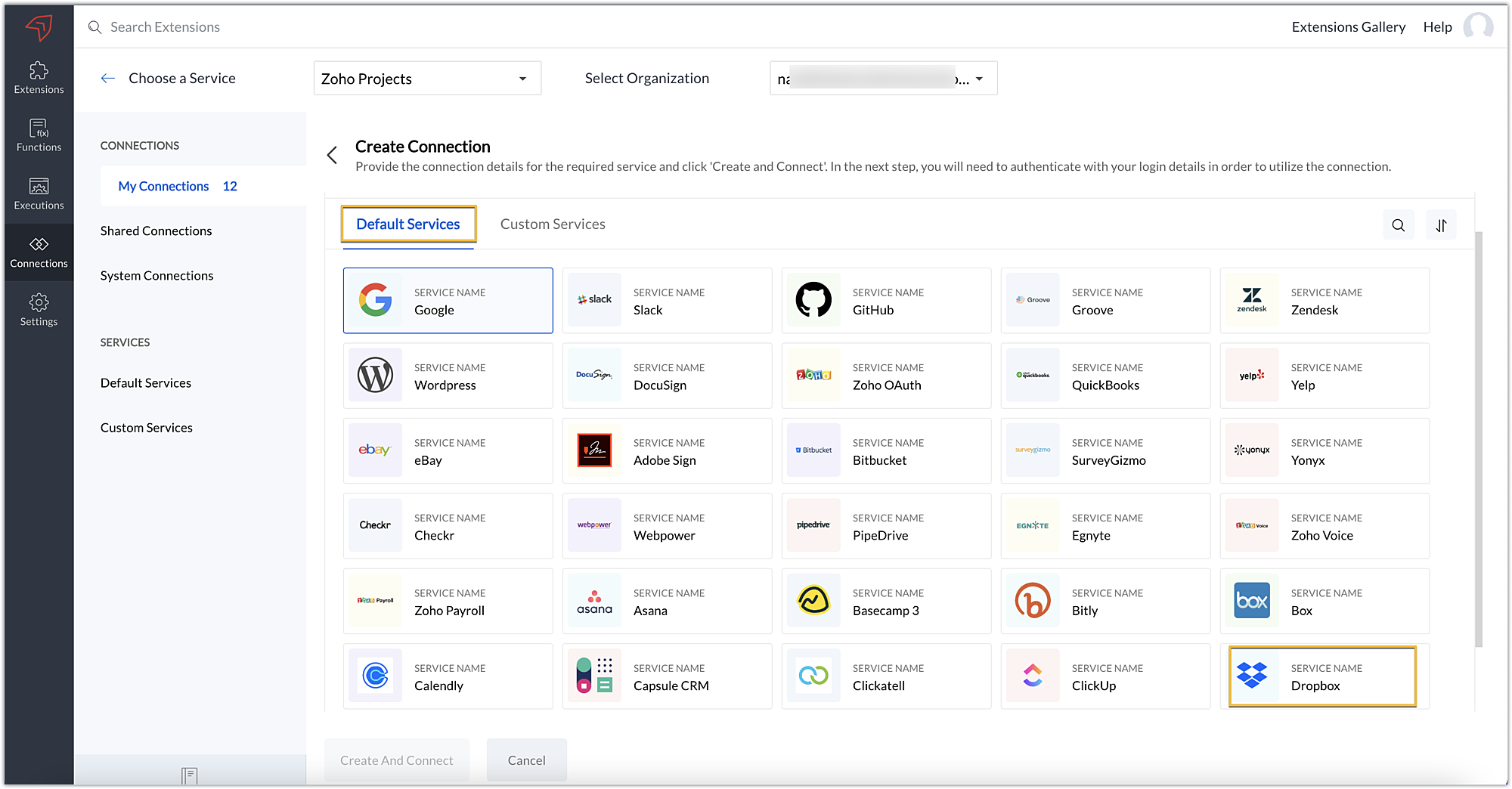
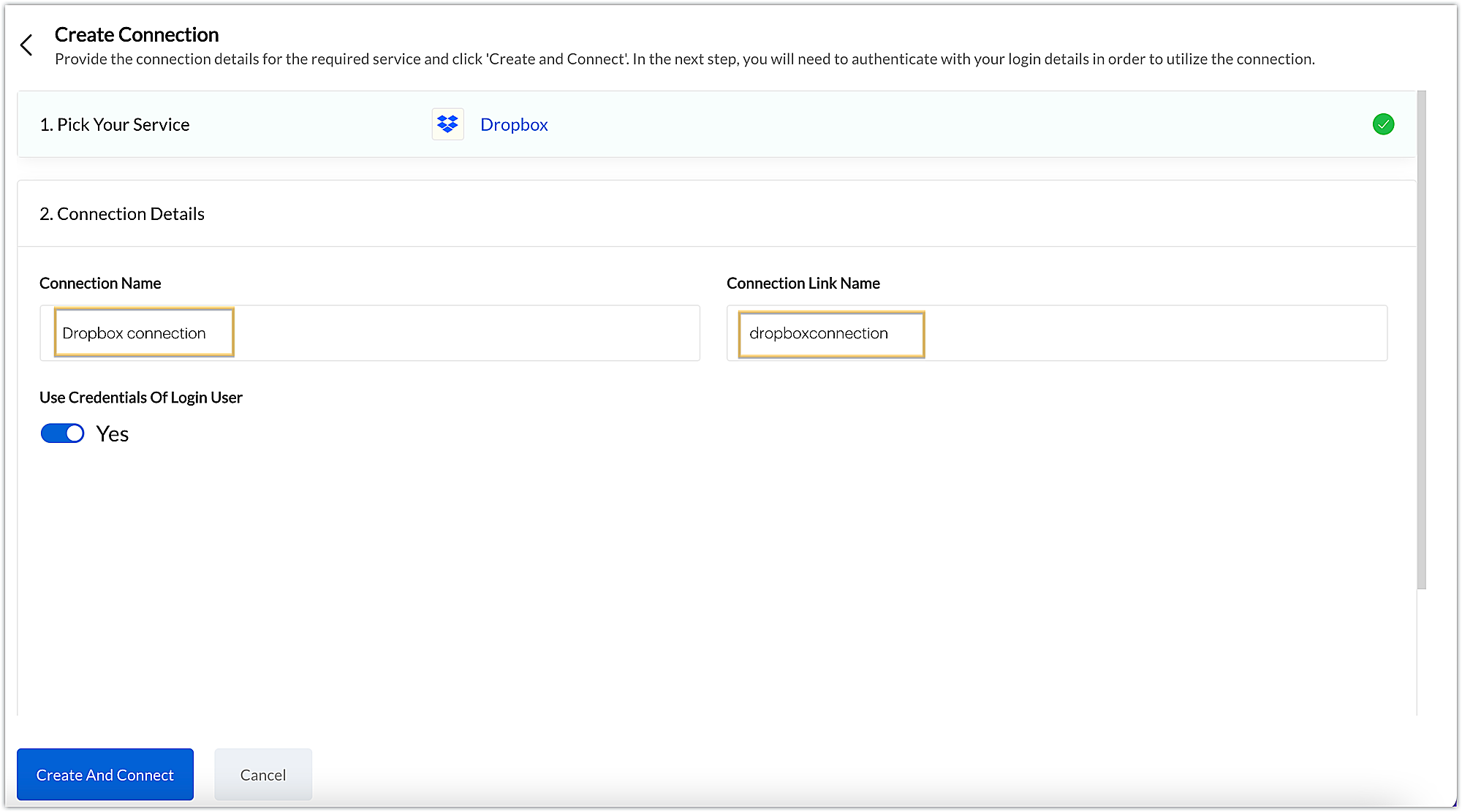
- After choosing the service, enter the connection name. A connection link name will be populated automatically.
- Toggle Use credentials of login user to Yes if you want every user installing the extension to access the connection using their own login credentials, or No if admin credentials are enough to access the connection.
- In our example, we'll proceed with the former. So toggle to Yes, and then click Create and connect.
Note: For services in which the option to choose the scopes is displayed, choose the necessary scopes, and then click Create and connect.
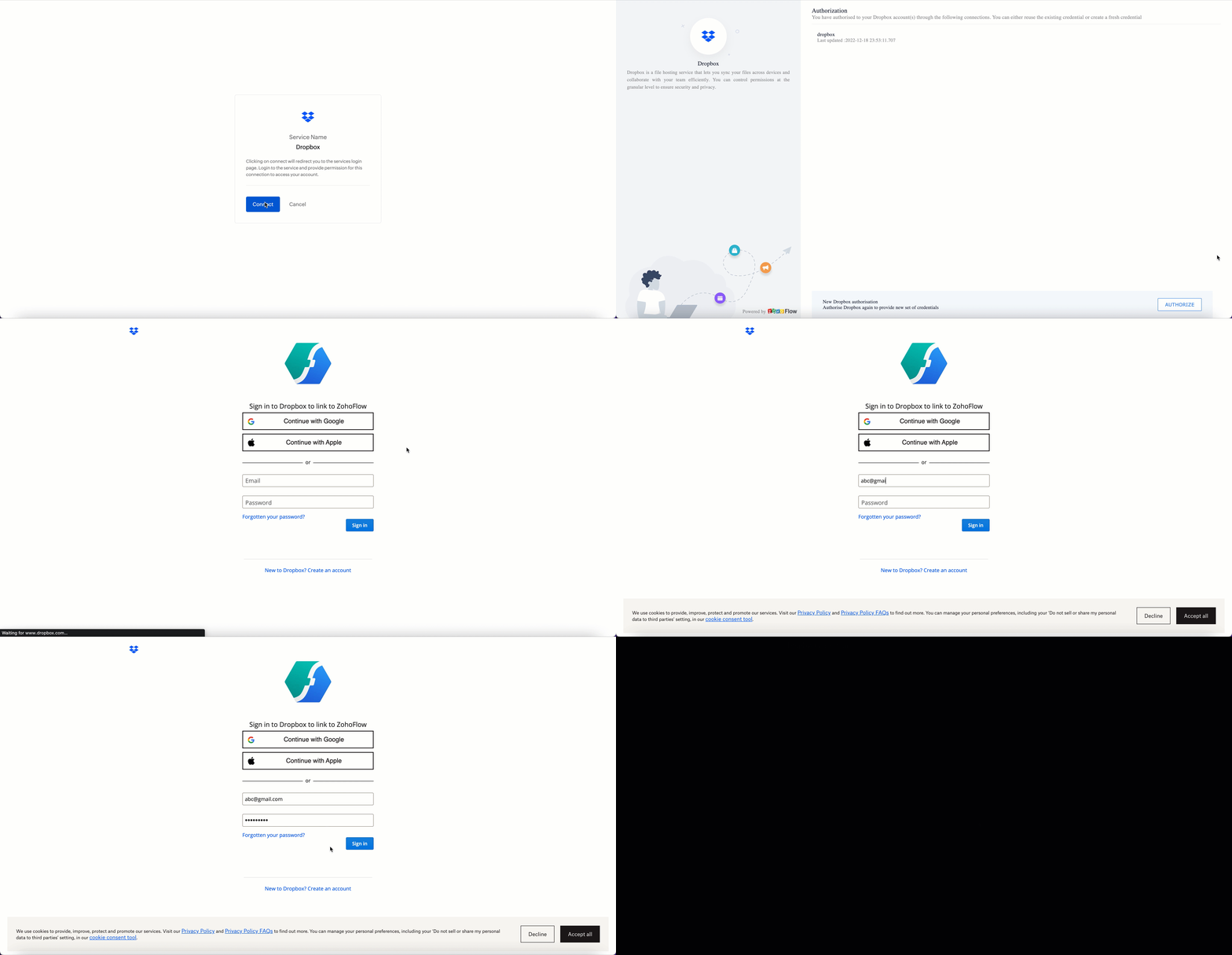
- You’ll be directed through a series of authorization steps before being prompted to connect with Dropbox by entering your login information.
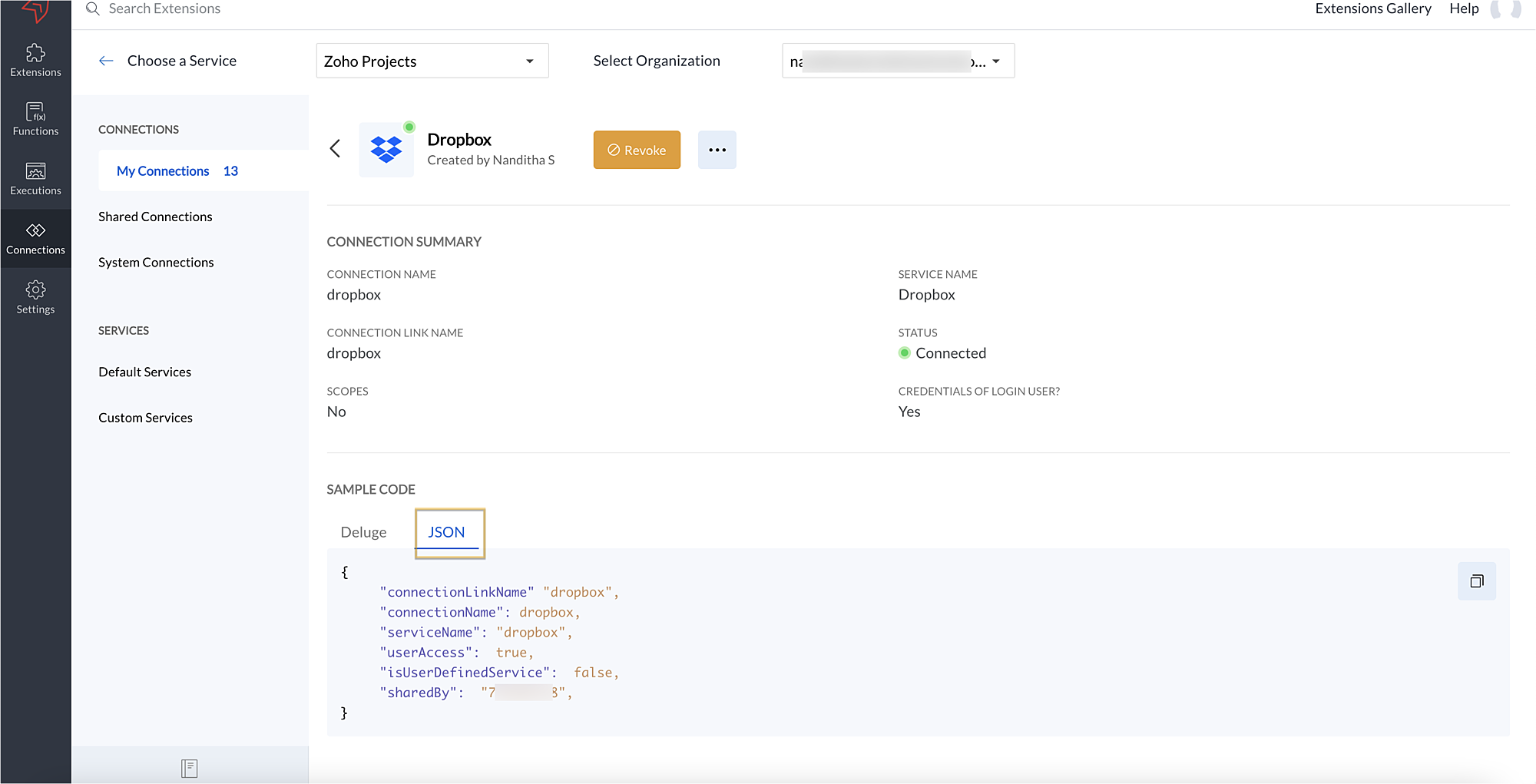
- The connection will be established successfully once you sign in with Dropbox, and you will be redirected to the Connection Summary details page in Sigma.
- To access this connection as part of an extension, you’ll need to configure the sample code provided under the JSON section in the plugin-manifest.json file. We’ll explore this in the next section.
2. Extension configuration
Now that we've successfully established our connection, let's look at how we can achieve our use case feature of displaying the Dropbox file request folder within the Zoho Projects task detail page. As mentioned earlier, to accomplish this, we’ll need to implement the following measures.
A. Create an extensionB. Configure the plugin-manifest.json fileC. Set up the widget code
Let's explore these steps in order.
A. Create an extension
- Create an extension for Zoho Projects using the Sigma cloud editor.
B. Configure the plugin-manifest.json file
- As previously stated, to access the connection established between Zoho Projects and Dropbox, the connection must first be configured in the plugin-manifest.json file.
- Copy the JSON sample code from the Connection Summary Details page and paste it into the plugin-manifest.jsonfile as the value for the connections key.
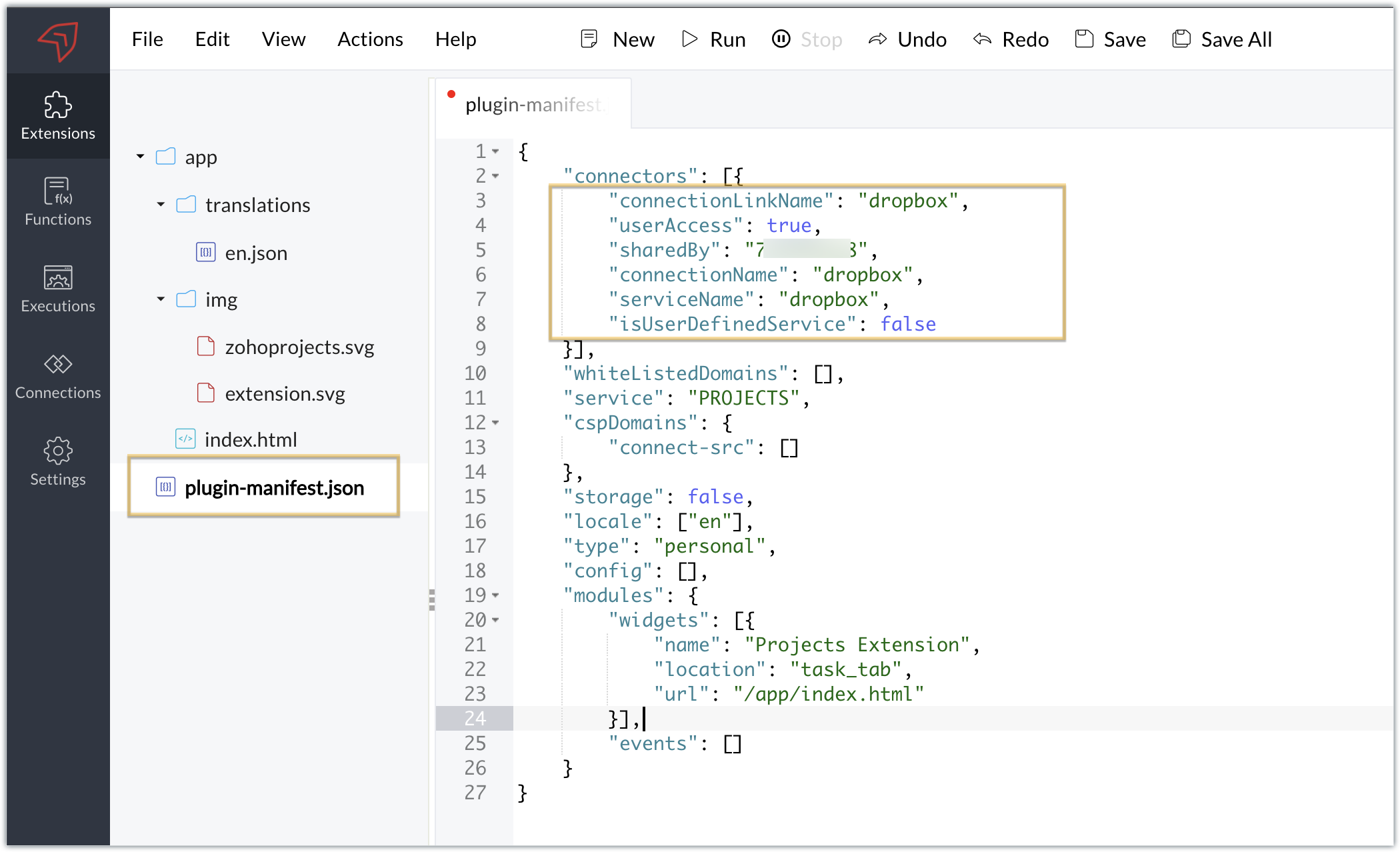
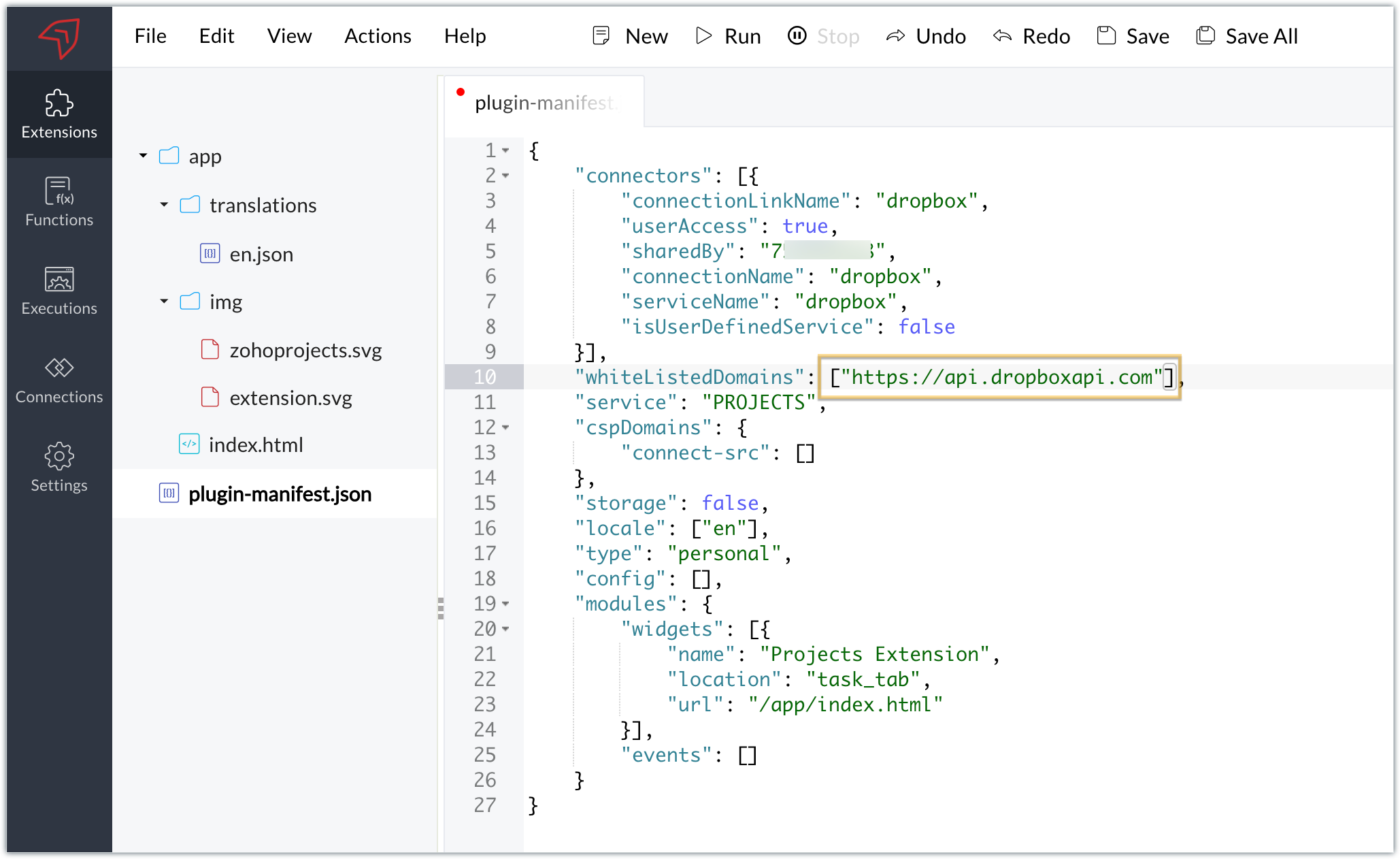
- You will also need to white list the Dropbox domain for Dropbox calls to be processed without being blocked.
- Include the domain in the plugin-mainfest.json file as the value for the whiteLitsedDomains key.
- As we saw in our earlier post, the plugin-manifest.json file includes a widget called Projects Extension by default. For our example, because we’re connecting with Dropbox and constructing a widget that will include Dropbox request folders to upload files, enter the widget name and location.
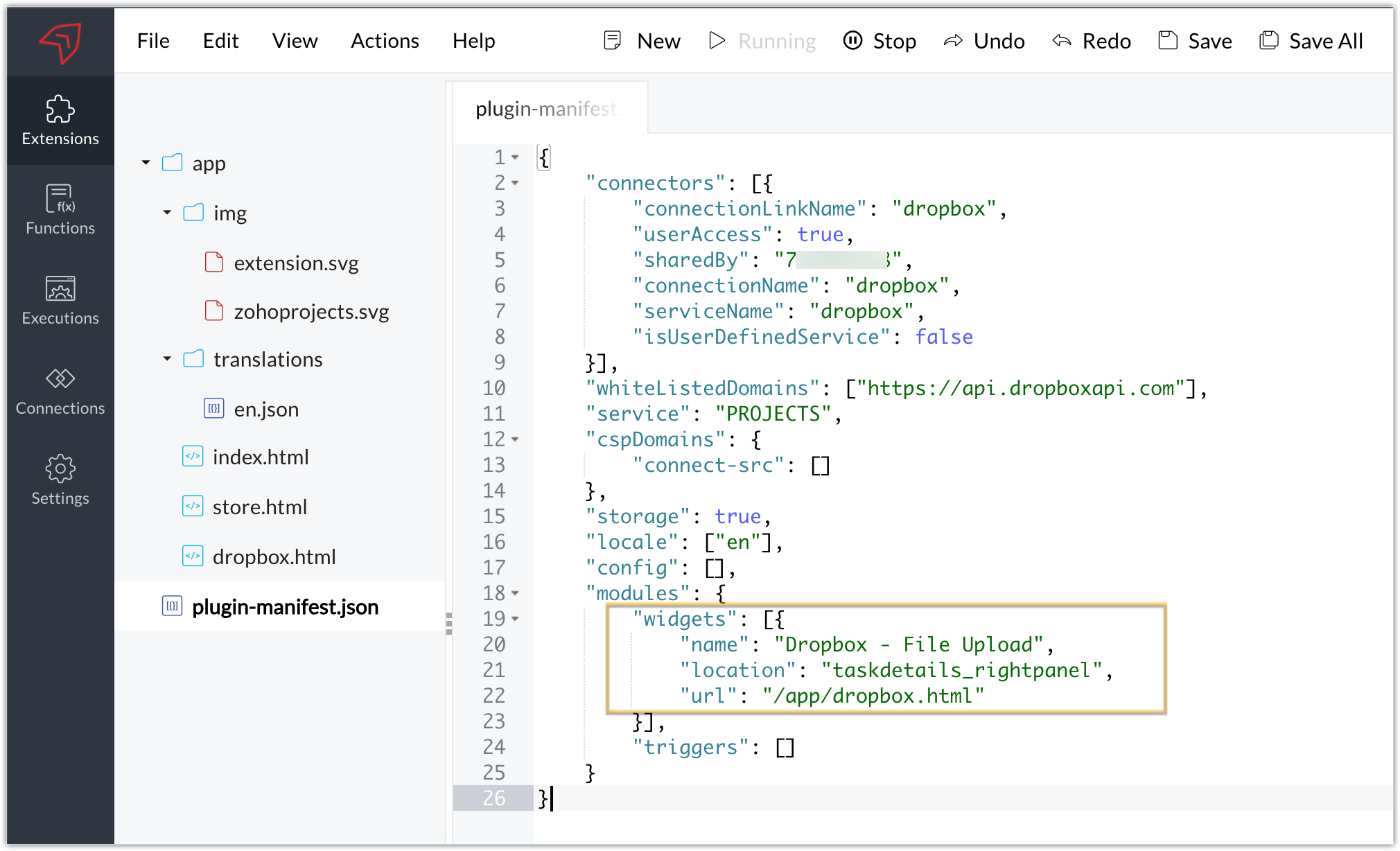
- The final configured plugin-manifest.json file for our example would be as follows:
- {
- "connectors": [{
- "connectionLinkName": "dropbox",
- "userAccess": true,
- "sharedBy": "xxxxxxx",
- "connectionName": "dropbox",
- "serviceName": "dropbox",
- "isUserDefinedService": false
- }],
- "whiteListedDomains": ["https://api.dropboxapi.com"],
- "service": "PROJECTS",
- "cspDomains": {
- "connect-src": []
- },
- "storage": true,
- "locale": ["en"],
- "config": [],
- "modules": {
- "widgets": [{
- "name": "Dropbox - File Upload",
- "location": "taskdetails_rightpanel",
- "url": "/app/dropbox.html"
- }],
- "triggers": []
- }
- }
C. Setting up the widget code
Now, that we’ve created an extension and configured the plugin manifest file, let's finally set up the widget code in order to display all Dropbox file request folders inside our task details right panel.
Dropbox.html widget code: Please find the widget code snippet as an attachment in this post.
- In this widget code, we’ve invoked the Dropbox API to list file request folders by constructing and passing the required data along with the connection we had established for Dropbox.
- The API will be invoked and return all of the file request folders in the task details right panel, from which users can click on the link and directly upload files to Dropbox from within a task in Zoho Projects itself.
Sample output
- Once the code is setup, publish and install the extension to check the functionality in the Zoho Projects portal.
- Enter a task and click the extensions icon in the right panel.
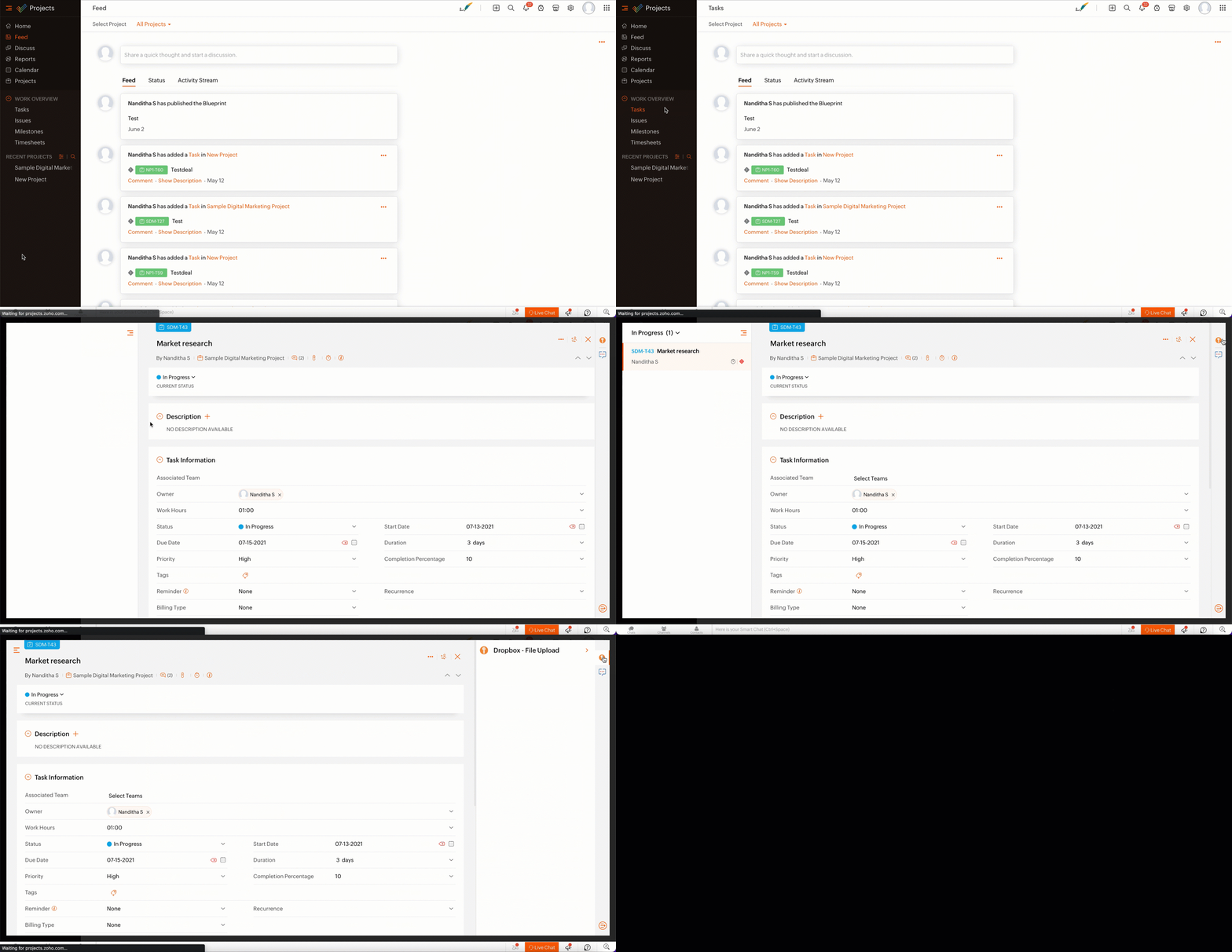
- From the lists of your Dropbox file requests, select the requests to which you wish to upload files.
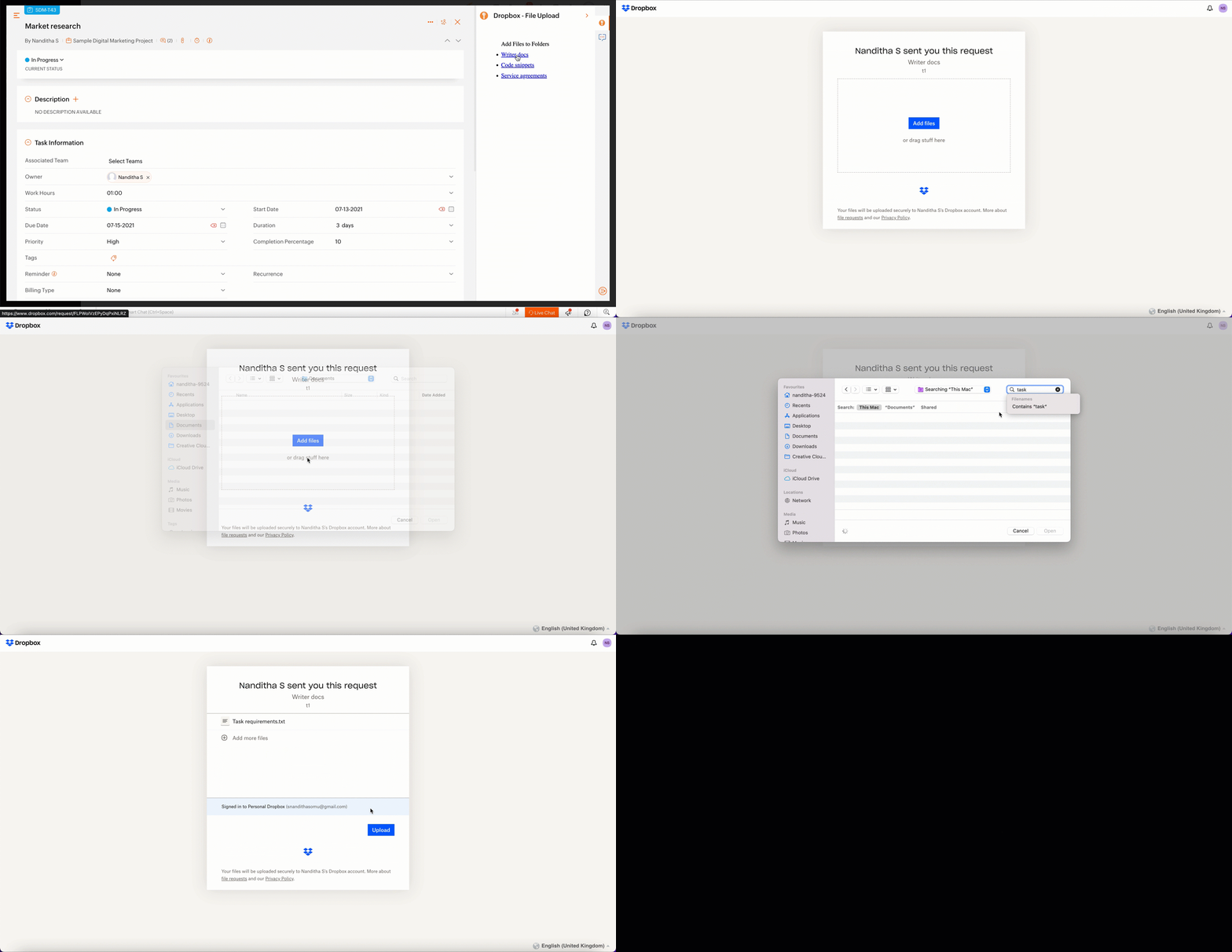
- The file will be successfully uploaded in the respective Dropbox file request.
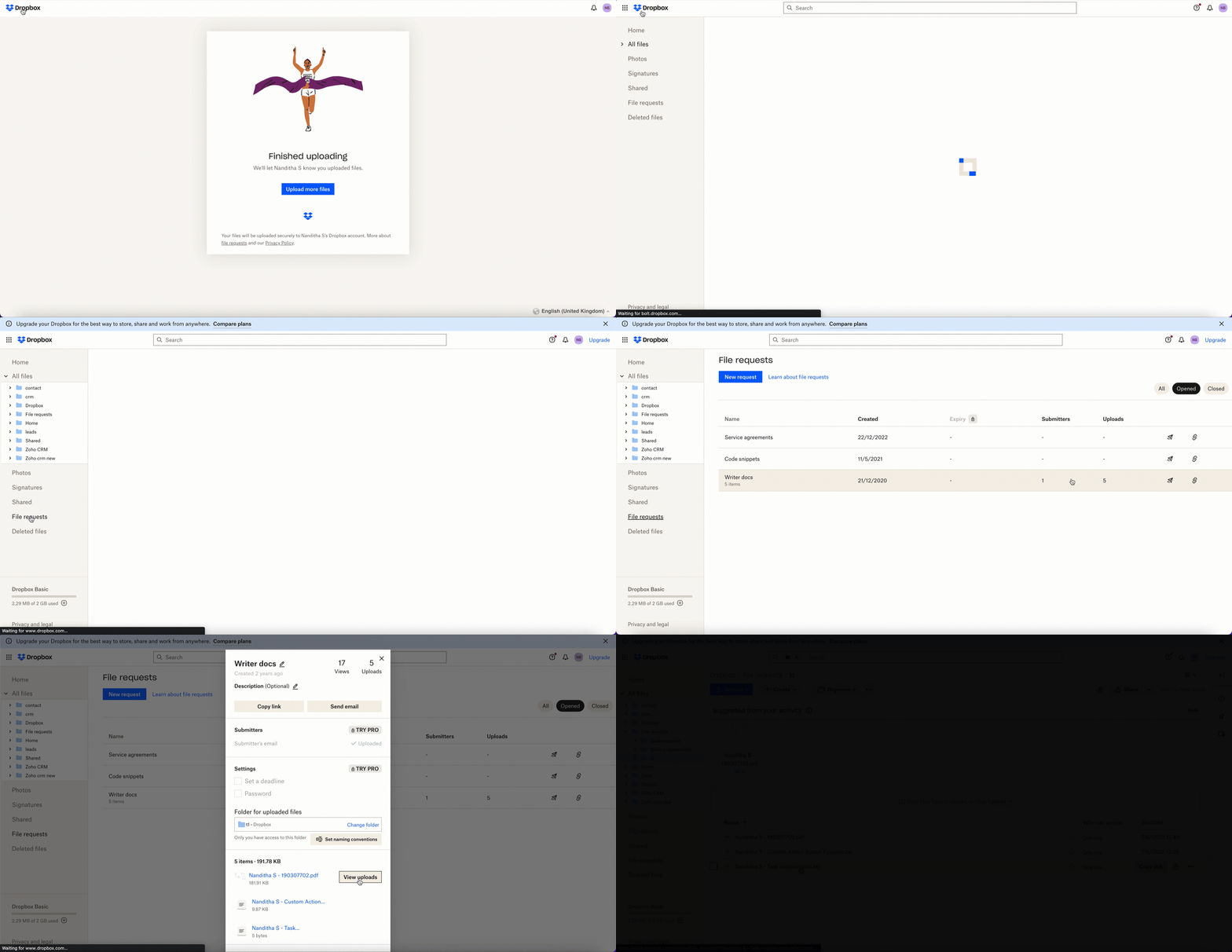
We’ve demonstrated how to upload files directly to Dropbox file request folders from within Zoho Projects in this example. As part of your extension, you can use the Connections feature to do a variety of tasks, some of which are highlighted below.
- View and update files associated with a certain request.
- Create Dropbox folders and share them with collaborators.
Connections, therefore serves as a powerful tool that assists you in establishing a connection with other apps and performing smooth data transactions across your applications, thereby improving business functions and optimizing your work.
We hope this information was useful to you. Continue to follow us for further updates!

Sign up for a Zoho Developer account and start developing extensions for Zoho products using Sigma.
SEE ALSO
Topic Participants
Nanditha Somasundaram Somasundaram
Sticky Posts
Building extensions #10: Fetch customized user inputs, store them globally at the app level, and access them across entities
This data storage concept enables you to store data related to your extension for both entity properties and extension properties. In our previous piece, we looked at how to store data for entities using entity properties. In this post, we'll look atBuilding extensions #9: Store, retrieve, and access entity-specific data in widgets using data storage
Data storage - Overview Storing data related to the extension you are working on is essential. It can be saved as key-value pairs for an entity or extension, known as entity and extension properties, respectively. Data can be saved for the following entitiesBuilding extensions #7: Create custom widgets for a simplified end-user experience
Discover the benefits of using widgets! We explored the significance of widgets, prerequisites, and the availability of JS SDK methods as part of our previous post. In this post, let's go over a detailed example of using widgets along with certain ZohoBuilding extensions #6: Custom user interfaces with Widgets
Welcome to our post on Widgets for Zoho Projects! In our last post, we explored the significance of the connections feature, showed how to use it, and provided an example use case. In this article, we'll look at the importance of widgets, another featureBuilding extensions #5: Integrating applications with Zoho Projects through Connections
In our last post, we discussed the essential features that a Zoho Projects extension can provide. Starting with this post andin every subsequent post going forward, we'll go through each of those features in depth, one by one, with an example use case.
Recent Topics
Approval Button in Subform
Hi Team, I’m working on a subform-based requirement where users will submit requests, and these requests must go through approval by multiple team managers. Each line item in the subform needs to be individually approved or declined based on the user'sSetting checkbox value on template in Sign from Creator
Good day, Please help me understand how do I set a tick from a checkbox in Creator into a checkbox on a Sign template. Below is the only values on the Sign template and the code from Creator, "field_boolean_data": {}, "field_date_data": {}, "field_radio_data":Zoho Projects - Unread Comment Icon
Hi Projects Team, It would be great if there was a notification I con on the comments icon so it's easy to see which tasks have new comments. Something like a red circle with a number of unread comments would be great. Thanks for considering my feedZoho Projects - Update Feed via API
Hi Projects Team, Please consider adding an API to allow update and retrieval of messages to the Feed. Thank youAutomated log-out/session end
I'm concerned about security of our data. Is it possible to set an automatic time-out for user sessions on Zoho CRM, after a certain period of inactivity or when the session reaches a certain duration (12 hours perhaps)?Subform auto populate values
Hi Team, I’m trying to retrieve values from Zoho People using API functions and dynamically populate them into a subform. For example, I’ve created a form with several fields that users will fill out. Based on their input, I need to fetch records fromWhat is New in CRM Functions?
What is New in CRM Functions? Hello everyone! We're delighted to share that Functions in Zoho CRM have had a few upgrades that would happen in phases. Phase 1 An all new built-in editor for better user experience and ease of use. ETA: In a couple of days.Gantt Chart - Zoho Analytics
Are there any plans to add Gantt Charts capabilities to Zoho Analytics?WhatsApp Calling Integration via Zoho Desk
Dear Zoho Desk Team, I would like to request a feature that allows users to call WhatsApp numbers directly via Zoho Desk. This integration would enable sending and receiving calls to and from WhatsApp numbers over the internet, without the need for traditionalThis user is not allowed to add in Zoho. Please contact support-as@zohocorp.com for further details
Hello, Just signed up to ZOHO on a friend's recommendation. Got the TXT part (verified my domain), but whenever I try to add ANY user, I get the error: This user is not allowed to add in Zoho. Please contact support-as@zohocorp.com for further details I have emailed as well and writing here as well because when I searched, I saw many people faced the same issue and instead of email, they got a faster response here. My domain is: raisingreaderspk . com Hope this can be resolved. Thank youIdentify long running sync jobs/tables
My sync process causes strain on my production database and I'd love some tools/alerts to help me identify which tables are taking the longest. The current screen only shows 3 tables at a time and truncates the last fetch time so that it is very cumbersomeTemporarily rate limited due to IP reputation.
We have suddenly started receiving the following Mail Delivery Status Notification: Diagnostic-Code: 4.7.650 The mail server [136.143.184.12] has been temporarily rate limited due to IP reputation. For e-mail delivery information, see https://aka.ms/postmasterAutomatically CC an address using Zoho CRM Email Templates
Hi all - have searched but can't see a definitive answer. We have built multiple email templates in CRM. Every time we send this we want it to CC a particular address (the same address for every email sent) so that it populates the reply back into ourSolution to Import PST File into Office 365.
MailsDaddy OST to Office 365 Migration Tool is an outstanding solution to recover OST files and migrate them into Office 365 without any hassle. Using this software users can multiple OST files into Office 365 with complete data security. It offers usersBest-practice setup in Zoho One for managing combined candidate pools and exporting anonymised CVs
We are new users of the Zoho One bundle and operate a consulting and engineering company. Our workforce model includes a mix of permanent employees, active job applicants, and freelance/independent consultants. All three groups need to be searchable,Associate emails from both primary and secondary contacts to deal
We need to associate emails from multiple contacts to a deal. Please advise how this can be achieved. At present, only emails from primary contacts can be associated. ThanksNew integration: Zoho Sign for Zoho Projects
Hey there! We’re excited to announce the brand-new Zoho Sign integration for Zoho Projects! With this integration, users can now send documents for signatures, track their progress, and manage approvals—all without leaving Zoho Projects. This bridgesUpdate to attachment display in ticket threads
This enhancement will provide faster access for support teams and end-users, significantly boosting productivity for everyone. Get ready for a more efficient and satisfying experience! Immediate benefits Faster ticket rendering reduces wait times andNarrative 15: Blueprint - Automate, guide, and transform your support processes
Behind the scenes of a successful ticketing system: BTS Series Narrative 15: Blueprint - Automate, guide, and transform your support processes Even organizations that deliver quality products and services can face low customer satisfaction when theirDifferent MRP / Pricing for same product but different batches
We often face the following situations where MRP of a particular product changes on every purchase and hence we have to charge the customer accordingly. This can't be solved by Batch tracking as of now so far as I understand Zoho. How do you manage it as of now?Batch/lot # and Storage bin location
Hi I want to ask for a feature on Zoho inventory I own a warehouse and I've gone through different management software solutions with no luck until I found Zoho, it has been a game changer for my business with up to the minute information, I'm extremely happy with it. It's almost perfect. And I say Almost because the only thing missing for me (and I'm sure I'm not alone) is the need of being able to identify the lot number of my inventory and where it is located in the warehouse. Due to the natureZOHO BOOKS - RECEIVING MORE ITEMS THAN ORDERED
Hello, When trying to enter a vendor's bill that contains items with bigger quantity than ordered in the PO (it happens quite often) - The system would not let us save the bill and show this error: "Quantity recorded cannot be more than quantity ordered."Good news! Calendar in Zoho CRM gets a face lift
Dear Customers, We are delighted to unveil the revamped calendar UI in Zoho CRM. With a complete visual overhaul aligned with CRM for Everyone, the calendar now offers a more intuitive and flexible scheduling experience. What’s new? Distinguish activitiesSync desktop folders instantly with WorkDrive TrueSync (Beta)
Keeping your important files backed up and accessible has never been easier! With WorkDrive desktop app (TrueSync), you can now automatically sync specific desktop folders to WorkDrive Web, ensuring seamless, real-time updates across devices. Important:Writer update results in BitDefender blocking it as malware
After updating Writer to latest update, Bitdefender blocked the app and writer no longer runs.Zoho One Unified Portal - Applications
Hello, It is great to see the work on the New Unified Customer Portal. Thanks for that. The number of applications is limited though. It is now only around the Zoho Books ecosystem (Books, Expense...) and Zoho Social. = Are other applications plannedRefresh frequency
Dear Zoho Team, I really, truly appreciate that Zoho Books gets frequent updates. As a matter of fact this is how a good SaaS company should stay on top. However, I feel that I have to hit refresh almost every day. This was exciting at the beginning butRefund
My plan expired today, and I updated my payment details with a new credit card. At the same time, I wanted to downgrade, but the system wouldn’t allow the downgrade until the payment details were updated. As a result, I was charged for the same plan beforeAdd "Fetch Composite Item" Action for Inventory
I want to make a Flow that uses information returned in the GET call for Composite Items, and it's not currently available in Zoho Flow. Please consider adding this functionality.Calling Function via REST API with API Key gives 401 using Zoho Developer
Hi, I created a couple of functions using the one month trial of Enterprise edition, which I was able to call using the API Key method from Postman and from an external site. Now that my trial has expired, I have created the same functions in the DeveloperError due to - 'Internal Exception' when uploading Sign-generated PDF file to workdrive via Deluge in Zoho CRM
Hi I wasnt getting this error a few days ago and my code had not changed, so I'm wondering if there's a Zoho bug somewhere? I am downloading a PDF file from a Zoho Sign url using invokeurl and then uploading it to a Workdrive folder using zoho.workdrive.uploadFile.Embed CRM record images in email templates
I have email templates that I want to embed dynamic images in their body - not as an attachment. For the context, the image is a QR code individual to each contact. So there are couple of challenges for which I think there is no solution in CRM: 1/ IAssign multiple departments to multiple helpcenters
Hi there! I have a reseller company for a software and I'm using Zoho Desk as my helpcenter and ticket management system. The software is great and I would like to make a suggestion! With multi-branding activated, your departments that visible in helpZoho Desk Training
Hello, We've had Zoho desk for a while now, but we run into issues occasionally, and I was wondering if there was a customer who currently uses it and really enjoys the functionality, that would be wiling to chat with us?Exciting Updates to the Kiosk Studio Feature in Zoho CRM!
Hello Everyone, We are here again with a series of new enhancements to Kiosk Studio, designed to elevate your experience and bring even greater efficiency to your business processes. These updates build upon our ongoing commitment to making Kiosk a powerfulEdit default "We are here to help you" text in chat SalesIQ widget
Does anyone know how this text can be edited? I can't find it anywhere in settings. Thanks!PO Based Advance payment to Vendor
We recommend to introduce a provision at PO to make advance payment to vendors and auto apply that advance paid later at the time of Vendor Bill submission for that PO. This will help us track PO-wise Total Payments.Converting Customer Invoice to Purchase Bill
Hi, In my service-based business, I sometimes create the customer invoice first, and later I receive the purchase bill from the vendor for the same job. Is there any option in Zoho Books to: Convert a customer invoice into a purchase bill, or Link/associateGetting Project Template List using the REST API
I am trying to confirm that I can use the REST API to create a project using a project template. The API documentation indicates this is possible by providing the Template ID, but it is not clear at all how to get a list of available Project TemplatesHow to get Quickbooks Desktop Info into Zoho?
Our team has used Quickbooks desktop for years and is looking at switching to Zoho books in 2026. I want to bring all old sales history over since we use Zoho CRM. I can export Item sales history and generic sales orders from Quickbooks desktop. How doNext Page