View subform entries without viewing a record in Zoho CRM | Kiosk Studio Session #8
In a nutshell
Have you ever wanted to take a quick peek at a record's subform?
Examples might be invoiced items in an invoice, ordered items in a sales order, or purchased items in a purchase order.
Let's say you're viewing your list of invoices in Zoho CRM and there's a button next to an invoice. When you click it, you see the invoiced items (subform entries) for that invoice—and you can do the same for every invoice in the list. And imagine you can quickly add a subform entry or delete multiple entries—all without ever opening a record.
With Kiosk Studio, you can now quickly build this for your CRM users.
Want to replicate this option in multiple modules? Simply clone the kiosk and rework it to suit each module. Easy work with Kiosk Studio!
Have you ever wanted to take a quick peek at a record's subform?
Examples might be invoiced items in an invoice, ordered items in a sales order, or purchased items in a purchase order.
Let's say you're viewing your list of invoices in Zoho CRM and there's a button next to an invoice. When you click it, you see the invoiced items (subform entries) for that invoice—and you can do the same for every invoice in the list. And imagine you can quickly add a subform entry or delete multiple entries—all without ever opening a record.
With Kiosk Studio, you can now quickly build this for your CRM users.
Want to replicate this option in multiple modules? Simply clone the kiosk and rework it to suit each module. Easy work with Kiosk Studio!
Hello everyone,
Modules in Zoho CRM often contain subforms, which are collections of individual entries related to the specific module you're looking at. For example, records in an invoice module might contain the products/services for which each customer has been billed, all added as entries in a subform, along with other details like quantity, list price, and so on.
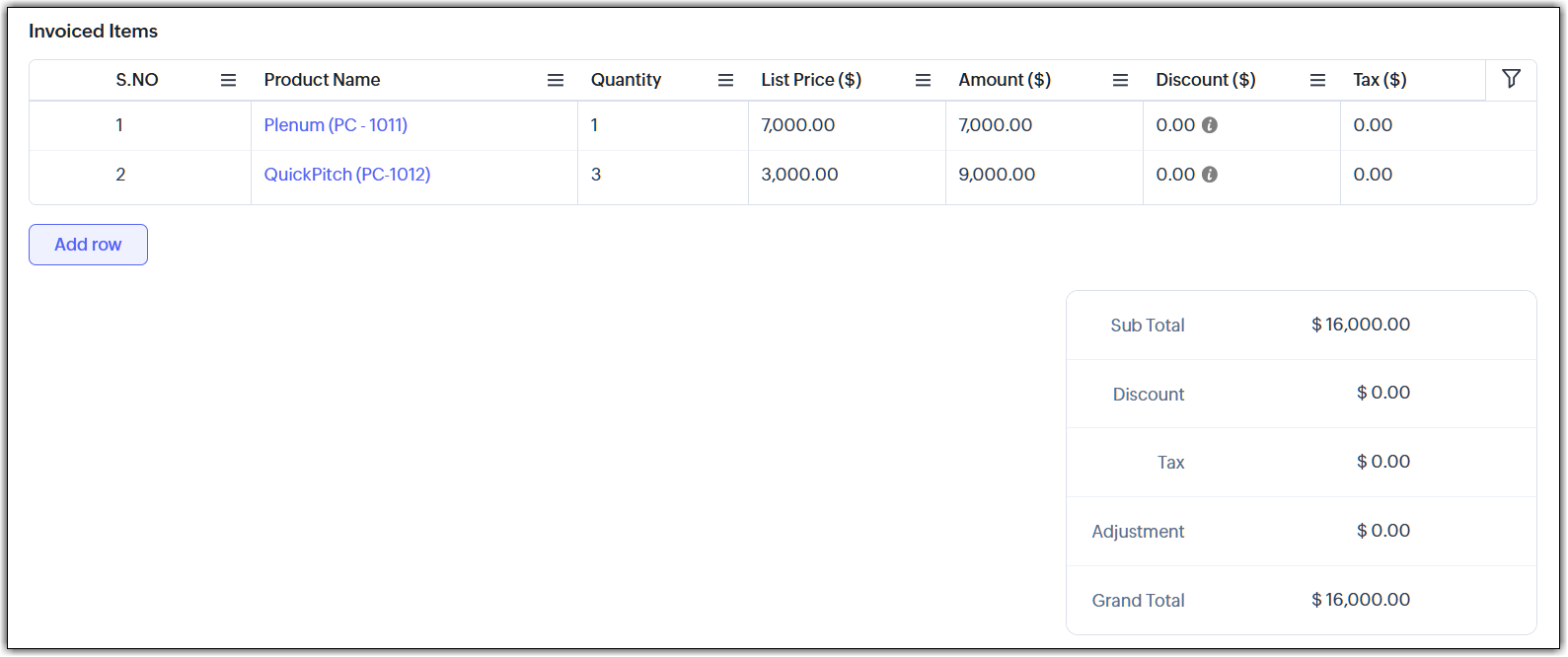
In the past, working with a subform has usually involved opening a record, scrolling down, making changes, saving them, and then returning to the list view. Doing that for multiple records ends up in a slow workflow for your end users.
Speed it up with Kiosk Studio
What if you could add a button that made the following possible?
- Click the button and instantly see the invoiced items tied to that invoice.
- Need to add a new item? Do that right there.
- Want to remove one or more items? Select and delete—again, without opening that record.
You can make this happen with Kiosk Studio. Let's look at how.
Scenario
Members of your finance team open the Invoices module and are surprised to see a new addition. Next to each invoice is a button: “View Invoiced Items.”

They decide to try it out:
Your teams can zoom through their workflows and make small changes quickly—all thanks to this new button. You can even clone this kiosk for other modules, like Sales Orders, Quotes, and so on.
Behind the button
The button that you see in the UI is connected to a kiosk.

Let's see how this kiosk is configured:
As you can see, we can quickly configure the kiosk using elements like GetRecords, Screens, and others.
The code for the adding and removing subform entries is attached to this article. Please note that the code in these files will give you a rough idea of what to do, but you'll have to tweak it and make it better before you use it in your account.
The code for the adding and removing subform entries is attached to this article. Please note that the code in these files will give you a rough idea of what to do, but you'll have to tweak it and make it better before you use it in your account.
New to Kiosk Studio? Get up to speed quickly by checking out the following resources:
- For a basic overview, check out Kiosk Studio: An overview.
- If you'd like to learn more about the various elements found in kiosks, check out Elements of a kiosk.
- For instructions on how to create and embed kiosks, see Working with Kiosk Studio.
- If you run into difficulties, submit a ticket and get help from our support team.
Check out previous Kiosk Studio session posts here:
- Session #1 covers how to view customers from the same industry.
- Session #2 covers how to build a call script kiosk.
- Session #3 looks at streamlining appointments.
- Session #4 shows how kiosks can simplify sales for bank employees.
- Session #5 helps you review loan applications quickly.
- Session #6 packs an entire service request workflow into a single kiosk.
- Session #7 helps you create your own convert feature.
Got a Kiosk Studio success story or creative use case? Share it in the comments—we might feature yours in an upcoming post!
Topic Participants
Kiran Karthik P
Sticky Posts
Enhancement to ICR’s field prompting: Preferred data extraction using advanced field prompting
Dear Customers, We hope you’re well A quick background Intelligent Character Recognition (ICR) comes as part of Zia’s optical recognition capability called Zia Vision. When we introduced it last April, the data extraction was training-based and was applicableGood news! Calendar in Zoho CRM gets a face lift
Dear Customers, We are delighted to unveil the revamped calendar UI in Zoho CRM. With a complete visual overhaul aligned with CRM for Everyone, the calendar now offers a more intuitive and flexible scheduling experience. What’s new? Distinguish activitiesAccessibility in Zoho CRM: Not just a feature—a way to empower
For instructions on setting up these controls, please check this help document: Configuring accessibility controls. Hello everyone, Today (December 3, 2024), on the International Day of Persons with Disabilities, we begin our journey towards a CRM thatScaling the customer journey: What's new in CommandCenter
Dear Customers, The last time we connected about CommandCenter, it was about the tool's new controls and revamped UI. Personally, the overhaul of the UI from the last update, still excites me. Today, we're here with news about its scalability and addedZoho CRM's sales trend and sales follow-up trend dashboards are now customizable
Dear Customers, We're here with good news! Sales trend and sales follow-up trend are two system-defined dashboards that help you understand trends and anomalies in your sales outreach and conversion efforts. They use Zia's intelligence to identify patterns
Recent Topics
Improved Functionality PO Bill SO Invoice
Hello, I need to enter over 100 items, it's frustrating to scroll a few item rows and wait for more to load, then scroll again. It would be nice to have buttons that scroll to the top or bottom with one click. Furthermore, these items I'm adding are VATGenerate a link for Zoho Sign we can copy and use in a separate email
Please consider adding functionality that would all a user to copy a reminder link so that we can include it in a personalized email instead of sending a Zoho reminder. Or, allow us to customize the reminder email. Use Case: We have clients we need toI would like to request a new feature or setting for SalesIQ.
Hello Zoho Team, I would like to request a new feature or setting for SalesIQ. Currently, when a user opens our contact widget and clicks on the "Chat with us" option, it opens a standard chat window that remains empty until either the user types a messageIn Zoho inventory Converting sales return to cerdit note from using Api from Creator Error details: {"code":-1,"message":"Invalid Sales Return ID."}
In Zoho inventory Converting sales return to cerdit note from using Api from Creator Error details: {"code":-1,"message":"Invalid Sales Return ID."} this is button Function used in the Creator map Inventory.Create_Credit_note(int CRE_ID) { return_valueRealtime Translations of Video via OnAir
It would be an amazing feature to have a drop down selector in the On Air video area for attendees to select a language to convert the original language to.Zia should track how customer relationships evolve over time
Here's a feature idea that I've been thinking about The Problem Zia is great at analyzing individual interactions email sentiment, call transcription, best time to contact. But here's what it can't do: tell you how a relationship has evolved over time.First Name in Mail
While sending a mail/message to the user, I want only the first name to be displayed—for example: “Hi John” instead of the full name using "Hi ${Name_Field}"Looking for Guidance on Building a Zoho Website
I'm exploring the possibility of building a custom website with specific features using Zoho as an alternative platform. My goal is to create something similar to https://gtasandresapk.com , with the same kind of functionality and user experience. I'dFSM integration with Books
Hi, I have spent a few months working with FSM and have come across a critical gap in the functionality, which I find almost shocking....either that, or I am an idiot. The lack of bi-directional sync between Books and FSM on Sales Orders/ Work OrdersHow to Track Inventory Usage from Zoho FSM to Zoho Inventory?
Hi everyone, We’re currently working on integrating Zoho FSM with Zoho Inventory, and we’ve encountered a challenge we’re hoping the community can help us understand better. Here’s the context: When we create a Work Order in Zoho FSM that involves partsSet Field Mandatory by Client Script ZOHO CRM
#Tips of the day We can set the field as mandatory by the client script var field_obj = ZDK.Page.getField('Custom_Field1'); field_obj.setMandatory(true); Custom_Field1 = Field API Name Apart from is if you have required any kind of Zoho work please doassociating products with accounts
I have all my accounts and products in zoho now. I need to generate a sales order for an account. The product lookup feature on the sales order shows no products...how can I get them to appear.Can we rely on order of returned ids when inserting multiple records?
Hello! API https://www.zoho.com/crm/developer/docs/api/v8/insert-records.html does not mention that the response array will match the input array*, keeping this important information implicit and someone might have doubts to rely on it. (*the responseNew UI for Writer - Disappointed
I've been enjoying Zoho Writer as a new user for about 6 months, and I really like it. One of my favorite things about it is the menu bar, which you can hide or leave out while still seeing most of your page because it is off to the left. I think thisZoho CRM Community Digest - February 2026 | Part 2
In this edition, we’re highlighting a few more product enhancements, along with some helpful community discussions that explore everyday CRM scenarios from automating reminders and managing lead outreach to making the most of APIs and client scripts.Dont want to list inactive items.
If an item is made inactive, there is no point in showing it in the item list. Please provide an option to hide all inactive items in 'Preferences'.Client Script event on any field of a Detail page
Hi everyone! I'd like to trigger a Client Script when a user modifies a field - any field - from the Account Details page, how can I do this? I don't want to trigger it on a specific field, but on all of them. Thanks in advance!Tip #66 - Exploring Technician Console: Network Statistics - 'Insider Insights'
Hello Zoho Assist Community! Have you ever wondered why a remote session feels sluggish, or wanted to check whether connectivity issues are on your end or the customer's? That's exactly where the Network Statistics feature in Zoho Assist comes to theSyncing zoho books into zoho crm
I was wondering how I can use zoho books in crm as I have been using them separately and would like to sync the two. Is this possible and if so, how? ThanksREFUND REQUEST FOR PLAN SUBSCRIPTION CANCELLED
I have cancelled my Zoho Books subscription and would like to request a full refund for the subscription. Kindly process the refund at your earliest convenience.purchasing a pagkage
goodmorning i want to pay for my monthly package but your app is sayinng i have insufficient funds yet i loaded money on my account yesterday though in our currency of ugxEdit Receipt, how?
Do you notice the big blank space in Receipt? I want to remove that. I know there is a template but that blank space, I can't seem to remove it. Please help. Thank you!Can I export a TXF (TurboTax exchange format) file out of Zoho Books?
Hello, I'm trying to do my US Small Business Taxes using Intuit's Turbo Tax. Can I export my expenses from Zoho Books to a TXF format file, so that it can then be imported into Turbo Tax? Thanks, RajneshTax inclusive and exclusive for Sales invoices
Hello, where can I set my tax to be inclusive or exclusive for invoices in Zoho Books? There used to be a button for me to do that right above the products table. Can someone help me please? Thank you!Unable to produce monthly P&L reports for previous years
My company just migrated to Books this year. We have 5+ years financial data and need to generate a monthly P&L for 2019 and a monthly P&L YTD for 2020. The latter is easy, but I'm VERY surprised to learn that default reports in Zoho Books cannot createZOHO Reports are taking longer time to get refresh
Hi Team, Since last few days, I'm facing issues in getting updated reports. For eg: right after making an expense entry or even posting a journal, it is taking longer then expected for the updated reports. Refer below: "You are viewing the report thataudio and video comments in tasks in zoho projects
Hi, is it planned to have the ability to post audio and video comments? the whatsapp wechat format of communicating is a reality... tools like zoho project would facilitate a lot teamwork by facilitating the way in which we can give feedback in audio and video rather than only text. thx!Looking for Zoho + Twilio Automation Specialist (Duda Website Integration)
Hi everyone, I’m looking for an experienced Zoho specialist to help build a mostly automated CRM and booking system for my service business. I already have a live website built on Duda.co and need help integrating my existing forms into Zoho CRM (no rebuildZoho CRM For Everyone UI Rollout Begins for All Users
Hello Partners, We have started rolling out the new Zoho CRM For Everyone UI as the default experience for all users. This update is being released in three phases based on organization size and account type. We want to keep you informed of the rolloutHow to retreive the "To be received" value of an Item displayed in Zoho inventory.
Hi everyone, We have our own Deluge code to generate a PO according to taget quantity and box quantity, pretty usefull and powerful! However, we want to reduce our quantity to order according to "To be received" variable. Seems like this might not evenIntroducing Explainer Videos for Zoho Desk: Solve everyday challenges with simple configurations
Dear everyone, We have created a set of short explainer videos that show how common support scenarios can be handled using simple configurations within the product. The solutions often lie in the plain sight, but go unnoticed. Through these videos weNotifications Feeds unread count?
How do I reset the unread count on feeds notifications? I've opened every notification in the list. And the count never goes to zero.Simple reliable solution to convert MSG files for AOL Mail?
A simple and reliable way to convert MSG files for AOL Mail is by using a professional tool MacGater Mac MSG Converter. This software allows users to quickly convert MSG files into formats compatible with AOL, such as MBOX or direct email migration. ItZoho One Support is non existent...
I've tried through Email, Chat, this community and finally through Phone. There is no way to receive an answer. Email = over a week and no answer Chat = not available Community = no answer at all Telephone = after clicking myself through the callcenterDisable Zoho Contacts
We don't want to use this app... How can we disable it?Custom module - change from autonumber to name
I fear I know the answer to this already, but thought I'd ask the question. I created a custom module and instead of having a name as being the primary field, I changed it to an auto-number. I didn't realise that all searches would only show this reference.Edit a previous reconciliation
I realized that during my March bank reconciliation, I chose the wrong check to reconcile (they were for the same amount on the same date, I just chose the wrong check to reconcile). So now, the incorrect check is showing as un-reconciled. Is there any way I can edit a previous reconciliation (this is 7 months ago) so I can adjust the check that was reconciled? The amounts are exactly the same and it won't change my ending balance.Introducing Zoho MCP for Bigin
Hello Biginners! We're excited to introduce Zoho MCP for Bigin, a completely new way of interacting with Bigin data using AI. With Zoho MCP, you can securely connect your Bigin account with popular AI tools like Claude, Cursor, Windsurf, and VS Code,SAP Business One(B1) integration is now live in Zoho Flow
We’re excited to share that SAP Business One (B1) is now available in Zoho Flow! This means you can now build workflows that connect SAP B1 with other apps and automate routine processes without relying on custom code. Note: SAP Business One integration[Action Required] : Update Shopify Access Scope to fetch complete order history
Hello Shopify Users! Shopify has updated the access scope for apps under developer portal. With this change, the read_orders scope now provides access only to the last 60 days of order history. To access older historical orders, Shopify requires a separateNext Page