What will happen if we deploy two Zobots/Chatbots on the website?
Hi everyone,
The chatbot is a powerful tool to automate customer interaction on your website. But, what will happen if we deploy two different chatbots on the website? If you've deployed both answer bot and Zobot on the website for the same flow, then one of the bots will execute based on the visitor criteria. If you've set the same criteria for both the bot then 70% of the time Answer bot will execute and respond to the visitors. We always recommend you to have one chatbot deployed on the website. But, if you have multiple criteria of visitors on your website, then we have more suggestions for you in this post. Come on, let us discuss them together!
1. Is it possible to setup different Zobots for different pages of my website?
Yes, it is possible. The bot requirement may differ according to the business. Some might need a Zobot for marketing purposes to showcase their products and offers. A few businesses might need an Answer bot for answering routine questions. But it would be nice to have different bots on the website to achieve maximum engagement.
Note:
- When you deploy the Answer bot and Zobot, the answer bot will get triggered overriding the Zobot.
- When you deploy 2 or more Zobots on your website, the Zobot which is recently edited will get triggered overriding the other Zobots.
2. How can we deploy different bots based on the pages/URLs?
There are two solutions to handle these cases.
Solution 1 - Setting different Business hours:
The bots can be deployed based on their working hours. For example, a Zobot can be activated on business hours, and during non-business hours, the answer bot can be activated.
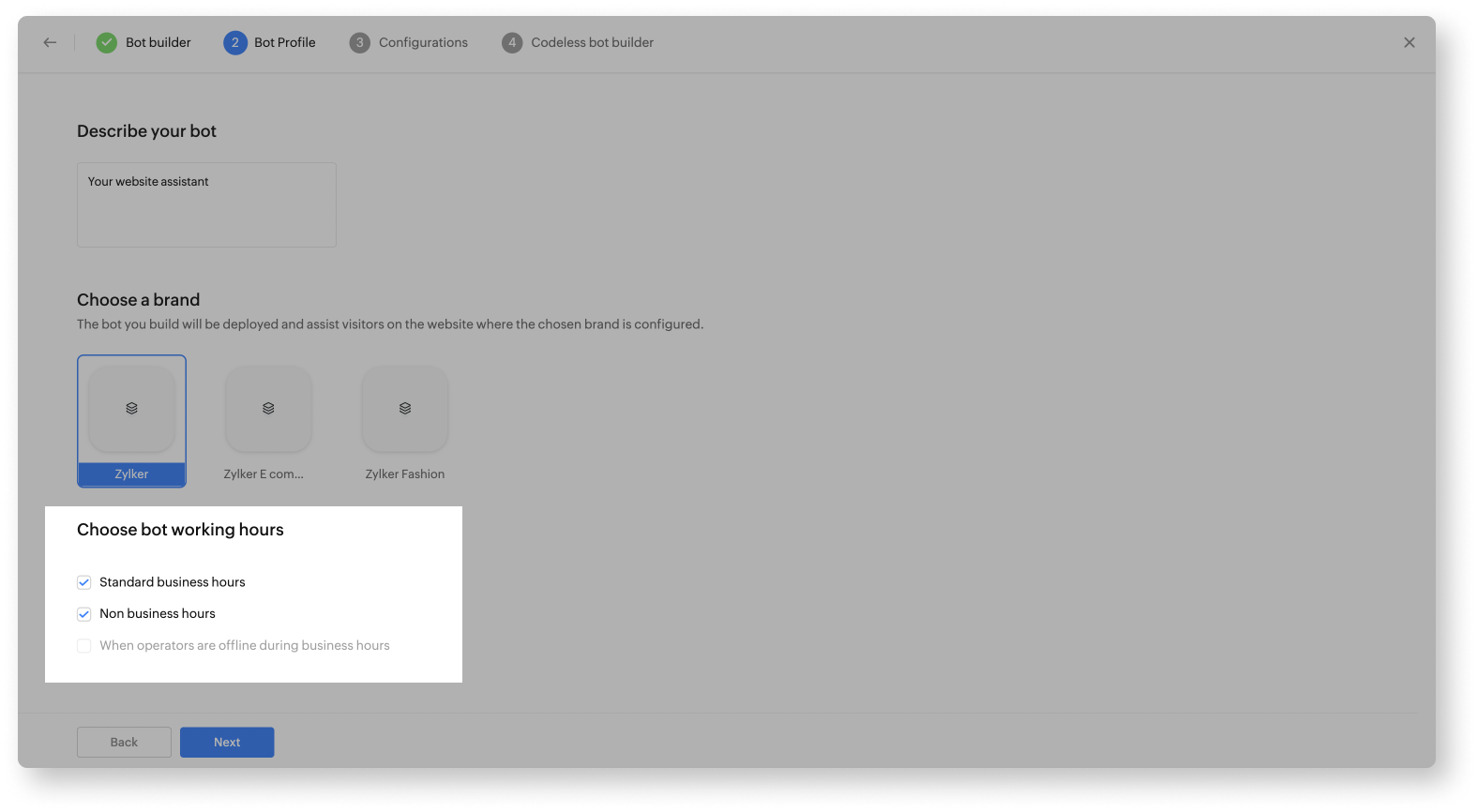
Solution 2 - Different Flow based on the Pages/URLs
You can setup different bot flows based on the website URLs using Criteria router block and Trigger handler in Codeless bot builder and SalesIQ scripts respectively.
For the Codeless bot, the Criteria router block helps you to split the bot's flow based on the visitor's criteria. For example: In an E-commerce website, on the home page, the bot can be used from the marketing perspective to showcase personalised products or offers to your visitors. The bot can have another flow with Auto pilot block on the contact page to provide extensive support.
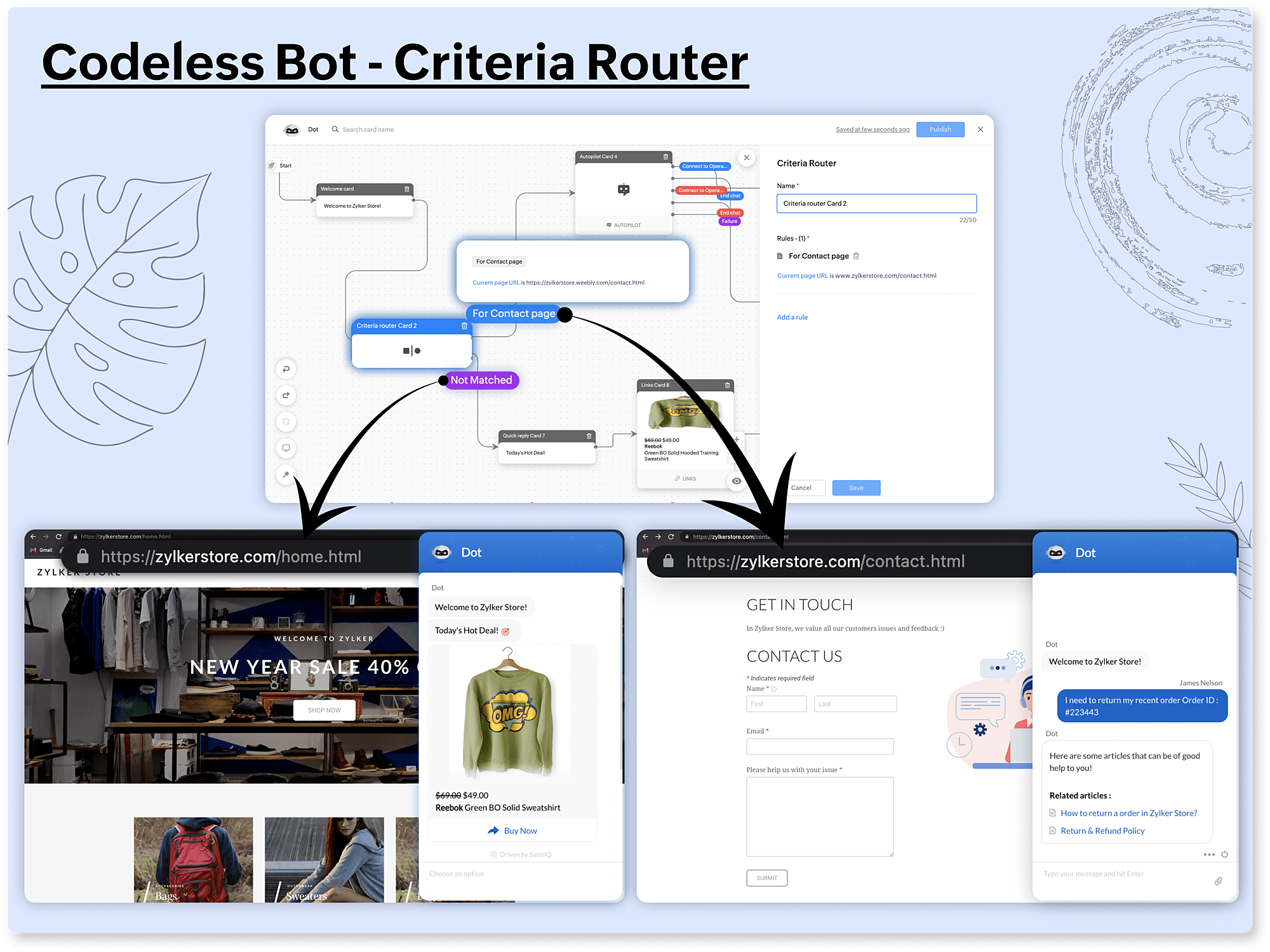
As mentioned in the above reference, when the customer navigates to the contact page, the Autopilot block will be triggered and answers the visitor's questions using your resources (Articles and FAQs). For the rest of the pages (Not matched) flow, the bot provides the visitors with product suggestions.
For the SalesIQ script platform, a rule can be specified based on the website URLs on the trigger handler using the syntax below.
- currentPageUrl = visitor.get("current_page_url");
- if(currentPageUrl.contains("home"))
- {
- // condition for pages home and other pages
- response = Map();
- response.put("action","reply");
- response.put("replies",{"Hey there! Welcome to Zylker Store"});
- response.put("input",{"type":"select","options":{"Today's Hot deals","I want to buy","Just browsing"}});
- return response;
- }
- else if(currentPageUrl.contains("contact"))
- {
- //condition for only contact page
- response = Map();
- response.put("action","reply");
- response.put("replies",{"Hey there! How can I help you today"});
- response.put("input",{"type":"select","options":{"I need assistance","Order not recieved","Raise a ticket"}});
- return response;
- }
- else
- {
- response = Map();
- response.put("action","reply");
- response.put("replies",{"Hey there! Welcome to Zylker Store"});
- response.put("input",{"type":"select","options":{"Today's Hot deals","I want to buy","Just browsing"}});
- return response;
- }
This way, you can have a different flow based on the URL while having one Zobot deployed on your website.
3. Is it possible to deploy the Answer bot in Zobot flow?
Yes, using the Autopilot function, you can bring the answer bot engine inside Zobots' flow. We have autopilot block for the codeless bot builder, and for SalesIQ scripts, autopilot_action can be used. To know more about autopilot, click here.
I hope you found this post helpful! Try this out and share your feedback on the comment section 😄
Topic Participants
Sasidar Thandapani
Sticky Posts
Optimizing Chatbot Versatility by Combining Answer bot and Zobot
Hi everyone! Great to see you. We are delighted to introduce the Answer bot card/autopilot function for the Codeless and SalesIQ Script bot platforms. This provides your bot with Q&A capabilities similar to the Answer bot. So, you can bring your AnswerWhat will happen if we deploy two Zobots/Chatbots on the website?
Hi everyone, The chatbot is a powerful tool to automate customer interaction on your website. But, what will happen if we deploy two different chatbots on the website? If you've deployed both answer bot and Zobot on the website for the same flow, then
Recent Topics
Personalize Email Campaigns using CRM Data
Recently, few of our CRM users wanted to send an email campaign with personalized sender details and signature so that recipients can instantly recognize the sender. We are happy to announce the new enhancement in campaign creation through which you can personalize your email campaign using CRM Contact/Lead Owner's data. Let’s see how we can use those data to send emails. Personalize sender details Using Zoho Campaigns, you can send an email campaign with a personalized sender name and email address集めて終わりにしない。― Zoho FormsからCRMへデータをつなぐ
ユーザーの皆さま、こんにちは。ゾーホージャパンの友田です。 Zoho Formsで問い合わせや資料請求を受け付けた後、その情報をどうしていますか? 例えば、 フォームから届いた氏名や会社名、メールアドレスを確認して、Zoho CRMにも同じ情報を入力している。 そんな作業が発生している場合、FormsとCRMをつなぐことで、その手間を減らせるかもしれません。 Formsに入力された情報をCRMへ Zoho Formsは、Zoho CRMと連携できます。 例えば、Webサイトから資料請求を受け付ける場合、Sheet co-edit: no live presence — also on Collaborate demo?
Two Sheet co-edit sessions open OK (same document_id, document.edit: true), but there’s no real-time collaboration: no cell highlights, Group Chat → Users stays empty. Writer co-edit works on the same Office Integrator setup. We see the same on the officialShort product videos on Zoho Commerce product pages: what works?
Short product videos are becoming a normal part of online store pages, and I have been thinking about how to use them well on a Zoho Commerce store. A few points that seem to matter: Keep them short. 6 to 15 seconds showing the product from a few anglesHow to embed Google Analytics GA4 tracking on a standalone Public Page (outside Customer Portal)?
Hi, Is there an official or recommended way to embed Google Analytics (GA4) tracking directly onto a standalone public Zoho Creator Page (outside of a Customer Portal)? I’m considering using an invisible Custom JS Widget as a workaround, but I’d loveUnable to integrate Whatsapp Messaging into Zoho CRM - Business Messaging
Hello, I want to set up Business Messaging in our Zoho CRM and am struggling to set it up. I have logged into the account and our facebook business page, our business shows in the dropdown for WhatsApp Business Account but does not for WhatsApp BusinessZoho CRM calendar merge with outlook
Hi Zoho team! I did the steps for syncing the zoho CRM calendar with outlook. Everything works well as long as the user creates meetings inside the newly created Zoho CRM calendar in outlook, but I need a way to also display the meetings which are receivedThunderbird cannot authenticate Zoho on android
I keep getting a message from Thunderbird on Android that it could not authenticate for my account, dadashton@zoho.com., and to update my server settings. Now the settings are exactly the same for my other devices (1 Windows, 1 Mac and 2 Linux) Can anybodyBills import rejects the Account column (The account does not exist), although the accounts exist in the Chart of Accounts
Hello Zoho Books Team, I am unable to import bills into my Zoho Books. The import keeps rejecting the Account column, even though the accounts exist and work when I create a bill manually. What I am doing Bills > Import Bills, CSV/XLSX file, 145 rows,How do I reorder the item table columns in my invoice template?
There must be a way I just cannot find it. Anyone?Zoho Desk API returning 403 SCOPE_MISMATCH for Ticket Search API
Hello Zoho Support Team, We are experiencing an authorization issue with the Zoho Desk Ticket Search API. Our integration was working correctly yesterday, but we are now receiving the following error when calling the Search Tickets endpoint: API: GETFree webinar: Zoho Sign in Q3 2026
Hi there! From smarter signing on your Apple devices to new ways to verify and personalize your documents, Zoho Sign had a busy Q3—and we're bringing it all together in one session. Join us for a complete walkthrough of everything new this quarter, plusZoho Desk - Delete an email conversation
When using Zoho support desk I see an option to delete and edit conversations that are comments, BUT if the conversation was automatically added as a conversation from an email, then the option to delete it seems not to be available. Is there a way toMessages do not open and I cannot reply to messages in Zohodesk
Hi, this is an unusual behaviour. I cannot reply to messages: Accessing a draft message - runs endlessly. Sending Emails fail:Link item in purchase order to Customer
Is it possible to link each item in purchase order to a customer which would create an associated list, so I can easily find where, when and what my customer have order from us. Thanks!Passing the CRM
Hi, I am hoping someone can help. I have a zoho form that has a CRM lookup field. I was hoping to send this to my publicly to clients via a text message and the form then attaches the signed form back to the custom module. This work absolutely fine whenI want to test some payment subscription with a test credit card from stripe
I have a test customer and place https://stripe.com/docs/testing#international-cards test credit card number to the Add New Card in subscription.zoho customer page. After I added, the test card was declined. Am I missing something?This user is not allowed to add in Zoho. Please contact support-as@zohocorp.com for further details
Hello, Just signed up to ZOHO on a friend's recommendation. Got the TXT part (verified my domain), but whenever I try to add ANY user, I get the error: This user is not allowed to add in Zoho. Please contact support-as@zohocorp.com for further details I have emailed as well and writing here as well because when I searched, I saw many people faced the same issue and instead of email, they got a faster response here. My domain is: raisingreaderspk . com Hope this can be resolved. Thank youStrengthen your account security with Password Policy
Still using the same password for all your accounts? Or perhaps your password is easy to guess or follows a predictable pattern? If so, your account could be at risk. Once someone gets hold of a password that you reuse, they could potentially gain accessExpanding sales, marketing, and support capabilities in Zoho CRM Plus 3.0
Hey everyone, It's been more than 10 years since we launched Zoho CRM Plus back in 2014. This is quite a milestone, and we've come a long way in empowering you with everything you need to offer an exceptional customer experience. On that note, we expandedIntroducing PRM: Build, manage, and scale your partner ecosystem
Growing a partner ecosystem is a good problem to have. What starts as a handful of partners can quickly turn into a maze of spreadsheets, emails, and disconnected processes. More partners mean more opportunities, greater reach, and new ways to growLive connection to DS files in Zoho Creator / ChatGPT
As an idea, we are using ChatGPT to build with Zoho Creator (outside of Zia), which is works brilliantly to assist write deluge, provide test suggesitons etc. Currently we are uploading the DS files which are very point in time, it would be great to haveZoho Forms - Feature Request - Embed iFrame or Dynaic URLs in Description fields
Hi Zoho Forms team, I'm working with a client who uses Zoho Forms internally to collect information over the phone from potential work placement candidates. At the end of the form, the candidate needs to be booked in for an induction, which we've configuredNew in Office Integrator: Add text, diagrams, and drawings to your spreadsheet
Hi users, We are pleased to introduce the Shapes feature in Zoho Office Integrator's spreadsheet editor. It lets users create visual elements; including simple shapes, text boxes, freehand drawings, and structured diagrams; directly within the spreadsheet.Highlight what matters, erase what doesn’t in PDFs
When reviewing PDFs or preparing them for sharing, two things often come up: you want to draw attention to what’s important, and you want to hide what isn’t. Zoho PDF Editor gives you both capabilities in one place with its highlight and erase tools.WorkDrive Desktop Sync Is Being Deprecated: Move to WorkDrive TrueSync for a Smarter Experience
Hi everyone, We are excited to share a better, smarter way to access and manage your files directly from your computer! We’re transitioning from our legacy Desktop Sync app to WorkDrive TrueSync, designed to give you faster performance,greater flexibility,Set connection link name from variable in invokeurl
Hi, guys. How to set in parameter "connection" a variable, instead of a string. connectionLinkName = manager.get('connectionLinkName').toString(); response = invokeurl [ url :"https://www.googleapis.com/calendar/v3/freeBusy" type :POST parameters:requestParams.toString()Introducing the Zoho Campaigns MCP server
Hello everyone, We are pleased to announce that Zoho Campaigns is now available in Zoho MCP. You can now connect your Zoho Campaigns organization to AI tools such as Claude, ChatGPT, GitHub Copilot in VS Code, and Cursor, and manage your email marketingSubForm Custom Sort - Deluge Workflows
I have been experimenting with the Custom Order function of Subforms, it works beautifully within the subform itself and retains the sorting order. However, I need to be able to iterate through the records in Deluge using the sort order (The usage caseBank feeds automation is broken - requires manual intervention and authentication
Yodlee supports Australian Open Banking CDR protocols natively, but Zoho Books' implementation is still triggering legacy screen-scraping MFA blocks on CBA and other business banking accounts. When will Zoho update its Australian bank feed pipeline toCannot Access Subform Display Order in Deluge
As highlighted in this community post, we still have to deal with the significant limitation of not being able to access the user-sorted order of subform rows through Deluge. This creates a major disconnect between the UI capabilities and backend automation,Process FOR loop for subform items in the order of the manual sorting
Hi Guys, I have searched everywhere and tried everything, but I still not able to resolve one particular challenge. I have a subform in my Invoice with rows for each item. I made it so that we can change the order of the items manually. I need to be ableAugmenting subform capabilities
Greetings, everyone! Finally, the day has come for us to announce some of the most anticipated, requested, and exciting updates to subforms in Zoho Creator. As you're aware, subforms are an integral part of Creator forms, as they help in establishingBuild appointment scheduling into your vibe-coded apps with Zoho Bookings
Exploring vibe coding? Wondering how an app built with AI can handle appointment scheduling? Join our upcoming live webinar to discover how Zoho Bookings APIs can help connect applications to scheduling capabilities. Here's what we'll explore: • ShowIs there a way to make Reason For Loss field mandatory at Closed Lost stage?
Hi guys, Reason For Loss system picklist appears on Verify Details page but it is not mandatory so as a result, AEs tend to omit it (leave at default value -None-). Is there a way to make it mandatory at Closed Lost? I tried layout rule but this fieldHow to customize the displayed name of contacts in Trident?
Hello, For work purposes, I sort different customers into different folders, and I also change their display names in Contacts so I can easily recognize them later. However, Trident doesn’t seem to support this. Even after I edit a contact’s name in Contacts,User and mailbox reports in Zoho Mail: Review account status, storage, and login activity of users
Administrators often need answers to questions such as which users have never logged in, whose storage is almost full, or which mailboxes are accessed through POP or IMAP. The User and Mailbox reports in the Zoho Mail Admin Console provide these detailsZOHO CRM APP - SALESINBOX
Is it possible to access SALESINBOX in the CRM MOBILE APPZoho mail always free not showing up for me
Im in the Australian data centre regionTip #96 – See more of the remote screen with Virtual Monitor – 'Insider Insights'
Hello Zoho Assist Community! Say you're supporting a device that has no monitor attached, like a server in a closet or a kiosk PC. You connect, and the screen is tiny, blurry, or distorted. Text overlaps and windows end up in odd places. TroubleshootingNext Page