Updates in Zoho Workplace applications | Oct and Nov 2023

Updates in Zoho Workplace applications | Oct and Nov 2023

Hello Workplace Community,

We wish you all a Merry Christmas! 🎄 

Hope you're all doing good and staying safe. This Christmas, we have quite a few treats in the form of new features and enhancements across the applications in Zoho Workplace.

Let's take a quick look at them.

Zoho Mail

Mail Reading Formats: Plain & Rich Text

In Zoho Mail, it is now possible to read emails in the preferred mode of your choice. Enabling Plain or Rich text mode from the Mail View Options within settings allows you to choose between a visually enhanced and formatted text or a simple, unformatted text format to read your emails.

Send personalized Out-of-Office messages for internal and external contacts

You can now set distinct Out-of-Office replies to senders within your organization and those outside it. Manage your professional communications effectively, ensuring that your messages are not only automated but also finely tuned to the expectations of both internal and external audiences.

Admin Configured Out-of-Office response for internal and external senders

Now, administrators can also configure distinct Out-of-Office responses for emails from senders within the organization and external senders, ensuring that both internal and external contacts receive responses crafted to their respective needs and contexts.

Users can create email-enabled Groups with admin approval

Organizations users now have the option to create a group as an email-enabled group directly from their group management page if the admin has granted permission through the admin console.

Add email event invitations to Zoho CRM Calendar

You can now choose to add event invitations from your emails directly to the Zoho CRM Calendar instead of the Zoho Calendar for more efficient and consolidated management of your business events or activities related to customer relationship management.

New DRE Gallery function alert!

Now, our gallery of pre-defined DRE functions has a new addition, bringing even more flexibility to manage your inbox. A pre-written script to automatically add attachments from an email to CRM when the sender is listed as a CRM lead or contact is added to the Gallery function.

Associate Contact card to your email signatures

No more copying and pasting your contact information repeatedly. You can now include contact cards directly into your email signature. Recipients can easily save your contact details directly from your signature, eliminating the hassle of manual entry. It's a one-time setup for a lasting impact on every email you send.

Seamless language translation for your emails

No need to worry about missing out on important information or struggling to understand emails in different languages. In Zoho Mail, you can now translate all your emails to your preferred language. Enhance your email communication experience, fostering global collaboration and ensuring that language diversity is no longer a barrier to effective communication.

Admins can now recall sent emails

No more worrying about emails sent by mistake. Admins can now recall emails sent by users within the organization. This ensures that any unintended or erroneous messages are swiftly corrected, providing enhanced control and flexibility over email communications.

Shared Mailbox support in email Retention and Backup

In Admin Console, the ability to retain, backup, or recover emails now extends to shared mailboxes. Administrators can now have the same level of control and security for shared mailboxes as they have for individual user accounts and make sure that critical data is protected and accessible when needed, even for collaborative spaces within Zoho Mail.

Zoho Calendar

Audio Meeting or Video Meeting - Pick your style

With the Zoho Meeting integration, you can now choose to create either audio or video conferencing while scheduling an event. When Zoho Meeting is selected as a Conference option, a meeting will be set up in Zoho Meeting and the conference link will be emailed to the attendees.

Zoho WorkDrive

Video and audio preview enhancements

We have enhanced video and audio previews by adding sneak forward (Shift+Right arrow) and sneak backward (Shift+Left arrow) options. We have also introduced shortcut options for muting/unmuting (M), entering/exiting full-screen mode (F), and playing/pausing your content (space bar).

Additionally, we have introduced picture-in-picture (PIP) support for video files.

Experience WorkDrive in your preferred Indian language

India's rich linguistic diversity is now fully accommodated by WorkDrive. No matter which region you're from or which language you speak, WorkDrive is here to support your collaboration and document management needs.

We have expanded our language support to include all 22 official Indian languages. This means that you can now access and interact with WorkDrive in your preferred Indian language for a more convenient and user-friendly experience.

Locate files quickly with our recent search enhancements
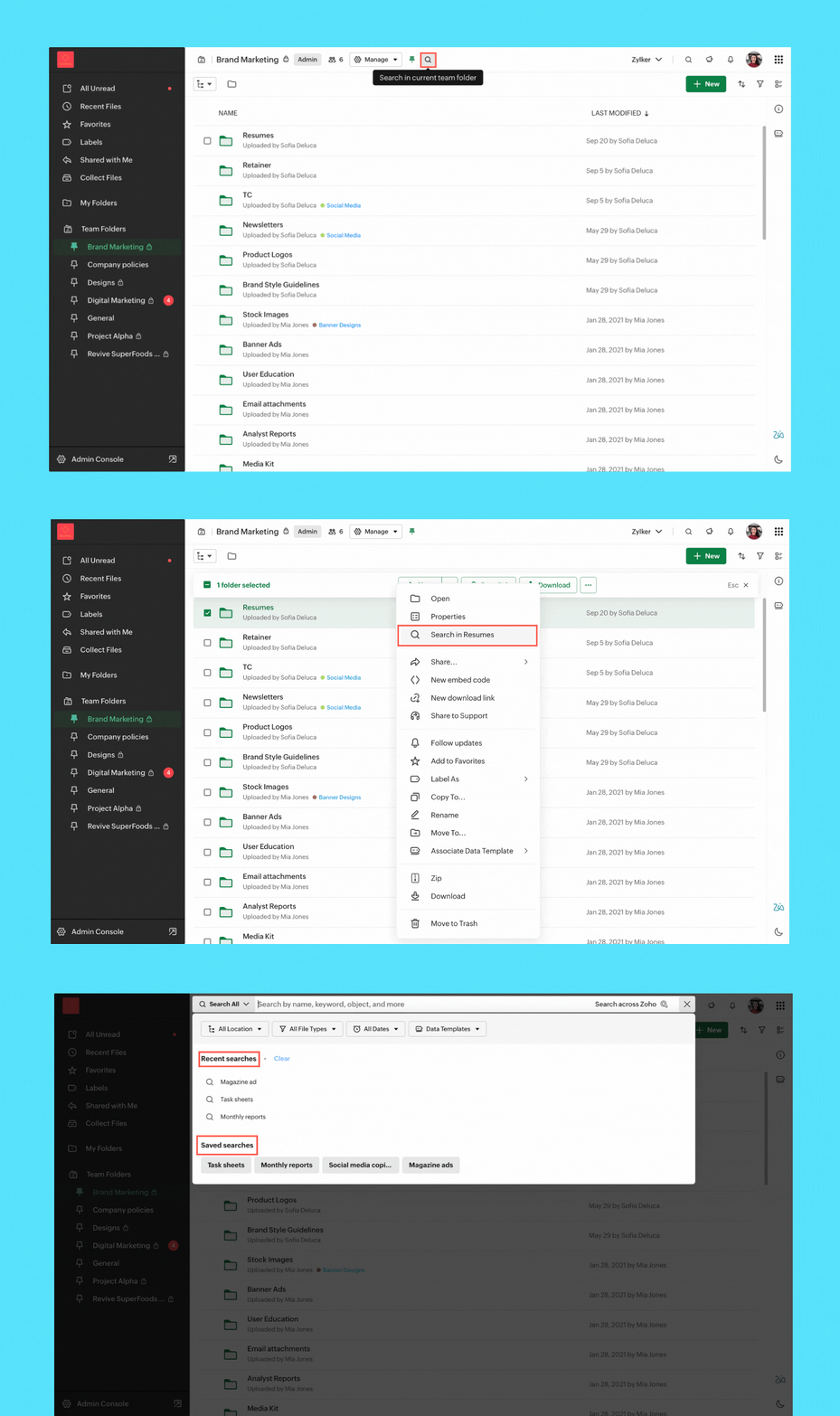
Search enhancement
  • Streamlined search: We've enabled quick search options to help you find files in your My Folder, Team Folder, Org Folder, and any other specific subfolder.
  • Save search: You can now save search keywords along with the applied filters, making the process of generating future search results effortless.
  • Recent search listings: Your recent searches are now at your fingertips within the search UI. Quickly access them to find the information you need.

Zoho Cliq

Enhancements in Admin Panel

  • eDiscovery and data retention: Retrieve and clean up your organization’s data and assets with eDiscovery and data retention policies. These are necessary for compliance audits, lawsuits, and intellectual property theft, as you can quickly locate and provide the required supporting evidence.
  • Audit trails: Get a snapshot of all user activities across chats and channels at a glance and maintain a record of all critical actions performed by specific users across different modules.
  • Usage reports: Measure adoption rates and the hours spent on different modules. Admins can get a clear picture of the organization's interactions and how everyone uses Cliq.
  • Media IP versioning: With this new tool, you can track which of Cliq's media servers are whitelisted within your organization's network. This ensures continuous and seamless connectivity in your calls and meetings.
  • Status configuration across the organization: Manage your organization's status configurations by customizing the text, setting time limits for each status, and availability of custom statuses.
  • Centralized management for your channels:  Get better control over every channel within your organization by performing detailed actions like changing channel admins, adding or removing participants, and adjusting the roles available to a channel admin from a single centralized location.

AI advancements

  • Meeting summary & action items: Effortlessly review discussions with AI-generated meeting transcripts, pinpointing critical details and follow-up tasks for actionable insights.
  • Unread message summary: Missed a group chat and overwhelmed by hundreds of unread messages? Now generate message summaries to quickly catch up on what is going on.
  • Writing assistant: Receive support in composing messages with tone analysis and grammar correction while also gaining additional insights about your texts from our AI, Zia. Explore details like writing quality, word count, and readability for a comprehensive writing experience.

Updates in the Collaboration corner

  • Auto response: Set an auto-response in Cliq to keep your colleagues informed of your unavailability and return time with the out-of-office responder.
  • Pin multiple messages: Effortlessly pin multiple important messages in a chat to ensure essential information remains at the forefront.

Channel permission to close threads

With our latest addition to channel permissions, you can efficiently designate who can close threads, offering improved control over your channel's discussions.

Zoho Meeting

Import webinar registrants with a CSV

Streamline your webinar registration process by uploading a CSV file containing attendee names and emails. You can effortlessly import your webinar registrations, saving time and simplifying the process. To import registrations, navigate to the registrations tab of the scheduled webinar and click Import CSV in the top right corner.

End of session notification

With the end-of-session notification, you can choose to remind all participants or only the host about the scheduled end time of a meeting. You can also choose when and how many times you'd like to be reminded about the scheduled end time. This can be customized under the Meeting settings.

Zoho Writer

Visualize, summarize, and transform data in mail merge templates

Display data exactly the way you want and highlight key insights with group by and aggregate in Zoho Writer's mail merge templates.

Zoho Sheet

Create and share bulk spreadsheets seamlessly using Merge Templates

Do you spend hours drafting new records and copy-pasting data from other sources? You can efficiently create and share bulk data records with the Merge Template in Zoho Sheet.
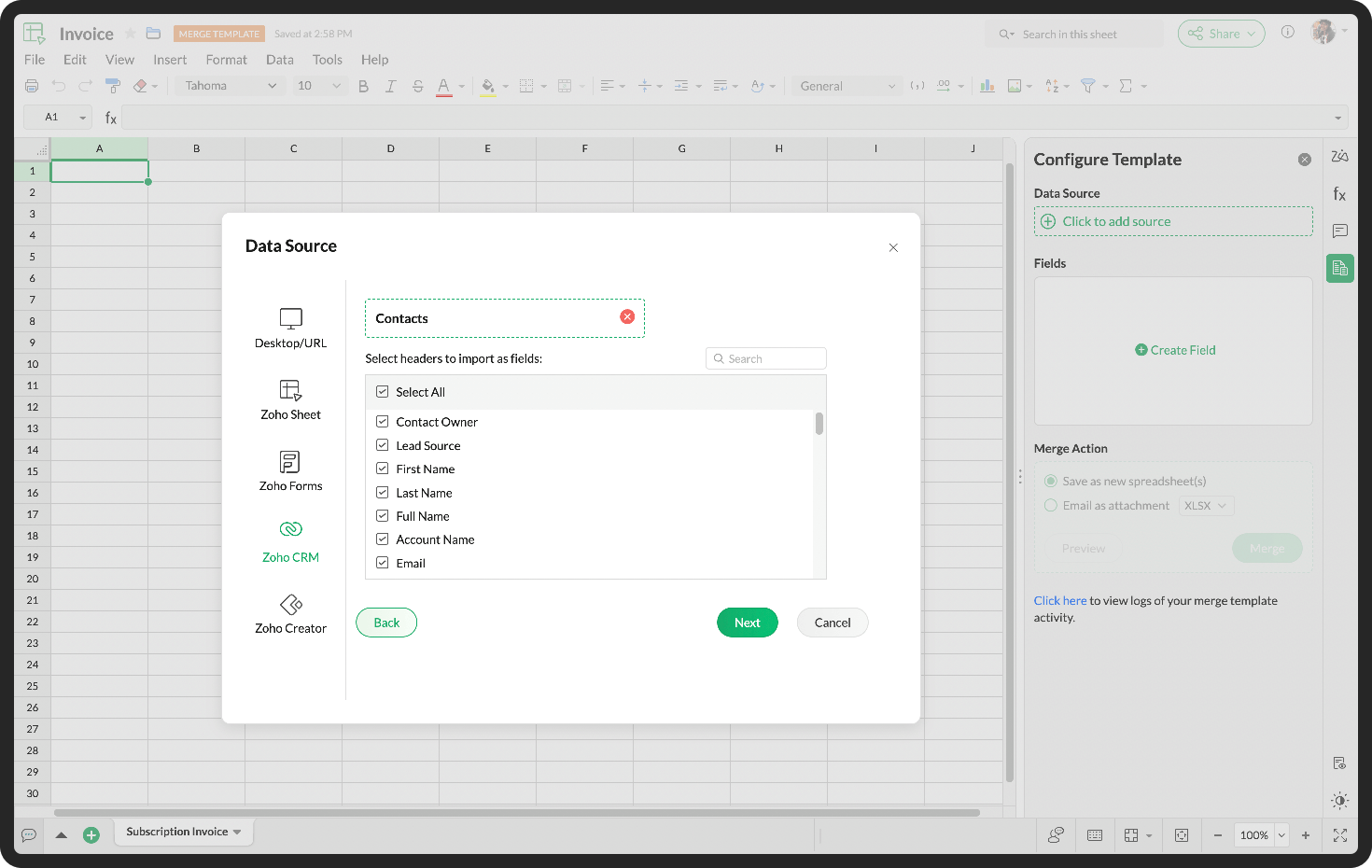
Merge template

Zoho Connect

Get instant reminders for live broadcasts

With the convenience of reminders, you can get notified about live broadcasts to help you plan your participation effectively.

Boost task activity with the fun Arcade feature

Get points for performing certain task activities. From creating a task to changing the task status, earn points for your active participation on the board.

Get detailed insights on your posts

Understand user sentiment and interaction on your posts, such as views, comments, and reactions to help you keep track of your post-related engagement at all times.

Do try out the features, enhancements and let us know your feedback and suggestions in the comments section given below.

Follow us on Twitter, LinkedIn and Instagram for regular updates.


      Zoho Campaigns Resources


        • Desk Community Learning Series


        • Digest


        • Functions


        • Meetups


        • Kbase


        • Resources


        • Glossary


        • Desk Marketplace


        • MVP Corner


        • Word of the Day


        • Ask the Experts


          • Sticky Posts

          • Product Updates in Zoho Workplace applications | February 2026

            Hello Workplace Community, Let’s take a look at the new features and enhancements that went live across all Workplace applications for the month of February. Zoho Mail Organize Personal Notes with Collections You can now create collections under My Personal
          • Product Updates in Zoho Workplace applications | January 2026

            Hello Workplace Community, Let’s take a look at the new features and enhancements that went live across all Workplace applications for the month of January. Zoho Mail Zoho People Notifications preview in Zoho Mail Notification emails from Zoho People
          • Product Updates in Zoho Workplace applications | December 2025

            Hello Workplace Community, Let’s take a look at the new features and enhancements that went live across all Workplace applications this December. Zoho Mail Block emails without notifying the sender Block emails without sending a rejection notification
          • Product Updates in Zoho Workplace applications | November 2025

            Hello Workplace Community, Let’s take a look at the new features and enhancements that went live across all Workplace applications this November. Zoho Mail Format comments easily using Slash Commands With Slash commands, you can easily format text, insert
          • Product Updates in Zoho Workplace applications | October 2025

            Hello Workplace Community, Let’s take a look at the new features and enhancements that went live across all Workplace applications this October. Zoho Mail Create Signature from Compose window You can now effortlessly create a Signature using the Create

          Zoho CRM Plus Resources

            Zoho Books Resources


              Zoho Subscriptions Resources

                Zoho Projects Resources


                  Zoho Sprints Resources


                    Zoho Orchestly Resources


                      Zoho Creator Resources


                        Zoho WorkDrive Resources


                          Zoho CRM Resources

                          • CRM Community Learning Series

                            CRM Community Learning Series


                          • Tips

                            Tips

                          • Functions

                            Functions

                          • Meetups

                            Meetups

                          • Kbase

                            Kbase

                          • Resources

                            Resources

                          • Digest

                            Digest

                          • CRM Marketplace

                            CRM Marketplace

                          • MVP Corner

                            MVP Corner


                            Zoho Writer Writer

                            Get Started. Write Away!

                            Writer is a powerful online word processor, designed for collaborative work.

                              Zoho CRM コンテンツ


                                ご検討中の方

                                  • Recent Topics

                                  • Permission Denied - Reports Module - Super Admin

                                    "Permission Denied Sorry, you cannot view this report because you do not have permission to access one or more of its modules. To view the report, please provide permission to access those modules in the Profiles and Organize Tabs settings." Fresh new
                                  • test environment

                                    Hello, we want to know if Zho expense has test environment to set up new rules etc.
                                  • Using Email Triggers on Zoho Flow

                                    Hello, I'm sending the email to create the variables as this article says: https://help.zoho.com/portal/en/kb/flow/user-guide/create-a-flow/articles/email-trigger#How_email_trigger_works But the collection of the variables only seems to work when the
                                  • How can I transfer data from Production to Development environment?

                                    Hi, I am using Creator V6 and would like to bring all the data in production to the Development and Testing environments? Is there an easy way of doing that or I have to export and import each table?
                                  • Zoho Analytics: Clarification on Email Schedule Limits in Basic Plan

                                    Hi Team, I have a question regarding the email scheduling limits in the Zoho Analytics Basic Plan. The plan shows that I can create 4 email schedules. However, I understand that schedule consumption is calculated based on recipients (i.e., 1 schedule
                                  • Exporting All Custom Functions in ZohoCRM

                                    Hello, All I've been looking for a way to keep about 30 functions that I have written in Zoho CRM updated in my own repository to use elsewhere in other instances. A github integration would be great, but a way to export all custom functions or any way
                                  • Printing invoices using templates

                                    Hello. I have a sales application and i need to print invoices, delivery ntoes etc and i'm trying to use the record template feature which allow you to use all of the fields from a report. My question is how do i make calculated fields which are not in
                                  • Cliq iOS can't see shared screen

                                    Hello, I had this morning a video call with a colleague. She is using Cliq Desktop MacOS and wanted to share her screen with me. I'm on iPad. I noticed, while she shared her screen, I could only see her video, but not the shared screen... Does Cliq iOS is able to display shared screen, or is it somewhere else to be found ? Regards
                                  • Plug Sample #15 - Enable Human-Like, Contextual Interactions in SalesIQ with Zia Agents

                                    Zia Agents are conversational AI assistants designed to understand user intent and respond intelligently, helping businesses automate conversations and offer personalized support at scale. While Zia Agents are yet to be publicly released, access is currently
                                  • Removing Custom Modules

                                    Hello Everyone, I'm trying to remove custom modules from my Zoho CRM. I've ran into the issue, where I'm unable to delete the Modules because there are lookup fields in the fields associated with other modules. When I attempt to delete the modules, they are grayed out and I'm unable to remove them.  Can I please get help on removing the modules or resetting the entire Zoho CRM to its Out of Box settings with out having to delete my account? Thanks SC
                                  • 【Zoho CRM】キオスク機能のアップデート

                                    ユーザーの皆さま、こんにちは。コミュニティチームの藤澤です。 Zoho CRMのキオスク機能のアップデートを紹介します。これまで以上に柔軟性が増し、データ処理が高速化されたことで、リアルタイムのデータ取得が可能になりました。 目次 クライアントスクリプトで、キオスクをどこからでも起動が可能に 新規データ作成処理を使用してキオスク実行中にデータをリアルタイムで取得 データ取得画面における新しい機能強化 1. クライアントスクリプトで、キオスクをどこからでも起動が可能に キオスク向けクライアントスクリプトのサポート(第一段階)がリリースされました。これにより、Zoho
                                  • Standard view for every agent

                                    Hello there, I am facing the following challenge. I would like to provide a standardised view for all agents. This view should not be editable by the user. It would be nice for the users if the tickets were divided into columns (like prio work mode).
                                  • Mapping a new Ticket in Zoho Desk to an Account or Deal in Zoho CRM manually

                                    Is there any way for me to map an existing ticket in Zoho desk to an account or Deal within Zoho CRM? Sometimes people use different email to put in a ticket than the one that we have in the CRM, but it's still the same person. We would like to be able
                                  • Create a Custom view that displays the current signed on support reps Tickets

                                    Is there a way to create a custom view that has criteria that says Ticket Owner = [Current Signed on Support rep]?
                                  • Trying to validate user's age through DoB

                                    We have a form where a user enters their birthdate. We'd like a rule that counts whether the user is over or under 25 years of age. This amounts to 9125 days elapsed between today and an easy way to do this would be to use conditional rule Is Before [x]
                                  • Zoho Desk - Trial Extension Error - Insufficient Privileges to perform this operation. Contact your Administrator.

                                    Zoho Desk - Trial Extension Error - "Insufficient Privileges to perform this operation. Contact your Administrator." I am receiving this error above when trying to extend my trial, and I am the Administrator. Please advise on how to bypass.
                                  • filter on sheets mobile (iOS, iPadOS) does not work

                                    re-posting this as a question because reporting as a problem netted zero responses... I have this issue on every spreadsheet, whether imported or created natively in Zoho Sheets. I can use on desktop without issue: but on iOS the filter dropdowns are
                                  • Unable to Access /crm/v7/taxes – OAuth Scope Mismatch in Zoho CRM API

                                    I am currently integrating Zoho CRM (v7 API) with our system and I need clarification regarding the Taxes API and OAuth scopes. Context: We are creating Quotes via the API (/crm/v7/Quotes) Each quote contains line items with taxes (e.g., TVA 19%, 10%,
                                  • Business Day Logic Update: More Accurate Scheduling for Your Workflows

                                    Hello everyone, We’re improving how business-day calculations work in workflows, especially when triggers happen on weekends. This update ensures that offsets like +0, +1, and +2 business days behave exactly as intended, giving you clearer and more predictable
                                  • Territories as filters

                                    The territory function within the CRM is great for controlling record access and managing a sales organization however, territories are not available as a filter options within the CRM when creating reports or dashboard components. Adding the ability
                                  • What's new in Zoho Social - Q1 recap

                                    Hello everyone, We’ve rolled out a bunch of updates in Q1, and we’re excited to walk you through them. To help you explore these features in detail, we’re hosting a Q1 recap webinar where we’ll show you how to make the most of each update. Q1 recap webinar
                                  • Payment Card or Identity form-fill from Vault?

                                    Hello! I'm working on replacing Bitwarden with Vault and one issue I've run into is that I can't find any option to fill address and payment forms from Payment Card or Identity info that has been saved in Vault. Is there a way to do this? Is it a planned
                                  • Query on Tracking Visitor Activity with Zoho Forms & SalesIQ

                                    I have a query regarding Zoho Forms, Zoho SalesIQ, and Zoho CRM. I have embedded a Zoho Forms form on my website, and I’m trying to understand if it’s possible to capture a user’s website activity (such as pages visited, visit count, etc.) when they submit
                                  • Merging Photos from Subforms into Writer

                                    I've got a subform that contains uploadable photos. Im trying to merge them into a template but there is no option to pull them in. Is this possible? We are creating an inspection module where we can take photos and make notes and export to a report.
                                  • Add Unified Project-Wide Development & Release GitHub Dashboard

                                    Hi Zoho Projects Team, I am writing to submit a feature request for a Unified Development & Release GitHub Dashboard that provides centralized GitHub visibility at both the Project and Milestone levels. The Vision: We need a single "Command Center" that
                                  • RouteIQ user Licensefor Non–Zoho One User

                                    Zoho RouteIQ needs to be purchased for Zoho CRM. The current setup uses the Zoho One plan, but RouteIQ is required for a different user who is not part of Zoho One. However, they need access to routes and customer details within RouteIQ for planning their
                                  • Private Contacts & Tasks

                                    What is the timeframe for being able to filter Activities and Contacts from being viewed by the rest of my team? I sync with Outlook and the ability to create a task that is private would be of great help. I have to take my dog to the vet this morning and because I put it in my Outlook calendar, now my whole team is aware of it because I had no way to mark it "private" in zoho. A simple checkbox would be great! I would be more than happy to provide examples of how ACT does this. For each event or
                                  • WhatsApp Calling Integration via Zoho Desk

                                    Dear Zoho Desk Team, I would like to request a feature that allows users to call WhatsApp numbers directly via Zoho Desk. This integration would enable sending and receiving calls to and from WhatsApp numbers over the internet, without the need for traditional
                                  • Sum over

                                    Hi, Is there an equivalent in Zoho (Aggregated Formula) to SQL’s SUM() OVER (PARTITION BY ...)? I’m looking for a way to calculate a sum within a group (partition) without collapsing the data, so that the result is still available at the row level. Has
                                  • Api Version 2 Refresh Token invalid_code

                                    While Refresh token i am always getting Error {     "error": "invalid_code" } i am trying to pass all parameter as per this https://www.zoho.com/crm/developer/docs/api/refresh.html still non of things working any one have idea whats the reason for same ... please help due to this i stuck since last one week
                                  • Is it possible to clone my Lead module layout to Customer and Potential layouts?

                                    I've customized all fields and their order for Leads module and I would like to know if I'm able to clone those fields into another modules, only to avoid repeated work. Awaiting.
                                  • Invoice date is incorrect

                                    I'm trying to pull a report of Sales Orders and filter by Invoice Date. (ex: all of 2025) Unfortunately, the filter still returns lots of SO's from other years including 2026 which would be impossible to have an invoice in 2025 from a 2026 order. It's
                                  • DYK 2 - Filter Columns in List View

                                    Did You Know you could filter columns across lists in Zoho Projects ? This allows you to quickly narrow down large datasets without navigating to the filter panel from time to time, making it easier to focus on what matters right from where you are working.
                                  • Sync Enable issue Between Zoho FSM and Invoice

                                    Hello Latha, I hope you are doing well. I am trying to enable synchronization between Zoho FSM (Org ID: 170000078905) and Zoho Invoice (Org ID: 170000079301). However, when I attempt to do so, I receive an “Internal error” message. Could you please assist
                                  • Introducing Auto-trigger for Screening Bot

                                    Still manually sending screening tests after every application? Not anymore. With Auto-trigger for Screening Bot, screening now begins automatically. When a candidate applies for a job that has an attached assessment, Recruit checks whether the test has
                                  • Canvas templates can now be shared with different CRM organizations

                                    Moderated on 14th February, 2023: Dear all, This feature is now open for all users in all DCs. To learn more about importing and exporting canvas templates, read our help doc -Customizing Record Detail Page Using Canvas Dear All, We hope you're well!
                                  • Zoho Mail Android app update: UI revamp

                                    Hello everyone! We are excited to share that the first phase of the Zoho Mail Android UI revamp is now live. In this update, we have redesigned navigation bar at the bottom to quickly access the Email, Calendar, Contacts, and Settings modules. Also, the
                                  • CRM x WorkDrive: We're rolling out the WorkDrive-powered file storage experience for existing users

                                    Release plan: Gradual rollout to customers without file storage add-ons, in this order: 1. Standalone CRM 2. CRM Plus and Zoho One DCs: All | Editions: All Available now for: - Standalone CRM accounts in Free and Standard editions without file storage
                                  • How to add a custom hyperlinked button in ZohoCRM Canvas Builder?

                                    I am building custom views in ZohoCRM Canvas builder, with one view that will be used for a client Portal. Trying to add a custom button that when clicked opens a separate window to a ZohoForm. How do I do this?
                                  • Filtering on related module

                                    I have a custom module (Module1) which is related to another custom module (Module 2) Module 1 can have many related records in Module 2. Module 2 has a date field. Module 1 has related list Module 2 I want to filter Module 1 to list all records where
                                  • Next Page