Data Import: New interface, improved field mapping, and more
Hello everyone!
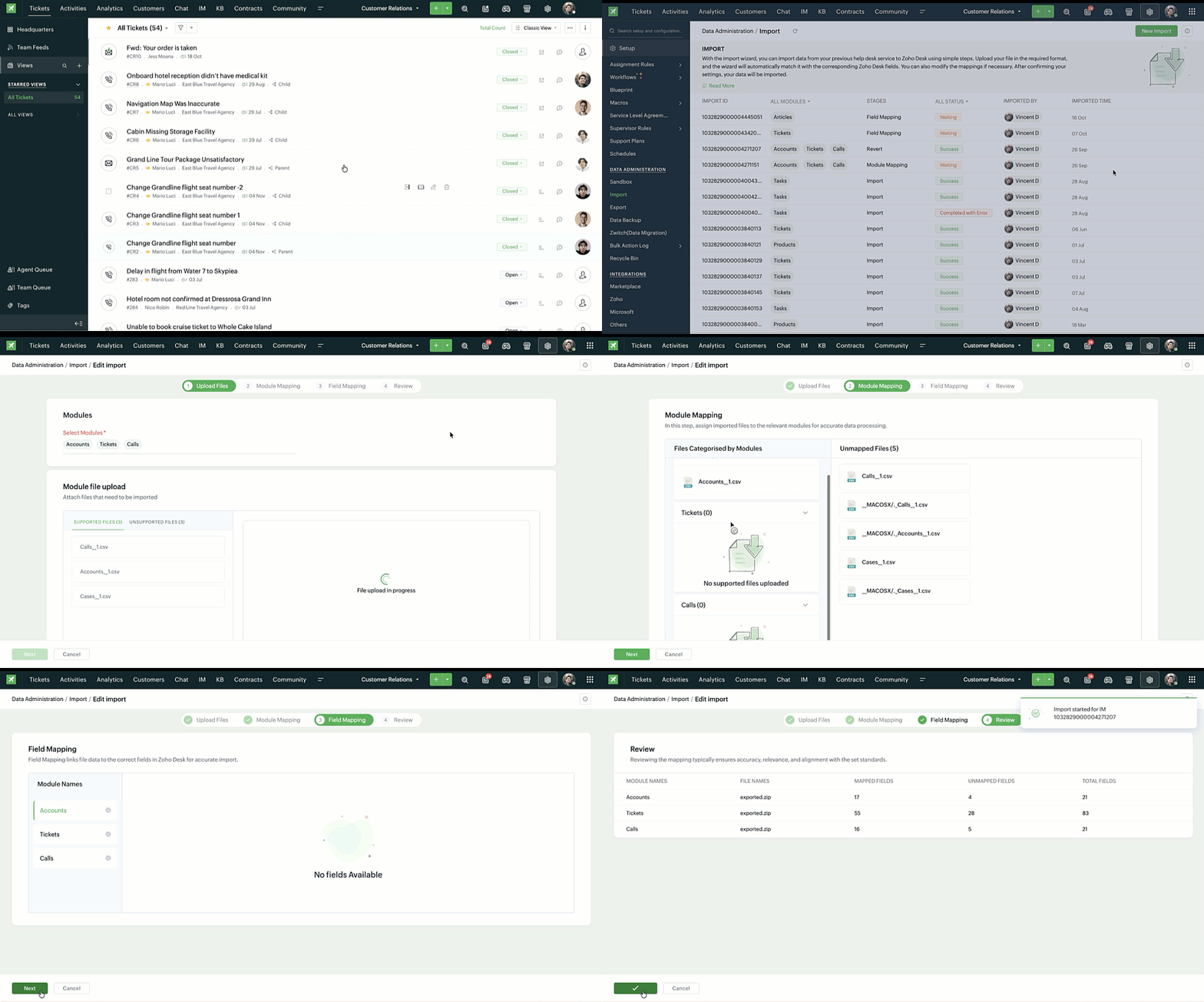
We’ve redesigned the data import process to ensure accurate field alignment and verify that every column in the uploaded file maps correctly with Desk fields before import. Here's how:
Streamlined Import Steps
Importing data is now more guided and detailed—from selecting multiple modules to mapping fields with clearer steps and improved instructions at every stage—it is now simpler to validate and manage imports.

User can now review and validate every mapping detail before proceeding:
- Field in File: Displays the column names contained in the first row of data in the uploaded file, which helps identify the data source for each field.
- Desk Fields: Shows the corresponding field names in Zoho Desk, ensuring that each imported data point lands in the right place.
- Field Format: Allows users to set formatting for data in a field, especially dates and times, for consistency after import.
- Sample Data from File: Displays real examples from the second and third rows of import file, letting a user verify that each mapping and data format looks correct before importing.


Import History
The Import History page shows every a record of the imported files in one place along with the following details:
- Import ID, module name, and import stage
- Import status (In Progress, Success, Failed, Waiting)
- Imported by and imported time

Additional capabilities
- Add data to existing imports: New records can be added to a completed import using the same module and field mappings. No need to start over; Desk automatically applies the previous mapping setup for continuity.
- Revert imports: Undo imported data in just one click. If users have added data multiple times (e.g., Add Data 1, Add Data 2), reverting will remove only the latest addition.
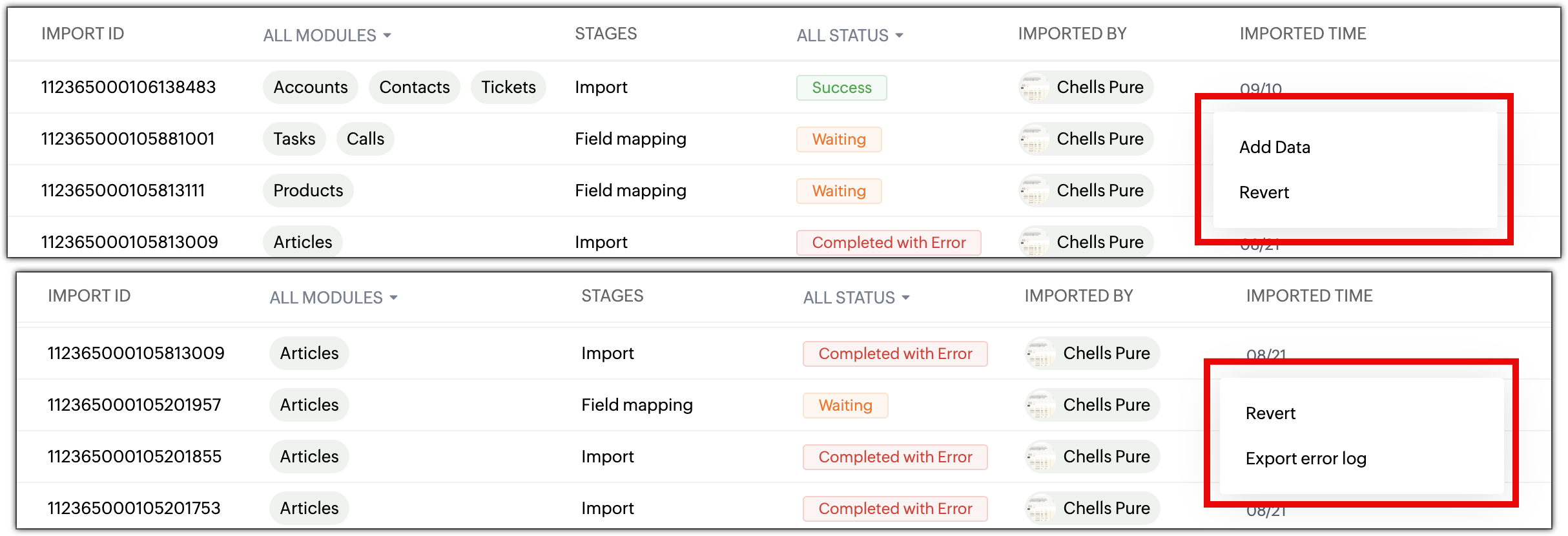
- Detailed error logs: Identify why an import failed in the new Error Logs section lists so the users can correct and re-import without repeating previous errors.

Points to remember
- Add Data is available only if the original import was successful.
- A user cannot modify mappings while adding data as it follows the original import setup.
- Unsupported file types (.xls, .pdf, etc.) will be automatically separated under Unsupported Files.
The new interface for import is now available in all data centers. For more details, please refer to the help document.
PM: @Nivedhan Senthilkumar
Regards,
Velantina V
User Ed | Zoho Desk
Topic Participants
Velantina V
Sticky Posts
2024 Email Authentication Standards: Elevating Security with Google and Yahoo
In contemporary email communication, email authentication plays a pivotal role in mitigating email fraud, spam, and phishing attacks. Brace yourself for a new level of security. Starting February 2024, Gmail and Yahoo will be implementing robust emailUsing Agent Email Address as From Address
Currently, while replying to a ticket, it is possible for agents to choose their own email addresses as 'from' addresses. Although we built this just for that little extra flexibility, in hindsight, it hasn't figured much in conventional usage. Almost all businesses prefer that responses to their customers' tickets be sent from the common support/service email address and NOT from those of individual agents. During personal interactions at events, some of you have even made passing mentions aboutEdit and Delete options in Comments
A lot of teams have been using ticket comments extensively to collaborate everyday. Notification Center further improved this experience by bringing real-time updates. As we continue to build more improvements to this experience, we've shipped a small-yet-importantWebinar 2: Supercharged customer support for growing business
Join us for this webinar and learn how to step up your support game using a real-time communication platform to generate happier, more successful customers. In this live webinar, we will will discuss the importance of SalesIQ for your support team and how it can help you: Understand your customers better and their journeys to proactively support and engage them even before they ask for help. Integrating real time conversations into Zoho Desk’s Support, providing a conversational customer serviceCustomize Colors of your Customer Self Service Portal
You asked for it. We heard you. We're happy to roll out the most sought after feature request, Customizing the Colors of your Customer Self-service Portal. Now you can set the color of your customer portal to mimic your company's web site, so that your customers visiting the portal will not feel alienated by the default theme. Go ahead and configure the color of the header, tabs, fonts and background according to your needs. You can either choose between default color themes like Blue, Grey, Green
Nederlandse Hulpbronnen

Recent Topics
filter on sheets mobile (iOS, iPadOS) does not work
re-posting this as a question because reporting as a problem netted zero responses... I have this issue on every spreadsheet, whether imported or created natively in Zoho Sheets. I can use on desktop without issue: but on iOS the filter dropdowns areHow to map fields from Zoho Recruit to Zoho People
I've got these fields from my Job Offer that I'm trying to map to the Work information fields in Zoho People, but they arent showing up. For example, how do I get the department name field (in the job post) to map to the work information field in ZohoMass email from Report output
Hi, I'd like to send a mass email based on a report output. The report is pulling multiple information from linked modules. Each line of the report ends up with a contact name, email and multiple field values pulled from the linked modules (some are customIntroducing SlyteUI : From Idea to a Working Interface in Minutes
Hello everyone! Are you spending hours building basic UIs? Does even the smallest customization feel like a major task? CRM customization should feel intuitive and straightforward, not time consuming or exhausting. SlyteUI makes this possible by simplifyingAdd Comprehensive Accessibility Features to Zoho Writer
Hello Zoho Writer Team, We hope you are doing well. We would like to submit a feature request to enhance Zoho Writer with a full set of accessibility tools, similar to the accessibility options already available in the Zoho Desk agent interface. 🚧 CurrentHow to see Tickets that require a response
When an agent checks his work he should be able to see a list of tickets that he has to reply to. Currently he can only see if the ticket is closed or open. However the ticket might be open but we are waiting for the customers reply, so there is nothingZoho Books' 2025 Wrapped
Before we turn the page to a new year, it’s time to revisit the updates that made financial management simpler and more intuitive. This annual roundup brings together the most impactful features and enhancements we delivered in 2025, offering a clear[Free webinar] Integrations in Zoho Creator - Creator Tech Connect
Hello everyone, We’re excited to invite you to another edition of the Creator Tech Connect webinar. About Creator Tech Connect The Creator Tech Connect series is a free monthly webinar featuring in-depth technical sessions designed for developers, administrators,Issue with attaching files to a task through the API
Hello! I've implemented a function that creates a task for every new bill that is created but I haven't been able to attach to the task the files which are attached to the bill. I have encountered multiple errors but the most common one is error 33003:Trigger workflows from SLA escalations in Zoho Desk?
Hey everyone, I’m currently working with SLA escalation rules in Zoho Desk and ran into a limitation that I’m hoping someone here has solved more elegantly. As far as I can tell, SLA escalations only support fairly limited actions (like changing the ticketCan I hide empty Contact fields from view?
Some contacts have a lot of empty fields, others are mostly filled. Is there a way I can hide/show empty fields without changing the actual Layout? I would like to de-clutter my view, and also be able to add information later as I am able. I would beAgents permission per department
Hi Team, can I setup permission for each agent what they can do in each department, for example I want account department agents to only have view access to support department tickets and not allowed to assign or reply to clients. I am sure this wouldAsk the Experts - Live Q&A webinar
Hello Community, We’re excited to host our very first Ask the Experts session! Join us on 7 April 2026 from 11 a.m. to 12 p.m. (IST) for this live webinar Q&A session, where you will have an opportunity to connect directly with our product experts, gainCliq iOS can't see shared screen
Hello, I had this morning a video call with a colleague. She is using Cliq Desktop MacOS and wanted to share her screen with me. I'm on iPad. I noticed, while she shared her screen, I could only see her video, but not the shared screen... Does Cliq iOS is able to display shared screen, or is it somewhere else to be found ? RegardsPrevent Automatic Milestone Inheritance for Newly Created Task Lists
Hello Zoho Projects Team, We hope you are doing well. We would like to request an enhancement regarding how new task lists inherit Milestone association in Zoho Projects. Current Behavior: At the moment, when a new task list is created below an existingHiding / removing Currency field from Layout
Hello, I'm working on the LEAD standard layout of Zoho CRM. I like to have it as minimal as possible for our team. I could remove most of the field, but Currency is not possible. As lead, I don't quite understansd the necessity to have Currency as mandatory.Updating Sales orders on hold
Surely updating irrelevant fields such as shipping date should be allowed when sales orders are awaiting back orders? Maybe the PO is going to be late arriving so we have to change the shipment date of the Sales order ! Not even allowed through the api - {"code":36014,"message":"Sales orders that have been shipped or on hold cannot be updated."}Can we have Backorder Management ?
Can we have Backorder Management ?Accept credit card payment for multiple invoices
We have a problem with Zoho Books. While we can charge a customer's credit card for an individual customer invoice, we cannot charge a customer's credit card for more than one invoice. In our business, it is common for a client to phone up and say, "HereAnyone in Australia using Zoho Books AND has their account with NAB?
Hi I have an account with both NAB and Suncorp. Suncorp transaction come in the next day however NAB transactions take 4-5 business days to appear. eg: A deposit made today in my Suncorp will be imported into Zoho tomorrow. A deposit made today to the NAB account will be imported maybe Saturday (Friday overnight). I have contacted both Zoho and NAB but noone seems to know why. I was just wondering if anyone else in Australia uses NAB and has this issue (or doesn't) maybe we could compare notes andNewby Questions - Vendors, Customers, and Income vs. Other Income Clarifications
Q1. For Deposits, there does not seem to be an option for "Income". "Other Income" is an option however. What is the process to add the option to assign a deposit to type "Income"? Q2. In many cases Vendors and Customer are the same. Vendors may purchaseISO 3166-2 Compliant Country and Regions
Zoho should consider implementing ISO 3166-2 standards for countries and regions in address dropdowns. It adds a lot of noise in the data when items added programmatically conform to ISO 3166-2 (e.g., TX for Texas, CA for Canada, etc.), but the few itemsTax on Imported goods charged by Shipping Company
Hi Folks, I imported goods from outside Canada, for better understanding I will give an example data. imported goods value: 2000$ The shipping company sent me an invoice containing the following information: Custom duty on imported goods: 400$ AdministrationInvoice Import Error: "Either Tax or Tax Exemption Reason is required" - Recurring Across All Attempts
Issue Description: I'm experiencing a critical issue with invoice imports in Zoho Books. Every import attempt fails with the same error message, regardless of the tax data provided: Either Tax or Tax Exemption Reason is required. This error is blockingZia Agents in Zoho CRM: a better way to set up digital employees
Hello everyone, If you've been using Zia Agents in Zoho CRM, so far using Connections was the only deployment method you're familiar with. You create an agent in Zia Agents (define its objective, write instructions, use tools, add knowledge base) andAmazon FBA integration - Handle invoice reconciliation under different GSTINs,
Dear Zoho Community, Thank you for the clarification regarding the Amazon FBA integration, default warehouse, and GSTIN mapping in Zoho Inventory. I understand that Zoho currently supports only one warehouse for Amazon FBA, and that all FBA orders areZoho CRM Copilot Connector
Hello, Are there plans to release a connector for Zoho CRM and Copilot? I'm in the early research stages of potentially switching our CRM solution to Microsoft Dynamics because of its out of the box integration with Copilot. The advantage being that weZoho Sheet for Desktop
Does Zoho plans to develop a Desktop version of Sheet that installs on the computer like was done with Writer?Automation Series: Notify Admin When User Accepts an Invitation
In Zoho Projects, a portal is an organisational-level workspace where user can manage multiple projects. To join a portal, a user will have to accept the portal invitation. However, it is important for admins to be in the loop when a user accepts theLimitation in Using Images or Icons within Dropdown Options in Zoho Survey
Zoho Survey does not support the inclusion of images or icons within dropdown (select box) options. Dropdown question types are limited to text-only choices, which restricts the ability to present visually rich options such as product images or icons.Zoho Bookings - Feature Request - Services Which Include A Resource and Consultant
Hi Bookings Team, My feature request is to have the ability to add Consultants and Resources to Services. Use case: Your business provides first aid training and there are certain equpment you require to provide the half day training. There are only specificWhat's New in Zoho Invoice | January – March 2026
Hello everyone! We're back with the latest updates and enhancements we've rolled out in Zoho Invoice from January to March 2026. Here's what's new this quarter: Compact Bilingual Template [GCC Editions] Tax Calculation on MRP for Tobacco Products [IndiaWhat is a realistic turnaround time for account review for ZeptoMail?
On signing up it said 2-3 business days. I am on business-day 6 and have had zero contact of any kind. No follow-up questions, no approval or decline. Attempts to "leave a message" or use the "Contact Us" form have just vanished without a trace. It stillcan change deal colors in bigin?
can be super useful if we can change colors deals process any way to do it?Facturation électronique 2026 - obligation dès le 1er septembre 2026
Bonjour, Je me permets de réagir à divers posts publiés ici et là concernant le projet de E-Invoicing, dans le cadre de la facturation électronique prévue très prochainement. Dans le cadre du passage à la facturation électronique pour les entreprises,Subform edits don't appear in parent record timeline?
Is it possible to have subform edits (like add row/delete row) appear in the Timeline for parent records? A user can edit a record, only edit the subform, and it doesn't appear in the timeline. Is there a workaround or way that we can show when a userZoho One - White Label
Releasing a white-label feature for Zoho One, or any software or service, can offer several advantages and benefits for both the company providing the software (Zoho in this case) and its users. Here are some key reasons for releasing a white-label featureGoogle Fonts Integration in Pagesense Popup Editor
Hello Zoho Pagesense Team, We hope you're doing well. We’d like to submit a feature request to enhance Zoho Pagesense’s popup editor with Google Fonts support. Current Limitation: Currently, Pagesense offers a limited set of default fonts. Google FontsClient Script | Update - Client Script Support For Custom Buttons
Hello everyone! We are excited to announce one of the most requested features - Client Script support for Custom Buttons. This enhancement lets you run custom logic on button actions, giving you greater flexibility and control over your user interactions.Setting default From address when replying to request
At the moment, if I want to reply to a request, the From field has three options, company@zohosupport.com, support@company.zohosupport.com, and support@company.com. The first two are really internal address that should never be seen by the customer andNext Page