Storage space in Zoho Forms: The ultimate guide to efficiently managing your data
Storage space in Zoho Forms: The ultimate guide to efficiently managing your data


Are you using Zoho Forms for data collection? As with any data-intensive application, understanding how storage space is calculated is essential. That's why we've created this guide— to show you everything you need to know about managing storage space in Zoho Forms! From understanding how storage space is calculated, to viewing and managing it effectively, we'll discuss it all below.
 
How is storage space calculated?
 
When it comes to calculating storage space in Zoho Forms, there are a few things you should keep in mind. The majority of your storage space is consumed by the signatures, images, and files uploaded to your forms.
 
How and where to view storage space:
 
Now that you understand how storage space is calculated, let's talk about how and where you can view your available space.
 
To view your entire Zoho Forms organization's storage usage, along with plan details, navigate to the Account Usage section and click View Usage. Refer to this link for more information.
 
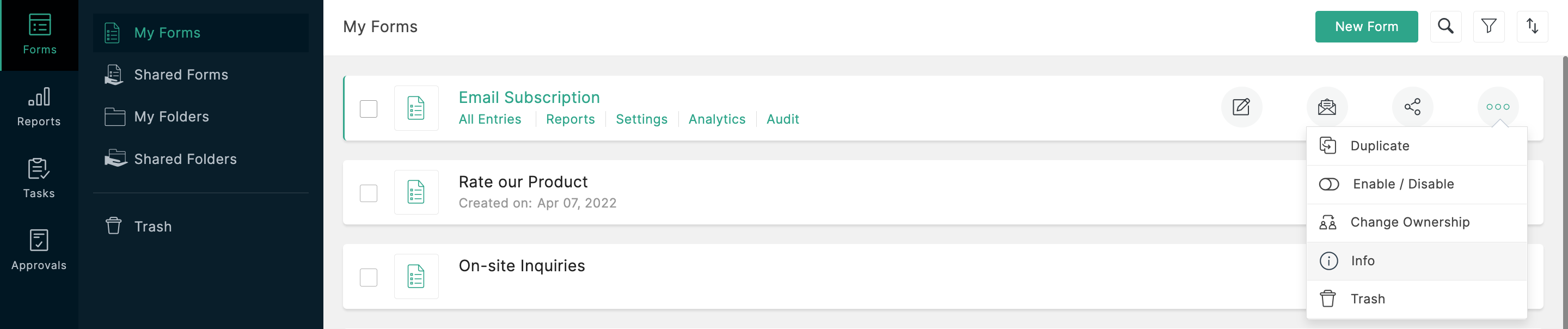
To view the storage information about a particular form, such as the total number of submissions and total amount of storage space consumed by the form, visit the 'Info' section. Refer to this link for step-by-step instructions.

 
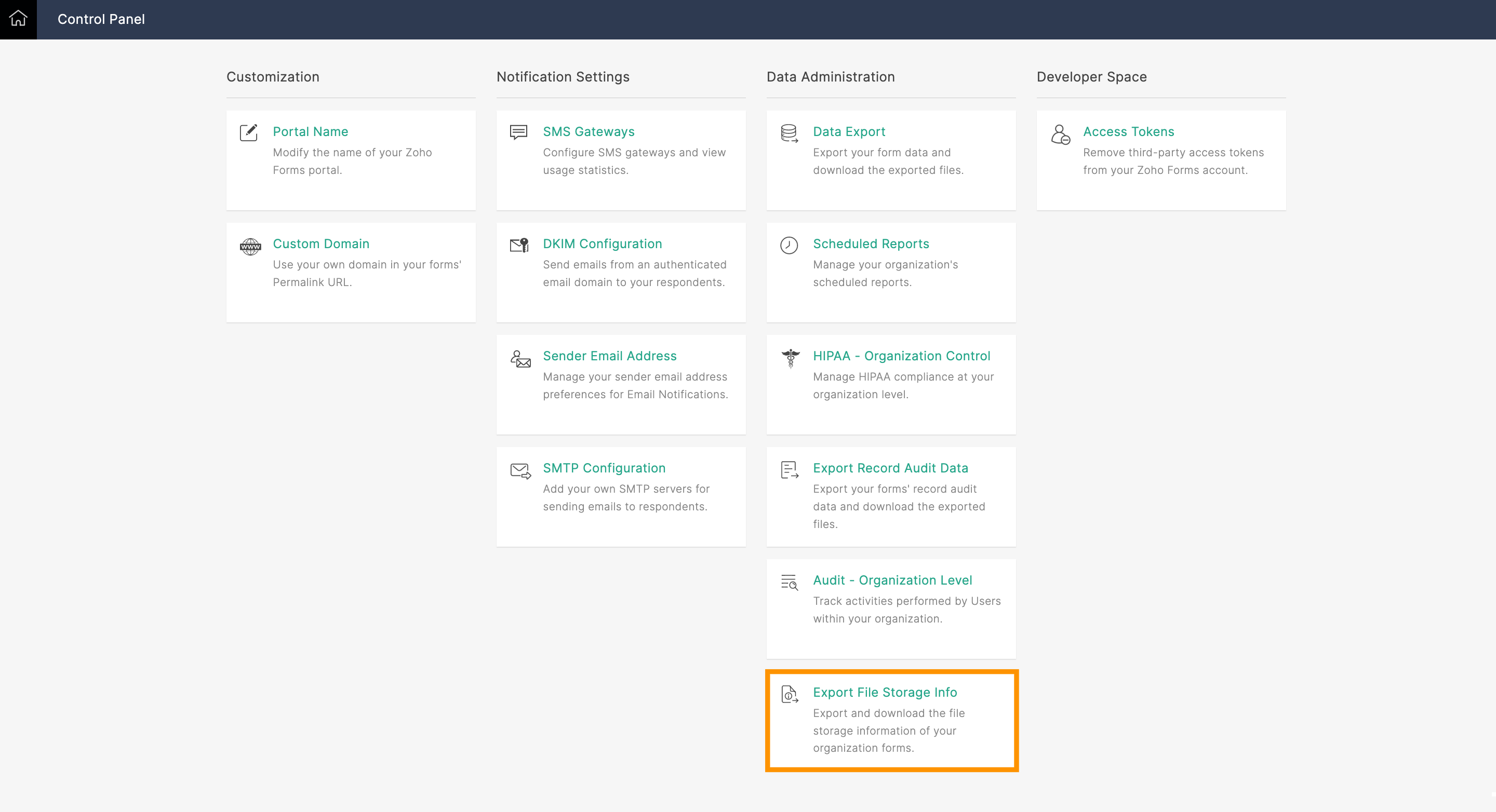
What if you're the Super Admin and need to view the storage space taken up by forms created by other users within your organization? That's when the Export File Storage Info option comes into play. Using this option, you can export your organization's file storage information as a CSV file. You'll see the following information for all forms created in your organization: form owner's email address, form title, and storage used by each form in MB.

 
What to do when you're about to reach your storage limit:
 
If you're worried about running out of storage space, Zoho Forms has got you covered! As long as you subscribe to a paid plan, we'll send an email alert to the Super Admin's account when you reach 90% of your total storage limit.
 
So, what happens when you reach your storage limit? There are a few things you can do. First, you can purchase our storage add-ons to increase the space available in your Zoho Forms account immediately. Check out our help link for more information on our plans and pricing.
 
Another option is to perform a data export and delete the files collected. This means you'll export all your collected data, and then delete the files/entries manually (you'll have to permanently delete them from the trash too) to free up storage space. Keep in mind that, once deleted, your files cannot be retrieved.
 
Preventing storage space issues with the Manage Form Attachment option:
 
To avoid running out of storage space in Zoho Forms, you could use the Manage Form Attachment option. This allows you to push collected files to a different cloud storage service, like Zoho WorkDrive, Dropbox, or Google Drive, upon each form submission.
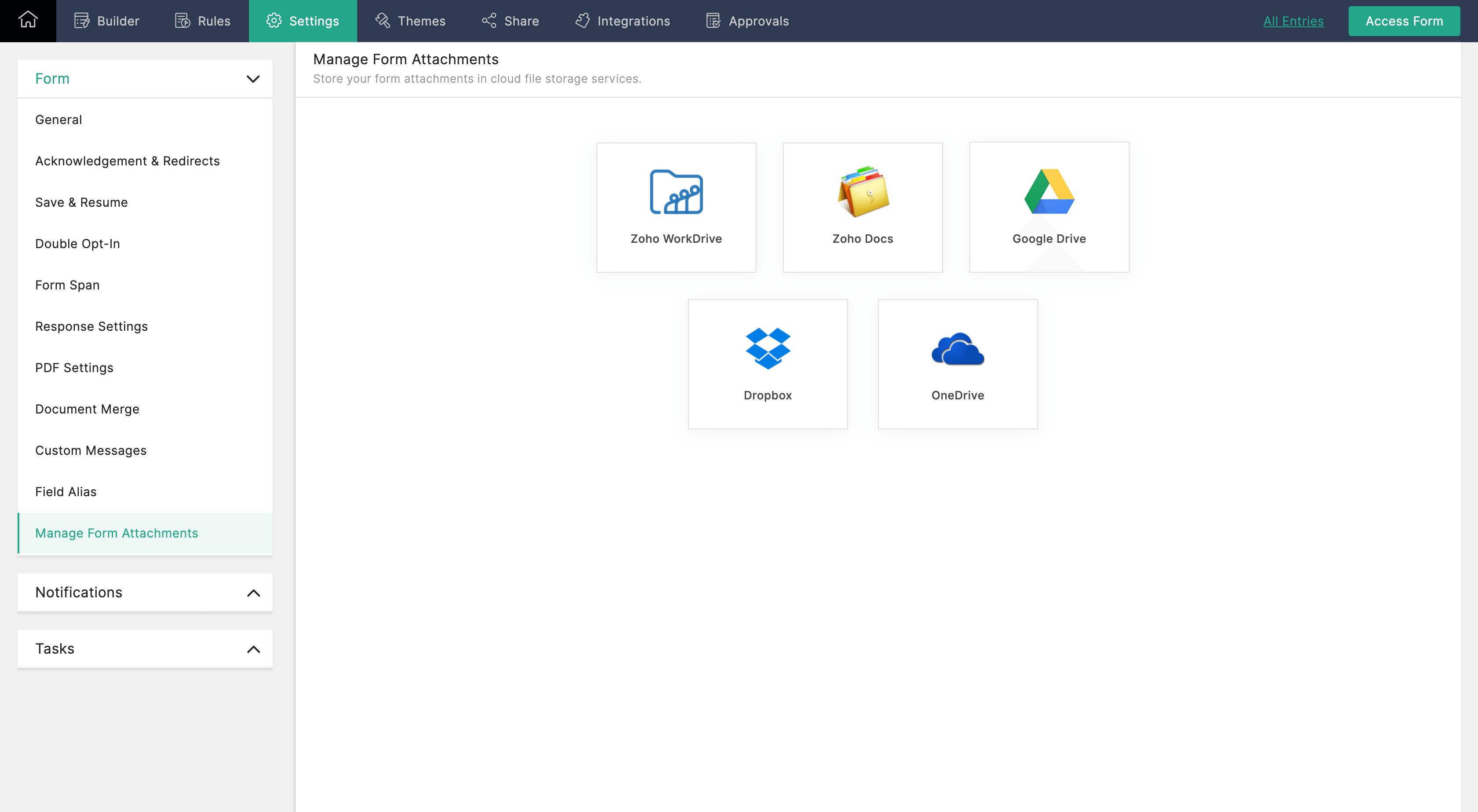
 

Once configured, the uploaded files will only be stored only by your selected file storage service, and will not be available in Zoho Forms. Check out our help link for more information on how to configure the Manage Form Attachment option.
 
Managing your storage space in Zoho Forms is essential to ensuring the smooth functioning of your forms. By monitoring your storage usage, you can avoid running out of storage space and take necessary actions to increase your storage limit or delete unwanted data.

Give this tip a try and let me know how it goes. You can also send your thoughts and feedback to support@zohoforms.com.


Until next time,
Niveditha

    • Sticky Posts

    • Easily track referrals with Zoho Forms

      Referral tracking can be a powerful way for businesses to understand where their leads are coming from. With Zoho Forms, tracking the referral sources of your leads is an easy and straightforward process. Here are some tips to help you make the most of
    • 9 Ways to use Zoho Forms this Navratri

      Hello form builders!Navratri is almost here! It is a time for celebration and culture in the Indian community, and organizing such a grand event can be overwhelming. But with the right tools, you can streamline the process and focus on creating unforgettable
    • The secret to collecting data from valid users

      Collecting accurate data is crucial for making informed decisions. Zoho Forms offers two efficient ways to validate user data and ensure that you collect entries exclusively from valid users. Double Opt-in: Double Opt-in is a privacy feature that ensures
    • Storage space in Zoho Forms: The ultimate guide to efficiently managing your data

      Are you using Zoho Forms for data collection? As with any data-intensive application, understanding how storage space is calculated is essential. That's why we've created this guide— to show you everything you need to know about managing storage space
    • Linking primary form submissions to a second form submission

      Let's imagine you have a form that you use to request a minimal amount of data from your users. To collect additional information, you redirect them to another form either automatically or based on a condition. During the course of redirection, you can

    Nederlandse Hulpbronnen


      • Recent Topics

      • Tickets without registration

        Hi, would it be possible to give customers the opportunity to be able to read their tickets without registration?
      • Zoho People > Performance Management > Appraisal cycle

        Hello All I am using this 2 users to test out how it work on Performance Management User 1 - Reportee User 2 - Reporting Manager : Li Ting Haley User 1 : Self Appraisal Error How do i fix this error?
      • SalesIQ Tip for Admins: Guide Operators in Real-time Without Interrupting the Chat

        Consider this. You're a supervisor and you're looking through the active conversations. An associate is mid-chat with a high-value prospect. The prospect asks something unexpected, maybe about a tailor-made subscription plan or a bulk discount that’s
      • Early Access: Check Printing in Zoho Books

        Hello Everyone,   Are you constantly writing checks to pay your vendors?   We've got a great news to share with you! You can now pay your vendors by writing and printing a check directly from Zoho Books. The feature is ready and we'll be rolling it out to our customers in phases.  It is available in the  US Edition of Zoho Books and also in the Global edition, where the country is selected as USA and the currency is USD.   Here’s a summary of what’s possible:   1. Write and print a check. 2. Make
      • Connecting Zoho Inventory to ShipStation

        we are looking for someone to help connect via API shipStation with Zoho inventory. Any ideas? Thanks. Uri
      • Syncing zoho books into zoho crm

        I was wondering how I can use zoho books in crm as I have been using them separately and would like to sync the two. Is this possible and if so, how? Thanks
      • Zoho no support response.

        Problem is Zoho support seems to be just a concept. Just completing my trial, am ready to purchae 3 user subscriptions pending answer to a question, submitted two suport request during my trial that weren't responded to. Gave up trying the 888 line. Hard to imagine my production data in hosting environment with no support response.
      • Updating transaction number series for fiscal year 2026-2027 in Zoho POS

        A fiscal year or financial year is a 12-month period that businesses follow to manage and track their financial activities such as expenses, revenue, and taxes. This doesn't need to match the calendar year (JAN-DEC) and varies based on region, and tax
      • Trigger workflows from SLA escalations in Zoho Desk?

        Hey everyone, I’m currently working with SLA escalation rules in Zoho Desk and ran into a limitation that I’m hoping someone here has solved more elegantly. As far as I can tell, SLA escalations only support fairly limited actions (like changing the ticket
      • Add Bounced as an Email Action / Notification for Bounced Emails

        This is one of the hard requirements for the clients we're servicing. They want to get an internal email notification whenever the email they sent to their contacts have bounced, so that they can look into it and update the email address. Currently, the
      • Bank Feeds

        Since Friday my bank feeds wont work. I have refreshed feeds, deactivate and reactivate and nothing is working
      • Mass emails - Allow preview of which emails will receive the email based on the criteria

        Feature request. Please allow us to view and confirm the exact recipients of the mass emails based on the criteria we've chosen before sending. It can be quite sensitive if you send the mass email to some wrong accounts accidently, so it would be great
      • Lack of Looping and Carry-Forward Functionality in Zoho Survey

        Zoho Survey currently does not support looping or carry-forward functionality, meaning it is not possible to dynamically generate follow-up questions based on each option selected in a previous question or to pipe selected responses (such as {Looping
      • How I Implemented Subscription-Based Access Control and Expiry Handling in Zoho Creator

        I recently worked on a use case where users come into the application to request a service, but they should only be able to continue the process after completing a subscription. The challenge was not just controlling access, but also making sure that
      • sync two zoho crm

        Hello everyone. Is it possible to sync 2 zoho crm? what would be the easiest way? I am thinking of Flow. I have a Custom Module that I would like to share with my client. We both use zoho crm. Regards.
      • Forecast in Zoho CRM Just Got Smarter with an upgraded Zia Intelligence

        Hello Everyone, We are here with an interesting enhancement to Forecasts in Zoho CRM — Enhanced Zia Insights for your sales Forecast. Imagine a regional sales manager reviewing their team’s performance using forecasts in Zoho CRM. Instead of switching
      • Option to Delete Chats in IM

        Currently, there is no option to delete any chats in IM, regardless of their source.
      • Update TDS and TCS rates for Income Tax Act, 2025 (effective April 1, 2026)

        Hello everyone, The Income-tax Rules, 2026 (G.S.R. 198(E), dated March 20, 2026) have been notified, marking a significant structural shift in India’s direct tax framework. From April 1, 2026, the Income Tax Act, 2025 replaces the Income Tax Act, 1961.
      • What is a realistic turnaround time for account review for ZeptoMail?

        On signing up it said 2-3 business days. I am on business-day 6 and have had zero contact of any kind. No follow-up questions, no approval or decline. Attempts to "leave a message" or use the "Contact Us" form have just vanished without a trace. It still
      • Service line items

        Hello Latha, Could you please let me know the maximum number of service line items that can be added to a single work order? Thanks, Chethiya.
      • Automation Series: Auto-assign Resources as Task Owners

        In Zoho Projects, task ownership can be set automatically during task creation, allowing resources to be assigned based on the task name. Resources are work equipment or tools added to the portal to monitor their usage across projects. They can be assigned
      • Zoho CRM Email Templates 100% Width No Background How?

        Hi, On the Zoho CRM Email Templates in setup > customization > templates > new templates > I choose blank template, but still it puts in a gray background and a max width for the email. I just want to make an email that looks like an email I would send from gmail that has no background or max width. How do you do this? 
      • Subform edits don't appear in parent record timeline?

        Is it possible to have subform edits (like add row/delete row) appear in the Timeline for parent records? A user can edit a record, only edit the subform, and it doesn't appear in the timeline. Is there a workaround or way that we can show when a user
      • AI secretary

        In our company, Claude is the secretary and creates inquiries and schedules from Gmail. You no longer have to enter them yourself. The secret is that we created an MCP server that connects to CRM. https://x.com/Mac_nishio/status/1917954562566328694
      • 5 small changes to Recruit that make a big difference

        Sometimes, the biggest improvements aren’t new features, they’re small changes that make everyday actions feel smoother. Over the past few weeks, we’ve made a few such updates across Zoho Recruit. They’re subtle, but together, they remove friction from
      • Project Management Bulletin: March, 2026

        We are passionate about equipping our users with efficient solutions that help them run their businesses successfully. Our collective efforts over the past 2 years have culminated in the launch of Sprints 3.0— built with reliable features, impactful integrations,
      • New security enhancements for portal users: MFA and password management

        Hello everyone, We are excited to announce three major security enhancements that are now available to portal users in Zoho CRM: Organization-wide multi-authentication for portal users - Admins can enforce multi-factor authentication across the entire
      • What matters more in Zoho implementations: tools or system architecture?

        I recently worked on a full-stack migration for a catering equipment business using Zoho One with Shopify, and it raised a few interesting observations. The setup included migrating a large product catalog (around 9,700+ SKUs), integrating multiple supplier
      • [Free Webinar] Learning Table Series 2026 – Customer agreement & contract management using Zoho Creator

        Hello everyone, We’re excited to announce the next session in Learning Table Series 2026, where we will continue with our purpose-driven approach—focusing on how Zoho Creator’s features help solve real-world business challenges. Each session in this series
      • Zoho Payroll's USA and KSA editions are available in Zoho One!

        Greetings! We’re excited to share that Zoho Payroll, currently available only in India and the UAE, is now introducing the KSA (Kingdom of Saudi Arabia) edition and the USA (United States of America) edition, and these editions are now available in Zoho
      • Looking for Guidance on Building a Zoho Website

        I'm exploring the possibility of building a custom website with specific features using Zoho as an alternative platform. My goal is to create something similar to https://gtasandresapk.com , with the same kind of functionality and user experience. I'd
      • Multilingual website feature

        Would be a great feature to have. I saw that this feature was available for backstage. I think it could be done for zoho sites too.
      • [Webinar] Modernize your sales engine with agentic analytics

        Traditional sales decision-making methods aren't cut out for modern businesses. Leveraging AI in sales helps businesses actively respond to the changing dynamics of the market. Agentic AI is letting sales teams across industries make better decisions
      • Built-in Date Functions in Zoho Analytics Query Tables

        I have a doubt about whether Zoho Analytics Query Tables provide built-in functions for start date, end date, and the current month
      • Zoho Commerce in multiple languages

        When will you be able to offer Zoho Commerce in more languages? We sell in multiple markets and want to be able to offer a local version of our webshop. What does the roadmap look like?
      • Nimble enhancements to WhatsApp for Business integration in Zoho CRM: Enjoy context and clarity in business messaging

        Dear Customers, We hope you're well! WhatsApp for business is a renowned business messaging platform that takes your business closer to your customers; it gives your business the power of personalized outreach. Using the WhatsApp for Business integration
      • Zoho Recruit mailserver get blocked by Microsoft!

        Hi, We have experienced this issue twice now, where Zoho Recruit outbound IP addresses are being blocked by Microsoft. We are confident that Microsoft is the blocking party, as all outbound emails to candidates with @hotmail.com, @live.com, and @outlook.com
      • Connectivity issues with Google Calendar and third-party integrations

        Description: We are currently experiencing a critical failure with Zoho CRM third-party connections. This issue is heavily affecting our primary workflow. Symptoms: Sync Failure: Existing Zoho CRM to Google Calendar connections have been failing for approximately
      • How can I export all Deluge code across the application?

        I’m working on a application with multiple forms, reports, and HTML views, where Deluge scripts are used across workflows, field actions, and custom functions. Is there a way to export all Deluge scripts into a single file for easier search?
      • First Name in Mail

        While sending a mail/message to the user, I want only the first name to be displayed—for example: “Hi John” instead of the full name using "Hi ${Name_Field}"
      • Next Page