Team Modules in Zoho CRM: Empower Every Team, Break Silos and Boost Collaboration
Hello Everyone,
The ultimate goal of every business is to achieve customer delight—and achieving customer delight cannot happen with the effort of a single person or team. At Zoho CRM, we believe that it’s a shared mission that spans across your entire organization. From Sales and Pre-sale to Marketing, Onboarding, and beyond, every team plays a role in shaping the customer's experience.
While sales teams are the champions that lead customer conversions and make the tough negotiations with prospects, the ultimate clinching of a business deal is the result of cumulative efforts of multiple minds. So instead of limiting Zoho CRM's capabilities to just one team, we introduced Teamspaces to onboard multiple customer-facing teams onto the CRM platform.
However, how do these teams work in the CRM system?
Presenting Team Modules, a powerful new way to empower all customer-facing teams with the tools they need to manage relationships and contribute to business success.
With Team Modules, each department within a team can build and manage their own processes directly within Zoho CRM; there will be no need to rely solely on central admins. This enables cross-functional teams to work in sync toward a common goal: delighting your customers, every single day.
In this post, we’ll walk you through how Team Modules fit into Zoho CRM, the availability of automation within them, manage team users, and enable seamless coordination through requests.
How do Team modules fit into Zoho CRM?
In traditional CRM setups, the authority to configure processes across all teams typically rests with central admins — a necessary measure to ensure data privacy and consistency. However, this often creates bottlenecks, delaying essential internal processes.

With Zoho CRM for Everyone, we’ve changed that. Now, multiple customer-facing teams can operate from within their dedicated Teamspaces and each teamspace can have its own Teamspace Admin, who oversees the activities and workflows specific to that team. Learn more.
Within every Teamspace, processes can be configured and executed through Team Modules. Team modules are customizable modules that enable teams to set up their own workflows and manage data independently. Learn more.
Let's take the example of the Sales team. They may handle multiple processes such as Customer Conversions, Sales Administration, Renewals, and more. Each of these processes is typically managed by different departments. These departments with their own processes and responsibilities can be captured via Team Modules.
To ensure data security and integrity, Team Modules come with module-level access controls that let you manage permissions with precision. Team Modules include different types of users or roles:
- Team module admins,
- Managers,
- Members,
- Participants, and
- Requesters.
From our example above, the department heads for each sales process in the sale team can be assigned as team module admin. Team members from the department can be assigned with other types of users or personas depending on their roles and responsibilities.
Each role or type of user in the team module have specific permissions, ensuring that they perform their tasks without compromising data access or privacy. Learn more.

In conclusion, while a central admin will certainly continue to operate at the highest level to take care of company-wide priorities and governance, team module admins now have the flexibility to configure and run their own modules — leading to faster, more efficient operations.
The image below depicts a CRM system built for an ecommerce industry where there are multiple teams within their teamspaces, having multiple processes captured in a team module and each process will be managed by a team module admin.

Automation in Team Modules
Empowering teams to build their own processes means giving them the tools to automate those processes too. Team module admins or users with Create Team Module permissions enabled can set up automations for their team.
Team Module Admins or users with the appropriate permissions can:
- Create workflow rules, blueprints, approval processes, and assignment rules
- Design canvas pages, webforms, layout rules, validation rules, and wizards
This lets them handle a huge set of use cases when it comes to common tasks like assignment, approval, process compliance, notifications, etc. Learn more.
Let's look at an example of automation configured in a case study team module of the Marketing Team:
- An assignment rule to assign enterprise case studies to marketing managers automatically
- A workflow rule to send notifications to customers to keep them in the loop.
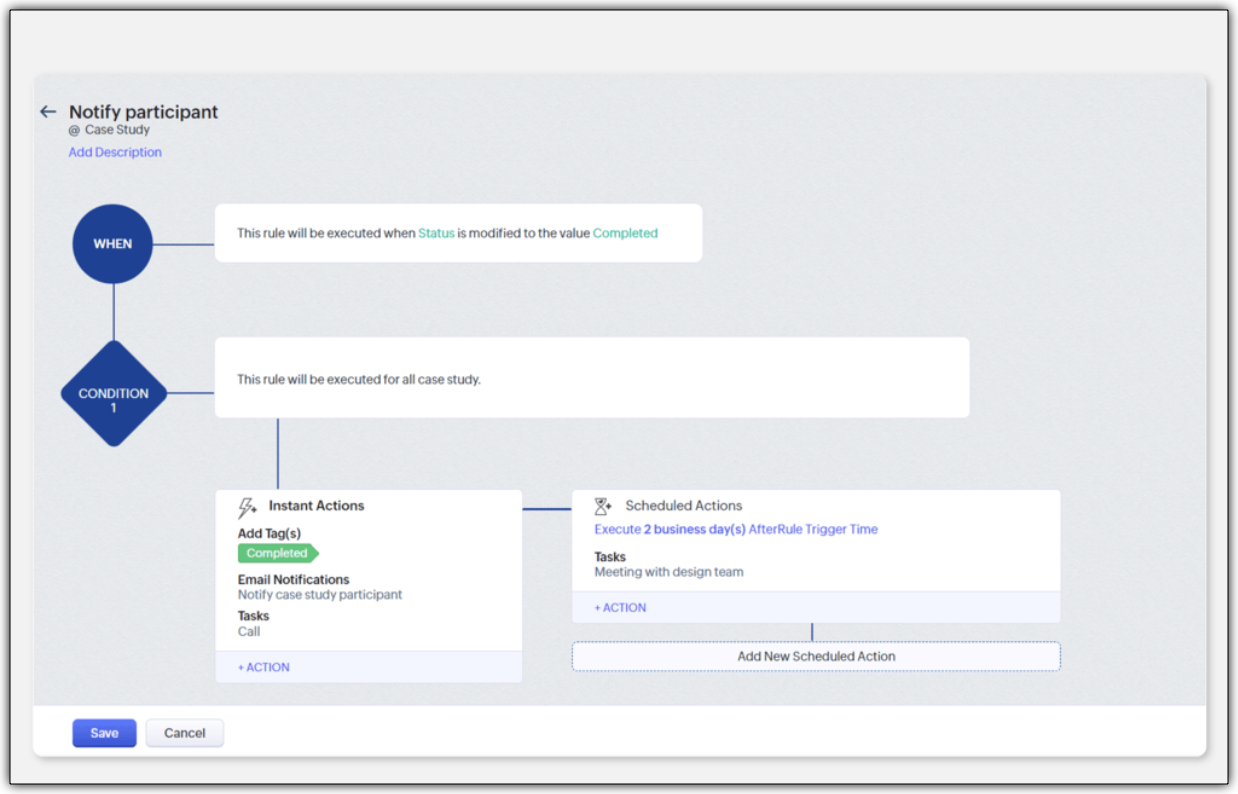
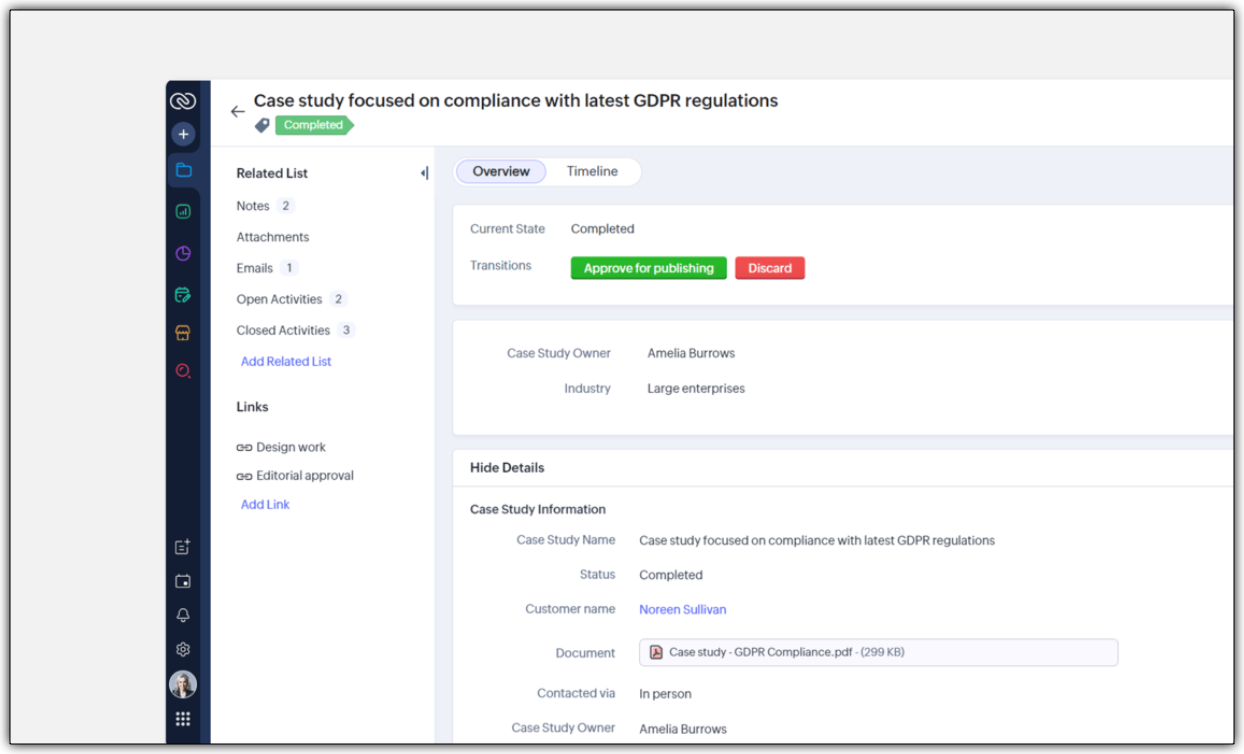
- A blueprint to streamline the case study publishing process
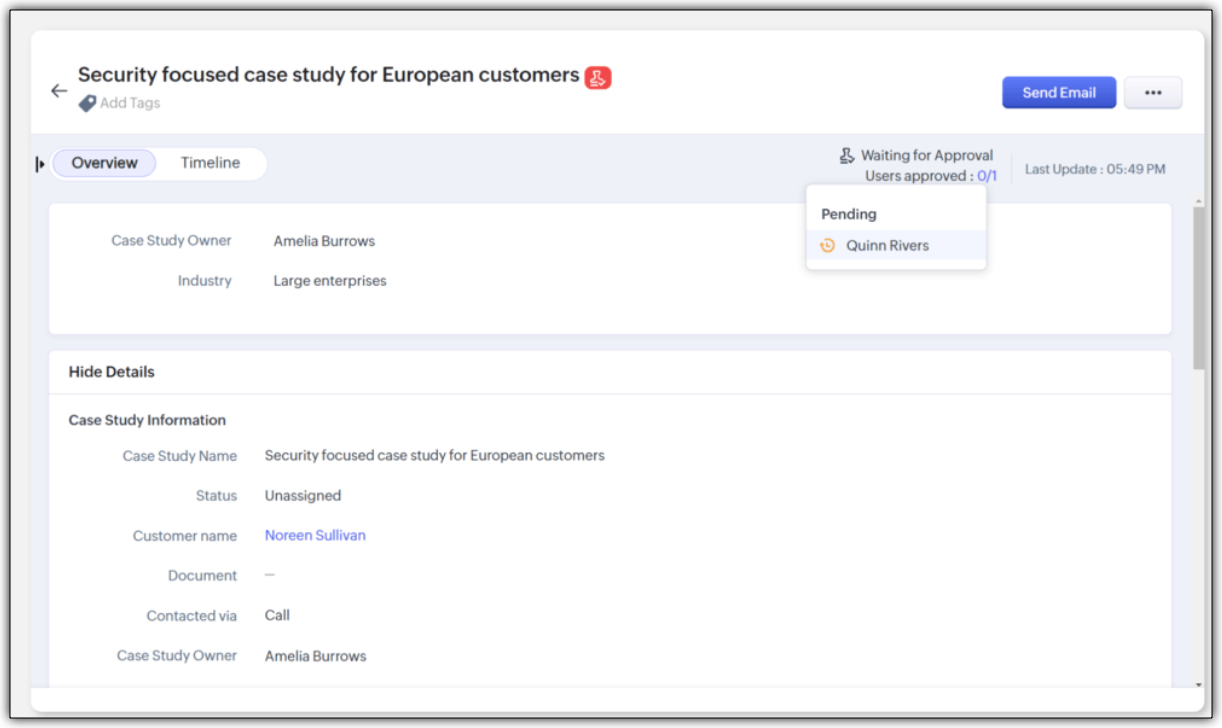
- An approval process to ensure that case studies are signed off by a team module manager
Improving Team Coordination
Winning a customer is often like running a relay race where one team hands off to the next until the goal is achieved. With multiple customer-facing teams onboard, how can they coordinate to achieve their goal - in case of any industry, it would be to close a deal successfully.
For example, in a typical SAAS industry, there would be multiple customer-facing teams : Sales team, Marketing team, Pre-sales team, Onboarding team and a Training team. Once all the teams are onboarded onto the CRM platform, teams would require information from each other during a sales process. Example,
- While the sales team is negotiating their next big deal, they may have to request supporting material like case studies from the marketing team.
- If a marketer wants to write a better case study, in turn, they may like to raise a request for customer implementation from the solutions experts team and so on.
In our current-day CRM system, these requests or the need for information between teams happen outside the CRM ; via chats, emails, or spreadsheets, thus leading to disconnects and inefficiencies.

CRM for Everyone addresses this challenge by making team coordination a seamless part of the user interface by introducing Requesters.
Each team could register a need for a deliverable from another team in order to move ahead in the process by raising what we call a "request". In the above case, the sales team is the "Requester" for Marketing, Presales, and Legal teams requesting different materials and action items in order to close a sale. Learn more

They can keep a track of their requests without being privy to their other teams' internal operations directly from the "My Requests" tab. The Requesters can also be kept informed once their requests have been met. In our example, when ultimately the case study does arrive, the sales team that "requested it" can follow it up, not via chat or email, but in the CRM itself.

How can users be assigned as Requesters?
Team Module Admins can assign Requesters in three ways:
- Individually : Add specific users when setting up a Team Module.
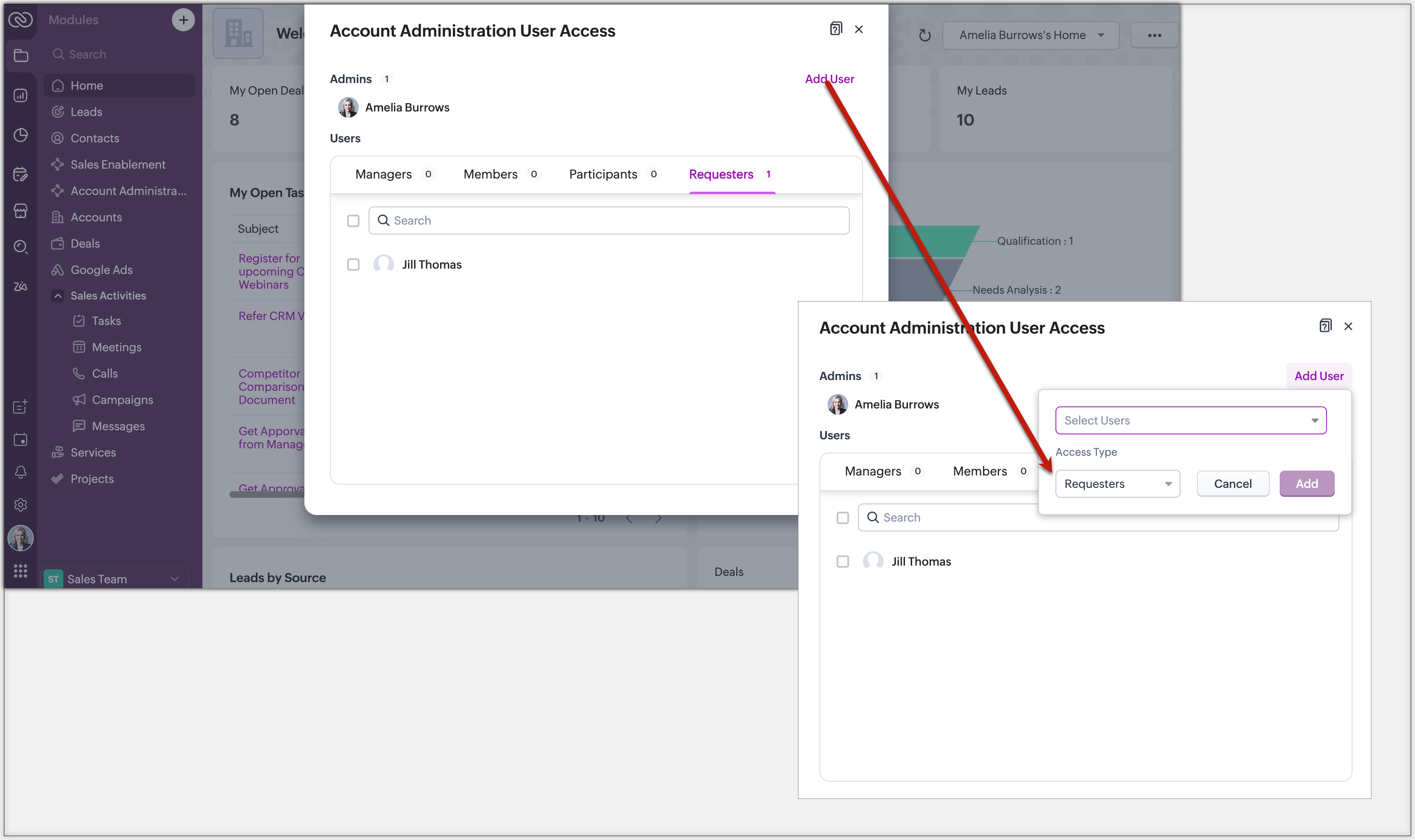
- QR Code or Link : Generate a link or code from requester settings. Anyone with access can instantly join and submit requests, no manual effort needed.
Example: Marketing can embed a QR code in an internal newsletter to allow regional sales reps to submit campaign briefs easily.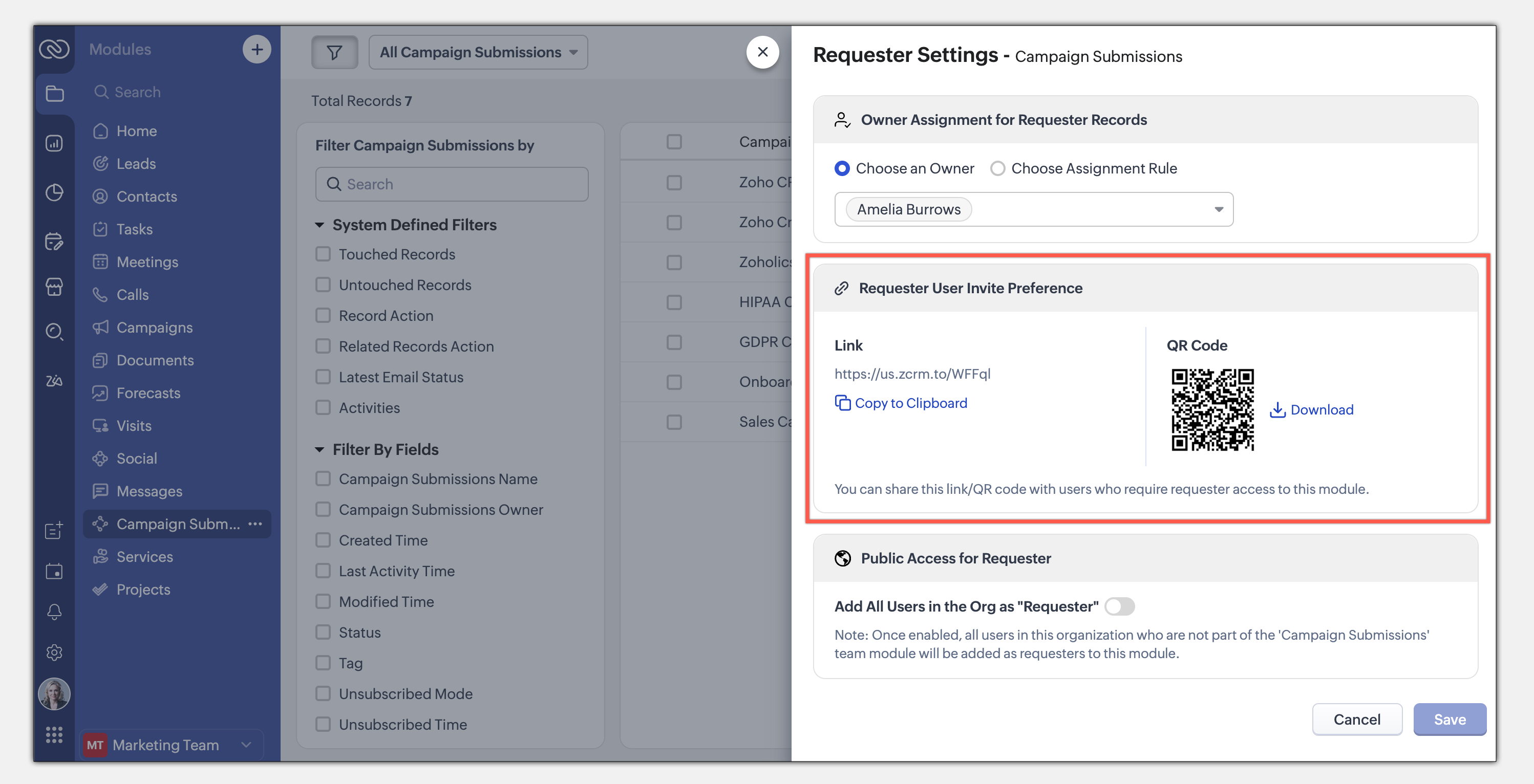
- Enable All Users : Allow all users in the organization to become requesters in a given module.
Example: A Sales Enablement module can be accessed by Product, Marketing, or Training teams to submit requests for sales insights.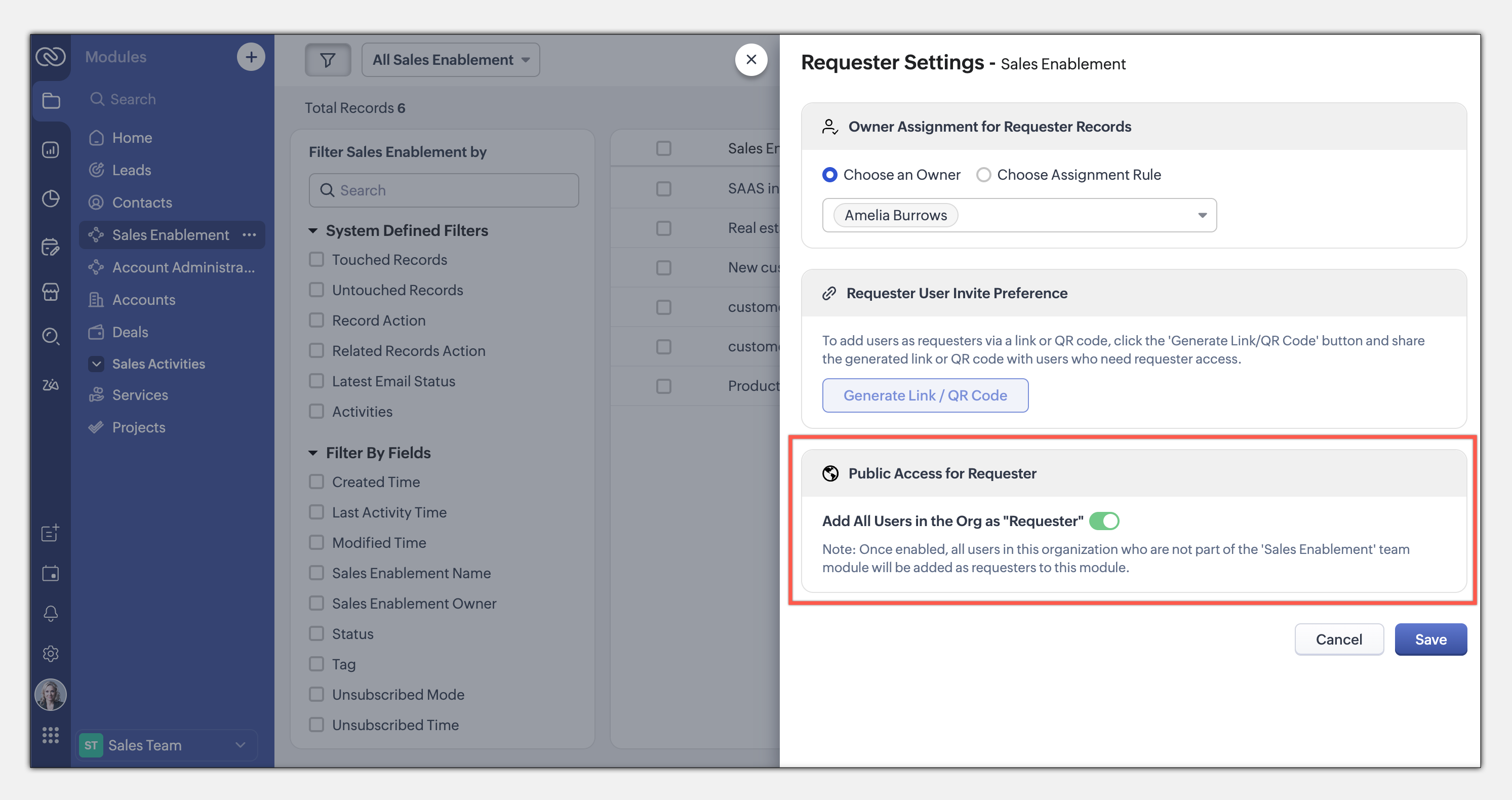
This seamless, integrated request system ensures teams can collaborate efficiently while maintaining privacy and process control. Learn more
This entire loop of requests and coordination between teams to meet a common goal is woven into the CRM interface as an integral part of the system, thus eliminating communication silos. This also puts us a good step closer to improving the adoption of CRM by several teams across the organization.
The details and nitty-gritty of who can manage what, who can view which data sets, etc., have to be carefully decided and managed. So CRM for Everyone also packs in an easy interface for each team to organize and manage their team modules.
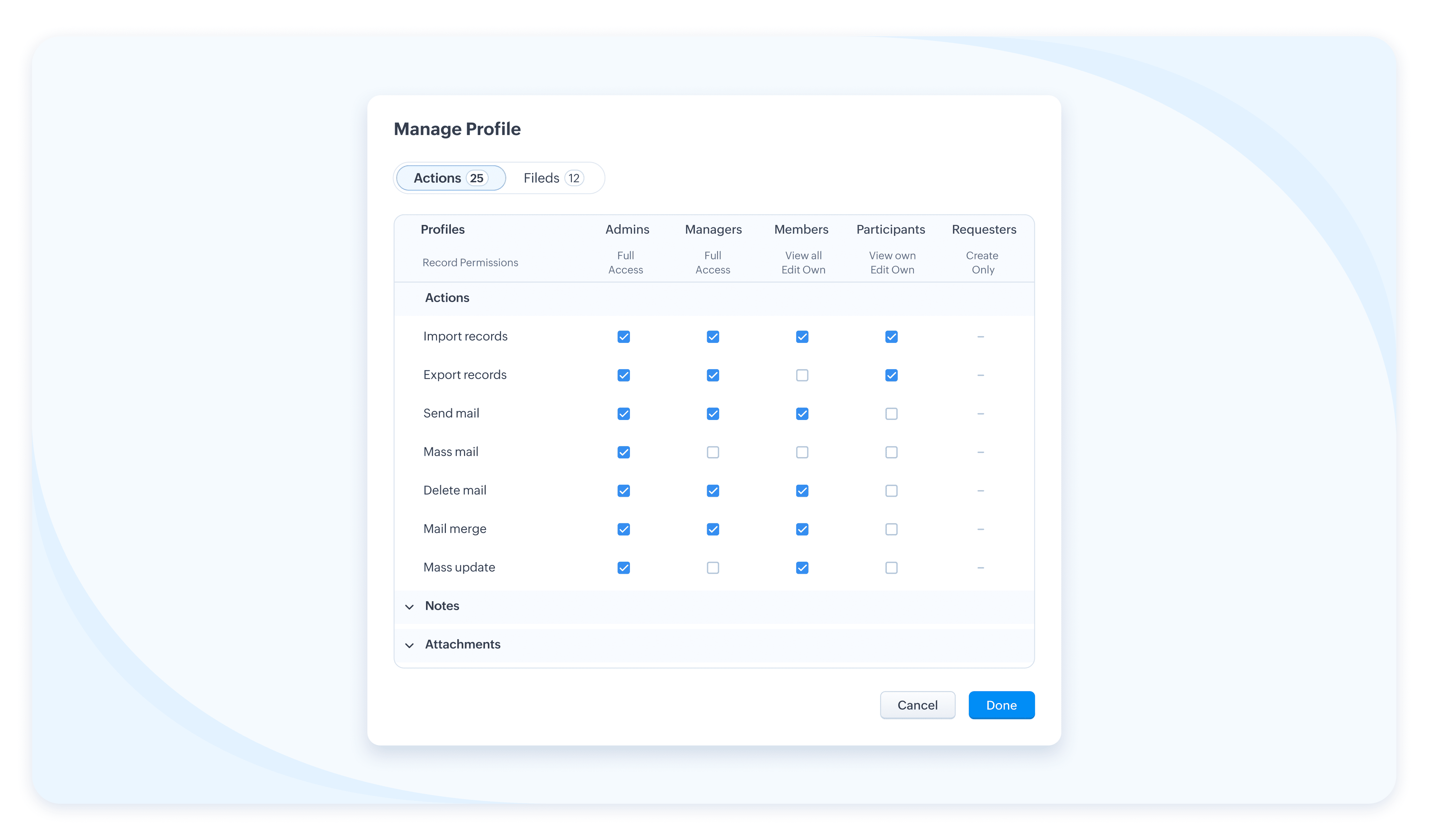
The details and nitty-gritty of who can manage what, who can view which data sets, etc., have to be carefully decided and managed. So CRM for Everyone also packs in an easy interface for each team to organize and manage their team modules.
Team Users For Team Modules
When we aspire to democratize the system and empower various non-sales teams, we hear you thinking, how do we take it from being an aspiration to ground level implementation? What motivates an organization to bring, most likely a large number of non-sales users, on to Zoho CRM? What’s their incentive?
Well, so far, the non-sales teams have probably not had the opportunity at all, to be a part of the same CRM system where all the customer data and processes are housed. The fact that Team Module will now give them that opportunity to be a part of this crucial system and simplify their work management is an incentive in itself, so to speak.
Of course, there is also a cost-related incentive. Since the non-sales team members will typically not need access to all of CRM, we have created a new type of user license to encourage their access to CRM— called the Team User license, which is priced lower than a regular CRM user license, and by design will allow only limited access to CRM.
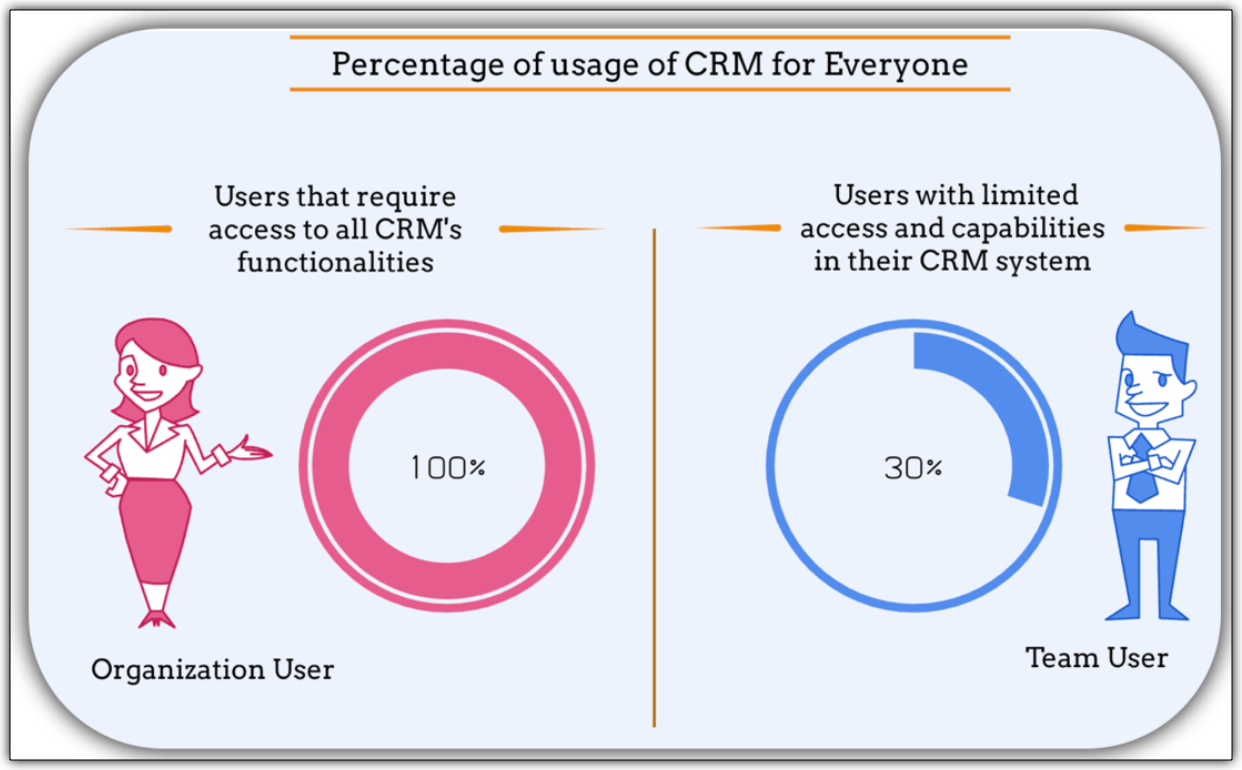
With the introduction of Team User licenses, we will now have two types of CRM users:
➤ Organization User
➤ Team User
Well, so far, the non-sales teams have probably not had the opportunity at all, to be a part of the same CRM system where all the customer data and processes are housed. The fact that Team Module will now give them that opportunity to be a part of this crucial system and simplify their work management is an incentive in itself, so to speak.
Of course, there is also a cost-related incentive. Since the non-sales team members will typically not need access to all of CRM, we have created a new type of user license to encourage their access to CRM— called the Team User license, which is priced lower than a regular CRM user license, and by design will allow only limited access to CRM.
With the introduction of Team User licenses, we will now have two types of CRM users:
➤ Organization User
➤ Team User
- The Organization User is your regular power CRM user who will need access to all CRM data and most functionalities. Typically, a sales team member.
- A Team User is typically a non-sales team member, whose work could be managed in CRM alongside sales, as they have a part to play in the entire customer-oriented process. For example: A presales executive who needs to step in to give a product demo to a customer right after a salesperson's pitch. Alternatively, a Legal team member might have to process contract signatures while closing a deal. Additionally, a Training team member who will take up a training request for a customer on-demand.
The legal team members, trainers, or pre-sales executives can make contributions only in their respective Team Modules. They don't require the entire range of features in the CRM system. In fact, they won't even need access to some key organization modules. They log into the system to fulfil their responsibilities, complete their deliverables, and then log out.
Such users are your ideal candidates for Team User Licenses.
Such users are your ideal candidates for Team User Licenses.
What is the cost of a Team User license?
Team User licenses are priced significantly lower than a regular CRM license and enable you to have cost savings, depending on how you want to distribute the Org Vs Team licenses among your users.
A Team User License costs:
➤ $9/ team license/ month (if paid annually)
➤ $11/ team license / month (if paid monthly)
For instance, Zylker Corp has onboarded 50 members of their sales team to the Zoho CRM Enterprise edition. They now wish to add an additional 30 non-sales customer operations members as Team Users. The distribution of licenses for these 80 users (on the Enterprise edition) will be as follows:
Organization Users - 50 users * 40 $ = 2000 $
Team Users [Annual ] - 30 users * 9 $ = 270 $
-----------------------------------------------------------------
Total Cost - 80 users = 2270 $
Let's see how much they would have to pay without this license in case they have to onboard all users using the regular CRM Org License :
All users as Organization users, therefore, 80 users * 40 $ = 3200
Thus, Zylker Corp's total savings with the Team User License is 930 $ which is significantly lower than regular CRM licenses.
A Team User License costs:
➤ $9/ team license/ month (if paid annually)
➤ $11/ team license / month (if paid monthly)
For instance, Zylker Corp has onboarded 50 members of their sales team to the Zoho CRM Enterprise edition. They now wish to add an additional 30 non-sales customer operations members as Team Users. The distribution of licenses for these 80 users (on the Enterprise edition) will be as follows:
Organization Users - 50 users * 40 $ = 2000 $
Team Users [Annual ] - 30 users * 9 $ = 270 $
-----------------------------------------------------------------
Total Cost - 80 users = 2270 $
Let's see how much they would have to pay without this license in case they have to onboard all users using the regular CRM Org License :
All users as Organization users, therefore, 80 users * 40 $ = 3200
Thus, Zylker Corp's total savings with the Team User License is 930 $ which is significantly lower than regular CRM licenses.
Team Modules in Zoho CRM make it easier for all your customer-facing teams to manage their own work, collaborate smoothly, and stay aligned. With CRM for Everyone, you can break down silos, speed up processes, and deliver better customer experiences—together.
It’s a smarter, more connected way to use CRM across your organization.
Start using Team Modules today and bring every team closer to your customers.
Regards,
Serena Woolridge
Resources
Topic Participants
Serena Woolridge
Sticky Posts
Introducing Multiple Sandbox Types and Support for Module's Data Population
Register here for the upcoming Focus Group webinar on Multiple Sandbox | Help documentation to learn more about the new enhancements Hello everyone, Sandbox in CRM is a testing environment for users to create and test new configurations like workflowGood news! Calendar in Zoho CRM gets a face lift
Dear Customers, We are delighted to unveil the revamped calendar UI in Zoho CRM. With a complete visual overhaul aligned with CRM for Everyone, the calendar now offers a more intuitive and flexible scheduling experience. What’s new? Distinguish activitiesVoC in Zoho CRM is now data savvy: Explore response drilldown, summary components and participation in CRM criteria
VoC has all the goods when it comes to customer intelligence—which is why we're constantly enhancing it. We recently added the following: A customer drilldown component that shows you the list of prospects and customers behind a chart's attribute ExpandedWrapping up 2025 on a high note: CRM Release Highlights of the year
Dear Customers, 2025 was an eventful year for us at Zoho CRM. We’ve had releases of all sizes and impact, and we are excited to look back, break it down, and rediscover them with you! Before we rewind—we’d like to take a minute and sincerely thank youPresenting ABM for Zoho CRM: Expand and retain your customers with precision
Picture this scenario: You're a growing SaaS company ready to launch a powerful business suite, and are looking to gain traction and momentum. But as a business with a tight budget, you know acquiring new customers is slow, expensive, and often delivers
Nederlandse Hulpbronnen

Recent Topics
Introducing Radio Buttons and Numeric Range Sliders in Zoho CRM
Release update: Currently out for CN, JP, AU and CA DCs (Free and standard editions). For other DCs, this will be released by mid-March. Hello everyone, We are pleased to share with you that Zoho CRM's Layout Editor now includes two new field formats—Is it possible to setup bin locations WITHOUT mandating batch tracking?
Hi fellow zoho users, I'm wondering if anyone else has a similar issue to me? I only have some products batch tracked (items with shelf life expiry dates) but I am trying to setup bin locations for my entire inventory so we can do stock counting easier.Implementing Inventory Process
I am just starting to create an inventory system through Zoho for a nonprofit. We receive in-kind donations of items for kids, and utilize them in 2 or 3 different programs. Then families come in and take the items. I'm thinking of this structure: OurBest way to start zoho inventory with bulk openning stock
We are already using zoho book since long time for cars trading company. Now to streamline more, would like to import the excel data of closing stock of inventory to zoho inventory and to start on. Since we need to track each VIN (unique vehicle id number)Service Reports.
Hello Team, I have a requirement to create multiple service reports for a single AP. That means, in one AP I have 5 service line items, and all line items are linked to assets. Once I complete the AP, I want to generate 5 individual service reports, oneBlueprint enhancements - Parallel and multiple transitions, and more
Last modified on Sep 4, 2023: All Zoho CRM users can now access these enhancements. Initially, these features were available only on an early access basis and by request. However, as of August 2, 2023, they have been made available to all users in allItem Bulk Edit - Allow for Reorder Level
We're implementing a process for using the Reorder Level field for Items, and I have to go through and add this value to a huge chunk of our Items. It's driving me bonkers that I have to do this individually through the UI rather than bulk updating. ItZoho CRM || Unable to Bulk Assignment of Territories for Contacts
Dear Zoho CRM Support Team, I hope this email finds you well. We recently performed a bulk upload of Contacts into Zoho CRM using the official sample Excel template downloaded from the CRM. The upload itself was completed successfully; however, we encounteredWhat's New in Zoho Inventory | August – October 2025
Hello customers, The last quarter has been incredibly productive! We've released a powerful slate of new features and enhancements in Zoho Inventory designed to give you better control, greater efficiency, and expanded functionality across your inventoryDisable Zoho Inventory Tracking / Delink Zoho Books & Inventory
We have integrated zoho inventory with zoho books? Now after a long time, we want to disable inventory tracking and delink these 2 modules. Zoho says we cant do it. Anybody else going thru the same ? Any possibility at all? Why does zoho not allow toTracking Non-Inventory Items
We have several business locations and currently use zoho inventory to track retail items (sales and purchase orders). We were hoping to use zoho inventory to track our non-inventory items as well (toilet paper, paper towels, etc). I understand that wePrice Managment
I have been in discussions with Zoho for some time and not getting what I need. Maybe someone can help explain the logic behind this for me as I fail to understand. When creating an item, you input a sales rate and purchase rate. These rates are justSet Warehouse based on Vendor
Greetings. I would like to set automaticaly the Warehouse based on the Vendor. Context: I am working on an adaptation of a Purchase Order to be used as a Quotation. I have defined that when a user has to raise a quote the Vendor will be "PROCUREMENT" I would like to set the Warehouse to a predefined value when "PROCUREMENT" is set as Vendor. I have tried to do with the Automation feature using the Field Update option, but Warehouse does not is listed as a field. Can you help? Thanks in advance.How to add interviews through API
I'm trying to add an interview without much luck. The documentation gives examples of adding just about everything except an interview. However, the issue might be the way I'm formatting it, because the documentation is unclear to me. It seems as if the xml should be passed in the url, which seems unusual. I've tried the data as both plain and character escaped, but nothing seems to work, nor do I even get an error response. https://recruit.zoho.com/recruit/private/xml/Interviews/addRecords?authtoken=***&scope=recruitapi&version=2&xmlData=<Interviews> <rowAuto tagging
Some of the articles I enter into Notebook get there when I enter them in Raindrop.io and IFTTT copies the articles in Notebook. When this happens the notes are tagged but instead of useful one word tags with topic the tag pertains to the specific articleHow do I save audio files to my PC that I record into Zoho Notebook from my phone?
I was thinking of using Zoho Notebook as a way to store composition ideas, as well as for other things if it can handle this. For this to be useful for me though, I need to be able to have an easy way to download those audio files to my PC, either individuallySearch mails in shared mailbox
Hi everyone, is there a way to search mails in shared mailbox's? Search in streams or mail doesn't return anything from mails in shared mailboxes. Thanks! RafalKaizen #186 : Client Script Support for Subforms
Hello everyone! Welcome back to another exciting Kaizen post on Client Script! In this edition, we’re taking a closer look at Client Script Support for Subforms with the help of the following scenario. " Zylker, a manufacturing company, uses the "Orders"Writing SQL Queries - After Comma Auto Suggesting Column
When writing SQL Queries, does anyone else get super annoyed that after you type a comma and try to return to a new line it is automatically suggest a new column, so hitting return just inputs this suggested column instead of going to a new line? AnyoneIntroducing Multiple Sandbox Types and Support for Module's Data Population
Register here for the upcoming Focus Group webinar on Multiple Sandbox | Help documentation to learn more about the new enhancements Hello everyone, Sandbox in CRM is a testing environment for users to create and test new configurations like workflowConvert invoice from zoho to xml with all details
How to convert an Invoice to XML format with all detailsImporting into the 'file upload' field
Can you import attachments into the file upload field. I would expect it to work the same way as attachments do, But can't seem to get it to work.Sync your Products Module for better context.
In customer support, context is everything. The integration between Zoho Desk and Zoho CRM helps your sales and support teams function as one, delivering better customer experiences. With the latest update to this integration, you can now sync the Product module in your Zoho CRM with your Zoho Desk portal. This feature enables products from Zoho CRM to reflect in the "product" field in Zoho Desk. This can save your support team valuable time and effort. Some things to note when syncing the two:Where is the desktop app for Zoho Projects???
As a project manager, I need a desktop app for the projects I manage. Yes, there's the web app, which is AWESOME for cross browser and platform compatibility... but I need a real desktop app for Projects that allow me to enter offline information whereCRM verify details pop-up
Was there a UI change recently that involves the Verify Details pop-up when changing the Stage of a Deal to certain things? I can't for the life of me find a workflow or function, blueprint, validation rule, layout rule ect that would randomly make itDoes Zoho Writer have Dropdowns
I want to add a drop down field in Zoho writer. Is this possible?Multiple header in the quote table???
Hello, Is it possible in Zoho CRM to add multiple headers or sections within the Quote product table, so that when the quote is printed it shows separate sections (for example “Products” and “Services”)? To clarify, I’m asking because: This does not appearopenUrl in blueprints
My customer wants to open a URL at the end of a blueprint transition. Seems this isn't possible right now but it would be very useful. In this thread, https://help.zoho.com/portal/en/community/topic/openurl-not-working the Zoho agent said that it's logicallyDropshipping Address - Does Not Show on Invoice Correctly
When a dropshipping address is used for a customer, the correct ship-to address does not seem to show on the Invoice. It shows correctly on the Sales Order, Shipment Order, and Package, just not the Invoice. This is a problem, because the company beingPrepayment of a sales order
How does everyone handle this common (at least it is common for us!) situation? We require all our orders to be fully prepaid before shipment since we manufacture made to order, custom products. Since ZOHO does not allow a sales order to be prepaid, we are forced to create an invoice at the time an order is placed to allow the customer to pay it. Our sales category is therefore skewed, since the sale was actually booked at the time an order was placed, rather then at the time it is shipped, whichAccess to Specific Zoho Desk layout for external parties
Hi, We have a partner who handles for us sales requests from specific markets. He is not a Zoho Desk user. But we want him to b part of a specific Zoho Desk layout to handle inquiries. How to achieve it in the easiest way possible?Deposit on a Sales Order
Good day, 100% of my business is preorders, no inventory. I am trying to run away from QB for one of my businesses, but I require two options that I don't seem to find with Zoho Books. 1 - If there is a way to apply a deposit on a sales order, as withHow Does Knowledge Base Search and Article Recommendation Work?
Hello, I would like to understand how the Knowledge Base search engine works. Specifically, does it search based on: The article title only? The full article content? Both, the article and the content? Keywords? Tags? Also, how does the system determineBulk Delete Attachments
Is there a way to bulk delete attachments on the form entries? our storage is full and deleting files one by one is pain taking process.How do I sync multiple Google calendars?
I'm brand new to Zoho and I figured out how to sync my business Google calendar but I would also like to sync my personal Google calendar. How can I do this so that, at the very least, when I have personal engagements like doctor's appointments, I canAbility to Disable System Banner Messages in Chat Flow Control
Dear Zoho SalesIQ Team, Greetings, We would like to request an enhancement related to the system banner messages in Zoho SalesIQ chat flow control. Current Behavior: SalesIQ allows configuring various automatic banner/system messages such as: WaitingHow do you do ticket add ons in Backstage?
Hi Everyone, If you wanted to have general admin tickets and allow for add ons, like camping, or car or Carbon offset. What would you do? Peace RobinIdle Chat Reminders for Agent-Handled Conversations
Dear Zoho SalesIQ Team, Greetings, We would like to request an enhancement to the Idle Chat Handling functionality in Zoho SalesIQ—specifically for chats that are handled by human agents after a bot-to-agent transfer. Current Behavior: In Zobot settings,Layout Adjustment.
Hello Latha, Hope you are doing well. I wanted to check with you about adjusting the layout columns in the Service Report from the backend, as currently there is no capability for us to customize the layout from our end. Below is the output that I amSnapchat
Are there any plans to add Snapchat to Zoho Social or is there any API that we can use to integrate into Zoho.Next Page