Zoho Creator Upcoming Updates - November 2025
Hello everyone,
Welcome to your monthly roundup of new features and enhancements! We hope you've already taken a look at Release Projection 2—it details the features coming your way for the rest of the year. And this month, we're excited to start rolling out some of those key updates.
Without further ado, let's dive in!
- Theme builder
- Sync to external calendars
- Record comments for portal users
- Refreshed UI for mobile apps
- Add and remove dependency apps to environments
- Data sync in integration fields
- New built-in connectors
--------
Theme builder
The upcoming all-new theme builder is designed to help you create a professional and vibrant appearance for your apps. With an intuitive, easy-to-use interface, you can now pick modern themes to align with your brand identity and deliver a polished user experience.
The theme builder allows you to customize:
- Layout: Choose from predefined theme layouts.
- Logo: Decide whether to display your organization logo, app icon, or no logo at all.
- Color: Select preferred colors from preset color palettes.
- Font: Choose from 12 available fonts.

How to access
Once the feature is released, you can navigate to the edit mode of your application and click Themes under the Design section.
Once the feature is released, you can navigate to the edit mode of your application and click Themes under the Design section.

Note: The themes feature is being rolled out in a phased manner. The first time you access it, you'll need to click the Try New Themes button to enable it for your account.
How can this help you?
The theme builder enables you to maintain brand consistency and create visually appealing apps effortlessly. It helps present users of your applications with a superior experience across devices.
The theme builder enables you to maintain brand consistency and create visually appealing apps effortlessly. It helps present users of your applications with a superior experience across devices.
Applicable for: C5, C6
Availability: All DCs
Availability: All DCs
Status: To be released
--------
Adding acyclic dependency apps to environments
Now, you can add applications with dependencies to environments, streamlining the lifecycle management of complex, interlinked apps that share logic through cross-app references (like lookups or page references).
Initially, acyclic dependencies (where apps follow a linear dependency structure without circular references) will be supported. Cyclic dependencies (where apps reference each other in a loop) will be introduced later in a phased rollout.
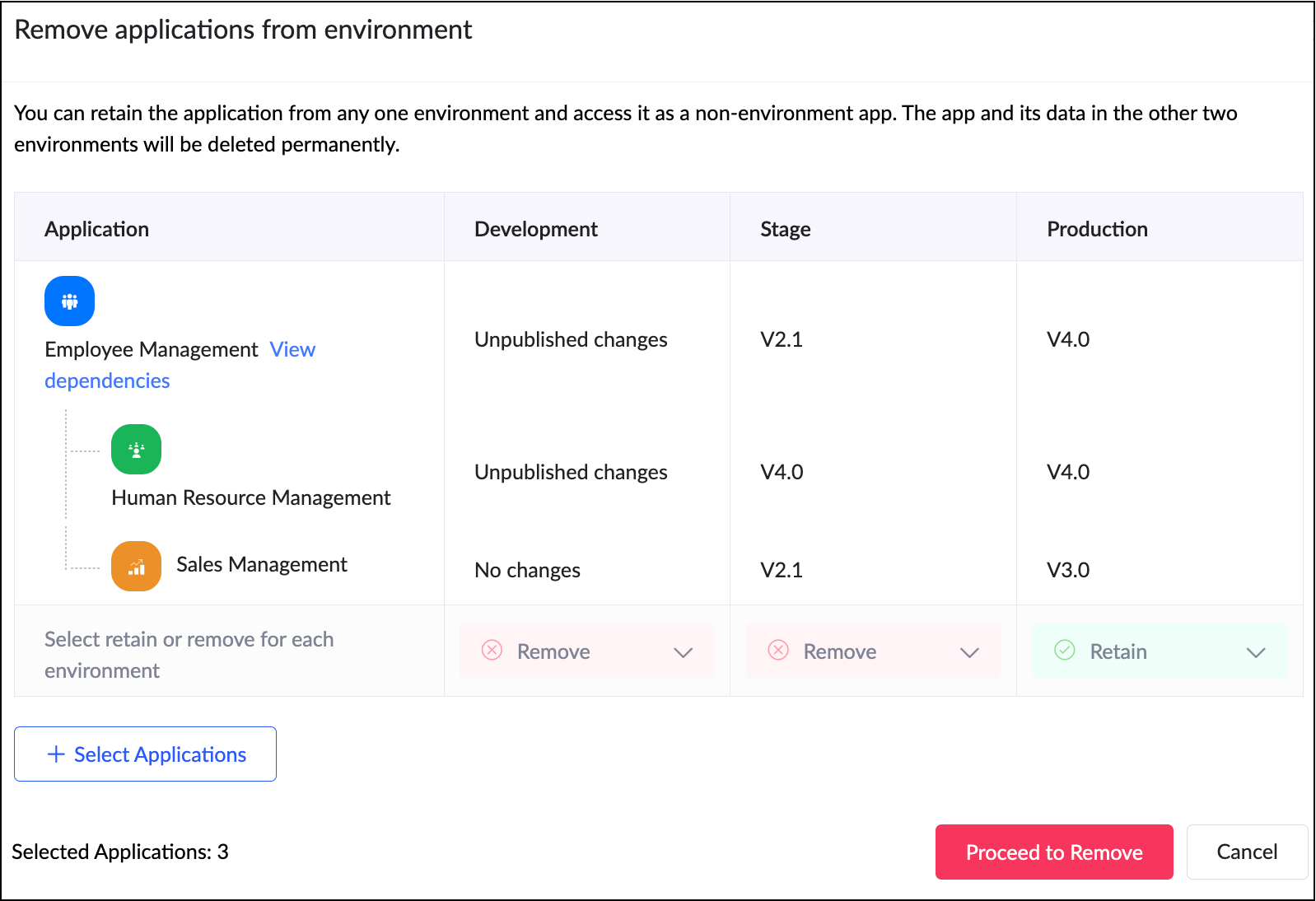
Additionally, when removing apps from environments, all acyclic dependent apps will now be removed together, ensuring more efficient and consistent dependency management without orphaned references.
Use case
Assume a company uses separate Creator apps for different functions, like employee management and payroll processing. Since the payroll depends on the employee data, one app references another in a linear manner. With this new update, you can add both apps together to environments. This ensures seamless ADLM flow without breaking app relationships.
Assume a company uses separate Creator apps for different functions, like employee management and payroll processing. Since the payroll depends on the employee data, one app references another in a linear manner. With this new update, you can add both apps together to environments. This ensures seamless ADLM flow without breaking app relationships.
How to access
When adding an app to an environment, dependent apps with acyclic references will automatically be included.

When removing from environments, the dependent apps will also be removed together.
When adding an app to an environment, dependent apps with acyclic references will automatically be included.
When removing from environments, the dependent apps will also be removed together.
How can this help you?
This enhancement removes a long-standing limitation in Zoho Creator and unlocks true environment-level management for dependent applications. It streamlines the management and deployment of dependent applications,ensuring consistency and stability across environments.
Applicable for: C6
Availability: All DCs
Status: General Availability
Reference: Adding applications to environment
Availability: All DCs
Status: General Availability
Reference: Adding applications to environment
--------
Sync to external calendar
The Sync to External Calendar feature allows you to integrate published reports from your app with popular calendar tools like Zoho Calendar, Google Calendar, Outlook, Apple Calendar, and more. This feature works through an iCal feed URL and is helpful in ensuring that your events and schedules stay synchronized across platforms.
Use case
Let's say you use Zoho Creator to manage appointments for your business. With syncing to external calendars, you can automatically push these appointments to Google Calendar or Outlook. This provides your staff and clients with real-time updates directly on their personal calendars.
Let's say you use Zoho Creator to manage appointments for your business. With syncing to external calendars, you can automatically push these appointments to Google Calendar or Outlook. This provides your staff and clients with real-time updates directly on their personal calendars.
How to access
Navigate to the published report, click More Options (⋮), and select Sync to External Calendar. Generate the iCal feed URL and add it to the calendar application of your choice.
Navigate to the published report, click More Options (⋮), and select Sync to External Calendar. Generate the iCal feed URL and add it to the calendar application of your choice.
How can this help you?
This feature keeps your schedules automatically up to date by exporting data from published reports to external calendars, ensuring real-time updates and seamless synchronization across platforms.
This feature keeps your schedules automatically up to date by exporting data from published reports to external calendars, ensuring real-time updates and seamless synchronization across platforms.
Applicable for: C5, C6
Availability: All DCs
Status: General Availability
Reference: Understanding Sync to External Calendar
Availability: All DCs
Status: General Availability
Reference: Understanding Sync to External Calendar
--------
Record comments for portal users
We've brought in the capability for portal users to add comments to records. Previously, only internal users could add comments to records. With this enhancement, portal users can now join the conversation by adding comments as well. This update bridges the gap between internal and external stakeholders, allowing both user types to collaborate seamlessly within records.
Use case
Imagine a training management app where clients log in to a portal to track their sessions. With this feature, both the trainers (internal users) and clients (portal users) can discuss updates or clarify details directly within the record.
Imagine a training management app where clients log in to a portal to track their sessions. With this feature, both the trainers (internal users) and clients (portal users) can discuss updates or clarify details directly within the record.
How to access
Portal users can add comments directly within record details, just like internal users.
Portal users can add comments directly within record details, just like internal users.
How can this help you?
This feature fosters better collaboration and transparency by enabling direct communication between internal users and portal users.
This feature fosters better collaboration and transparency by enabling direct communication between internal users and portal users.
Applicable for: C5, C6
Availability: All DCs
Status: General availability
Reference: Understanding record comments
Availability: All DCs
Status: General availability
Reference: Understanding record comments
--------
Refreshed mobile UI
We're introducing a refreshed, modern UI that redefines the experience for users on Zoho Creator mobile apps. The new interface offers intuitive navigation, simplified data submission, and a clearer presentation of information across reports and dashboards.
Beyond core elements such as forms and reports, the new theme extends to other aspects of the mobile app, such as notifications, error responses, and more, with the aim of ensuring a consistent and polished experience throughout.
How can this help you?
The refreshed UI focuses on enhancing usability and accessibility. It ensures a unified and professional experience across every part of the mobile app.
The refreshed UI focuses on enhancing usability and accessibility. It ensures a unified and professional experience across every part of the mobile app.
Applicable for: iOS and Android
Availability: All DCs
Status: To be released
Status: To be released
--------
Data sync in integration fields
We've introduced the ability to manually sync data in integration fields, ensuring that Creator always reflects the latest information from your connected services. These integration fields in Creator forms serve as lookups to pull data from third-party services when a new record is created within Creator. Previously, once a record was saved, the corresponding data remained static and didn’t automatically reflect updates from the external service.
With this enhancement, admins and developers can now initiate a sync for integration fields from the Connections slider in live mode. This action updates existing Creator records with the most recent information from the connected service keeping both systems aligned.
Further, we've also added support for reconfiguring datasources without affecting your existing connections. If the datasource includes module-specific configuration fields, you can manage them from the Connection slider in Live mode. After the initial setup, these fields can be modified anytime using the Reconfigure option.
Use case
Let's say a Creator app pulls customer details from Zoho CRM via an integration field. Earlier, if a customer updated their phone number in CRM, it wouldn't reflect in those existing records mapped to it. Now, you can refresh the integration fields' data anytime and keep your records up to date, in line with the current value in CRM.
How to access
Navigate to the Connections slider in the live mode of your application and go to Datasource > [Required datasource name] > Integration Fields Sync.
Navigate to the Connections slider in the live mode of your application and go to Datasource > [Required datasource name] > Integration Fields Sync.
How can this help you?
This enhancement ensures the data in integration fields stay accurate, improving data reliability and decision-making.
This enhancement ensures the data in integration fields stay accurate, improving data reliability and decision-making.
Applicable for: C5, C6
Availability: All DCs
Status: General availability
Reference: Connections in Live and Edit mode
Availability: All DCs
Status: General availability
Reference: Connections in Live and Edit mode
--------
Expanded suite of built-in connectors
We've broadened our built-in connector line-up by introducing hundreds of new connectors. Some of the widely used services now supported include:
- AWS services(like Dynamo DB, Kinesis, EC2, Lambda, and more)
- LinkedIn
- Confluence
- Airtable
- Jira Service Management Alert
- Netsuite
- Xero
- Mailchimp
- ... and more!
With this update, Zoho Creator now offers over 1,200 built-in connectors, empowering you to integrate with most popular apps used in different industries.
--------
And that's all for this month! We'll keep this post updated as and when each feature is released.
We'd love to hear your feedback in the comments. Stay tuned for more enhancements coming your way!
Regards,
Zoho Creator Team
Topic Participants
Ashwin Vishal R
Sticky Posts
Introducing Zoho Creator's 2025 Release Projection 2
Hello Creators! I'm Prakash, from the Creator product management team, and today I'm delighted to unveil our next set of features as part of Release Projection 2 for 2025. With thoughtful analysis and planning, we've curated powerful new capabilitiesZoho Creator - 2023 Release Projection 1
Hello everyone! A very Happy New Year to you and your family. Hope you're all good and having a great time using Zoho Creator to make your lives easier and your businesses prosper. 2022 was an action-packed year for us at Creator, and we hope to continueZoho Creator User Group meetups in a city near you! - Oct - Nov, 2023
Greetings from the Zoho Creator team! We're hosting a series of Zoho Creator meetups in various cities across the globe, and we'd love to meet you there! Our meetups are a great opportunity to network with industry peers, exchange ideas and best practices,Zoho Creator - 2023 Release Projection 2
Hello everyone! Time truly flies when you're having an incredible journey, and today we mark the completion of an eventful and action-packed six months. It feels like just yesterday when we embarked on this adventure together with the launch of our newUpcoming Updates - August 2022
Hi all, Greetings from the Zoho Creator team! Today we've got news for you on some exciting updates. And rest assured— there’s more to come! In this post, we'll be going over the upcoming features and improvements for this month as mentioned below. A
Nederlandse Hulpbronnen

Recent Topics
Introducing Automatic Field Addition (Text Tags) in Zoho Sign
Hello, Today we are excited to announce the general availability of automatic field addition (text tags) feature in Zoho Sign. Now, you can now add text tags in the content of your documents and Zoho Sign will automatically add the corresponding fields when they are uploaded for the signing process. For example: when you add text tags to your sales orders, new employee contracts, and NDAs, Zoho Sign will add the corresponding fields when these documents are uploaded for the signing process. If youIntroducing Built-in Telephony in Zoho Recruit
We’re excited to introduce Built-in Telephony in Zoho Recruit, designed to make recruiter–candidate communication faster, simpler, and fully traceable. These capabilities help you reduce app switching, handle inbound calls efficiently, and keep everyWrite-Off multiple invoices and tax calculation
Good evening, I have many invoices which are long overdue and I do not expect them to be paid. I believe I should write them off. I did some tests and I have some questions: - I cannot find a way to write off several invoices together. How can I do that,Splitting Transactions in Zoho Books
I have read in past forum posts that the ability to split bank transactions would likely be implemented - it's definitely a typical accounting program feature. I'm new to Zoho and thought I'd found nirvana until I realized this feature doesn't seem toStatement Aging On Cutomer Statement
Hello, Is it possible to put aging on customer statements? Current 1-30days 31-60days 61-90days 91-120days Over 120 days. See attached image from another accounting package. Many customers pay off a statement and clear older invoices.Unveiling the next iteration of Ask Zia in Zoho CRM: An all-new chat interface, conversation history, actions, and much more
Your CRM assistant just leveled up. Zoho CRM's Ask Zia functionality now offers a more conversational and context-aware experience to help you not just understand your data, but act on it—all from one chat window. With its redesigned interface and expandedResponse rate and time on social media
Hello, I just want to know if it's possible to manage the response rate and response time from my social media on zoho social ? I don't see any statistical reports on the online scoreboard ? Thank you in advance for your response and sorry if the question has already been postedWhatsapp BOT with CRM
Hello, how do you use Whatsapp integrations in zoho CRM?Ability to translate Zoho CRM Kiosks
Hi team, Is support for translating kiosk text and screen names in the Zoho CRM translation tool planned on the roadmap? Thanks,Whatsapp Limitation Questions
Good day, I would like to find out about the functionality or possibility of all the below points within the Zoho/WhatsApp integration. Will WhatsApp buttons ever be possible in the future? Will WhatsApp Re-directs to different users be possible basedEditing the list of Categories in the Categorize Manually section of Banking in Zoho Books
Hi, I need to create two new Categories called Withdrawals and Deposits to categorize payments in a bank account. How do I edit the Categories list?Can I write a check in Zoho Books with no associated bill?
This currently does not seem possible, and I have a client that desperately needs this function if I am able to convert them with Quickbooks. Thank you in advance for your reply.Internal Fillable Contract with Zoho Writer (Before Sending to Client)
Hi everyone, I’m trying to automate the following process in Zoho CRM and would appreciate some guidance. Process: When a Deal moves to a specific stage, CRM triggers an automation. CRM sends a contract template to an internal team member so they can[Free Webinar] Intelligent document processing with Zoho RPA
Hello everyone! Greetings from the Zoho RPA team! We're excited to invite you to our upcoming webinar on intelligent document processing with Zoho RPA, where we'll introduce powerful new capabilities designed to make your automation journey smarter, faster,Enhancements for Currencies in Zoho CRM: Automatic exchange rate updates, options to update record exchange rates, and more
The multi-currency feature helps you track currencies region-wise. This can apply to Sales, CTC, or any other currency-related data. You can record amounts in a customer’s local currency, while the CRM automatically converts them to your home currencyWhen I schedule calendar appointments in zoho and invite external emails, they do not receive invites
Hello, We have recently transitioned to zoho and are having a problem with the calendar feature. When we schedule new calendar appointments in zoho the invite emails aren't being sent to the external users that we list in participants. However, this worksZoho People > Performance Management > Appraisal cycle
Hello All I am using this 2 users to test out how it work on Performance Management User 1 - Reportee User 2 - Reporting Manager : Li Ting Haley User 1 : Self Appraisal Error How do i fix this error?Send emails directly via Cases module
Greetings all, The ability to send emails from the Cases module, which users have been eagerly anticipating, is now available, just like in the other modules. In Zoho CRM, Cases is a module specifically designed for managing support tickets. If your organizationWebinar Alert: Supercharge landing pages with data insights | Zoho LandingPage
Every visitor to your landing page leaves behind valuable data, but are you leveraging it to improve conversions? Join our expert-led Landing Page Analytics webinar to learn how to track, analyze, and optimize landing page performance with Zoho LandingPage’sBulk Deletion of Zoho Projects Using Node.js and Zoho Projects API
Zoho Projects currently does not provide a built-in option to delete multiple projects in bulk from the UI. When working with testing environments or large numbers of temporary projects, deleting them one by one becomes time-consuming. To address this,Show unsubscribed contacts ?
Hello, I would like to display the unsubscribed contacts. Unfortunately, I do not have this subscription type as described in the documentation (https://help.zoho.com/portal/en/kb/marketing-automation-2-0/user-guide/contacts/contact-management/articles/subscription-type-24-1-2024#Subscription_Type_field.)Track Marketing Automation Campaigns in Zoho CRM
Hello, I've been searching but haven't found the exact answer to this question. I am looking to track Marketing Automation email campaigns and activities inside of Zoho CRM. Use Case: Action: Prospect Submits A Lead Form Outcomes: Prospect created inValidation rule for Date field
The condition settings for a Date field are are absolutlly usless. Conditions can only be set for a specific date, which is logically ineffective in most cases. When setting a condition for a Date field, users usually need to compare the value relativeEasily map shift data fields during user imports
Greetings all, You can now include all your shift-related data for your users without any hassle during user imports. With this enhancement, the Map Import Fields to Zoho CRM option includes all shift-related fields: Current Shift, Next Shift, and ShiftUnable to send
Hello, I am unble to send any single email during the whole time due to the Zoho IP 136.143.188.16 being bloked by SpamCop.net Please help can somebody help me?Adding new data to the sheet with most recent data being added to top row.
I am using a form that I built from within sheets. When the form is submitted, is it possible to have the data entered in (for example) row 2 (since row 1 is the heading) instead of being added into the next available row which should be hundreds ofHow do you arrange order in which the speakers are listed in a session once they have been selected?
Probably another simple thing I've missed but I can't find how to arrange the order in which the speakers are listed in a session once they have been selected. We usually want the speakers listed alphabetically by last name, but sometimes not. Once theProduct Updates in Zoho Workplace applications | February 2026
Hello Workplace Community, Let’s take a look at the new features and enhancements that went live across all Workplace applications for the month of February. Zoho Mail Organize Personal Notes with Collections You can now create collections under My PersonalIntroducing note actions and dynamic visibility in Kiosk Studio
Hello all, We are introducing enhancements to Kiosk Studio that will improve the product scope and meet your custom needs more precisely. What's new? Add notes as Actions: You can add notes to CRM records as kiosk Actions, as well as insert merge fieldsRegarding the Recipient Email change
I was not being able to change the Recipient email. Kindly resolve the problemRequest to Customize Module Bar Placement in New Zoho CRM UI
Hello Support and Zoho Community, I've been exploring the new UI of Zoho CRM "For Everyone" and have noticed a potential concern for my users. We are accustomed to having the module names displayed across the top, which made navigation more intuitivekanban view for client portal
Are kanban views an option for client portals? Access to Kanban views in the client portals would solve some mobile-compliant issues I have with the UI. Kanban functions very nicely on mobile and would be a super asset for my clients and vendors as they【Zoho CRM】サンドボックスのアップデート:メール送信トレイ機能の追加
ユーザーの皆さま、こんにちは。コミュニティチームの藤澤です。 CRMのサンドボックス(テスト環境)にメールの送信トレイ機能が追加されました。 本番環境でメール配信の前に、サンドボックスで送信される全てのメールを確認・検証できます。ワークフロー、承認プロセス、一括送信など、あらゆる送信パターンに対応しています。 「メールの送信トレイ」機能を使うと、顧客へ送信する前にメールの内容を事前確認できます。項目の欠落や書式の乱れなど、あらゆる問題をサンドボックス内でチェックできるため、本番環境でのトラブルを未然に防ぐことに役立ちます。Force mandatory entry on one of two fields on Contacts
We are finding our users aren't always entering a phone number or email address of a contact. We would like to make these fields mandatory but realize they won't always have both pieces of information, but should at least have one. Is there a way to makeHow can I prevent having recepients from being added as contacts in Zoho Desk?
How can I prevent having recepients from being automatically added as contacts in Zoho Desk? There's no option to disable this.Agent Concern
would like to ask the difference between an agent and a light agent. can a light agent close a ticket. thank you.Train Zoho Answer Bot Based on Customer
Hi all, Is it currently possible to mark Help Centre articles to a specific customer, and restrict the answer bot to only use relevant information if it is either marked as "General", or tagged for the specific customer in question? We currently haveNon-depreciating fixed asset
Hi! There are non-depreciable fixed assets (e.g. land). It would be very useful to be able to create a new type of fixed asset (within the fixed assets module) with a ‘No depreciation’ depreciation method. There is always the option of recording landErrorcode 554
Hello, I am unble to send any single email during the whole time due to the Zoho IP 136.143.188.16 being blocked by SpamCop. Please can somebody help me?Spamcop
Have been trying to email several of our clients and many of our emails keep getting bounced back with an error that states: ERROR CODE :550 - "JunkMail rejected - sender4-op-o16.zoho.com [136.143.188.16]:17694 is in an RBL: Blocked - see spamcop.net/bl.shtml?136.143.188.16"Next Page