Zoho Sprints - Q2 Updates for 2026 | Zoho Community

Zoho Sprints - Q2 Updates for 2026 | Zoho Community

Improve your agile project management experience with the newly released capabilities in Zoho Sprints. This quarter we've shipped a few new features and enhancements that are built around smarter planning and execution tools, tighter integrations, and improved user experience. Q2 2026 is all about helping you move faster and stay ahead of your project.

The following are the updates:
  1. Export test case and execution data
  2. Apply layout rules for releases
  3. Plan for sprint capacity
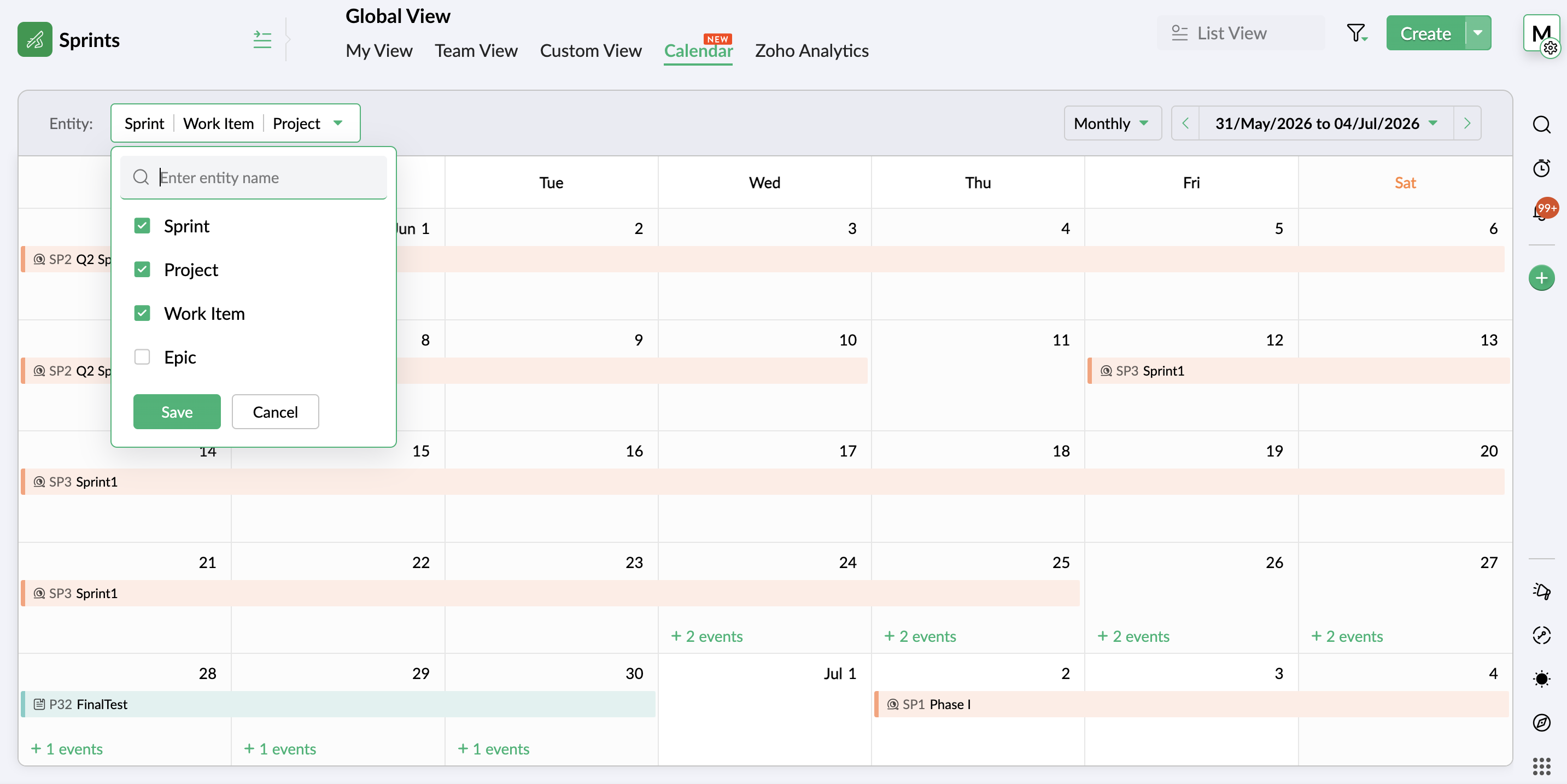
  4. View entities on a global calendar
  5. Create folders through Google Drive Extension
  6. Add custom nested picklist in form layout
  7. Use Zia Search for Zoho Sprints
  8. Compare data using duration and work hours in Timesheet report
  9. Restrict, pin, and share comments
  10. Add weekly logs in global view
  11. Add custom fields to OKR layout
  12. View unread notifications

Export test cases and execution details

Your test management system now enables you to export test cases and execution details for use or reference outside your Zoho Sprints environment. Export the data in XLS or CSV format and download the file for offline access or external use. Learn more

Sprint Capacity Planning

Capacity Planning is an integral aspect of an efficient agile project process. Zoho Sprints now equips sprint managers with the necessary tools to plan and assign work items to the team members based on their availability and workload. This helps proper load distribution and better productivity. The process helps set realistic deadlines, assess member availability, avoid uneven workload, and eventually improve overall sprint health. Learn more


View entities on global calendar and add weekly logs

Global View has two major capabilities:
  1. An additional view in the Global View presents your workspace entities on a calendar for a comprehensive, date-based view. It provides an overview of all the project activities throughout the workspace on a weekly or monthly calendar. Easily scan through the schedule of project, work item, sprint, epic, release, timesheet, or meeting. Learn more


  2. Adding weekly logs is now possible through global view. The timesheet view allows you to add logs in bulk through a weekly table, enabling multiple time logs being added in a single interface.

Create folders through Google Drive Extension

Google drive extension previously facilitated item level coordination between your Google and Sprints workspace. Now, its scope is widened to include Project, Sprint, Epic, and Release modules as well. Learn more

This enhancement also includes the google drive folder creation and parent folder mapping abilities that customers have requested.

Add custom nested picklist in form layout

Use the nested picklist option to heighten the capabilities of the picklist options in your custom layouts. Define groups of picklists in a single field to add sub-options under one the main options, creating a nested list of options. Learn more

Compare data using duration and work hours in Timesheet report

The duration and work hours details are incorporated into Actual vs Planned Timesheet report for better comparison-based insights. It offers a comparison of the actual hours for sprints and work items against their duration and work hours. This gives an understanding of the gaps in the pace of progress in terms of duration. Learn more

Search using Zia

Leverage a single search interface instead of sifting through individual projects to find and access your Zoho Sprints work items. Zia Search provides a unified search platform to find targeted information across workspace. Learn more


Restrict, pin, and share comments

  1. Restrict comments view access to your workspace to ensure external users cannot view them.
  2. Pin important comments at the top of the thread.
  3. Include comments across work items to reflect in linked or shared items.

Use Google Meet in MeetingBridge

Google Meet is now available alongside other service providers on MeetingBridge. Users with an existing Google account configured in Zoho Sprints can easily add Zoho Sprints OAuth scope to Google workspace to authenticate integration. Learn more

Apply layout rules for releases

The utilities of layout rules feature in now extended to the release module. Expand the scope of your data gathering and processing unit by adding conditional rules and subsequent trigger actions. Adding rules to your release layout provides you with an additional layout of customization that enables you to better refine data using facilities like dynamic show/hide fields or sections, mandate certain fields, set default values, or restrict picklists to adapt the layout to your project preferences. Learn more

Customize OKR layout

Add custom fields to the existing Objectives and Key Results layout to introduce business-specific or organization-specific details that need to be documented. Create a more targeted and self-reliant goal tracking system that work best for your vision. Learn more

View unread notifications

The new Unread view in Notifications section provides a dedicated view for unread notifications. The notifications that are read will be removed from this view.

There're more features and enhancements lined up for the upcoming quarter. So keep an eye on this space. In the meantime, explore these features and let us know which of these live up to your expectations.

Thanks,
Zoho Sprints Team

    • Sticky Posts

    • New in Zoho Sprints: Release Management

      Hello all,    We are excited to launch the next big feature on our roadmap - The all-new 'Release Management'. We can hear your 'WOW' and yes we're also happy to hit our next milestone. Agile as a concept strives in delivering a qualified outcome at the end of each iteration. This process will not only help hasten your delivery but can also stand as a potential to plan your next phase accordingly. Do you think these iterations are sufficient to run your projects?    For instance, if you have a big
    • Introduce automation to your iterations with Zoho Flow

      We are delighted to announce that you can now connect your favorite project management applications and automate your workflows using Zoho Flow. The great news is, you don't have to spend your time or effort in coding complex integrations. Using Zoho Flow's drag and drop builder, you can effortlessly build customized workflows with triggers and actions. What is a Trigger? A trigger is an event that kickstarts the flow. What is an Action? An action is a task that the flow executes automatically. For
    • Zoho Sprints - Your team is all set to sprint ahead

      Hello there, It's been a week since we launched the Zoho's only agile project management tool - Zoho Sprints. I guess you guys are loving it! Bringing agility to your team has never been this easy because you will be able to inspect, iterate, and adapt. You have a requirement; break it down into smaller units; get the work done in parallel; receive the deliverables in shorter phases called sprints. The best part of Agile is you get a chance to quickly respond to change and not stick to a fixed plan.

    Nederlandse Hulpbronnen


      • Recent Topics

      • What is a realistic turnaround time for account review for ZeptoMail?

        On signing up it said 2-3 business days. I am on business-day 6 and have had zero contact of any kind. No follow-up questions, no approval or decline. Attempts to "leave a message" or use the "Contact Us" form have just vanished without a trace. It still
      • Is there a way to show contact emails in the Account?

        I know I can see the emails I have sent and received on a Contact detail view, but I want to be able to see all the emails that have been sent and received between all an Accounts Contacts on the Account Detail view. That way when I see the Account detail
      • The Social Wall: July 2026

        Hello everyone! We're halfway through the year, and we bring to you three new updates designed to help you experiment with your content, discover your top-performing posts, and automate your engagement workflow. Instagram Trial Reels Instagram trial reels
      • Mail Id’s backup

        Dear Zoho Team, Kindly share the backup of my all mail id’s associated with Zoho account. Thanks, Saurabh Sharma +91 8851066915
      • Recurring Events Not Appearing in "My Events" and therefore not syncing with Google Apps

        We use the Google Sync functionality for our events, and it appears to have been working fine except: I've created a set of recurring events that I noticed were missing from my Google Apps calendar. Upon further research, it appears this is occurring
      • Stock Based Sort-by option in Category Pages

        In a category page product with In-Stock should come in the top of the categories product list rather than out-of-stock products. No having this option is extremely disappointing, I made the initial request about 7 months ago but still not even an update
      • Stock based sort-by option

        I have more than 300 products in a category with out of stock items count of 150. The out of stock items are coming on top of the category product page list, is there a way to show the in-stock items on top of the list & move the out -of stock items in
      • Out of Stock items showing in Commerce

        I have over 6000 items and most are not in stock, but all items are showing up in Commerce whether they are inventory or not. What option or feature can you use to hide items in Commerce at zero or negative quantities? I currently am using Commerce for
      • Creating Email template that attaches file uploaded in specific field.

        If there's a way to do this using Zoho CRM's built-in features, then this has eluded me! I'm looking to create a workflow that automatically sends an email upon execution, and that email includes an attachment uploaded in a specific field. Email templates
      • What's New in Zoho Billing | July 2026

        July brings a new set of updates to Zoho Billing to make your billing operations more efficient. These include a redesigned checkout experience, expanded Hosted Payment Page capabilities, compliance improvements, enhanced reporting, and more. Enhancements
      • Zoho CRM Community Digest - July 2026 | Part 1

        Hello everyone, July is here! The first two weeks brought six CRM updates ranging from privacy-ready webforms to a significantly more powerful Layout Rules engine, two community wins worth a look (a dashboard workaround for spotting leads with no activities,
      • Zoho CRM - Email/Message icon for Deal List View

        Hi Team, My idea is to include a message icon at the start of the row of Deals when an unread message has been received. This would really help highlight the Deals where urgent action is required. Thanks for considering this request. Regards, Ashley
      • Email notification for followers

        Is there a way to enable email notification for followers of a support ticket? ie: Ticket #123 is owned by Agent#1, Agent#2 adds themselves as a follower. Whenever ticket #123 receives an email from the customer, Agent#1 receives an email. Agent#2 would
      • Introducing parent-child ticketing in Zoho Desk [Early access]

        Hello Zoho Desk users! We have introduced the parent-child ticketing system to help customer service teams ensure efficient resolution of issues involving multiple, related tickets. You can now combine repetitive and interconnected tickets into parent-child
      • Desk Contact Name > split to First and Last name

        I am new to Zoho and while setting up the Desk and Help Center, I saw that new tickets created or submitted from the Help Center used the Contact Name field. This would create a new Contact but put the person's name in the Last Name field only. The First
      • Vendor payment unexpectedly routed through Prepaid Expenses instead of Accounts Payable

        Hello, We are investigating an unexpected accounting behavior in Zoho Books. We created vendor bills and vendor payments for two suppliers using what appears to be the same workflow, but the journal entries are different. Vendor 1 – UZ Store (works correctly)
      • Line Spacing

        I am new to zoho writer - when I create a new document or either open an existing document - everything is double spaced. I tried changing the line spacing to single but still nothing happens do you know what I can do to change this double spacing format?  
      • LinkedIn RSC is now live in Zoho Recruit

        LinkedIn Recruiter System Connect (RSC) is here. Your Zoho Recruit data (candidates, jobs, notes, stage updates, resume attachments, and more) now syncs with LinkedIn in real time. Note: LinkedIn RSC is included with your LinkedIn Recruiter Corporate
      • Managing Shopify Payout Balances in Zoho Books

        I am recording my Shopify orders as Invoices and once Shopify credits my bank account I reconcile the payout to the specific invoices and create a new transaction to account for the Shopify Merchant Fee. That is fairly straightforward to me. How should
      • Charging for WhatsApp replies starting in October 2026

        Meta has announced that it will charge for reply messages on WhatsApp starting October 1, 2026, and the free 24-hour window will no longer exist. How will Zoho SalesIQ handle this billing? https://developers.facebook.com/documentation/business-messa
      • Upcoming Change: Increased character limits for module and field labels

        To provide greater flexibility in customizing your CRM, we are increasing the maximum character limits for module labels and field labels in Zoho CRM. What's changing? Label Current Limit New Limit Module Label 25 characters 50 characters Subform Module
      • Change of Blog Author

        Hi, I am creating the blog post on behalf of my colleague. When I publish the post, it is showing my name as author of the post which is not intended and needs to be changed to my colleague's name. How can I change the name of the author in the blogs?? Thanks, Ramanan
      • SPAM (and some other) folders missing on three of my Zoho Mail accounts

        I have four email accounts with Zoho Mail. Three days ago, the Spam folder on three of these accounts vanished. It is gone on the Windows and Linux desktops as well as the web-based and Android versions, and I have tried it on multiple machines. The only
      • Using data from multiple sheets

        I am looking for a way to automate the process of taking multiple Zoho sheets and collating the data into one combined sheet (such that no duplicates occur). Currently I can only think of importing all the sheets into Excel and then running a macro to perform the task. Is there a simpler way offered by Zoho?
      • Cliq iOS can't see shared screen

        Hello, I had this morning a video call with a colleague. She is using Cliq Desktop MacOS and wanted to share her screen with me. I'm on iPad. I noticed, while she shared her screen, I could only see her video, but not the shared screen... Does Cliq iOS is able to display shared screen, or is it somewhere else to be found ? Regards
      • Conflict with Google Sheets

        While I was working on a google sheet in Firefox, I suddenly started getting an error dialog in Google sheets: "Loading issue. Troubleshoot this issue by clearing application resources". It then says to clear cookes etc. etc. which didn't help. Disabling
      • Error 1011 saving website personalisation — blocking all changes (corrupted "home_page.content" field)

        When trying to save changes under Settings → Brands → MY COMPANY → Website → Personalisation → Messenger, I receive the following error: "Either the request parameters are invalid or absent" upon checking on the developer console of the browser I get
      • All new Address Field in Zoho CRM: maintain structured and accurate address inputs

        Availability Update: 29 September 2025: It's currently available for all new sign-ups and for existing Zoho CRM orgs which are in the Professional edition exclusively for IN DC users. 2 March 2026: Available to users in all DCs except US and EU DC. 24
      • CRM x WorkDrive: We're rolling out the WorkDrive-powered file storage experience for existing users

        Release plan: Gradual rollout to customers without file storage add-ons, in this order: 1. Standalone CRM 2. CRM Plus and Zoho One DCs: All | Editions: All Available now for: - Standalone CRM accounts in Free and Standard editions without file storage
      • HR Helpdesk Cases

        We have Zoho One Enterprise. I'm trying to find HR Helpdesk Cases, but my UI does not match the documentation. I'm not sure how to move forward.
      • Tip #7 - Siri shortcuts in Zoho CRM

        Hello Everyone, Here is a tip about the 'Siri Shortcuts' feature and how it works in the iOS version of the Zoho CRM mobile app. What are Siri shortcuts? Siri Shortcuts are quick actions across your apps on iOS. They can perform an action automatically
      • Automatic Department and Employee Sync Between Zoho One and Zoho People

        Dear Zoho Support, I'm writing to propose a valuable feature request that would streamline data management and improve user experience within the Zoho ecosystem: automatic synchronization between departments and employees in Zoho One and Zoho People.
      • Nothing triggers a Journey

        I have been on the phone with Zoho support and they claim their development team needs to investigate more. However, I've found this is a pretty standard answer after a call takes any amount of time. After that, it's days and even weeks before it actually
      • Manually Backorder Sales Order and/or Change Sales Order Status

        Is there an option to manually 'backorder' a sales order, or otherwise change it's status?  In some cases, we receive orders for products that are out of stock, but we already have issued POs to our suppliers for replenishment.   Ex- we created a PO on
      • Backorder process review - Automating Removal of Sales Order from "On Hold" When PO is Received

        Hello Zoho Inventory Team, Currently, sales orders in On Hold status are released only when the bill for the purchase order is created. In our workflow, it would be much more efficient if the sales order could automatically move out of On Hold as soon
      • Kaizen #254 - Building a Temporal Lead Score Decay System in Zoho CRM

        Hello, CRM Wizards! Welcome to a fresh week of Kaizen. In this post, we will build a temporal lead score decay system that works alongside your existing scoring rules by introducing percentage-based score decay driven solely by customer inactivity. By
      • Metadata API Access to Functions

        I think it would be incredibly helpful to have api access to every function's code. Our team primarily uses deluge functions to update fields across modules according to business logic. I would like to create a visual dependancy model for our CRM, but
      • API actions/approvals endpoint returns UNAPPROVABLE despite user having full permissions and being the assigned approver

        Hi Team, We are trying to programmatically approve a record via the CRM API but consistently receive an UNAPPROVABLE error, even though the same user can approve the record without issue from the UI. Endpoint called: POST https://www.zohoapis.com/crm/v6/{module}/{record_id}/actions/approvals
      • Get a realistic picture of your revenue with Forecast Adjustments in Zoho CRM

        #crm25q1 Dear Customers, We hope you're doing well! Today, we're here with an important enhancement for business decision makers: forecast adjustments. Let's get straight to it! With technology on the rise and CX at its core, businesses are constantly
      • I am not able to check in and checkout in zoho people even location access allowed

        This issue i am facing in mackbook air m1, I allowed location in chrome browser and i also tried in safari but getting similar issue. Please have a look ASAP.
      • Next Page