Client Script | Update - Client Script Support For Custom Buttons
Hello everyone!
We are excited to announce one of the most requested features - Client Script support for Custom Buttons. This enhancement lets you run custom logic on button actions, giving you greater flexibility and control over your user interactions. This support is now available across all DCs.
Custom Buttons enables you to extend your Zoho CRM and perform a predefined set of actions based on your requirements.
What you can do with this new capability?
With Client Script support for custom buttons, you unlock a whole new level of control, interactivity, and speed within Zoho CRM. Here is what this powerful enhancement enables:
- Trigger record-specific logic instantly, based on where and what you're viewing.
- Auto-fill fields and suggest values intelligently for faster input.
- Cut down clicks and complete tasks faster with in-context buttons.
- Run guided multi-step flows that adapt to user input.
- Prompt users for confirmation before taking action - prevent mistakes and keep control in their hands
- Dynamically control a field’s visibility and properties, such as mandatory status, read-only state, and more
- Act in place - no tab-switching, no disruptions, just smooth execution and much more
How to configure this new capability?
You can now create a custom button and add Client Script for the created button by following these steps.
You can now create a custom button and add Client Script for the created button by following these steps.
- Go to Setup → Modules and Fields under Customization.
- Select a Module (e.g., Leads, Deals).
- Click on Buttons → Then click + New Button.
- Enter Button Name and select Action Type as "Client Script"
- Choose Button Position and Layout details.
- Click Create in Configured Client Script, enter the script, and click Add.
- Select the profiles for which these buttons should be visible.
- Click Save.

Note
The Client Script you intend to link with the button will be saved only after the custom button is saved.
Details of Custom Button Configuration with Client Script
- Event Type - Button
- Event Name - onClick
- Argument - context
The context differs based on where the button is placed.
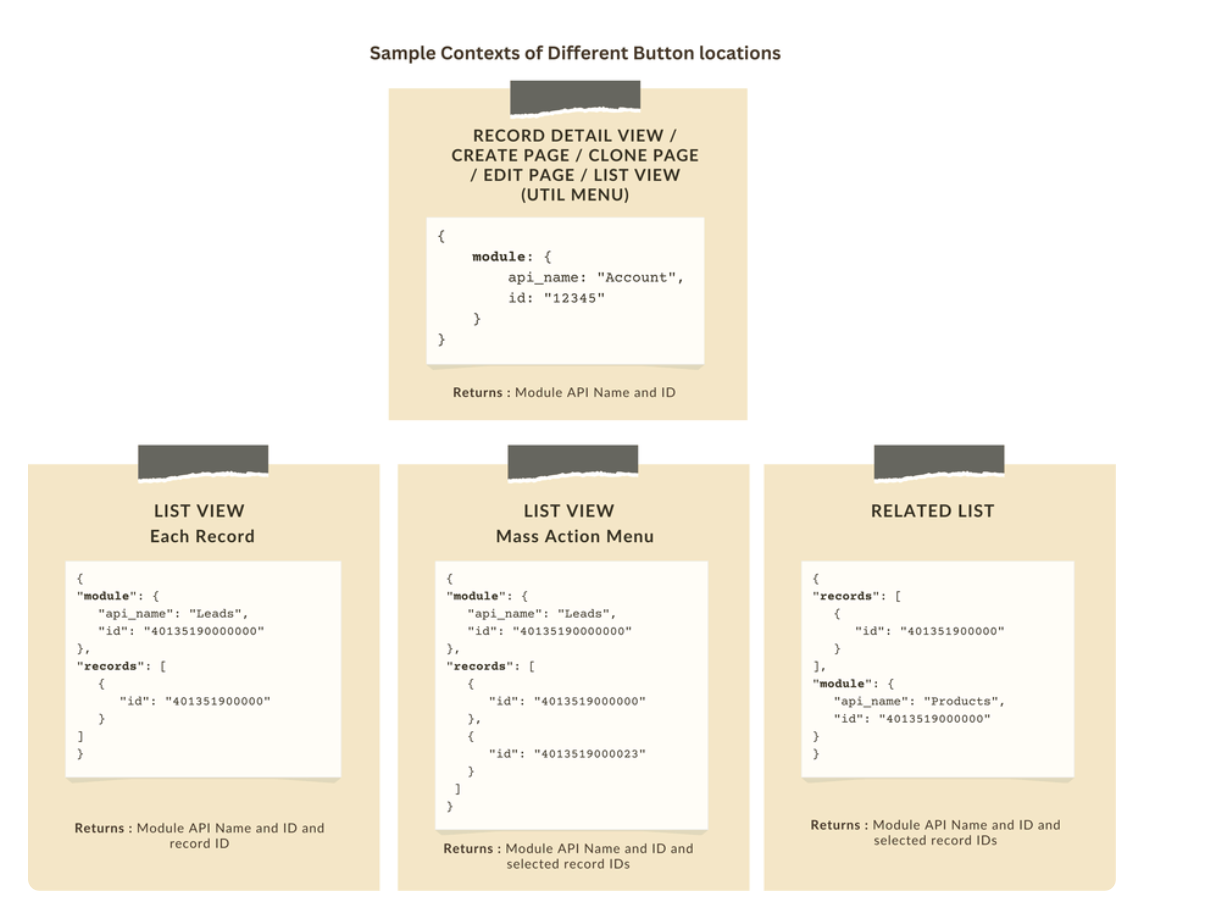
Let's explore how to implement this through the following use cases.
Use case 1: Add Notes instantly from List View or Bulk push notes to multiple records with a click!
Zylker’s sales team often needs to add notes while reviewing or after campaigns. Currently, they must open each record individually, making the process slow and inefficient. To streamline this, the admin wants to:
a. Include an "Add Notes" option directly from the List View for individual records, allowing sales reps to add notes without opening each record.
b. Add a "Add Bulk Notes" option, allowing users to select multiple records and add a common note to all selected records at once.
a) Here is the implementation of "Add Notes" in the List Page.

b) Here is the implementation of "Add Bulk Notes" in the List view page.

Use case 2 : Import product details effortlessly from Zoho Sheet and populate the Subform with a single click!
Zylker manufactures medical instruments, and its sales representatives manage bulk orders from distributors and hospitals. Product details are typically provided in a sheet, which the sales reps must manually enter into the subform on the Order Creation Page(Create Page). To streamline this time-consuming process, the admin wants to add a custom button named "Import Products" to the Order Creation Page. When clicked, it should
- Prompt for the Sheet ID.
- Fetch order details (product names, quantities, and prices) from the specified Zoho Sheet.
- Populate the Product list Subform in Zoho CRM.

Code Sample link
Use case 3 - Send bulk emails to selected students directly from the Course Module's Related List with ease!
Zylker’s managers often need to reach out to multiple students enrolled in a course - whether to share updates, newsletters, or important announcements. Currently, they have to open each student record individually to send an email, which is time-consuming.
To simplify this process, the admin wants to provide a "Send bulk mail" option in the Student Related List under the Course record, allowing managers to select multiple students and send a personalized email to all selected students in one go.

Note
- Client Script can be configured only from the Buttons page. The setup page displays existing scripts. Once a script is created, it can be edited and updated from the Client Script setup page.
- Mobile support will be available in Q3, 2025.
This support will be rolled out soon. We hope you find this incredibly beneficial!

Happy Client Scripting!
Topic Participants
Maadhari M
Subhash Kumar
Haiku Technical Support
Pablo Silva Osorio
Ishwarya SG
Sticky Posts
Kaizen #198: Using Client Script for Custom Validation in Blueprint
Nearing 200th Kaizen Post – 1 More to the Big Two-Oh-Oh! Do you have any questions, suggestions, or topics you would like us to cover in future posts? Your insights and suggestions help us shape future content and make this series better for everyone.Kaizen #226: Using ZRC in Client Script
Hello everyone! Welcome to another week of Kaizen. In today's post, lets see what is ZRC (Zoho Request Client) and how we can use ZRC methods in Client Script to get inputs from a Salesperson and update the Lead status with a single button click. In thisKaizen #222 - Client Script Support for Notes Related List
Hello everyone! Welcome to another week of Kaizen. The final Kaizen post of the year 2025 is here! With the new Client Script support for the Notes Related List, you can validate, enrich, and manage notes across modules. In this post, we’ll explore howKaizen #217 - Actions APIs : Tasks
Welcome to another week of Kaizen! In last week's post we discussed Email Notifications APIs which act as the link between your Workflow automations and you. We have discussed how Zylker Cloud Services uses Email Notifications API in their custom dashboard.Kaizen #216 - Actions APIs : Email Notifications
Welcome to another week of Kaizen! For the last three weeks, we have been discussing Zylker's workflows. We successfully updated a dormant workflow, built a new one from the ground up and more. But our work is not finished—these automated processes are
Recent Topics
Power up your Kiosk Studio with Real-Time Data Capture, Client Scripts & More!
Hello Everyone, We’re thrilled to announce a powerful set of enhancements to Kiosk Studio in Zoho CRM. These new updates give you more flexibility, faster record handling, and real-time data capture, making your Kiosk flows smarter and more efficientIncome not showing in direct bank feed
Hi, I am trying to enter income without knowing or mentioning customer, as i am told, my client wants single or cash basis accounting but i seriously struggling......................I am not able to check in and checkout in zoho people even location access allowed
This issue i am facing in mackbook air m1, I allowed location in chrome browser and i also tried in safari but getting similar issue. Please have a look ASAP.Preview future shift rotation in Shift Schedule
Hi, What if, instead of the current behavior, the Shift Rotation feature in Zoho People allowed users to preview future shift schedules before the scheduler execution? Currently, when a shift rotation is configured (for example, monthly rotation), theAutomatically Update Ticket Status in Zoho Desk Based on Actions in Zoho Projects
Hi Zoho Desk Team, Hope you’re doing well. We’re using the Zoho Desk–Zoho Projects integration to manage tasks related to customer tickets, and it works well for linking and tracking progress. However, there are a few important automation capabilitiesSign Out
Hello, I have a doubt with Permalink. I have a view created with critera to show only the records belonging to the user who has sign in. The problem is that the different users use the same computer and some times the user login keep signed, and when I send the permalink (by email) of the view, the users enter with other login signed. Moreover the permalink view doesn�t allow to do a log out. May I add something in the permalink to request always sign in? Sorry for my English. Many thanks! RegardsAnnouncing new features in Trident for Windows (v.1.39.4.0)
Hello Community! Trident for Windows just received a major update, with a range of capabilities that focuses on strengthening communication and simplifying workflows. Let’s dive into what’s new! Upload email attachments to WorkDrive. Until now, you couldIntroducing Automatic Field Addition (Text Tags) in Zoho Sign
Hello, Today we are excited to announce the general availability of automatic field addition (text tags) feature in Zoho Sign. Now, you can now add text tags in the content of your documents and Zoho Sign will automatically add the corresponding fields when they are uploaded for the signing process. For example: when you add text tags to your sales orders, new employee contracts, and NDAs, Zoho Sign will add the corresponding fields when these documents are uploaded for the signing process. If youIntroducing Built-in Telephony in Zoho Recruit
We’re excited to introduce Built-in Telephony in Zoho Recruit, designed to make recruiter–candidate communication faster, simpler, and fully traceable. These capabilities help you reduce app switching, handle inbound calls efficiently, and keep everyWrite-Off multiple invoices and tax calculation
Good evening, I have many invoices which are long overdue and I do not expect them to be paid. I believe I should write them off. I did some tests and I have some questions: - I cannot find a way to write off several invoices together. How can I do that,Splitting Transactions in Zoho Books
I have read in past forum posts that the ability to split bank transactions would likely be implemented - it's definitely a typical accounting program feature. I'm new to Zoho and thought I'd found nirvana until I realized this feature doesn't seem toStatement Aging On Cutomer Statement
Hello, Is it possible to put aging on customer statements? Current 1-30days 31-60days 61-90days 91-120days Over 120 days. See attached image from another accounting package. Many customers pay off a statement and clear older invoices.Unveiling the next iteration of Ask Zia in Zoho CRM: An all-new chat interface, conversation history, actions, and much more
Your CRM assistant just leveled up. Zoho CRM's Ask Zia functionality now offers a more conversational and context-aware experience to help you not just understand your data, but act on it—all from one chat window. With its redesigned interface and expandedResponse rate and time on social media
Hello, I just want to know if it's possible to manage the response rate and response time from my social media on zoho social ? I don't see any statistical reports on the online scoreboard ? Thank you in advance for your response and sorry if the question has already been postedWhatsapp BOT with CRM
Hello, how do you use Whatsapp integrations in zoho CRM?Ability to translate Zoho CRM Kiosks
Hi team, Is support for translating kiosk text and screen names in the Zoho CRM translation tool planned on the roadmap? Thanks,Create Receipt of a Donation (not a sale)
We are a non-profit organization that receives general donations. How do I create a receipt of payment for the donor and categorize the payment as a Gift? I tried the method of creating an invoice; however that automatically created a "Sales" transactionWhatsapp Limitation Questions
Good day, I would like to find out about the functionality or possibility of all the below points within the Zoho/WhatsApp integration. Will WhatsApp buttons ever be possible in the future? Will WhatsApp Re-directs to different users be possible basedEditing the list of Categories in the Categorize Manually section of Banking in Zoho Books
Hi, I need to create two new Categories called Withdrawals and Deposits to categorize payments in a bank account. How do I edit the Categories list?Can I write a check in Zoho Books with no associated bill?
This currently does not seem possible, and I have a client that desperately needs this function if I am able to convert them with Quickbooks. Thank you in advance for your reply.Internal Fillable Contract with Zoho Writer (Before Sending to Client)
Hi everyone, I’m trying to automate the following process in Zoho CRM and would appreciate some guidance. Process: When a Deal moves to a specific stage, CRM triggers an automation. CRM sends a contract template to an internal team member so they can[Free Webinar] Intelligent document processing with Zoho RPA
Hello everyone! Greetings from the Zoho RPA team! We're excited to invite you to our upcoming webinar on intelligent document processing with Zoho RPA, where we'll introduce powerful new capabilities designed to make your automation journey smarter, faster,Enhancements for Currencies in Zoho CRM: Automatic exchange rate updates, options to update record exchange rates, and more
The multi-currency feature helps you track currencies region-wise. This can apply to Sales, CTC, or any other currency-related data. You can record amounts in a customer’s local currency, while the CRM automatically converts them to your home currencyProject Management Bulletin: March, 2026
We are passionate about equipping our users with efficient solutions that help them run their businesses successfully. Our collective efforts over the past 2 years have culminated in the launch of Sprints 3.0— built with reliable features, impactful integrations,Send emails directly via Cases module
Greetings all, The ability to send emails from the Cases module, which users have been eagerly anticipating, is now available, just like in the other modules. In Zoho CRM, Cases is a module specifically designed for managing support tickets. If your organizationWebinar Alert: Supercharge landing pages with data insights | Zoho LandingPage
Every visitor to your landing page leaves behind valuable data, but are you leveraging it to improve conversions? Join our expert-led Landing Page Analytics webinar to learn how to track, analyze, and optimize landing page performance with Zoho LandingPage’sBulk Deletion of Zoho Projects Using Node.js and Zoho Projects API
Zoho Projects currently does not provide a built-in option to delete multiple projects in bulk from the UI. When working with testing environments or large numbers of temporary projects, deleting them one by one becomes time-consuming. To address this,Show unsubscribed contacts ?
Hello, I would like to display the unsubscribed contacts. Unfortunately, I do not have this subscription type as described in the documentation (https://help.zoho.com/portal/en/kb/marketing-automation-2-0/user-guide/contacts/contact-management/articles/subscription-type-24-1-2024#Subscription_Type_field.)Track Marketing Automation Campaigns in Zoho CRM
Hello, I've been searching but haven't found the exact answer to this question. I am looking to track Marketing Automation email campaigns and activities inside of Zoho CRM. Use Case: Action: Prospect Submits A Lead Form Outcomes: Prospect created inValidation rule for Date field
The condition settings for a Date field are are absolutlly usless. Conditions can only be set for a specific date, which is logically ineffective in most cases. When setting a condition for a Date field, users usually need to compare the value relativeEasily map shift data fields during user imports
Greetings all, You can now include all your shift-related data for your users without any hassle during user imports. With this enhancement, the Map Import Fields to Zoho CRM option includes all shift-related fields: Current Shift, Next Shift, and ShiftAdding new data to the sheet with most recent data being added to top row.
I am using a form that I built from within sheets. When the form is submitted, is it possible to have the data entered in (for example) row 2 (since row 1 is the heading) instead of being added into the next available row which should be hundreds ofHow do you arrange order in which the speakers are listed in a session once they have been selected?
Probably another simple thing I've missed but I can't find how to arrange the order in which the speakers are listed in a session once they have been selected. We usually want the speakers listed alphabetically by last name, but sometimes not. Once theProduct Updates in Zoho Workplace applications | February 2026
Hello Workplace Community, Let’s take a look at the new features and enhancements that went live across all Workplace applications for the month of February. Zoho Mail Organize Personal Notes with Collections You can now create collections under My PersonalIntroducing note actions and dynamic visibility in Kiosk Studio
Hello all, We are introducing enhancements to Kiosk Studio that will improve the product scope and meet your custom needs more precisely. What's new? Add notes as Actions: You can add notes to CRM records as kiosk Actions, as well as insert merge fieldsRegarding the Recipient Email change
I was not being able to change the Recipient email. Kindly resolve the problemRequest to Customize Module Bar Placement in New Zoho CRM UI
Hello Support and Zoho Community, I've been exploring the new UI of Zoho CRM "For Everyone" and have noticed a potential concern for my users. We are accustomed to having the module names displayed across the top, which made navigation more intuitivekanban view for client portal
Are kanban views an option for client portals? Access to Kanban views in the client portals would solve some mobile-compliant issues I have with the UI. Kanban functions very nicely on mobile and would be a super asset for my clients and vendors as they【Zoho CRM】サンドボックスのアップデート:メール送信トレイ機能の追加
ユーザーの皆さま、こんにちは。コミュニティチームの藤澤です。 CRMのサンドボックス(テスト環境)にメールの送信トレイ機能が追加されました。 本番環境でメール配信の前に、サンドボックスで送信される全てのメールを確認・検証できます。ワークフロー、承認プロセス、一括送信など、あらゆる送信パターンに対応しています。 「メールの送信トレイ」機能を使うと、顧客へ送信する前にメールの内容を事前確認できます。項目の欠落や書式の乱れなど、あらゆる問題をサンドボックス内でチェックできるため、本番環境でのトラブルを未然に防ぐことに役立ちます。Force mandatory entry on one of two fields on Contacts
We are finding our users aren't always entering a phone number or email address of a contact. We would like to make these fields mandatory but realize they won't always have both pieces of information, but should at least have one. Is there a way to makeNext Page