Kaizen #194 : Trigger Client Script via Custom buttons

Hello everyone!
Welcome back to another interesting and useful Kaizen post.
We know that Client Scripts can be triggered with Canvas buttons and we discussed this with a use case in Kaizen#180. Today, let us discuss how to trigger Client Script when a Custom Button is clicked. Using this, you can execute Client Script when a custom button is clicked.
In this post,
1. Event Details2. Supported Pages3. Use Case - Export Subform Rows to Zoho Sheet in a Single Click!4. Solution5. Summary6. Related Links
Client Script support for Custom Buttons opens up possibilities for automation, personalization, and enhanced user interactions in Zoho CRM when a custom button is clicked.
Here is a detailed walkthrough to help you understand it better.
1. Event Details
The Button event triggers the Client Script when a custom button is clicked. Each time this event is invoked, the context argument is passed to the Client Script. The context contains information about the page from which the button was clicked.
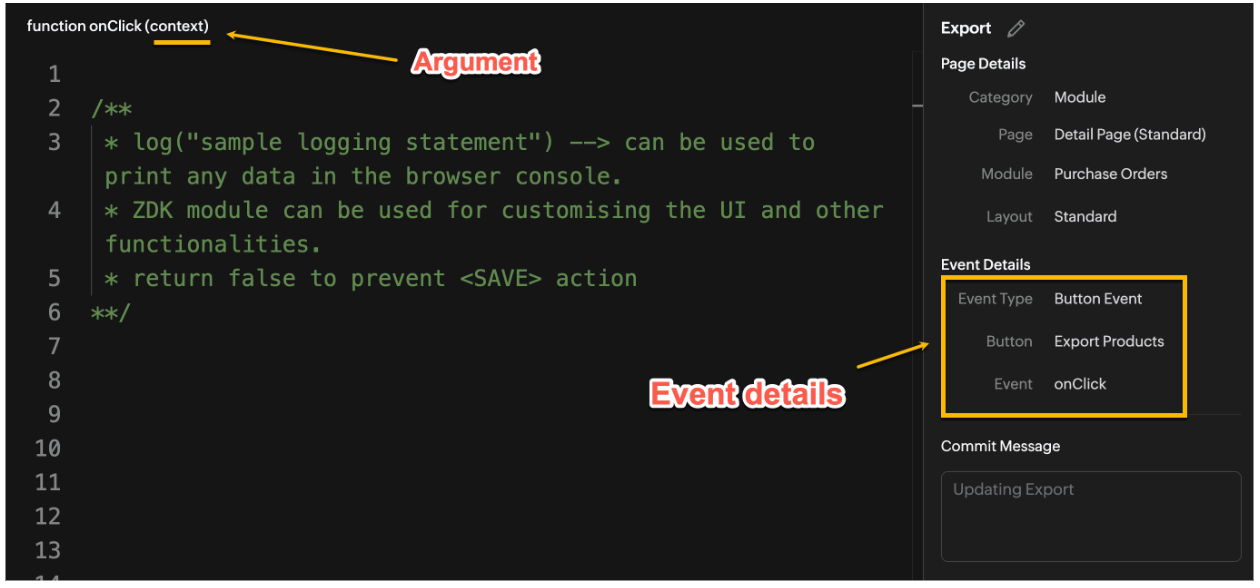
Click here to know more about Client Script Events.
2. Supported Pages
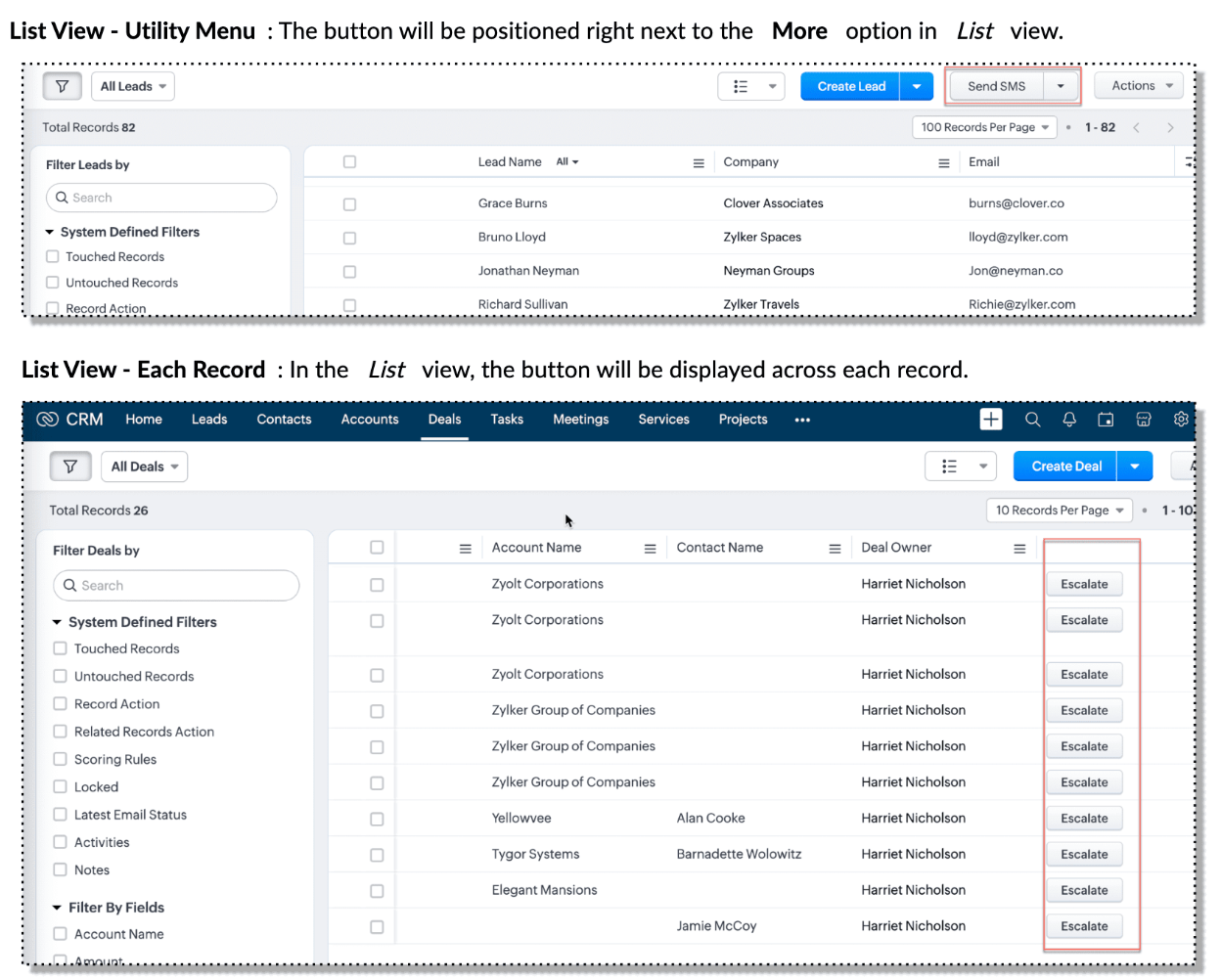
A Custom Button can be placed in different positions based on the Page.
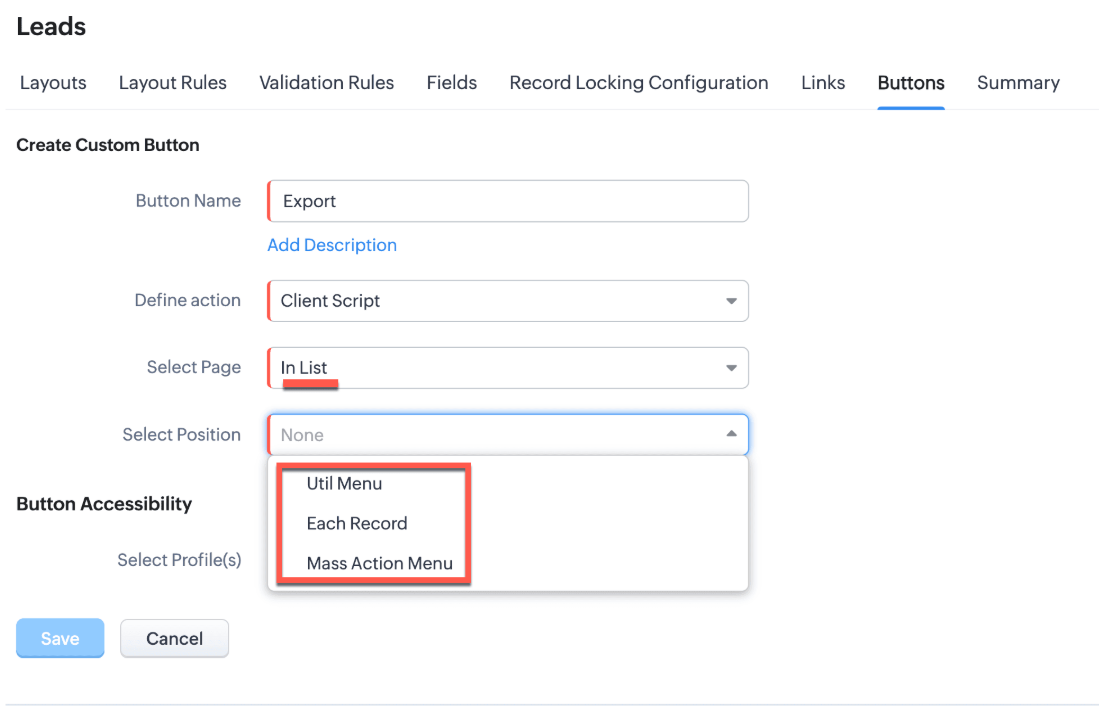
You can add a custom button in the Util Menu, in Each Record or in the Mass Action Menu of the List Page.

Also, a Detail Page can have a custom button either In Record or in the Related List. Click here for more details about the different possible positions of a custom button.
The following table lists the supported pages and the corresponding context argument, which provides different details based on the page type.

To create a Client Script and make it trigger when a custom button is clicked, first create a Custom button and associate it with a Client Script as shown in the following image.

Click here to view the steps to create a custom button and configure a Client Script.
Note:
You can configure the Client Script only from the Buttons page to trigger it when a user clicks a custom button, and not the usual way of Creating Client Script via setup page. Once a script is created, it can be edited and updated from the Client Script setup page
3. Use Case - Export Subform Rows to Zoho Sheet in a Single Click!
Zylker manufactures medical instruments, and its sales representatives frequently need to share bulk order details with distributors and hospital partners using Zoho Sheets. These details such as product names, quantities, and prices are captured in a Subform on the Purchase Order Detail(Standard) Page.
To simplify this, the admin wants to add a custom button called "Export Products" on the Purchase Order Detail Page. When clicked, it should export the Purchase Items from the Subform and move the content to the specified sheet.
4. Solution
To export subform rows to Zoho Sheet with a single click, you can add a custom button to the Detail Page of the record. When clicked, a Client Script will be triggered to fetch the subform data from the Detail Page and pass it to a Function that uses zoho.sheet.createRecords() to insert data into Zoho Sheet.
Here’s how to implement this:
- Add “Export Products” custom button on the Detail Page.
- Add the script to collect subform rows which invokes the Function.
- Write a Function to create entry in Zoho Sheets
A. Add “Export Products” custom button on the Detail Page.
- Go to Setup → Modules and Fields under Customization.
- Select a Module as Purchase Order.
- Click on Buttons → Then click + New Button.
- Enter Button Name and select Action Type as "Client Script"
- Choose Button Position and Layout details as shown in the following image.
- Click Create in Configured Client Script, enter the script, and click Add.
- Select the profiles for which these buttons should be visible.
- Click Save.

B. Add the Script to collect subform rows and invoke the Function
Use the following Client Script when you configure the custom button.
- var casesheetid = ZDK.Client.getInput([{ type: 'text', label: 'Enter the Sheet ID' }], 'Sheet details', 'OK', 'Cancel');
- if (casesheetid == null) {
- ZDK.Client.showAlert("Enter the *Case Sheet ID - Import* to import data");
- }
- var purchase_items = ZDK.Page.getField('Purchase_items).getValue();
- ZDK.Client.showLoader({type: 'page', template:'spinner', message: 'Export in progress, please wait'});
- var c=1;
- if (sheetid == null) {
- ZDK.Client.hideLoader();
- ZDK.Client.showAlert("Enter the *Case Sheet - Export* ID to export data");
- }
- purchase_items.forEach((r,i) => {
- try {
- resp = ZDK.Apps.CRM.Functions.execute("csvWrite", { "Product_Name": r.Product_Name.name, "List_Price": r.List_Price, "Discount": r.Discount, "Total": r.Total,"Sheetid":casesheetid }); }
- catch (error) {
- c = 0;
- ZDK.Client.hideLoader();
- ZDK.Client.showAlert("Unexpected issue occured while adding data in row number "); }
- });
- ZDK.Client.hideLoader();
- if (c) {
- ZDK.Client.showMessage("Export completed. Please check the Sheet");
- }
- else
- {
- ZDK.Client.showMessage("Unexpected error "); }}
In this code, several ZDKs are used for various purposes. Click on the ZDK hyperlinks to learn more.
- User Input: The code uses ZDK.Client.getInput() to fetch a "Sheet ID" from the user. This input is crucial for further operations.
- Input Validation: If the user cancels or doesn't enter a sheet ID, the code checks for null and prompts the user to enter the ID using ZDK.Client.showAlert().
- Function Invocation: The entries of Purchase Order subform are fetched using ZDK.Page.getField('Purchase_items).getValue() and written to Zoho Sheet using the Function csvWrite(), which internally calls zoho.sheet.createRecords().
- Loader Display: To indicate that a process is running, a loader is displayed using ZDK.Client.showLoader().
- Show Message: ZDK.Client.showMessage() displays that the Export is completed.
Note
The Client Script you intend to link with the button will be saved only after the custom button is saved.
C. Write a Function to create entry in Zoho Sheets
- Go to Setup > Developer Hub > Functions.
- In the Functions page, click + Create New Function.
- Choose the category as Button.
- Click Create.
- In the Create Function page, enter a name as csvWrite and description for your function.
- Enter the following function code and click Save.
- string standalone.csvWrite(String product,String qty,String up,String amt, String Sheetid){
- queryData = Map();
- writeData = Map();
- header = Map();
- writeData.put("Product",product);
- writeData.put("Quantity",qty);
- writeData.put("Unit_Price",up);
- writeData.put("Amount",amt);
- SheetData = zoho.sheet.createRecords("Sheetid","Sheet1",writeData,queryData,"sheetconnection");
- return SheetData;
- }
In the code above:
- sheetconnection refers to the name of the Zoho Sheet connection, which must have the scopes: ZohoSheet.dataAPI.UPDATE and ZohoSheet.dataAPI.READ.
- Click here to know how to create a Connection with the required scopes.
- sheetid is the unique identifier of the Zoho Sheet, available in the sheet’s URL.
- Sheet1 represents the name of the worksheet (i.e., the tab name shown at the bottom of the Zoho Sheet).
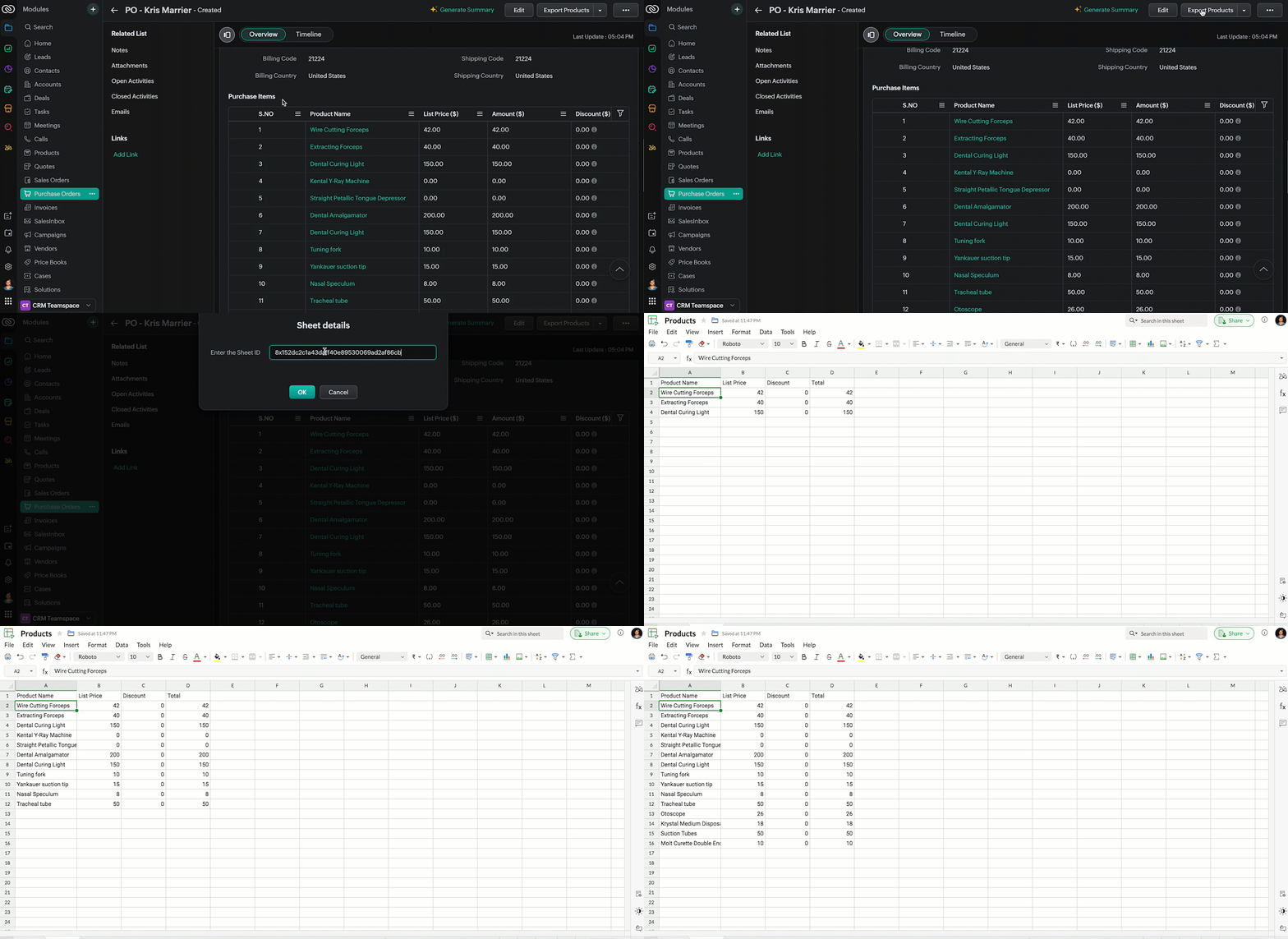
- Now, when the custom button is clicked, the Client Script is triggered. It prompts for the Sheet ID, fetches the contents of the Purchase Order subform, and invokes a function that writes the content to the Sheet.
Here's how the Client Script works.
5. Summary
In this post we have seen,
- What is a Button event?
- How to configure Client Script for a custom button
- How to write data into Zoho Sheets from Client Script
- How to create a Function and call it from Client Script
6. Related Links
- Customize Buttons using Client Script
- Automating Data Transfer from Zoho Sheets to Zoho CRM Subforms
- Update - Client Script Support For Custom Buttons
We are thrilled to be nearing the 200th post in our Kaizen series. As we approach this exciting milestone, we would love to hear from you. Do you have any questions, suggestions, or topics you would like us to cover in future posts? Your input helps us improve and shape the series to serve you better.
Previous Kaizen Post : Kaizen #193: Creating different fields in Zoho CRM through API | Kaizen Directory
We hope you found this post useful!
Happy Client Scripting! 😊
Topic Participants
Maadhari M
Rakesh Kumar
Gray
Sticky Posts
Kaizen #222 - Client Script Support for Notes Related List
Hello everyone! Welcome to another week of Kaizen. The final Kaizen post of the year 2025 is here! With the new Client Script support for the Notes Related List, you can validate, enrich, and manage notes across modules. In this post, we’ll explore howKaizen #217 - Actions APIs : Tasks
Welcome to another week of Kaizen! In last week's post we discussed Email Notifications APIs which act as the link between your Workflow automations and you. We have discussed how Zylker Cloud Services uses Email Notifications API in their custom dashboard.Kaizen #216 - Actions APIs : Email Notifications
Welcome to another week of Kaizen! For the last three weeks, we have been discussing Zylker's workflows. We successfully updated a dormant workflow, built a new one from the ground up and more. But our work is not finished—these automated processes areKaizen #152 - Client Script Support for the new Canvas Record Forms
Hello everyone! Have you ever wanted to trigger actions on click of a canvas button, icon, or text mandatory forms in Create/Edit and Clone Pages? Have you ever wanted to control how elements behave on the new Canvas Record Forms? This can be achievedKaizen #142: How to Navigate to Another Page in Zoho CRM using Client Script
Hello everyone! Welcome back to another exciting Kaizen post. In this post, let us see how you can you navigate to different Pages using Client Script. In this Kaizen post, Need to Navigate to different Pages Client Script ZDKs related to navigation A.
Recent Topics
Introducing recipient authentication via Stripe Identity in Zoho Sign
Hi everyone! It's important to authenticate your recipient's identity before they access and sign important documents to ensure the highest level of compliance. Zoho Sign already helps businesses do this with various authentication methods: SMS OTP EmailIntroducing Multi-Asset Support in Work Orders, Estimates, and Service Appointments
We’re excited to announce a highly requested enhancement in Zoho FSM — you can now associate multiple assets with Work Orders, Estimates, and Service Appointments. This update brings more clarity, flexibility, and control to your field service operations,Keep Converted Leads
How do I keep the converted leads in the Leads Module after conversion (converting it to account, contact, deal). I want to add it in a converted stage in the leads module in order to get a report or dashboard and see all converted leads from my pipCustomizing Global Search Settings for All Users
Hi Our team use the brilliant global search functionality within CRM many many times daily. But, we struggle with the out-of-the box columns that CRM gives you. We are always telling users to customize this look to more suit our business, to show theIntroducing Formula Fields for performing dynamic calculations
Greetings, With the Formula Field, you can generate numerical calculations using provided functions and available fields, enabling you to derive dynamic data. You can utilize mathematical formulas to populate results based on the provided inputs. ThisTip of the Week #77– Stay informed of the activities happening in your organization
Whenever a message is handled in Zoho TeamInbox, every action is recorded in the Activity Log. This ensures you always know what’s happening across your teams and inboxes. To access it, simply click the Audits icon on the left pane’s top bar after loggingZoho Logs - Not seeing logs since 30 Nov
Hi, we have a few functions running, I am testing some new ones and noticed that although I can see executions, I cannot see any logs, even when the first line on the functions is a log. I reviewed some existing functions, one of which is invoked on aWorkdrive MS Office integration
Have installed subscribed version of Zoho WorkDrive VSTO runtime not found is the error when I try to install Zoho_WorkDrive_For_Office Unable to open work files in Excel and Word Urgent, since I have migrated all my OneDrive files to work drive alreadyHow to change Zoho Vault password
I am searching where I can change the Vault Password after having changed the Zoho account password. I don't see this option anywhere in my account. It should be simple and accessible! Please help. Thanks!Zoho Workdrive - Communication / Chat Bar
Hi Team, Please consider adding an option to allow admins to turn on or off the Zoho Communication Bar. Example of what I mean by Communication Bar: It's such a pain sometimes when I'm in WorkDrive and I want to share a link to a file with a colleagueWhen Marking a Multiple Choice Answer Exclusive - Not Following My Survey Disqualification Logic
Using a multiple choice (many answers) question and I created survey disqualification logic that was working as intended. My question: Disqualification page logic is: If (QUESTION) is "any one of the following" then (OPTIONS) - a custom message populatesWhere to Add Machines as Products to Map with Assets in Zoho FSM?
implementing Zoho FSM for a clinical equipment supply company. The business sells and installs clinical machines in hospitals and clinics, and they also handle service requests, scheduled maintenance, calibration visits, and general machine upkeep. InShow Zoom Link in Recipient's Calendar
We set up meetings within a record, selecting the "Make this an online meeting". We use Zoom. Most of the recipients go to their calendar (usually Gmail or Outlook, corporate) to join the Zoom meeting, but there is no Zoom link in the calendar. Can thisZoho Bigin - should be able to link a "contact" to multiple "companies"
Hello Support, I called into telephone support and was told that a contact can only be linked to one company. We have situations were director are contacts of and directors of multiple companies so that seems a basic weakness in Bigin. When go to addDoes Thrive work with Zoho Billing (Subscriptions)?
I would like to use Thrive with Zoho Billing Subscriptions but don't see a way to do so. Can someone point me in the right direction? Thank youGCLID and Zoho Bookings
Is there anyway to embed a Zoho Bookings signup on a landing page and pass the GCLID information? More specifically, can this be done using auto-tagging and not manual tagging the GCLID? I know Zappier has an integration to do this but is there a betterRadio button data won't update
Wondering if anyone is experiencing the same problem. I tried bulk updating our data on Zoho Creator using API and noticed that the radio button field wasn't updated. I have tried updating it manually, it didn't work. When I tried updating a text fieldAccessing shared mailboxes through Trident (Windows)
Hi, I have a created a couple of shared mailboxes. The mailboxes are showing up on the browser based Zoho workplace, but I cannot seem to figure out how to access my shared inboxes through Trident (Windows). Am I missing something or is this feature notIntroducing Global Sets for easy management of similar picklists in CRM
Latest update (December 2025): You can now apply color coding to the values inside a global set, the same way you color code values in regular picklist fields. Update (Sep 2024): We've increased the maximum count limit for global sets. These new limitsUploading a signed template from Sign to Creator
Good day, Please help me on how to load a signed document back into Creator after the process has been completed in Sign. Below is the code that I am trying, pdfFile = response.toFile("SignedDocument_4901354000000372029.pdf"); info pdfFile; // AttachDecimal places settings for exchange rates
Hello, We are facing issues while matching vendor payments with banking feeds. As we often import products/services exchange rate comes into play. Currently, ZOHO allows only six digits for decimal places. We feel that conversions like JPY to INR requireNo Ability to Rename Record Template PDFs in SendMail Task
As highlighted previously in this post, we still have to deal with the limitation of not being able to rename a record template when sent as a PDF using the SendMail Task. This creates unnecessary complexity for what should be a simple operation, andNew in CPQ: Smarter suggestions for Product Configurator by Zia, and additional criteria in Price Rules
Hello everyone! CPQ's Product Configurator in Zoho CRM allows sales teams to define structured product bundles through configuration rules, ensuring that the right product combinations are applied consistently in quotes. Admins set up these configurationsProcess between CRM and Campaigns to ensure double opt-in contacts?
I would like to ask for a few clarifications to ensure we fully comply with best practices and legal requirements: According to the documentation (Zoho Campaigns CRM sync – Default option), the best and recommended way to sync contacts is by using theZoho Books - New Interface keep details with PDF View
Hello, The Zoho Books Interface has changed for estimates etc... One thing is causing issues though. Before the change, in PDF view you could see the detail information including custom fields entered for the estimate. Now, you have to switch betweenTip #52- Zoho Assist Downloads: Everything You Need in One Place- 'Insider Insights'
Looking to start remote support sessions faster, manage unattended devices effortlessly, or join sessions without any hassle? The Zoho Assist Downloads Center has all the tools you need—across desktop, mobile, IoT, and browser environments. With our rangeCondition based aggregate fields in subforms
Hello everyone, We're excited to inform you about the latest enhancements made to our aggregate field capabilities in subforms; create aggregate fields based on conditions! An aggregate field is a column on which a mathematical function has been applied.SalesInbox
Sorry for saying this but SalesInbox is a really mess. BIG FAIL. Bad UX and VERY bad IMAP sync. I don't know how can someone use this to be more productive. It's just the oposite. I'm trying to use SalesInbox for a while but sales people do not have just sales activities so we still have to came back to the mail app anyway. Folders of SalesInbox are not in sync with folders of mail server (wich syncs Ok to mobile) and vice-versa wich leads to double work as now you have to cleanup 3 inboxes (MailPrint labels on selected view
How can I print labels for select view. Always defaults to ALL contacts when I select View = Mailing Labels. Thanks!!Update CRM Price Books to include volume discounts as per Zoho Books/Inventory
Once again, Zoho has 3 great products that all store information in different ways (which is not helpful when you attempt to integrate the 3 products - one of the best features of Zoho). Zoho CRM Price Books are basic at best. Zoho Books/Inventory PriceTip #40- Strengthen Remote Support with IP-based Restrictions in Zoho Assist– ‘Insider Insights’
Protecting sensitive data and preventing unauthorized access is a top priority for any organization. With IP-based restrictions in Zoho Assist, you can ensure that only users from trusted networks can initiate remote support sessions. Say your IT teamPrinting Client Lists
I was looking for a way to print out client lists based on the account. For example if I want all my contacts from company A on one sheet, how would I do this. Moderation Update (3rd December 2025): There are two challenges discussed in this thread. 1.Qwen to be the default open source Generative AI model in Zoho Desk
Hello everyone, At Zoho Desk, we will make the latest Qwen (30B parameters) the default LLM for our Generative AI features, including Answer Bot, Reply Assistant, and others. As a subsequent step, we will discontinue support for Llama (8B parameters).ZOHO Blueprint and Workflow
Hi, Correct me if i'm wrong, Blueprint triggers when a record that meets the criteria is created. It follows a specific transition that you will be setting up. Does blueprint work if the first state was triggered by a workflow? For example, In my custom module 1, I have a field named status. The statuses are 1, 2, 3 and 4. As soon as I create a new record, a workflow triggers that updates the status field to 1. Can a blueprint start from 2? My other concern is, can blueprint transitions work at theZoho CRM Participants Automatic - Invite Using Deluge
Hi Zoho! Is there a way to make the invitations automatic via API? I'm using this one but it doesn't work or reflect in the CRM: participantUser = Map(); participantUser.put("type","email"); participantUser.put("participant",email); participantUser.put("invited",Greek character in Deluxe script
Hi, We have been using a script since 2022 which replaces characters in Greek contact names using replaceAll. Since this morning, all the Greek characters used in the script have turned to question marks. I tried retyping the characters, copy-pastingWork Order Assignment for Engineers Handling Their Own Requests
I’m setting up FSM for a business where there are multiple engineers, but each engineer handles their own process end-to-end receiving the service request, creating the work order, and completing the field service job. I noticed that I must create anExperience Zoho Show on Mac now!
Work today isn’t tied to a single place, time, or routine. It happens in cafes between meetings, on flights, or late at night when ideas strike. And when ins, your tools need to be ready, wherever you are. That’s why we built the Zoho Show app for Mac.【開催報告】東京 ユーザー交流会 Vol.4 | Zoho CRM 自動化のコツ ・Bookings のビジネス活用シーンとおすすめ機能を紹介
ユーザーの皆さま、こんにちは。コミュニティチームの藤澤です。 11月28日(金)に新橋で「東京 ユーザー交流会 Vol.4」を開催しました。ご参加くださったユーザーの皆さま、ありがとうございました。ユーザー交流会の年内開催は、今回が最後でした。 この投稿では、当日のセッションの様子や使用した資料を紹介しています。残念ながら当日お越しいただけなかった方も、ぜひチェックしてみてください😊 ユーザー活用事例セッション:関数やクライアントスクリプトまで、CRMをもっと便利に Zoho CRM には、ワークフローやブループリントなど、さまざまな自動化に役立つ標準機能が備わっています。さらに、関数(Deluge)のようにスクリプトを記述して高度な自動化を実現することもできます。Kiosk Button Actions
I need to add an action to a Kiosk Button to loop me back to start the kiosk again and I am not sure what that looks like (function, etc.).Next Page