Storage space in Zoho Forms: The ultimate guide to efficiently managing your data
Storage space in Zoho Forms: The ultimate guide to efficiently managing your data


Are you using Zoho Forms for data collection? As with any data-intensive application, understanding how storage space is calculated is essential. That's why we've created this guide— to show you everything you need to know about managing storage space in Zoho Forms! From understanding how storage space is calculated, to viewing and managing it effectively, we'll discuss it all below.
 
How is storage space calculated?
 
When it comes to calculating storage space in Zoho Forms, there are a few things you should keep in mind. The majority of your storage space is consumed by the signatures, images, and files uploaded to your forms.
 
How and where to view storage space:
 
Now that you understand how storage space is calculated, let's talk about how and where you can view your available space.
 
To view your entire Zoho Forms organization's storage usage, along with plan details, navigate to the Account Usage section and click View Usage. Refer to this link for more information.
 
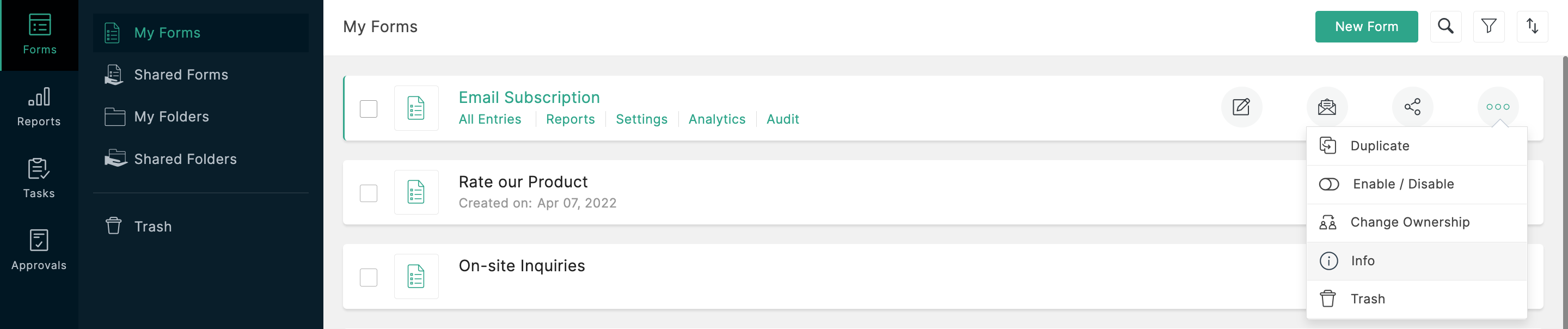
To view the storage information about a particular form, such as the total number of submissions and total amount of storage space consumed by the form, visit the 'Info' section. Refer to this link for step-by-step instructions.

 
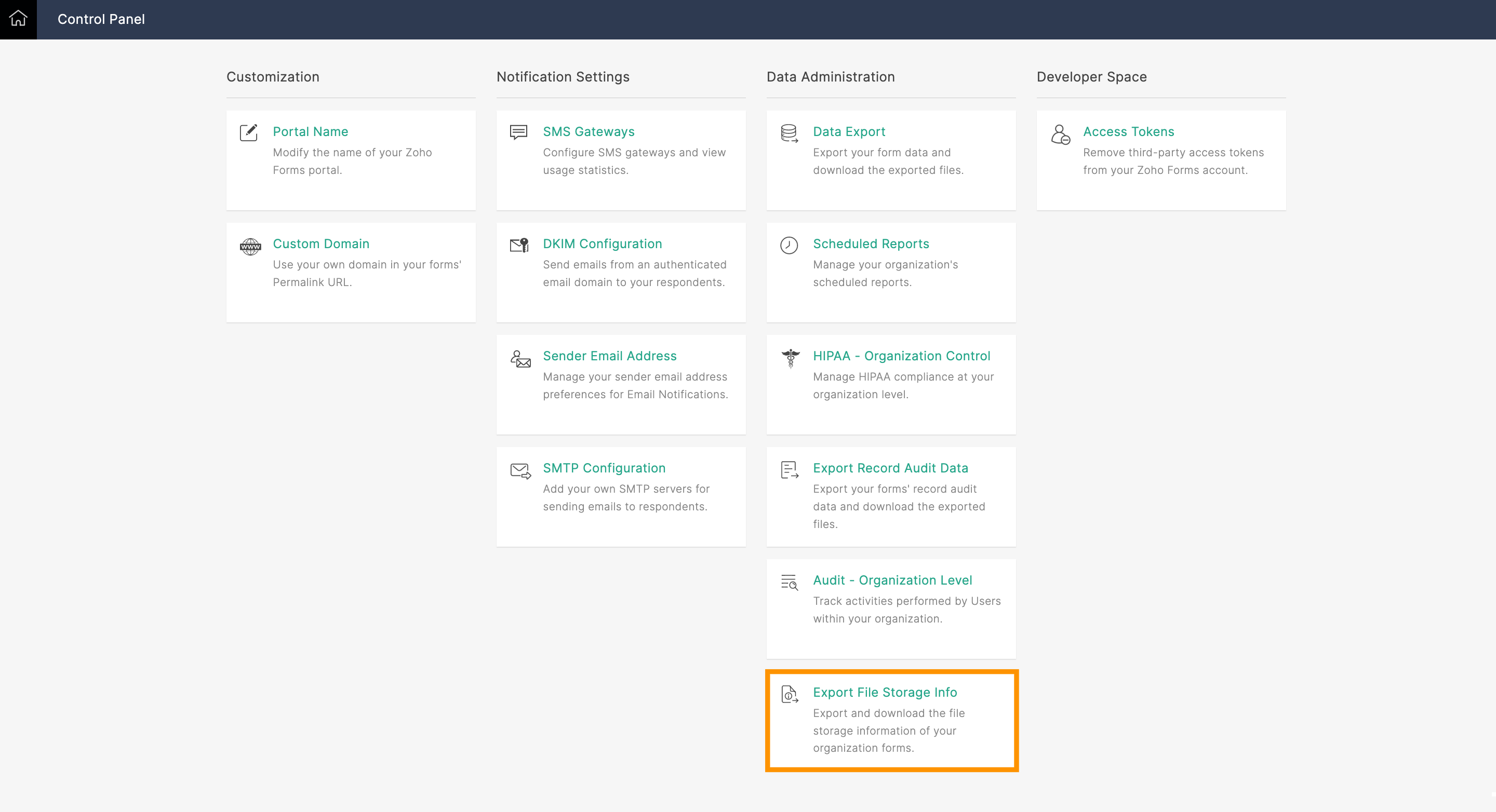
What if you're the Super Admin and need to view the storage space taken up by forms created by other users within your organization? That's when the Export File Storage Info option comes into play. Using this option, you can export your organization's file storage information as a CSV file. You'll see the following information for all forms created in your organization: form owner's email address, form title, and storage used by each form in MB.

 
What to do when you're about to reach your storage limit:
 
If you're worried about running out of storage space, Zoho Forms has got you covered! As long as you subscribe to a paid plan, we'll send an email alert to the Super Admin's account when you reach 90% of your total storage limit.
 
So, what happens when you reach your storage limit? There are a few things you can do. First, you can purchase our storage add-ons to increase the space available in your Zoho Forms account immediately. Check out our help link for more information on our plans and pricing.
 
Another option is to perform a data export and delete the files collected. This means you'll export all your collected data, and then delete the files/entries manually (you'll have to permanently delete them from the trash too) to free up storage space. Keep in mind that, once deleted, your files cannot be retrieved.
 
Preventing storage space issues with the Manage Form Attachment option:
 
To avoid running out of storage space in Zoho Forms, you could use the Manage Form Attachment option. This allows you to push collected files to a different cloud storage service, like Zoho WorkDrive, Dropbox, or Google Drive, upon each form submission.
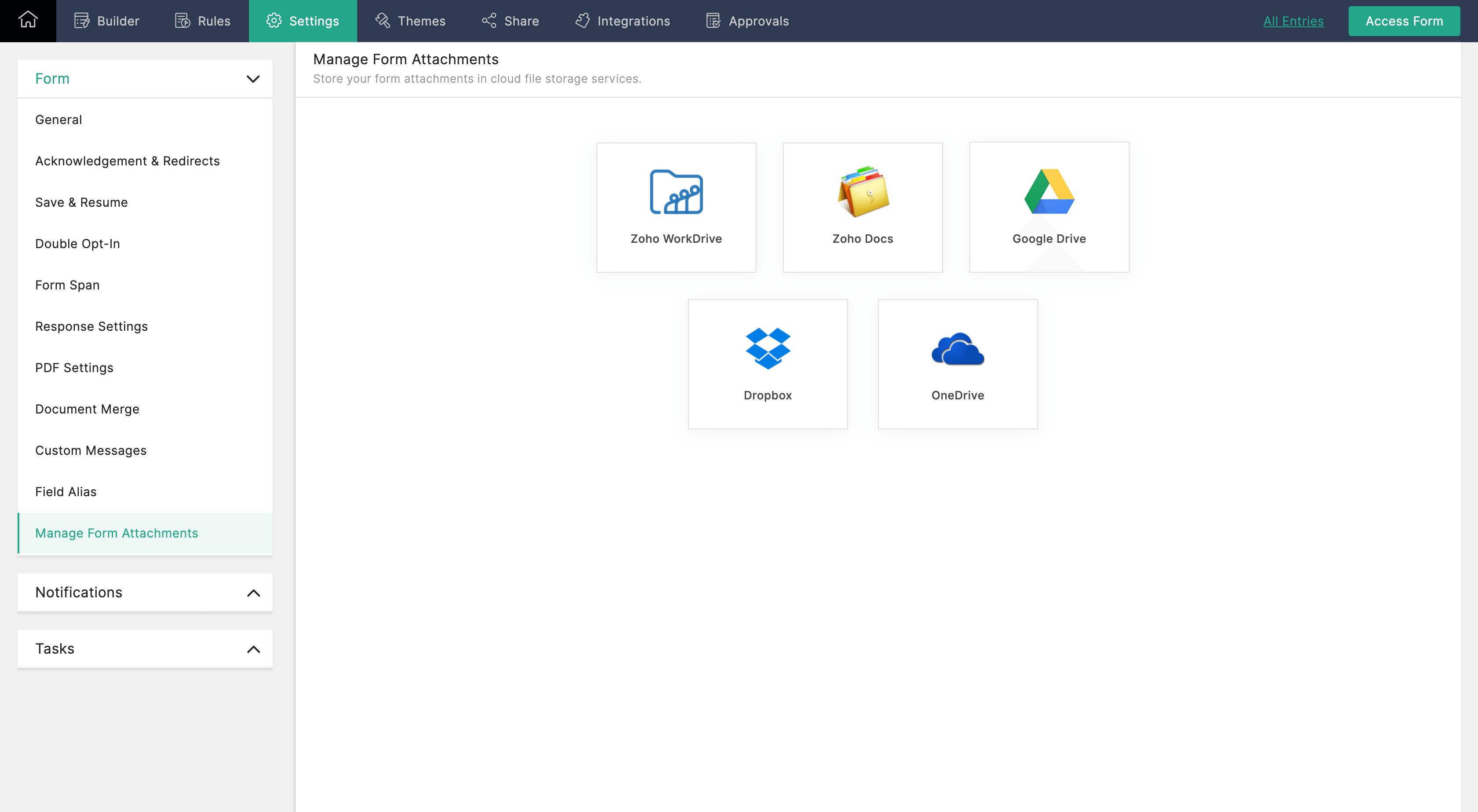
 

Once configured, the uploaded files will only be stored only by your selected file storage service, and will not be available in Zoho Forms. Check out our help link for more information on how to configure the Manage Form Attachment option.
 
Managing your storage space in Zoho Forms is essential to ensuring the smooth functioning of your forms. By monitoring your storage usage, you can avoid running out of storage space and take necessary actions to increase your storage limit or delete unwanted data.

Give this tip a try and let me know how it goes. You can also send your thoughts and feedback to support@zohoforms.com.


Until next time,
Niveditha

    • Sticky Posts

    • Easily track referrals with Zoho Forms

      Referral tracking can be a powerful way for businesses to understand where their leads are coming from. With Zoho Forms, tracking the referral sources of your leads is an easy and straightforward process. Here are some tips to help you make the most of
    • 9 Ways to use Zoho Forms this Navratri

      Hello form builders!Navratri is almost here! It is a time for celebration and culture in the Indian community, and organizing such a grand event can be overwhelming. But with the right tools, you can streamline the process and focus on creating unforgettable
    • The secret to collecting data from valid users

      Collecting accurate data is crucial for making informed decisions. Zoho Forms offers two efficient ways to validate user data and ensure that you collect entries exclusively from valid users. Double Opt-in: Double Opt-in is a privacy feature that ensures
    • Storage space in Zoho Forms: The ultimate guide to efficiently managing your data

      Are you using Zoho Forms for data collection? As with any data-intensive application, understanding how storage space is calculated is essential. That's why we've created this guide— to show you everything you need to know about managing storage space
    • Linking primary form submissions to a second form submission

      Let's imagine you have a form that you use to request a minimal amount of data from your users. To collect additional information, you redirect them to another form either automatically or based on a condition. During the course of redirection, you can
    • Recent Topics

    • When will Zoho Trident come to Linux?

      It already is implemented for MacOS, which is *nix based operating system. When will it be ported to Linux?
    • Zoho Commerce + MCP + Claude

      Hi everyone, I wanted to share a really impressive experience I had with Zoho Commerce + MCP + Claude. I created an MCP server using Zoho MCP Server and connected my Claude instance to my store built with Zoho Commerce. For safety, I enabled only product
    • UK payroll entries

      Hey guys, Nett payroll payments are imported direct into the bank, using an external payroll system (will be glad for Zoho to have a UK payroll app) At present I have monthly recurring bills for HMRC which are auto entered & paid when due. This seems
    • auto add as member the contact owner

      is there a way that i can make a zoho flow that will add the owner of the contact as a member of the chat after the round robin assignment?
    • Get Files Associated to Data Template via API

      I have a data template with multiple files associated to it, and trying to write a Deluge script that will fetch files associated with this data template. I created the script below based on the WorkDrive API documentation, one request uses the data templates
    • Zoho Book - Banking Module - Cash Credit account

      I have a CC account with a bank. I initially added the account as a 'Bank Account' under the banking module in Zoho Books. However, this CC Bank Account is showing as an asset instead of a liability. I have added the account as a credit card account but
    • Adding a custom formula field from sub-forms

      I have used my 5 Aggregated Sum fields in the subform. I have another column I want to add a summary of. This can be in a separate section/field. The formula field won't pull in information from the sub-form. How do I pull information from the sub-form
    • Remove Zoho Header from Portals

      I have a portal page with custom domain. But when I print directly from a webpage, the Zoho CRM header shows. It kind of kills the branding aspect. Is there a way to get rid of this?
    • Creator List not showing

      I've edited a list in creator, but when I open it in the live version the list is completely different. Anyone know why this is happening? Edit Version: Live Version:
    • Please design a better spam filter

      Hi Team, While I love Zoho Mail for all the awesome features you have designed - this is the one you need to do a lot of work on - Spam Filter. Your spam categorization seems to be very inefficient - any email containing brand images or a tracking pixel
    • Host not reachable when sending

      For few partner that I send regular emails now got error and they don't receive emails Temporary failure fam-xxx.hr/185.xx.xx.xxx Host not reachable. Have more than 20 mails in https://mailadmin.zoho.eu/cpanel/home.do#mailSettings/retryEmail please
    • IP flagged as abusive

      I'm getting the error that 136.143.188.15 is listed as abusive. I've checked with mxtoolbox.com and it is indeed in the list
    • App passwords stop working

      Some of my app passwords appear to stop working after awhile. Seems to happen every 6 months or so. Just had to change one again for the second time in a year. Is this a bug or a feature? Or perhaps changes are being made on the back end on occasion that
    • Duplicate entries for contacts birthdays

      Good morning I have recently started to use my Zoho calendar and noticed that there are multiple birthday events showing for some of my contacts. I have checked my contacts and there were duplicates for some contacts which I have now rectified but the
    • Problem: New Email Consistently Failing to Sync/Display in Inbox

      Recently, I have noticed that my Zoho Email inbox does not indicate I've received a new email, until I go to *another* folder and then return to the inbox. Only then will new emails be displayed. This has happened 100% of the time, during the past few
    • Zoho IMAP Access to mail doesn't sync messages

      As stated in the topic - I have company account email address setup, and it has ( as in the picutre ) ActiveSync and Imap access enabled. However the messages does not show up while logged in in Zoho Mail however when I log in in thunderbird everything
    • Cliq iOS can't see shared screen

      Hello, I had this morning a video call with a colleague. She is using Cliq Desktop MacOS and wanted to share her screen with me. I'm on iPad. I noticed, while she shared her screen, I could only see her video, but not the shared screen... Does Cliq iOS is able to display shared screen, or is it somewhere else to be found ? Regards
    • Temps working custom view in Zoho Recruit

      How do you create a custom view of temps working for this week.  I have tried multiple combinations of job status, start date, end date etc but I am unable to find the correct combinations to show the temps I have working this week?? Any suggestions on how I can do this. 
    • Client Scripts similar to CRM?

      Hi, Is there any plans for Client Scripts to become a feature of Recruit? Feel this will be a great benefit to a number of users. Would be great for example in cases where a Client has banned / blacklisted a Candidate - so that if that candidate is associated
    • Announcing Zoho Sheet desktop app for macOS and Windows (Beta)

      Hello Sheet users, We know you’ve been waiting for this one. It has always been the top priority on our roadmap to provide a single native desktop app for macOS and Windows that works both online and offline. Today, we are excited to announce that the
    • Automated entries past the current month in a calendar report

      Hi all, I have an automation problem. I have a form which on successfull entry adds either 5 or 10 more of these entries with a slight change so our customers can see it throug a calendar report on the webiste. The entry put in manually shows up perfectly
    • Billing Status Update

      Hello Latha, I’m working on a new automation (deluge) to fulfill one of our requirements. In this automation, there is a step to update the Work Order billing status from “Not Yet Invoiced” to “Non-Billable.” I tried to find the API information relevant
    • What's New in Zoho POS - April 2026

      Hello everyone, Welcome to Zoho POS’s monthly update, where we share our latest feature updates, enhancements, events, and more. Let’s take a look at how April went. Access and manage other web applications in Zoho POS with Web Tabs You can now access
    • Many Zoho POS Issues

      Can not apply credits from a customers account as a form of payment. It shows that you can but there is a bug that does not execute the action. Reported many times. Can not view Sessions from Zoho POS WebView, throws a JQUERY error Workflows and actions
    • HOW I CAN GET BETA VERSION FOT TESTING

      HI. ZOHO I AM INTERESTED IN YOUR BETA SOFTWARE TO EXPERIENCE NEW FEATURES.
    • Multiple EAN code for product

      option to add multiple EAN code for product???
    • Issue adding/changing mobile number for OTP

      Hi Zoho Community, I’m trying to add or change my mobile number, but I keep getting this error: “We’re unable to send OTP to this mobile number. Please contact support-as@eu.zohocorp.com” Because of this, I can’t verify my number or continue the setup.
    • Zoho Payroll Canada does not work

      We submitted payroll within the required timelines. The money was withdrawn from our account and our employees have not been paid. Impossible to get a hold of someone at Zoho. I can’t believe the company operates like this. What a bloody disgrace. Shame
    • Enhance Appointment Buffers in Zoho Bookings

      There was previously a long-standing feature request related to enhancing the way appointment buffers work in Zoho Bookings, but it looks like the original post has been deleted. I am therefore adding a new request that Zoho Bookings adjust how appointment
    • Functionality based URL to find records due today or in the next week

      I need to construct a URL to filter a view to records where the evaluation is due soon (i.e. in the next 7 days). To me, that includes today, but Zoho has a different opinion. Zoho defines 39 as NEXT_7_DAYS but this gives unexpected results. https://creatorapp.zoho.eu/...#Report:My_Evaluations?Evaluation_due_by_op=39
    • Allow customers to choose meeting venue and meeting duration on booking page

      My business primarily involves one-to-one meetings with my clients. Given the hybrid-work world we now find ourselves in, these meetings can take several forms (which I think of as the meeting "venue"): In-person Zoom Phone call I currently handle these
    • Event Time Zone in meeting invites are confusing users

      When sending calendar invites to internal and external users, the first section "Event Time Zone" is confusing people and they are automatically declining events. Can this section please be removed??? It already shows the correct time zone next to the
    • Forwarding without verification

      Hi, I use Tripit to keep track of all my business travel. I've recently moved over to Zoho and wanted to set up a forwarding rule to send various travel confirmation emails automatically to plans@tripit.com Obviously this is an email address I don't control,
    • Filter by user in Pivot Chart

      I have a Pivot chart where the data should be filtered by user. The user enters the system and should see only the data that correspond to it. Can anyone help me?
    • All new Address Field in Zoho CRM: maintain structured and accurate address inputs

      Availability Update: 29 September 2025: It's currently available for all new sign-ups and for existing Zoho CRM orgs which are in the Professional edition exclusively for IN DC users. 2 March 2026: Available to users in all DCs except US and EU DC. 24
    • Whatsapp Limitation Questions

      Good day, I would like to find out about the functionality or possibility of all the below points within the Zoho/WhatsApp integration. Will WhatsApp buttons ever be possible in the future? Will WhatsApp Re-directs to different users be possible based
    • Internal mails on our company domain (managed by Zoho) do not get delivered

      Hi last week Thursday and Friday a colleague had sent me two emails which did not show up at all in my inbox, spam or anywhere else. What this a problem with Zoho mail in general or did this affect just us? From the forum is reads like many problems had
    • #2 The Tax Talk Nobody Wants to Have

      "We are also able to manage our GST invoices without worrying about compliance issues. With Zoho Invoice, we are happy, our tax consultant is happy, and so are our customers," rejoices Shivprateek Habib, Partner, Flutterboots Services LLP. That's usually
    • Bulk upload images and specifications to products

      Hi, Many users have asked this over the years and I am also asking the same. Is there any way in which we can bulk upload product (variant) images and product specifications. The current way to upload/select image for every variant is too cumbersome.
    • Workflows fail silently in Zoho CRM and there is no native way to know

      Workflow automation is honestly one of the biggest reasons my clients choose Zoho. But there is one problem I keep running into across almost every implementation. When a workflow fails, nobody finds out. Email alerts hit daily limits and just stop. Custom
    • Next Page