What's New - January 2026
Hello Users!
We are starting the year with a strong lineup of updates, marking the beginning of many improvements planned to enhance your analytics experience. Explore the latest improvements built to boost performance, simplify analysis, and help you extract more value from your data.

Archive Data
No more querying all records while generating reports! Analyze data faster and optimize workspace performance with Archive Data. Move older or less-frequently used records out of active tables, and store them securely.
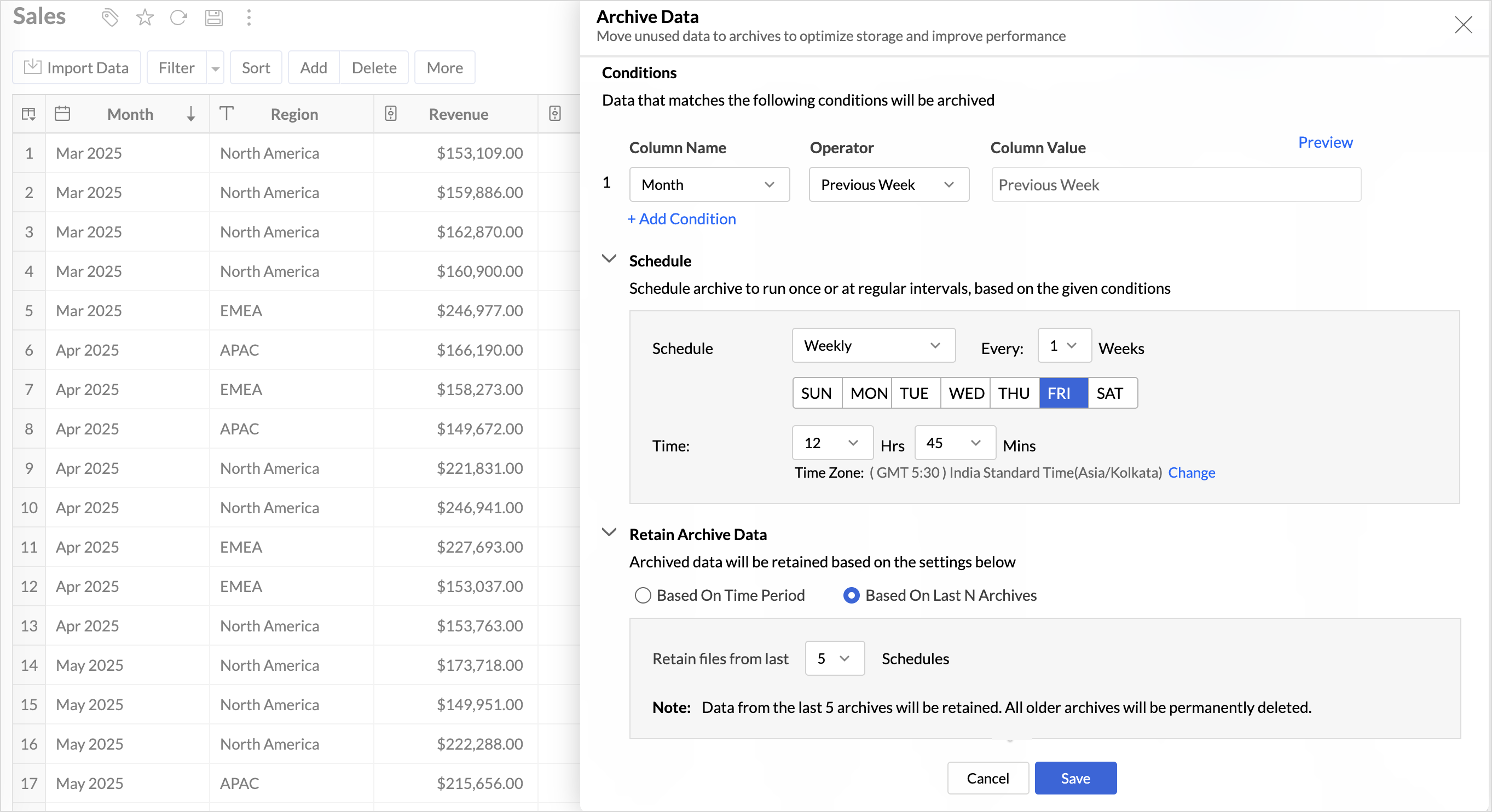
Key Benefits
- Pay only for what you analyze: Active data is reserved for analysis, while historical data is retained without impacting usage limits.
- Improved Querying and Faster Analysis: By limiting queries to relevant data, report generation and dashboard loading times are significantly reduced, resulting in faster insights and a more responsive analytics experience.
- Optimized Storage Usage: Archiving older data helps control table size, preventing unnecessary growth, and better management of row limits.
Organize Views with Tags
Group related views, and manage reports and dashboards effortlessly. Use tags to organize views by teams, departments, projects, or specific use cases, making it easy for users to navigate large workspaces.
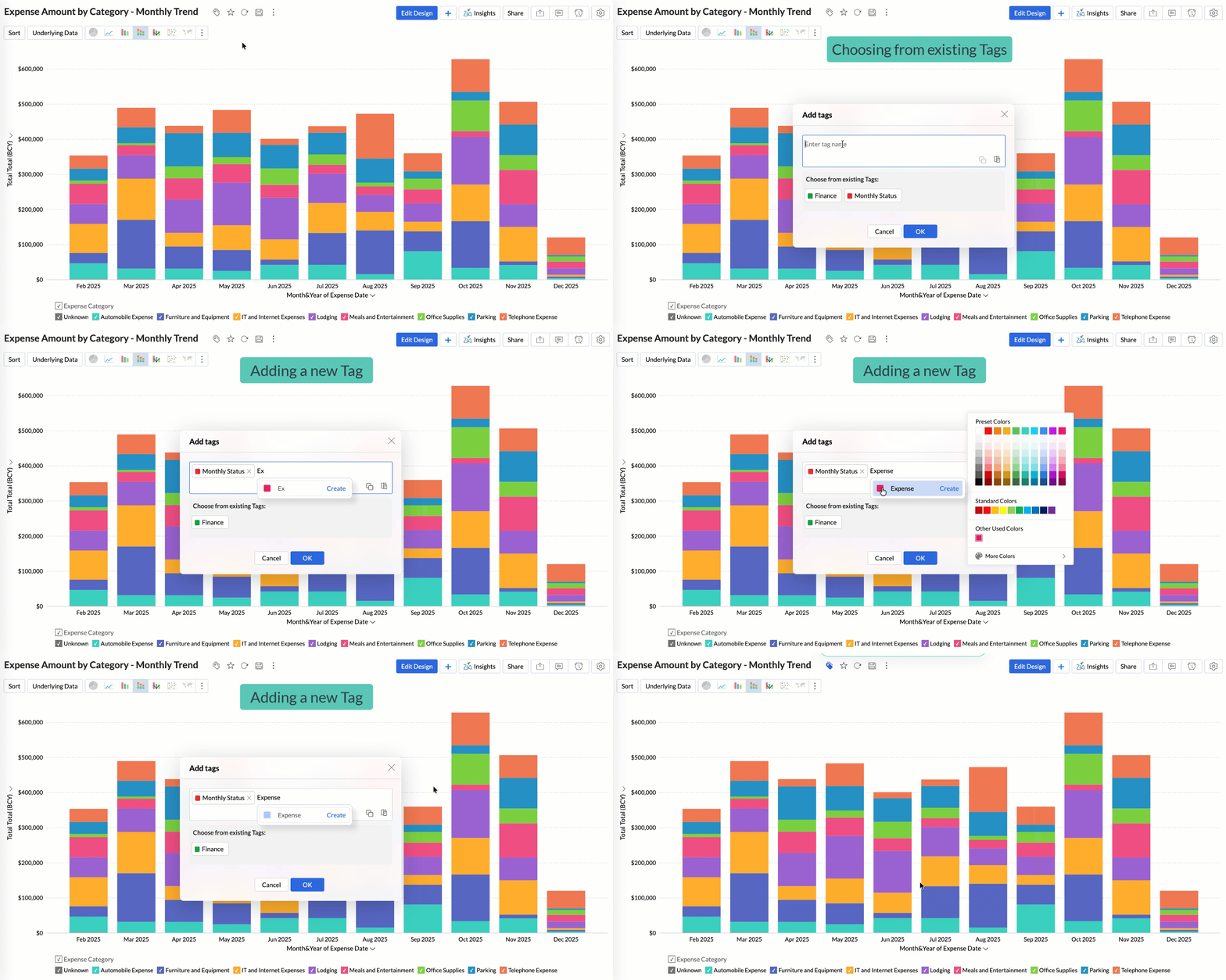
Quickly filter and find the right reports and dashboards, reduce clutter, and ensure teams always have access to the views that matter most to them.
Global Custom Sort
Custom sort was limited to individual reports previously. With recent enhancements, you can now define the sort order for text data types at the workspace level.
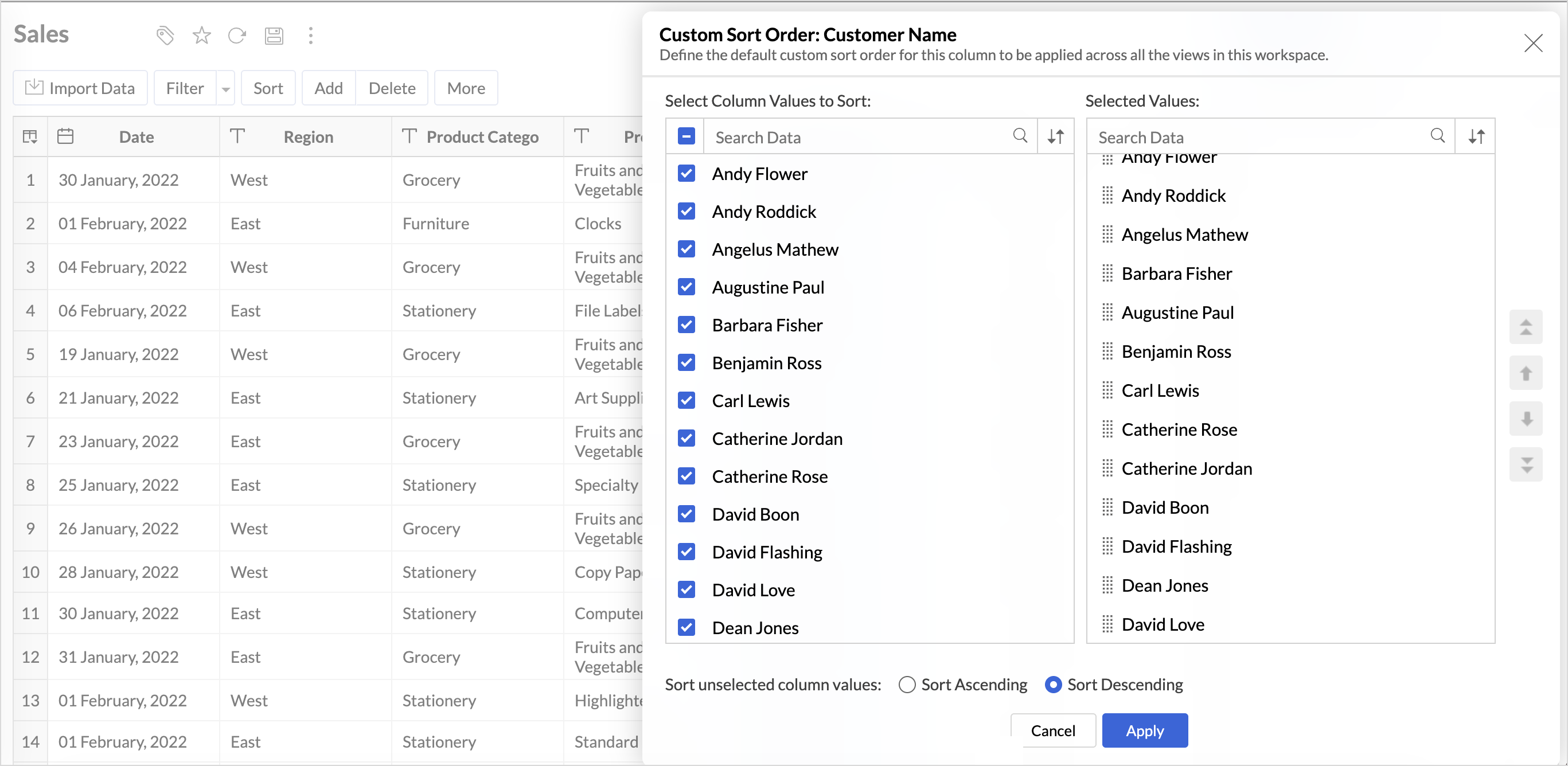
This improvement helps you maintain a consistent sorting across all reports, reduces repetitive setup, and saves time. It also ensures a standardized view of your data throughout the workspace.
Timeframe Selection for Overview Charts
Overview charts now offer flexible timeframe selection, allowing you to focus on relevant periods for deeper trend analysis.
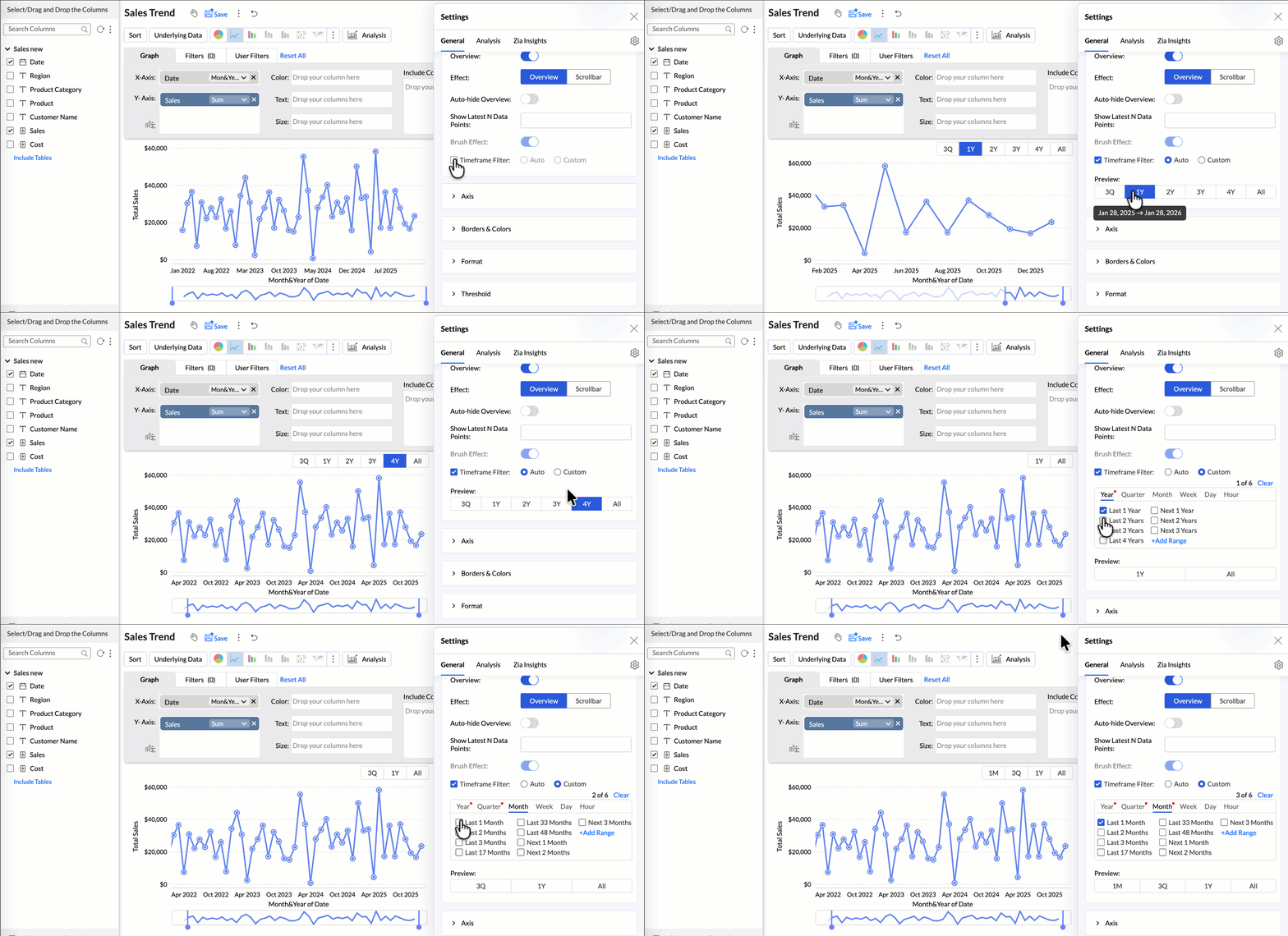
By narrowing the time range, you can better compare performance, identify patterns, and gain clearer insights without distraction from older data.
Customize Zia Insights placement in Dashboards
Choose where and how the insights are displayed, so that they complement your analysis without disrupting your dashboard layout. This gives you greater flexibility to present insights in the way that best suits your audience and reporting style.
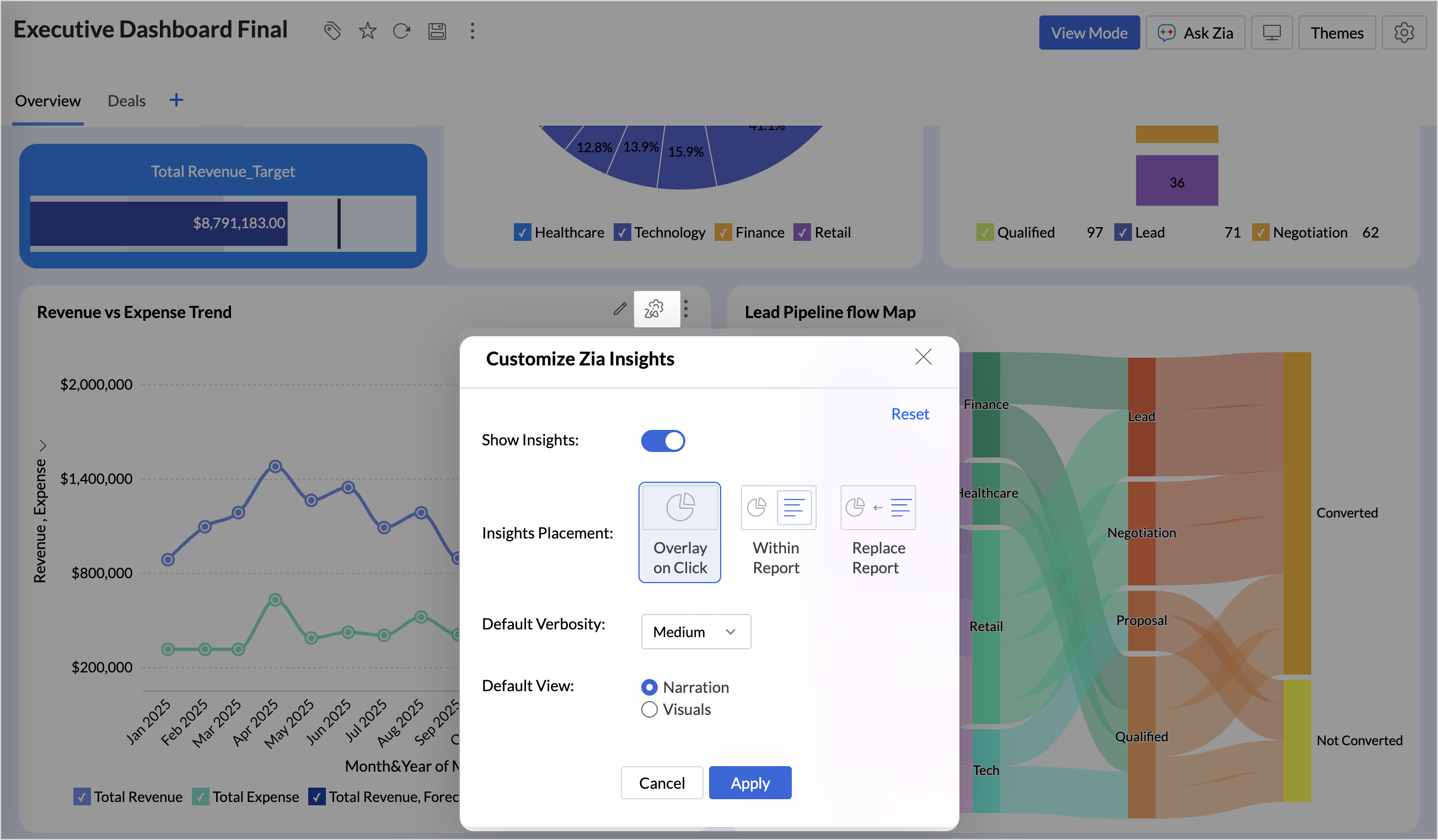
- Overlay: Displays insights in a floating panel that opens on demand, allowing users to review insights without leaving or altering the report view.
- Within Report: Embeds insights directly within the report, enabling users to view data and insights together in a single, continuous view.
- Replace Report: Displays insights as the primary view by replacing the report entirely, offering an insight-first experience focused on conclusions, rather than raw data.
Customize Image Size in Dashboards
Dashboards now support image size settings that let you control how images are displayed.
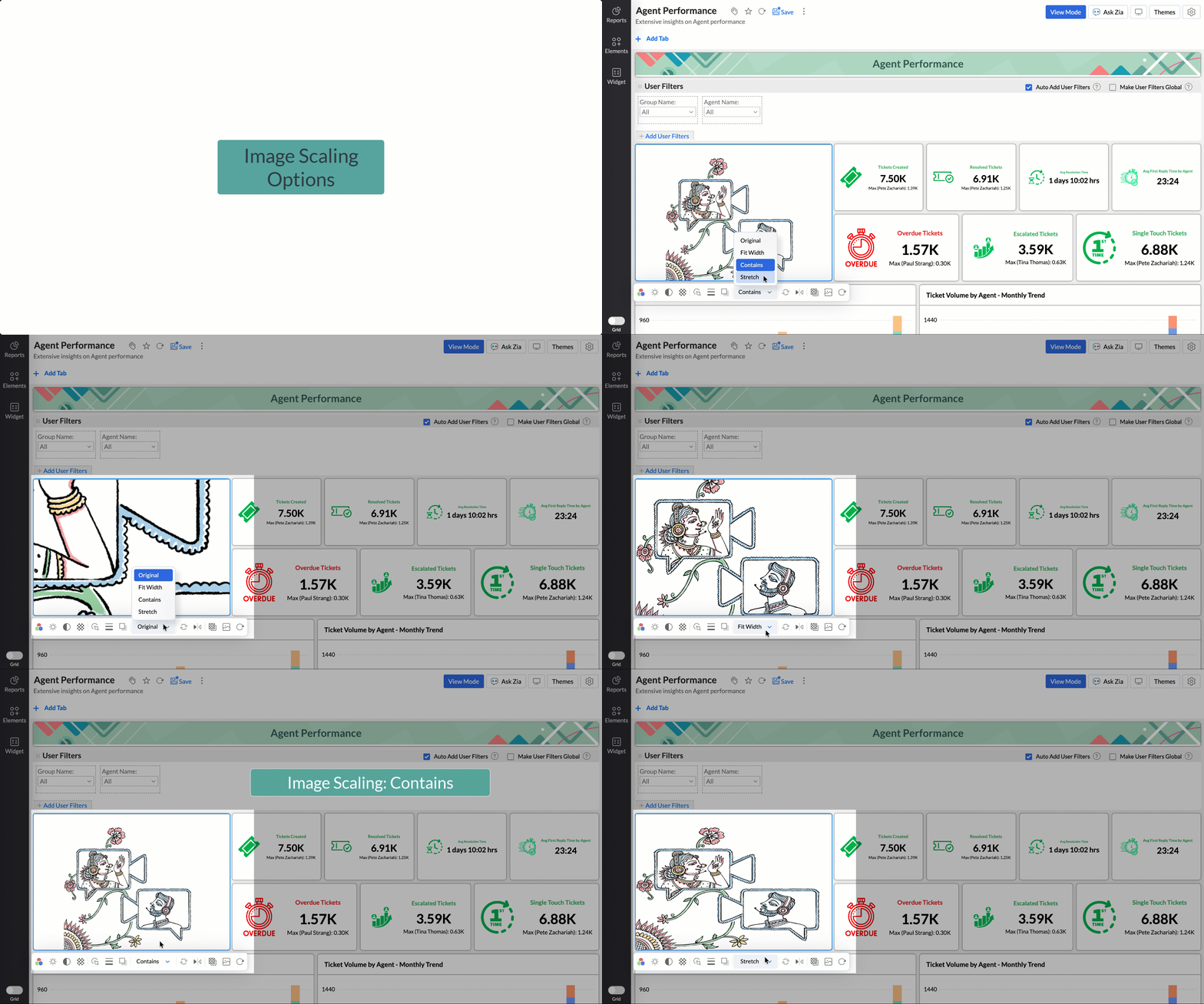
Choose from options like Original, Fit to width, Contain, or Stretch to ensure images align well with your dashboard layout, and thus improve visual clarity.
Tabular View Enhancements
- With this enhancement, all tables linked via lookup columns are now available in the Filter Criteria tab. This makes it easier to share views with users using associated filters, ensuring the specified criteria are automatically applied to the shared report.
- You can now customize lookup columns and the join paths used within Tabular View. This enhancement gives you control over how related tables are connected, helps avoid incorrect or ambiguous joins, and ensures more accurate and reliable data representation in your tabular reports.
New Business App Connectors
We have now introduced integration with two new business connectors Zoho FSM and Magento.
Zoho FSM
Connect your Zoho FSM Data with Zoho Analytics to analyze your field service operations in depth. Identify bottlenecks, optimize resource allocation with interactive reports and dashboards. Analyze revenue, service costs, and customer trends to improve profitability and service quality.
Adobe Commerce (Magento)
Analyze sales, orders, customers, and product performance with ready-made reports and dashboards. Track key metrics like revenue trends, average order value, and top-selling products. Gain insights into customer behavior and regional sales patterns. Make faster, data-driven decisions to optimize store performance and growth.
Topic Participants
Nisha Angel J
Sticky Posts
What's New in Zoho Analytics - January 2026
Hello Users! We are starting the year with a strong lineup of updates, marking the beginning of many improvements planned to enhance your analytics experience. Explore the latest improvements built to boost performance, simplify analysis, and help youWhat's New in Zoho Analytics - November 2025
We're thrilled to announce a significant update focused on expanding your data connectivity, enhancing visualization capabilities, and delivering a more powerful, intuitive, and performant analytics experience. Here’s a look at what’s new. Explore What'sWhat's New in Zoho Analytics - October 2025
Hello Users! We're are back with a fresh set of updates and enhancements to make data analysis faster and more insightful. Take a quick look at what’s new and see how these updates can power up your reports and dashboards. Explore What's New! ExtremeWhat’s New in Zoho Analytics – September 2025
Hello Users!! In this month’s update, we’re raising the bar across multiple touchpoints, from how you bring in data, plan and track projects to how you design and brand your dashboards. We’ve added the all-new Gantt chart for project visualization, expandedAnnouncing Agentic AI - Ask Zia!
We are delighted to roll out the new agentic AI capabilities in Ask Zia, where every stage of the BI workflow is assisted by AI. With a human-in-the-loop approach, Ask Zia ensures that you’re in command of the decision, while AI handles the complexity.
Recent Topics
Is there a Waiting Room Before The Webinar Starts?
It appears that there is no waiting room before a webinar starts. For example, with most webinar software you can collaborate with your co-presenter, set up your presentation and check to make sure everything sounds right before you go live. Zoho Meeting/WebinarOptimizing Zoho CRM Integration – Tips & Insights Needed
I hope you're all doing great! I'm currently working on integrating Zoho CRM with our platform, which helps users get iPhone Free of cost through verified government programs. Everything's coming together nicely so far, but I'd really appreciate someForms - Workflow
Apologies if this has been asked before. I would like to know if there is a way to setup a form where a customer completes the fields/questions on Page 1 and then it is forwarded to an internal department employee who completes the fields/questions onUsing the "Like" operator in Custom Formula
HI there, Can someone please explain the way to use the "LIKE" operator in an IF statement to compare strings? I have tried the following but am not getting the results I'm after. if( "CurrentStatus" like 'Rejected*','Unsuccessful','Pipeline') Thanks MattABA Files payment description
Hi, is there a way to automate the payment description on the ABA file creation. When you paying many vendors having to put this in each time is very time-consuming. I couldn't see if there was a way to workflow this to automate using deluge.GDPR Contd. - Handling Lawful Bases for Your Customers using Zoho CRM.
Hello folks, Continuing from our previous GDPR post, we bring to you the first cut of GDPR centric enhancements that are released for handling lawful bases for your customers in Zoho CRM. For your understanding we have split the entire process into three sections: Identifying Data Processing Basis Updating the Data Processing Basis in Zoho CRM Consent Management in Zoho CRM 1. Identifying Data Processing Basis The fundamental principle to handle the personal data of your data subjects is to processUpgrade the Lato font to the Lato 2 font
While there's not a major difference, I noticed that Zoho doesn't use the upgraded Lato 2 font but it instead uses the standard one. Lato 2 enhances the look of letters and numbers when you italicize them, among little things that get tweaked. Is it possibleMasked Field Type with Permission-Controlled Visibility in Zoho CRM
Dear Zoho CRM Team, Greetings, We would like to request a new feature that would enhance data security and access control within Zoho CRM, especially when handling sensitive internal information. Use Case: Our team occasionally needs to store sensitiveHow to properly setup Databridge on Linux Server?
Hello guys, i am running a Linux server on which I am installing the Zoho Databridge via command line. The Zoho tutorial ( https://help.zoho.com/portal/en/kb/analytics/user-guide/import-connect-to-data/databases-and-datalakes/articles/postgresql-3-3-2021#1_How_do_I_install_Zoho_DatabridgeHaven't used banking function for years and now want to reconcile and clean up my account
I'm in the UK and have been using Zoho Books for my private mental health practice since 2018. Up until recently, I've entered everything manually and not reconciled any items with my bank account. Every year, I run a report for that year and use thatinvalid element hsn_or_SAC
Hi, I am trying to record expense in Zoho expense. when submitting I am facing this issue invalid "element hsn_or_SAC" please help me with this. Regards, Abdul Hameed MRecap - Desk Story Series
In our exploration of the Wheels of Ticketing Series, we kicked things off by diving into a fundamental element of Desk Ticketing: the fields. These fields serve as the building blocks that gather essential information about tickets, customers, organisations,Tip of the Week #60– Reduce response time with shared inboxes!
When customer messages are scattered across different platforms and team members aren't sure who's responding, delays are inevitable. Slow responses frustrate customers and create a poor experience for your brand, especially when expectations are high.Hybrid project management in IT and software development services
Project management models serve a wide range of audience, however the highest takers for Agile project management methodology are the IT and software services industry. The flexibility to develop and release software iteratively with continuous improvement,What's New in Zoho Inventory | January - March 2025
Hello users, We are back with exciting new enhancements in Zoho Inventory to make managing your inventory smoother than ever! Check out the latest features for the first quarter of 2025. Watch out for this space for even more updates. Email Insights forOverdue payments pending approval max
I needed to validate update the email to pay for goods sold out, travel expenses and cars and vehicles for office, office supplies, properties purchase etcHow do I mass edit time entries?
Since you can not filter or sort time entries by what has and has not been invoiced (you can only see the icon but not separate invoiced from non-invoiced), I would like all time to initially be entered in as un-billable and I can change to billable as I bill them. (since you can see this separation) So my question is HOW do I mass edit this? Can it be done?Zoho Booking Page Footer
Is there any option available to add social media, like LinkedIn, on the Zoho Booking page?Custom SMTP is now available in Zoho Sign
Hi there! Want to send Zoho Sign emails from your organization's or personal email server? Look no further! Zoho Sign has introduced custom Simple Mail Transfer Protocol (SMTP) for Enterprise users across all data centers. By enabling custom SMTP, youHelp with SEO
Hi There, I have recently published a site and added some Keywords in the SEO settings. Searching Google I currently don't find my site though. When do these settings take effect? In the SEO settings there is also a section "Sitemap" I can change settings for "frequency" and "Priority" What do these settings do? Kind regardsReport Level Button
Currently I couldn't find a way to add a report level button I think currently we can only add buttons/actions for records, but having custom report level button would be really beneficial Usecases Click to import/sync Data from On Prem Systems ClickCreate collection from start integer to end integer
I want create some ticket number. Starts at 1 and end at 10. I want the result to be a string 1 - 2 - 3 - 4 - 5 - 6 - 7 - 8 - 9 - 10. Trying something like this but need the correct way write the start and end part. start = 1; end = 3; sequence = List();Importing Subform Data is Removed in Zoho Creator 6
Previously It was possible to import Data to the Subform in Creator 5 This basic and mandatory Feature was completely removed from Creator 6 with no Timeline to add support for it How are we supposed to add our data if we want to use Creator? Manually?Smart Document Automation:: From Zoho Projects to Zoho Writer – Merge, Edit, and Share
Hello Everyone, A custom function is a software code that can be used to automate a process and this allows you to automate a notification, call a webhook, or perform logic immediately after a workflow rule is triggered. This feature helps to automateHow to remove an Instagram post on Zoho Social?
Hi there, I wanted to delete yesterday's post on all social platform and managed to do so for Twitter and Facebook. I couldn't for Instagram as there is no option for delete. How can I delete successfully?【開催報告】東京 ユーザー交流会 Vol.2 2025/6/13 CRM Plus/Formsの活用におけるポイントやおすすめ機能を紹介
ユーザーの皆さま、こんにちは。コミュニティチームの藤澤です。 6月13日(金)に東京で「ユーザー交流会 Vol.2」を開催し、16名の方にご参加いただきました。ご参加くださった皆さま、ありがとうございました。 この投稿では、当日のセッションの様子や使用した資料を紹介しています。残念ながら当日お越しいただけなかった方も、ぜひご覧ください。 ユーザー活用事例セッション:マーケ・営業・サポートをつないで顧客体験を向上させる!Zoho CRM Plusのおすすめサービス活用事例 Zoho ChampionNo Real DANE Support
The issue in https://help.zoho.com/portal/en/community/topic/will-zoho-implement-dane was closed today claiming DANE was implemented. You never implemented DANE correctly, even if you think you did. DANE requires DNSSEC to work properly, you never addedApplying Price List to All Customers
I just created a new price list as we have several items that have volume price breaks. To create my price lists, I followed the instructions in this article: https://www.zoho.com/us/inventory/help/items/price-list.html When it comes to applying my priceWhat's wrong with this deluge code to create a Bill?
I know that all the data in the map is correct. The line items are pulled directly from a purchase order. // Add the purchase order ID to the bill billPOIds.add(poID); // Retrieve and merge the line items poLineItems = purchaseOrder.get("line_items");2 Ideas, Clone timesheet entry from monthly view and Notes in Weekly view
While i love timekeeping I am finding some things slow me down. Slow to the point of considering writing my own API call to do this. It would be so useful to be able to clone a timesheet entry from the monthly view. It is somewhat painful to have toZoho Workdrive API call to find public external Link for a Folder
Hi all, I can create new external share links for a WD Folder using this API call https://workdrive.zoho.com.au/api/v1/links . This works fine, however if there is already an external link created for a given folder, trying to create a new one fails (whichAccessing and Using Formula Field
Hi There, I created a formula field called 'Day of the Week' in the Leads module that takes the record created time and transforms it into the day of the week. The formula field returns the correct values. However, I am unable to find or use the field🇺🇸 🇨🇦 🇲🇽 Ask the Experts: A Live Q&A Session
Session Closed Thank you to everyone who participated in this Ask the Experts session! Your questions, insights, and engagement made it a valuable discussion for the entire Zoho Recruit community. The comment section is now closed, but feel free to browseAbility to Append or Prepend specific signer name field to all documents in an envelope
We use templates regularly and have a need to be able to rename the individual pdf documents contained in an envelope, such that a signer's name is appended or prepended (e.g. Form1 - SignerName). This is critical for us, because of how we process documentsExport an email as an HTML file?
How do we export an email in Zoho Marketing Automation as an HTML file? We have an advertising partner that needs our campaign email as an HTML file. We can't find any way to do this. If this is not possible, please explain why. It doesn't make senseFunction #30: Display list of associated PO on SO details screen
Hello everyone, welcome back to our series! Imagine having the ability to effortlessly access and view details of all purchase orders linked to a sales order directly from the sales order itself. Well, today's script is designed to do just that for you.Custom Print Button in Page/Stateless Form
[Zoho Creator] Unable to Add Custom Print Button to Page or Stateless Form We need the ability to add a custom print button on a page or stateless form in Zoho Creator to print a templated or formatted output (e.g., appointment confirmation, summary slip).Page Variable Not Passed from Report to Form
[Zoho Creator] Page Variable (Resource) Not Passed from Report to Form in Appointment Module We are facing a limitation in our Appointment Module related to the handling of page-level variables. We are using a page variable to select a resource, whichCreating Layout Rule With Formula Field
By The Grace Of G-D. Hi, I see that i cannot use Layout Rules to show/hide Formula Fields. Is that something you plan on adding sometime soon?Combine / merge multiple invoices into master
Good morning Zoho! Upon looking for a solution for my issue, I found many that had my similar problem...dating 13 years ago! Please, any updates on this? Merging multiple invoices on a Master Invoice would alleviate all the extra work of resending andNext Page