Building extensions #8: Improve and enhance user experience with modal boxes
Modal box - What is it and where can you use it?
A modal box is a user interface pop-up window or dialog box that appears over the currently active UI screen. When prompted, the modal box deactivates all other page content until the user closes it. The modal box feature is commonly used to display information based on user input or to engage the user in some activity, such as an attachment picker, where they can proceed only after selecting an attachment.
Support offered in Zoho Projects for modal boxes
Zoho Projects provides support for modal boxes through extension development, which includes methods for opening and closing modal boxes, passing and receiving data to and from modal boxes, and so on. You can view the various methods offered by Zoho Projects to use modal boxes in this document.
In this post, we'll go over an example scenario for using a modal box in depth.
Scenario
A Zoho Desk ticket agent handles issue/feature request tickets in Zoho Projects to work on development-related requests. When the development in Zoho Projects is completed, the Desk agent provides a solution to the customer. In this case, it would be beneficial for the Desk agent to have all open Desk tickets associated with them displayed in a single, dedicated tab within Zoho Projects.
Goal
Improve, enhance, and simplify an agent's work in Zoho Projects by:
➤ Showcasing all open Desk tickets within a single tab.➤ Providing them with ticket-specific details, allowing them to view ticket details and prioritize the Zoho Projects task associated with that ticket accordingly.
Solution
To accomplish this goal, use the modal box feature as part of the widgets concept discussed earlier. A Project tab widget labeled "Desk open tickets" can be created to display all open Desk tickets associated with an agent. When a specific ticket is selected, the agent can access all relevant information about the ticket, such as its status, priority, and so on. This will allow them to prioritize and work on the appropriate task in Zoho Projects that is associated with that ticket.
Now, let's go ahead and see the components that would be required to achieve this use case solution as part of an extension.
Required components
- In order to establish a secure integration between Zoho Projects and Zoho Desk for a seamless data transfer, a connection between Zoho Projects and Zoho Desk has to be established.
- An extension configuration process includes:
- Creating an extension.
- Configuring the plugin manifest.
- Setting up the widget code.
- Display all open Zoho Desk tickets associated with an agent in a tab called "Desk open tickets."
- Incorporate the modal box feature to display ticket-specific details while the agent chooses a ticket from the list of open desk tickets.
We have already explored the steps to establish a connection, create an extension, and configure the plugin-manifest.json file as part of our earlier posts. You can refer to those resources for detailed guidance. In this case, we have already completed most of these steps (screenshots below).
Connection
We have created a connection to establish a secure integration between Zoho Projects and Zoho Desk.
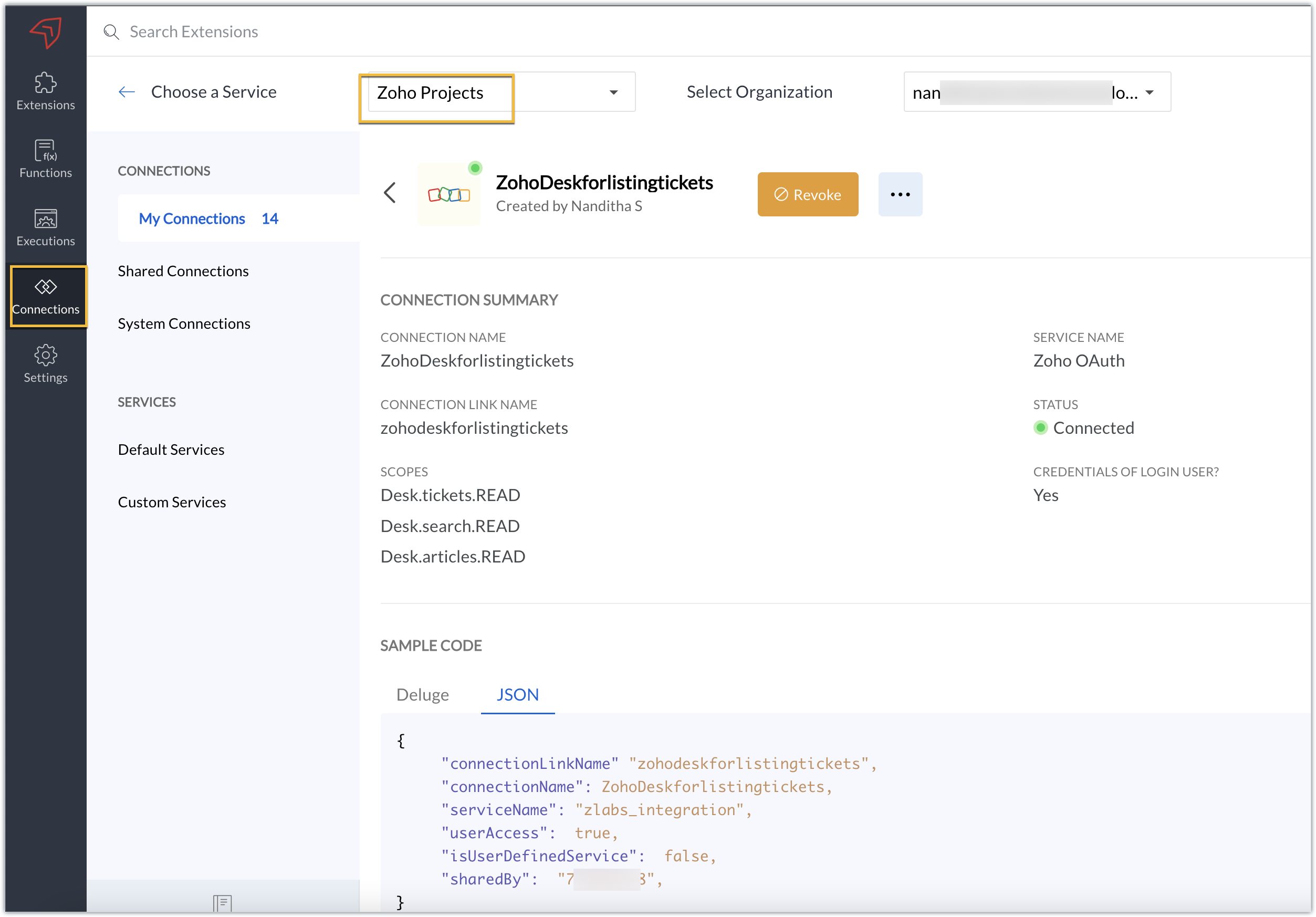
Extension configuration
Extension creation: We have created a new extension for Zoho Projects.
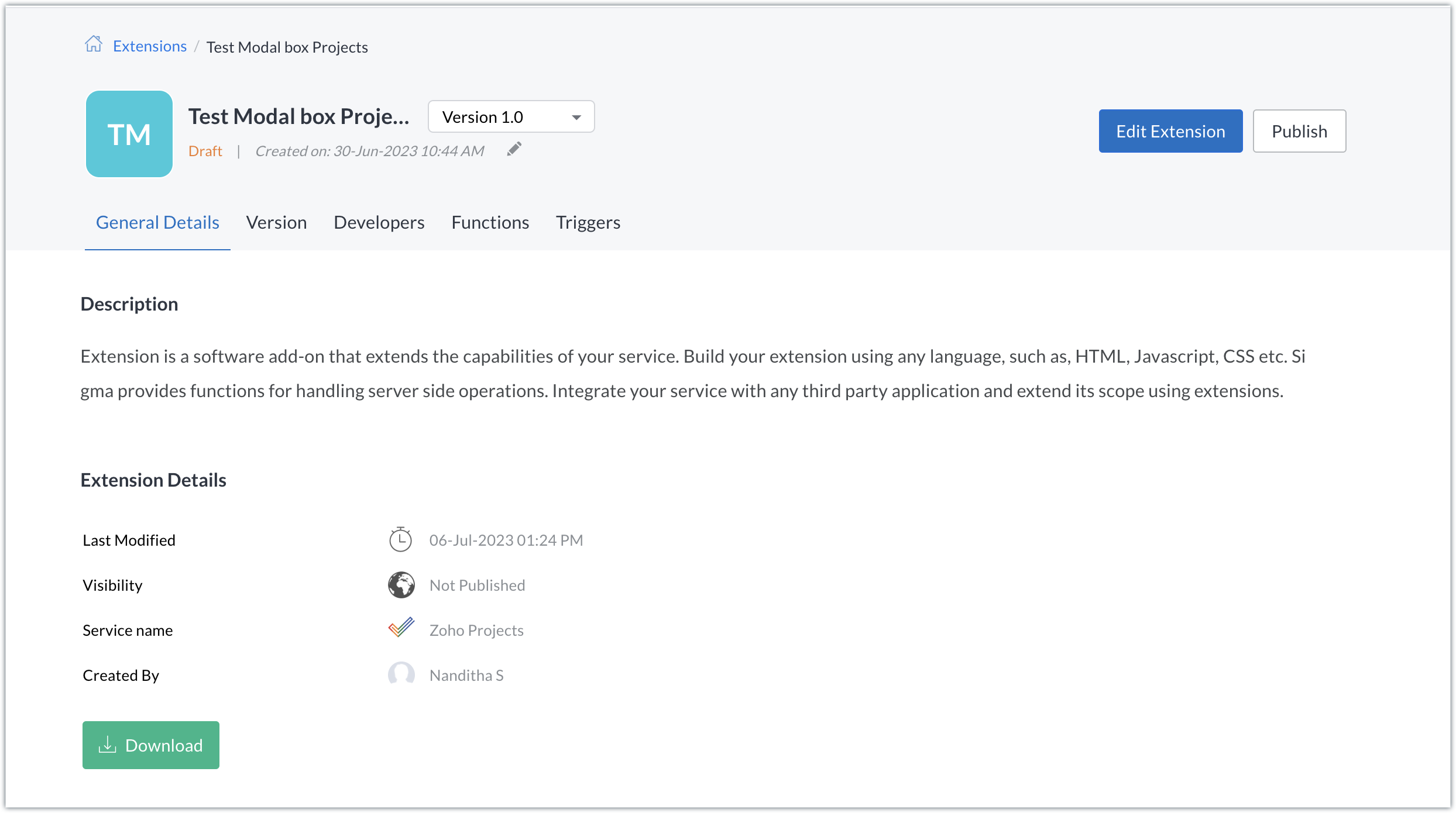
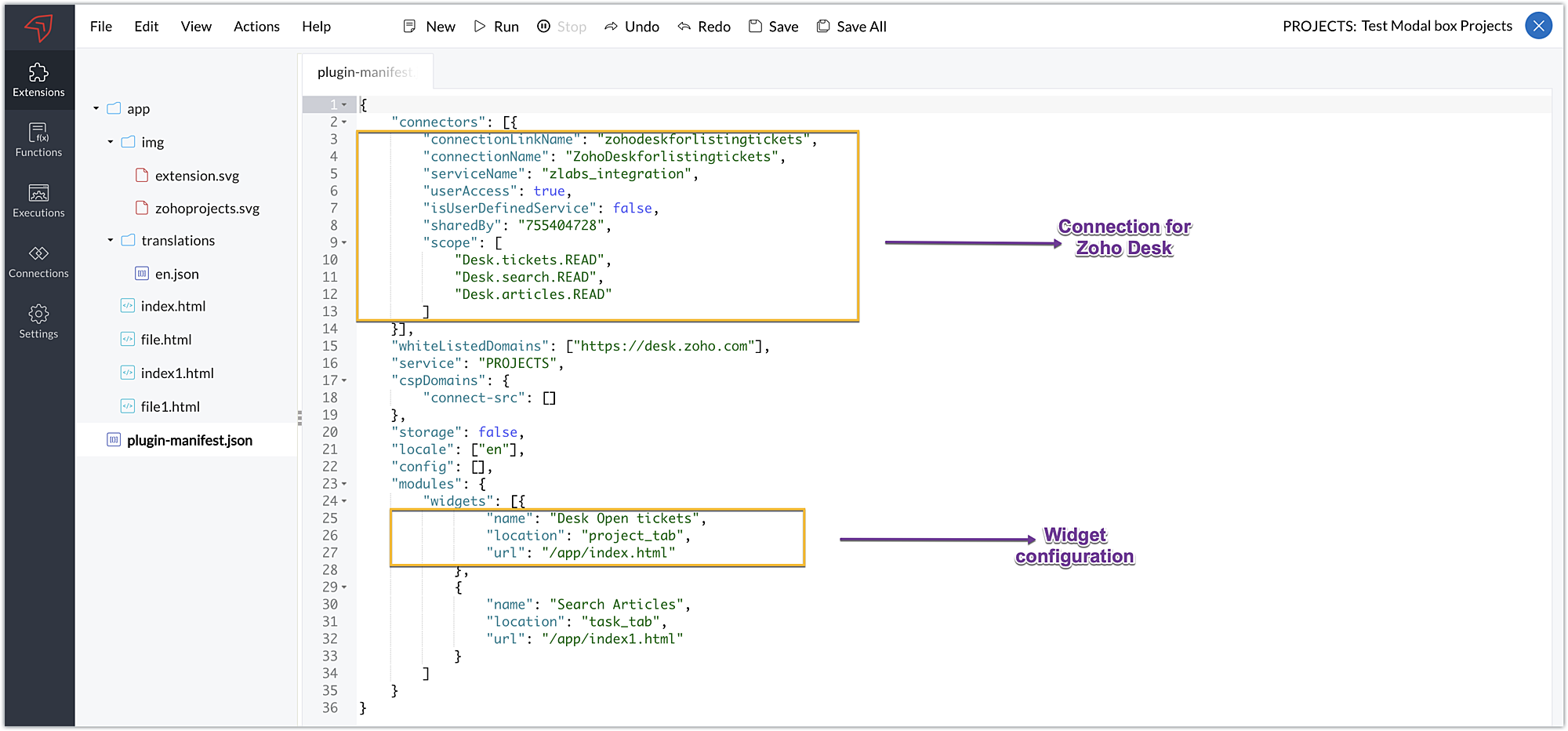
Plugin-manifest.json configuration: Once the extension was created, we configured the plugin-manifest.json file to include the created connection and a widget.
For our extension use case, the plugin-manifest.json file is configured as shown in the below screenshot.
Setting up the widget code
Now that we've set up the other components, let's move on to writing our widget code and incorporating the modal box feature.
Displaying open tickets in "Desk open Tickets" tab code snippet - index.html (find attachment in post)
- In the code snippet, the Zoho Desk API to list all associated tickets is invoked using the Zoho Projects request JS SDK method to get associated desk tickets.
- Certain mandatory parameters must be passed to the Zoho Projects Request Method, such as the third-party URL, data object, and connection. The details for the mentioned parameters in our use case are as follows:
➤ Data object - The data that must be constructed in order to invoke the third-party URL.➤ Connection - The name of the secure connection link created and configured in the plugin-mainfest.json file, as described in the previous section.
- A dropdown list displaying all open and associated desk tickets is created using the Zoho Desk API response.
- The dropdown list value selected by the end-user (i.e. the chosen ticket) is then fetched and stored in a variable called "selected ticket ID."
- Upon clicking Get Ticket Details, a modal box instance is created and opened using the modal.create and instance methods. The selected ticket ID value is emitted using the emit method with the keyword "stored-files" when the modal box is opened.
If you require further details on how the Zoho Projects Request method works, you can refer to our earlier post which explains the working and the required parameters for invoking this method in detail.
Modal box to display the details of the chosen ticket - file.html (find attachment in post)
- In the code snippet, the value emitted using the emit method for the keyword "stored-files" is received by the on method in the modal box UI. Using the received value, a hit is made to the Zoho Desk Get tickets API using the Zoho Projects Request Method again.
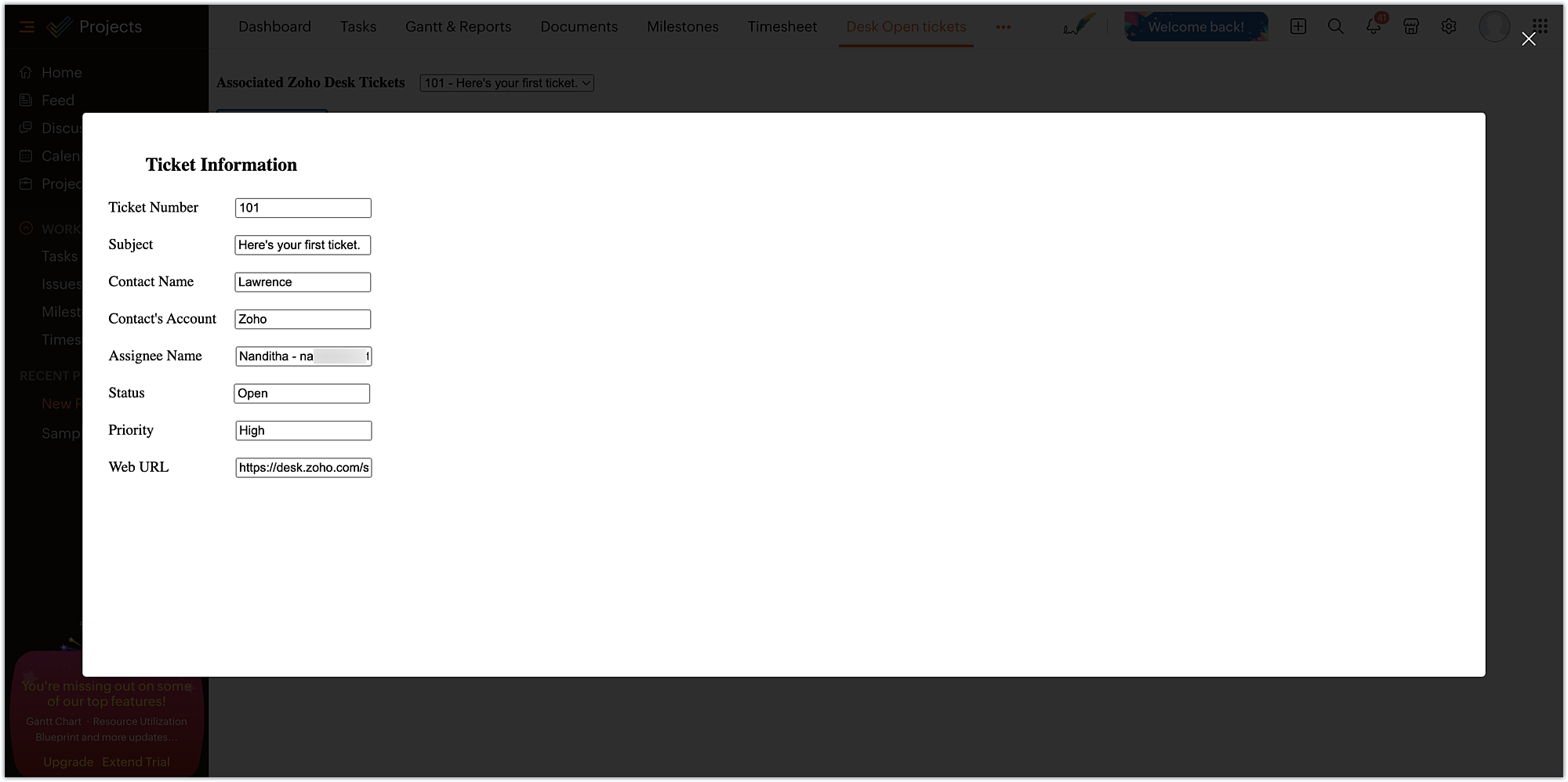
- From the ticket-specific details returned as the response of the Zoho Desk Get tickets API, the necessary details are fetched and then displayed to the agent for their reference. These details help them check on the status and prioritize the relevant Zoho Projects task related to that ticket.
Now, that we have completed the setup and have all the extension components ready, let's go ahead and see the output.
Sample output:
- Enter the Zoho Projects portal and select a project.
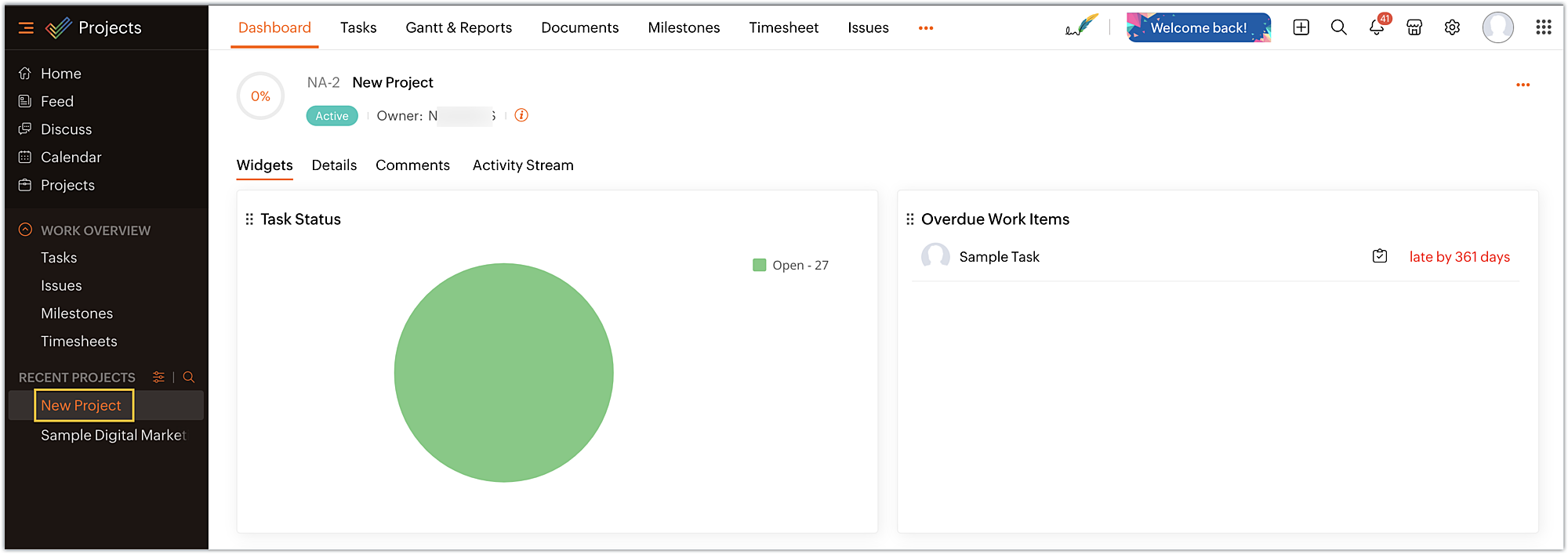
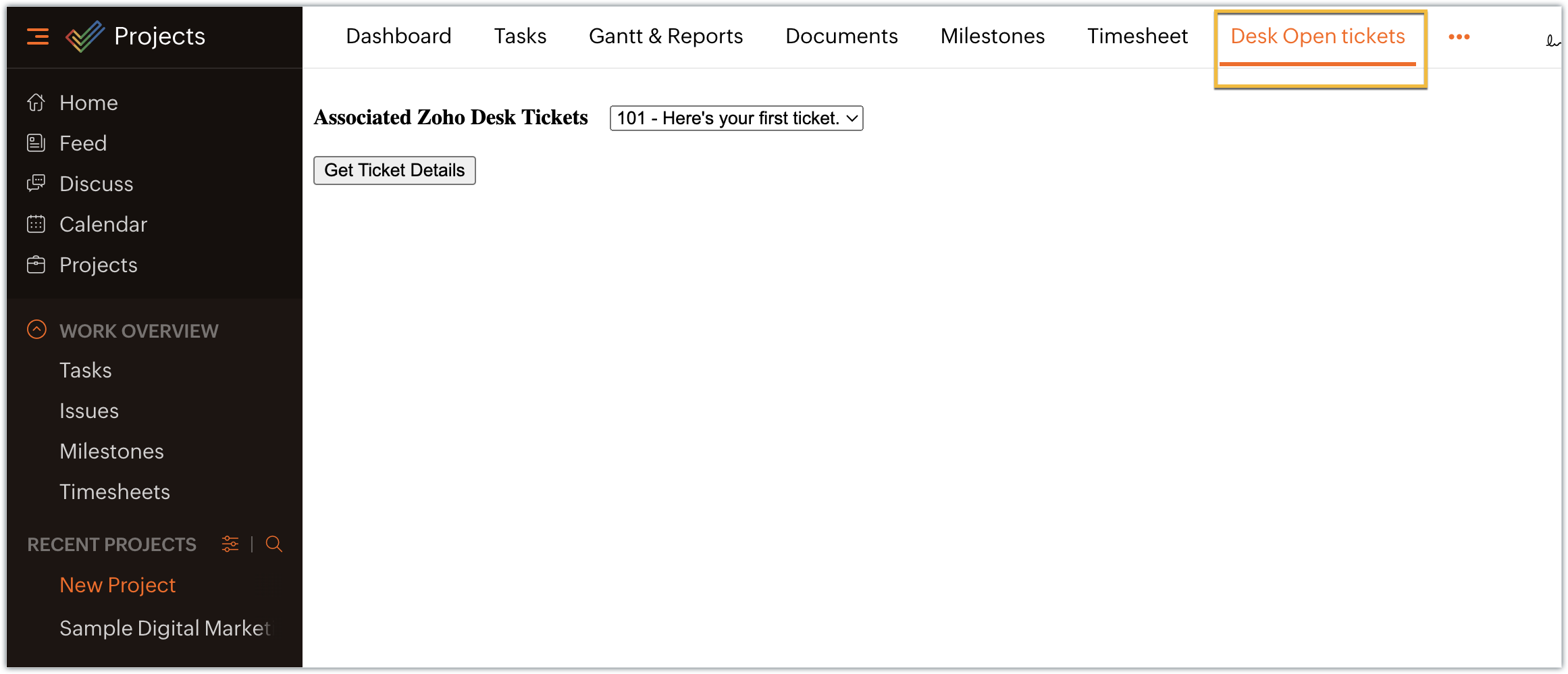
- Select the Desk open tickets option under the Projects tab. The dropdown menu appears, displaying a list of associated open tickets. Choose the ticket for which you want more details and click on Get Ticket Details.
- The selected ticket details are displayed in the modal box.
In this example, we have used the modal box feature to display some information based on user input. Similarly, a modal box can also be used to engage the user in performing some activity, like an attachment picker, wherein they can proceed further only after choosing an attachment. We hope you found this information useful. Keep following this space for more insights!
 Sign up for a Zoho Developer account and start developing extensions for Zoho products using Sigma.
SEE ALSO
Topic Participants
Nanditha Somasundaram Somasundaram
Sticky Posts
Building extensions #10: Fetch customized user inputs, store them globally at the app level, and access them across entities
This data storage concept enables you to store data related to your extension for both entity properties and extension properties. In our previous piece, we looked at how to store data for entities using entity properties. In this post, we'll look atBuilding extensions #9: Store, retrieve, and access entity-specific data in widgets using data storage
Data storage - Overview Storing data related to the extension you are working on is essential. It can be saved as key-value pairs for an entity or extension, known as entity and extension properties, respectively. Data can be saved for the following entitiesBuilding extensions #7: Create custom widgets for a simplified end-user experience
Discover the benefits of using widgets! We explored the significance of widgets, prerequisites, and the availability of JS SDK methods as part of our previous post. In this post, let's go over a detailed example of using widgets along with certain ZohoBuilding extensions #6: Custom user interfaces with Widgets
Welcome to our post on Widgets for Zoho Projects! In our last post, we explored the significance of the connections feature, showed how to use it, and provided an example use case. In this article, we'll look at the importance of widgets, another featureBuilding extensions #5: Integrating applications with Zoho Projects through Connections
In our last post, we discussed the essential features that a Zoho Projects extension can provide. Starting with this post andin every subsequent post going forward, we'll go through each of those features in depth, one by one, with an example use case.
Recent Topics
Deluge Learning Series – Best Practices in Deluge | December 2025
We’re excited to bring you the next session of the Deluge Learning Series, focused entirely on writing cleaner, faster, and more reliable Deluge code. In this edition, we’ll dive deep into the essential best practices every Deluge developer should followAssociate a Contact to a Campaign using deluge?
If I want to add one record to another related list, which zoho function do I use? zoho.updateRelatedRecord is not it I don't think. I simply want to take a "Contact" and associate it to a "Campaign" using deluge. Can anyone help? contactId = 5122008000000796037;Add "Groups" above "Users" in the Zoho Forms Left Menu
Hi, We have Groups but you have to go to a Form and Share or use the Directory App to manage them, please add "Groups" above "Users" in the Zoho Forms Left Menu so you can manage them in 1 place within Zoho Forms too. Thanks DanAdding Taxes to paid consultations in Zoho Bookings
I created a 'paid' consultation under Zoho Booking and integrated it with payment gateways for online/instant payment before a booking is done. How can I add 'taxes' to the price of consultation? I can add taxes to other Zoho apps (liks Books, Checkout,Zoho CRM Reports Module on Mobil App
I have the mobile app and the reports module doesn't appear in the sidebar for some reason. I saw a Youtube video where the user had the Reports module on mobile. Is there a setting to show it on mobile? Thanks.Inquiry on Help Centre Tab Customisation
Hi Zoho team, I’m wondering if it’s possible to further customise the Help Center tabs, specifically the descriptions under Knowledge Base, Community, and Tickets. While the current setup allows customising tab names, being able to tailor the descriptionsPassing a form object to a function
Suppose I have a sort_order field in multiple tables and I want to increment it by +1 onCreate of a new record. Is there a way to pass the form object as an argument into the function to keep things DRY? The following function from Zia works, but I'dCan you copy and paste a page within a form?
I have been looking at trying to copy/duplicate a whole page within a form. I can't see how I can do this without having to add all the data in again. This is very time consuming. Any help would be great.SMS to customers from within Bigin
Hi All, Is there anyone else crying out for Bigin SMS capability to send an SMS to customers directly from the Bigin interface? We have inbuilt telephony already with call recordings which works well. What's lacking is the ability to send and receiveUnable to sort as Descending order
Trying to change the sort order for a lookup field (checkboxes) from Ascending to Descending and keep getting an error in Deluge that the order must be Ascending Did anyone ran into this? Thanks EyalHow do I copy an email message to one or more other folders?
I can move a message to another folder using the "move to" option but I can't figure out how to copy a message.New feature request: Allow copy of email message to another folder
Hello Zoho team, This is a suggested new feature to allow copy an email message to either another folder or the same folder. Within the same Zoho account. This is not a support request about "label". This is a suggested new feature to allow copies ofHotmail is blocking the zoho mail IP
Greetings, Since last Tuesday (5 days ago today) I wrote to Zoho support and I still haven't received a single response (Ticket ID: 2056917). Is this how you treat people who pay for your email service? I am making this public so that those who want toDesk DMARC forwarding failure for some senders
I am not receiving important emails into Desk, because of DMARC errors. Here's what's happening: 1. email is sent from customer e.g. john@doe.com, to my email address, e.g info@acme.com 2. email is delivered successfully to info@acme.com (a shared inboxCreator Simplified #11: Create a custom button to download files
Hey there! This time, let's see how to create custom buttons to download the files uploaded in the file upload field. Sample use-case A training app has a module that provides the materials for all the available courses. Students can click on the correspondingHide horizontal lines at bottom of form
Hi I have a page with 3 forms embedded in html snippets. On each of the forms I can hide the submit button easily but I am left with the horizontal lines that bound that section and I cannot figure out to remove them (see below for the two sets of horizontalAutosaving of Form Field
HI can anyone suggest a way of autosaving or simulating an autosave function for a specific field in a form. The story is as follows. I have a bunch of technicians who write notes on how they do a repair. Sometimes they write for a couple of hours the troubleshooting process. If they click incorrectly, press ESC, Cancel or the browser crashes the information is lost which can be heartbreaking so my guys use notepad and then copy the information in. The only way around this is to click submit on theZoho Tracking Image location
So we've been having an issue with tracking email opens. Specifically in Gmail. Our emails are not that long either, maybe 4 sections of image/250 characters of text/button per section. But all my test accounts I used via Gmail we're showing opens. But then come to find out the tracking image is at the very bottom of the email. So If the message is clipped (It always just clips our social icons on the bottom) and the user doesn't click the show more button it never tracks the open. Looking at otherAI Interview Insights: Turn Recorded Interviews into Quick Transcripts & Summaries
Evaluating interviews shouldn’t require replaying long recordings or taking manual notes. With AI Interview Insights, you can now review complete transcripts and AI-generated summaries of your One-way (Recorded) interviews right inside Zoho Recruit. ThisEmployee Appraisal Applicability - Why is Date of Joining Hard-Coded?
In the new (to me, at least) Performance Appraisal Cycle wizard, it's possible to set criteria to determine for whom the appraisal process should apply. This makes sense on its face. However, one MUST use the Date of Joining criterion as a filter. WhySpotlight series #6: The Show app for Android TV has a new look!
Hello everyone! We are delighted to introduce our revamped and redesigned Show app for Android TV. Smart TVs are exploding in popularity. Android TV alone has over 110 million active monthly devices. Zoho Show, as part of a constant effort to improveAsk the Experts 26: Brighten every customer interaction with Zoho Desk all year long
Hello everyone, Greetings and welcome to Ask the Experts 26. As we wrap up 2025, we are excited to invite you to the 26th episode of our Ask the Expert series. 🎄The Merry Metrics Edition = Best of Zoho Desk [Best Practices + Holiday Automation + Year-EndPricing calculator
Alright, so I'm trying to create a pricing calculator/pricing report generator to use in a cabinet shop. I did all the logic and such, and the calculator works. I have a few other things that I would need it to be able to do though, I'll do my best toBug Details
In the Bug detail the milestoneid is missingStop completed task lists from disappearing?
Is there any way to stop projects from making tasks lists disappear when all the tasks in the list are completed? That's one of those little things where we're constantly fighting the product. For instance we have some projects which are ongoing - no start and end date. We use Kanban view to show the various task lists. We don't want the kanban list to disappear every time the items on it happen to be closed out. ThanksChange of Blog Author
Hi, I am creating the blog post on behalf of my colleague. When I publish the post, it is showing my name as author of the post which is not intended and needs to be changed to my colleague's name. How can I change the name of the author in the blogs?? Thanks, RamananAllow customers to choose meeting venue and meeting duration on booking page
My business primarily involves one-to-one meetings with my clients. Given the hybrid-work world we now find ourselves in, these meetings can take several forms (which I think of as the meeting "venue"): In-person Zoom Phone call I currently handle theseBooking outside of scheduled availability
Is there a way for staff (such as the secretary) to book appointments outside of the scheduled availability? Right now to do this special hours must be set each time. There should be a quicker way. Am I missing something?Operation Questions.
Hello, I hope you are well. To explain a little, we are a company that sells services and products with a technical team responsible for installation and maintenance. Zoho FSM can be useful for the technical team, namely for the technical coordinatorDirect Access and Better Search for Zoho Quartz Recordings
Hi Zoho Team, We would like to request a few enhancements to improve how Zoho Quartz recordings are accessed and managed after being submitted to Zoho Support. Current Limitation: After submitting a Quartz recording, the related Zoho Support ticket displaysUpdate date & time when a cell is edited
Hi All, I am desiring to have a cell update with the current date and time when another cell is edited. Any ideas? Thank youAdd "Groups" to "Share With" on Reports & All Entries
Hi, On Forms we can share Publicly, with Specific Users And/Or Specific Groups or All Users. With Reports and All Entries we lack the "Groups" option, please add this as with many users this saves a lot of work. Thanks DanAdd Pause / Resume Option to Zoho Quartz Recordings
Hi Zoho Team, We would like to request an enhancement to Zoho Quartz recordings: the ability to pause and resume an ongoing recording. Current Limitation: At the moment, when recording an issue with Zoho Quartz, the recording continues even when we areCustom Fields Not Showing Up in Invoice PDF Template Document Information
I have added 2 custom fields under Sales > Invoices > Manage Custom Fields. They are set to show in all PDFs. However when I am editing my Invoice PDF template, i do not see the custom fields under Document Information.Tracking Non-Inventory Items
We have several business locations and currently use zoho inventory to track retail items (sales and purchase orders). We were hoping to use zoho inventory to track our non-inventory items as well (toilet paper, paper towels, etc). I understand that weCan I use a Standalone CRM Function as the Callback URL For Async Export Data API?
I am creating an export job using this API https://www.zoho.com/analytics/api/v2/bulk-api/export-data-async/create-export/view-id.html There is a "callbackUrl" key in the CONFIG object. I tried copying the URL for a standalone function in CRM which canZOHO Books
Hi there, Why after I upgrade my Zoho invoice > Books then i wanted to add plugin which i cannot do. Please advise.How is Your eCommerce Experience w/Zoho Inventory?
First off, I'm SUPER grateful for the advent of Zoho Inventory and now the Zoho Commerce Suite. Overall, Inventory is a great product, especially for customers without an eCommerce presence. For eCommerce companies (especially those shipping more than ~10 packages/day), however, there are certain drawbacks that keep my clients from moving over to Zoho Inventory: Cons: 1. Invoice + Package Creation from Shopify/Other eCommerce Integrations: Zoho Inventory makes the somewhat perplexing decision toError AS101 when adding new email alias
Hi, I am trying to add apple@(mydomain).com The error AS101 is shown while I try to add the alias.Simplify Mass Replies with Predefined Templates and Snippets
Hello everyone, We are happy to introduce a new enhancement to Mass Reply that helps agents respond to customers quickly and consistently. With the addition of Email Templates and Snippets in the reply window, agents can use predefined messages whileNext Page