Introducing Connected Workflows in Zoho CRM for Everyone : Free Your Teams to Focus on What Matters
Hello Everyone,
We’re thrilled to introduce the next big evolution in Zoho CRM for Everyone -- Connected Workflows. This new feature builds on our commitment to deliver a CRM that’s truly inclusive, adaptable, and designed for consistent collaboration across your entire organization and not just your sales team.
With the launch of Connected Records, we enabled teams to share contextual information and stay aligned through record connections across modules. Now, with Connected Workflows, we’re taking it one step further by enabling Zoho CRM to coordinate work across teams and enable them to deliver their best for customers.
What are Connected Workflows?
While Connected Records make it easy to share customer context across your customer journey, however, many of the processes involved in your customer's journey need to be consistently carried out. That’s where Connected Workflows come in.
Connected workflows help free your teams from manual coordination by enhancing coordination across multiple teams and improving customer relationship management. They allow you to automate your entire customer journey that spans across multiple customer-facing teams.
With Connected Workflows, you can build smooth coordination between departments like Sales, Marketing, Legal, Onboarding, and Training so that each step in the customer journey is coordinated without manual follow-ups or miscommunication.
How to create Connected workflows?
"Users should have the Connected Workflows permission enabled in their profile settings."
Every connected workflow begins with a primary module, either an organization module or a team module, depending on your customer journey.
Triggers : Initiate by setting up triggers by configuring either a single trigger or multiple triggers for a module. The triggers are :
- when a record is created in the module
- When a record is edited record in the module,
- When a record is created or edited in the module, or
- When a field in the record is edited in the module.
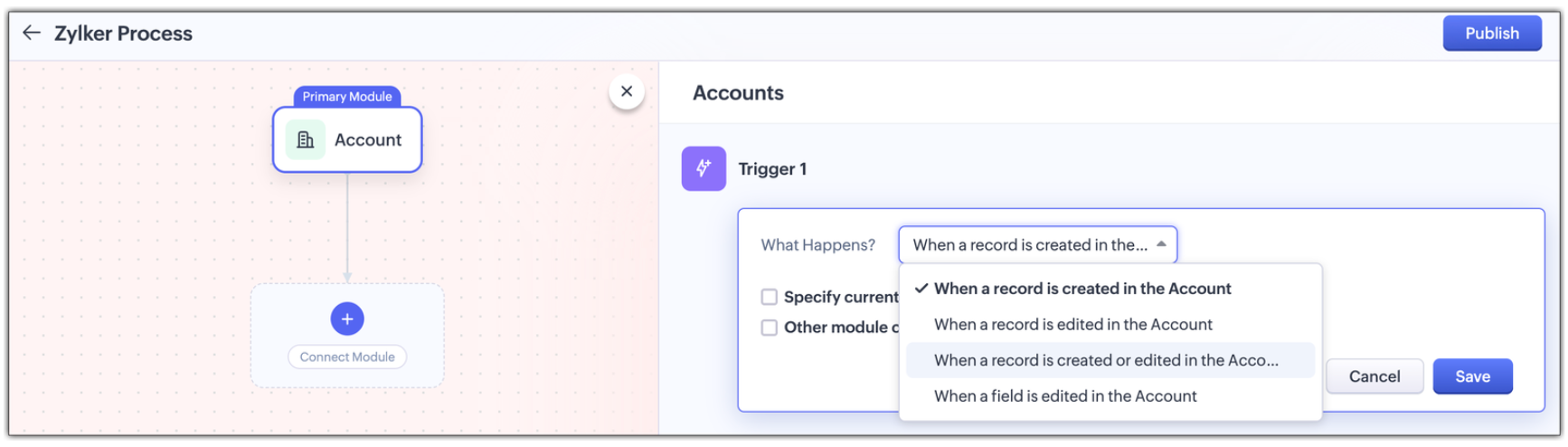
Multi-module criteria for Triggers : You can configure multiple criteria for triggers to execute actions in any other related modules; Enable other module criteria option for this. This ensures actions run when related modules are updated with values matching the trigger.
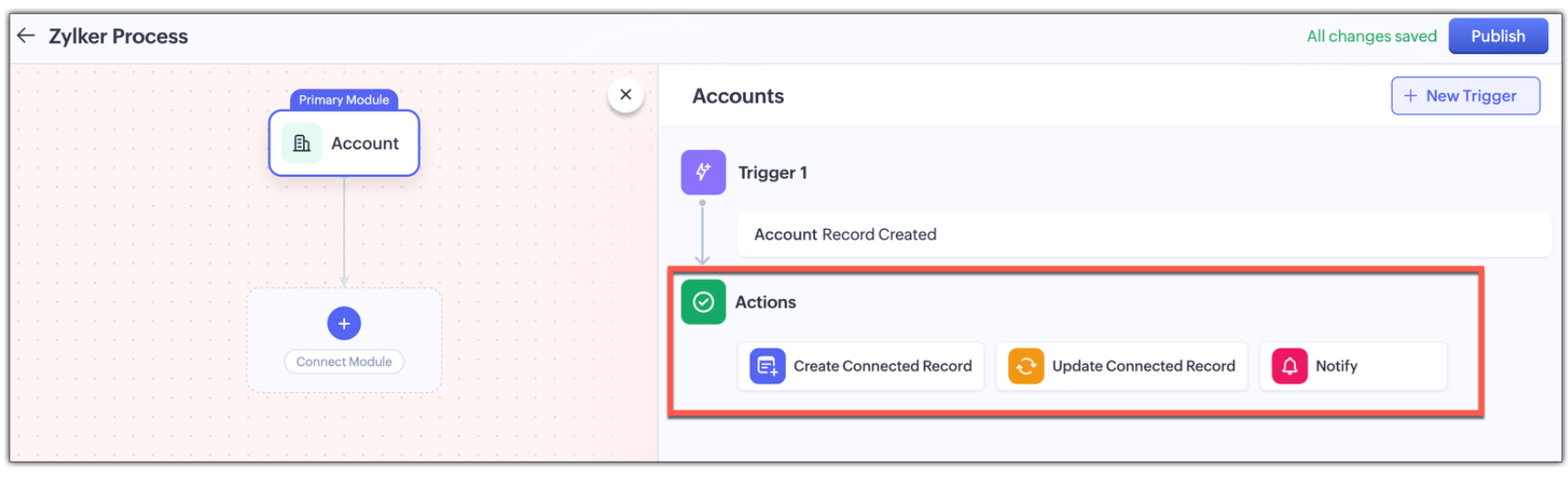
Actions : Assign one or more actions for each trigger . The actions are :
- Creating a new connected record in the associated module
- Updating an existing connected record in the associate module, or
- Notifying users via email.
Use Case: Automating the customer journey from a sales enquiry to customer success
A typical customer journey goes through four stages, and we know that even though the sales team is the initial point of contact, multiple teams are involved and will support the sales team to win the customer.
Involved Teams | |
Initial Evaluation | Sales Team is the point of contact Marketing team supports with customer-facing content in the Case Study Module |
Demo Request | Sales Team schedules a product demo Pre-sales team provides product demos in the Product demo module |
Customer Onboarding | Sales Team updates the sale cycle stage to 'Closed Won' Onboarding team helps the customer get started post-sale in the Onboarding Assistance module |
Product Training | Sales Team arranges for training sessions Training team helps the customer to be fully equipped to use the product in the Training module |
Here's how Connected Workflows can automate the sales process and achieve coordination between the multiple teams involved.
We’ll create a connected workflow with Deals as the primary module and configure three triggers:
Trigger 1: When a new record is created → Create a connected Case Study record for Marketing (Action)
Trigger 2: When Lead Status is "Qualified" → Create a Product Demo record and notify the Pre-sales Team(Action)
Trigger 3: When Deal Stage is "Closed Won" → Create an Onboarding record for handoff prep(Action)
This sets up three connected modules: Case Study, Demo Request, and Onboarding, as shown in the image below.

Now we will configure the associated modules.
- Case Study
Trigger : When status is "Completed" → Notify Sales Team about availability(Action) - Demo Request
Trigger : When status is "Completed" → Notify Sales Team that demo was given(Action) - Feedbacks (manually created from Demo Request)
Trigger : When new record is created → Email lead with feedback form(Action) - Onboarding
Trigger : When status is "Completed" → Notify Training Team to start sessions and Sales Team of onboarding completion; also create a Training record(Action) - Training (automatically created from Onboarding)
Trigger : When new record is created → Update Account type to "Customer" and notify Sales Team of training completion(Action)

Now let's look at how all these modules have been connected to carry out a customer journey in the GIF below.
In this entire customer journey, there is no loss of customer context, no repeated back-and-forth between teams, and no delays due to miscommunication. Each team receives a connected record with all the relevant data they need to execute their part of the process.
Here is another video with a detailed explanation on how connected workflows works :
How Are Connected Workflows Different from Traditional Workflows?
- Connected Workflows go beyond one module; they’re designed to coordinate across team boundaries and hence use multiple modules to build a workflow.
- Connected workflows trigger follow-up tasks/actions in both org and team modules.
- Connected Workflows generate connected records as part of the process, so new requests are automatically created in modules, and those teams will have full context from day one. Users can save the time they take to create requests from the Request tab with this feature.
Why use connected workflows for your business?
- No more manual follow-ups because of automating cross-team coordination and reducing dependency on reminders or emails.
- Achieving consistent execution across your customer's journey.
- Providing end-to-end visibility where teams see the full customer journey, not just their part in the entire journey.
- Above all, providing contextual coordination among multiple teams by minimizing delays between hand-offs.
We believe Connected Workflows will be a game-changer in how you deliver exceptional customer experience. We’re excited for you to start building your first Connected Workflow. Let us know in the comments if you have any queries.
Availability :
- This enhancement is available only in Zoho CRM's new UI.
- The number of connected workflows that can be created edition-wise are :
- Standard Edition. : 2
- Professional Edition : 2
- Enterprise Edition : 10
- Ultimate Edition. : 10
- Click here to learn about others limitations for this feature.
Early Access for Connected Workflows
We are in the process of opening out connected workflows for our customers, however, if you’d like early access to explore and use this feature, we’ve got you covered!
Fill out this form to get early access.
We’d love for you to try it out and share your feedback.
Resource Kit
Regards,
Serena Woolridge
Zoho CRM Marketing Team
Topic Participants
Serena Woolridge
sima
Aishwarya M
Andres
Mani Vembu
Sticky Posts
Introducing Multiple Sandbox Types and Support for Module's Data Population
Register here for the upcoming Focus Group webinar on Multiple Sandbox | Help documentation to learn more about the new enhancements Hello everyone, Sandbox in CRM is a testing environment for users to create and test new configurations like workflowGood news! Calendar in Zoho CRM gets a face lift
Dear Customers, We are delighted to unveil the revamped calendar UI in Zoho CRM. With a complete visual overhaul aligned with CRM for Everyone, the calendar now offers a more intuitive and flexible scheduling experience. What’s new? Distinguish activitiesVoC in Zoho CRM is now data savvy: Explore response drilldown, summary components and participation in CRM criteria
VoC has all the goods when it comes to customer intelligence—which is why we're constantly enhancing it. We recently added the following: A customer drilldown component that shows you the list of prospects and customers behind a chart's attribute ExpandedWrapping up 2025 on a high note: CRM Release Highlights of the year
Dear Customers, 2025 was an eventful year for us at Zoho CRM. We’ve had releases of all sizes and impact, and we are excited to look back, break it down, and rediscover them with you! Before we rewind—we’d like to take a minute and sincerely thank youPresenting ABM for Zoho CRM: Expand and retain your customers with precision
Picture this scenario: You're a growing SaaS company ready to launch a powerful business suite, and are looking to gain traction and momentum. But as a business with a tight budget, you know acquiring new customers is slow, expensive, and often delivers
Recent Topics
Report showing Bill Details with Project and Sales Invoice Number
Hi There, I am hoping that someone can help, I am looking for report that can show the bill and expense details along with project its as assigned to and the invoice number that the sales has been raised in. The goal is I can filter a customer/projectAdvanced Payment for Inventory Items with serial numbers
Hello, We sell equipment that we track the unique serial numbers on using Sales Orders. We can charge the customers an advanced payment, then the balance on delivery. We cannot figure out a way to do this in Books/Inventory: - Cannot part invoice a SOIs it possible to restrict ZCRM user to see only custom views created by administrator
I have segmented data in my CRM and I want to allow different users to be able to see only parts of it based on some criteria. I've tried to create and share a custom view, but then there is always an option for user to see all open lead for example.Issues Logging into ZOHO
Hello, one of my coworkers is having issues logging into ZOHO, she has requested a code when entering and the email is correct but she has not received the code. can you help us with this?Google Fonts Integration in Pagesense Popup Editor
Hello Zoho Pagesense Team, We hope you're doing well. We’d like to submit a feature request to enhance Zoho Pagesense’s popup editor with Google Fonts support. Current Limitation: Currently, Pagesense offers a limited set of default fonts. Google FontsAdd Popup Rejection Metrics to Reports
Hello Zoho PageSense Team, We would like to request improved reporting for popup interactions. Current Limitation: PageSense currently provides conversion data, but there is no clear visibility into: Popup rejections Popup closes (✕ button clicks) DismissalsAbility to Reset / Reinitialize Popup Cookies
Hello Zoho PageSense Team, We would like to request the ability to manually reset popup cookies. Current Limitation: At the moment, it is not possible to initiate a new popup cookie from the our side. Visitors who rejected or closed a popup will not seeControl Popup Cookie Expiration Duration
Hello Zoho PageSense Team, We would like to request an enhancement related to popup cookie management. Current Limitation: Currently, PageSense popup cookies remain active for 365 days, and this duration cannot be modified by us. If a visitor closes orClone / Export Popup Design Across PageSense Projects
Hello Zoho PageSense Team, We hope you’re doing well. We would like to request an enhancement that allows popup designs to be reused across different PageSense projects. Problem Statement: Currently, Zoho PageSense allows popups to be duplicated onlyAre there settings for hyperlinks?
Clicking a hyperlinked cell in Sheet creates this little pop-up with the actual hyperlink inside. Is it possible to have a 1-click link where if you click the cell it opens the link directly with no pop-up?Automatically include all ticket attachments in the ticket resolution email
Hello Zoho Community, We are implementing Zoho Desk in a real customer-facing production environment and have run into a limitation that is becoming a blocking requirement for our clients. The problem When a ticket is closed or resolved, Zoho Desk sendsKeep Zoho People Feature Requests in the Zoho People Forum
Hello Zoho People Product Team, Greetings. We would like to submit a feature request regarding the handling of feature requests themselves, specifically for Zoho People. Issue: Feature Requests Being Moved to Zoho One Zoho People feature requests areCan I write a check in Zoho Books with no associated bill?
This currently does not seem possible, and I have a client that desperately needs this function if I am able to convert them with Quickbooks. Thank you in advance for your reply.Finding text within a ticket: Expand All or Search this Ticket
The auto-collapse feature within a ticket is nice for screen scrolling, however it makes it difficult to find text within the ticket if the email is collapsed. In fact you cannot find text if it is collapsed. I would like to propose a feature that allowsBooks & Desk. Client mapping
Hi, I’ve been using Zoho Books for several years and am now looking to improve my customer service. I'm experimenting with Zoho Desk and want to sync and map my client data from Zoho Books. However, it seems that mapping requires both contacts to haveString handling
If I cut a currency string from a quote and try and paste it into the Deal "Amount", it will fail unless I manually delete any commas. Dollar signs are no problem, but comma's seem to fail. Please correct this Input Validation error.Allow Stripe Credit Card and Stripe ACH payment methods to be enabled separately on an invoice.
I need to be able to pick at the invoice level whether Stripe Credit Card and/or Stripe ACH payment methods are available. Currently, I'm not able to select from the two Stripe payment methods individually on an invoice. However, there are some largerSKUs for Invoices, POs, etc.
It doesn't appear that one can enable SKU display on invoices, POs, etc. This is problematic, and I don't see a good reason why this shouldn't be an option. Some of our vendors and customers use this in their system. Every other identifier code is availableFeature Request - Allow Customers To Pick Meeting Duration
Hi Bookings Team, It would be great if there was an option to allow customers to pick a duration based on a max and minimum amount of time defined by me and in increments defined by me. For example, I have some slots which are available for customersYouTube Live streaming? how to? Zoom has this feature, built-in. Can't find it on zoho meetings.
YouTube Live streaming? how to? Zoom has this feature, built-in. Can't find it on zoho meetings.Feature Request - A Way To Search Item Groups
Hi Inventory Team, I can't find any way to filter or search by fields of Item Groups. It would be great to see that functionality added. I have a use case where a single product might come from 5 or more suppliers and each supplier's item is an Item inFeature Reqeust - Include MPN In Selectable FIelds
I have noticed that the MPN is not available to show in the list view of Items. Please consider adding it as EAN, UPC and ISBN are all available, so it doesn't make much sense to exclude this similar option. Thanks for considering my feedback.Feature Request - Option To Hide Default System Fields on Items
Hi Zoho Inventory Team, As far as I know it is not possible to hid some of the defult system fields on Items, such as UPC, MPN, EAN, ISBN. A good use case is that in many cases ISBN is not relevant and it would be an improved user experience if we couldCampaigns does not work!
I am running into so many problems trying to use Zoho Campaigns, that I am seriously considering dropping the app from my (shrinking) list of Zoho applications I actually use. Apart from having to fight the software trying to create a design and email,Feature Request - Make Available "Alias Name" Field In Item List View
Hi Zoho Inventory Team, I have noticed that the "Alias Name" field does not appear on the list of selectable columns in the Customise Columns feature in the Items module. This would be very useful to see for businesses who are using the Alias Name fieldproduct name field issue-n8n
Hey guys, I have a question. I want to create a new product using the workflow. The problem is with the product name field; I don't know how to fill it in. The workflow starts with retrieving information from the leads table, retrieving links to scrapeHow to filter Packages in zoho inventory api
Hi Team, I want to perform some tasks in a schedular on the packages which are in "Shipped" state. I tried to use filter_by in my api call but in return I get response as {"code":-1,"message":"Given filter is not configured"} My Api request is as followsCRM
Is anyone else experiencing this issue? Our company is not moving out of using Gmail's web app. It just has more features and is a better email program than Zoho Mail. Gmail has an extension (Zoho CRM for Gmail) that we're using but we've found some seriousSyncing with Google calendar, Tasks and Events
Is it possible to sync Zoho CRM calendar, task and events with Google Calendar's tasks and events. With the increasing adoption by many major tool suppliers to sync seamlessly with Google's offerings (for instance I use the excellent Any.do task planningHow can i view "Child" Accounts?
It can be very useful in our field of business to know the parent-child account relationship. However, there seems to be a shortcoming in the parent account view: no child account list. How can we view the child accounts per each account?Easily perform calculations using dates with the new DATEDIF function
Hey Zoho Writer users! We've enhanced Zoho Writer's formula capabilities with the new DATEDIF function. This allows you to calculate the difference between dates in days, months, and years. Function syntax: =DATEDIF(start_date, end_date, unit) Inputs:Adding Comments Using Workflows - How to Change User Attributed
We have worklflows in Desk where a comment is added to a ticket based on certain criteria. It seems that the comment added is always attributed to the user who last edited the workflow. This does not make sense for us because: - It's misleading to otherAdd Attachment Support to Zoho Flow Mailhook / Email Trigger Module
Dear Zoho Support Team, We hope you are well. We would like to kindly request a feature enhancement for the Mailhook module in Zoho Flow. Currently, the email trigger in Zoho Flow provides access to the message body, subject, from address, and to address,Conect chat of salesiq with zoho cliq
Is there any way to answer from zoho cliq the chat of salesiq initiated by customers?Les dernières avancées en saisie de données et collaboration
Après une année dédiée à la recherche et au développement, notre équipe est prête à dévoiler des améliorations majeures pour Zoho Sheet. Ces nouveautés seront lancées par étapes afin d’en assurer une prise en main optimale. Nous commençons avec des fonctionnalitésRich Text For Notes in Zoho CRM
Hello everyone, As you know, notes are essential for recording information and ensuring smooth communication across your records. With our latest update, you can now use Rich Text formatting to organize and structure your notes more efficiently. By usingImplement Meeting Polls in Zoho Bookings
Dear Zoho Bookings Support Team, We'd like to propose a feature enhancement related to appointment scheduling within Zoho Bookings. Current Functionality: Zoho Bookings excels at streamlining individual appointment scheduling. Users can set availabilityService Account Admin for API Calls and System Actions
Hello, I would like to request the addition of a Service Account Admin option in Zoho product. This feature would allow API calls and system actions to be performed on behalf of the system, rather than an active user. Current Issue: At present, API callsPlease can the open tasks be shown in each customer account at the top.
Hi there This has happened before, where the open tasks are no longer visible at the top of the page for each customer in the CRM. They have gone missing previously and were reinstated when I asked so I think it's just after an update that this featureHow to Customize Task Creation to Send a Custom Alert Using JavaScript in Zoho CRM?
Hello Zoho CRM Community, I’m looking to customize Zoho CRM to send a custom alert whenever a task is created. I understand that Zoho CRM supports client scripts using JavaScript, and I would like to leverage this feature to implement the alert functionality.Next Page