Client Script Support for List Page (Canvas)
Hello everyone!
Welcome to another week of Kaizen. In today's post lets see how Client Script can be used in Canvas List Page to mask sensitive information from specific roles and add colors to Canvas List Page records based on custom criteria.This use case solves the question raised in this post.
In this Kaizen post,
- About Canvas List Page
- Supported Events for List Page(Canvas)
- Supported ZDKs for List Page(Canvas)
- Use Case
- Solution
- Summary
- Related Links
1. About Canvas List Page
The Canvas List Page provides ways to customize the record display in the module list. You can add record images, use custom buttons to represent fields, use specific font style or size for the field labels, change the alignment of field types and more.
2. Supported Events for List Page(Canvas)
You can write Client Script for three different views of the Canvas List page.
You can trigger Client Script on your List Page (Canvas) using the following events.
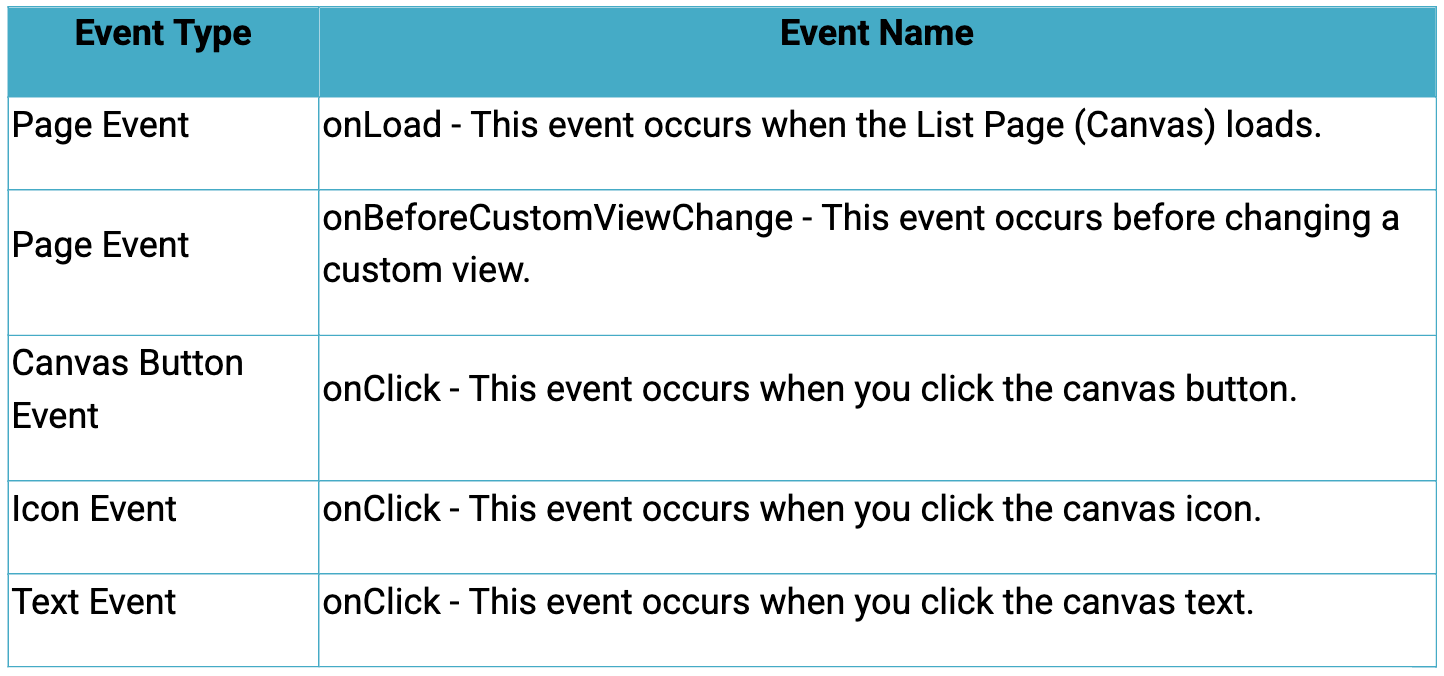
Click here to know more about the Events.
3. Supported ZDKs for List Page(Canvas)
Client Script enables you to customize List Views using the following list of ZDKs and Client Script functions.
- freezeColumns(option) - You can freeze list view and disable modifying columns.
- maskField(field_name, (length,character,reverse)) - You can mask fields in the List View
- sortByField(field_name, option) - You can sort field in the List View
- getRecords() - You can get Records in the List View
- selectRecords(criteria) - You can select Records in the List view by criteria
- selectRecordsByID(ids) - You can select Records in the List view by record ID
- clearSelection() - You can clear selected Records in the List view
- style(style_config, criteria) - You can style Records in the List View.
4. Use Case
Zylker uses Zoho CRM to manage high-volume orders where customer phone numbers are sensitive data. The CRM Admin wants role-based phone number masking on the Orders List Page (Canvas). To improve visibility and speed, the Admin also wants color-coded order cards in the List View based on order status.
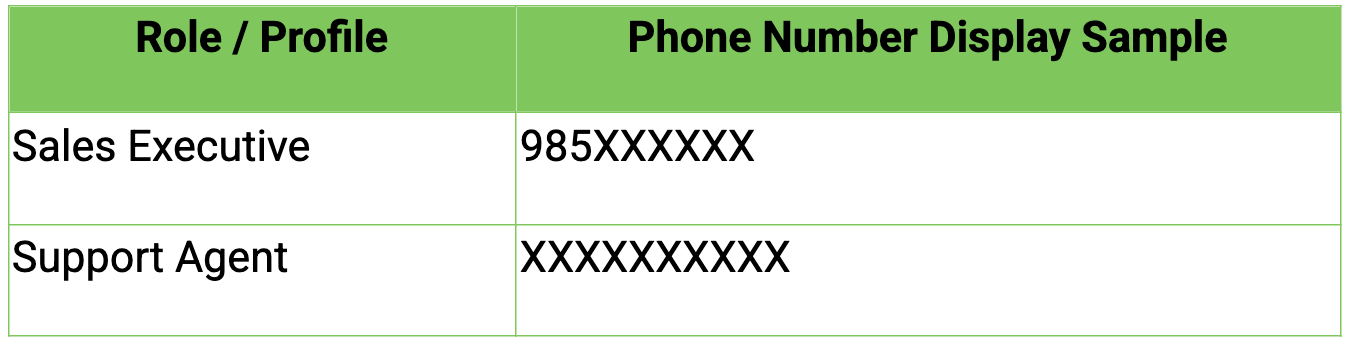
Role-Based Phone Number Visibility
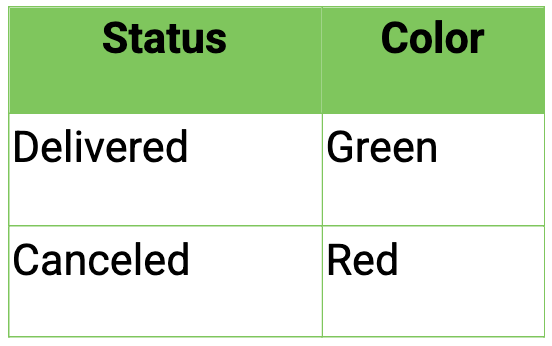
Order Status Color Coding
5. Solution
- Go to Setup > Developer Space > Client Script. Click +New Script.
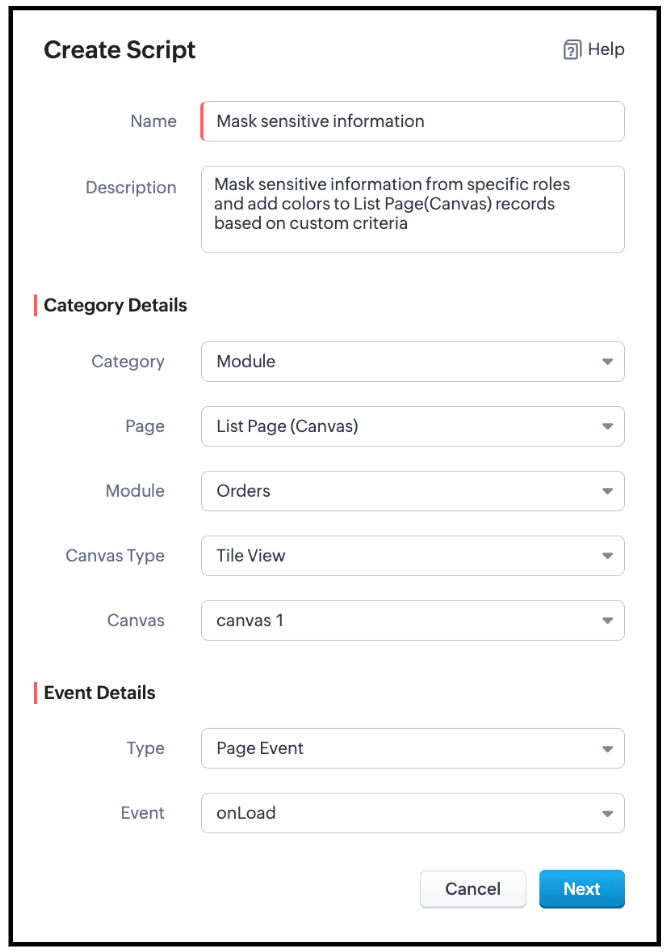
- Specify the details to create a script and click Next.
- Enter the following script and click Save.
- // Mask phone number based on user role
- if ($Crm.user.role.name === "Sales Executive") {
- // Mask 7 digits for Sales Executive
- ZDK.Page.getList().maskField("Phone_Number", {
- length: 7,
- character: "#",
- reverse: true
- });
- } else if ($Crm.user.role.name === "Support Agent") {
- // Mask 10 digits for Support Agent
- ZDK.Page.getList().maskField("Phone_Number", {
- length: 10,
- character: "#",
- reverse: true
- });
} - // Highlight cancelled orders in light red
- ZDK.Page.getList().style({
- record: {
- backgroundColor: "#FFD6D6"
- }
- },
- "(Status:equals:Cancelled)"
- );
- // Highlight delivered orders in light green
- ZDK.Page.getList().style({
- record: {
- backgroundColor: "#D3F9D8"
- }
- },
- "(Status:equals:Delivered)"
- );
- Use $Crm.user.role.name to retrieve the role of the currently logged-in user.
- When the role is Sales Executive, use ZDK.Page.getList().maskField() on the Phone_Number field to mask the first 7 digits, where
- length defines how many characters should be hidden
- character: '#' specifies the masking symbol
- reverse: false ensures masking starts from the beginning, allowing partial visibility.
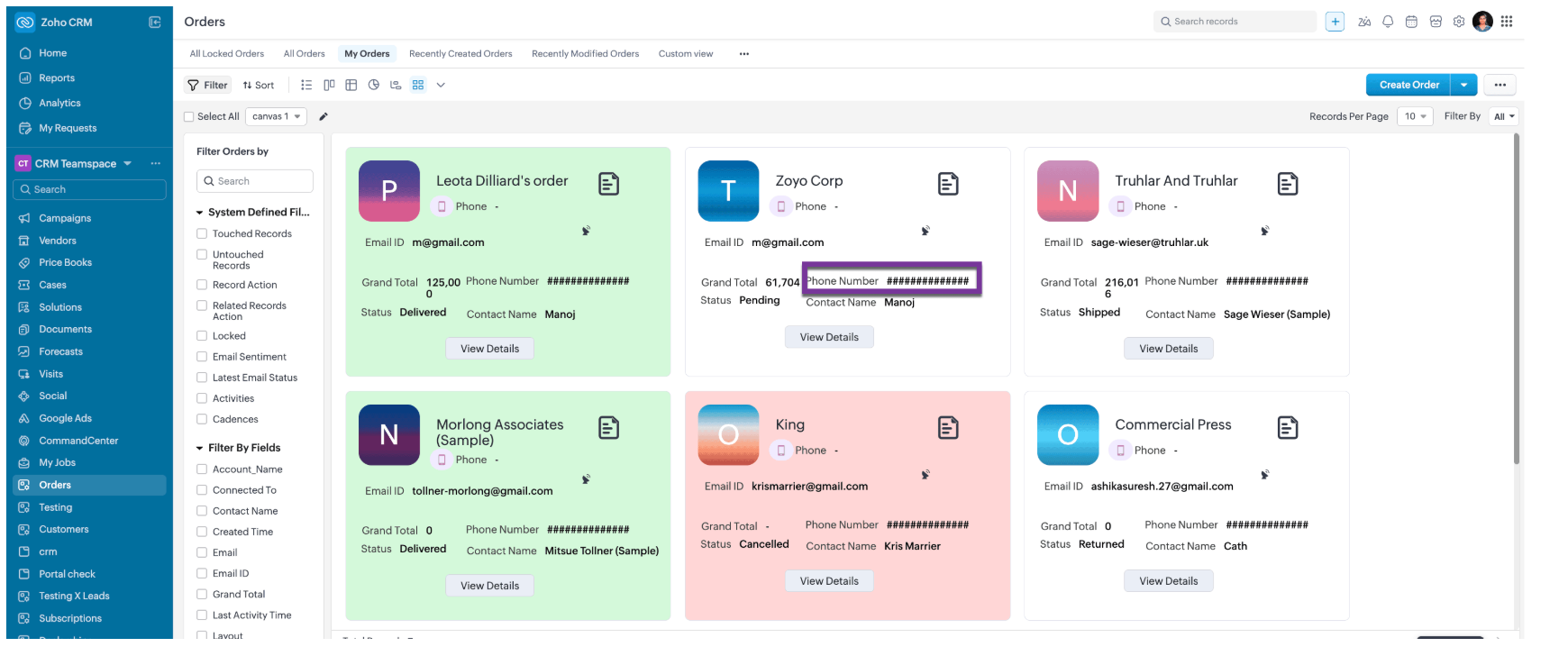
- When the role is Support Agent, use ZDK.Page.getList().maskField() on the Phone_Number field to mask all 10 digits, fully hiding the phone number using the same masking parameters.
- Use ZDK.Page.getList().style() to apply conditional styling to list records by configuring the record parameter to set the row backgroundColor.
- Apply the condition (Status:equals:Cancelled) to highlight cancelled records in light red, and (Status:equals:Delivered) to highlight delivered records in light green, enabling quick visual identification.
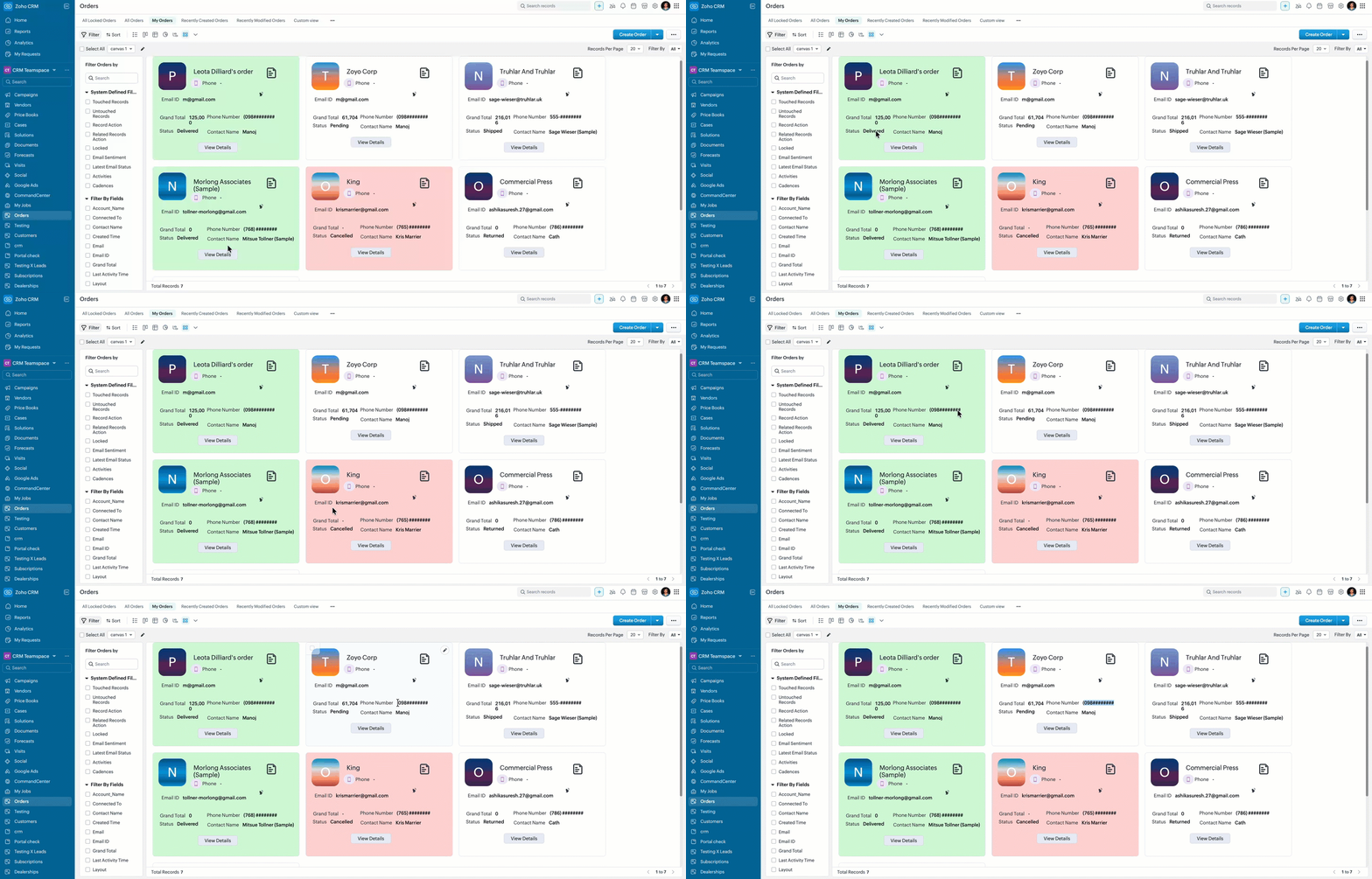
- Here is how the Client Script works for a "Sales Executive".
- Here is how the Client Script works for a "Support Agent".
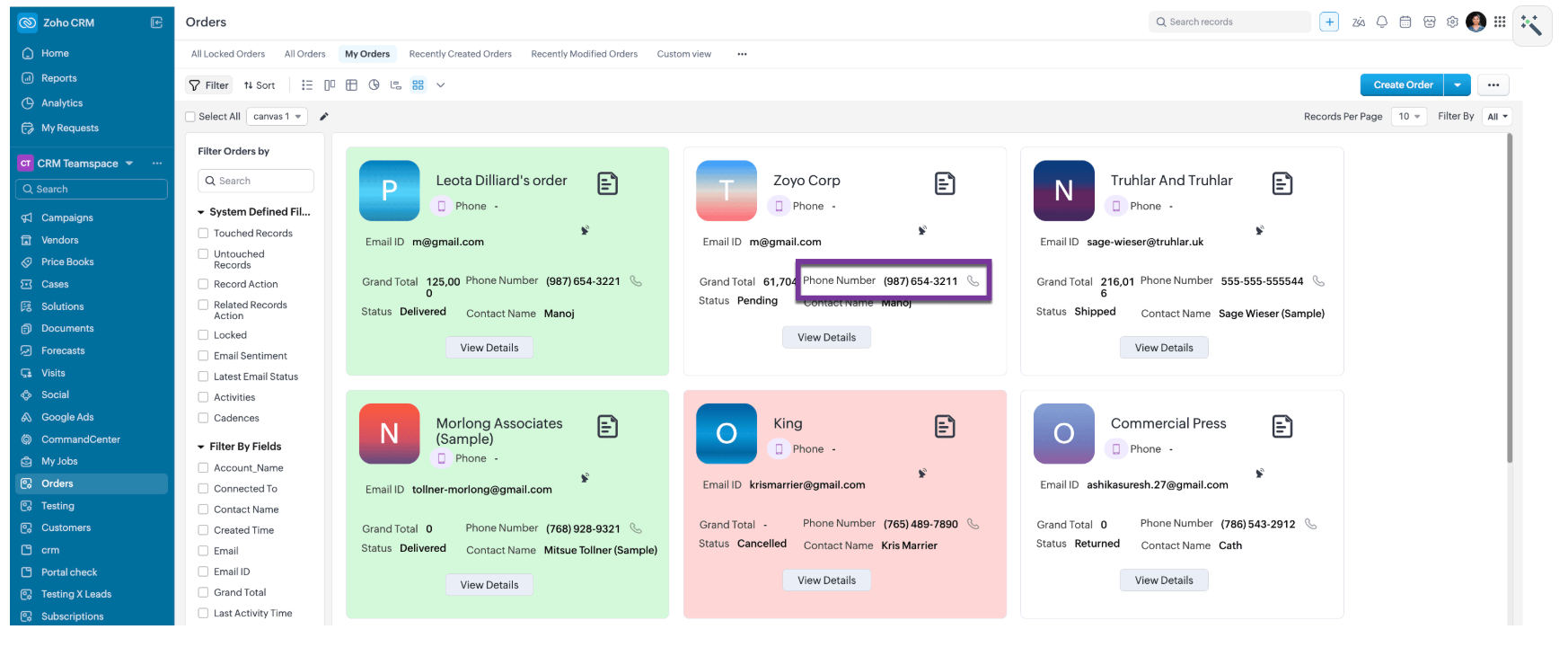
- Here is how the Client Script works for a for other roles like, Manager and Admin.
6. Summary
- Mask sensitive fields dynamically in List Page Canvas
- Apply role-based logic using current user context
- Improve list view readability with conditional record styling
7. Related Links

Topic Participants
Maadhari M
Sticky Posts
Kaizen #198: Using Client Script for Custom Validation in Blueprint
Nearing 200th Kaizen Post – 1 More to the Big Two-Oh-Oh! Do you have any questions, suggestions, or topics you would like us to cover in future posts? Your insights and suggestions help us shape future content and make this series better for everyone.Kaizen #226: Using ZRC in Client Script
Hello everyone! Welcome to another week of Kaizen. In today's post, lets see what is ZRC (Zoho Request Client) and how we can use ZRC methods in Client Script to get inputs from a Salesperson and update the Lead status with a single button click. In thisKaizen #222 - Client Script Support for Notes Related List
Hello everyone! Welcome to another week of Kaizen. The final Kaizen post of the year 2025 is here! With the new Client Script support for the Notes Related List, you can validate, enrich, and manage notes across modules. In this post, we’ll explore howKaizen #217 - Actions APIs : Tasks
Welcome to another week of Kaizen! In last week's post we discussed Email Notifications APIs which act as the link between your Workflow automations and you. We have discussed how Zylker Cloud Services uses Email Notifications API in their custom dashboard.Kaizen #216 - Actions APIs : Email Notifications
Welcome to another week of Kaizen! For the last three weeks, we have been discussing Zylker's workflows. We successfully updated a dormant workflow, built a new one from the ground up and more. But our work is not finished—these automated processes are
Recent Topics
Send Email Directly to Channel
Hi, We are coming from Slack. In Slack each channel has a unique Email address that you can send emails too. I currently forward a specific type of email from my Gmail InBox directly do this channel for Verification Codes so my team doesn't have to askSecure your external sharing process with OTP Authentication
For any business, it's crucial to share files externally in a way that is both secure and controlled. Let's say you want to share confidential data with your partners and vendors. You must ensure that only your intended recipients can access the sharedItems attribute questions
Many of my items have attributes, such as size and color. How can I add new fields to the "New Items" screen to capture that in my Purchase Orders, Items, and Sales Order pages? I only see these attribute fields when adding an Item Group. Also, on theIs there a way to search mail for items you haven't yet responded to?
I'm trying to create a search to show emails that haven't been responded to and that have also been assigned a tag or label. Is there a way to search for the inverse of replied?Subtotals per Header
Hey, we would like to display subtotals per header in our invoices:upgrade storage
how to upgrade my storageLinking items from books and subscription
Linking books and subscription It is a pity that it is not possible to associate with a product an article present in ZohoBooks This would make it possible to manage products composed of a nomenclature of articles of booksAdd the ability to view number of hours planned for a workorder while in the Dispatch Console
Hi Zoho, When dispatching a work order through the Dispatch Console, there's currently no way to view the number of planned hours for the service tasks associated with that specific work order. Having to click into the details each time to check plannedUploading Files from uploads api
I tried uploading the image from the API call but its giving me unauthorized error even i have given valid token in header. After uploading i need that id to pass in create ticket api uploads but its not uploading that file. Please help me out in thChange format of quantity format
Hi, I would like to change the qunatity format from 1,00 to 1. Is this possible? thanks!square up and Zoho books
Since we set up the app connection between square up and Zoho books we have realised that when the amounts are getting transferred Zoho is adding VAT again making the numbers 20% more than they should be. We have checked our settings and they VAT/ TaxHow to provide Access rights to specific Bank accounts
We have several bank accounts. I want to provide certain members access to only 2-3 accounts. It appears that when I give permissions, they are for ALL bank accounts. How do I do that?Errors Getting a Bank Transaction
Using Postman(for testing), I am receiving errors when attempting to get a single bank transaction. I am able to receive the list of bank transactions with https://www.zohoapis.com/books/v3/banktransactions/?organization_id={org_id} but when I try toSubscriptions Plans and CRM Products Integration?
Is there any way to set up plans and pricing in Zoho Subscriptions and have those available as Products in the CRM? We are trying to set up the CRM and the Products seem to be more geared toward selling products that are not subscription based. So if we sell annual or monthly contracts which are $10/seat/month, I can set this up as a plan in Subscriptions, but how can I set the same thing up in the CRM for the salespeople to sell/quote? What is the best practice for setting up the CRM Products toMapping Zoho Subscription Plans and Products to CRM and Books
We have products that are one time products and subscription products. 1) We would like to have the ability to create an opportunity in CRM that includes both one-time charge products and subscription products. Currently the only way of creating a subscription product is by defining a "Product->Plan" hierarchy in Zoho Subscription. It appears that the only SYNC between Subscription and CRM is around contacts and the Product->Plan hierarchy doesn't sync to CRM, thus, you would need a duplicateBulk update fields based on date
Hi! I need all the quotes with "Quote Stage" set to "Next Year" to update to "Draft" every January 8 (every year). Can you help?Target for a campaign
Hi, Hope you can help me. I need to create a report (for a marketing campaign) that combines Deals and Contacts to export all the contacts with closed deals. I can easily do that, what I cannot do is to remove from the target the contacts that have moreZoho Desk + Jira integration - Email notifications and comments posted by administrator instead of real user
Dear All, I set up the integration under my admin account, and now when users leave comments in Jira (to created tickets in Zoho Desk), the email notifications show that the ‘Administrator’ left a comment, not a real user. The same happens in the ticketCelebrating the power of visuals
On World Photography Day, we would like to highlight the power of visuals in customer service. Visuals promote learning and understanding in less time. A photograph can rekindle a memory, convey more than words, and give a fresh perspective. How doesBlocking / black listing customers
Hi, We have a situation, we observed that certain customers are blocking multiple appointments with our advsiors but not showing up. Some of these are repeat offenders. This leads to those service hours getting blocked and not available for genuine customers.Feature Request: Email Templates for notifications accross all services
Currently in Zoho Bookings, email notifications (such as booking confirmations, reminders, and cancellations) must be customized individually for each service. This becomes time-consuming and error-prone when managing multiple services that require consistentApproval-based booking with Zoho Creator and Zoho Bookings
Hi community members, We have developed a workaround for approval-based booking using Zoho Creator and Zoho Bookings! This provides a temporary solution as we work on the native feature, and it's useful for anyone needing an approval workflow when confirmingMember Accounts in Related List
Hi Team, Currently, when a parent account is associated with an account in FSM, there is no related list displaying the associated member accounts under the parent account’s related list section. To view member accounts, I have to manually search usinghow do i remove a specific Zoho Service from my account
I no longer need Zoho CRM, ZRM Assist nor ZRM BugTracker. How do I remove them from the list of apps for my account?I Want migarte all invoice details to zoho sheets
I want to migrate all existing invoice details to Zoho Sheet, and automatically update the sheet whenever a new invoice is created.were can i find my invoices i need this for my accountant
were can i find my invoices i need this for my accountant, how can i get id direct to my email?ONLY email field not populating Writer fillable document (randomly)
I have a Zoho Writer fillable document that has pulled all my data from my Zoho Sheets file, EXCEPT the email column. It pulled every data before and after that column with no issues. Screenshots attached. It's not my first time using the app or the feature,My number is marked as spam
Hello Zoho Mail Support, My phone number was incorrectly flagged as “spam” during sign-up. This is my personal number, and I have not engaged in any spam activities. Kindly review and verify my account so I can proceed with my email setup. Thanks.Personnalisation des paramètres dans Zoho Mail
Pourquoi cela compte-t-il ? La personnalisation des paramètres dans Zoho Mail permet aux administrateurs de configurer l’environnement de messagerie en fonction des besoins spécifiques de leur organisation. Que ce soit pour alléger l’interface pour certainesHow To Save Data Into Zoho CRM Sandbox
Hi Community, I want to save data into my zoho sandbox , for this I am using this api endpoint - https://www.zohoapis.com/crm/v8/Patients but I am getting this error - { "success": false, "message": "Zoho API request failed", "error": { "code": "INVALID_MODULE",Question about retrieving unsubscribed contacts (outside of lists) via API
Hello, I am currently using Zoho Marketing Automation and would like to integrate it with our company’s core system. For this purpose, I am exploring the API options available to retrieve contact information. Specifically, I would like to know if thereGetting “mandatory field missing: Service_Line_Items” When Creating Work Order via Zoho Flow Deluge
Hi Team, I’m trying to create a Work Order in Zoho FSM with only a Service Line Item (no Parts). However, I keep getting this error: Work Order Response: {"code":"MANDATORY_NOT_FOUND","details":{"api_name":"Service_Line_Items"},"message":"required fieldHow to customize the colors of the Client Portal login screen and add the company logo?
As title, how to customize the colors of the Client Portal login screen and add the company logo?Daily updates/fixes and how to see what was changed?
When I receive the notification that zoho was updated and I need to refresh it. How can I see what was changed or fixed? Sometimes they change things that effect my books and I need to know what they did. For example over this past weekend something wasUpcoming Change: Snowflake Username/Password Authentication Deprecation – Action Required
Hello Users, Snowflake has officially announced that username and password-based authentication will be deprecated by November 2025. You can find the official announcement [here]. If you're using a Snowflake connection in Zoho Analytics to import data,Why should I choose Zoho Inventory vs Odoo?
Hello there! I have used Zoho in different companies I've worked in, and I have a positive perception of it. I am starting a new import business for pipes, tubes, fittings, valves, elbows, etc., which all have serial numbers, cast numbers, etc., so IProduct Updates in Zoho Workplace applications | July 2025
Hello Workplace Community, Let’s take a look at the new features and enhancements that went live across all Workplace applications this July. Zoho Mail Import bookmarks from Pocket Worried about losing your Pocket bookmarks? Don't worry we have got you.PLEASE FIX YOR BUGS
PICTURES ARE BEING REJECTED DESPITE THEM FOLLOWING THE GUIDELINES ON DIMENTIONS.Kaizen# 204 - Answering Your Questions | Perform Field Updates before Blueprint transition via Client Script
Hello everyone! Welcome back to another exciting Kaizen post. One of the questions we received through your Kaizen feedback was: “How can I update fields before Blueprint transition and how to prevent a transition based on a condition using Client Script?”Create online meetings for Booking Pages with Zoho Meetings and Zoom
Greetings, We hope you're all doing well. We're excited to share some recent enhancements to Bigin's Booking Pages. As you know, Booking Pages let you create public pages to share your availability so that your customers can easily book time slots withNext Page