Zoho CRM for Everyone's NextGen UI Gets an Upgrade
Hello Everyone
We've made improvements to Zoho CRM for Everyone's Nextgen UI. These changes are the result of valuable feedback from you where we’ve focused on improving usability, providing wider screen space, and making navigation smoother so everything you need is just one click away.
We've made improvements to Zoho CRM for Everyone's Nextgen UI. These changes are the result of valuable feedback from you where we’ve focused on improving usability, providing wider screen space, and making navigation smoother so everything you need is just one click away.
What's Improved?
- Navigate from a Single Sidebar
- Prominent Global Search and Quick Create options located on top
- Setup moved to the top-right along with a Setup Homepage
- Utility Actions moved to the top-right
- Access Reports and Dashboards in a single click.
- Relocation of the Teamspace switcher tab and Manage Teamspace option
- Hide and Show Sidebar options retained
- Filter option and Record Views brought together
- Custom Views as Tabs
Check out the video below to get a quick look at the updated CRM Nextgen interface.
Read on to learn more about each of these UI improvements.
Navigate from a Single Sidebar
Currently in the Nextgen UI, the sidebar (primary) could expand to reveal a secondary sidebar where modules/folders were listed. This took up some of the screen space on the left and left users unable to view module data in one place.

We’ve now replaced the dual sidebar layout with one unified sidebar where modules/folders would be displayed as a scrollable list at the bottom. This frees up space, giving you more room for larger screen views and reduces the number of clicks needed to switch between modules.

Prominent Global Search and Quick Create options now on top
Currently, the search icon in the Nextgen UI is placed below the modules available in the sidebar which lacked visibility making it difficult for users to search for records across their account.

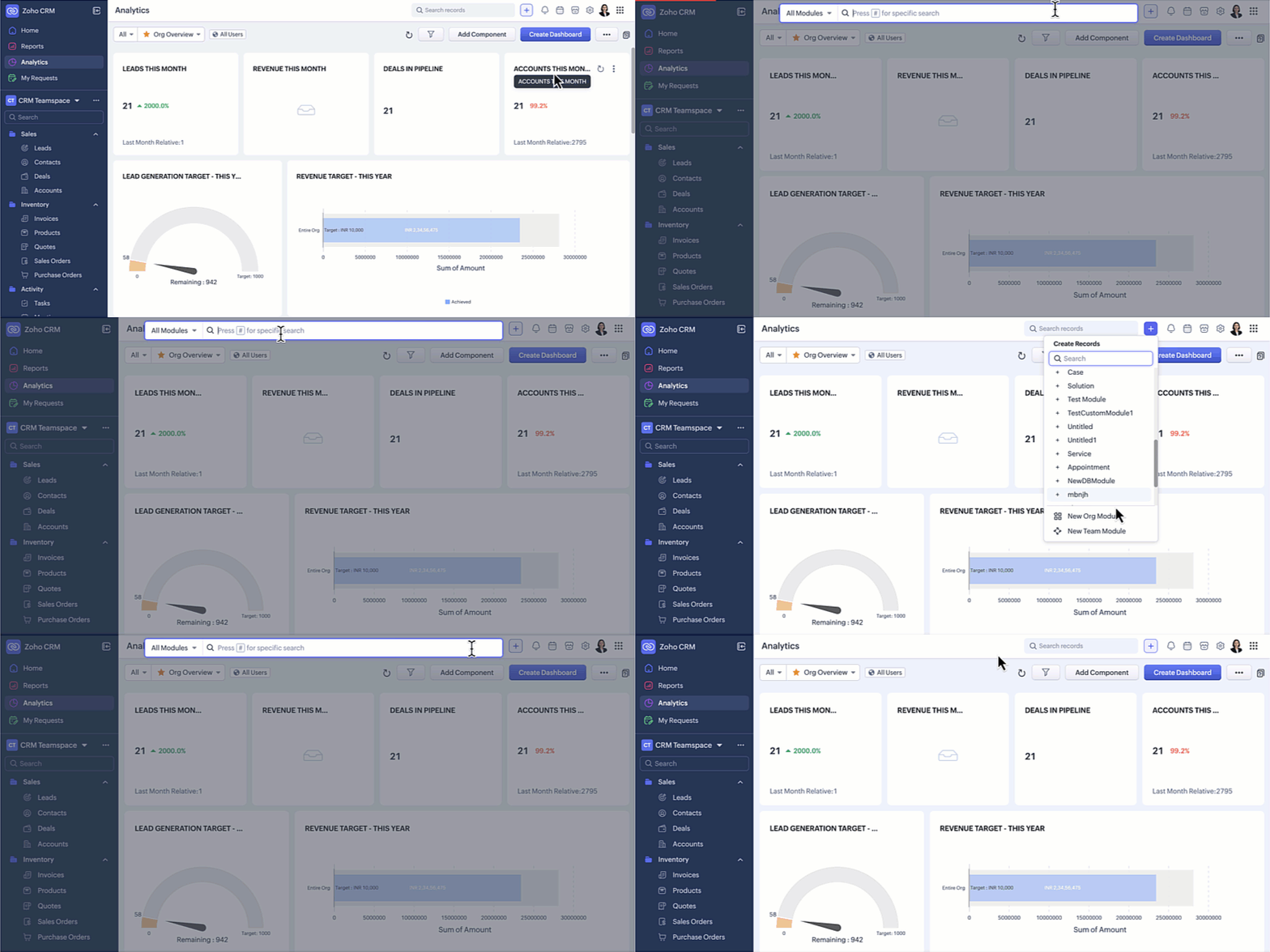
In this upgraded version, global search now lives at the top of your CRM screen. The Quick Create menu has also been merged with the '+' icon from the Modules Tab in this enhancement so all quick create actions can be carried out from one single place. From here, you can:
- Quickly find records, modules, or information across your CRM using global search.
- Create records directly from any module, create new team modules or create org modules.
Setup moved to the top-right along with a Setup Homepage
Currently, the setup menu in the Nextgen UI is at the bottom and opens directly to the list of features available for users not giving users a bird's eye view of all the features CRM offers.

Now, Setup menu is moved to the top-right corner of your CRM account opening to a Setup homepage. All settings on the setup homepage are neatly organized into easy-to-understand categories, as shown in the GIF below. With everything brought together in one central view, you can navigate effortlessly, find the tools you need at a glance, and configure them with fewer steps.

Access Reports and Dashboards in a single click
Currently, Reports and Analytics modules will list the various reports and dashboards created on the secondary sidebar. Accessing other modules from reports and dashboards requires multiple clicks as shown in the GIF below.

In this enhancement, we moved this list into a drop-down menu from which you can choose the report or dashboard required. Earlier, navigating to other modules required multiple clicks, with this enhancement you need only a single click to move between modules.
You can also manage folders and dashboards created, use Zia and Zoho Analytics from the same drop-down menu option. Look at the GIF below to know where the list of reports and dashboards will now be located.

Hide / Show Sidebar Menu
We have retained the hide and show menu option to give you the option to view data in a larger screen space as shown in the video below.

Relocation of the Teamspace switcher tab
Currently, the teamspace switcher is placed at the bottom as shown in the screenshot below.

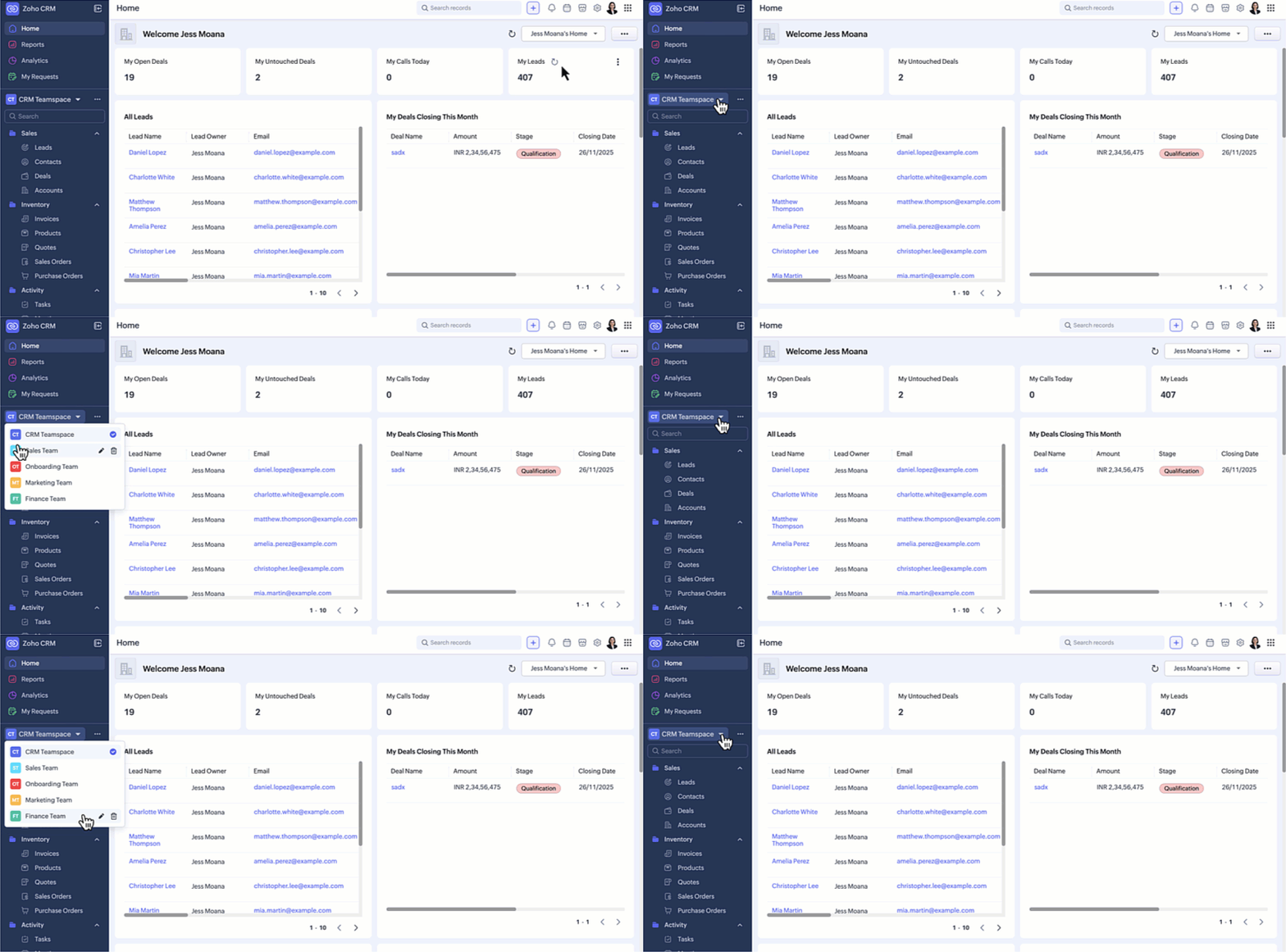
Now, we’ve relocated the teamspace switcher for easier access. We have added a More(...) option from where you can access the below options:
- It’s now centrally positioned, making it quicker to navigate between teamspaces.
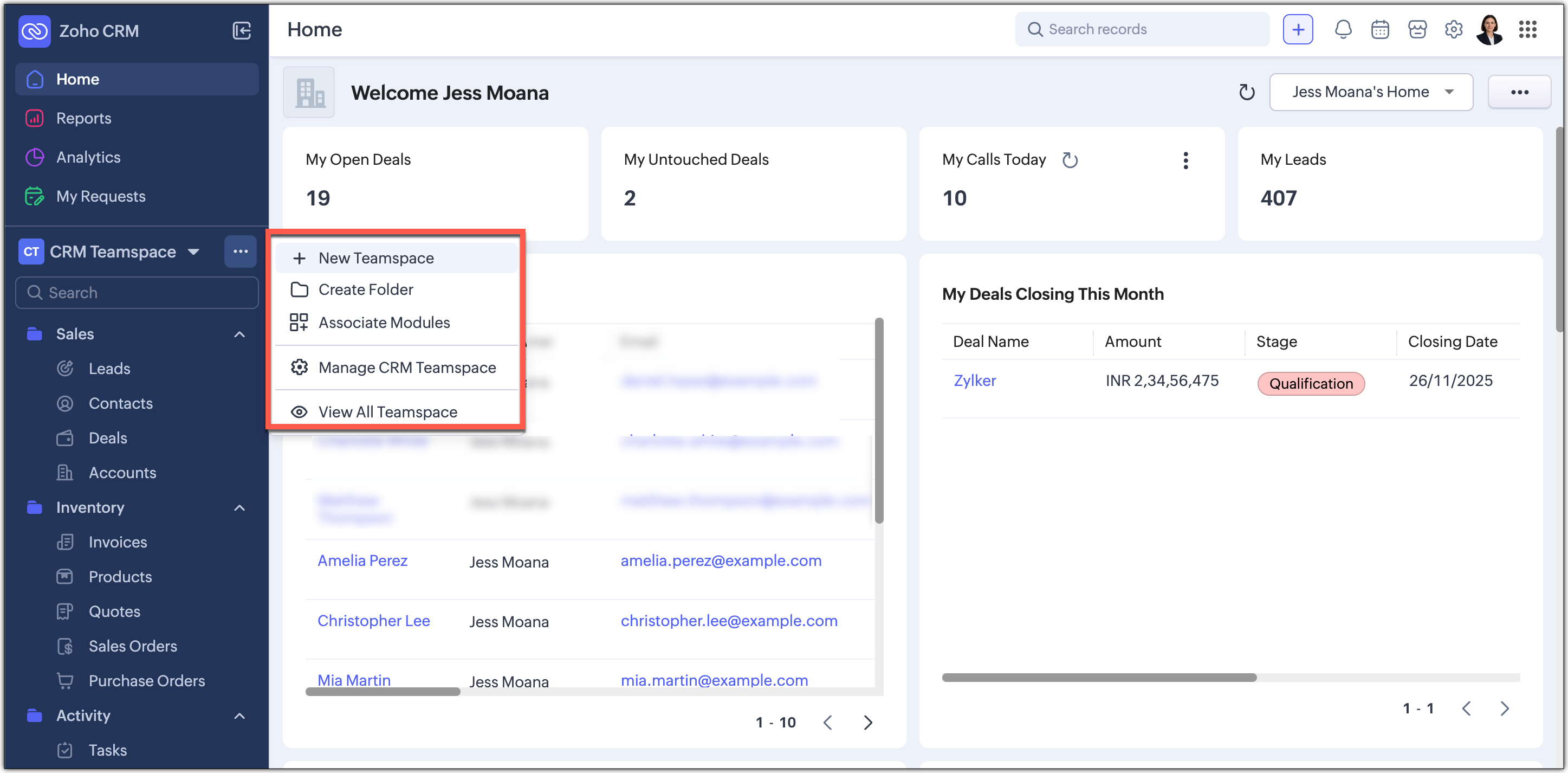
- Create new teamspaces, create folders, associate modules, manage and view teamspaces can now be done through the More Option next to the switcher tab.
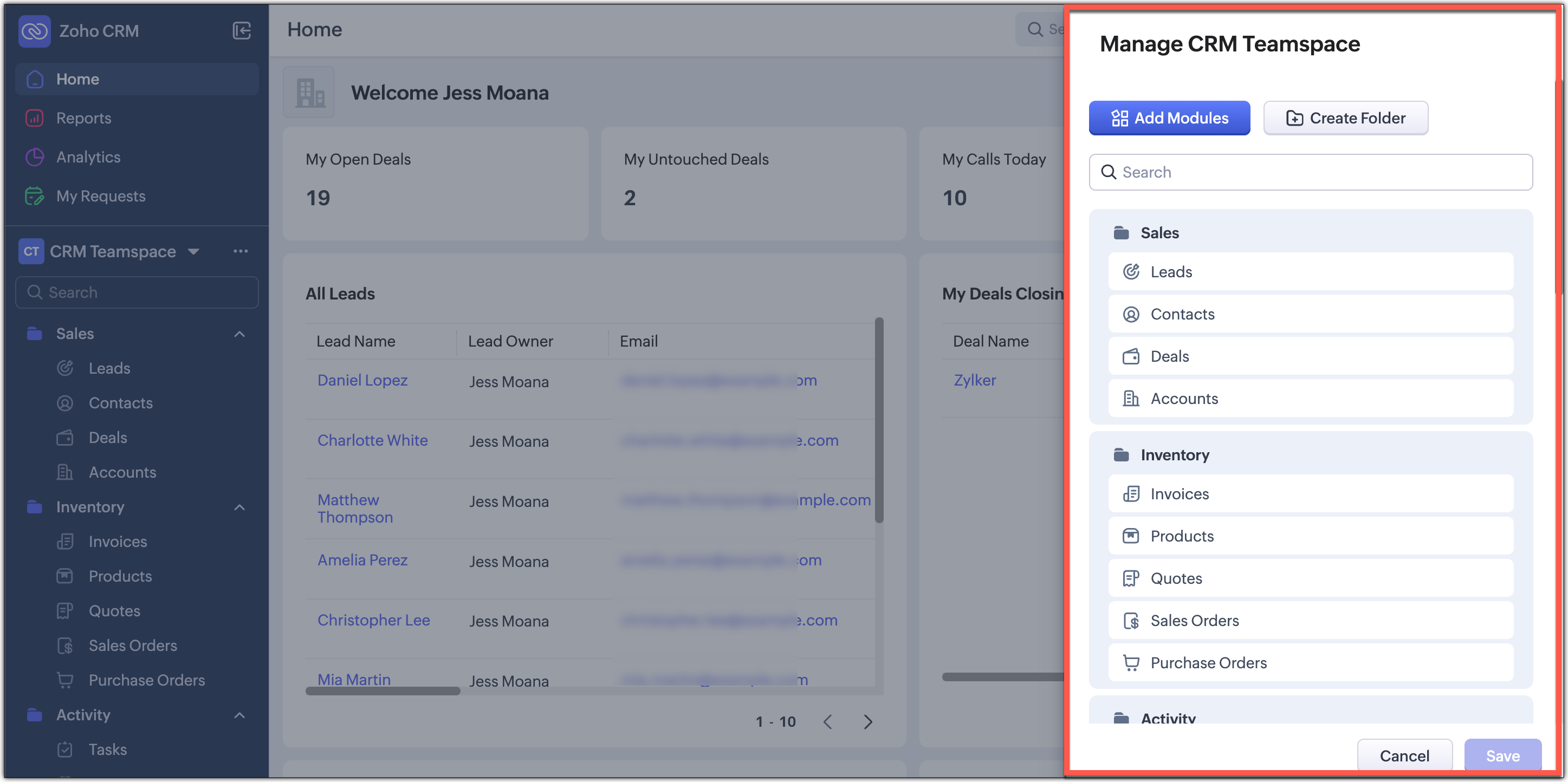
- Managing CRM teamspaces will now open out into a pop-up at the far-right of your screen.
Filter option and Record Views brought together
Currently, the filter option is available separately on top next to the custom view option. Similarly, record view for the module is also placed on top next to Create Record button and opens up as a drop-down for you to choose from.

In this enhancement, we’ve grouped the filter, sort, and record view options located on the action bar at the top of the list view just below the Module name. This creates a more consistent experience and makes these customization tools easier and quicker for you to access.

Custom Views as Tabs
You can now display your custom views as separate tabs, which makes them easy to spot and quick to open. This helps you keep your most used views right in front of you without extra clicks. It gives you a cleaner and more organized screen that matches the updated UI.

What does this mean for existing users?
We'll begin rolling out this upgraded version to existing accounts through a banner shown to users of the current Nextgen UI and the old UI. From the banner, users can either switch to this upgraded UI right away or choose to do it later at their convenience.
Please note that this banner will not be available for partner accounts and internal user accounts. You will land directly in this improved UI as we start rolling this out.
Timeline for the switch
For Nextgen UI users : The banner will be shown to switch to the upgraded version.You can either switch immediately or opt to choose at a later time. When you opt to switch later, you be forced to switch to the upgraded version after a week and the current Nextgen UI will no longer be available.
For old UI users : The banner will be shown allowing you to try the upgraded version. After this, clicking the Try CRM for Everyone button will take you to the upgraded version only, as the current Nextgen UI will no longer be available.

Availability
Currently this improved version is supported only in standalone CRM accounts. It will be supported for CRMPlus or Zoho One editions soon.
Release Plan
- For existing customers : We have started rolling out the upgraded Nextgen UI in batches for standalone accounts. Support for CRMPlus and Zoho One accounts will follow soon.
- For new signups : All new signups from today will get the upgraded Nextgen UI by default. This rollout is happening gradually across data centers.
Note : After switching to the upgraded Nextgen UI, users can still return to the Old UI if needed. However, they will not be able to switch back to the current Nextgen UI.
We're positive that this upgraded version of the Nextgen UI would definitely make your workday easier and more productive.
Your feedback continues to shape our product, so if you have any queries or thoughts, please do comment below and we will get back to you at the earliest.
Thanks & Regards,
Serena Woolridge
Topic Participants
Serena Woolridge
Zohoboy
Aishwarya M
Jeuel
Sunderjan Siddharth
Sticky Posts
Zoho CRM's sales trend and sales follow-up trend dashboards are now customizable
Dear Customers, We're here with good news! Sales trend and sales follow-up trend are two system-defined dashboards that help you understand trends and anomalies in your sales outreach and conversion efforts. They use Zia's intelligence to identify patternsIntroducing Multiple Sandbox Types and Support for Module's Data Population
Register here for the upcoming Focus Group webinar on Multiple Sandbox | Help documentation to learn more about the new enhancements Hello everyone, Sandbox in CRM is a testing environment for users to create and test new configurations like workflowGood news! Calendar in Zoho CRM gets a face lift
Dear Customers, We are delighted to unveil the revamped calendar UI in Zoho CRM. With a complete visual overhaul aligned with CRM for Everyone, the calendar now offers a more intuitive and flexible scheduling experience. What’s new? Distinguish activitiesVoC in Zoho CRM is now data savvy: Explore response drilldown, summary components and participation in CRM criteria
VoC has all the goods when it comes to customer intelligence—which is why we're constantly enhancing it. We recently added the following: A customer drilldown component that shows you the list of prospects and customers behind a chart's attribute ExpandedWrapping up 2025 on a high note: CRM Release Highlights of the year
Dear Customers, 2025 was an eventful year for us at Zoho CRM. We’ve had releases of all sizes and impact, and we are excited to look back, break it down, and rediscover them with you! Before we rewind—we’d like to take a minute and sincerely thank you
Recent Topics
Form to PDF template
I am looking to create a Form and when information is inputted, it will merge it into a PDF template we already have. There could be multiple lines in the form and each line inputs information into a new page of a PDF template.Please verify my account
Hi, We have just launched our website and received media coverage in our country. Hundreds of users are signing up for our platform every day. We would like to send them a welcome email, but we are unable to do so because our ZeptoMail account has notSubject character limit increase
We have an occasional user case where subject lines exceed 500 characters which is the ZeptoMail imposed limit. While I understand long subject lines are not "best practice", these are particular notification emails with specific information for clientAccount blocked
Yesterday I got my Zeptomail account blocked due to too many hard bounces. My account is used exclusively for sending transactional emails (eg. your order has been shipped, a form has been filled, etc) and the sudden blocking impacted hundreds of websitesNested notebooks
Dear Sir/Madam, I would like to know if it is possible to nest notebooks. It would be very helpful when there are too many, as it would improve organization. Thank you for your response. Best regards.Cannot see correct DNS config for mail after moving domain to another provider
I have moved my domain from one provider to another and after that zoho mail stopped working (expected). Problem is, zoho mail admin panel still shows (10 hours after move) that all records are correct while I haven't changed anything in my domain DNSProactive Alert for Existing Open Tickets per Contact / Account
Hello Zoho Desk Team, Greetings, and hope you’re doing well. We would like to submit a feature request aimed at improving agent awareness and efficiency when handling tickets in Zoho Desk. Use case When an agent opens a ticket (new or existing), it isTicket resolution field - can you add links, video, and images?
Seems like the ticket resolution fields is just a text field. Any plans to add the ability to add links, images...the same functionality in the problem description box? I would like to send the customer a link to a KB article, a link to our Wiki, embedTicket Resolution - Add rich formatting, screenshots and attachments
The resolution field only allows plain text at the moment. Many of our resolutions involve posting screenshots as evidence, it would be great for us to be able to have rich text formatting, be able to paste screenshots and add attachments in the solutionKaizen #140 - Integrating Blog feed scraping service into Zoho CRM Dashboard
Howdy Tech Wizards! Welcome to a fresh week of kaizen. This week, we will look at how to create a dashboard widget that displays the most recent blog post of your preferred products/services, updated daily at a specific time. We will leverage the potentialConvert Lead Automation Trigger
Currently, there is only a convert lead action available in workflow rules and blueprints. Also, there is a Convert Lead button available but it doesn't trigger any automations. Once the lead is converted to a Contact/Account the dataset that can be fetchedI'm getting this error when I try to link an email to a deal inside the Zohomail Zoho CRM extension.
When I click "Yes, associate," the system displays an "Oops!! Something went wrong" error message. I have attached a screenshot of the issue for reference.Zoho Sheet - Desktop App or Offline
Since Zoho Docs is now available as a desktop app and offline, when is a realistic ETA for Sheet to have the same functionality?I am surprised this was not laucned at the same time as Docs.ZOHO add-in issue
I cannot connect ZOHO from my Outlook. I am getting this error.Marketing Automation
L.S. Marketing Automation is and has always been part of the Zoho One bundle - according to the information provided on the Zoho Website. Why when I open Marketing Automation do I get the following message?: "Your trial has expired. We hope you enjoyedWhat's New in Zoho Analytics - January 2026
Hello Users! We are starting the year with a strong lineup of updates, marking the beginning of many improvements planned to enhance your analytics experience. Explore the latest improvements built to boost performance, simplify analysis, and help youTranslation from Chinese (Simplified) to Chinese (Traditional) is not working. It randomly translated. Google Translate accurately but zoho translate is not working at all
Hi friends, The newly added language for translation. https://www.zoho.com/deluge/help/ai-tasks/translate.html "zh" - Chinese "zh-CN" - Chinese (Simplified) "zh-TW" - Chinese (Traditional) my original text: 郑这钻 (and it is zh-CN) translated traditionalThe Social Playbook - January edition: Getting started with content creation
Social media isn’t just about posting some random content. It’s about why certain content works, how brands stand out, and what makes people pause mid-scroll. The Social Playbook is a monthly community series where we break all of that down. Through realSupport for Custom Fonts in Zoho Recruit Career Site and Candidate Portal
Dear Zoho Recruit Team, I hope you're doing well. We would like to request the ability to use custom fonts in the Zoho Recruit Career Site and Candidate Portal. Currently only the default fonts (Roboto, Lato, and Montserrat) are available. While theseAdding bank details to the contact through API
How to add bank-related information to the contact while creating it using API? The account number needs to be encrypted before sending it through API but not sure how to encrypt and get those values. Please guide me in this.Font breakage in Zoho Mail Desktop Lite application for Mac
Dear Zoho Mail and Workplace Community, With the latest update of macOS Sequoia and macOS Tahoe, there has been font breakages in the email preview of Zoho Mail Desktop Lite application for Mac. This breakage is due to the corruption of the System fontsFeature request - image resizing on sales orders
I need to be able to show the items on the sales orders, currently the item image shows really small and no way to resize it, need the ability to make the image larger to showcase the product on the pdfsNueva edición de "Ask The Expert" en Español Zoho Community
¡Hola Comunidad! ¿Te gustaría obtener respuestas en directo sobre Zoho CRM, Zoho Desk u otra solución dentro de nuestro paquete de CX (Experiencia del Cliente? Uno de nuestros expertos estará disponible para responder a todas tus preguntas durante nuestraAutomation Series: Auto-Notify External Users on Issue Closure
Hello Folks! In Zoho Projects, you can notify external issue reporters via email when an issue is marked as Closed. This helps the users avoid manual follow-ups and keeps the reporter updated. In this post, we’ll walk through a simple setup using a WebTurn chat conversations into real action with Integration Blocks in Guided Conversations
When a Guided Conversation fails, it's usually not because the logic is wrong. They fail because the conversation stops moving. A customer starts a chat with a clear goal: report an issue, check a status, or confirm something. At first, the flow doesBasic Mass Update deluge schedule not working
I'm trying to create a schedule that will 'reset' a single field to 0 every morning - so that another schedule can repopulate with the day's calculation. I thought this would be fairly simple but I can't work out why this is failing : 1) I'm based inclick to call feature
I've Zoho CRM and in that i want click to call feature.Can the Product Image on the Quote Template be enlarged
Hello, I am editing the Quote Template and added ${Products.Product Image} to the line item and the image comes up but it is very tiny. Is there anyway that you can resize this to be larger? Any help would be great! ThanksCreating Parent Child relationship in Accounts
We have customers with multiple locations, I setup the HQ as an account, then I setup the different sites marking the HQ as the parent to that location. If I then do a Deal for one of the locations, is there a way to show by looking at the parent accountLearner transcript Challenges.
Currently i am working on a Learner Transcript app for my employer using Zoho Creator. The app is expected to accept assessment inputs from tutors, go through an approval process and upon call up, displays all assessments associated with a learner inClient and Vendor Portal
Some clients like keeping tabs on the developments and hence would like to be notified of the progress. Continuous updates can be tedious and time-consuming. Zoho Sprints has now introduced a Client and Vendor Portal where you can add client users andneed a packing list feature
In our business, goods listed on an invoice are packed in separate boxes and shipped off. for e.g. an invoice may have 10 items. each item could then be packed in different boxes depending on qty of each item. this packing list is as important as the invoice for purposes of shipping documents. Request you to add this feature asap.#7 Tip of the week: Delegating approvals in Zoho People
With Zoho People, absences need not keep employees waiting with their approval requests. When you are not available at work, you can delegate approvals that come your way to your fellow workmate and let them take care of your approvals temporarily. Learn more!Admin Tip: Manage sub-domain emails using sub-domain stripping
As an admin, you may need separate domains for different departments such as sales, support, and marketing. While this approach offers flexibility, creating and managing multiple domains can quickly become overwhelming, especially since each domain requiresQuick Copy Column Name
Please add the ability to quickly copy the name of a column in a Table or Query View. When you right-click the column there should be an option to copy the name, or if you left-click the column and use the Ctrl+C keyboard shortcut it should copy theAbility to Edit YouTube Video Title, Description & Thumbnail After Publishing
Hi Zoho Social Team, How are you? We would like to request an enhancement to Zoho Social that enables users to edit YouTube video details after the video has already been published. Your team confirmed that while Zoho Social currently allows editing theHow do I remove a data source from Zoho Analytics?
I am unable to find a delte option on a datasource that i put in the system as an error. On teh web it refers to a setup icon but I do not see that on my interface?Add Employee Availability Functionality to Zoho People Shift Module
Hello Zoho People Product Team, Greetings and hope you are doing well. We would like to submit a feature request to enhance the Zoho People Shift module by adding employee availability management, similar to the functionality available in Zoho Shifts.Bigin, more powerful than ever on iOS 26, iPadOS 26, macOS Tahoe, and watchOS 26.
Hot on the heels of Apple’s latest OS updates, we’ve rolled out several enhancements and features designed to help you get the most from your Apple devices. Enjoy a refined user experience with smoother navigation and a more content-focused Liquid GlassIs Desk Down?
Across department - always an error. [Status Mode] - error [Table View and the rest] - workingNext Page