Improve your agile project management experience with the newly released capabilities in Zoho Sprints. This quarter we've shipped a few new features and enhancements that are built around smarter planning and execution tools, tighter integrations, and improved user experience. Q2 2026 is all about helping you move faster and stay ahead of your project.
The following are the updates:
- Export test case and execution data
- Apply layout rules for releases
- Plan for sprint capacity
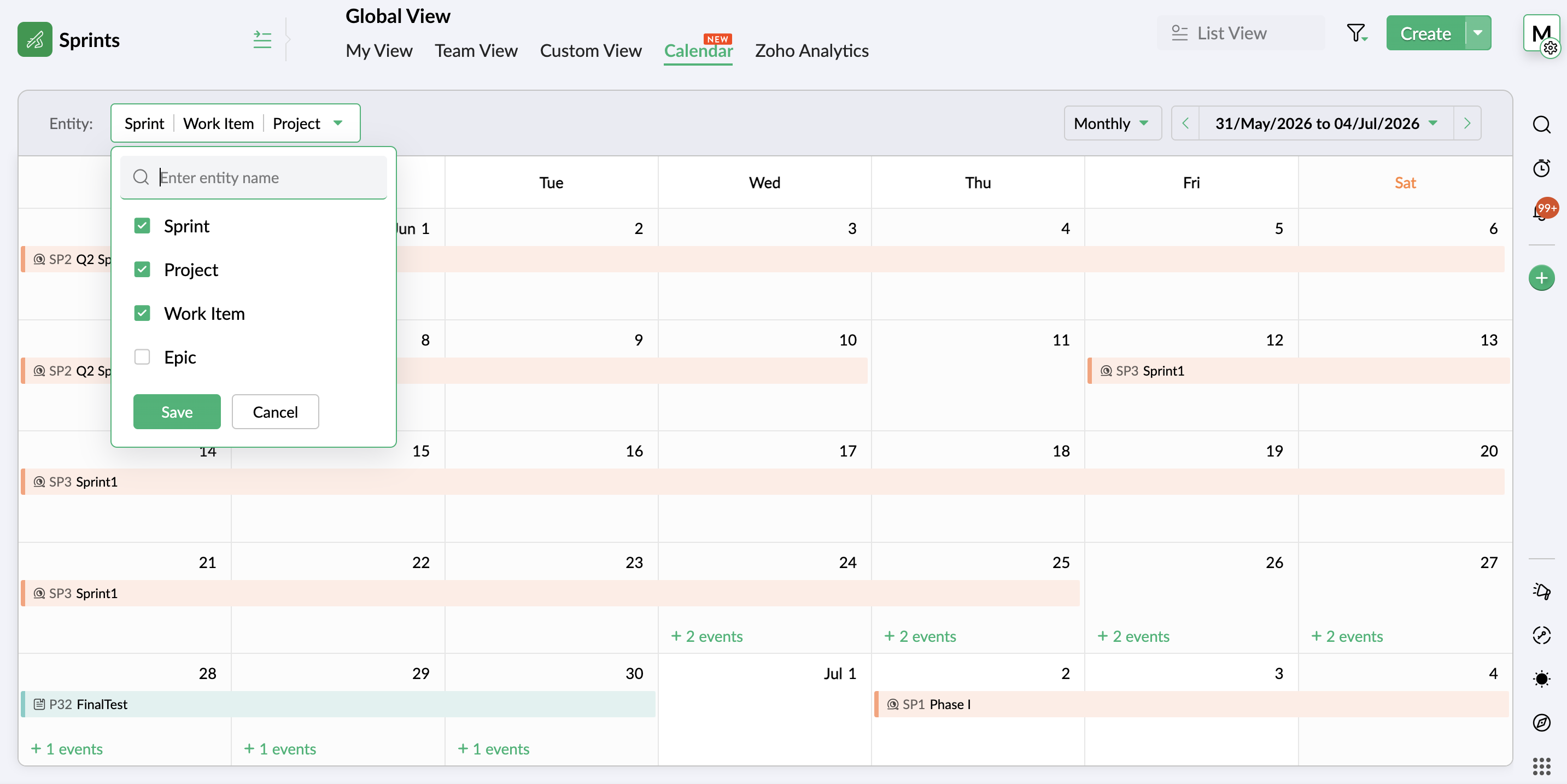
- View entities on a global calendar
- Create folders through Google Drive Extension
- Add custom nested picklist in form layout
- Use Zia Search for Zoho Sprints
- Compare data using duration and work hours in Timesheet report
- Restrict, pin, and share comments
- Add weekly logs in global view
- Add custom fields to OKR layout
- View unread notifications
Export test cases and execution details
Your test management system now enables you to export test cases and execution details for use or reference outside your Zoho Sprints environment. Export the data in XLS or CSV format and download the file for offline access or external use.
Learn more
Sprint Capacity Planning
Capacity Planning is an integral aspect of an efficient agile project process. Zoho Sprints now equips sprint managers with the necessary tools to plan and assign work items to the team members based on their availability and workload. This helps proper load distribution and better productivity. The process helps set realistic deadlines, assess member availability, avoid uneven workload, and eventually improve overall sprint health.
Learn more
View entities on global calendar and add weekly logs
Global View has two major capabilities:
- An additional view in the Global View presents your workspace entities on a calendar for a comprehensive, date-based view. It provides an overview of all the project activities throughout the workspace on a weekly or monthly calendar. Easily scan through the schedule of project, work item, sprint, epic, release, timesheet, or meeting. Learn more
- Adding weekly logs is now possible through global view. The timesheet view allows you to add logs in bulk through a weekly table, enabling multiple time logs being added in a single interface.
Create folders through Google Drive Extension
Google drive extension previously facilitated item level coordination between your Google and Sprints workspace. Now, its scope is widened to include Project, Sprint, Epic, and Release modules as well.
Learn more
This enhancement also includes the google drive folder creation and parent folder mapping abilities that customers have requested.
Add custom nested picklist in form layout
Use the nested picklist option to heighten the capabilities of the picklist options in your custom layouts. Define groups of picklists in a single field to add sub-options under one the main options, creating a nested list of options.
Learn more
Compare data using duration and work hours in Timesheet report
The duration and work hours details are incorporated into Actual vs Planned Timesheet report for better comparison-based insights. It offers a comparison of the actual hours for sprints and work items against their duration and work hours. This gives an understanding of the gaps in the pace of progress in terms of duration.
Learn more
Search using Zia
Leverage a single search interface instead of sifting through individual projects to find and access your Zoho Sprints work items. Zia Search provides a unified search platform to find targeted information across workspace.
Learn more
Restrict, pin, and share comments
- Restrict comments view access to your workspace to ensure external users cannot view them.
- Pin important comments at the top of the thread.
- Include comments across work items to reflect in linked or shared items.
Use Google Meet in MeetingBridge
Google Meet is now available alongside other service providers on MeetingBridge. Users with an existing Google account configured in Zoho Sprints can easily add Zoho Sprints OAuth scope to Google workspace to authenticate integration.
Learn more
Apply layout rules for releases
The utilities of layout rules feature in now extended to the release module. Expand the scope of your data gathering and processing unit by adding conditional rules and subsequent trigger actions. Adding rules to your release layout provides you with an additional layout of customization that enables you to better refine data using facilities like dynamic show/hide fields or sections, mandate certain fields, set default values, or restrict picklists to adapt the layout to your project preferences.
Learn more
Customize OKR layout
Add custom fields to the existing Objectives and Key Results layout to introduce business-specific or organization-specific details that need to be documented. Create a more targeted and self-reliant goal tracking system that work best for your vision.
Learn more
View unread notifications
The new Unread view in Notifications section provides a dedicated view for unread notifications. The notifications that are read will be removed from this view.
There're more features and enhancements lined up for the upcoming quarter. So keep an eye on this space. In the meantime, explore these features and let us know which of these live up to your expectations.
Thanks,
Zoho Sprints Team
Recent Topics
[Webinar] Conversational AI: The new paradigm for agentic analytics
From hard coding to powerful agents, data and analytics is undergoing a tectonic shift, and conversational agents are at the forefront of this transformation. This goes beyond democratizing business intelligence; it's about accelerating the path from
Make Rich Text fields available in Canva Print Views
Everything is on the title. I don't really understand why this is not already possible as Rich Text Fields are available in Canva Detailed Views for example.
How to RSVP an invite using the Zoho API
Perhaps I am missing something, but I don't see any way to use the Zoho API to RSVP an Invite. This what I've tried: PATCH https://calendar.zoho.com/api/v1/calendars/{cal}/events/{event} ?attendeedata={"attendees":[{"email":"me@example.com","status":"ACCEPTED"}],
Is Zoho Assist Secure Connect even practical for 1 person shop?
I was gun ho with Zoho Assist to replace my existing Remote Access product I have been using but I need to implement MFA on each unattended connection. Right now each of these connections in my other product has a rotating token that I have enter off
FSM service call view
"Why can't we sort by assigned service resource in the service call view?"
Zia Agents looks promising, but I still cannot deploy my first agent or connect WhatsApp after weeks of support tickets
Hi Everyone, I am posting here because I am stuck and need practical help from someone who has successfully deployed a Zia Agent with WhatsApp. Zia Agents looks like a very promising product. I have watched the platform expand quickly, and I have noticed
Marketing Tip #46: Run flash sales the right way
A flash sale can do a lot for your store. It can clear slow-moving inventory, spike revenue on a slow day, or reward your most loyal customers. But if done carelessly, flash sales can backfire. Customers start expecting discounts, stop buying at full
Send Notify on new Ticket to a Team based on customers email address AND only on these addresses
Hi ZohoDesk, I would like to have Team A receive a Notification on every ticket created. I would like Team B to receive a Notification email only if the incoming ticket contains elements of a certain group of customer's email addresses only. They should
Inventory API - Retrieve all uploaded product / item images
I know that I can get the primary image for each product / item or composite item, by using the /image endpoint. https://inventory.zoho.com/api/v1/compositeitems/<item-id>/image?authtoken=<TOKEN> This will return only one photo, even if the item has multiple images uploaded. Is there a way to retrieve all images stored for an item via the Zoho Inventory API?
Drop Down Menu - Adding up values
I have a form that has 22 drop down fields each having a value of 0-10 to choose from. Is it possible to have it add up the total value of those selected numbers and have it tally it up in another field at the end? So example: if each of the 22 fields
Change Last Name to not required in Leads
I would like to upload 500 target companies as leads but I don't yet have contact people for them. Can you enable the option for me to turn this requirement off to need a Second Name? Moderation update (10-Jun-23): As we explore potential solutions for
Setting checkbox value on template in Sign from Creator
Good day, Please help me understand how do I set a tick from a checkbox in Creator into a checkbox on a Sign template. Below is the only values on the Sign template and the code from Creator, "field_boolean_data": {}, "field_date_data": {}, "field_radio_data":
Cliq iOS can't see shared screen
Hello, I had this morning a video call with a colleague. She is using Cliq Desktop MacOS and wanted to share her screen with me. I'm on iPad. I noticed, while she shared her screen, I could only see her video, but not the shared screen... Does Cliq iOS is able to display shared screen, or is it somewhere else to be found ? Regards
How to Delete, Disable, or Remove Streams from the Mail App?
Is there a way to remove Streams from the mail app sidebar? I get too many notifications, it doesn't add any value to Zoho's functionality (especially since you can just make comments inside an email), and is distracting. I do not want notifications/alerts
Remove the mandatory Name Card buttons (or at least make them optional)
Please remove the mandatory Name Card buttons (or at least make them optional) A recent change to the Name Card in Zoho SalesIQ (currently affecting WhatsApp) introduced mandatory buttons before a visitor can provide their name. I believe this change
Zoho Wont Login
Can anyone tell me why my password stops logging in all the time? Is it a ploy to make you change your password? I have to use OTP all the time. I dont want to change passwords all the time. Over the last couple of years I've found myself using Zoho (as
Frustrated with Zoho Assist QuickSUpport
Trialling Zoho Assist and I have a variety of clients. A lot are computer illiterate. Some have poor vision. The current support sessions are using apps which have desktop icons for the appropriate apps. I either connect on demand then the client approves
What's New in Zoho Inventory | April & May 2026
Hello users, We're excited to roll out the latest Zoho Inventory updates for April and May 2026. These enhancements are designed to make your daily operations smoother and more efficient, from advanced inventory management and flexible pricing to automated
Gemini Action - Add "inineData" Support
Thank you guys for adding a Gemini action. I like Gemini models for the "grunt work" of AI, as they have the cheapest tokens of the trustworthy providers One thing that's missing in the action, though, is the ability to pass file data. If you pass a base64-encoded
HR Helpdesk Cases
We have Zoho One Enterprise. I'm trying to find HR Helpdesk Cases, but my UI does not match the documentation. I'm not sure how to move forward.
CRM x WorkDrive: We're rolling out the WorkDrive-powered file storage experience for existing users
Release plan: Gradual rollout to customers without file storage add-ons, in this order: 1. Standalone CRM 2. CRM Plus and Zoho One DCs: All | Editions: All Available now for: - Standalone CRM accounts in Free and Standard editions without file storage
Zoho CRM Copilot Connector
Hello, Are there plans to release a connector for Zoho CRM and Copilot? I'm in the early research stages of potentially switching our CRM solution to Microsoft Dynamics because of its out of the box integration with Copilot. The advantage being that we
Zoho Projects - Will there ever be a send email feature in Zoho Project?
Hi team, Are there plans to or will there ever be a sendemail feature in Zoho Projects, brining it in line with other similar platforms like Asana, ClickUp and Monday? I know that you can add comments via email to a specific task, but I believe this only
Introducing Microsoft Word Integration in Zoho Contracts
We are excited to announce a new feature that brings contract authoring and negotiation in your familiar environment — the Microsoft Word Integration. What This Integration Brings The Microsoft Word Integration connects Zoho Contracts with the Microsoft
Share Video Response Card ion Zobot
I am using the zobot codeless bot builder in SalesIQ. I want to share a video but delay the next response card until after the video has finished playing or has been stopped. Is this possible?
Customer image field
I created a custom image field for estimates, and it works as expected. The only issue I have is that I want to be able to place the custom image field in the estimate invoice. Is there a way I can do that, the field does not give the option to display
Sub Folders
It would be great if there could be sub-folders in reports. We have a ton of individual reports and folders that would be easier to navigate this way
Goals API - Zoho People
Hi Team, I would like to get the API details for retrieving organisation-wise Goals from Zoho People. Currently, I am able to retrieve individual employee goals using the following API: https://people.zoho.com/api/v3/performance/goal/{emp_id} However,
Question and responses disapear
I have a form where several people have had issues where the questions, responses or submission simply disappear when trying to complete the form. It seems to be random with no pattern of question, browser or OS. Hopefully there is a fix in the platform
Unable to send message;Reason:553 Relaying disallowed. Invalid Domain
Hi, Now when I try to reply to an email, I see the Unable to send message;Reason:553 Relaying disallowed. Invalid Domain voicemessagedownloader.com error. I tested sending an email when I set it up in the past and it worked. I have checked the Zoho Organization
Guide customers to the right booking page with routing forms
Greetings from the Zoho Bookings team! We're excited to introduce Routing Forms in Zoho Bookings. Routing forms let you collect information from customers before they schedule an appointment and automatically direct them to the most appropriate booking
Analytics Dashboard User Filters Default Value
User Filters on Dashboard do not allow Unknown to be set as a default filter value. I have to include NULL values in my dashboard among other values but I can't include NULL/Unknown by default in Dashboard User Filters.
Horrible download speed
Using a trial of Zoho Assist and downloading a 316 MB file on a 500/500 fibre connection to a remote computer on the same network took 7 mins to complete. On AnyDesk it took 1 min or so.
How to Backup Zoho to PST?
I'm looking for a simple way to backup Zoho Mail emails to PST format. I tried the IMAP method with Outlook, but it seems slow and complicated for large mailboxes. I need a solution that can: Export Zoho emails to PST Preserve attachments and folder hierarchy
Zoho Books | Product updates | August 2026
Hello users, July has been an exciting month for Zoho Books! This month, we're excited to introduce HTML PDF Templates, Placeholders as Pills, expanded approval workflows for Sales Returns and Journals, and significant compliance updates across the India,
Action required: WhatsApp now uses BSUID as the primary identifier
Important If your support team uses WhatsApp to engage with customers, there is an important platform change you need to know about. BSUID support is now mandatory for all WhatsApp Business Platform partners and businesses. WhatsApp is introducing usernames,
Tip #83- Give Customers a Faster Way to Reach You with the Quick Support Plugin – 'Insider Insights'
Hello Zoho Assist Community! Think about the last time a customer needed urgent support. They emailed in, waited for a response, got a session link, couldn't find it in their inbox, called back, and by the time the session actually started, a good chunk
Final Notice: Migrate Your ASAP Mobile SDK by August 31
Alert August 31, 2026 is the deadline. After this date, older ASAP Mobile SDK versions will no longer work with the ASAP Help Widget. If your app hasn't been migrated to a supported SDK version, users will no longer be able to access the ASAP Help Widget
Approval Process configuration is now more flexible and fully customizable
Hello everyone! Zoho CRM's Approval Process is back with a better user experience that makes it easier to add rules to your processes. This enhancement includes some UI updates that help you create highly structured approval stages—and more. Let's look
Kaizen #255 - Building a Real-Time Operational Dashboard with Zoho CRM Queries
Hello Everyone, Welcome back to another edition of the Kaizen series, where we uncover powerful ways to extend and customize Zoho CRM. In the previous Query Kaizens, we explored how Queries can retrieve CRM data, invoke REST APIs, and even update CRM
Next Page