Dear All,
We hope you're well!
It's been almost a year since we opened Zoho CRM's Voice of the Customer solution up for
early access. We are grateful for the reception and support you have been showing us with regards to its adoption and feedback. Since the big release, we have been developing more customer-forward features to go with it: the latest one being
Voice-based forecast analysis. You can find the help documents here:
Voice of the Customer.
Now, to expand the scope of VoC for your business, we have developed the ability to use calls as a source.
Calls as a source
Calls are undoubtedly the common mode of communication in every businesses. On a busy day, calls act as an on-demand recourse to follow-up your leads, clarify doubts, fix problems, and so on and are a potential source to reveal candid customer expressions. Realizing this, we are bringing insights derived from call correspondences in your organization, in addition to the existing sources: Zoho Desk, Zoho Survey, and emails. How will this addition benefit you?
The benefits of adding calls as a source are two-fold.
- Dashboards that display insights from existing sources will now carry insights from calls as well. This broadens your scope of understanding your customers' opinions and feedback on your business.
The dashboards that will have call insights are:
Response-based sentiment analysis
The response-based sentiment analysis provides you with intel about common sentiments observed in your customer responses across mediums. The following charts in this dashboard portrays insights from calls as well for greater accuracy in the analysis of sentiments in the responses. To learn more about this dashboard, click
here.
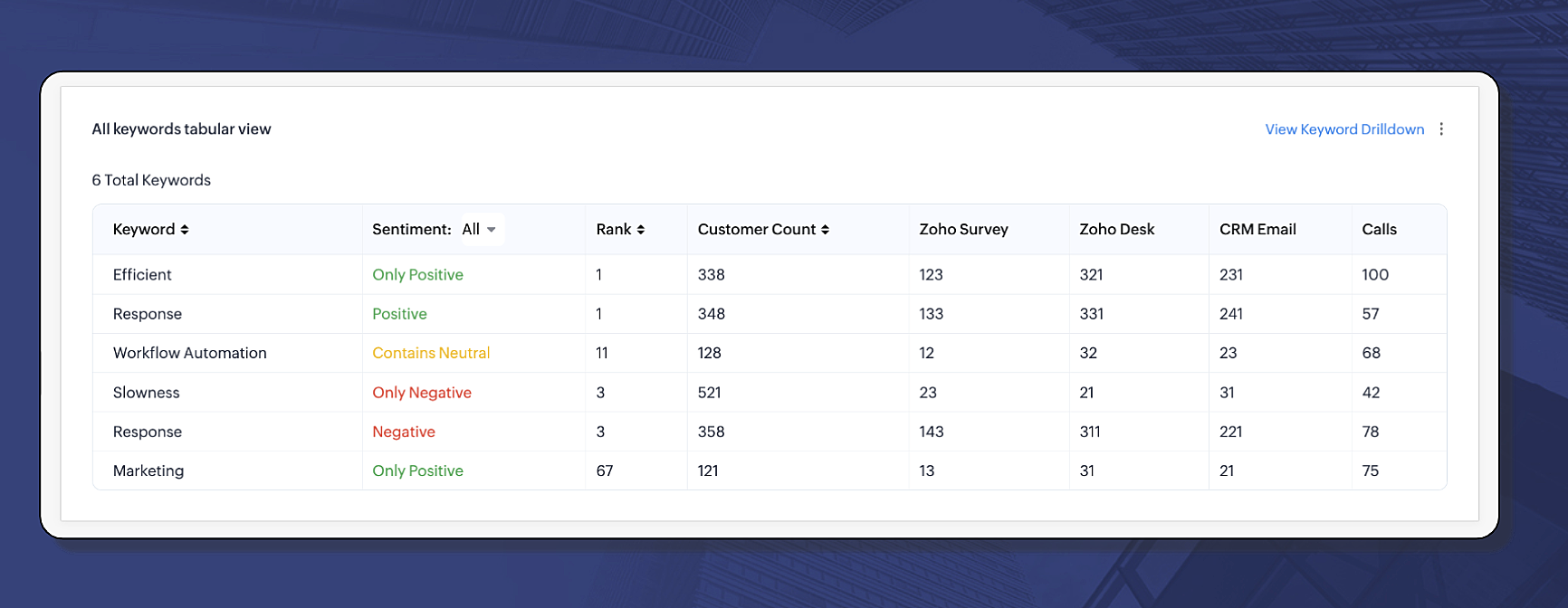
- All keywords tabular view: The below image tabulates the keywords used by your customers in different mediums and their sentiments. As you can see, "Efficient", with positive connotation, is a keyword ranked top with highest usage across all available mediums. At the same time, you can see another keyword with negative undertone, "Slowness", is also being used across different mediums. With calls now being an added channel, implies the gravity of these keywords' sentiments.
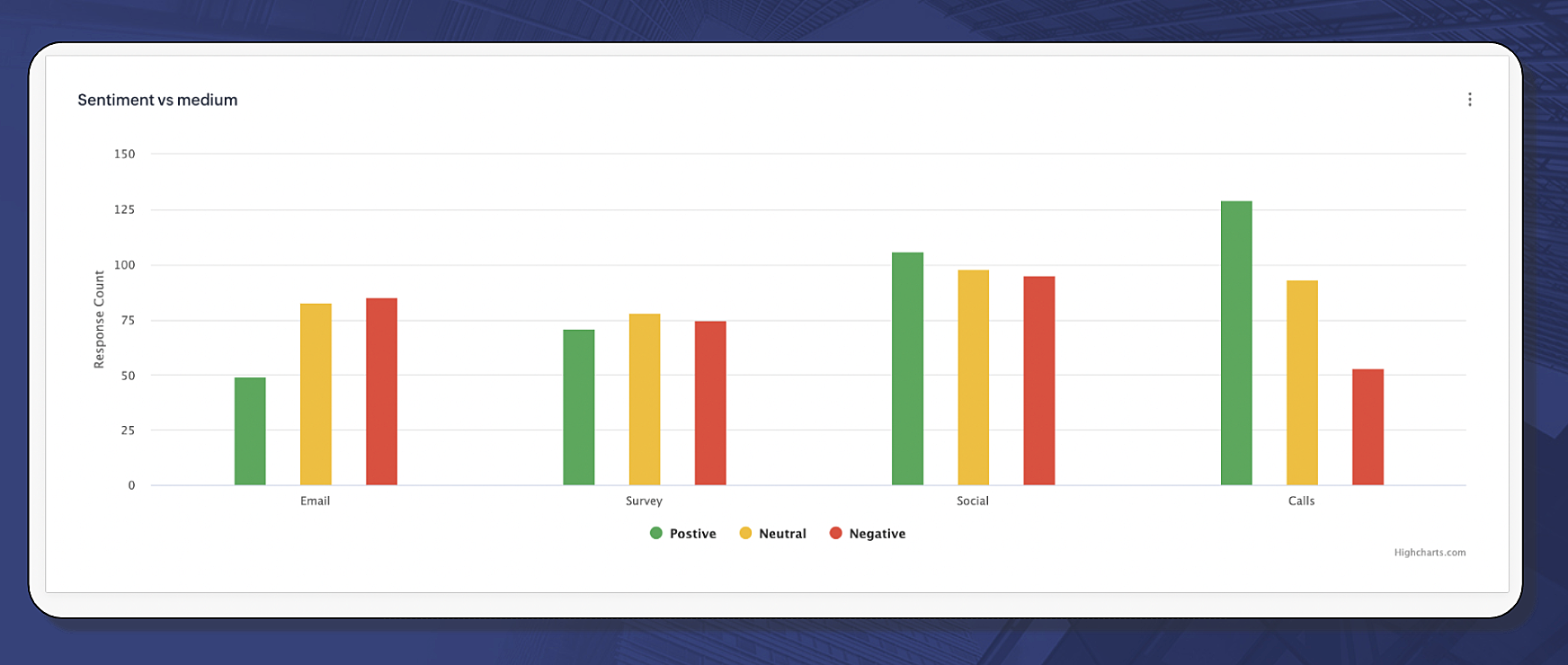
- Sentiment vs medium: The sentiment vs medium chart is a simple bar diagram comparing different sentiments expressed across different channels. You can ascertain which feedback from which medium has more intensity to it. For example, the below image suggests that customers are more positive through calls than they are in the emails. This means, when there is a critical situation, such as an escalation, calls are the best mode to approach customers and explains that one-to-one verbal communication helps settle a fix.
Competitor analysis
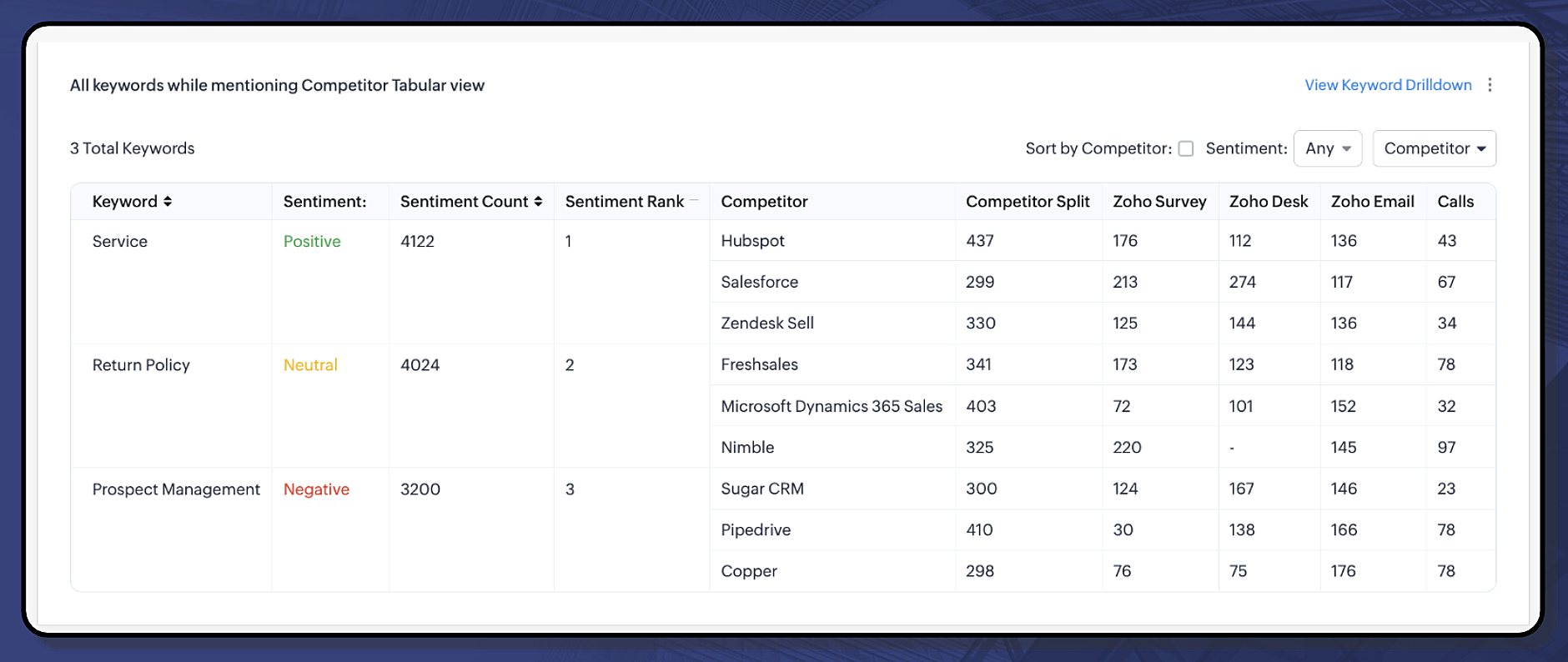
Competitor analysis shows the reality of your customers' perception. It will help you tailor a favorable workaround to approach your prospects and customers and win the deal. The following chart shows the keyword mentions used with respect to the competitors and the underlying sentiments from different mediums, including calls. For more information about competitor analysis, click
here.
All keywords related to competitor mention tabular view:
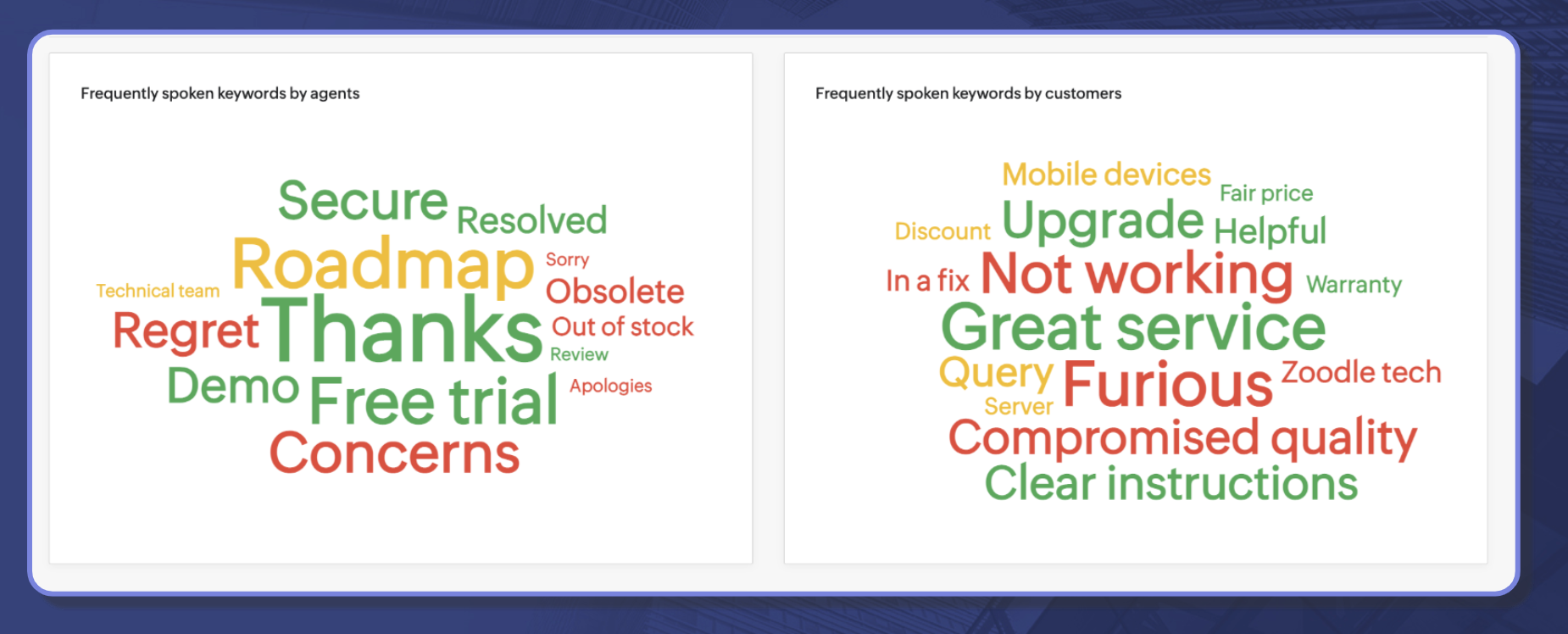
The service offering is positively regarded for certain competitors. There are consistent mentions about them in different channels, including calls.2. A dedicated dashboard for call analytics: A call between your business and your customer contains valuable subjective cues, such as their expectations, interests, sentiments, issues, and more. This dedicated call analytics dashboard will display two charts that will collate frequently used keywords by your agents and your customers through which you can get a quick peek into what is being discussed in your business.
Let's learn more!
Call Analytics dashboard
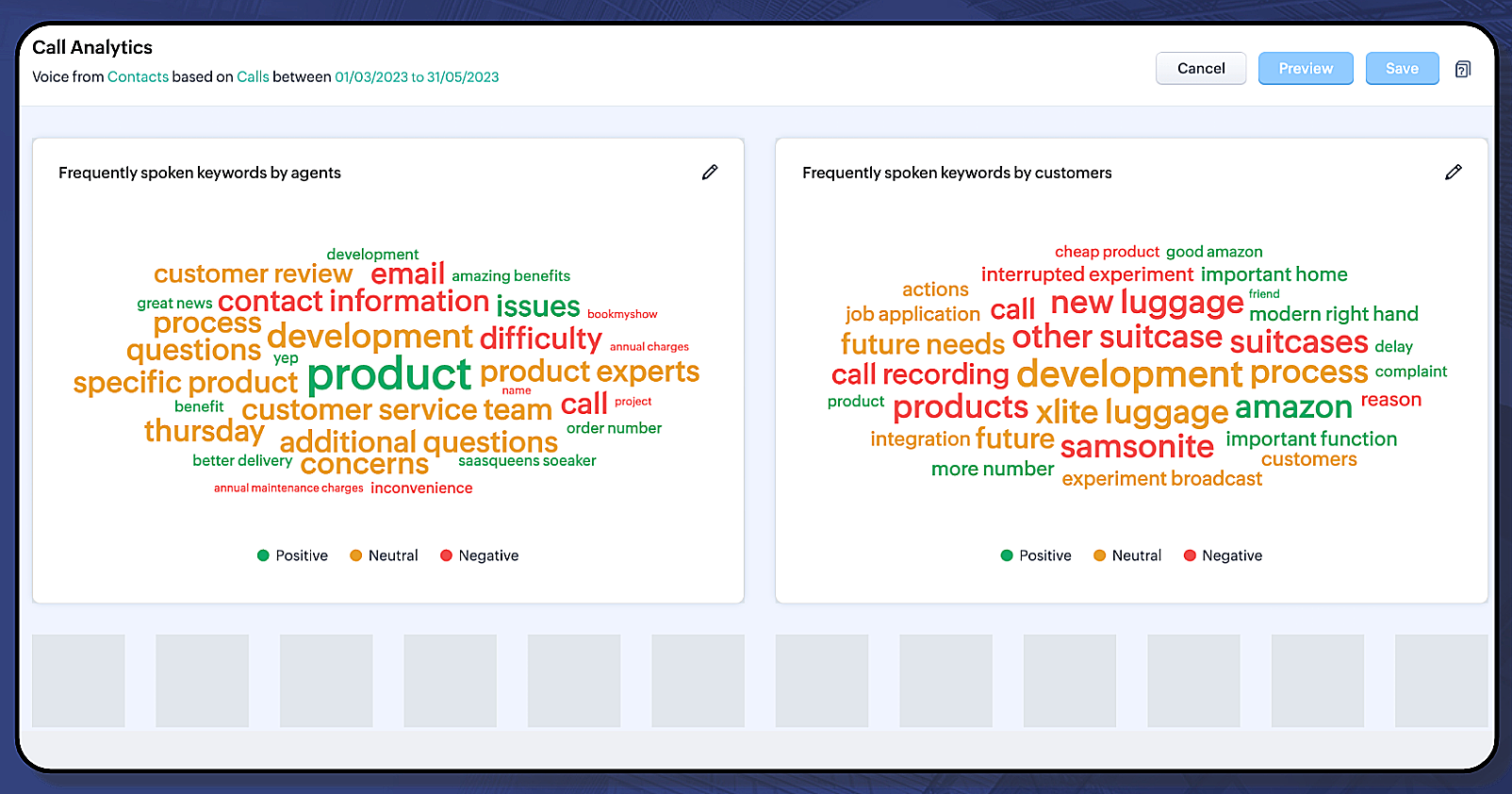
The call analytics dashboard deals purely with call correspondences in your organization. It displays the following charts:
- Frequently spoken keywords by agents
- Frequently spoken keywords by customers
Cue: More call-based insights are under development and you will hear about them in the coming days.
How are keywords aggregated?
Using the most recent call transcription features, Zia will be able to facilitate transcription of your recorded calls to text. Using its simple text analysis, Zia will be able to identify who is the customer and who is the agent, and aggregate the top 30 key words used by both your agents and customers.
Here's an illustration as to how Zia works on the call transcription text:
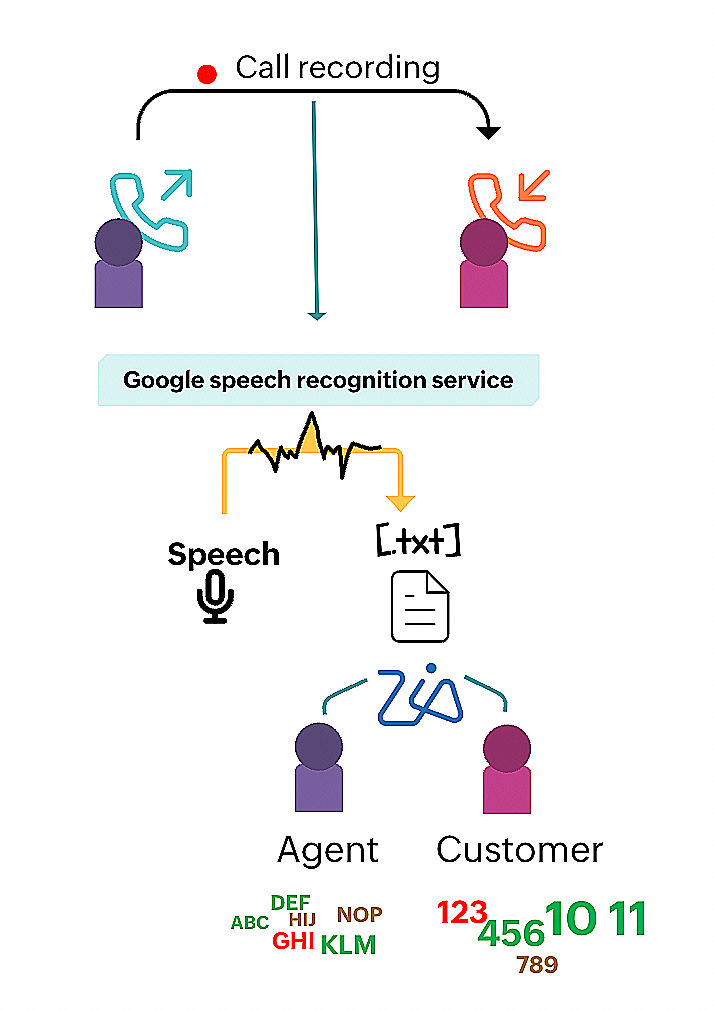
Using call intelligence, Zia can collate keywords to come up with a useful call analytics dashboard.
Notes:
- Calls will be the default source/channel for this dashboard, and you cannot change it.
- This dashboard is only available for Leads and Contacts modules.
- In order to use this dashboard, you need the following facilities enabled:
Managing call analytics dashboard:
You can do the following actions to manage the call analytics dashboard:
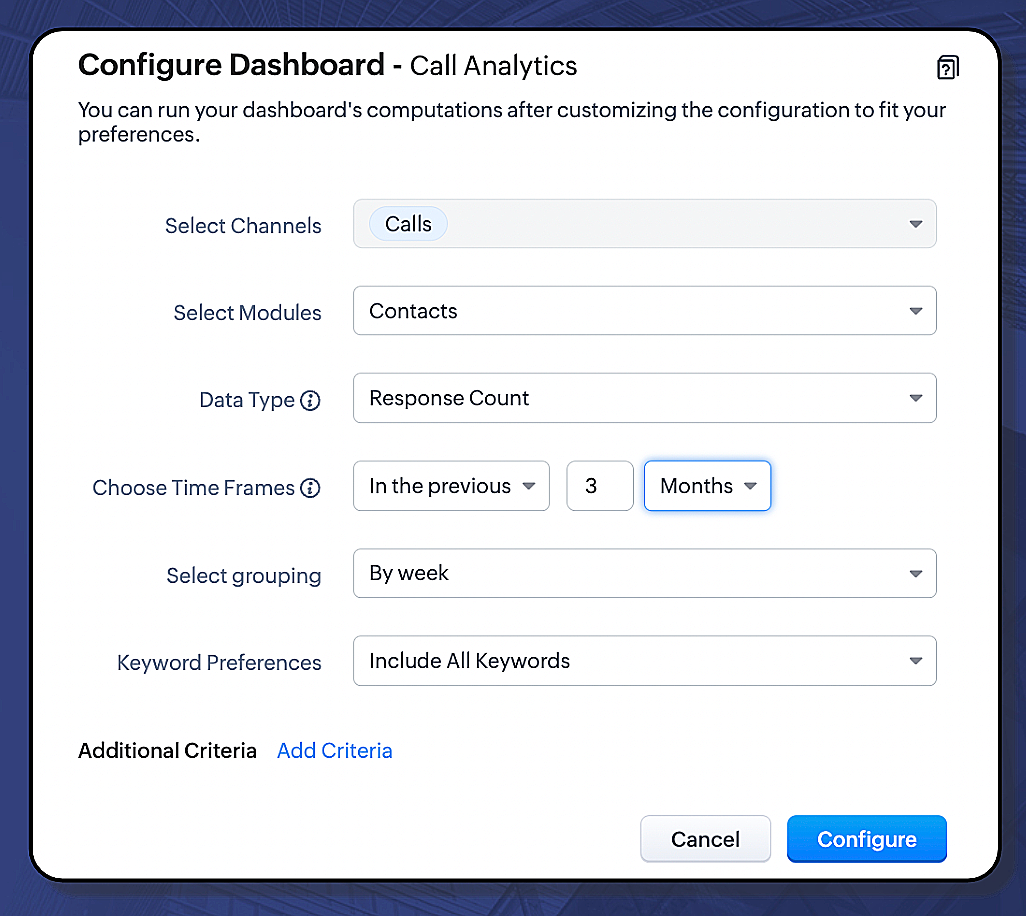
- Configure dashboard
- Choose which module, you want the call analytics to be displayed for.
- Choose the desired data type
- Choose the time frame
- Choose the grouping
- Enter the keyword preferences
- Reorder the charts
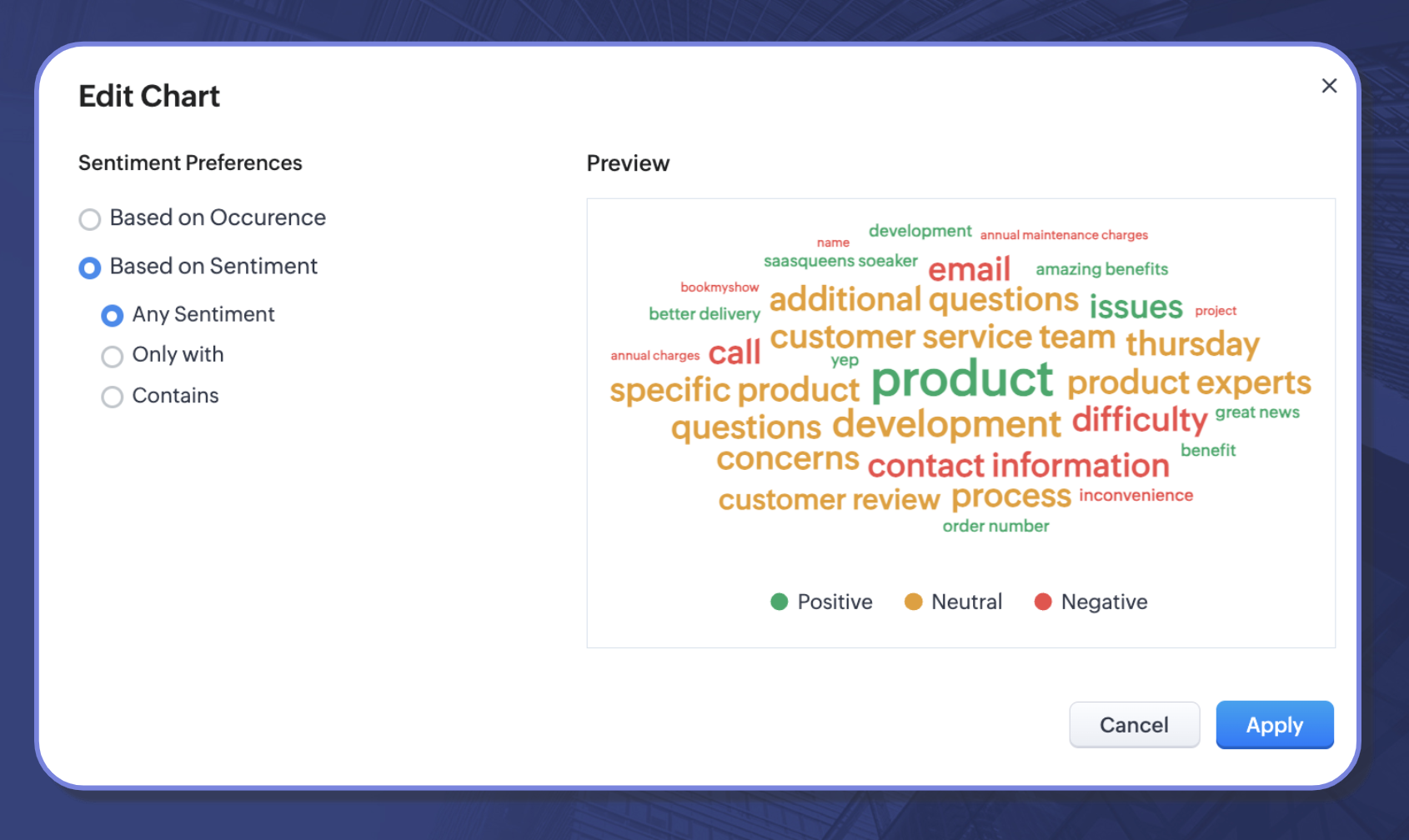
- Alter the sentiment preferences for individual charts
Availability: The enhancement will be available for users subscribed to the early access program in the EU, US, and IN DCs.
That's all for today's announcement. We hope this new addition will help you get closer to your customer opinions and help you act upon them. Should you have any feedback/questions/doubts, feel free to drop them in the comments section, our experts will be happy to take them.
Thanks and have a good one!
Kind regards,
Saranya Balasubramanian
Recent Topics
Zoho Sign - Zoho CRM extension upgrade
Hi everyone, We've updated Zoho Sign extension for Zoho CRM with significant internal changes. Impact on existing Zoho Sign extension users Users using the extension without customization If you are using the integration without implementing Zoho Sign's
Zoho Books blocks invoicing without VeriFactu even though it is not mandatory until 2027
I would like to highlight a very serious issue in Zoho Books for Spain. 1. The Spanish government has postponed the mandatory start of VeriFactu to January 1st, 2027. This means that during all of 2026 businesses are NOT required to transmit invoices
Group by Owner/ Owner Kanban /Group by Custom Field
Hi, We are missing the option of viewing Tasks grouped by their owner, as it is an essential function for us to manage our employees' working tasks. We find it hard to inspect what are the tasks that our employees are working on. We are seeking an option
Flow using way too many tasks
I built a flow that is using way too many tasks for what it is doing. I reached out to support a week ago but never heard back so hoping the community can help. Does a filter count as a task? I am seeing tons of records filtered with < 1 Sec Time Taken
Regarding the integration of Apollo.io with Zoho crm.
I have been seeing for the last 3 months that your Apollo.io beta version is available in Zoho Flow, and this application has not gone live yet. We requested this 2 months ago, but you guys said that 'we are working on it,' and when we search on Google
Start Workflow from Deluge Script
I have developed a customized process from our CRM that leverages a deluge script to create a statement of work document. Once the document has been created via the merge and store function, I would like the ability to start a workdrive review & approve
Saved Sections?
In sites editor, the + button reveals options to add a section, element, etc. It includes Saved Sections, but I can find no way to save a section I've already created. Otherwise, is there a way to copy a section from one page to another?
Marketer's Space: Unable to select a sender address? Here's the fix
Hello Marketers, Welcome back to yet another post! So you've added a sender address in Zoho Campaigns and later found that you're not able to select it while creating an email campaign. Has this ever happened to you? If so, don't worry—you're not alone.
Loading Project Balances in ZOHO Books for each project
Hello, What is the best method for loading project balances actual and budget into ZOHO books to provide tracking to our project managers. We have projects and federal awards (also treated as projects) which span multiple years. We are converting from
Auto-Invite Users to Portals in Zoho CRM based on Conditions
Hello Everyone, You can now automate portal invitations in Zoho CRM with the new Auto-Invite users feature in Portal management. No more manually enabling portal access one by one. With this enhancement, you can automatically send invites for users to
Scale up your writing style with content analysis tool in Knowledge Base
Hello everyone, Sometimes writers may have strong knowledge about the subject but may find it challenging to articulate clearly or produce comprehensible, jargon free content. To make the process easier and to ensure consistent, high-quality articles,
Zoho Books "Update" Trigger for Zapier?
Hi Zoho Team, I've been in talks with Zapier about using their services to connect my Zoho Books account to various apps, but I require an additional trigger beyond the "New" trigger. I require an "Update" trigger, which will allow me to filter and create Zaps only when certain conditions are fulfilled on the Zoho Books end before I automate a separate app. Specifically this will help me create invoices in QuickBooks Online only when payments are recorded in Zoho Books, rather than when a new invoice
How to prevent editing of closed tickets in Zoho Desk?
I would like to confirm whether it is possible to completely prevent agents from editing tickets once their status is set to Closed. Is there any configuration, permission, or best practice in Zoho Desk to ensure that closed tickets remain read-only and
Zoho Desk Limitations
Good day, all, I would like to know whether others share my frustration with some of Zoho's limitations. Don't get me wrong, I like Desk (and I also have a subscription for Analytics), I have been with them for close to 10 years, and unfortunately, I
New Mandatory One-Click Unsubscribe Link Overshadowing Custom Unsubscribe Link
I was recently informed by Zoho CRM Support that they are now mandated by the large email service providers like Google and Yahoo to provide a one-click unsubscribe option in the header (not the body) of all mass emails. I have a custom unsubscribe link
how to undoreconciled transaction
how to undo reconciled transaction
Can I export all attachments from Zoho CRM?
Exciting Updates to the Kiosk Studio Feature in Zoho CRM!
Hello Everyone, We are here again with a series of new enhancements to Kiosk Studio, designed to elevate your experience and bring even greater efficiency to your business processes. These updates build upon our ongoing commitment to making Kiosk a powerful
Change eMail Template for Event-Invitations
Hello ZOHO-CRM Team How I can change the eMail Template for Event-Invitations? I work with the German Version of the Free Version. I know how I can modify eMail alerts or Signature Templates, but where I can other eMails modify you send out? Thank you for your answer. Regards, Juerg
Right-Click Pipeline to Open in New Tab
Please add the ability to right-click on a pipeline to open it in a new tab
Service Title in Service Report Template Builder
I am currently working on the Service Report Template Builder in Zoho FSM. I have created three separate service report templates for different workflows: Preventive Maintenance Report Requested Service Report Installation Report My issue is that I cannot
Zoho Sign for Zoho Projects
Documents authorization and validation with signature is now easier in project management with Zoho Projects' Zoho Sign extension. Sign documents or send them for signatures directly from tasks and issues using Zoho Sign extension in Zoho Projects. Extension
Deluge Learning Series – Best Practices in Deluge | December 2025
We’re excited to bring you the next session of the Deluge Learning Series, focused entirely on writing cleaner, faster, and more reliable Deluge code. In this edition, we’ll dive deep into the essential best practices every Deluge developer should follow
Associate a Contact to a Campaign using deluge?
If I want to add one record to another related list, which zoho function do I use? zoho.updateRelatedRecord is not it I don't think. I simply want to take a "Contact" and associate it to a "Campaign" using deluge. Can anyone help? contactId = 5122008000000796037;
Add "Groups" above "Users" in the Zoho Forms Left Menu
Hi, We have Groups but you have to go to a Form and Share or use the Directory App to manage them, please add "Groups" above "Users" in the Zoho Forms Left Menu so you can manage them in 1 place within Zoho Forms too. Thanks Dan
Zoho Books | Product updates | October 2025
Hello users, We’ve rolled out new features and enhancements in Zoho Books. From iOS 26 updates to viewing reports as charts, explore the updates designed to enhance your bookkeeping experience. Zoho Books Updates for Apple Devices At WWDC 2025, Apple
Adding Taxes to paid consultations in Zoho Bookings
I created a 'paid' consultation under Zoho Booking and integrated it with payment gateways for online/instant payment before a booking is done. How can I add 'taxes' to the price of consultation? I can add taxes to other Zoho apps (liks Books, Checkout,
Zoho CRM Reports Module on Mobil App
I have the mobile app and the reports module doesn't appear in the sidebar for some reason. I saw a Youtube video where the user had the Reports module on mobile. Is there a setting to show it on mobile? Thanks.
Inquiry on Help Centre Tab Customisation
Hi Zoho team, I’m wondering if it’s possible to further customise the Help Center tabs, specifically the descriptions under Knowledge Base, Community, and Tickets. While the current setup allows customising tab names, being able to tailor the descriptions
Passing a form object to a function
Suppose I have a sort_order field in multiple tables and I want to increment it by +1 onCreate of a new record. Is there a way to pass the form object as an argument into the function to keep things DRY? The following function from Zia works, but I'd
Can you copy and paste a page within a form?
I have been looking at trying to copy/duplicate a whole page within a form. I can't see how I can do this without having to add all the data in again. This is very time consuming. Any help would be great.
SMS to customers from within Bigin
Hi All, Is there anyone else crying out for Bigin SMS capability to send an SMS to customers directly from the Bigin interface? We have inbuilt telephony already with call recordings which works well. What's lacking is the ability to send and receive
Unable to sort as Descending order
Trying to change the sort order for a lookup field (checkboxes) from Ascending to Descending and keep getting an error in Deluge that the order must be Ascending Did anyone ran into this? Thanks Eyal
How do I copy an email message to one or more other folders?
I can move a message to another folder using the "move to" option but I can't figure out how to copy a message.
New feature request: Allow copy of email message to another folder
Hello Zoho team, This is a suggested new feature to allow copy an email message to either another folder or the same folder. Within the same Zoho account. This is not a support request about "label". This is a suggested new feature to allow copies of
Hotmail is blocking the zoho mail IP
Greetings, Since last Tuesday (5 days ago today) I wrote to Zoho support and I still haven't received a single response (Ticket ID: 2056917). Is this how you treat people who pay for your email service? I am making this public so that those who want to
Desk DMARC forwarding failure for some senders
I am not receiving important emails into Desk, because of DMARC errors. Here's what's happening: 1. email is sent from customer e.g. john@doe.com, to my email address, e.g info@acme.com 2. email is delivered successfully to info@acme.com (a shared inbox
Creator Simplified #11: Create a custom button to download files
Hey there! This time, let's see how to create custom buttons to download the files uploaded in the file upload field. Sample use-case A training app has a module that provides the materials for all the available courses. Students can click on the corresponding
Hide horizontal lines at bottom of form
Hi I have a page with 3 forms embedded in html snippets. On each of the forms I can hide the submit button easily but I am left with the horizontal lines that bound that section and I cannot figure out to remove them (see below for the two sets of horizontal
Autosaving of Form Field
HI can anyone suggest a way of autosaving or simulating an autosave function for a specific field in a form. The story is as follows. I have a bunch of technicians who write notes on how they do a repair. Sometimes they write for a couple of hours the troubleshooting process. If they click incorrectly, press ESC, Cancel or the browser crashes the information is lost which can be heartbreaking so my guys use notepad and then copy the information in. The only way around this is to click submit on the
Next Page