Enhance Data Visibility with Mapping Fields from Lookup Module
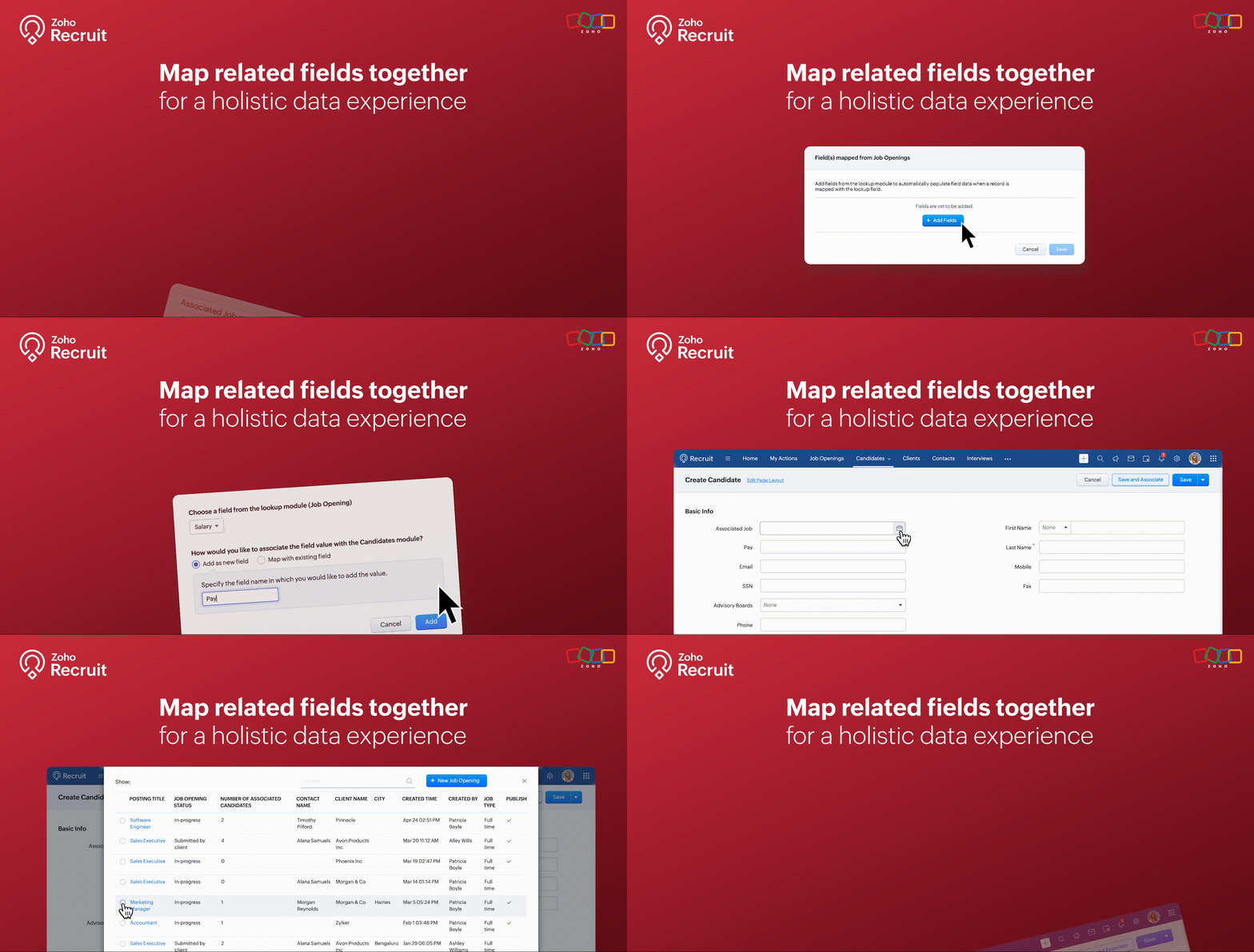
We’re thrilled to announce an exciting new feature in Zoho Recruit: Mapping Fields from Lookup Module! This powerful addition is designed to display additional details from a related module when using lookup fields. This enhances data visibility and provides more context within a single module view.
What is Mapping Fields from Lookup Module?
The "Mapping Fields from Lookup Module" feature allows you to incorporate additional fields from related (lookup) modules directly into your primary module's layout. This means you can now view more contextual information within a single view without the need to switch back and forth between different modules.
For example, if you're in the Candidates module, you can map fields like Job Location, Job Type, and Hiring Manager from the Job Openings module. This way, you can see all key details about the job opening a candidate applied for right within the candidate’s record.
Benefits
- Enhanced Data Visibility: By mapping fields from related modules, you can see all pertinent information at a glance. This comprehensive view enables better decision-making since all the relevant data is readily accessible within a single module.
- Improved Workflow Efficiency: Say goodbye to the constant toggling between different modules. With mapped fields, you have a more streamlined workflow, saving time and reducing the chances of missing critical information.
- Better Data Consistency: Ensure that all necessary information is consistently available across different modules. This reduces data silos and enhances the reliability of your recruitment data.
Use Cases
1. Streamlined Candidate Evaluation:
Managing candidate evaluations often requires accessing various details about job openings they’ve applied for. Mapping fields from the Job Openings module to the Candidates module makes this process seamless and efficient.
Example:
A recruiter at a healthcare organization is evaluating candidates for multiple nursing positions. By mapping fields like Shift Type, Department, and Hiring Manager from the Job Openings module, they can view all relevant job details directly within the candidate’s profile. This comprehensive view helps the recruiter quickly assess each candidate's fit for the roles based on the specific requirements of each department, without needing to navigate to the Job Openings module.
2. Comprehensive Interview Scheduling:
Scheduling interviews for candidates can be a complex task, especially when coordinating with multiple hiring managers. Mapping fields from the Interview Schedule module to the Candidates module can streamline this process.
Example:
An HR coordinator at a retail company is responsible for scheduling interviews for various store manager positions. By mapping fields such as Interview Date, Interview Time, and Interviewer from the Interview Schedule module to the Candidates module, they can keep track of all upcoming interviews directly from the candidate’s profile. This ensures that the coordinator can efficiently manage interview schedules and communicate details to candidates without missing any critical information.
3. Enhanced Client-Specific Job Management:
Recruitment firms often manage job postings for multiple clients, each with specific requirements and details. Mapping fields from the Clients module to the Job Openings module can provide a unified view of client-specific job postings.
Example:
A recruitment consultant at a staffing agency is managing job postings for several clients in the finance sector. By mapping fields such as Client Industry, Client Contact, and Special Requirements from the Clients module to the Job Openings module, the consultant can view all client-related information directly within each job opening. This comprehensive view helps the consultant tailor their recruitment efforts to meet the unique needs of each client, ensuring better client relationship management and more successful job placements.
How to Use the Mapping Fields from Lookup Module
- Identify the Fields: Determine which fields you want to map from the lookup module to your primary module.
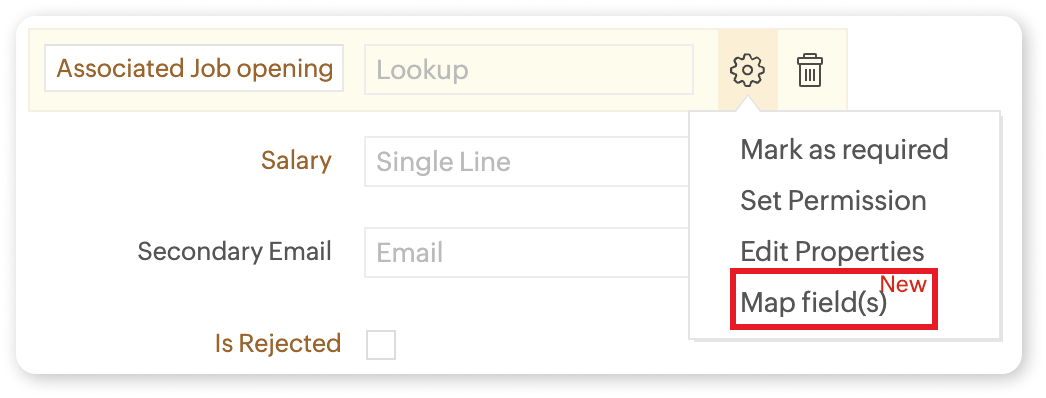
- Add the Lookup Field: Include the lookup field in your module layout where you want the additional information to appear.
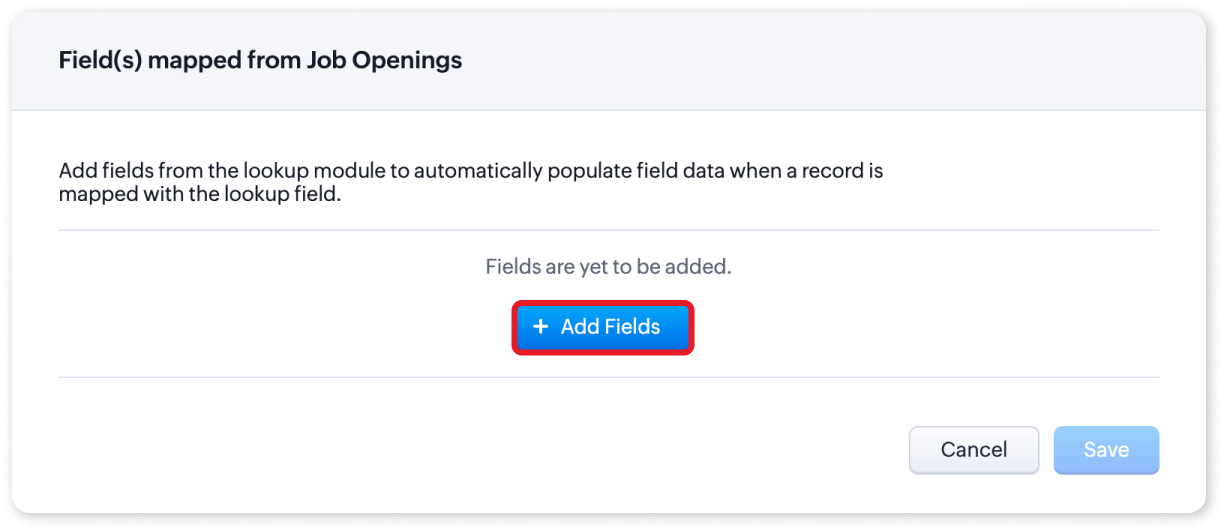
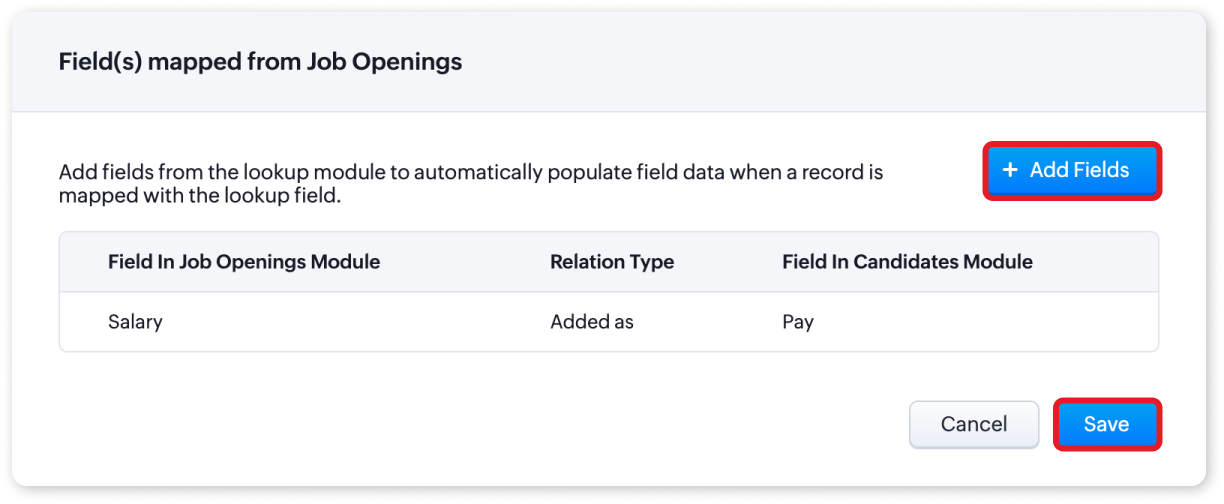
- Map the Fields: Click on the settings icon and select "Map Field(s)". You can choose to add the fields as new or map them to existing fields.
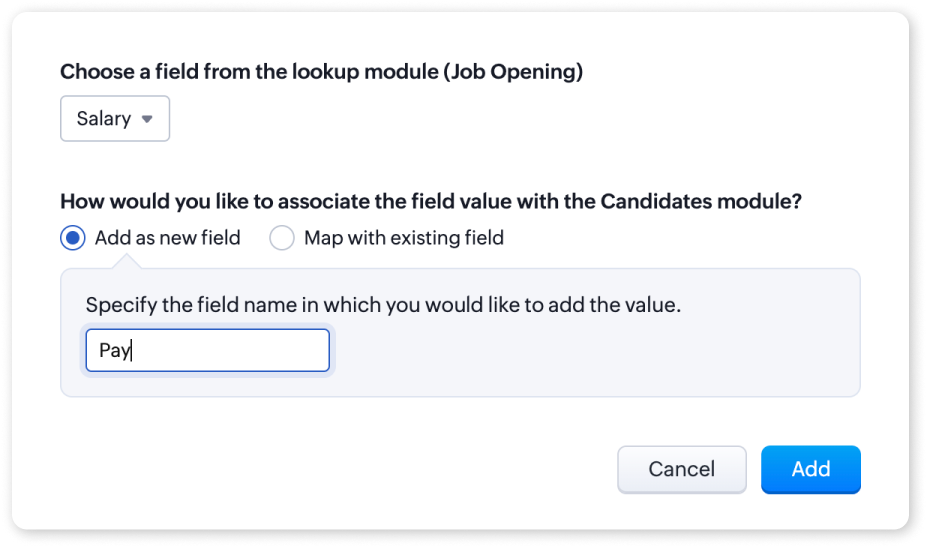
- Save Changes: Once you have mapped the fields, save the changes to your layout.
For more detailed information, please refer to our help article on Mapping fields from Lookup Module. If you have any questions or suggestions regarding this update, feel free to leave a comment below or reach out to our customer support team at support@zohorecruit.com.
Regards
Team Zoho Recruit
Topic Participants
Akshaya P
fundae Careers
Gowtham Prashanth
Sticky Posts
Zoho Recruit Community Meetup - London 🇬🇧
Hello Recruiters! We’re excited to announce that the Zoho Recruit team is coming to the UK for an in-person Zoho User Group (ZUG) Meetup in London! This is your chance to connect with fellow Zoho users, learn from experts, and walk away with actionableAn update to improve email delivery | Email Authentication & Relay
Update Rollout Latest Update: Enterprise users (8th July, 2025) This update is now live for Enterprise plan users in all regions. This includes People Plus, but not Zoho One, which will be covered in an upcoming update. Professional users (31st May 2025)Zoho Recruit User Group Meet-up | INDIA 2025 (Venue Finalised)
Hello Zoho Recruit users from India, We’re pleased and excited to announce our 2025 edition of Zoho user group meet-up in India in five cities! In this meet-up, our team of experts will help you understand the intricate nuances to use Zoho Recruit better,Zoho Recruit is coming to the UK | Zoho Community Learning Series
Customers from the United Kingdom, Exciting news: We will be in London for the Zoho Recruit user meet up. Our team will help you better understand the intricate nuances of Zoho Recruit to help you hire faster, inform about new and upcoming features, andAsk the experts - A live Q & A discussion on Zoho Recruit
We are delighted to come back with another edition of Ask the Experts community series. This edition, we'll be focusing on everything about Zoho Recruit. The topics will focus on the features that are used/asked by the majority of users and also based
Recent Topics
الخصم على مستوى فاتورة المبيعات
السلام عليكم ورحمة الله وبركاته مطلوب في إنشاء خصم على مستوى فاتورة المبيعات وليس على مستوى البند أريد معرفة الطريقة؟VAT and Taxes option not available
Dear ZOHO Team , The VAT and Taxes options in my ZOHO books account not available,I tried to find how to enable or check the way to use this option but unfortunately couldn't find it anywhere ,I'm in UAE ,kindly let me know what to do to solve this issueDefault Tagging on API-generated Transactions
If one assigns tags to an Item or Customer, those tags get auto-populated in each line item of an Invoice or Sales Order when one creates those documents. However, if one creates the Sales Order or Invoice via the API (either directly coding or usingDirect Feed (Bank)
Is Direct feed integration for AlRajhi and ADCB bank supported by Zoho Books in GCC/SaudiSales Order, Invoice and Payment numbers
Hi zoho friends, it is me again, the slow learner. I'm wondering if there is a way to have it so the Sales order, invoice and payment numbers are all the same? It would be easier for me if they were the same number so there is not so many reference numbersCustomer Satisfaction (CSAT) Report
From data to decisions: A deep dive into ticketing system reports The customer satisfaction (CSAT) report helps teams understand how customers feel about their support experience, identify service gaps, and continuously improve the help desk. It turnsTimeline Tracking Support for records updates via module import and bulk write api
Note: This update is currently available in Early Access and will soon be rolled out across all data centers (DCs) and for all editions of Zoho CRM. The update will be available to all users within your organization, regardless of their profiles or roles.Shifts in Zoho People vs Zoho Shifts?
Hello Zoho People Team, We hope you are doing well. We are evaluating the Shifts functionality within Zoho People and comparing it to the standalone Zoho Shifts product. We’ve encountered comments and discussions suggesting that the Shifts feature insideDisable fields in During action in Blueprint?
Hi there. I've tried field disable (setReadOnly(true)) using client script and the event is onMandatoryFormLoad on detail page, assuming it'll work on blueprint fields, but it bears no result. Is this the expected behaviour? That we can't do this yet?Develop and publish a Zoho Recruit extension on the marketplace
Hi, I'd like to develop a new extension for Zoho Recruit. I've started to use Zoho Developers creating a Zoho CRM extension. But when I try to create a new extension here https://sigma.zoho.com/workspace/testtesttestest/apps/new I d'ont see the option of Zoho Recruit (only CRM, Desk, Projects...). I do see extensions for Zoho Recruit in the marketplace. How would I go about to create one if the option is not available in sigma ? Cheers, Rémi.Subforms and automation
If a user updates a field how do we create an automation etc. We have a field for returned parts and i want to get an email when that field is ticked. How please as Zoho tells me no automation on subforms. The Reason- Why having waited for ever for FSMAllow Managers to Create Shifts for Their Departments in Zoho People
Hello Zoho People Product Team, Greetings and hope you are doing well. This feature request is related to Zoho People - please don't move it to zoho one! We would like to submit a feature request regarding shift management permissions in Zoho People.Zoho Learn and Zoho CRM integration
I would like to see an integration between Zoho Learn and Zoho CRM. 1. To be able to add articles in a related list in all modules 2. Zia to suggest related articles in a Deal or Case or Lead 3. Ability to read / search articles during a call / followMaintain steady traffic to your domain: How Domain Aliasing helps
Consider this scenario: An organization has its primary domain as administrator.com. Now it wants to shorten its domain to admin.com because it's simpler and easier to remember. However, changing the domain completely can cause the following problems:Why Sharing Rules do Not support relative date comparison???
I am creating a Sharing Rule and simply want to share where "Last Day of Coverage" (Date field) is Greater than TODAY (Starting Tomorrow). However, sharing rules don't have the option to compare a date field to a relative date (like today), only to StaticWorkflow rule only allows 10 workflow per module
Apparently a Zoho professional edition only allows 10 workflow rules per module. This makes workflow allocation literally impossible while allocating potential to different members of the team. I have 15 licenses. Is there a way in which related alerts can be varied? In other words, is it possible to have different related alerts be triggered with different rule criteria. so if I say, if potential is 'x' then trigger related alert 'x' and if potential is 'y' then trigger related alert 'y' Thanks,IF Statement in Zoho CRM Formula Field
Hi, I am attempting to write a formula field that will give me one result if one statement AND another statement are true, then a different value if the first statement AND a different statement are true, else 0. Stated differently: if account = destinationCRM Percent custom fields: When will it show the % symbol and behave like %?
1. Actually Percent custom fields fail to show the % symbol. 2. When in formulas Percent fields work like number: 100 x 5% = 5 ideal world 100 x 5% = 500 what happens actually 3. When importing Percent fields the % symbol has to be removed and the dataEditing the Ticket Properties column
This is going to sound like a dumb question, but I cannot figure out how to configure/edit the sections (and their fields) in this column: For example, we have a custom "Resolution" field, which parked itself in the "Ticket Information" section of this"Total Hours" on Employee Attendance Report
I'm learning that in Zoho jargon, "total hours" does not include paid breaks. Or at least not the way that my setup is working. That seems a little weird to me, since most jurisdictions in the US don't differentiate between time spent on paid break andIntegration with...
Dear Zoho Commerce team, Please could you consider the integration within Zoho Commerce / Inventory and Qapla'? (https://www.qapla.it/en/) This app is better than Aftership in many ways: - Aftership integration require PRO plan and price start from moreGenerate leads from instagram
hello i have question. If connect instagram using zoho social, it is possible to get lead from instagram? example if someone send me direct message or comment on my post and then they generate to leadAdding Markdown text using Zoho Desk API into the Knowledge Base
Hi Zoho Community members, We currently maintain the documentation of out company in its website. This documentation is written in markdown text format and we would like to add it in Zoho Knowledge Base. Do you know if there is REST API functionalityCreate case via email
Good Afternoon, I have just registered and am taking a look around the system. Is it possible to create a case via email. I.e. an employee/client/supplier emails a certain address and that auto generates the case which then prompts a member of staffNeed a Universal Search Option in Zohobooks
Hello Zoho, Need a Universal Search Option in Zohobooks to search across all transactions in our books of accounts. Please do the needful ThanksLocked Notebook
Hi, I hadn't used my Notebook in some time and was refamiliarizing myself with it. I clicked a lock icon and now I can't unlock. When I hit the information or unlock icons I'm taken to a page with the notebook icon and a keyboard. When I type, nothingHide fields only for creation
Hello, I'd like to hide some fields only during the creation of a contact in Zoho CRM. In fact I have some fields that are automatically calculated thanks to an automation, so when my users create a contact I don't want them to fill those fields. I knowIssues with Zoho Sheet in Mac
I have downloaded the Zoho App from App Store but It is failing to Save As, Open & Download Operations. App StoreWeekly Sales Summary
Is it possible to generate a weekly report in Zoho Books to show -$$ amount of estimates generated -# of estimates generated by Salesperson -$$ amount of Sales Orders created -$$ amount of Invoices generatedOpenAPI Specs are just plain wrong
The provided yml files for generating the OpenAPI specs are absolutely riddled with errors and inconsistencies. From missing fields on the objects, to just incorrectly named resource objects. I'm having to go through and manually changing the spec toAdd Account column to Invoice screen
Please show the account column on Invoice creation screen. It is an unnecessary step to have to click add additional info and then select the account for line item. Example : on the bill creation screen when entering description we can easily code it against an account. On the invoice screen it requires additional click. Adding the column on the Invoice screen will make it faster to enter transactions. We currently have 5-6 different accounts that we code line items against, You can imagine the extraCustom Footer – Zoho Writer Document
Hello everyone, I’m having an issue adding a custom footer in a Zoho Writer document. I would like to insert my company information (including a logo + address) in the footer. The problem is that when I add these elements, the main content of my pagesReport grouping
I have added a grouping in a report but it is not working how i had expected. I wanted to group a summary on a field named Size but when i add the grouping the report is still showing me each record and making a summary at the bottom of the report. WhatSocial Media Simplified with Zoho Social: Preview your Instagram grid before posting
For a platform like Instagram that relies on visual appeal, it's important that you plan your image and video content in a way that holds your audience's attention. Planning your grid ahead of time gives you the benefit of understanding how your postsError code 1000
Can you please tell me why the following, occasionally causes this error via the api, not every time ?... zoho.books.updateRecord("salesorders",organizationID,salesorderID,{"template_id":"#################069","custom_fields":[{"label":"DelDate","value":"Tuesday,VAT rates - exempt and out of scope
Good Evening, UK based company here. I am a bit confused in respect of setting up VAT rates for exempt goods and services; at present I am simply leaving the VAT rate blank in the transactions in order to prevent any VAT appearing in the VAT return. WhenHow to loop through Multiple Upload and Display Actual File Name
I have been reading the help on the File Upload Control and reviewed the Deluge help on files and I can not figure out how to loop through the uploaded files and do anything but get the automatically created file names. The code below will run but eachabou arattai
I want to use the Arattai app for business purposes, so please convert my account to a business account.I have my own invoice app, and I want to link it with the Arattai app for direct messaging.Configurable Zoho Cliq Notifications for Zoho People Alerts
Hello Zoho People Product Team, Greetings and hope you are doing well. We would like to request an enhancement to Zoho People notifications, enabling a native delivery via Zoho Cliq with admin-level control, similar to the notification settings availableLooking back at Zoho Calendar in 2025
Hello Zoho Calendar Community, As we step into a brand-new year, we’d like to take a moment to thank you for being an active and valued part of the Zoho Calendar community. Your trust, feedback, and continued engagement motivate us to keep evolving andNext Page