Flex Your Creativity – A New component to Canvas in Zoho CRM
Hello Everyone
We’re excited to introduce Flex, a new component for Canvas in Zoho CRM! Flex is here to give you greater control over how your data is displayed in your layouts. This component enables responsive layouts that adapt across different screen sizes and devices, thus enhancing the end user's experience.
What can you do with Flex?
Adding the Flex component to your layout helps you create customizable and adaptive designs and improves data visualization and user interaction.
This component ensures that your canvas is designed optimally no matter the screen size.
Use a flex component when you want a layout that is :
Responsive : easily adapts to different screen sizes
Flexible : allows items to grow, shrink, or align dynamically
Centred : helps centre elements vertically or horizontally
Evenly Spaced : distributes items evenly within a component
Requires Row or Column layouts : makes arranging elements on rows or columns easy
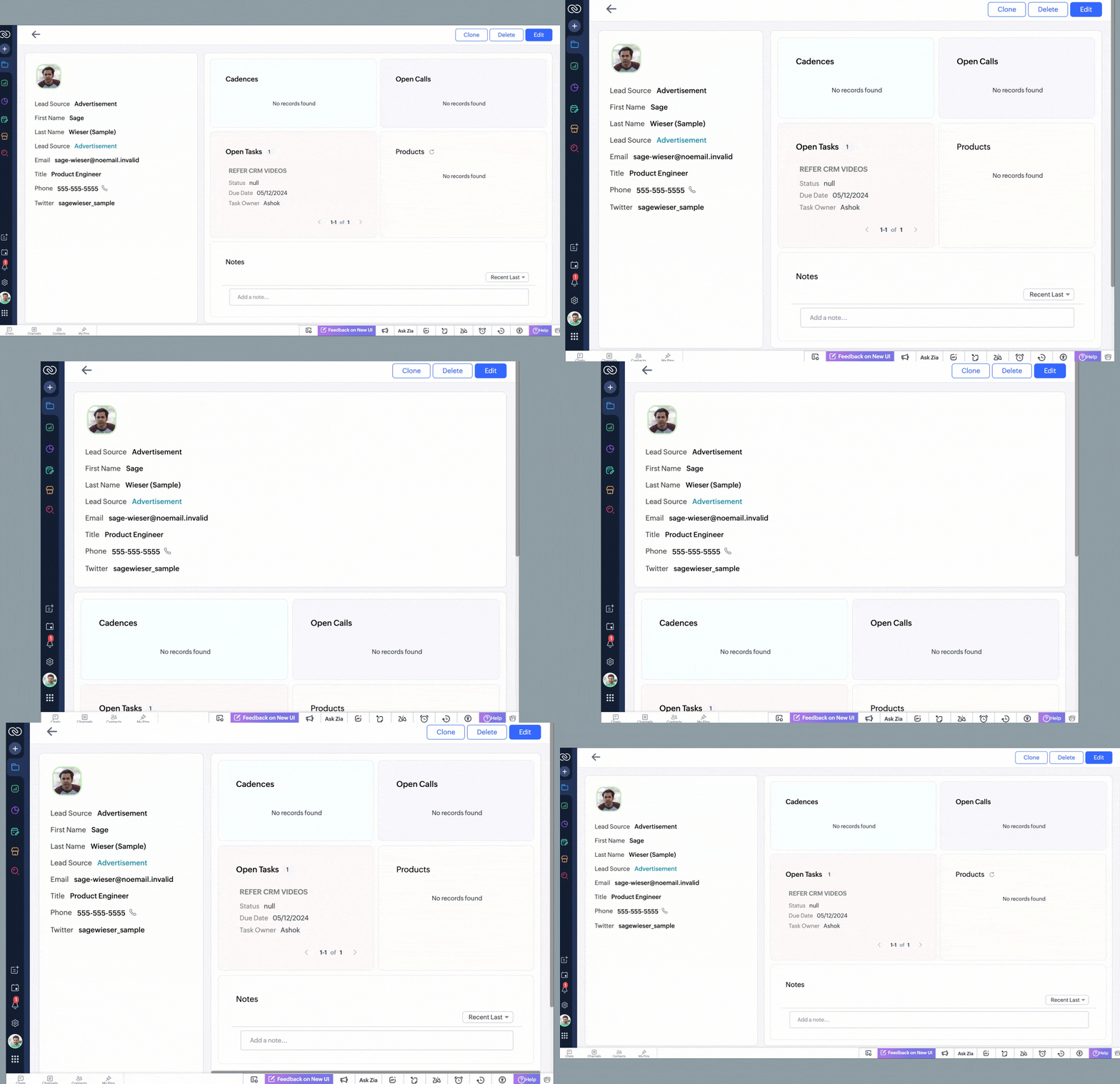
See below to understand how a record looks after using a canvas layout created with flex components that will automatically adjust as information is added to the interface.
Types of Flex components
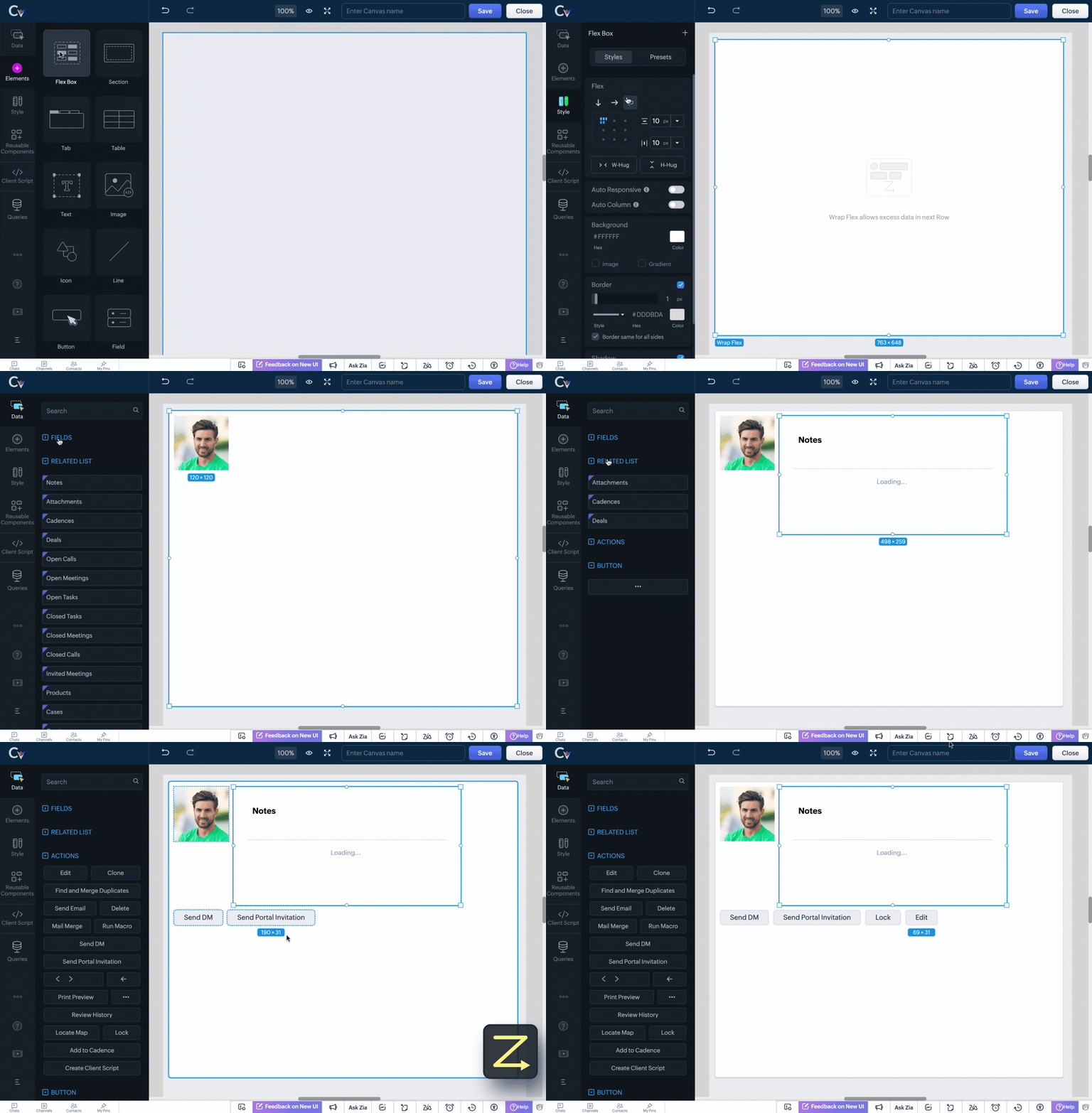
There are three types of flex components that you can choose from to create your canvas layout depending on your requirement.
Vertical Flex

Horizontal Flex

Wrap Flex
How does Flex help achieve responsive layouts?
The Flex Component brings in essential tools that automatically adjust elements of a layout, ensuring a seamless user experience. These include:
Auto Responsive

Auto Column

Minimum & Maximum Width for Items
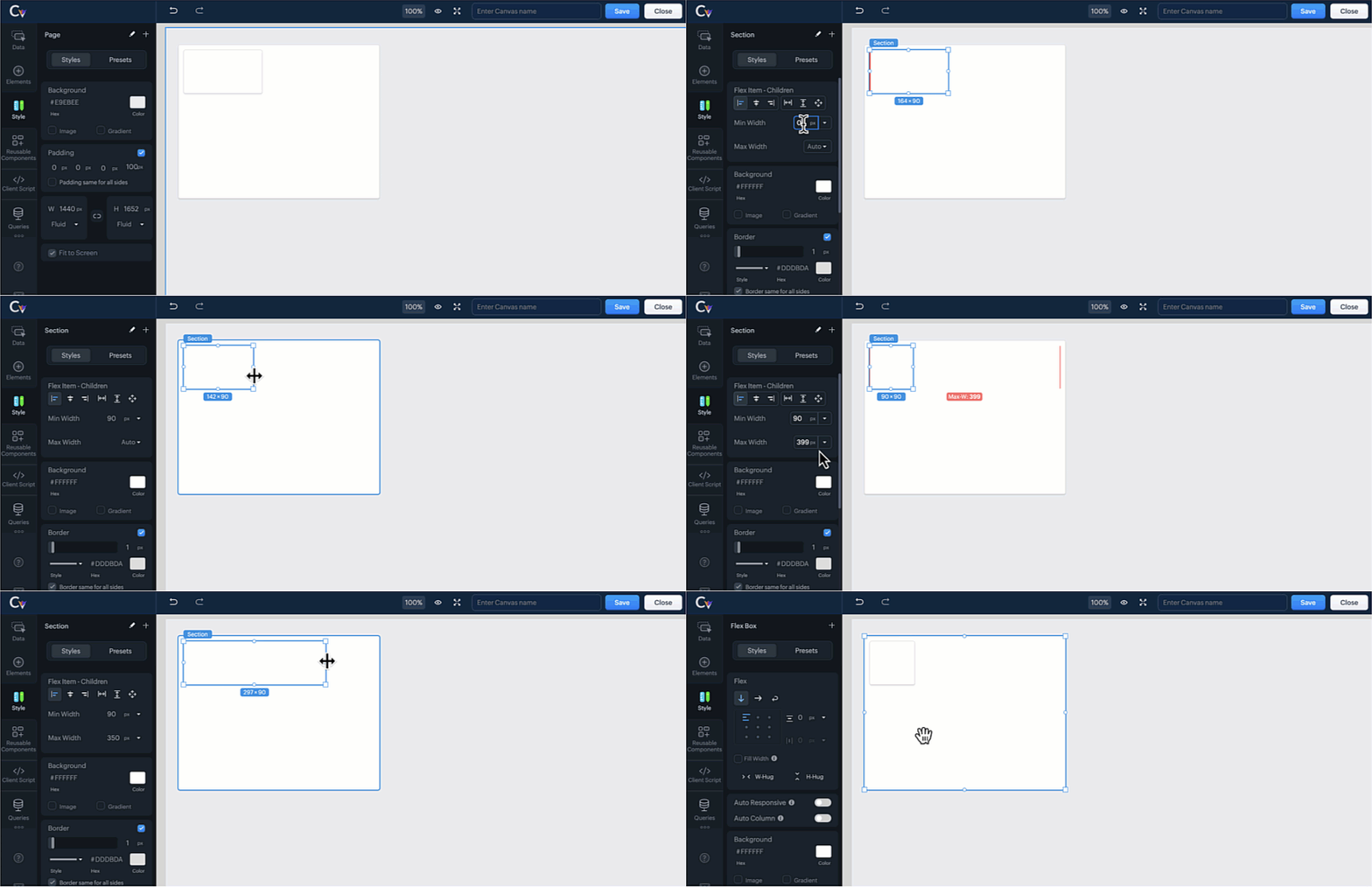
 Note : You cannot select both auto responsive and auto columns tools for the selected component at the same time. Doing so will automatically deselect one of the options.
Advanced Flex Tools for Customization
Take full control over your CRM interface with these additional Flex Tools:
Flex Item Alignment - Align elements precisely within the layout for a polished and professional appearance.
Flex Item Gaps - Maintain consistency by adding uniform spacing between flex items, improving readability.
Flex Item Hug - Allow an element to shrink or expand based on content size, optimizing space usage.
Child Flex Items - Control how nested items behave within a flex component, improving adaptability.
Fill Width - Stretch components to occupy the full width of the vertical flex component for a seamless design.
Convert to Flex - Easily convert multiple elements into a flex component and save time and effort creating from scratch.
Replace with Section / Replace with Flex - Replace a flex component with a section or replace a section element with a flex component easily from the canvas builder without disrupting the layout's design.
For more details, please comment below, and we will get back to you at the earliest.
Topic Participants
Serena Woolridge
Zohoboy
Ishwarya SG
Donnetta Byrd
Sunderjan Siddharth
Sticky Posts
Good news! Calendar in Zoho CRM gets a face lift
Dear Customers, We are delighted to unveil the revamped calendar UI in Zoho CRM. With a complete visual overhaul aligned with CRM for Everyone, the calendar now offers a more intuitive and flexible scheduling experience. What’s new? Distinguish activitiesConsumers are talking about your business. Are you listening?👂
A loyal customer might be praising your product in a forum. A frustrated user could be posting a harsh review on a public site. An excited partner may have left a comment on your campaign. A domain expert might be deconstructing your product. A prospectEnhancements to the formula field in Zoho CRM: Auto-refresh formulas with the "Now" function, stop formula executions based on criteria, and include formulas within formulas
Dear Customers, We hope you're well! By their nature, modern businesses rely every day on computations, whether it's to calculate the price of a product, assess ROI, evaluate the lifetime value of a customer, or even determine the age of a record. WithElevate your CX delivery using CommandCenter 2.0: Simplified builder; seamless orchestration
Most businesses want to create memorable customer experiences—but they often find it hard to keep them smooth, especially as they grow. To achieve a state of flow across their processes, teams often stitch together a series of automations using WorkflowPresenting ABM for Zoho CRM: Expand and retain your customers with precision
Picture this scenario: You're a growing SaaS company ready to launch a powerful business suite, and are looking to gain traction and momentum. But as a business with a tight budget, you know acquiring new customers is slow, expensive, and often delivers
Recent Topics
CRM verify details pop-up
Was there a UI change recently that involves the Verify Details pop-up when changing the Stage of a Deal to certain things? I can't for the life of me find a workflow or function, blueprint, validation rule, layout rule ect that would randomly make itZoho inbuilt Telephony made a lot of issues!
Hi there, I am a user that I am working with zoho inbuilt telephony around 1 month. Non of my colleagues are happy with this app! most of the time customer cannot hear my customer service team, customers say our voice is breaking. whenever Telephony supportRequire ticket resolution
Hi Zoho team, Is there a way to require resolution even if an agent did not use a blueprint? for example, our blueprint has a "resolve" transition but what if agent revoked blueprint and manually set the status of ticket to closed? Is there a way whereSuper Admin Logging in as another User
How can a Super Admin login as another user. For example, I have a sales rep that is having issues with their Accounts and I want to view their Zoho Account with out having to do a GTM and sharing screens. Moderation Update (8th Aug 2025): We are workingIntegrate your Outlook/ Office 365 inbox with Zoho CRM via Graph API
Hello folks, In addition to the existing IMAP and POP options, you can now integrate your Outlook/Office 365 inbox with Zoho CRM via Graph API. Why did we add this option? Microsoft Graph API offers a single endpoint to access data from across Microsoft’sAny way to "Pay with Check" or "Refund with Check" for Credit Notes?
When we have a Bill in Zoho Books, we can select the "Pay with Check" option which then allows us to print/cut the check directly out of Zoho Books. When we created a Credit Note and want to refund the customer, is there any way to Refund with Check,CRM Mobile reports
When our engineers finish a job they like to email the customer a job report. This is best done todate as an email template but we can find no way to include an image field from that module. Is there any other options?Items Below Reorder Point Report?
Is there a way to run a report of Items that are below the Reorder Point? I don't see this as a specific report, nor can I figure out how to customize any of the other stock reports to give me this information. Please tell me I'm missing something sUnify All Zoho Video Meeting Experiences into One Standardized Platform
Hi Zoho Team, We would like to share an important user experience concern regarding the current state of video meeting functionality across the Zoho ecosystem. The Problem Within Zoho, there are multiple ways to initiate or schedule a video meeting: ZohoWhen Zoho Tables Beta will be open to EU data center
Hello all, We in EU are looking at you all using and testing and are getting jealous :) When we will be able to get into the beta also? We don't mind testing and playing with beta software. Thank you!Start Form on a different page (i.e., hide form pages)?
I have a Zoho form that uses the `Field Alias - Prefill URL` feature. My goal is to have a pre-filled field that directs the user to a specific starting page in the form. For example: The URL will have a field alias that will auto-populate a field withAPI Pagination Error: 'from' Parameter Limit
Hello, I am encountering an error while paging through the Zoho Desk API results: Status code: 422 - {"errorCode":"UNPROCESSABLE_ENTITY","message":"The value passed for field 'from' exceeds the range of '0-4999'."} Is 5000 the maximum number of recordsPrevent new Record Association
Hello all, We have a small sales organization therefore, it's helpful for everyone on the sales team to be able to view the full list of accounts to assist in preventing duplicate accounts from being created. However we want to prevent people from creatingMicrosoft Teams now available as an online meeting provider
Hello everyone, We're pleased to announce that Zoho CRM now supports Microsoft Teams as an online meeting provider—alongside the other providers already available. Admins can enable Microsoft Teams directly from the Preferences tab under the MeetingsStandard Payment Term is not pulled from account to quotation
Hey Team There seems to be something off. I do have "Net 30" as my default payment term in Zoho Books for my customers. If, from the customer overview or quote section, I create a new Quotation, the payment terms field stays blank and doesn't get thePassing the CRM
Hi, I am hoping someone can help. I have a zoho form that has a CRM lookup field. I was hoping to send this to my publicly to clients via a text message and the form then attaches the signed form back to the custom module. This work absolutely fine whenHow can we disable "My Requests"?
We are not using this functionality in our system at all and our users get confused.Update Subform in specific field(Status) without affecting other fields in Zoho CRM using Deluge?
Scenario: PRODUCT Module(change name Plot) in any product status change From Available to Booked then on PROJECT Custom Module have Subform So, Subform name is Property Details now in that Subform 1 field is STATUS that update according to product statusPayPal payment received recording problem
Hi, A little while back one of our customers used the PayPal payment option to pay an invoice For some reason though the payment is showing up twice within the Payments section of the invoice! Instead of setting the invoice value to ZERO, it now shows a negative value Anyone else face this problem? I've checked PayPal and there is only 1 payment in reality... A bug? Actonia ps: for anyone from Zoho Customer Service or tech team, its Invoice 785 in our accountstring(87) "{"code":"INVALID_TOKEN","details":{},"message":"invalid oauth token","status":"error"} " grtting this error
Using access token i am trying to add sales orders through api but it is throwing errors like the above i have mentioned. Please help me for thatHow to mute chat notification sound by default in Zoho SalesIQ?
We’ve recently embedded the Zoho SalesIQ chatbot on our website, and we’ve noticed that notification sounds sometimes play even when the visitor hasn’t interacted with the chat widget yet. We’re trying to understand two things: Why do these sounds occurHow to Hide Article Links in SalesIQ Answer Bot Responses
I have published an article in SalesIQ, and the Answer Bot is fetching the data and responding correctly. However, it is also displaying the article link, which I don’t want. How can I remove the link so that only the message is shown?ZOHO CRM App - Open Meetings Option Not Appearing
Hello. I have a sales rep who's using the Zoho app and says that when he selects the account, the Open Meetings option with the + sign does not appear. It doesn't matter if it's a new account with no previous meetings or an existing account. Any ideasCurrency limitation when integrating Zoho CRM & Zoho Books
Brief Video of Problem: https://www.loom.com/share/d61d1d07d0904e149d80c1901a22418e. Background · Our business is based in Australia and we have to have Zoho Books in AUD to comply with tax and reporting regulations in Australia. · We sellAdd RECURRING option when adding email to calendar events
When you add an email to a calendar event, there is no option to make that new calendar event into a recurring event. It is counterproductive to make an event from your email to then have to go to your calendar, find the event, and make it recurring.Using Contains as a filter
We are using Zoho Reports, ServiceDesk Plus analytics. I do not see how to create a report filter using Contains comparison of a string values, is one string contained in another. For example, Task Title contains the word Monitor. Is this possible in Zoho Reports? This reporting feature is available in SDP reporting. Thanks in advance, Craig RiceApplications built with Zoho Creator
Hi, I’m really interested in seeing how others have built their application using Zoho Creator, especially those designed for external users (clients, vendors, or the public). If you’ve developed something along those lines and don’t mind sharing, I’dLINE Auto Message Connect to Zoho
When I integrated LINE into the CRM, I was prompted to disable “Chat,” “Auto Response,” and “Greeting Messages,” and to enable the webhook. However, since I have already set up some auto-reply features in LINE, including Rich Messages and greeting automation,Option to block bookings from specific email address or ip adresss in zoho booking
Sometime few of our client keep booking irrelevant booking service just to resolve their queries and they keep booking it again and again whenever they have queries. Currently its disturbing our current communication process and hierarchy which we haveThreaded conversations for emails sent via automation
Hi Guys, I hope you are doing well. Don't you guys think we should have an option in a workflow to notify users either as a new email or the previous email thread. For example, if you have one deal in the process and there are 10 different stages duringAll new Address Field in Zoho CRM: maintain structured and accurate address inputs
The address field will be available exclusively for IN DC users. We'll keep you updated on the DC-specific rollout soon. It's currently available for all new sign-ups and for existing Zoho CRM orgs which are in the Professional edition. Managing addressesCreate folder is fetch fails
coming from zapier... zapier has a google drive task that searches for a specific folder in google drive, and if it fails to find the folder it will create a folder based on the search criteria, and contine along the singluar path of the flow. TryingMeetups de Usuarios de Zoho - Noviembre 2025
¡Hola, Comunidad! Durante el mes de noviembre celebraremos los Meetups de usuarios de Zoho, encuentros presenciales pensados para quienes queráis mejorar vuestras estrategias de lead nurturing y aprender a sacar el máximo partido a herramientas como ZohoIntroducing 7 New Connectors in Zoho DataPrep!
We’ve just made data management even easier - Zoho DataPrep now supports 7 new external connectors to help you build more robust, scalable ETL pipelines. Why it matters: ✅ Broader data access ✅ More automation, less manual work ✅ Smarter pipelines, betterSystem flaws and lack of response from Zoho
I have had to go on here as no-one is replying to my emails regarding my problem (been 10 days and no email reply) and your chat facility online through your Zoho Books software opens and closes immediately, so not functioning properly. I actually calledHow do I increase the email attachment size in Zoho CRM ?
It looks like I'm limited to 10MB when sending an attachment using the email widget on a record in Zoho CRM. Is there a way to increase the size? Or can I use some other tool? From what I'm reading online, I'm maxed out at 10MB. Any insight would be greatlySales Order, Invoice and Payment numbers
Hi zoho friends, it is me again, the slow learner. I'm wondering if there is a way to have it so the Sales order, invoice and payment numbers are all the same? It would be easier for me if they were the same number so there is not so many reference numbersMissing information data Zoho inventory
there some missing data in Zoho inventory connection. pick list stock counts bin location we have requested it via mail and the support team doesn’t gove feedback. has anyone achieve to get these info or to ask other ya lesFirst day of trying FSM in the field.
What we found. 1. with out a network connection we were unable to start a service call? 2. if you go to an appointment and then want to add an asset it does not seem possible. 3. disappointed not to be able to actually take a payment from within the appZoho Desk app update: AI powered features
Hello everyone! We’ve introduced various AI-powered services on the Zoho Desk app. Let's take a look at what's new. Generate Content: Generate Content uses AI to formulate responses based on the your query and provides a ready-to-use reply which can beNext Page