Introducing Schedules for smarter availability management
Greetings from the Zoho Bookings team!
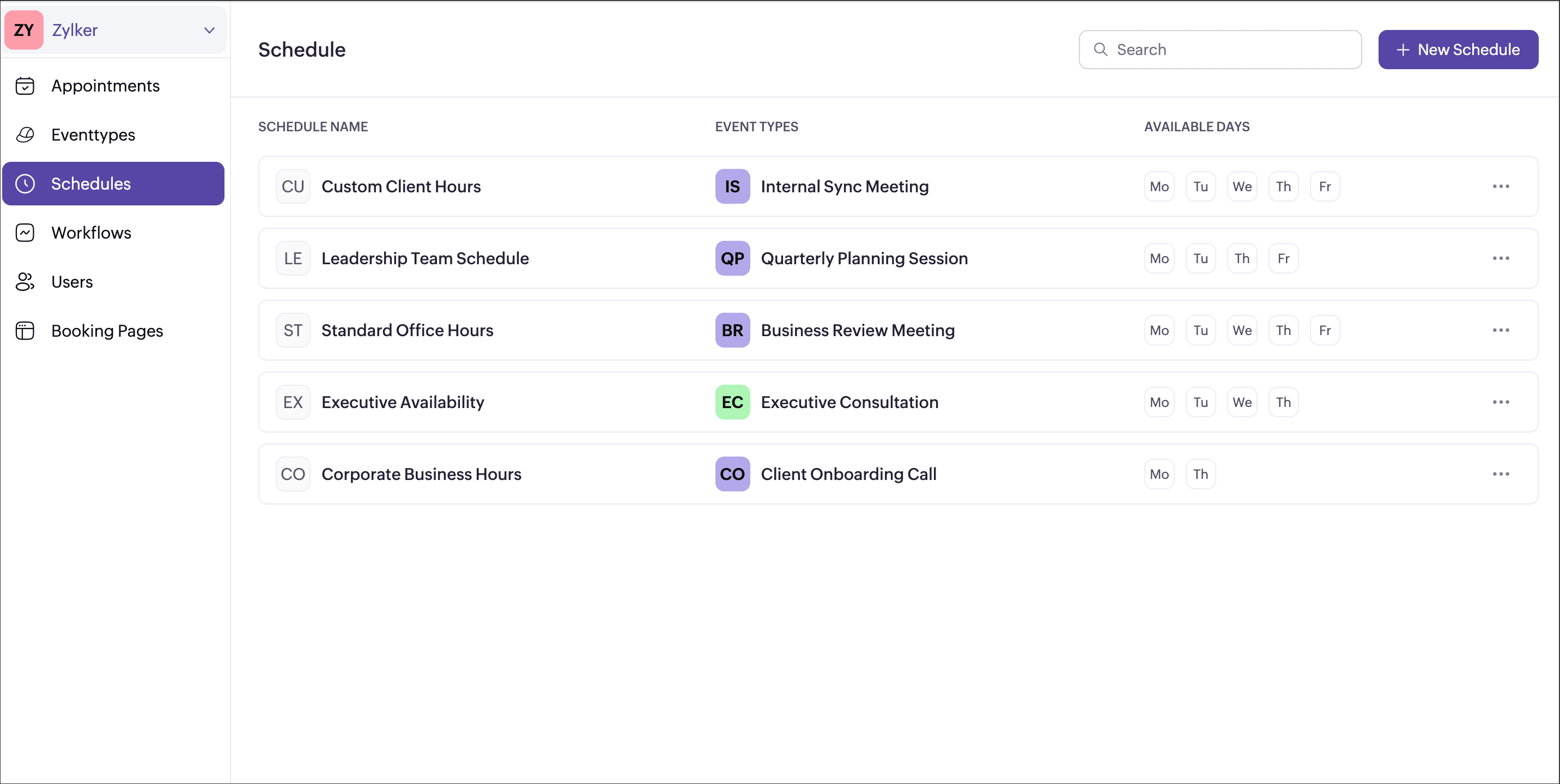
We’re excited to introduce Schedules, a powerful enhancement to manage availability across your workspace. Schedules are reusable working-hour templates that help you define and maintain consistent availability across multiple event types, while still giving you the flexibility to handle exceptions such as holidays or any extended working hours.
With Schedules, admins can define available hours once and reuse them across multiple event types, making availability management simpler, consistent, and scalable.
What’s new?
Create a common working hour template at the workspace level.
Assign it to multiple or all event types in one go.
Any updates to the schedule automatically reflect across assigned event types.
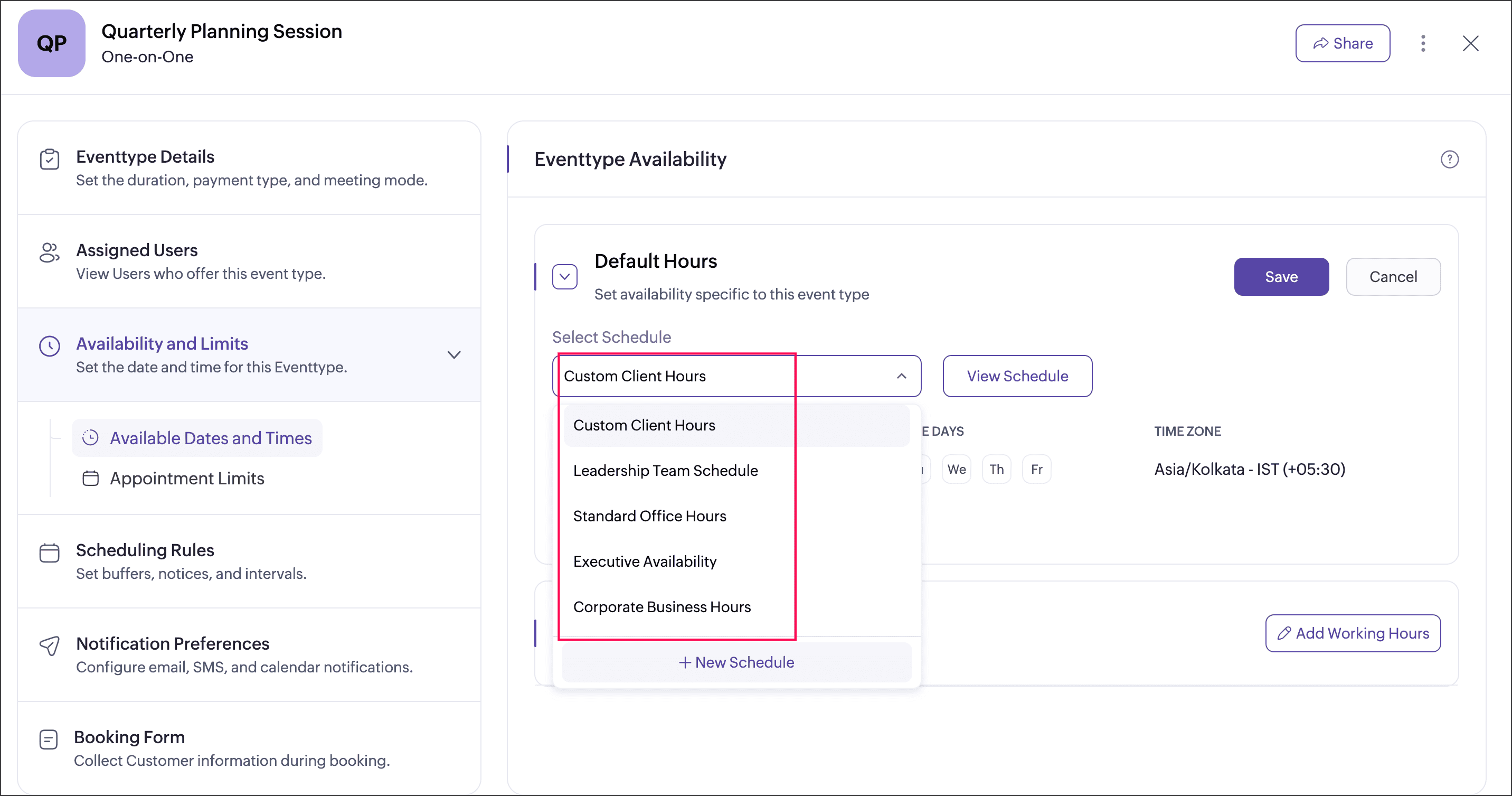
Event type can be assigned with the schedule that has been created at the workspace level, or the event type can be set to follow user working hours.
User-specific hours let you define custom availability for multiple users within an event type, and you can choose whether to apply or ignore these hours by enabling or disabling the Override user-specific hours option.
Each event type can be associated with a single schedule at a time.
Date Overrides
Date overrides let you make temporary exceptions to a regular schedule without changing the defined working hours. You can use them to add additional availability or mark unavailability for specific dates or date ranges. For more precise control, you can choose a custom range to define specific chunks of hours on a particular day. For example, making an event type available from 10 AM to 12 PM and again from 4 PM to 6 PM on the same day for special sessions.
Date overrides let you make temporary exceptions to a regular schedule without changing the defined working hours. You can use them to add additional availability or mark unavailability for specific dates or date ranges. For more precise control, you can choose a custom range to define specific chunks of hours on a particular day. For example, making an event type available from 10 AM to 12 PM and again from 4 PM to 6 PM on the same day for special sessions.
Why this matters
- Maintain consistent availability across your workspace
- Reduce repetitive schedule setup
- Support complex real-world scenarios like team-based bookings and shared resources
- Keep control centralized while allowing necessary flexibility
Availability
This feature is available to all users on paid plans. Admins can create schedule for every workspace, while users can view their assigned schedules under My Space → Availability.
We believe schedule will make managing availability simpler, cleaner, and more scalable especially for growing teams. Have questions or feedback? Drop a comment below or write to us at support@zohobookings.com. We’d love to hear from you!
We believe schedule will make managing availability simpler, cleaner, and more scalable especially for growing teams. Have questions or feedback? Drop a comment below or write to us at support@zohobookings.com. We’d love to hear from you!
Regards,
The Zoho Bookings Team
Topic Participants
Priyadharsini T
Sticky Posts
New feature: Invite additional guests for your bookings
Hello everyone, Greetings from Zoho Bookings! We are happy to announce the much-awaited feature Guest Invite, which enhances your booking experience like never before. This feature allows additional participants to be invited for the bookings to make📣📣 Zoho Bookings Schedulathon 2025 is here!
Hey Zoho Bookings fam, We're excited to invite you to our first-ever hackathon: Yes, Zoho Bookings Schedulathon 2025 is live now. This is a virtual event and you can participate anywhere from the world. Businesses should be able to set up meetings from📣 [Webinar] Spikra shows how businesses leverage Zoho Bookings to increase revenue
[Webinar] Spikra shows how businesses leverage Zoho Bookings to increase revenue Hi all, Service-based businesses need to be on top of their client experience game to stay ahead. Spikra, one of our Advanced Zoho Partners, has been helping businesses deliver📣📣 Zoho Bookings - Feature Roadmap 2024
Hi Everyone, Thank you for all the support you have been showing Zoho Bookings. We had a fabulous 2023, with a bunch of new features and over 60K new users. In 2024, our prime focus will be on user experience, and we have a few vital features coming inAttention: Important updates to the payment gateway integrations
Greetings from the Zoho Bookings team! We have a few important updates to the payment gateway integrations that allow you to collect online payments for your appointments. The following payment gateways will be updated, and we encourage you to make the
Recent Topics
How to Track Inventory Usage from Zoho FSM to Zoho Inventory?
Hi everyone, We’re currently working on integrating Zoho FSM with Zoho Inventory, and we’ve encountered a challenge we’re hoping the community can help us understand better. Here’s the context: When we create a Work Order in Zoho FSM that involves partsSet Field Mandatory by Client Script ZOHO CRM
#Tips of the day We can set the field as mandatory by the client script var field_obj = ZDK.Page.getField('Custom_Field1'); field_obj.setMandatory(true); Custom_Field1 = Field API Name Apart from is if you have required any kind of Zoho work please doEnhancements for Currencies in Zoho CRM: Automatic exchange rate updates, options to update record exchange rates, and more
The multi-currency feature helps you track currencies region-wise. This can apply to Sales, CTC, or any other currency-related data. You can record amounts in a customer’s local currency, while the CRM automatically converts them to your home currencyassociating products with accounts
I have all my accounts and products in zoho now. I need to generate a sales order for an account. The product lookup feature on the sales order shows no products...how can I get them to appear.Can we rely on order of returned ids when inserting multiple records?
Hello! API https://www.zoho.com/crm/developer/docs/api/v8/insert-records.html does not mention that the response array will match the input array*, keeping this important information implicit and someone might have doubts to rely on it. (*the responseNew UI for Writer - Disappointed
I've been enjoying Zoho Writer as a new user for about 6 months, and I really like it. One of my favorite things about it is the menu bar, which you can hide or leave out while still seeing most of your page because it is off to the left. I think thisCRM x WorkDrive: File storage for new CRM signups is now powered by WorkDrive
Availability Editions: All DCs: All Release plan: Released for new signups in all DCs. It will be enabled for existing users in a phased manner in the upcoming months. Help documentation: Documents in Zoho CRM Manage folders in Documents tab Manage filesZoho CRM Community Digest - February 2026 | Part 2
In this edition, we’re highlighting a few more product enhancements, along with some helpful community discussions that explore everyday CRM scenarios from automating reminders and managing lead outreach to making the most of APIs and client scripts.Dont want to list inactive items.
If an item is made inactive, there is no point in showing it in the item list. Please provide an option to hide all inactive items in 'Preferences'.Client Script event on any field of a Detail page
Hi everyone! I'd like to trigger a Client Script when a user modifies a field - any field - from the Account Details page, how can I do this? I don't want to trigger it on a specific field, but on all of them. Thanks in advance!Tip #66 - Exploring Technician Console: Network Statistics - 'Insider Insights'
Hello Zoho Assist Community! Have you ever wondered why a remote session feels sluggish, or wanted to check whether connectivity issues are on your end or the customer's? That's exactly where the Network Statistics feature in Zoho Assist comes to theSyncing zoho books into zoho crm
I was wondering how I can use zoho books in crm as I have been using them separately and would like to sync the two. Is this possible and if so, how? ThanksIntroducing a smarter, faster, and more flexible charting experience
Hello Zoho Sheet users, We're delighted to share the latest news about a major update to charts in Zoho Sheet! The new version supports dynamic data ranges, granular styling options, faster loading, and other interesting enhancements that allow you toREFUND REQUEST FOR PLAN SUBSCRIPTION CANCELLED
I have cancelled my Zoho Books subscription and would like to request a full refund for the subscription. Kindly process the refund at your earliest convenience.Connecting Airwallex in Zoho Books
I have a question. I’m trying to connect our Airwallex account to Zoho Books, but the integration does not seem to work. Could you please guide me on how to properly connect Airwallex? I need to see the expenses also, since it only shows the profits nowpurchasing a pagkage
goodmorning i want to pay for my monthly package but your app is sayinng i have insufficient funds yet i loaded money on my account yesterday though in our currency of ugxEdit Receipt, how?
Do you notice the big blank space in Receipt? I want to remove that. I know there is a template but that blank space, I can't seem to remove it. Please help. Thank you!Can I export a TXF (TurboTax exchange format) file out of Zoho Books?
Hello, I'm trying to do my US Small Business Taxes using Intuit's Turbo Tax. Can I export my expenses from Zoho Books to a TXF format file, so that it can then be imported into Turbo Tax? Thanks, RajneshTax inclusive and exclusive for Sales invoices
Hello, where can I set my tax to be inclusive or exclusive for invoices in Zoho Books? There used to be a button for me to do that right above the products table. Can someone help me please? Thank you!Unable to produce monthly P&L reports for previous years
My company just migrated to Books this year. We have 5+ years financial data and need to generate a monthly P&L for 2019 and a monthly P&L YTD for 2020. The latter is easy, but I'm VERY surprised to learn that default reports in Zoho Books cannot createZOHO Reports are taking longer time to get refresh
Hi Team, Since last few days, I'm facing issues in getting updated reports. For eg: right after making an expense entry or even posting a journal, it is taking longer then expected for the updated reports. Refer below: "You are viewing the report thataudio and video comments in tasks in zoho projects
Hi, is it planned to have the ability to post audio and video comments? the whatsapp wechat format of communicating is a reality... tools like zoho project would facilitate a lot teamwork by facilitating the way in which we can give feedback in audio and video rather than only text. thx!Looking for Zoho + Twilio Automation Specialist (Duda Website Integration)
Hi everyone, I’m looking for an experienced Zoho specialist to help build a mostly automated CRM and booking system for my service business. I already have a live website built on Duda.co and need help integrating my existing forms into Zoho CRM (no rebuildZoho CRM For Everyone UI Rollout Begins for All Users
Hello Partners, We have started rolling out the new Zoho CRM For Everyone UI as the default experience for all users. This update is being released in three phases based on organization size and account type. We want to keep you informed of the rolloutHow to retreive the "To be received" value of an Item displayed in Zoho inventory.
Hi everyone, We have our own Deluge code to generate a PO according to taget quantity and box quantity, pretty usefull and powerful! However, we want to reduce our quantity to order according to "To be received" variable. Seems like this might not evenIntroducing Explainer Videos for Zoho Desk: Solve everyday challenges with simple configurations
Dear everyone, We have created a set of short explainer videos that show how common support scenarios can be handled using simple configurations within the product. The solutions often lie in the plain sight, but go unnoticed. Through these videos weNotifications Feeds unread count?
How do I reset the unread count on feeds notifications? I've opened every notification in the list. And the count never goes to zero.Simple reliable solution to convert MSG files for AOL Mail?
A simple and reliable way to convert MSG files for AOL Mail is by using a professional tool MacGater Mac MSG Converter. This software allows users to quickly convert MSG files into formats compatible with AOL, such as MBOX or direct email migration. ItZoho One Support is non existent...
I've tried through Email, Chat, this community and finally through Phone. There is no way to receive an answer. Email = over a week and no answer Chat = not available Community = no answer at all Telephone = after clicking myself through the callcenterDisable Zoho Contacts
We don't want to use this app... How can we disable it?Custom module - change from autonumber to name
I fear I know the answer to this already, but thought I'd ask the question. I created a custom module and instead of having a name as being the primary field, I changed it to an auto-number. I didn't realise that all searches would only show this reference.Edit a previous reconciliation
I realized that during my March bank reconciliation, I chose the wrong check to reconcile (they were for the same amount on the same date, I just chose the wrong check to reconcile). So now, the incorrect check is showing as un-reconciled. Is there any way I can edit a previous reconciliation (this is 7 months ago) so I can adjust the check that was reconciled? The amounts are exactly the same and it won't change my ending balance.How to add "All Open AND Overdue" back to the Home Page Task Component?
Hi everyone, I’m looking for a way to restore the Tasks component dropdown list on the Zoho CRM Home Page. Since the recent update to the Task area in my Home Page Classic View, the dropdown options (e.g., My Next 7 Days + Overdue) are too restrictiveDynamic Questions in Zoho Forms
Is it possible to add dynamic questions (like displaying a user’s name) in Zoho Forms? I know this is possible in surveys, but can we implement similar functionality in Zoho Forms?Introducing Zoho MCP for Bigin
Hello Biginners! We're excited to introduce Zoho MCP for Bigin, a completely new way of interacting with Bigin data using AI. With Zoho MCP, you can securely connect your Bigin account with popular AI tools like Claude, Cursor, Windsurf, and VS Code,Three Zoho Billing Limitations Blocking Standard Subscription Operations
After working through Zoho Billing support for over a year on these three issues without resolution, we wanted to flag them to the broader community. We are curious whether other businesses are running into the same walls. 1. Cannot Prepone (Move Earlier)SAP Business One(B1) integration is now live in Zoho Flow
We’re excited to share that SAP Business One (B1) is now available in Zoho Flow! This means you can now build workflows that connect SAP B1 with other apps and automate routine processes without relying on custom code. Note: SAP Business One integration[Action Required] : Update Shopify Access Scope to fetch complete order history
Hello Shopify Users! Shopify has updated the access scope for apps under developer portal. With this change, the read_orders scope now provides access only to the last 60 days of order history. To access older historical orders, Shopify requires a separateAdvance Payment Record Removed When Deleting Applied Credit from Bill
Hello, So while working with vendor advance payments, I noticed that removing the applied credit from a bill also removes the corresponding entry from the Payments Made section. What I did : Recorded an advance payment to a vendor through Payments Made.How to Connect Zoho Books with e-Way Bill Portal (Step-by-Step Guide)
Integrating Zoho Books with the e-Way Bill portal helps automate your logistics and compliance process. Follow the steps below to set it up easily: 🚀 How to Connect Zoho Books with e-Way Bill Portal (Step-by-Step Guide) Integrating Zoho Books with theNext Page