Spreading Love, One Ticket at a Time
At Zylker Techfix, customer service wasn't just about solving issues, it was about creating meaningful human connections. The team believed that every interaction was an opportunity to understand their customers better and offer solutions that truly made a difference.
Understanding the Customer
Customer service is about showing love for customers and loving what you do. Every ticket is an opportunity to connect, solve problems, and make customers feel valued. Zoho Desk became the heart of Zylker Techfix operations to help them do just that.
The Ticket Module: A Treasure Trove of Insights
The Tickets Module records every interaction with the customer. This place helped establish relationships with customers.
The team discovered the Ticket tabs as a wealth of features to understand their customers better:
- Conversation Module held records of the ticket conversations and private comments, helping them keep an eye on interactions with the customer, ensuring no detail was missed.
- Under the Resolution Tab, they mandated recording resolution to track customer actions, ensuring every issue was resolved with care.
- The Parent-Child ticket feature linked related tickets, making it easier to see the bigger picture and provide consistent support.
- Time Entry Module kept them in track with billable hours and time spent on tickets, ensuring efficiency and transparency.
- The History Tab offered insights into past interactions, allowing agents to filter by incoming responses, outgoing replies, comments, and attachments. This was crucial for tracking ticket progress and ensuring timely resolutions.
- The Geo-Location Module is another powerful tool that works well with the Zoho Desk App. This enables to track the location of field service representatives, ensuring real-time updates and better service coordination.
- The Activity Tab helped filter activities based on specific criteria, providing a detailed view of customer interactions.
- Approval Tab facilitated streamlined approval processes, ensuring that responses requiring managerial review were promptly addressed.
- The Attachment Module helped in organizing and accessing customer-related documents easily.
 Note: For early access to the Parent-child ticket feature, request here. This applies to Professional and Enterprise users only.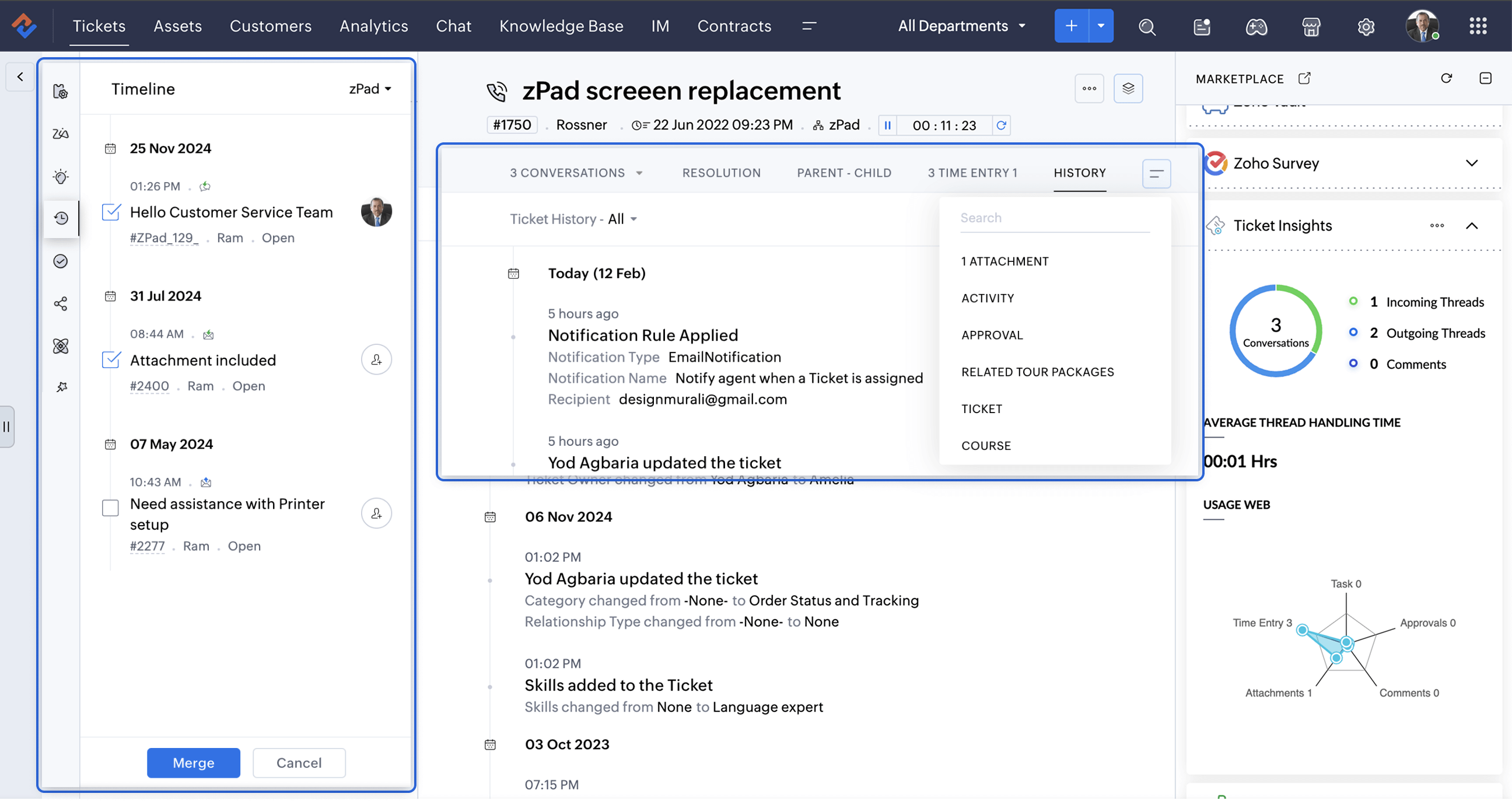
A Smarter Approach to Ticket Management
At times, when Zylker Techfix experienced a surge in tickets, the Ticket Detail banner on the left provided the following details on the ready-to-use extensions:
- Ticket Properties showed the customer and ticket information
- Field Predictions auto-filled customer details, saving time.
- Zoho's AI, Zia leveraged the Answer Bot to provide solutions based on the knowledge base created by the user within Zoho Desk.
- The Ticket Follower option let them keep a track of the tickets handled by them or other agents.
- The Ticket Timeline let them keep an eye on the previous cases handled for the client in the specific Department or All Department. Within a specific department, agents could also merge tickets for efficient handling.
- To ensure visibility across departments, the Share Ticket Option allowed teams to share tickets with different departments while maintaining appropriate access controls such as Full Access, Restricted Access, or Read-Only Access.
Presenting three essential extensions to stay on the go with customer service:
1. Customer Insights for Zoho Desk: Know Your Customers Better
The value of customer service grows as you gain deeper insights into your customers by understanding their experiences, emotions, and the journeys they have taken with your brand.
How well do you know your customers?
How well do you know your customers?
With Customer Insights for Zoho Desk located on the Ticket Detail panel on the left, you can access key interaction details, including response times, resolutions, the number of tickets handled, and happiness ratings. These insights help build stronger relationships and enhance service quality.
In customer service, care is more than just providing solutions.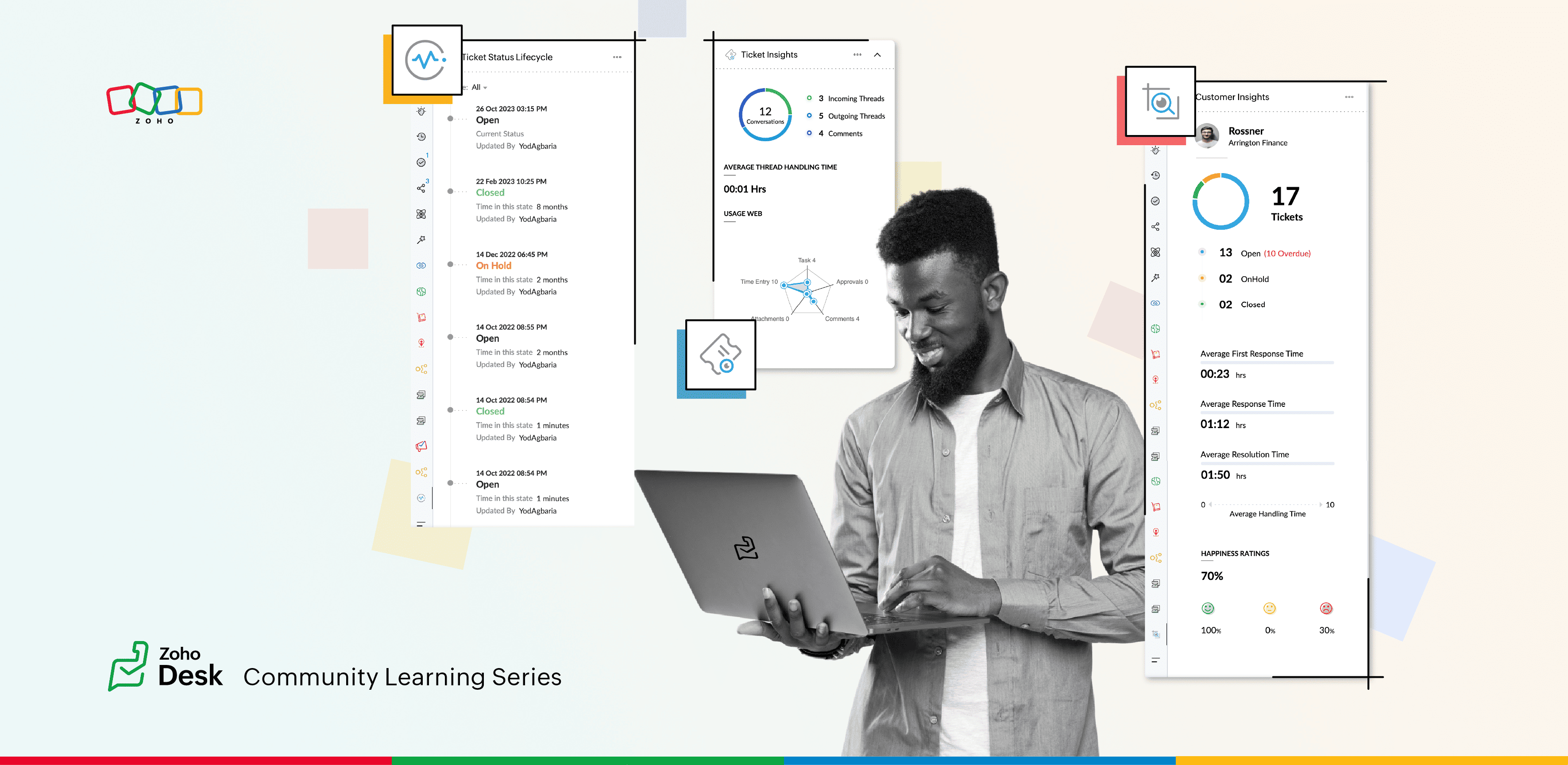
2. Ticket Insights for Zoho Desk: A One-Shot View
Install Ticket Insights for Zoho Desk from the Marketplace Extensions to enhance your ticketing experience.
Where can you view the insights?
- Open a ticket in Zoho Desk.
- Click on the Marketplace
 icon next to the Ticket Subject.
 - Maximize Ticket Insights for a detailed overview.
This tool gave them a one-shot view of:
- Threads: The number of incoming and outgoing threads within a ticket.
- Average Thread Handling Time: How quickly they were resolving issues.
- Ticket Module Usage: A detailed web of how each module was being utilized.
3. Ticket Status Lifecycle for Zoho Desk : At a Glance
Install this extension from Marketplace  icon on the top right. You can view the Ticket Status Lifecycle on the Ticket Detail panel on the left.
icon on the top right. You can view the Ticket Status Lifecycle on the Ticket Detail panel on the left.The Ticket Status Lifecycle provides detailed insights into ticket status changes, including the exact time of each update and the agent responsible for the modification. These insights help identify bottlenecks and assess the efficiency of support processes.
For example, tracking the duration a ticket remaining in a particular status can highlight areas that need improvement. Additionally, the extension allows users to filter the timeline to focus on specific statuses, such as "Open", "On hold", or "Waiting on Customer", or "Pending Approval."
This level of detail ensures that support teams gain a clear and chronological understanding of each ticket’s progression, enabling more informed decision-making and process optimization.
Wrap Up
This helped Zylker Techfix capture critical information in a short time, enabling them to stay on top of their game and offer proactive support.
Zylker Techfix realized that customer service is an act of love. With Zoho Desk and its extensions like Customer Insights, Ticket Insights, and Ticket Status Lifecycle, they understood their customers better, engaged with them meaningfully, and delivered solutions that brought joy.
And so, they continued to spread love, one ticket at a time.
Topic Participants
Lydia | Zoho Desk
Sticky Posts
Register for Zoho Desk Beta Community
With the start of the year, we have decided to take a small step in making the life of our customers a little easier. We now have easy access to all our upcoming features and a faster way to request for beta access. We open betas for some of our featuresShare your Zoho Desk story with us!
Tell us how you use Zoho Desk for your business and inspire others with your story. Be it a simple workflow rule that helps you navigate complex processes or a macro that saves your team a lot of time; share it here and help the community learn and grow with shared knowledge.Tip #1: Learn to pick the right channels
Mail, live chat, telephony, social media, web forms—there are so many support channels out there. Trying to pick the right channels to offer your customers can get pretty confusing. Emails are most useful when the customer wants to put things on record. However, escalated or complicated issues should not be resolved over email because it's slow and impersonal. When you need immediate responses, live chat is more suitable. It's also quick and convenient, so it's the go-to channel for small issues.Welcome to Zoho Desk Community - Say hello here!
Hello everyone! Though we have been here for a while, it’s time to formally establish the Zoho Desk Community; we’re really happy to have you all here! This can be the place where you take a moment to introduce yourself to the rest of the community. We’d love to hear all about you, what you do, what company or industry you work for, how you use Zoho Desk and anything else that you will like to share! Here’s a little about me. I am Chinmayee. I have been associated with Zoho since 2014. I joined hereWebinar 1: Blueprint for Customer Service
With the launch of a host of new features in Zoho Desk, we thought it’ll be great to have a few webinars to help our customers make the most of them. We’re starting off with our most talked about feature, Blueprint in Zoho Desk. You can register for the Blueprint webinar here: The webinar will be delivered by our in-house product experts. This is a good opportunity to ask questions to our experts and understand how Blueprint can help you automate your service processes. We look forward to seeing
Recent Topics
My domain did not activate
Hi, my domain (apsaindustrial.com.ar) did not activate, and the phone verification message never arrived. Please would you solve this problem? Thanks.Already have Zoho account. Not letting me log in
I already have a Zoho account that is associated with my Google email and my phone number. Even though I'm already logged in to Zoho, when I click on the mail icon to access my email, it takes me to the pricing page. When I click on the free option, itZOHO Mail App Not working
There seems to be an issue with Zoho Mail App today. It is not connecting to server, internet is working fine, tried uninstalling app and reinstalling, loading circle keeps spinning round. Is there an update on the way?facing error 550 5.4.6 while sending emails
Please help me fix this issueAllow Itemization for Recurring Expenses
For whatever reason, one cannot itemize a Recurring Expense. This capability should be added. The use cases to support this are largely the same as what they were to allow for itemization in Expenses. Anything that would need to be itemized for a regularZoho reply to not working. just reply to my self
Hello. i using on my wordpress website a contact form from Wsform. i can set the reply to email there. normally it works. but since i am using your wordpress plugin zoho mail it doesn`t work. its not using the reply to (email from customer). I just canPainfully Slow Zoho mail
Since yesterday Zoho Mail seems to have starting functioning very slowly and having a few bugs. It's slow to open mails, slow to send, slow to change between email accounts. Sometimes clicking on a particular folder (eg Sent folder) stops working andCan't receive any email from other platform
Hello,everyone, i'm just join zoho and create two email accounts for my own business. I was using it to get a verified email from stripe, but can't receive it. and I use my private gmail account to send test email twice, first time show below reply, butWeekly Tips: Secure your attachment downloads with Zoho Mail
Safety is one of our main concerns, whether it’s about device security or online protection. We use tools like fingerprint scanners, facial recognition, and two-factor authentication to keep our devices and email accounts secure. We use methods like OTPYour Incoming has been blocked and the emails will not be fetched in your Zoho account and POP Accounts
Can some on help me regarding our account . thank you so muchZoho Creator integration with Sage 50
Hi, Wondering if anyone has had any experience connecting Zoho to Sage 50 and could share any information on this matter. Thank you.Dropshipping Address - Does Not Show on Invoice Correctly
When a dropshipping address is used for a customer, the correct ship-to address does not seem to show on the Invoice. It shows correctly on the Sales Order, Shipment Order, and Package, just not the Invoice. This is a problem, because the company beingConditional Email Forwarding
How can I set conditional email forwarding of the users? For example: Mail should be forwarded to a address only if it comes from a particular sender. So, I want such email forwarding, which forwards mails based on particular conditions, like the incomingIncoming emails not appearing in Inbox
Hello, I have an issue with incoming emails sent from my website (domain: h2ostop.si). Emails are visible in the Sent folder, which means they are successfully sent through Zoho SMTP, but they never appear in my Inbox. Nothing arrives in Inbox, Spam,Automatic Matching from Bank Statements / Feeds
Is it possible to have transactions from a feed or bank statement automatically match when certain criteria are met? My use case, which is pretty broadly applicable, is e-commerce transactions for merchant services accounts (clearing accounts). In theseEmail Opt Out Question
Has the problem where if a customer is emailed opt out prevents you sending standard emails? For me this feature is simply to stop any email marketing and should not block people from receiving emails via Zoho mobile, which makes no sense.Can No Longer Access Zoho Email Accounts from iPhone or iPad Apple Mail Apps ,.
Keeps asking for password, Says ID or password incorrect. Tried creating a new app specific password. Same result. Is this possibly related to the server maintenance. Have verified all email settings, userid and password. This has worked for years untilLatest update caused issue in using marathi typingzoho
With latest update now marathi typing does Not work in zohonotebook. I preferred zoho over other because it was supporting marathi font without any distortion.. But after new update,keyborad simply does not workLogin verification emails never received.
I can't login to my account. You send a verification email, but it never arrives. This is a common problem, frequently caused by some relay point out there classifying the sender as a spammer. Is there anything I can do to bypass this? Maybe get a textGlobal lists for Multi select
It would be great if I could select a global list to use for a multi select dropdown filed.Hotmail is blocking the zoho mail IP
Greetings, Since last Tuesday (5 days ago today) I wrote to Zoho support and I still haven't received a single response (Ticket ID: 2056917). Is this how you treat people who pay for your email service? I am making this public so that those who want toYahoo is rejecting e-mails sent from a Zoho server
Diagnostic-Code: 4.7.0 [TSS04] Messages from 136.143.169.51 temporarily deferred due to unexpected volume or user complaints - 4.16.55.1; see https://postmaster.yahooinc.com/error-codes Remote-MTA: dns; mta5.am0.yahoodns.netYahoo blocks e-mail sent from Zoho servers
Getting this for a bunch of Yahoo addresses. Do you know if some of your servers got blacklisted? Diagnostic-Code: 4.7.0 [TSS04] Messages from 136.143.169.51 temporarily deferred due to unexpected volume or user complaints - 4.16.55.1; see https://postmaster.yahooinc.com/error-codesWorking with dates and Function Field
Hello friends! I'm trying to add days to a date, however the field function will always shows 00:00:00 after the resultant date. How can I display only the date, whithout the time? toDate(input.request_date.addDay(input.Prazo_acordado),"MM,d,yyyy") The code above will result something like "11-Feb-2020 00:00:00", but I want to display only "11-Feb-2020"What's New in Zoho Analytics - November 2025
We're thrilled to announce a significant update focused on expanding your data connectivity, enhancing visualization capabilities, and delivering a more powerful, intuitive, and performant analytics experience. Here’s a look at what’s new. Explore What'sUnable to send message;Reason:550 5.4.6 Unusual sending activity detected. Please try after sometime.
Please help my account got blocked automatically, can you help me how to avoid it? Thanks so muchUnusual activity detected from this IP. Please try again after some time
When i try to create new addresses on my account i am getting this error, it has been 24 hours now and i am still getting this error can anyone helptemporary system errorlouis
J'essaye d'envoyer des mails avec mes 2 adresses mail qe nous avons sur le compte arthur@lepunch.fr et louis@lepunch.fr mais j'ai toujours le message temporaire system error, je reçois les mails mais impossible d'en envoyer a qui que ce soitHow to Cancel/Delete Queued Mail Merge?
Hi. I just tried to do a mail merge before realizing there's a limit on number of sends. I accidentally sent one of my lists twice, and all of those emails are currently queued. Is there any way to cancel or delete a queued mail merge? Would love to beNeed to add a new admin for my domain
Hello Zoho Support, I am the owner of the domain localeistanbul.com. The current super admin account (admin@localeistanbul.com) is not accessible. I do not want to reset or delete the existing account because I need to keep all existing emails. PleasePossible Fraud Site.
Hello. I received a text with the sender's name as zoho, claiming that my account was at risk and that I should sign in at https://verify.zohomails.ru/signin to verify my account. I signed in on the web address above, and a few days later someone hackedZoho mail to Teaminbox
Hello, We're searching for new mail program. Now I'm testing a bit with zoho mail and team inbox. My findings in the research: Pop mail throught zoho mail is almost instant. Any pop or imap via external provider takes a couple minutes to 15 minutes beforeCrear tarea CRM con recordatorio desde Zoho Flow
Hola, estoy intentando crear desde Zoho Flow una tarea en CRM. Lo he logrado hacer pero sin recordatorio, ya que no se como se debe escribir el string adecuado. He probado varias alternativas, pero ninguna me funcionó hasta ahora. - FREQ=NONE;ACTION=EMAIL;TRIGGER=DATE-TIME:${FechaVto}Inquiry Regarding Automated Assignment of Zoho TeamInbox Messages using Zoho Flow and Deluge
Hello, Our company is currently using Zoho TeamInbox, and we are interested in automating the assignment of responsible parties using tools such as ZOHO Flow and Deluge. Is it possible to achieve this? Allow me to provide more details. Currently, whenImages Don't Display on Blog
Hi, I've just posted a new blog entry, but regardless of format (png or jpeg) Images that display in Preview mode do not display on any browser in the published post. I've not done anything different with this post than others regarding images, please advice. Thanks! Edit: I've discovered that moving the image files from a my sub directory folder "Pics for Blog" to the top level of the "Files" folder on my site allows the images to display live. This, even though my other blog posts are correctlyUpgrade Zoho Desk Agent-Side Answer Bot to GenAI
Hello Zoho Desk Team, We hope you're doing well. Following the recent announcements and rollout of the GenAI-based Answer Bot in Zoho SalesIQ (Nova '25), we’d like to formally request a similar upgrade for the Answer Bot used by agents inside Zoho Desk.Marketers' Space: The importance of warming up your sender domain
Hello Marketers, Welcome back to yet another post! Today, we'll talk about why warming up your sender domain matters. Imagine you've recently started a business and want to share the news with your customers. You've designed a great email campaign usingAn Exclusive Session for Zoho Desk Users: AI in Zoho Desk
A Zoho Community Learning Initiative Hello everyone! This is an announcement for Zoho Desk users and anyone exploring Zoho Desk. With every nook and corner buzzing, "AI's here, AI's there," it's the right time for us to take a closer look at how the AISearch Just Got Smarter in Notebook
Hello there! Introducing Our New & Improved Search Experience! We heard your feedback! Many of you shared that our previous search had some challenges like • Inconsistent results across different clients • Limited accuracy in finding the right contentZoho Desk app update - AI Integration for IM Chats
Hello everyone! We have now introduced AI integration for IM Chats within the Zoho Desk mobile app. To access the feature, please enable the 'Generative AI' settings on the desktop site(desk.zoho.com). Please refer to the help link attached below: ZohoNext Page