Introducing hiring manager reviews in Zoho Recruit
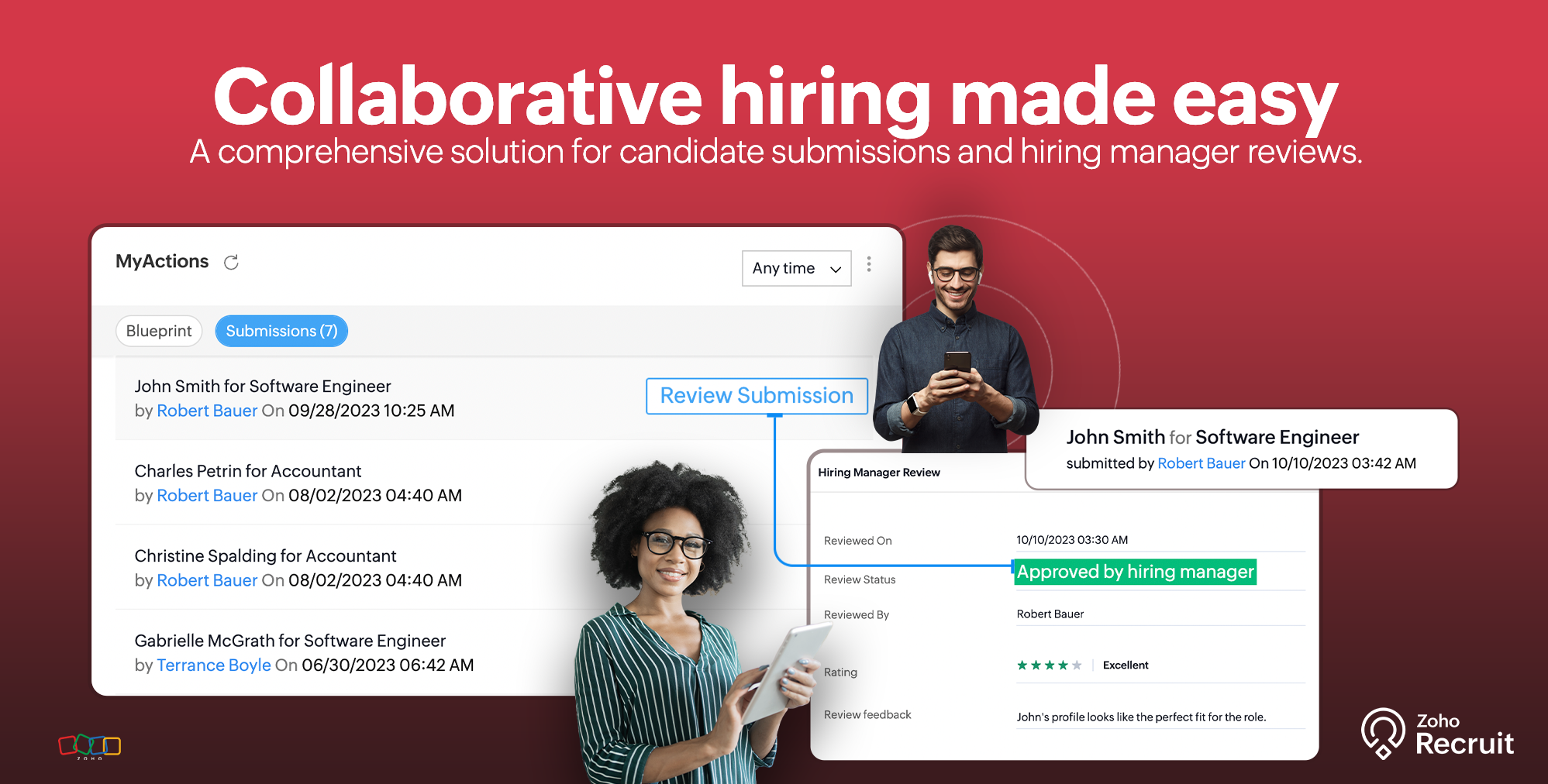
We are thrilled to announce a groundbreaking update to our Corporate HR Edition that streamlines your hiring process like never before. Say hello to our enhanced version of Candidate Submissions and Hiring Manager Reviews, designed to make your recruitment journey faster, more efficient, and entirely paperless.
Seamless Candidate Submissions
When a recruiter submits a candidate profile for an open position, a dedicated record is created in the Submissions sub-module. This record acts as a centralized hub, storing all relevant information related to the submission. No more juggling between emails and files—everything you need is in one place!

Effortless Hiring Manager Reviews
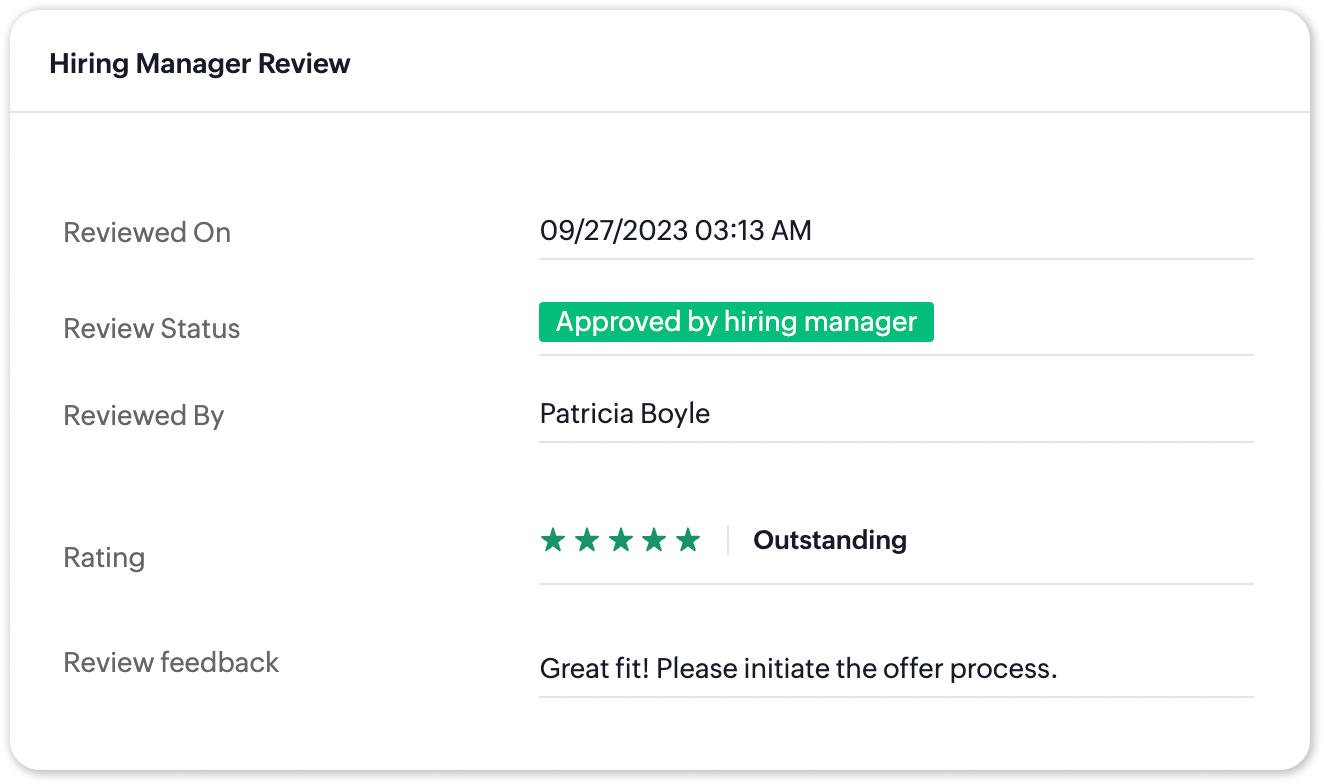
Hiring managers receive instant notifications via email and in-product alerts, right in the notifications menu. With a few clicks, they can now review submitted candidates directly within the system. The intuitive interface allows hiring managers to swiftly approve or reject candidates, making the decision-making process a breeze.
Increase Collaboration, Enhance Team Productivity
By digitizing the submission and review process, Zoho Recruit promotes collaboration among recruiters and hiring managers. With real-time updates and notifications, team members can instantly access candidate profiles, share feedback, and make decisions collaboratively. This enhanced collaboration not only speeds up the hiring process but also fosters a more productive and cohesive team environment, leading to better decision-making and high-quality hires.

Customizable Workflows for Tailored Solutions
We understand that every organization is unique. That's why we empower you with customizable criteria-based workflows. Imagine triggering automated actions such as sending email alerts, updating fields, executing custom functions, or adding specific tags, all tailored to your specific needs. This flexibility ensures that your hiring process aligns perfectly with your organization's requirements.

Workflow actions for submissions
- Notifications: Receive instant notifications via Email, Zoho Cliq and Slack when a submission meets specific criteria, ensuring you never miss a potential candidate.
- Custom Functions: Execute personalized functions, such as scheduling follow-up interviews, without manual intervention.
- Tags: Categorize submissions with relevant tags for quick and efficient candidate sorting.
Real Life Use Cases
Scenario #1: Streamlined Communication
Imagine a scenario where a recruiter submits a candidate for a technical position. The hiring manager, immediately notified, reviews the candidate within the system and approves the submission. Simultaneously, an email alert is triggered to the recruiter, ensuring they are aware of the status change promptly.
Scenario #2: Efficient Candidate Tracking
Say, a recruiter submits multiple candidates for various positions. Workflow alerts can be set up to tag submissions based on the hiring manager's department. As hiring managers review and approve candidates, the system automatically updates their review to both the related candidate & submission, making it effortless for HR teams to track candidates across different roles and departments.
Automate your review process
Say you've configured an end-to-end blueprint process and do not wish to disrupt it by manually adding review. You can handle hiring manager reviews using the system transitions Approve Submission and Reject Submission to handle the submission and review process within your blueprint.

This update ensures that your hiring process becomes not just efficient, but also tailored to your unique organizational needs. For more information, refer our help article or contact our customer support team at support@zohorecruit.com.
Regards,
Team Zoho Recruit
Team Zoho Recruit
Topic Participants
Pradyumn K
Walter
David
Gowtham Prashanth
Sticky Posts
An update to improve email delivery | Email Authentication & Relay
Update Rollout Latest Update: Enterprise users (8th July, 2025) This update is now live for Enterprise plan users in all regions. This includes People Plus, but not Zoho One, which will be covered in an upcoming update. Professional users (31st May 2025)Zoho Recruit User Group Meet-up | INDIA 2025 (Venue Finalised)
Hello Zoho Recruit users from India, We’re pleased and excited to announce our 2025 edition of Zoho user group meet-up in India in five cities! In this meet-up, our team of experts will help you understand the intricate nuances to use Zoho Recruit better,Zoho Recruit is coming to the UK | Zoho Community Learning Series
Customers from the United Kingdom, Exciting news: We will be in London for the Zoho Recruit user meet up. Our team will help you better understand the intricate nuances of Zoho Recruit to help you hire faster, inform about new and upcoming features, andAsk the experts - A live Q & A discussion on Zoho Recruit
We are delighted to come back with another edition of Ask the Experts community series. This edition, we'll be focusing on everything about Zoho Recruit. The topics will focus on the features that are used/asked by the majority of users and also basedRestriction on 'From' addresses with a public domain
Dear Zoho Recruit Community, We hope this message finds you well. This post is to inform you about some important updates regarding email restrictions within Zoho Recruit. Effective post 31st March 2025, we will be implementing changes to the use of email
Recent Topics
Zoho Books - France
L’équipe de Zoho France reçoit régulièrement des questions sur la conformité de ses applications de finances (Zoho Books/ Zoho Invoice) pour le marché français. Voici quelques points pour clarifier la question : Zoho Books est un logiciel de comptabilitéName autocomplete
Hi, During searching emails the web tool does not always propose the auto-completion of the saved emails. As a result I either have to go to contacts and look up the exact email, or the exact full name including the middle name and any dots, which is very annoying. For example I have a contact that I emailed in the past that has "First M. Last" <email@email.com> type of contact. When I start typing 'First' the email may or may not pop up in the autocomplete menu. Then if I start typing "first last"How do i follow up my email campaign in-thread
Is there a way to follow up the email campaign so that it is in-thread using zoho campaigns? eg customer gets original email with subject line "hello" then 5 days later follow up would be with subject line "RE: hello".Announcing new features in Trident for Mac (1.29.0)
Hello everyone! Trident for macOS (v1.29.0) is here with new features and enhancements to enhance your business communication. Let's take a quick look at them. Access shared mailboxes. You can now view and access shared mailboxes in Trident, which areBooks is extremely slow again today !
Everything is running slowly even with 500mb connection speedCyclic dependencies in many-to-many relationships...
I have an application which includes a form for companies, and a form for contacts. Each company can be assigned 1 technical and 1 administrative contact. I have this working okay so far, but I want to copy the scripts used so far to a new empty application. When I import the scripts it fails with a message that says: Problem encountered while creating the application Error in resolving form dependency:Cyclic dependency among the forms:[Company, Contact] What can I do to resolve this? After all,Zoho API to create ticket
I'm developing an integration to create tickets via API, but, locally it works (send and recieve requests). In production it also works sending requests, but, my file don't recieve any response data. My URL is available in Zoho API Console and I haveAutomate Timesheet Approvals with Multi-level Approval Rules
Introducing Approval Rules for Timesheets in Zoho Projects. With this automation, teams can manage how timesheets are reviewed and approved by setting up rules with criteria and assigning approvers to handle submissions. Timesheet, when associated toLabels Part 2
Hey Zoho Mail Team, On the labels window on the left-hand pane, alphabetize label name display, rather than displaying in order created. This one should be easy. Thanks, DrewBuilding Toppings #1 - Serving your needs with Bigin Toppings
Hey Biginners! We're excited to kick off our Developer Community series on building toppings for Bigin, and our goal is to provide an accessible, beginner-friendly, and relevant path for every developer. Imagine creating tiny pieces of software that unlockCan we create Sprint with tasks from Multiple projects?
Hi Team, We were using Zoho Sprints for quite sometime. Currently we have started the process of Sprint method. We couldnt create the active sprint board with the tasks from multiple projects. I would like to know whether this is possible or Any timelineTip of the Week #74– Create automated workflows in MS Power Automate
Zoho TeamInbox now connects directly with Microsoft Power Automate, letting you streamline everyday routines tasks such as from sending emails to managing threads, with automated workflows. About the integration Zoho TeamInbox integrates with MicrosoftAccount validation
Hello everyone, I registered my account on ZeptoMail to use the system, but the problem is that the verification period on Zepto's end has already passed and I have limited functionality.Paste issues in ZOHO crm notes
Hi, since a week or so I have issues with the paste function in ZOHO CRM. I use "notes" to copy paste texts from Outlook emails and since a week or so, the pasting doesnt function as it should: some text just disappears and it gives a lot of empty lines/enters.....Is it possible to add a gradient color to a newsletter im designing?
From where i sit it looks like you can only choose a single color but not combine 2 colors?New Feature: Audit Log in Zoho Bookings
Greetings from the Zoho Bookings team! We’re excited to introduce Audit Log, a new feature designed to help you track all key actions related to your appointments. With Audit Log, you can maintain transparency, strengthen security, and ensure accountability.Account disabled
I have an issue I need help with. Whilst trialing ZOHO CRM I created the following: Account1 (-------------) using m__ame@m__rg___s__i__.___.__ and 2 personal emails Account2 (-------------) using a personal email and 2 users _al__1@______________._o_.__Blocked Email
We are a Zoho One subscriber and use Yahoo as our MX provider. A few times each year, for the past four years, CRM blocks one or more of my Zoho One users from receiving internal email from CRM. This includes "@mentions" in all modules, and emails frommessage var is empty in bot mention handler
Hi, I'm encountering a problem: in my bot's mention handler, I want to retrieve the text the user typed when mentioning the bot. Example: On the #tests-cyril channel, I send this message: “@Donna hello how are you ?” I expect the system variable "message"Remembrance Day to Remember – Recalling Values
The phrase “at the eleventh hour” refers to the 11th hour of the 11th day of the 11th month in 1918, when the hostilities of World War I came to an end—but it still holds meaning today. Remembrance Day (Veterans Day in the US) is observed on NovemberHow to display two measures (sales and price) divided by categories on one line chart
Hi everyone, I’m having trouble figuring out how to display two columns on a line chart with category breakdowns. What I need is a line chart where one line represents Sales and the other represents Price. However, the Price data is divided into aroundCreate custom rollup summary fields in Zoho CRM
Hello everyone, In Zoho CRM, rollup summary fields have been essential tools for summarizing data across related records and enabling users to gain quick insights without having to jump across modules. Previously, only predefined summary functions wereIntroducing the locking option for CRM records
Last modified on 06/04/2023: Record locking option in CRM is now available for all Zoho CRM users in all DCs. Note that it was an early access feature available only upon request. Hello All, Hope you're doing well! We're thrilled to introduce our latestTwo new enhancements in Zoho CRM: Introducing new criteria for user fields and displaying group information in users page
Announcement moderated on 14th June, 2023. Dear All, These enhancements are opened for all users in all DCs. ------------------------------------------------------------------------------------- Dear All, Hope you're well! We are here with two usefulTip #49- Navigating the Remote Support Dashboard in Zoho Assist- 'Insider Insights'
The Remote Support dashboard in Zoho Assist is designed to help technicians quickly access, manage, and monitor all their support sessions from a single, intuitive interface. Whether you’re starting a new session, managing ongoing connections, or reviewingBMI formula
I've been trying for hours to calculate BMI using height and weight as my only inputs. It's a simple calculation and I even went to ChatGPT to help me figure this out in Zoho Forms, but it led me down a path of "try this" and "try this". None of my attemptsSEO on blogs
Hello, google is not able to find my blogs. Can you advice me if I need to change some settings or anything else to make it retrievable via SEO many thanks, hansDuplicated Notebooks
Out of the blue, almost all of my notebooks got duplicated and the different copies contain different information. Some seem like older copies than the others. I use the linux desktop app and sometimes the Android app. I assume that the sync failed at some point and was unable to merge the two versions together. But I'm afraid to add anything else to my notebook because if it can't properly sync 5 notebooks with only a handful of notes each, what will happen when I have hundreds of notes and I loseMind mapping in Zoho Projects
Good morning, I would like to congratulate the Zoho team for building such an inovative and responsive application that fits in the daily challenges of so many work groups. I would like suggest you another functionality that helps a lot in project planning and development: mind mapping. Mind mapping would be of great help for brianstorming, knowledge management and other needs in online collaboration. Thanks and wish you all the best! George Maha Empresa Júnior Multidisciplinar do Instituto deRetainer invoice in Zoho Finance modlue
Hello, Is there a way of creating retainer invoices in the Zoho Finance module? If not can I request this is considered for future updates please.Documents don't sync properly
Hello, My team recently moved to Zoho workDrive, some of my team, work remotely so we believed Zoho would be the best way to share and edit files as well as access files withing the team. However we are experiencing sync issues, when a file is uploaded in the file explorer and shows sync complete, same file can be seen on the Zoho web app but other team members can't see the said file because it is not syncing properly. i figured out that if i were to go to preferences in settings and resync theWe are looking for an experienced Zoho Developer
Hi Everyone! We’re on the lookout for a skilled Zoho Developer with hands-on experience in the Zoho Developer Platform (The Vertical CRM Platform) and if you don't know what that is, then you are not the person we are looking for. You would also needInitiate approval workflow after "on edit --> on success"
Dear Community, currently I am working on a initiative tracker which should handle approval workflows based on different initiative status. As far as I understand, an approval workflow can be triggered (only?) when data is entered for the input form to the database. Example: A new initiative is created and submitted. --> Approval Workflow triggered Here comes my question: Is it also possible to trigger an approval workflow if the form was "simply" updated? (on edit --> on success) Imagine the initiativeTax Deductible Donations to a Charity Organisation
For Australia, what's the best/proper method for entering an expense that is a tax deductible donation to a charitable organisation. And thus is appears correctly in Accounts and BAS as a GST payable deduction?Simultaneous use of WhatsApp Account in SalesIQ and ZohoDesk
Hi, We have only one number registered in Meta, it's possible use same account for two apps? All times here we try is stopping in SalesIQ. Regards,External lookup fields to synchronise with Analytics
Hello. I suggest adding external lookup custom fields to the Zoho Analytics integration settings. Currently, these types of fields are not available for synchronisation, so they cannot be used to generate reports with related tables in Analytics. ThankWe should have an option to Toggle Off KB Article Links in AI Answer Bot Replies
Hi everyone, I'm creating this topic to share a feature idea that I think would improve the customer experience when using the AI Answer Bot for self-service. The Current Behavior (The Problem) Currently, when the AI Answer Bot generates a summary orBoot Loop After Removing Service from Client via Admin
We have multiple laptops experiencing a boot loop / unable to login after the Zoho Remote service was removed from their machine remotely via the desktop client. The Windows sign-in screen is not available, and users are unable to login. This seems likeRequest Backend Correction — Domains Mapped to Same Help Center (Multi-Brand Setup Failure)
Hello Zoho Desk Support Team, I need assistance correcting a domain-to-brand mapping issue in our Zoho Desk instance (The Blue Ribbon Project). Both of our verified domains currently point to the same Help Center instead of separate brand portals. Currentis there any option to enable the participants interact - can write on the screen, while the screen is shared by the host?
this is most expected features - for teaching children. is there any option to enable the participants interact - can write on the screen, while the screen is shared by the host?Next Page