Kaizen #177: Duplicate Check Preferences API vs. Upsert API

- What is the Duplicate Check Preferences API?
- Use Case
- Duplicate Check Configurations
- Updating Duplicate Check Configuration
- How Duplicate Check Preferences Work During Record Creation/Update?
- What is the Upsert API?
- Use Case
- Differences between Duplicate Check Preferences API and Upsert API
What is the Duplicate Check Preferences API
in Zoho CRM. Based on the given criteria, the system will restrict the creation or update of duplicate records. For example, if the Phone field is marked as unique and set for duplicate checks, the system will make sure that no two records have the same phone number during records creation or update.
Use case
Duplicate Check Configurations
The following is the configuration for duplicate check in the Leads module via API.
- The "module" parameter is mandatory, and its supported value is Leads.
- The above URL applies to both Leads and Contacts module configurations.
- You must mark at least one field as mandatory. So, the system can check for duplicates based on the value in the unique field within the Leads module when creating a record.
{ "duplicate_check_preference": { "type": "converted_records", //Converted Leads custom view in Leads module } } |
{ "duplicate_check_preference": { "code": "SUCCESS", "details": {}, "message": "Duplicate check enabled for converted_records successfully.", "status": "success" } } |
{ "duplicate_check_preference": { "type": "mapped_module_records", "type_configurations": [ { "field_mappings": [ { "current_field": { "api_name": "Email", "id": "5725767000000002601" }, "mapped_field": { "api_name": "Email", "id": "5725767000000002503" } } ], "mapped_module": { "api_name": "Contacts", "id": "5725767000000002179" } } ] } } |
How Duplicate Check Preferences Work During Record Creation/Update
Use the Insert Records API to create records in a module.
{ "data": [ { "Company": "Villa Margarita", "Last_Name": "Dolan", "First_Name": "Brian", "Phone": "12345", "State": "Texas" } ] } |
Response
{ "data": [ { "code": "DUPLICATE_DATA", "details": { "api_name": "Email", "duplicate_record": { "Owner": { "name": "Patricia Boyle", "id": "5725767000000411001", "zuid": "808233918" }, "module": { "api_name": "Contacts", "id": "5725767000000002179" }, "id": "5725767000000774010" //The record that already exists in the Contacts module. }, "json_path": "$.data[0].Email", "more_records": false }, "message": "duplicate data", "status": "error" } ] } |
Duplicates are also checked during record updates. If a record is updated with a value that already exists in a unique field, the system indicates it as a duplicate and returns a "DUPLICATE_DATA" error.
Update Duplicate Check Configuration
Input JSON
{ "duplicate_check_preference": { "type": "mapped_module_records", "type_configurations": [ { "field_mappings": [ { "mapped_field": { "api_name": "Phone", //The previously configured Email field as a unique identifier in Contacts has now been replaced with the Phone field. "name": "Contacts", "id": "5725767000000411001" }, "current_field": { "api_name": "Phone", "name": "Leads", //The previously configured Email field as a unique identifier in Leads has now been replaced with the Phone field. "id": "5725767000005381030" } } ], "mapped_module": { "api_name": "Contacts", "name": "Contacts", "id": "5725767000000002179" } } ] } } |
What is the Upsert API?
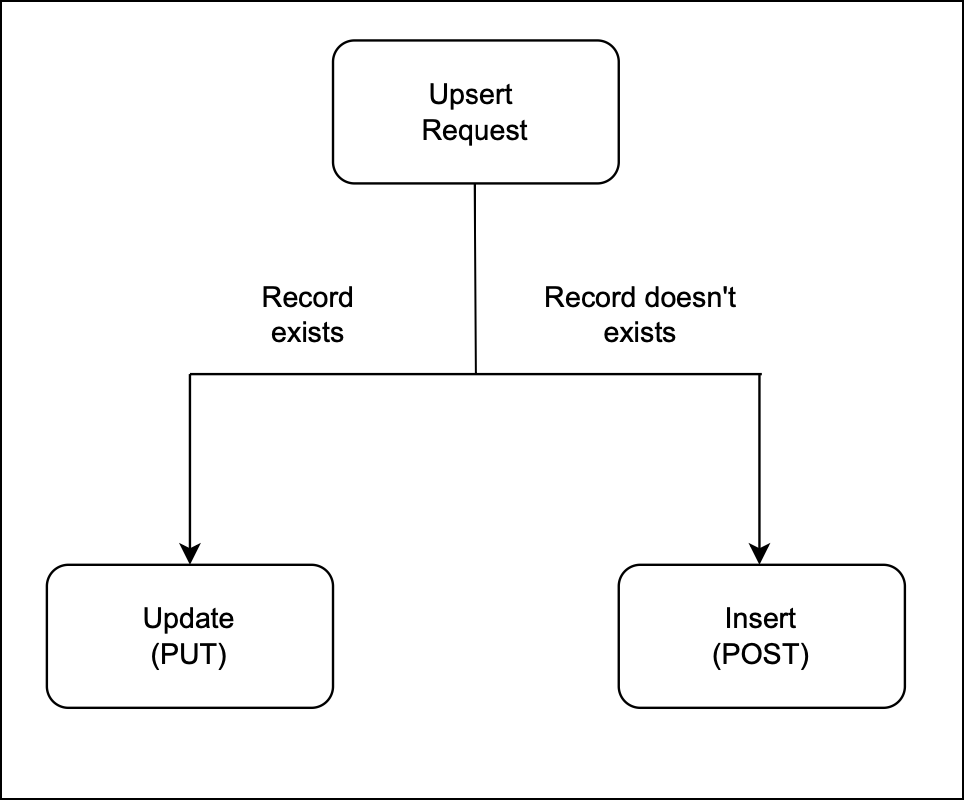
The Upsert API is a combination of "update" and "insert".
How it works?
You provide a unique identifier (e.g., email, phone number, or a custom field) to check for existing records.
If a record with the same identifier exists, it updates that record.
If no matching record is found, it creates a new one.
Use Case
- Update existing customer records details if the given unique identifier, such as email or phone number, matches an existing record in Zoho CRM.
- Insert a new record if no match is found. This way, Zylker ensures that new customers are added efficiently.
There are two types of duplicate check fields:
The table below lists the system-defined unique fields. When you create a record using the Upsert API, the system checks these fields for duplicate entries.
Leads | |
Contacts | |
Accounts | Account_Name |
Deals | Deal_Name |
Campaigns | Campaign_Name |
Cases | Subject |
Solutions | Solution_Title |
Products | Product_Name |
Vendors | Vendor_Name |
PriceBooks | Price_Book_Name |
Quotes | Subject |
SalesOrders | Subject |
PurchaseOrders | Subject |
Invoices | Subject |
Custom Module | Name |
ii. User-defined duplicate check fields
You can set a normal field as a duplicate check field by enabling "Do not allow duplicate values." Note that you can only set fields with the following field-types as unique— Single Line, Email, Phone, Number, Long Integer, and URL.
Sample Input JSON
Here, "Email," a system-defined field, has been used as a duplicate check field.
{ "data": [ { "Email": "alice@mail.com", "First_Name": "Alice", "Last_Name": "Brown", "Phone": "+1-555-222-3333", "Order_Date": "2024-01-10", "Order_Value": "$175.00" }, { "Email": "pat@mail.com", "First_Name": "pat", "Last_Name": "Davis", "Phone": "+1-555-666-7777", "Order_Date": "2024-01-15", "Order_Value": "$300.00" } ], "duplicate_check_fields": [ "Email" //You can set the order in which the system checks for duplicate records by specifying the duplicate_check_field array in the input. ] } |
Response
{ "data": [ { "code": "SUCCESS", "duplicate_field": null, "action": "insert", "details": { "Modified_Time": "2025-02-08T09:43:08-08:00", "Modified_By": { "name": "Patricia Boyle", "id": "5725767000000411001" }, "Created_Time": "2025-02-08T09:43:08-08:00", "id": "5725767000005425036", "Created_By": { "name": "Patricia Boyle", "id": "5725767000000411001" } }, "message": "record added", "status": "success" }, { "code": "SUCCESS", "duplicate_field": "Email", "action": "update", "details": { "Modified_Time": "2025-02-08T09:43:08-08:00", "Modified_By": { "name": "Patricia Boyle", "id": "5725767000000411001" }, "Created_Time": "2025-02-08T08:52:22-08:00", "id": "5725767000005425002", "Created_By": { "name": "Patricia Boyle", "id": "5725767000000411001" } }, "message": "record updated", "status": "success" } ] } |
Differences between Duplicate Check Preferences API and Upsert API
Duplicate Check API | Upsert API |
Duplicate Check Preferences can be enabled only in the Leads module. | Supports all modules. |
Throws a "DUPLICATE_DATA" error if a duplicate is detected. | Updates the existing record with new field values if a match is found for the unique fields; otherwise, inserts a new record. |

- More enhancements in the COQL API are now live in Zoho CRM API Version 7. Check out the V7 Changelog
for detailed information on these updates. ✨
- OAuth Scopes Page for Zoho CRM APIs. ✨

Topic Participants
Subramanian K
Andres
Jeganprabhu S
Sticky Posts
Kaizen #198: Using Client Script for Custom Validation in Blueprint
Nearing 200th Kaizen Post – 1 More to the Big Two-Oh-Oh! Do you have any questions, suggestions, or topics you would like us to cover in future posts? Your insights and suggestions help us shape future content and make this series better for everyone.Kaizen #226: Using ZRC in Client Script
Hello everyone! Welcome to another week of Kaizen. In today's post, lets see what is ZRC (Zoho Request Client) and how we can use ZRC methods in Client Script to get inputs from a Salesperson and update the Lead status with a single button click. In thisKaizen #222 - Client Script Support for Notes Related List
Hello everyone! Welcome to another week of Kaizen. The final Kaizen post of the year 2025 is here! With the new Client Script support for the Notes Related List, you can validate, enrich, and manage notes across modules. In this post, we’ll explore howKaizen #217 - Actions APIs : Tasks
Welcome to another week of Kaizen! In last week's post we discussed Email Notifications APIs which act as the link between your Workflow automations and you. We have discussed how Zylker Cloud Services uses Email Notifications API in their custom dashboard.Kaizen #216 - Actions APIs : Email Notifications
Welcome to another week of Kaizen! For the last three weeks, we have been discussing Zylker's workflows. We successfully updated a dormant workflow, built a new one from the ground up and more. But our work is not finished—these automated processes are
Recent Topics
Error "Invalid client task found corresponding properties" only when triggered from workflow ?
Hi All, I am facing an error message I never encountered previously: Error in executing On Add - On Load script Error in executing thisapp.get_all_projects_api_call function. Line:(2) Error in executing thisapp.getAccessTokenFromRefreshToken function.How to interpret Campaign report statistics - definitions/explanation
I am trying to make sure I understand the Campaign report correctly Do you have a list of definitions for: Delivered - it has reached the recipient's inbox Campaign reach - is this the number that have opened the campaign email? Unique Opens Clicks/OpenSchedule a Call by Date and Time when a specific lead status is selected
Hi Wanting to create a workflow where a call can be scheduled by date & time when a specific lead status is selected. Can only currently set the date by Due Date - Trigger Date - Plus 'x' day(s) ThanksZoho CRM's Copy Customization functionality now works across DCs, for customized accounts, and more
Availability This feature is available in Standard, Professional, Enterprise, and Ultimate editions. These changes have been rolled out to all users in all DCs. For more information, please refer to these help documents: Overview | Instructions HelloHow can I bold text on Zoho Forms submit buttons?
In the old theme builder, I could bold the text on a form's submit button. With the new theme builder, I can only change the text of the header or fields in the form, and not the button itself.[Integration Edition] Deluge Learning Series – Third-Party Integrations with Deluge | October 2025
We’re excited to continue this three-month edition of the Deluge Learning Series: Session 1 – Integrating Zoho Apps with Deluge Using Built-In Integration Tasks Session 2 – Integrating Zoho Apps with Deluge Using invokeURL and invokeAPI Session 3 – Third-PartyFeature Request: Tag, Search, and Report on Individual Private Comments
Zoho Desk Team, First, I want to say that we are extensive users of Zoho Desk and it is a core part of our support operations. We rely heavily on the private comments feature for internal communication, knowledge sharing, and maintaining a clear historyZoho CRM Community Digest - August 2025 | Part 2
Hello Everyone! Here's a quick round-up of handy tips, clever workarounds, and product updates from late August. Product Updates: Meeting Enhancements in Zoho CRM! Track whether a meeting is online, in-office, or at the client’s location using the newAssistance Needed: Ticket Status Not Updating and Sorting by Last Customer Reply in Zoho Desk
Hello, I’m facing two issues in Zoho Desk that I’d like your guidance on: Ticket Status Not Updating: When a customer replies to a ticket, the status does not change to Reopened. Instead, it remains in Waiting on Customer, even after the customer’s responseRound robin
Hi, I'm trying to set up a round robin to automatically distribute tickets between agents in my team but only those tickets that are not otherwise distributed by other workflows or direct assignments. Is that possible and if so which criteria should ITime Entry Notifications
Hi All - I have support staff who place notes of their work in the time entry section of Zoho Desk. Is there a specific workflow or setting I need to enable to have the ticket holder updated via email when an entry is saved?Change text in help desk
Hi, Please let me know how can i change the this text, see screenshot.Customer happiness customisation
Hi, I was wondering if it's possible to somehow customise to whom and when customer happiness request is sent? Can you enable it only for selected tickets for example based on workflow or any other criteria (customer name, tag or anything else)? AlsoNo Zoho Support Response in Months
I want to say that I love Zoho FSM, Books, and CRM, but the support is scary bad. About 2-3 months ago, I emailed Zoho FSM support with two specific issues I needed help with, and I have still not received one single response. I also submitted a supportNull
If a result is null how do I make it so that a custom error pops up instead of the default error? Can someone write an example as if I were using the script builder?Format a "return" message
Good day, Is there a way to format the message of the "return" function in CRM deluge script?Having Trouble Opening The Candidate Portal
Recently am having trouble opening the Candidate Portal. It keeps loading but cannot display any widgets. Tried Safari, Chrome and Edge. Non of them work. Please solve the problem ASAP.Tip of the Week - Spot Risky Sales with Conditional Formatting
In Zoho Analytics, small tweaks can lead to big insights. One such feature is Conditional formatting based on other columns, your key to instantly spotting where sales success is overshadowed by product returns. Our tip this week shows you how to applyHow do I duplicate / copy a campaign
I am evaluation Zoho Campaigns and sent an email to one of my personal email accounts from Zoho Campaigns. It went into my junk file in Hotmail. I want to duplicate that same (1-page) campaign and send it to another of my personal accounts to try toFor a Bill, can "Pay via Check" - Can we also "Pay via Check" when documenting refund for payment?
We really like when we have a Bill in Zoho Books that we can record payment by selecting "Pay via Check" and that will cut the check for us from Zoho Books. However, when we have to write checks as a result of invoice overpayment, we can not select "PayCreator Change History: Ways to improve
Hi Everyone, Recently been working in developing this change history(an idea from Zoho Forms) - unlike forms that you can this with a click but using Creator, we can use "old" keyword. The concept I come up with is to put the result in a table however,Suitability of Zoho One (Single User License) for Multi-State GST Compliance & Cost Analysis
Hello Zoho Team, I am an e-commerce business owner selling on platforms like Amazon, Flipkart, and Meesho, and I'm currently using their fulfillment warehouses. I have two GSTIN registrations and am planning to register for an additional 2-3 to expandadd employees and customiz
I want a Zoho software to track employees record. I logged in a demo so now I tried adding employee, first thing when I click on add employee it takes me to a page where it says add user maximum 10 users, my first doubt why users I don't want employeesInactive User Auto Response
We use Zoho One, and we have a couple employees that are no longer with us, but people are still attempting to email them. I'd like an autoresponder to let them no the person is no longer here, and how they can reach us going forward. I saw a similarZoho People Attendance Module - Split Shifts
Hello, Our business employs a number of college students who often split their workdays between work hours and class schedules, resulting in split shifts. For example: Employee 1 works 9am to 11:30am and then leaves for class, returning to work at 3pmZoho One subscription
we have got Zoho CRM for 3 users and we paid for the app , and we have still 9 months to go , but if we join Zoho one , does it mean the payment for that subscription would be a waste? Please help. Thanks.How Zoho CRM Can Enhance Your Faucets Accessories Business Operations?
In today's competitive market, having a reliable CRM system is crucial for managing customer relationships and streamlining business operations. For businesses in the faucets accessories niche, Zoho CRM offers powerful tools to help manage everythingDashboard
I’m currently working on a project using the Zoho IoT Cloud with an ESP32 and MQTT. I’ve successfully connected the ESP32 to Wi-Fi and MQTT, and the data from the ESP32 is displayed in the telemetry section of the cloud. However, when I try to createCan i connect 2 instagram accounts to 1 brand?
Can i connect 2 instagram accounts to 1 brand? Or Do i need to create 2 brands for that? also under what subscription package will this apply?Zoho Forms - Improved Sub-Forms
Hi Forms team, I'm helping a client move from JotForms to Zoho Forms and I've found another opportunity for improvement. In the below screenshot, JotForm left and Zoho Forms right. The Zoho Forms Sub-Form is quite a poor visually. There is no way to makeWhat's New in Zoho Billing | Q3 2025
Hello everyone, We are excited to share the latest set of updates and enhancements made to Zoho Billing in Q3 2025. From the latest GST updates to multi-level discounting, Zia-powered report summaries, and customizable web forms, these updates are designedHow to Delete Personal Account Linked with My Mobile Number in past or by someone else
How to Delete Account Created with My Mobile Number in past or by someone else This is creating issues in making or sync with my credentials mobile and email address..WhatsApp Business Calling API
Dear Zoho SalesIQ Team, I would like to request a feature that allows users to call WhatsApp numbers directly via Zoho SalesIQ. This integration would enable sending and receiving calls to and from WhatsApp numbers over the internet, without the needMarketer's Space - Going beyond basics: Smarter ecommerce marketing with Zoho Campaigns
Hello Marketers, Welcome back to this week's Marketer's Space. In the last post, we discussed the basics of email marketing and how to get started with email marketing in ecommerce. In this part, we'll dive much deeper into some other advanced featuresConnecting two modules - phone number
Hi, I’d like some guidance on setting up an automation in Zoho CRM that links records between the Leads module and a custom module called Customer_Records whenever the phone numbers match. Here’s what I’m trying to achieve: When a new Lead is createdZoho Marketing Automation 2.0 - Landing Page function not working
Dear Zoho Team, I am working on implementing Zoho Marketing Automation 2.0, and am now looking into the section "Lead Generation". If I open the "Landing Pages" section, I immediately get an Error code: Error: internal error occurred. Can you help meUnable to use Sign "You have entereed some invalid characters"
Unable to use Sign "You have entered some invalid characters" I do not see any invalid characters. The text in "Leave a Note" is plain text which I entered directly into the field. See attached screenshotcannot login from outlook on mobile
Hi there, I tried to set up my email accounts on my iphone using outlook, but it always return email address and password error. Please find the attachment for the screenshot. I am pretty sure that I typed in the correct email address and password and the imap has been enabled from zoho admin account. I can configure the email address on iphone default mail service as well as outlook on pc, the problem only occurs on the outlook app on mobile. I do need to use this app instead of the iphone defaultElevate your CX delivery using CommandCenter 2.0: Simplified builder; seamless orchestration
Most businesses want to create memorable customer experiences—but they often find it hard to keep them smooth, especially as they grow. To achieve a state of flow across their processes, teams often stitch together a series of automations using WorkflowMessages not displayed from personal LinkedIn profile
Hello. I connected both our company profile and my personal profile to Zoho social. I do see all messages from our company page but none from my private page. not even the profile is being added on top to to switch between company or private profile,Next Page