Kaizen #194 : Trigger Client Script via Custom buttons

Hello everyone!
Welcome back to another interesting and useful Kaizen post.
We know that Client Scripts can be triggered with Canvas buttons and we discussed this with a use case in Kaizen#180. Today, let us discuss how to trigger Client Script when a Custom Button is clicked. Using this, you can execute Client Script when a custom button is clicked.
In this post,
1. Event Details2. Supported Pages3. Use Case - Export Subform Rows to Zoho Sheet in a Single Click!4. Solution5. Summary6. Related Links
Client Script support for Custom Buttons opens up possibilities for automation, personalization, and enhanced user interactions in Zoho CRM when a custom button is clicked.
Here is a detailed walkthrough to help you understand it better.
1. Event Details
The Button event triggers the Client Script when a custom button is clicked. Each time this event is invoked, the context argument is passed to the Client Script. The context contains information about the page from which the button was clicked.
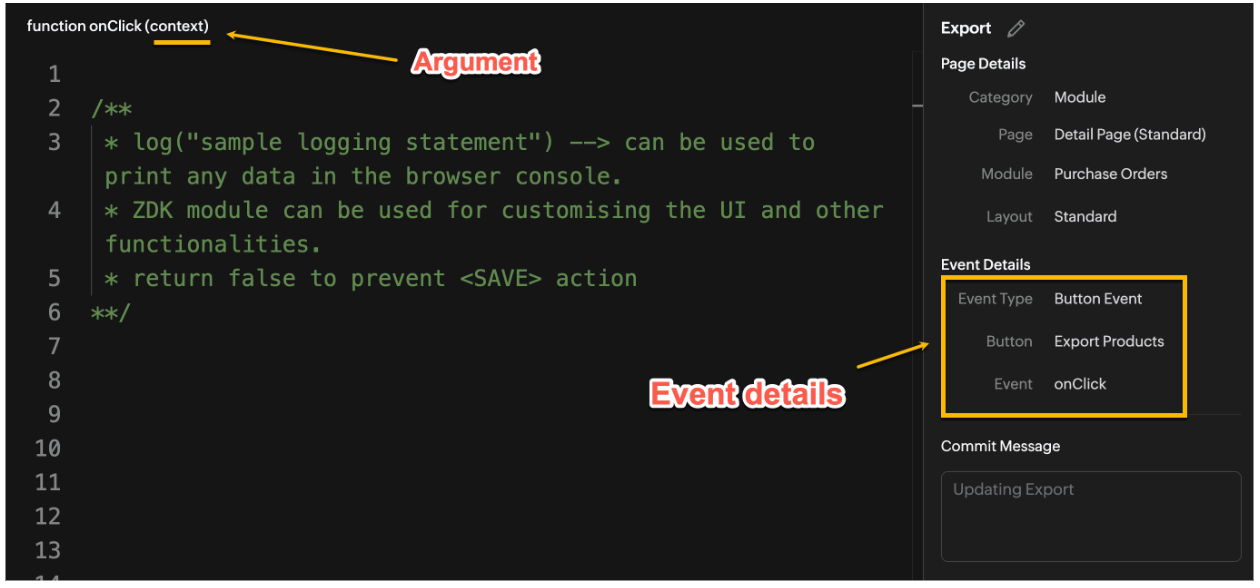
Click here to know more about Client Script Events.
2. Supported Pages
A Custom Button can be placed in different positions based on the Page.
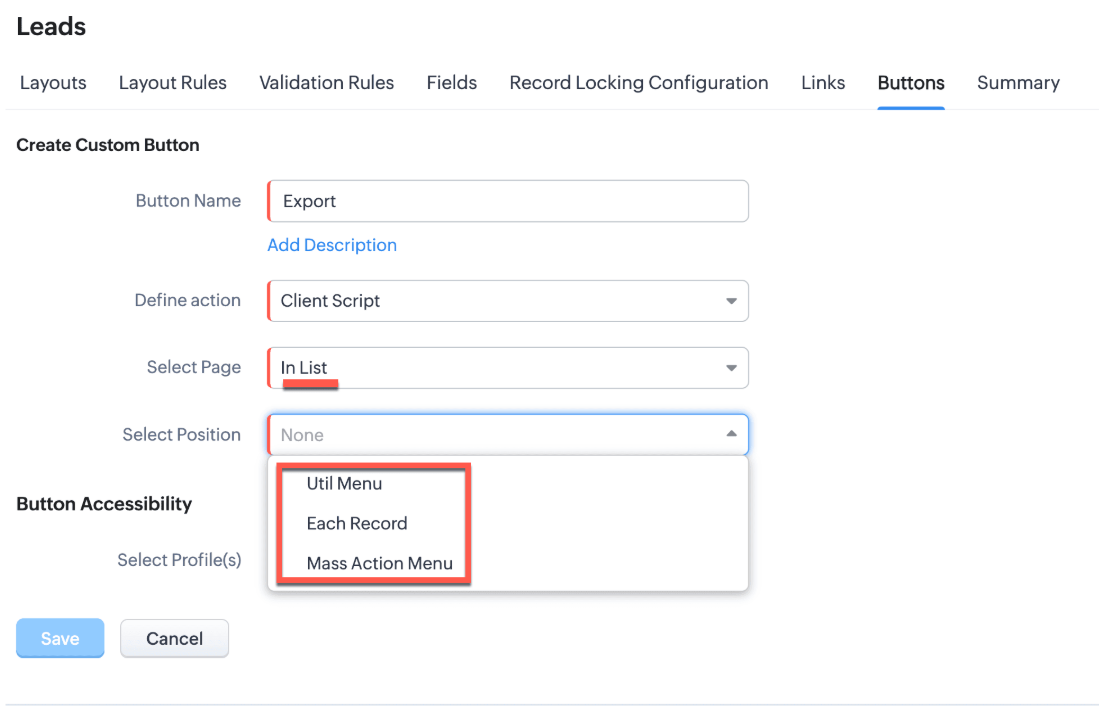
You can add a custom button in the Util Menu, in Each Record or in the Mass Action Menu of the List Page.
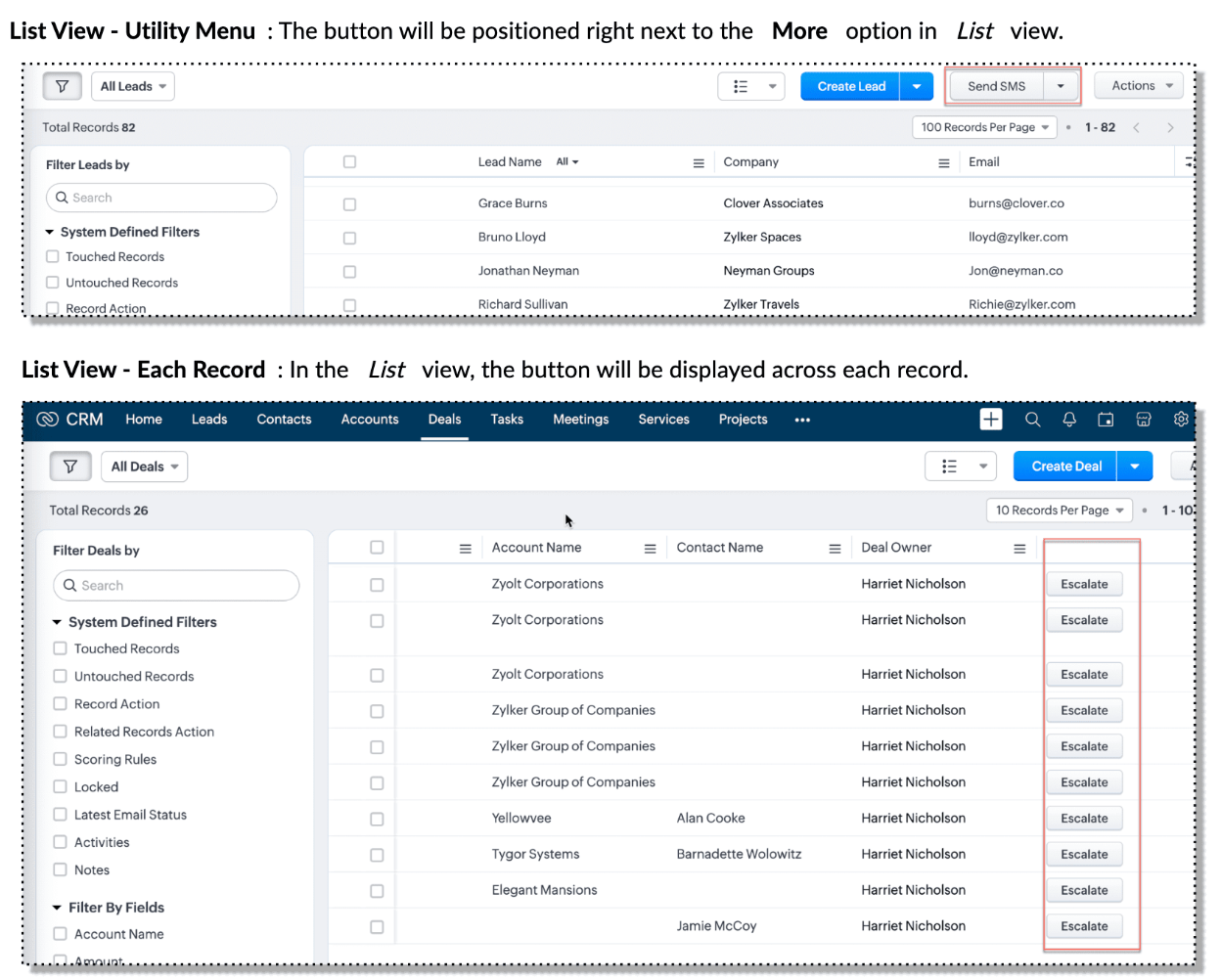

Also, a Detail Page can have a custom button either In Record or in the Related List. Click here for more details about the different possible positions of a custom button.
The following table lists the supported pages and the corresponding context argument, which provides different details based on the page type.

To create a Client Script and make it trigger when a custom button is clicked, first create a Custom button and associate it with a Client Script as shown in the following image.

Click here to view the steps to create a custom button and configure a Client Script.
Note:
You can configure the Client Script only from the Buttons page to trigger it when a user clicks a custom button, and not the usual way of Creating Client Script via setup page. Once a script is created, it can be edited and updated from the Client Script setup page
3. Use Case - Export Subform Rows to Zoho Sheet in a Single Click!
Zylker manufactures medical instruments, and its sales representatives frequently need to share bulk order details with distributors and hospital partners using Zoho Sheets. These details such as product names, quantities, and prices are captured in a Subform on the Purchase Order Detail(Standard) Page.
To simplify this, the admin wants to add a custom button called "Export Products" on the Purchase Order Detail Page. When clicked, it should export the Purchase Items from the Subform and move the content to the specified sheet.
4. Solution
To export subform rows to Zoho Sheet with a single click, you can add a custom button to the Detail Page of the record. When clicked, a Client Script will be triggered to fetch the subform data from the Detail Page and pass it to a Function that uses zoho.sheet.createRecords() to insert data into Zoho Sheet.
Here’s how to implement this:
- Add “Export Products” custom button on the Detail Page.
- Add the script to collect subform rows which invokes the Function.
- Write a Function to create entry in Zoho Sheets
A. Add “Export Products” custom button on the Detail Page.
- Go to Setup → Modules and Fields under Customization.
- Select a Module as Purchase Order.
- Click on Buttons → Then click + New Button.
- Enter Button Name and select Action Type as "Client Script"
- Choose Button Position and Layout details as shown in the following image.
- Click Create in Configured Client Script, enter the script, and click Add.
- Select the profiles for which these buttons should be visible.
- Click Save.

B. Add the Script to collect subform rows and invoke the Function
Use the following Client Script when you configure the custom button.
- var casesheetid = ZDK.Client.getInput([{ type: 'text', label: 'Enter the Sheet ID' }], 'Sheet details', 'OK', 'Cancel');
- if (casesheetid == null) {
- ZDK.Client.showAlert("Enter the *Case Sheet ID - Import* to import data");
- }
- var purchase_items = ZDK.Page.getField('Purchase_items).getValue();
- ZDK.Client.showLoader({type: 'page', template:'spinner', message: 'Export in progress, please wait'});
- var c=1;
- if (sheetid == null) {
- ZDK.Client.hideLoader();
- ZDK.Client.showAlert("Enter the *Case Sheet - Export* ID to export data");
- }
- purchase_items.forEach((r,i) => {
- try {
- resp = ZDK.Apps.CRM.Functions.execute("csvWrite", { "Product_Name": r.Product_Name.name, "List_Price": r.List_Price, "Discount": r.Discount, "Total": r.Total,"Sheetid":casesheetid }); }
- catch (error) {
- c = 0;
- ZDK.Client.hideLoader();
- ZDK.Client.showAlert("Unexpected issue occured while adding data in row number "); }
- });
- ZDK.Client.hideLoader();
- if (c) {
- ZDK.Client.showMessage("Export completed. Please check the Sheet");
- }
- else
- {
- ZDK.Client.showMessage("Unexpected error "); }}
In this code, several ZDKs are used for various purposes. Click on the ZDK hyperlinks to learn more.
- User Input: The code uses ZDK.Client.getInput() to fetch a "Sheet ID" from the user. This input is crucial for further operations.
- Input Validation: If the user cancels or doesn't enter a sheet ID, the code checks for null and prompts the user to enter the ID using ZDK.Client.showAlert().
- Function Invocation: The entries of Purchase Order subform are fetched using ZDK.Page.getField('Purchase_items).getValue() and written to Zoho Sheet using the Function csvWrite(), which internally calls zoho.sheet.createRecords().
- Loader Display: To indicate that a process is running, a loader is displayed using ZDK.Client.showLoader().
- Show Message: ZDK.Client.showMessage() displays that the Export is completed.
Note
The Client Script you intend to link with the button will be saved only after the custom button is saved.
C. Write a Function to create entry in Zoho Sheets
- Go to Setup > Developer Hub > Functions.
- In the Functions page, click + Create New Function.
- Choose the category as Button.
- Click Create.
- In the Create Function page, enter a name as csvWrite and description for your function.
- Enter the following function code and click Save.
- string standalone.csvWrite(String product,String qty,String up,String amt, String Sheetid){
- queryData = Map();
- writeData = Map();
- header = Map();
- writeData.put("Product",product);
- writeData.put("Quantity",qty);
- writeData.put("Unit_Price",up);
- writeData.put("Amount",amt);
- SheetData = zoho.sheet.createRecords("Sheetid","Sheet1",writeData,queryData,"sheetconnection");
- return SheetData;
- }
In the code above:
- sheetconnection refers to the name of the Zoho Sheet connection, which must have the scopes: ZohoSheet.dataAPI.UPDATE and ZohoSheet.dataAPI.READ.
- Click here to know how to create a Connection with the required scopes.
- sheetid is the unique identifier of the Zoho Sheet, available in the sheet’s URL.
- Sheet1 represents the name of the worksheet (i.e., the tab name shown at the bottom of the Zoho Sheet).
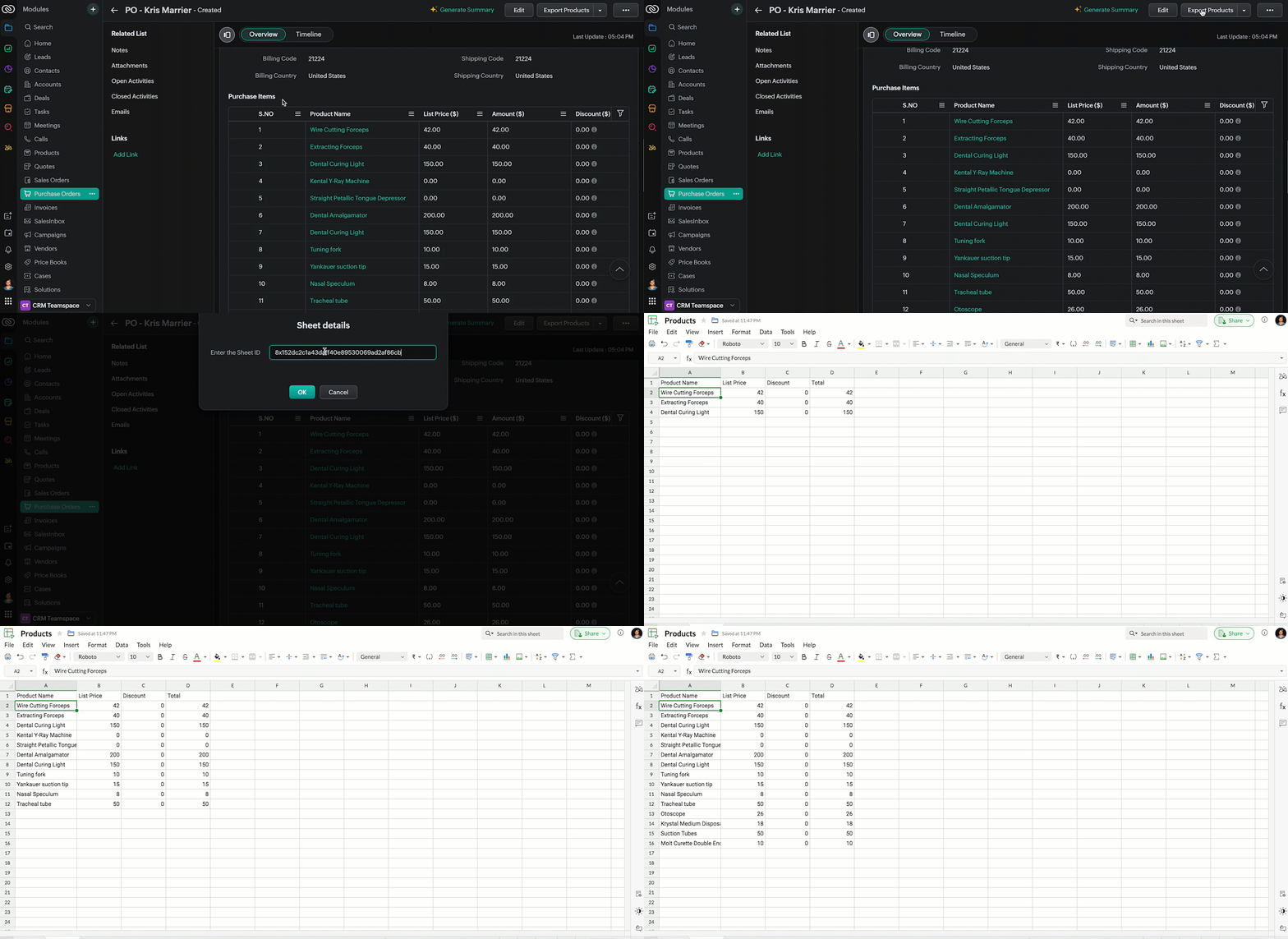
- Now, when the custom button is clicked, the Client Script is triggered. It prompts for the Sheet ID, fetches the contents of the Purchase Order subform, and invokes a function that writes the content to the Sheet.
Here's how the Client Script works.
5. Summary
In this post we have seen,
- What is a Button event?
- How to configure Client Script for a custom button
- How to write data into Zoho Sheets from Client Script
- How to create a Function and call it from Client Script
6. Related Links
- Customize Buttons using Client Script
- Automating Data Transfer from Zoho Sheets to Zoho CRM Subforms
- Update - Client Script Support For Custom Buttons
We are thrilled to be nearing the 200th post in our Kaizen series. As we approach this exciting milestone, we would love to hear from you. Do you have any questions, suggestions, or topics you would like us to cover in future posts? Your input helps us improve and shape the series to serve you better.
Previous Kaizen Post : Kaizen #193: Creating different fields in Zoho CRM through API | Kaizen Directory
We hope you found this post useful!
Happy Client Scripting! 😊
Topic Participants
Maadhari M
Rakesh Kumar
Gray
Ishwarya SG
Sticky Posts
Kaizen #198: Using Client Script for Custom Validation in Blueprint
Nearing 200th Kaizen Post – 1 More to the Big Two-Oh-Oh! Do you have any questions, suggestions, or topics you would like us to cover in future posts? Your insights and suggestions help us shape future content and make this series better for everyone.Kaizen #226: Using ZRC in Client Script
Hello everyone! Welcome to another week of Kaizen. In today's post, lets see what is ZRC (Zoho Request Client) and how we can use ZRC methods in Client Script to get inputs from a Salesperson and update the Lead status with a single button click. In thisKaizen #222 - Client Script Support for Notes Related List
Hello everyone! Welcome to another week of Kaizen. The final Kaizen post of the year 2025 is here! With the new Client Script support for the Notes Related List, you can validate, enrich, and manage notes across modules. In this post, we’ll explore howKaizen #217 - Actions APIs : Tasks
Welcome to another week of Kaizen! In last week's post we discussed Email Notifications APIs which act as the link between your Workflow automations and you. We have discussed how Zylker Cloud Services uses Email Notifications API in their custom dashboard.Kaizen #216 - Actions APIs : Email Notifications
Welcome to another week of Kaizen! For the last three weeks, we have been discussing Zylker's workflows. We successfully updated a dormant workflow, built a new one from the ground up and more. But our work is not finished—these automated processes are
Recent Topics
Tip #62- Exploring Technician Console: Send Ctrl + Alt + Del- 'Insider Insights'
Hello Zoho Assist Community! This week, we’ll be exploring the Send Ctrl + Alt + Del option in the Technician Console. Let’s jump right in. System administrators often rely on Ctrl + Alt + Del when managing remote devices that have unresponsive applicationsDisappearing Mouse cursor in Zoho Mail / Windows 11 (Chrome + Edge)
I'm seeing an issue when writing mails with the light theme with the mouse cursor being white and the document area also being white - making it nearly impossible to see the mouse cursor. I see the problem on Windows 11 under Chrome and Edge. (Yet toSKUs for Invoices, POs, etc.
It doesn't appear that one can enable SKU display on invoices, POs, etc. This is problematic, and I don't see a good reason why this shouldn't be an option. Some of our vendors and customers use this in their system. Every other identifier code is availablehow to avoid duplicate customer
How can i avoid to create a duplicate customer. I charged a same customer with two different plans and it showed up twice in my customer list and subsequently in Zoho books contacts. It creates confusion to have a same customer appears multiple times in customer or contact list. How can i avoid it.Tags with spaces
I imported notes from Evernote where tags can have spaces in them (for example "House Expenses" or "House Improvements". The import worked fine. Now I want to add a new note and assign it a tag. As soon as I type "House" followed by the space I get aRSC Connectivity Linkedin Recruiter RPS
It seems there's a bit of a push from Linkedin Talent Solutions to keep integrations moving. My Account Manager confirmed that Zoho Recruit is a Certified Linkedin Linkedin Partner but does not have RSC as of yet., (we knew that :-) She encouraged meim facing issue on generate the Estimate price
i couldn't understand what is the issue , i cant generate Estimate price where is the issuecannot be able to add user
Dear team I tried to add a new user for sales team, but after entering the OTP its showing error message cannot add nowChanging an existing item to different accounts & inventory-tracked
Hi everyone, I have an item in Zoho Books that was originally set up as a non-inventory item. Over time, I associated it with different sales and purchase accounts, and I now have many invoices, bills, and reports that use this item. My business processHow do I edit the Calendar Invite notifications for Interviews in Recruit?
I'm setting up the Zoho Recruit Interview Calendar system but there's some notifications I don't have any control over. I've turned off all Workflows and Automations related to the Calendar Scheduling and it seems that it's the notification that is sentbig 5 accounts
how do you find what accounts are listed as Big 5 ?Zoho recruit's blueprint configuration is not functioning as mapped
Current Status: Zoho Blueprint is not functioning as configured. Issue: We are moving a Candidate status in Zoho Recruit "for active file" but we encountered: "Status cannot be changed for records involved in Blueprint." This happens to various clientDelay in rendering Zoho Recruit - Careers in the ZappyWorks
I click on the Careers link (https://zappyworks.zohorecruit.com/jobs/Careers) on the ZappyWorks website expecting to see the job openings. The site redirects me to Zoho Recruit, but after the redirect, the page just stays blank for several seconds. I'mfavorites no longer listed
Hello, I can no longer navigate to my Favorites from the pulldown at the top of my grid view (see attached screenshot). I wasn't able to find it anywhere! Please help me display my Favorites. Thank you!How to add interviews through API
I'm trying to add an interview without much luck. The documentation gives examples of adding just about everything except an interview. However, the issue might be the way I'm formatting it, because the documentation is unclear to me. It seems as if the xml should be passed in the url, which seems unusual. I've tried the data as both plain and character escaped, but nothing seems to work, nor do I even get an error response. https://recruit.zoho.com/recruit/private/xml/Interviews/addRecords?authtoken=***&scope=recruitapi&version=2&xmlData=<Interviews> <rowOffer already made- but I withdrew it
I made an offer letter, but made a mistake on it. I withdrew the offer but now I can't recreate the correct offer. Zoho keeps saying that "A same offer has already been made". I look in the "offers" and there are NO offers (this is the first time I'veControl the precision of answer bot responses
Hello everyone, Admins can control the precision with which the Answer bot analyzes and generates a response by adjusting the threshold levels. Based on predefined threshold values, Zia analyzes how closely the query matches with the available KB articles.Rebrand your CRM with the all-new custom domain mapping setup
UPDATES TO THIS FEATURE! 19th Jan, 2024 — Custom domain mapping has been made available for portal users in Zoho One and CRM Plus. 23rd June, 2023 — Custom domain mapping has been made available for all users, in all DCs. Hello everyone! We are elatedAdd Israel & Jewish Holidays to Zoho People Holidays Gallery
Greetings, We hope you are doing well. We are writing to request an enhancement to the Holidays Gallery in Zoho People. Currently, there are several holidays available, but none for Israel and none for Jewish holidays (which are not necessarily the sameSender Email ID is duplicate
My sender id "automate@erplaunchpad.com" is coming as duplicate but I have not used it anywhere else please helpBuilding Toppings #6 - Install and uninstall actions
Hello Biginners! In our previous forum post, we explored creating connections - specifically, custom service connections in the Bigin Developer Console. In this post, we'll focus on another feature that can be used in every topping: install actions. We'llNew UI in Zoho One CRM
Hello, Just switched to the new UI for Zoho One CRM, do not like it, especially the search functions. What are the steps to backstep to the previous UI? UPDATE: I found it.App like Miro
Hi all, is there a way to have a interactive whiteboard like in Miro? We want to visualize our processes and workflows in an easy way.Important updates to your connectors
Hello everyone, Greeting from Zoho Creator! We're excited to announce that we'll be rolling out significant backend updates to Zoho Creator's built-in connectors to enhance security by following the latest frameworks. The existing version of some of theHow Do Mutliple Sales People Prospect in the "LEADS" module without calling the same leads?
We have 4 sales reps and the Leads module does not have real time intuitive knowlodge to make the sales rteps dont call the same people at the same time. How can we crate a fluent prospecting sytem where the salres reps can go out bound without callingKeeping track of project expenses
I have talked to a few support techs and it is very hard for me to believe that Zoho's project accounting software can't keep accounts for my projects. I must not understand what they're saying. We get a contract to build something. So the project revenueMailbox delegation - A secure way to enable collaboration
Admins often encounter scenarios where a user needs another team member to access and manage their mailbox during extended leave, role transitions, or while handling high email volumes. In such situations, ensuring business continuity without sharingCanvas View bug
I would like to report a bug. When clone a canvas view from an existing canvas view, if the original canvas view have canvas button with client script. Then the new create canvas view will have canvas button, it is make sense. But when I try to deleteExport blueprint as a high-resolution PDF or image file
This would be a good feature for organizations that want to share the blueprint process with their employees but don't want them to have access to the blueprint in the system settings. At the moment all that users can do is screenshot the blueprint orZoho Recruit Community Meetup - London 🇬🇧 (Venue Finalised)
Hello Recruiters! We’re excited to announce that the Zoho Recruit team is coming to the UK for an in-person Zoho User Group (ZUG) Meetup in London! This is your chance to connect with fellow Zoho users, learn from experts, and walk away with actionableIs Zoho down today?
I can't do a single thing. I tried changing some views and reports and got "undefined" - then I tried editing a form, got "undefined' - started a new form and can't add any fields as when I drag and drop it also says "undefined." What is going on? HELP.How to create estimates/Invoices with sub-totals
Every other accounting package can create estimates and invoices with Sub-totals. How can I do that in ZohoBooks?【参加無料】東京 Zoho ユーザ交流会 NEXUS ー AI エージェント (Zia Agents)の活用事例 / CRMで実現するマーケティング業務効率化
ユーザーの皆さま、こんにちは。コミュニティチームの藤澤です。 3月27日(金)に東京、新橋で「東京 Zoho ユーザー交流会 NEXUS」を開催します! ーーーーーーーーーーーーーーーーーーーーーーーーーーーーーーーーーーーー ✒️申し込みはこちらから:https://www.zohomeetups.com/tokyo2026vol1#/?affl=communityforumpost2 ーーーーーーーーーーーーーーーーーーーーーーーーーーーーーーーーーーーー ★参加のおすすめポイント ✅ AIエージェント(Zia)のリアルに使える実例を知るZoho books Inventory valuation report VS Stock GL value
At one client, we track inventory using composite (bundled) items, and in the system settings we have enabled the option to prevent stock from going below zero. After the year-end physical count and quantity adjustments, we identified a mismatch: InventoryPython - code studio
Hi, I see the code studio is "coming soon". We have some files that will require some more complex transformation, is this feature far off? It appears to have been released in Zoho Analytics already🚀 WorkDrive 6.0 (Phase 1): Empowering Teams with Content Intelligence, Automation, Accessibility, and Control
Hello, everyone! WorkDrive continues to evolve from a robust file management solution into an intelligent, secure, and connected content collaboration platform for modern businesses. Our goal remains unchanged: to simplify teamwork, strengthen data security,Support Custom Background in Zoho Cliq Video Calls and Meetings
Hello Zoho Cliq Team, We hope you are doing well. We would like to request an enhancement to the video background capabilities in Zoho Cliq, specifically the ability to upload and use custom backgrounds. Current Limitation At present, Zoho Cliq allowsISO 27001 Compliance
What are people doing to ensure ISO 27001 compliance for their Zoho environments? It would make sense for Log360 Cloud to integrate natively with the Zoho suite, but that is not the case. It requires a gateway cluster, which is not an option for a fullyZoho People - Retrieve the Leave Details - get("LeaveCount")
Hi, Zoho People I need to collect all of an employee's leave requests for the calendar year and check how many half-days they have taken. If I run the script on the query he just modified, I can retrieve the information related to that query and use theWhat's new in Zoho Sheet: Simplify data entry and collaboration
Hello, Zoho Sheet community! Last year, our team was focused on research and development so we could deliver updates that enhance your spreadsheet experience. This year, we’re excited to deliver those enhancements—but we'll be rolling them out incrementallyNext Page