Plug Sample #4: Improve your customer interacting experience by letting Zobot remember your website visitor name!

Plug Sample #4: Improve your customer interacting experience by letting Zobot remember your website visitor name!

Hi Everyone! 

In our Plug sample series, we have another simple yet efficient plug for your Codeless bot builder. Before that, I have a question. Let's say you go to the same coffee shop everyday for your morning coffee. Wouldn't you be happy if the waiter greeted you by your name and remembered what you usually order? Not just you, that would be the case for everyone. And that includes your customers too. 

Similarly, when the visitor lands on your website and your chatbot is greeting them. They might not want to enter their names to the bot every time they visit. So to avoid redundancy you can use the following plug for the Zobot to remember the visitor name and scale-up your customer service experience. Plugs in the Codeless bot are used to create custom functions to achieve customizable actions for your no- code bot. Now let's learn how to create a plug to remember your website visitor name and email address and add it in the chatbot flow built with Codeless bot. 

Note: Remember that the visitor information will be stored only after they agree to the privacy policy

What can this Plug do?
  • When a visitor/customer visits your website, they will give their such as name and email. These details will be saved in SalesIQ (Visitor information).  
  • This plug can prevent asking the name when it is already available in visitor info/context variable. 
Note: Learn more about the context variable here

How to create this Plug?
  • In your SalesIQ Dashboard, navigate to Settings > Developers > Plugs > Click on Add .
  • Provide your Plug a name, description, select the Platform as SalesIQ Scripts and click on Create Plug.  
  • Click on Parameters, provide the following
  • Input Parameter: name | Data Type: String
  • Output Parameter: message | Data Type: String
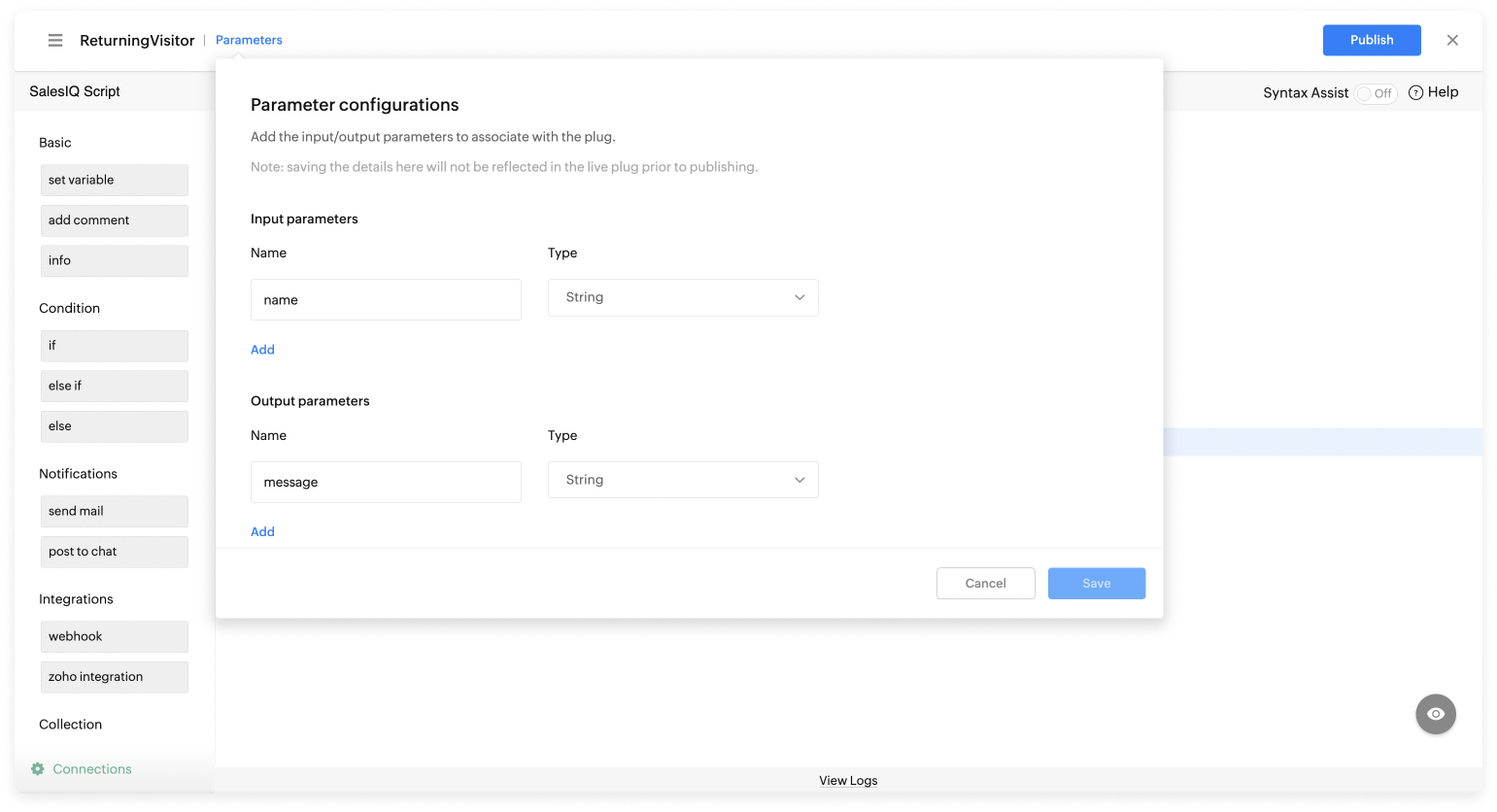
 
Copy, paste the below code and make the required changes.
  1. name = "";
  2. name = session.get("name").get("value");
  3. if(name.containsIgnoreCase("Visitor"))
  4. {
  5. }
  6. else
  7. {
  8.  returning_message = "Yes " + name + ", can you please let me know your issue?";
  9. }
  10. response = Map();
  11. response.put("message",returning_message);
  12. return response;
  • Then, click Save, preview the Plug and Publish it.
How to add this Plug in Codeless bot builder?
  • Navigate to Settings > Bot > Add, provide the necessary information, select Codeless Bot as a bot platform, or open an existing bot.
  • Select the Plugs under Action Block and choose the required Plug (Only published plugs will be listed here)
  • Select "Name" in the visitor variable as the Plug input and provide a context variable for the output. 
  • After, click Save
Note: The visitor names name will be stored in a context variable. It can be used in other cards to provide more personalization. To avail it, type % and choose "visitor.name". 
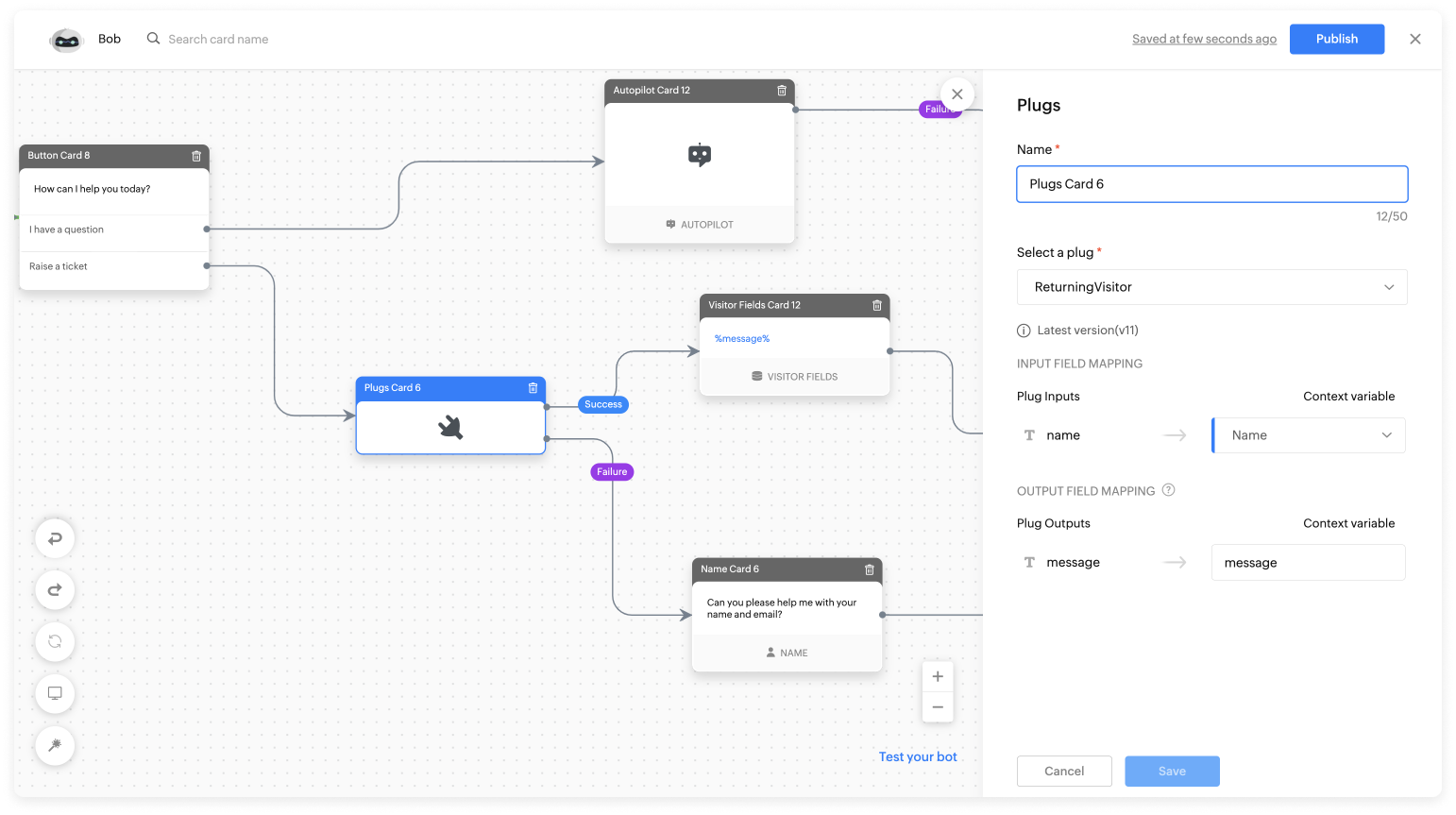

Working of the Plug in Codeless bot:
 
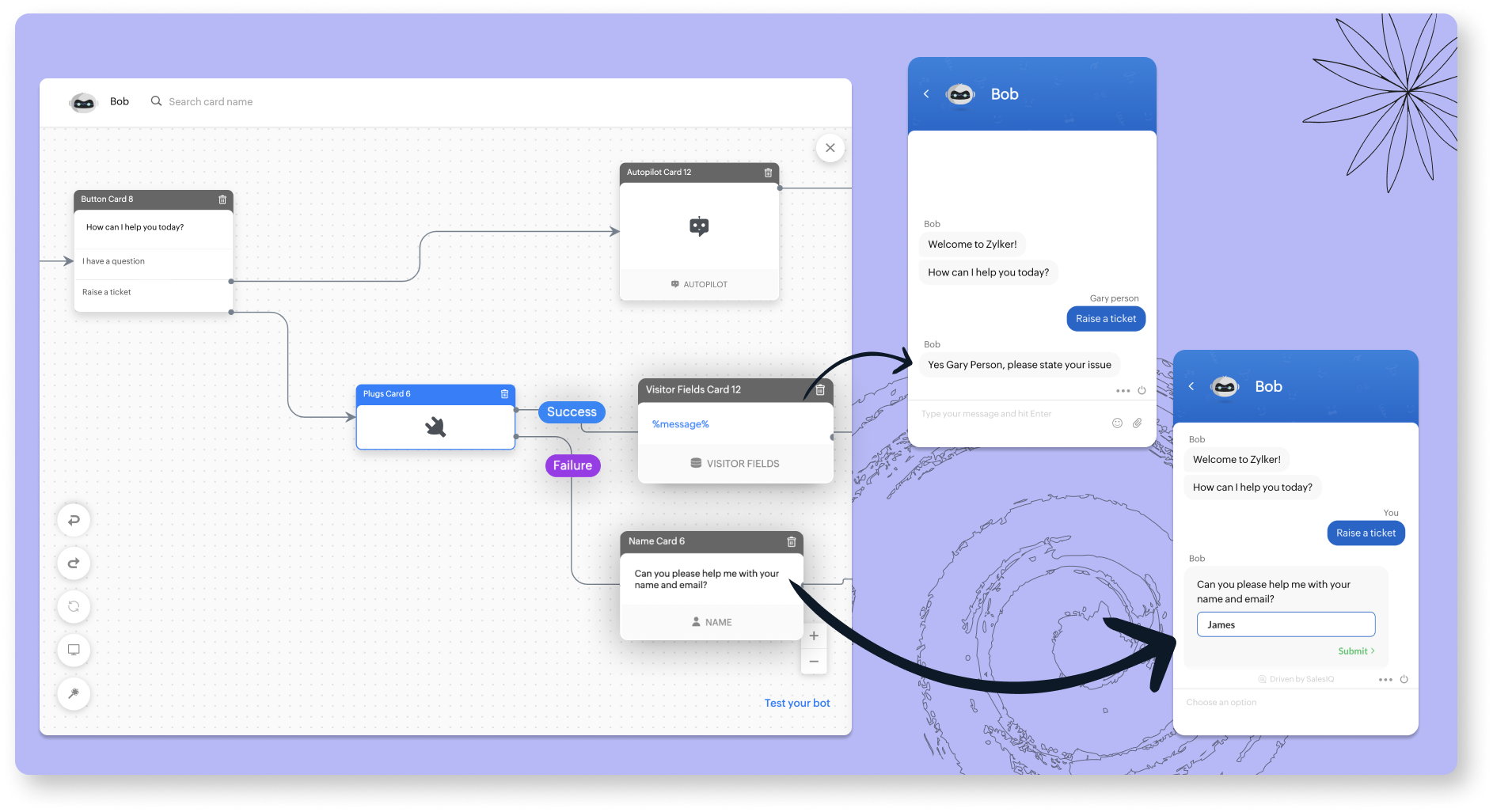
The Plug has 2 cases, success and failure. 
  • Success case - When the Name is available in the visitor variable (Name = visitor name), the bot will consider the visitor as returning visitor and will not ask the name again. 
  • Failure case - When the name is unavailable (Name = null), the bot will ask the visitor the name. 


Related links:
To know more about the features of Zobot, kindly visit our Resources Section. 

    • Recent Topics

    • Zoho CRM Workflow and Function Backup Options

      Hi everyone! I have been able to make several backups of my CRM data and noticed that the Workflows and Functions are not included in these backups. To my knowledge, there is no backup feature for workflows and functions, which is problematic in of itself.
    • Export data using advanced export options and customizable settings

      Hello everyone, The user interface for exporting data has been revamped with updates to make data exports more flexible and efficient for users. These updates not only enhance usability but also bring advanced capabilities to help users extract precise
    • Retainer invoice in Zoho Finance modlue

      Hello, Is there a way of creating retainer invoices in the Zoho Finance module? If not can I request this is considered for future updates please.
    • Zoho Analytics Export API

      Hi Team, I’m working on some integration tasks and wanted to confirm if it’s possible to retrieve a Zoho Analytics table as JSON data using a Deluge script. I’ve already stored my custom data from multiple sources and combined it into a single source.
    • Moving data from one pipeline to another

      Hey all, I've got some complex pipelines to build and I'd like to seperate them into seperate pipelines rather than have one mammoth one. If I create 2 pipelines, is there any easy way to use the output of Pipeline1 to be the input into Pipeline2? Or
    • How to export/find all deluge code.

      Hi, I have a large app wich contains several forms, reports, html views, I need to find thow my application if any contains specific word, I could find it manually by editing app and see on every section(field code, on succes, on load, etc) but I would like to do it faster. Is there a way to at least export it to a file the whole deluge code on my application?
    • Very long loading times | bad performance [ZOHO DC: EU]

      Hello there, we have recently noticed that the loading times have become extremely long when retrieving tickets and ticket details. For example, I open any ticket and get the following view. The subject and standard information (ticket owner, status etc.)
    • COD with Partial payment

      Two reasons why we need COD with partial payment option. 1) Since we deal heavy weight products our shipping costs are too high. If shipment is rejected by customer we incur huge loss. 2) Some competitors place fake orders with different names and return
    • Slicers are now available in Zoho Sheet—filter your data interactively

      At Zoho Sheet, we diligently track user requests and feedback. In line with this, based on extensive user requests, we've integrated Slicers to pivot tables and are delighted to announce its release. Slicers are interactive visual filters that have add,
    • Resizing a Record Template Background Inage

      Hi everyone, I have an issue which I can't seem to resolve: Basically, I'm designing a record template in certificate form. I've specified A5 landscape. I've set my background image the same dimensions with total pixels at 443,520. Whatever I try, when
    • Zoho API to create ticket

      I'm developing an integration to create tickets via API, but, locally it works (send and recieve requests). In production it also works sending requests, but, my file don't recieve any response data. My URL is available in Zoho API Console and I have
    • Updated font library: New font styles and custom font options in Zoho Sheet

      Zoho Sheet's font library now supports 500+ font styles in 60+ languages! The updated font library is stacked with new font styles, and some of the previously available font styles have been replaced with equivalent options. There are two ways you can
    • Introducing Data Bars: Graphically represent changes in data within the cells

      Conditional formatting has helped millions of spreadsheet users analyze and highlight their data more efficiently. In addition to the classic rules, color scales, and icon sets available in Zoho Sheet, you can now apply Data Bars, a convenient method
    • Default Font Size in Desk

      How do I set my default font size in Desk? It takes me about 45 minutes to find the place to set it, then, when I sign out of Zoho and log back in, it's back to font 10 again. Seems like this would be simple, but like everything with Zoho, it's buried
    • Tip #19 - Create checkbox tracker in your spreadsheet

      Hello Sheet users! We are here with yet another tip to help you get the most out of Zoho Sheet. Spreadsheets can be used to handle a variety of tasks, but ever tried using checkboxes to track the progress of your action items dynamically? Here's a sample
    • Tip #20 - Three things you probably didn't know you can do with picklists

      Hello Zoho Sheet users! We’re back with another quick tip to help you make your spreadsheets smarter. Picklists are a great tool to maintain consistency in your spreadsheet. Manually entering data is time-consuming and often leaves typos and irregular
    • Per Level Approval for admins

      We need Process admins like Zoho CRM in Zoho Books for per stage approval Currently in books, admins only have the option for Final Approval But for example, in cases like when an employee is on leave, we can't just approval one level we only have option
    • CUSTOM FUNCTION GIVE ERROR #EVAL!

      CUSTEM FUNCTION CREATE KYA ZOHOSHEET ME US FUNCTION KO USE KIYA LEKIN DATA TO SAHI HAI LAKIN DATA SHEET ME NAHI LAG LAHA HAI KRUPYA SOLVE KARE MY CODE IS float ADDTWO_TWO(float NO1, float NO2) { ADD = NO1 + NO2; return ADD; }
    • Need to set workflow or journey wait time (time delay) in minutes, not hours

      Minimum wait time for both Campaigns workflows and Marketing Automation journeys is one hour. I need one or the other to be set to several minutes (fraction of the hour). I tried to solve this by entering a fraction but the wait time data type is an integer
    • Integrate Projects for Desk KB article release tasks

      Could you please look into the possibility of integrating project tasks for Zoho Desk article release processes? We are looking for an internal integration between Zoho Projects and Zoho Desk's KB article drafting, reviewing and releasing tasks. We could
    • Have Some Bugs in Zoho CRM Ask Zia Assistant

      Hi Support Team, I have found some bugs in Zoho CRM Ask Zia Feature Please Check below screenshot, insight option is showing twice i think its in early access that's why its have some bugs .
    • Feature enhancement: Highlight rows based on a cell value

      Hello Sheet users, We're excited to announce a new feature enhacement, shaped directly by your valuable feedback! As you might know, conditional formatting is a great tool for anyone dealing with large data sets. Previously, if you’ve ever wanted to draw
    • Mind mapping in Zoho Projects

      Good morning,   I would like to congratulate the Zoho team for building such an inovative and responsive application that fits in the daily challenges of so many work groups. I would like suggest you another functionality that helps a lot in project planning and development: mind mapping. Mind mapping would be of great help for brianstorming, knowledge management and other needs in online collaboration.   Thanks and wish you all the best! George Maha Empresa Júnior Multidisciplinar do Instituto de
    • Shortcut to fill a range of cells

      Good evening: I'm writing because I haven't been able to find a feature that allows you to select a range of cells, type in one of them, and then use a key combination to type in all of them. In Excel, the keyboard shortcut is Ctrl+Enter. I haven't found
    • Create custom rollup summary fields in Zoho CRM

      Hello everyone, In Zoho CRM, rollup summary fields have been essential tools for summarizing data across related records and enabling users to gain quick insights without having to jump across modules. Previously, only predefined summary functions were
    • Detect and ignore bots in visitors

      The SalesIQ visitor numbers are basically useless to us because there is no bot detection. We get the same bots coming in from the same countries looking at the same pages every day. It can't be that difficult to tell the difference between an actual
    • Updating custom fields in Zoho Projects

      Hi I am wondering if anyone has experience with custom fields in Zoho Projects. I am struggling to update the field using either deluge or the api endpoint. My code is: //custom_Map = map(); custom_Map = {"UDF_DOUBLE_1":"0.27"}; update_Map = map(); update_Map.put("custom_fields",custom_Map.toList());
    • Markdown for Desk?

      Hi, my company wants to use markdown for formatting text in Desk (in all modules there, especially Tickets and Helpcenter). Zoho already offers use of markdown in several products (see https://help.zoho.com/portal/en/kb/backstage/microsite-guide/formatting-with-markdown/articles/formatting-with-markdo)
    • Change Currency symbol

      I would like to change the way our currency displays when printed on quotes, invoices and purchase orders. Currently, we have Australian Dollars AUD as our Home Currency. The only two symbol choices available for this currency are "AU $" or "AUD". I would
    • Calendar not working

      Are we the only ones. On any browser we cannot click on any of our calendar appointments and get them to open. They just make the browser loop. WE have reached out and have been told they are working on it. The office staff are really stuck. The point
    • Good news! Calendar in Zoho CRM gets a face lift

      Dear Customers, We are delighted to unveil the revamped calendar UI in Zoho CRM. With a complete visual overhaul aligned with CRM for Everyone, the calendar now offers a more intuitive and flexible scheduling experience. What’s new? Distinguish activities
    • Remembrance Day to Remember – Recalling Values

      The phrase “at the eleventh hour” refers to the 11th hour of the 11th day of the 11th month in 1918, when the hostilities of World War I came to an end—but it still holds meaning today. Remembrance Day (Veterans Day in the US) is observed on November
    • Gmail is ramping up its email sender policy as of November 2025

      Hello marketers, As you may be aware, Gmail introduced a guideline for bulk senders starting February 2024. If not, here's a quick refresher straight from Google: After this policy was announced first in 2023 and soft-implemented in February 2024, we
    • Tip of the week #16 - Search and filter threads based on criteria

      Zoho TeamInbox lets you search and filter threads with any information that you have about the thread. You just have to input the criteria and Zoho TeamInbox will list all the threads that match the condition.   Firstly, there is a global search you can
    • WhatsApp Message Template Quick Reply Buttons

      Hello, I created my first Message Template to overcome the 24-hr messaging window and it was approved by WhatsApp/Meta. When I go to Meta, I also see that template brought from Zoho Desk, and used it via Zoho Desk IM. However, I notice that when in Meta's
    • Account in Quick View Filter

      I have a report that I often run against a specific Account. Every time, I have to go into the edit menu and change the Advanced Filter. I would prefer to use the Quick View Filter, but it does not allow me to use the one and only field that makes any
    • All new Address Field in Zoho CRM: maintain structured and accurate address inputs

      The address field will be available exclusively for IN DC users. We'll keep you updated on the DC-specific rollout soon. It's currently available for all new sign-ups and for existing Zoho CRM orgs which are in the Professional edition. Latest update
    • Collapsible Sections & Section Navigation Needed

      The flexibility of Zoho CRM has expanded greatly in the last few years, to the point that a leads module is now permissible to contain up to 350 fields. We don't use that many, but we are using 168 fields which are broken apart into 18 different sections.
    • Set Display for Numbers/Currency/etc with Client Script/Customization in Canvas List Page

      Is it possible to set a display mask for a number/currency field using Client Script or customization? I have custom fields that I would like to keep the decimal places for calculation purposes, but do not need them displayed to the user. So 101.3568
    • 136.143.188.51 blocked by spamcop

      Zoho mailserver seems to be blocked by spamcop. Cant send mail to my customer. Not sure what to do.
    • Next Page